
Live Webinar: Top 3 Nightmares Every QA Has Faced. Register Now.
Turn your manual testers into automation experts! Request a Demo

Release Notes: Pivotal Tracker Integration, Audit trail

This week, we developed several new features. 

Integrations (Pivotal Tracker)

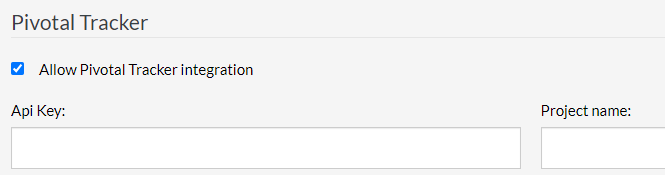
Users can now create a ticket in Pivotal Tracker from an error reported in testRigor and attach this error to the ticket.

  • To do so, simply enable the integration in Settings-> Integrations, then provide the API key of his Pivotal account and Project name
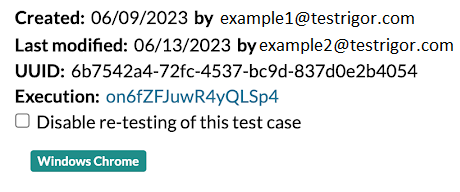
Audit trail for test case creation

We added Audit trails to act as record-keepers for each test case, date and user for creation and modification. Displaying date and user for creation and modification.
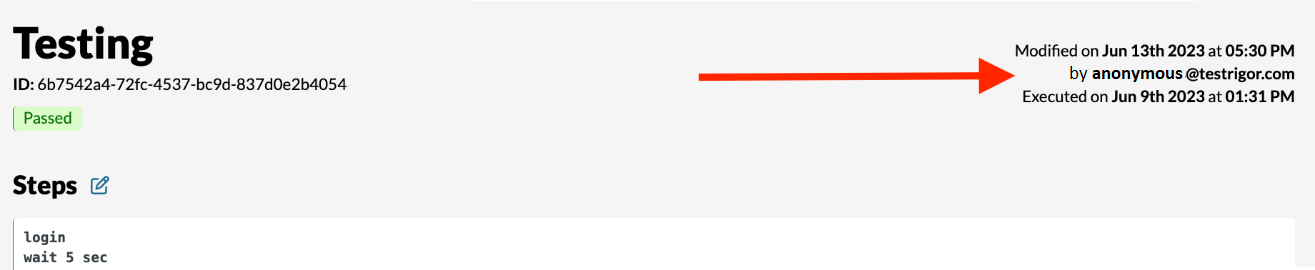
This is also reflected within the Execution page.

Related Articles

Release Notes: Copy Rules and Settings, Homepage Pagination

Copy Reusable Rules to Another Suite The new copy rules button in testRigor lets you duplicate reusable rules to other test ...

Release Notes: Bulk Edits, Rules Tooltip Settings

User Settings for Reusable Rules Tooltip Preview When you hover over a rule, you can view its execution steps directly in a ...

Release Notes: Revamped Sidebar, Actual Text Parameter

Key Sidebar Options Moved to the Top for Easier Access This is a minor but important usability update. The navigation buttons for ...
Privacy Overview
This site utilizes cookies to enhance your browsing experience. Among these, essential cookies are stored on your browser as they are necessary for ...
Read more
Strictly Necessary CookiesAlways Enabled
Essential cookies are crucial for the proper functioning and security of the website.
Non-NecessaryEnabled
Cookies that are not essential for the website's functionality but are employed to gather additional data. You can choose to opt out by using this toggle switch. These cookies gather data for analytics and performance tracking purposes.









