
Release Notes: JIRA Native Tickets, Autocomplete for Variable Names
 |
More Detailed JIRA Ticket Creation from testRigor
In this release, testRigor introduces an improved integration with JIRA, making it simpler and more precise to create JIRA tickets directly from testRigor. The system now uses JIRA’s native issue creation page, ensuring full compatibility while automatically transferring key information from testRigor, including test steps, error details, and other context data. This enhancement helps you generate more detailed and actionable JIRA issues from the start.
- Open the Errors page in your test suite.
- Click “Create an issue in JIRA”.
- Enter the project name or key and click “Load issue types”.
- Login to JIRA, then go back to testRigor and select the desired issue type.
- Click “Continue”, and testRigor will redirect you to the native JIRA ticket creation interface, where you can review and edit all fields before submitting the issue.

Caption: Create an Issue in Jira button on the Errors page.
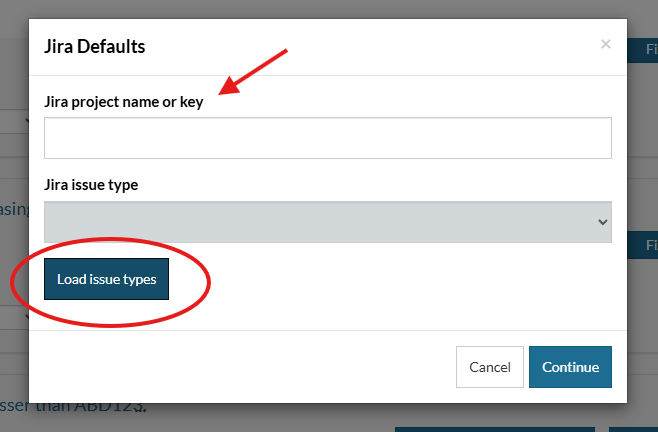
Caption: The JIRA modal in testRigor.
This update provides a smoother, more efficient workflow for QA teams, test engineers, and developers who rely on seamless bug tracking between testRigor and JIRA.
Editor Autocomplete for Variable Names
This update introduces a powerful autocomplete feature in testRigor, designed to make writing test steps faster and more intuitive. The new functionality automatically suggests variable names that match the text you’re currently typing, significantly reducing manual input and the chance of typing errors.
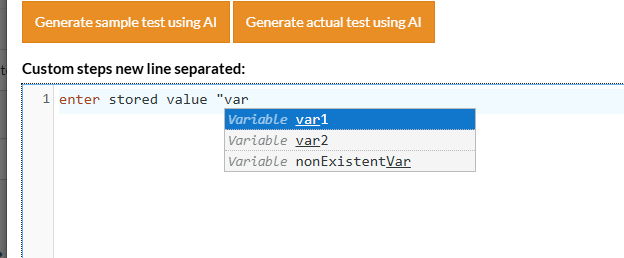
Caption: testRigor’s new autocomplete functionality for variable names.
With intelligent suggestions that appear as you type, this enhancement speeds up test case creation, improves workflow efficiency, and ensures a smoother experience for QA engineers working with testRigor.










