
What is Failover Testing?
 |
Failover testing is the art of demonstrating that a system can handle the periods it was never meant to see. Servers going down in the middle of transactions, databases suddenly not being available, networks partitioning themselves into isolated islands, without warning. In today’s always-ON world, users don’t just judge software by how well it works on normal days, but by how gracefully it recovers on the worst days.
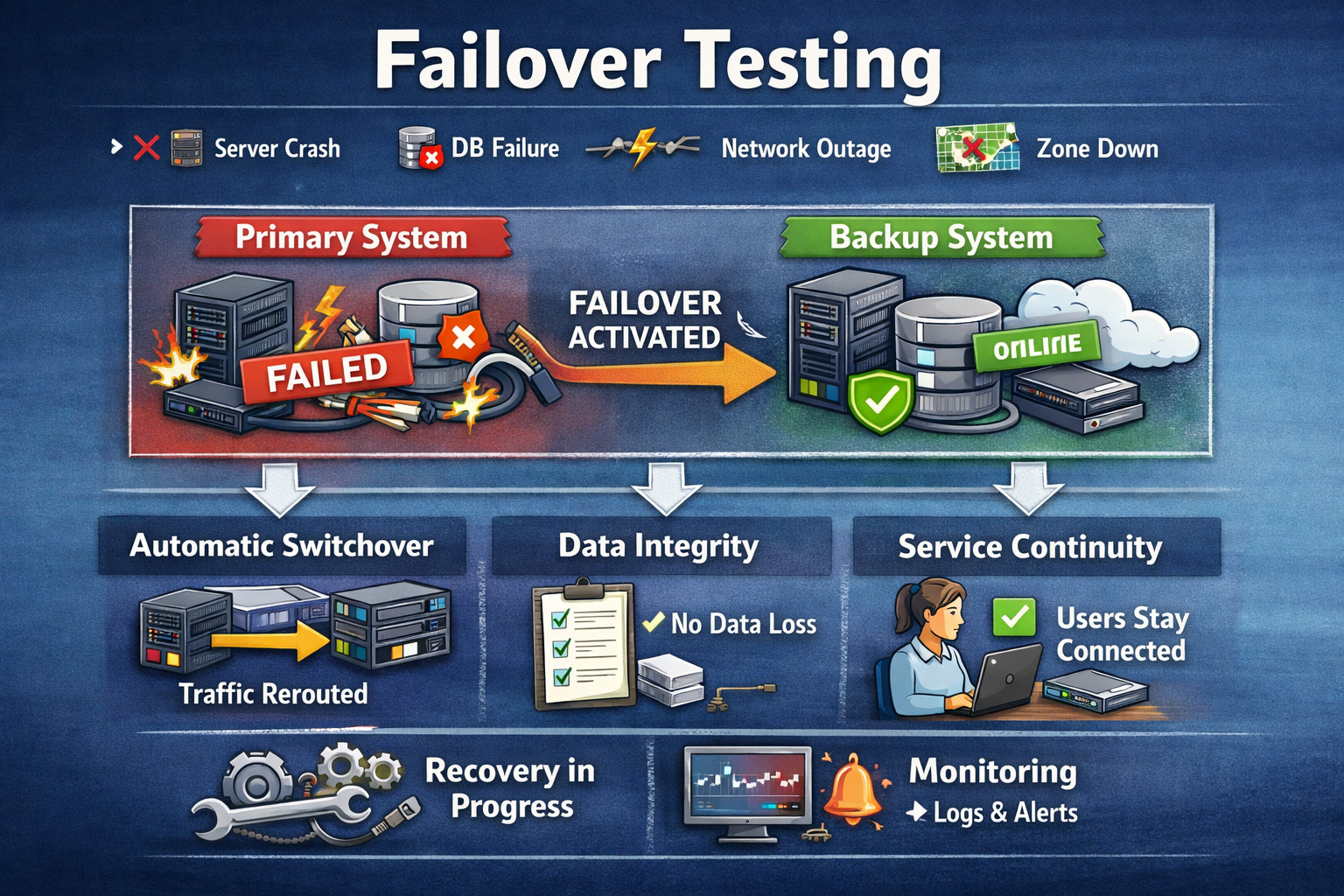
At its heart, failover testing addresses a high-stakes question: when failure occurs, does the system automatically fail over to backups while maintaining availability and data integrity? But redundancy alone isn’t sufficient; failover must be practiced. It’s clear that the switch should be fast, safe, and predictable under real-world conditions.
| Key Takeaways: |
|---|
|
What is Failover Testing?
A failover test is a procedure where the failure of a system (or its part) is forced on purpose to make sure that the system switches over to the secondary component seamlessly and functionality stays up with minimal disruption. Instead of attempting to demonstrate that nothing will ever break, its interests lie in asserting that this is how the system behaves when things fail.
The intention is that your architecture, configuration, and operations will keep the service available. Also, the data corrects and recovers to normal behaviour quickly. Ultimately, failover testing verifies that the system can be predictably and safely restored under actual faults.
In simple terms:
- Failure Occurs: A component of your system (a node, a database, or an entire region) stops being available due to crashes, outages, or other forms of network failure. This initial failure is typically abrupt and unavoidable in practical systems.
- Failover Mechanism Activates: The failure is identified, and failover procedures defined in the application are applied (for example, redirecting traffic, choosing a new leader, activating a standby component). All this information is supposed to be automated and must not involve human interaction.
- Service Continues: Users are still able to reach important parts of the site, and effectiveness is not too hampered. The system guarantees data integrity and ensures proper handshaking during such a transfer.
- Recovery Follows: The vulnerable unit is repaired, replaced or reused again, and the system returns gradually to its safe state. Traffic and load are redistributed to reinstate the expected performance and redundancy levels.
Failover testing sits at the intersection of availability, resilience, disaster recovery, and reliability engineering.
Why Failover Testing Matters
The vast majority of teams have a strong focus on “happy path” testing, where all features work as expected because every dependency is healthy and responsive. That strategy validates that everything works as expected, yet it doesn’t necessarily represent the messy truth of production contexts.
Real events occur when the overall system degrades, nodes fail, the network is flaky, or essential services are unavailable. Failover testing is important because it ensures your system can handle those conditions (instead of a partial failure becoming an ugly mass outage)
Key Outcomes: Failover Testing Helps Ensure
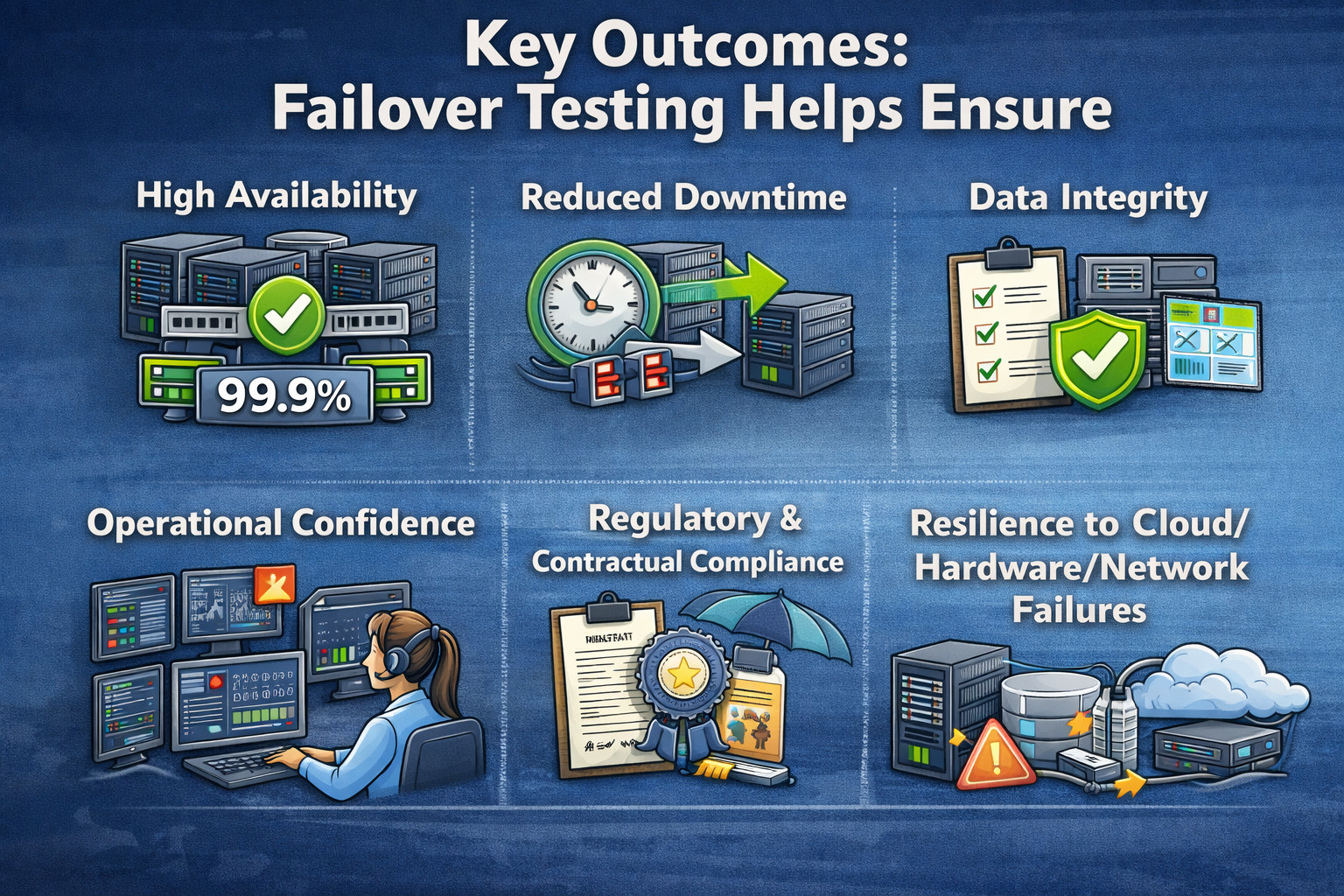
- High Availability: Failover testing provides availability in case of the failure of part of the system. Users can work on important features for as long as they need without interruptions.
- Reduced Downtime: Automatic failover can slash outage times significantly, from hours to seconds or minutes. This reduces the impact on business and enhances user confidence.
- Data Integrity: It ensures transactions are not lost, duplicated, or corrupted during switch-over. It is important to note that our system remains correct even in the presence of failures.
- Operational Confidence: Ongoing failover testing provides on-call teams with confidence that the system will behave as expected when they respond to incidents. It’s also a proof point that runbooks, alerts, and escalation paths are functioning properly.
- Regulatory and Contractual Compliance: Applications and service-level agreements within many industries require verifiable recovery, not mere plans in print. Failover testing is proof that recovery goals can be achieved.
- Resilience to Cloud/Hardware/Network Failures: It guarantees that the system is resilient enough to cope with realistic infrastructure problems, such as VM failures, disk corruptions, and network splits. This enhances robustness beyond just defending against software bugs.
Failover testing frequently exposes problems that regular functional testing will never uncover, including misconfigured health checks, split-brain scenarios, slow leader election, non-idempotent operations, hidden single points of failure, or stale DNS/TTL behavior.
Failover Testing vs. Related Testing Types
Failover testing overlaps with other reliability testing categories, but it’s not identical.
Failover Testing vs. Redundancy Testing
- Redundancy Test: Confirms that backup components (for example, replicas, standby servers or alternative routes) are present and well configured. This verifies that the system has sufficient structural redundancy.
- Failover Testing: This makes sure the system can, indeed, switch to those backups when it suffers an actual failure. This provides the guarantee that the switchover would be automatic, soon enough, avoiding breaking availability or data correctness.
Failover Testing vs. Disaster Recovery Testing
- Disaster Recovery (DR) Testing: It focuses on validating recovery from large-scale, severe events such as a full region outage, major data corruption, or ransomware incidents. The emphasis is typically on restoring services and data according to defined RTO and RPO targets. Read: Backup and Recovery Test Automation – How To Guide.
- Failover Testing: It often targets smaller, more common failures like an instance crash or an availability zone outage to ensure services continue with minimal disruption. These tests can also be included as part of a broader DR strategy when validating regional or system-wide recovery.
Failover Testing vs. Load/Performance Testing
- Performance Testing: It tests how a system performs under expected load and peak loads by examining throughput, response time, and resource utilization. The system is generally considered to be in good health and fully functional for such tests.
- Failover Testing: This tests how the system behaves when parts of it fail, including whether it remains available and how quickly it recovers. It also tests performance before and after failover, as recovery events often result in short-term spikes in latency or a drop in capacity.
Failover Testing vs. Chaos Testing
- Chaos Testing/Engineering: It introduces faults in a general and frequent way into systems to discover unexpected system-level weaknesses and complex failure interactions. And it’s for that purpose of discovery, often pushing resilience beyond what you would expect.
- Failover Tests: These are usually more scoped and scripted towards a specific failure situation, as well as expected recovery. Outcomes are analyzed against explicit pass criteria, including time to recovery, error rates, and data correctness.
In practice, failover testing can be a structured subset of chaos engineering.
Core Concepts Behind Failover
To know whether failover works, you have to understand how failover in distributed systems actually works. Failover is not a single event; it is a multi-stage process of redundancy, discovery, switching control, data recovery, and more. Robust failover testing verifies this whole chain, not just a single link.
- Redundancy: The system can fail over only when it has standby components. For most, this involves more than just a single application instance behind a load balancer and primary-replica databases, and may consist of multi-zone or multi-region configurations. This can also span across active-active clusters and active-passive standby configurations based on the architecture.
- Failure Detection: Before a failover can take place, the system has to realize that something is wrong (unhealthy or unavailable). This detection is typically informed by health checks, heartbeats between nodes, monitoring signals such as latency spikes or high error rates, and consensus protocols that track leader liveness. Inadequate detection results in late failover, or instead in unnecessary switchover.
- Decision and Orchestration: After a failure occurs, the system has to make a decision and switch. This might look like load balancers draining unhealthy nodes, Kubernetes rescheduling pods, cluster managers electing a new leader, DNS propagation or regional failover. The rate and accuracy of such orchestration significantly impact the end user.
- State and Consistency Management: For stateless components, failover is rather simple, as new instances can quickly replace failed instances. It’s problematic for stateful services such as databases, queues, caches, and session stores because an incorrect failover can result in data loss, duplication or instability. Testing needs to ensure that state changes maintain correctness in the presence of failures.
- Recovery and Stabilization: Systems must achieve a stable and robust state post-failover. The failed node may return as a follower/replica, data likely needs to be replayed and queues/backlogs emptied, and traffic should repartition over time to prevent overload. Good failover testing ensures that the system doesn’t just survive; it comes out of a failure in a stable state.
Failover testing must validate all five.
What are You Testing in Failover Testing?
Failover testing is not a single test; it’s an aggregation of tests that evaluate different reliability guarantees in the face of actual failures. The goal is always to provide evidence that the system remains usable, correct, and observable as it transitions into a backup mode of operation and stabilizes on the backup.
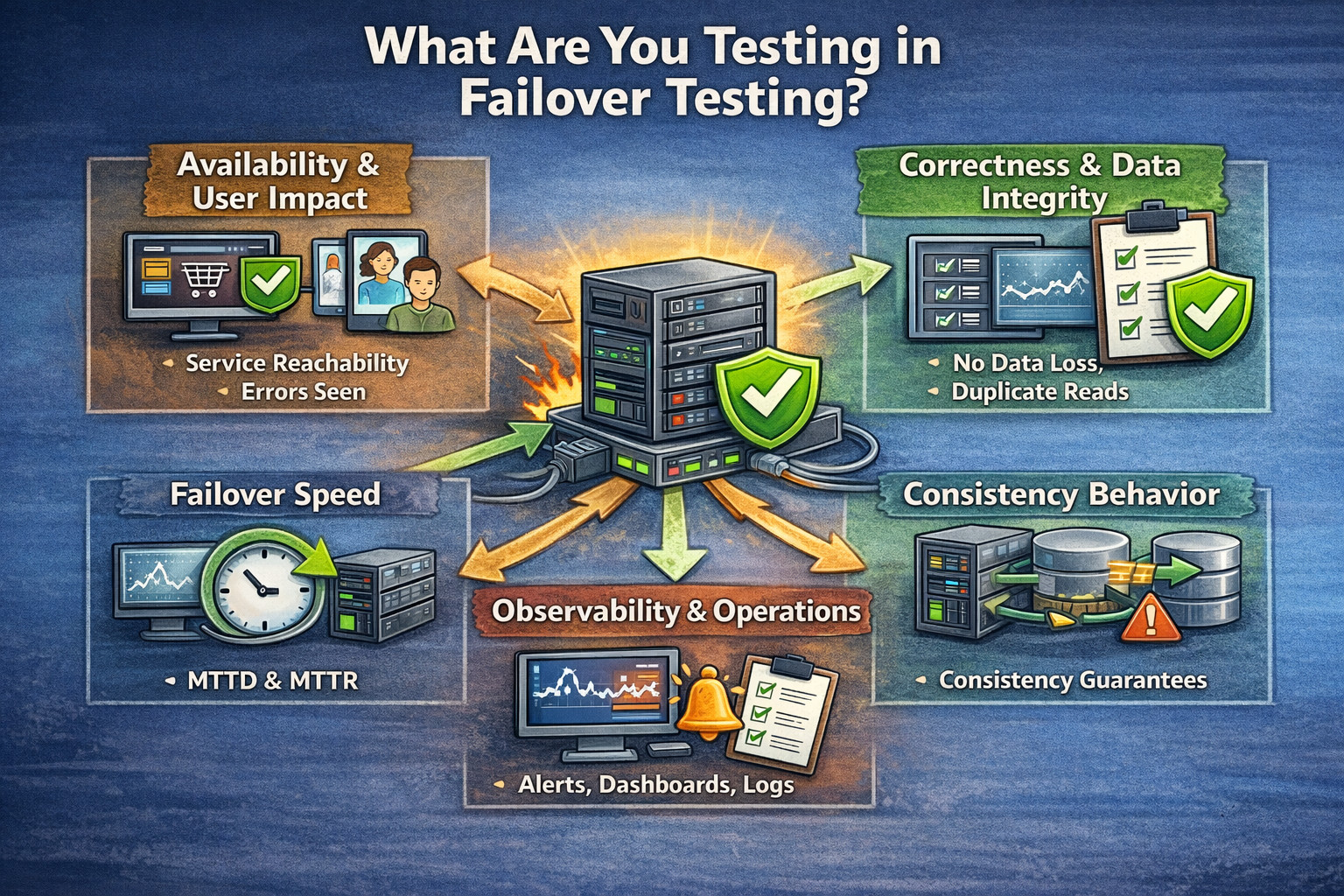
- Availability and User Impact: You are validating that the service remains reachable and that users can still complete critical actions like login, checkout, and key API calls. You also measure how many errors users see and how long the disruption lasts.
- Correctness and Data Integrity: You are confirming that transactions remain atomic and durable even during the switchover, with no data loss or corruption. You also check for duplicates, ordering violations, and whether compensating actions trigger correctly when needed.
- Failover Speed: You measure how quickly the system detects the failure (MTTD) and how fast it restores service (MTTR). You also track how long it takes for performance to fully return to normal after the failover event.
- Consistency Behavior: You verify that the system’s behavior matches its promised consistency model, especially if it uses eventual consistency. You also check whether reads become stale during failover and whether clients are forced into safe modes like read-only.
- Observability and Operations: You confirm that alerts, dashboards, and incident signals accurately reflect the failure and recovery. You also ensure logs, traces, and runbooks remain reliable and useful throughout the event.
Common Failover Patterns
Different architectures use different failover mechanisms, so the risks and test focus areas change with the pattern. Understanding the pattern helps you design failover tests that validate the right behaviors under real failure conditions.
Active-Passive (Primary/Standby)
In this model, one instance actively serves traffic while a standby instance stays ready to take over. Failover typically involves promoting the standby and redirecting traffic to it.
| Pros | Risks | Failover tests should check |
|---|---|---|
| Simple traffic model, predictable behavior | Standby might be stale or misconfigured, promotion might be slow, or there might be hidden drift between primary and standby environments |
|
Active-Active (Multi-Primary)
Multiple nodes or regions serve traffic simultaneously, sharing load and availability responsibilities. Failover often means shifting traffic away from a degraded node/region while maintaining consistency.
| Pros | Risks | Failover tests should check |
|---|---|---|
| Better utilization, potentially higher availability | Data conflicts, complex consistency models |
|
N+1 Redundancy Behind a Load Balancer
This typical pattern runs many replicas behind a load balancer so that losing one or more instances doesn’t impact service. Failover is typically handled by health checks and automatic instance replacement.
| Pros | Risks | Failover tests should check |
|---|---|---|
| High tolerance for instance, loss scales horizontally with demand | Bad health checks may keep routing to unhealthy nodes, sticky sessions can worsen user impact, replacement may interrupt in-flight work if not handled well |
|
Leader Election Clusters
A leader coordinates decisions or writes while followers replicate the state and stand by to take over. Failover depends on leader failure detection and rapid, correct leader election.
| Pros | Risks | Failover tests should check |
|---|---|---|
| Clear authority for writes/coordination, supports replicated state for resilience | Slow or unstable leader election, split-brain leadership errors during re-election |
|
Types of Failures to Simulate
Failover testing is only as good as the failure scenarios you include, because real-world outages usually repeat the same patterns. By simulating these failures intentionally, you verify that the system can detect problems, switch over safely, and continue operating without major disruption.
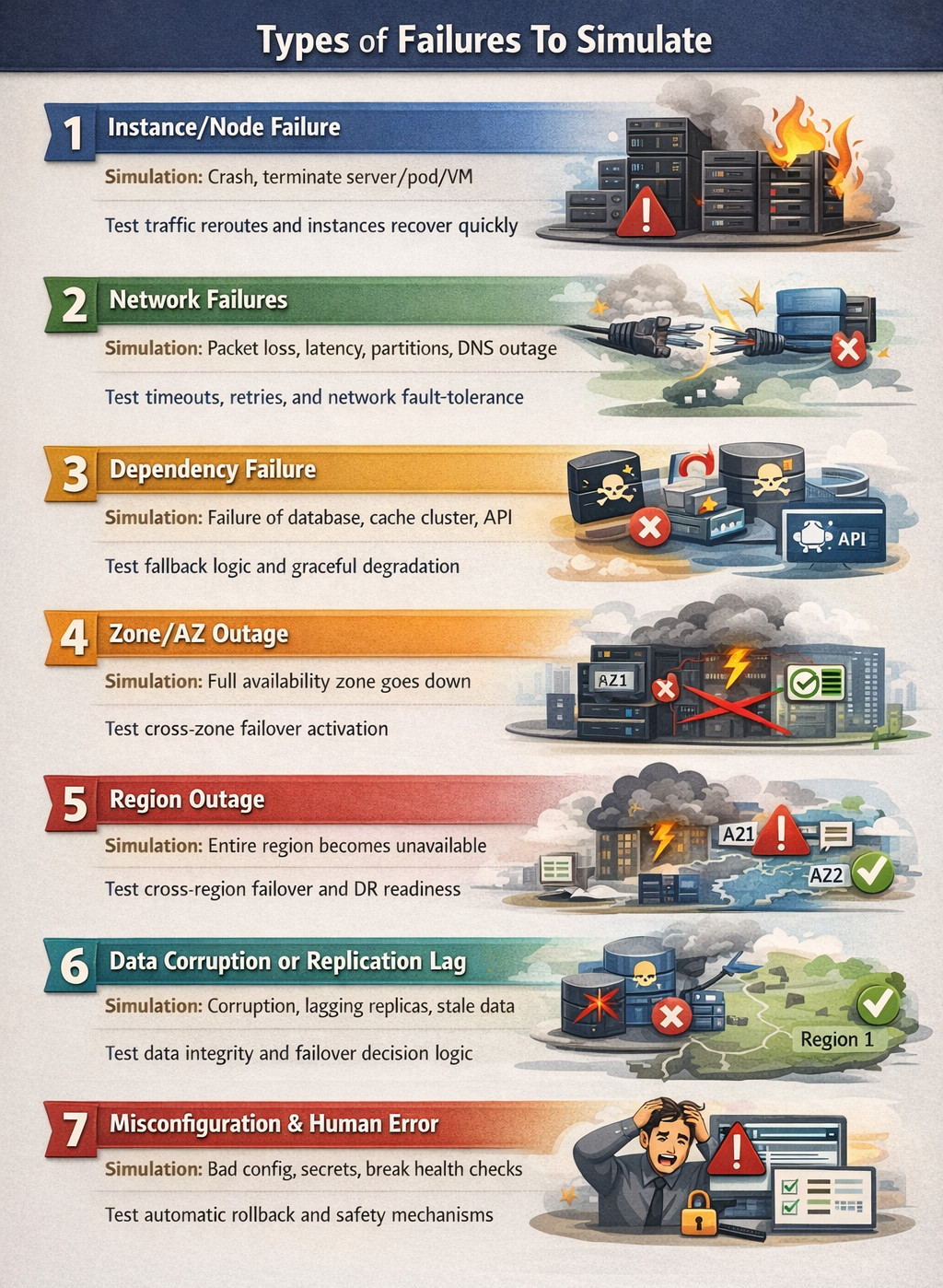
- Instance/Node Failure: This involves crashing or terminating a server instance, container/pod, or VM unexpectedly to mimic common infrastructure failures. The expected behavior is that traffic reroutes quickly, replacement instances come online, and the service continues to function.
- Network Failures: These scenarios include packet loss, latency spikes, network partitions between services, or DNS resolution failures. The expected behavior is that timeouts and retries behave correctly, and the failure does not cascade into widespread outages.
- Dependency Failure: Here, you simulate failures in critical dependencies such as the primary database, cache cluster, message broker, or third-party APIs. The expected behavior is that fallback logic activates, circuit breakers prevent overload, and the system degrades gracefully where needed.
- Zone/AZ Outage: This simulates a full availability zone becoming unavailable, which is a realistic cloud failure mode. The expected behavior is that traffic shifts to other zones and stateful services promote replicas to maintain availability.
- Region Outage: This simulates an entire region going down, which is a higher-severity scenario often tied to disaster recovery readiness. The expected behavior is that cross-region failover activates, routing/DNS shifts, and recovery aligns with DR objectives like RTO and RPO.
- Data Corruption or Replication Lag: These tests cover cases where replicas fall behind significantly or corruption is detected in the storage layer. The expected behavior is that failover does not promote an unhealthy replica, and integrity safeguards prevent bad data from becoming primary.
- Misconfiguration and Human Error: These scenarios include incorrect security rules, secrets not applied consistently, or deployments that break health checks. The expected behavior is that rollback and safety automation prevent unsafe promotion and restore a stable configuration quickly.
Failover Testing Strategy
Designing failover tests requires more than “breaking something and seeing what happens”, it needs a structured plan tied to business-critical behavior. A step-by-step approach ensures you test the right failure scenarios, measure the right outcomes, and build confidence that the system will recover predictably in production.
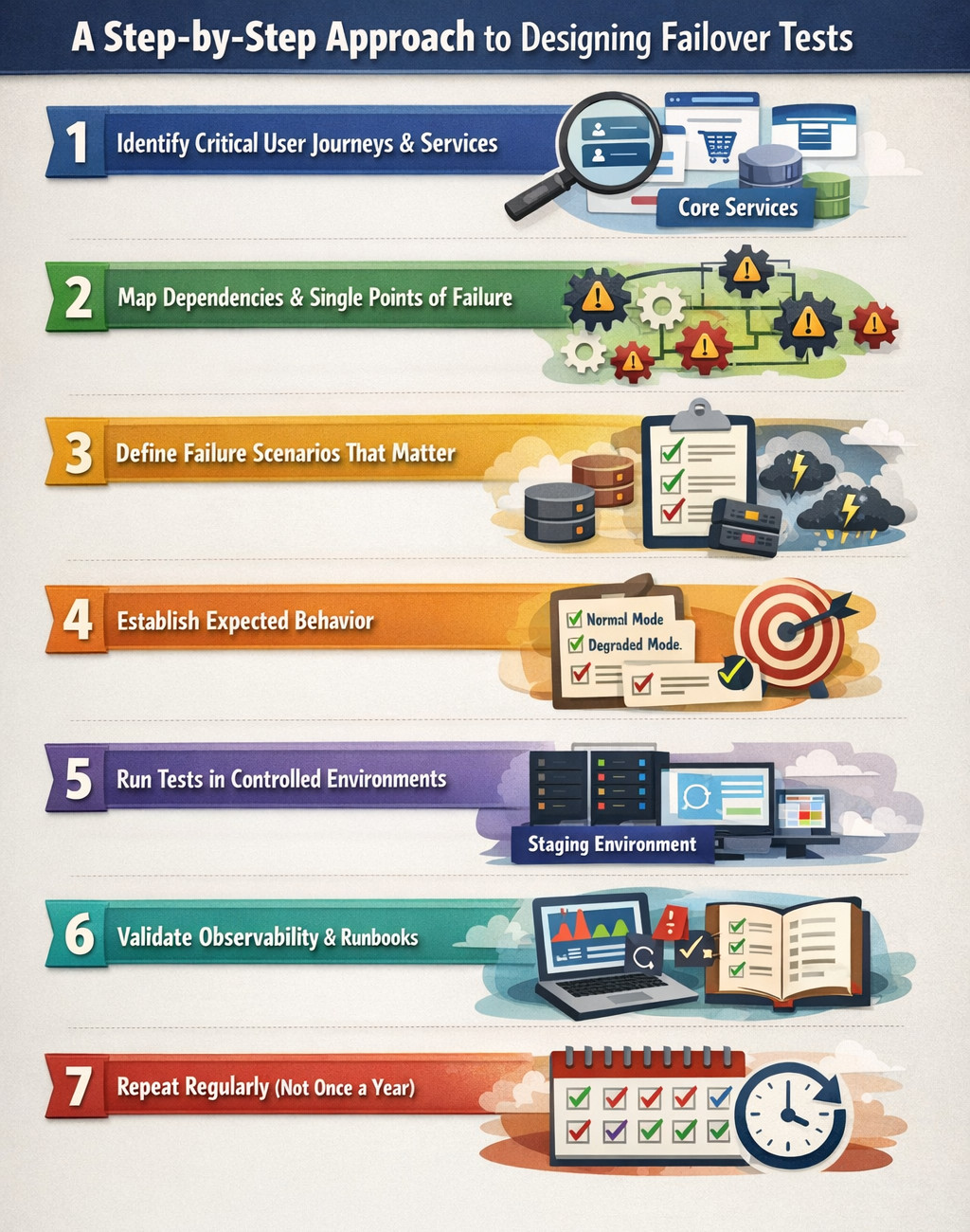
Step 1: Identify Critical User Journeys and Critical Services
Start by identifying the user journeys and services that must remain available, because not every feature needs the same failover guarantee. Focus first on authentication, payments/checkout, core read/write workflows, and admin or operational flows that are often overlooked. Automate these journeys as end-to-end tests with testRigor, so you can rerun them during failover drills.
Step 2: Map Dependencies and Single Points of Failure
Create a dependency map showing how services rely on databases, queues, caches, and external integrations. This helps expose shared components and hidden single points of failure, such as a single load balancer, IAM service, or region-bound storage.
Step 3: Define Failure Scenarios That Matter
Use production incident history and threat modeling to select the most realistic and damaging failure modes. Prioritize the top failures you have seen in the past and the high-risk scenarios you fear but have not tested yet.
Step 4: Establish Expected Behavior for Each Scenario
For each failure scenario, define what “correct behavior” looks like from a user and system perspective. Specify allowed degraded modes and clearly identify which features can be temporarily disabled safely without breaking core business outcomes.
Step 5: Run Tests in Controlled Environments First
Begin in a staging environment that closely mirrors production topology, configuration, and dependencies. Failover behavior can differ dramatically if staging is smaller, simplified, or uses different managed services than production.
Step 6: Validate Observability and Runbooks
Failover is not truly successful if on-call teams cannot see what happened and respond confidently. Ensure alerts trigger appropriately, dashboards reflect reality, logs/traces remain usable, and runbooks match actual system behavior.
Step 7: Repeat Regularly (Not Once a Year)
Failover readiness decays over time due to config drift, infrastructure changes, upgrades, and new dependencies. Make failover testing recurring and tie it to release cycles or reliability milestones so resilience stays continuously verified. Schedule recurring failover drills and run the same regression pack using the testRigor suite every time to prevent resilience regression.
When to Run Failover Testing?
Failover testing shouldn’t be treated as a once-a-year “DR day” activity, because system resilience can degrade as the architecture evolves. It is most valuable when done proactively, before real failures expose gaps in recovery behavior.
Common triggers include major infrastructure changes (such as region migrations or new clusters), database engine upgrades, and the introduction of new replication/caching layers or critical dependencies. It should also be run when scaling beyond previous limits, before committing to high-stakes SLAs, and after incidents to confirm the same failure cannot recur, while mature teams perform smaller drills monthly or per release.
Conclusion
Failover testing is ultimately about proving, through real, forced-failure scenarios, that your system doesn’t just survive outages but continues serving users with minimal disruption while preserving correctness and integrity. By repeatedly validating detection, orchestration, state consistency, and recovery under realistic faults, teams prevent “redundancy on paper” from turning into downtime in production. Done regularly, failover testing becomes operational muscle memory that keeps availability promises credible even on the worst days.
| Achieve More Than 90% Test Automation | |
| Step by Step Walkthroughs and Help | |
| 14 Day Free Trial, Cancel Anytime |











