
What are Fallbacks in AI Apps?
 |
We’ve all been there: You’re chatting with a bot, trying to solve a simple billing issue. You’ve explained your problem three times, but the bot just keeps repeating, “I’m sorry, I don’t understand that request.” Eventually, it spits out a cold, technical error code and closes the window.
That dead end is the result of a missing fallback. When an AI app doesn’t have a safety net, it doesn’t just fail; it fails loudly and unprofessionally.
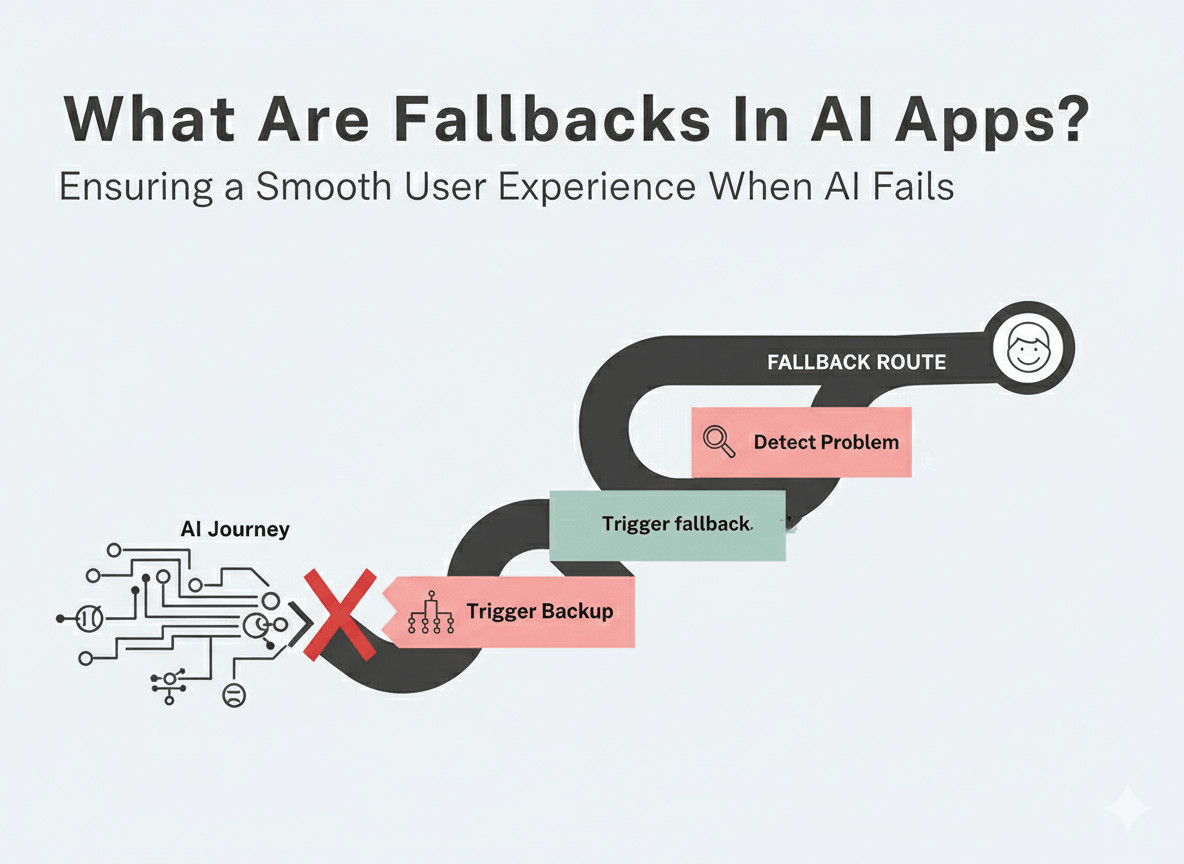
In this guide, we’re moving beyond the “I’m sorry” loop to explore how modern software teams build AI fallbacks that keep users happy, even when the technology trips up.
| Key Takeaways: |
|---|
|
What are Fallbacks in AI Apps?
Fallbacks are your plan B strategies in the case the AI app hits a wall. These strategies help ensure that your app behaves gracefully in front of the user. A good fallback doesn’t make the user start over. If the AI fails after you’ve already given it your name and order number, the fallback system (or the human who takes over) should already have that information.
Generally, guardrails and fallbacks go hand-in-hand. If a guardrail blocks a dangerous response, the fallback is what provides the polite, professional alternative so the user still feels cared for.
Read more about guardrails over here: What are AI Guardrails?
Why Do We Need Fallbacks in AI Apps?
AI can be unpredictable and land you in trouble if you don’t have strategies implemented that take care of such situations. Fallbacks help with:
- Preventing the Dead End: When AI fails without a fallback, the user hits a brick wall. They might see a scary technical error message like Error 500 or a blank screen. This is the fastest way to lose a customer’s trust. But if you have a fallback, then instead of a crash, the user sees a helpful message like: “I’m having a little trouble with that. Would you like to see our most popular help articles instead?“
- Stopping Hallucinations: AI is designed to help the user, and it is this very virtue that can land it in trouble. The trouble is that AI confidently fakes facts just to give an answer. This is known as a hallucination. A common fallback mechanism here is setting a confidence score. If the AI is only 40% sure of its answer, the fallback stops it from speaking and says, “I’m not quite sure about that. Let me connect you to a real person who can help.“
- Handling Peak Hour Traffic: Sometimes, the company that provides the engine for the AI (like OpenAI) gets too much traffic and slows down or crashes. If your app relies 100% on them, your app crashes too.
- Protecting Your Brand Reputation: An AI that says something offensive or incorrect isn’t just a technical bug; it’s a PR disaster. Fallbacks help protect your brand’s image.
Reasons Why AI Fails
Unlike traditional software that might fail due to a button being broken or the server being down, AI apps often struggle with more complex problems.
- Out of Scope Prompts: AI models are trained on specific data and are meant for certain purposes. If you ask a “Real Estate Bot” for a recipe for chocolate cake, it hits a wall. Without a fallback, the AI might try to answer anyway, which means a gibberish response for the user.
- Low Confidence: Sometimes the AI understands the words you’re saying, but it doesn’t understand the intent. This happens often with sarcasm, slang, or very long, rambling questions. Then the AI guesses what you want. This is how hallucinations happen.
- Service Outages: This is a purely technical failure. Your app is fine, but the AI engine (like OpenAI or Google’s servers) is having an outage.
When Do Fallbacks Get Triggered?
In a well-built AI app, guardrails and fallbacks work in relay. You’ll generally see fallbacks getting triggered when the AI:
- Behaves inappropriately → Done via guardrails
- Faces technical or infrastructure issues → Done via technical triggers
In both cases, fallbacks are called upon.
Thus, you will see fallbacks getting triggered in these scenarios:
- Technical Failures: This could include issues like the AI service provider failing for some reason or the API response being unfavorable.
- Confidence Scores: This is when the AI’s response isn’t up to the mark and hence, scores low. Generally done via guardrails.
- Guardrail Blocks:
- Unacceptable Input: In most cases, there are guardrails that vet the incoming prompt even before the AI responds to it, mainly to safeguard from a jailbreak. This is to make sure that the prompt doesn’t break the system, or if the AI is even qualified to handle this request.
- Unacceptable Output: Sometimes, the AI might form a response that won’t fly with the user; maybe it uses curse words or provides a biased viewpoint, or hallucinates. Guardrails will flag this, and the switch to a fallback will happen immediately.
Fallback Strategies for AI Apps
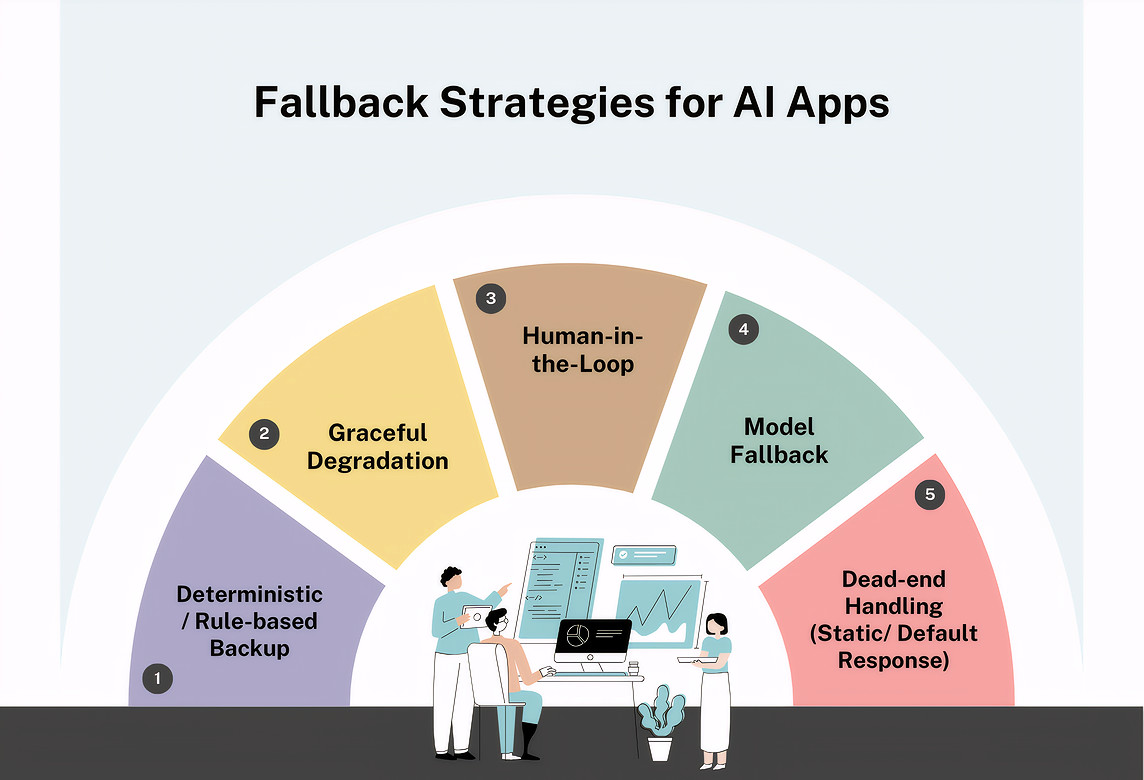
When we talk about having a fallback in AI apps, we don’t necessarily mean that there’s just a single plan B. Generally, it is good to have a few of these strategies implemented in case of various situations.
Graceful Degradation
Instead of the system crashing completely when the high-tech AI fails, the app steps down to a simpler, more reliable version of the feature. You thus provide a “good enough” experience rather than “no experience”.
Let’s look at an example of graceful degradation. You have an AI search engine that understands complex questions like “Find me a dress for a summer wedding in Italy under $200.” If the AI fails, the site switches to a standard keyword search for “summer wedding dress” and shows a price filter.
This helps with service outages or technical hiccups in the AI provider’s server. It keeps the user moving forward even if the experience is a bit less personalized.
Deterministic / Rule-Based Backup
This is when the AI is confused or gives an answer with a “low confidence” score, the system stops trying to be “smart” and switches to hard-coded, pre-written rules. It’s like a scripted menu on a phone call.
Here’s an example of this. A customer asks a banking bot a very complex question about mortgage interest rates. The AI doesn’t understand the phrasing, so it triggers a rule: “If the user mentions ‘mortgage’ and confidence is low, show a button to ‘Download our Current Rate Sheet PDF’.”
This mainly helps solve ambiguity. It prevents the AI from guessing (hallucinating) and instead provides a verified, correct piece of information.
Human-in-the-Loop
This is the ultimate fallback. When the AI reaches the edge of its abilities, or when the stakes are too high for a machine to handle, the system automatically hands the conversation over to a real person.
For example, an AI-powered medical assistant is helping a patient check their symptoms. If the patient mentions chest pain, the AI immediately stops and says, “I’m connecting you with a nurse right now”, while simultaneously flagging the case for a human medical professional.
This helps with high-risk situations, complex emotional needs, or edge cases that the AI hasn’t been trained to handle yet. Read: How to Keep Human In The Loop (HITL) During Gen AI Testing?
Redundant AI / Model Fallback/ Model-to-Model Handover
This implies using a second, simpler AI model to step in if the primary one is unavailable or too slow.
Here’s an example. Your app uses a very powerful AI (like GPT-4) for writing emails. If that service is overloaded and slow, the app automatically switches to a faster, cheaper model (like a basic text-filler) to provide a draft quickly.
You’ll need this when the primary model fails to respond, or you’ve hit your rate limit. It ensures your app stays fast even when the main AI is struggling with heavy traffic.
Static/ Default/ Dead-end Response
This is the simplest form of fallback. If all else fails, the system provides a carefully written, static message that guides the user toward a different solution.
For example, instead of saying “Error 500: Internal Server Error“, the app says, “I’m having a hard time answering that right now. You can check our FAQ page here, or try rephrasing your question.”
This type of fallback is very helpful in the event of a total system failure. It protects your brand’s reputation by remaining professional and helpful even during a crash.
How to Build a Fallback?
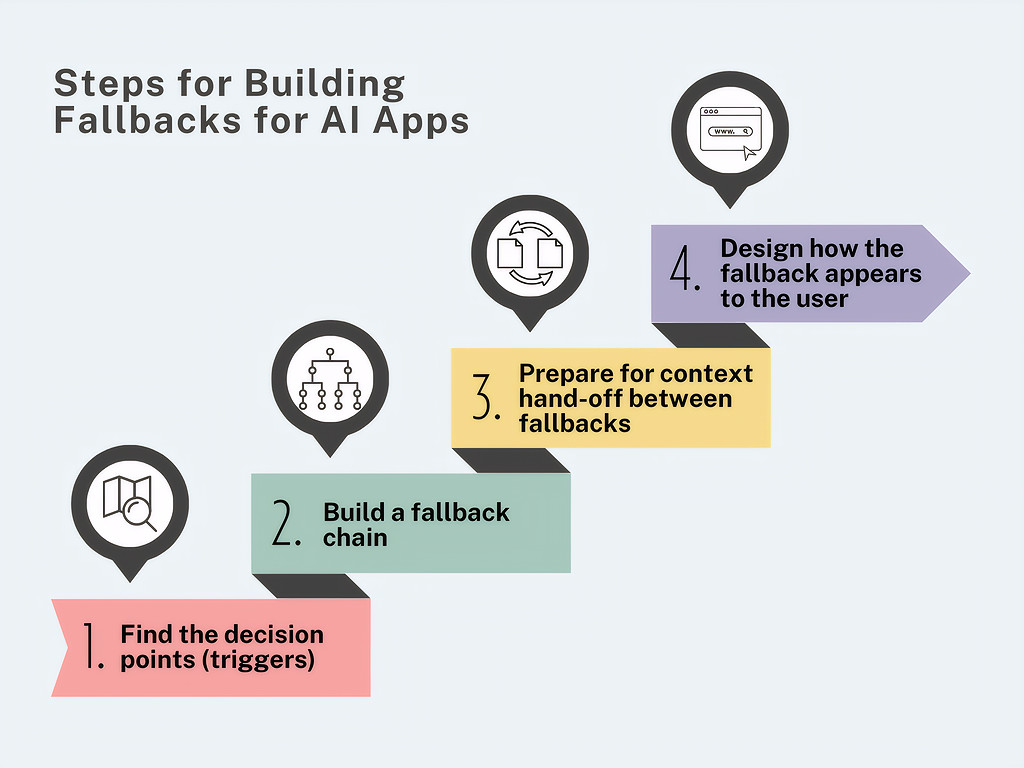
Let’s look at how you can go about building fallbacks for AI apps.
Step 1: Build the Decision Points
Figure out the triggers that will invoke fallbacks. This also means that you’re deciding the failure thresholds, that is, when you want the AI to give up. Your triggers are generally going to be timeouts, confidence, and the guardrails.
Step 2: Build the Fallback Chain
Your backups also need backups! Create a chain, like a tree, to make sure of this. If the best option fails, it tries the next best thing. The order can go something like this:
- Top of the Ladder (The Dream): Your most advanced, smartest AI.
- Middle of the Ladder (The Reliable Backup): A simpler, cheaper AI that is less likely to crash or get confused.
- Bottom of the Ladder (The Guarantee): A non-AI system, like a search bar, a pre-written menu of buttons, or a “Contact Us” form.
Step 3: Build the Context Hand-off
This is the most critical part of the build. If the AI fails while talking to a customer named Sarah about her Order “#123“, the fallback system must know Sarah’s name and order number.
Step 4: Now Design the Fallback’s Appearance for the User
You need to design how the fallback actually looks to the user. You never want them to see a spinning wheel or a blank screen. Some examples of these are static responses or animations that help cover the switch.
Best Practices for Building Fallbacks
- Be thorough with mapping all failure scenarios. This will help you come up with good fallback strategies.
- Always map fallbacks and guardrails. This will ensure that when your app hits a roadblock and your guardrail catches it, it is handled smoothly by a fallback.
- Make sure that the user doesn’t see the switching happening behind the scenes. A perfectly built fallback makes the user feel like the app intended to show them the backup all along. It turns a system failure into an alternative path.
- Instead of connecting your app directly to the AI, use a middleman, like an AI Gateway or a Proxy.
- Use good monitoring and logging practices to track fallback activation frequency, response times, and success rates.
- Test your fallbacks regularly. Use AI-powered tools like testRigor to test these implementations using plain English tests. Here are some good examples of how easily you can do this: AI Features Testing: A Comprehensive Guide to Automation.
Final Note
As our apps modernize, we need better strategies to ensure that the user experience isn’t compromised, even during downtimes. Fallbacks help us achieve this. A good fallback strategy will keep your customer happy and you in the loop. Remember to plan thoroughly before implementing and use AI-powered tests to validate your fallbacks. After all, what better way to test the unpredictability of AI than with AI!
FAQs
Is a fallback the same thing as an error message?
Not quite. An error message (like Error 404) tells the user something is broken and stops there. A fallback is active; it tries to solve the problem. Instead of just saying “I’m broken“, a fallback might say, “I’m having trouble connecting, but here is a list of help articles that might solve your problem.”
Do all AI apps need fallbacks?
If you want your app to be professional and reliable, yes. Because AI is probabilistic (it makes educated guesses), it will eventually be wrong or get stuck. Without a fallback, those moments turn into dead ends for your customers.
What triggers a fallback to start working?
Usually, it is one of three things: a technical glitch, a guardrail block, or low confidence.
Does the user know when a fallback is happening?
Ideally, no. A great fallback feels like a natural part of the conversation. For example, if a chatbot can’t answer a complex legal question, it might smoothly transition to: “That’s a great question for our legal team; would you like me to connect you to a live agent?” The user feels helped, not failed.
How do you test if a fallback actually works?
You have to bully your app! You intentionally break the internet connection, or you ask the AI trick questions that you know will trigger a safety block. Then, you check to see if the backup system (plan B) appears correctly and quickly.
Will adding fallbacks make my app more expensive?
Actually, it often saves money. A good fallback can solve a user’s problem using a simple, cheap “pre-written” answer rather than wasting expensive AI “brain power” on a question it doesn’t understand anyway.
| Achieve More Than 90% Test Automation | |
| Step by Step Walkthroughs and Help | |
| 14 Day Free Trial, Cancel Anytime |











