
Integration Tests vs Unit Tests: What Are They and Which One to Use?
 |
In modern software engineering, automated testing is no longer optional; it is integral to building scalable, reliable, and maintainable systems. Irrespective of what methodologies the team follows, the question remains the same: How do we ensure that the software works as intended? The answer lies in the most commonly used testing techniques, unit tests, and integration tests.
| Key Takeaways: |
|---|
|
In this article, we aim to gain a clear understanding of unit testing and integration testing. We will begin with the definitions and then proceed to the differences. By the end of this article, you will have a clear understanding of what unit testing and integration testing are, as well as which one is most suitable in specific situations.
Let’s start!

What is Unit Testing?
Unit testing is an approach to testing individual components at the modular level. Each unit is tested in isolation, which often includes mocking the necessary data.
Unit testing focuses on testing only internal components and should never involve communicating with external components. It is mostly performed by developers.
- A function
- A method
- A class
- A small component of a module
The key concept in unit testing is isolation: unit tests should not depend on external services, databases, file systems, or network calls. Instead, they use mocks, fakes, or stubs to simulate dependencies.
- If it includes connecting to a database.
- If it consists of an interaction with a web browser.
- If a request is sent over a network.
- It touches multiple modules.
Unit testing does not show the whole picture and is not beneficial to anyone other than software engineers. So, does it mean it’s not very important?
Quite the opposite!
With a good unit test coverage, the quality of code will definitely be high, and QA will end up with fewer bugs to find. Many organizations strive to achieve as high as 90% unit test coverage for any new feature.
Unit tests ensure each function of code, however tiny it is, performs its intended tasks.
For example, if you are developing a chess game, you might want to ensure each piece can only move as it’s supposed to.
Goals of Unit Testing
- It ensures the correctness of individual components.
- Unit testing catches defects early during development.
- It supports refactoring by providing fast feedback.
- Unit tests serve as documentation for system behavior.
Examples of Unit Tests
- Testing a calculator function that adds two numbers in a calculator project.
- Verifying that a string formatter outputs correct formatting.
- Confirming that business logic rules are applied correctly in a single method
Characteristics of Good Unit Tests
- Fast: Executes in milliseconds.
- Isolated: It is independent of external systems.
- Repeatable: Unit test produces consistent results no matter where or when run.
- Deterministic: There is no randomness or time-dependency unless mocked.
- Simple and Focused: Each test should cover only one behavior.
Standard Tools for Unit Testing
- JavaScript/TypeScript: Jest, Mocha, Vitest
- Python: pytest, unittest
- Java: JUnit, TestNG
- C#: NUnit, xUnit
- Ruby: RSpec
Why Is Isolation Good for Unit Tests?
Unit tests are performed to reveal bugs in a very specific portion of the code. If a unit test fails, developers must understand precisely the position where the code malfunctioned. This is the reason unit tests are performed in isolation.
When performing unit tests in isolation, we are taking dependencies like database connections and usage of file systems out of the picture. This speeds up the test execution at the same time, reducing the cost. Unit tests are typically the fastest to get the test results and are commonly run on every commit before it can be released for further testing.
Unit tests also help ensure that basic functionality is robust. Unless the code is changed, tests that pass or fail are supposed to exhibit the same behavior, which is only possible in isolation.
- Unit Testing: Best Practices for Efficient Code Validation
- Are Unit Tests a Waste?
- How to Choose the Best Unit Testing Framework for JavaScript
What Is Integration Testing?
By now, it’s clear to you what unit testing is about. With integration testing, however, it can get a little bit trickier. Let’s take a look.
Imagine opening an e-commerce website, browsing around, and then placing some items in your cart. The next step is checkout, and you decide to use PayPal, only to discover that the website throws an error, making checkout impossible. That is an example of a bug that could’ve been easily caught if all modules had been tested, that is, an integration test had been in place.
An integration test validates how multiple units of code (modules) work together as a system.
- API endpoints calling business logic functions.
- Microservices communicate via HTTP or messaging.
- Modules interacting with a database.
- Frontend communicating with backend.
Integration tests often rely on real external resources or realistic substitutes, such as containerized databases or in-memory adapters, in contrast to mock data used in unit testing.
- (Less common) Tests that use any resource (such as a network connection or a database connection) that isn’t mocked out.
- (More common) Full-on software testing, where various modules of an application under development are tested together.
That’s the fundamental difference we need to identify between the two most common forms of testing.
We can now examine integration testing at a deeper level to gain a clearer definition. Let’s start by understanding its goals, examples, characteristics, why it is essential, and some tools.
Goals of Integration Testing
- Validate that the components interact correctly with each other.
- Ensure proper data flow across modules.
- Spot issues skipped by unit tests (misconfigurations, schema mismatches).
- Verify integration with external systems (APIs, DBs, queues).
Examples of Integration Tests
- Testing an API endpoint that writes data to a database.
- Verifying data flows from UI → backend → database and back.
- Testing communication between two microservices.
- Running a web app with a real or mock database.
Characteristics of Good Integration Tests
- Realistic: Integration tests simulate real-world usage.
- Comprehensive: It covers cross-module interactions.
- Automated: Integrated tests can be run in a CI pipeline.
- Predictable: Integrated tests are predictable in a consistent test environment (e.g., Docker).
Standard Tools for Integration Testing
- Test containers (Java, .NET, Node.js)
- Supertest (Node.js API testing)
- Postman/Newman
- pytest + real database
- Spring Boot Test (Java)
Why is Integration Testing Important?
In a realistic situation, no project can escape vulnerabilities, bugs, breakdowns, even after using the most optimized algorithms and adhering to clean coding practices. These problems never cease to exist.
The main reason for this is that multiple developers collaborate on a single project, with each one having their own style of approaching problem-solving and different ideas. No matter how effectively they collaborate, developers end up accidentally inserting bugs into each other’s features.
Unit testing will only spot issues in their respective units. However, the issues introduced as a result of collaborative development go unnoticed. This is where integration testing comes in.
A checkout bug we’ve referred to at the beginning of this section wouldn’t have been caught by a unit test, but the correct integration test would easily identify it.
- Integration Testing: Definition, Types, Tools, and Best Practices
- Integration Testing vs End-to-End Testing
Key Differences Between Unit Tests and Integration Tests
Many junior developers often think of unit testing and integration testing as synonyms or closely related testing types, as they are performed in the subsequent stages of development.
Let’s explore significant differences between unit testing and integration testing to get a clear picture of them and to which one is applied and when.
| Unit Testing | Integration Testing |
|---|---|
| In unit testing, each module of the software is tested separately. | In integration testing, all modules of the software are tested in combination. |
| In unit testing, the tester knows the internal design of the software. | Integration testing doesn’t know the internal design of the software. |
| Unit testing is performed first of all testing processes. | Integration testing is performed after unit testing and before system testing. |
| Unit testing is white box testing. | Integration testing is black box testing. |
| Unit testing is performed by the developer. | Integration testing is performed by the tester. |
| Detection of defects in unit testing is easy. | Detection of defects in integration testing is difficult. |
| It identifies issues and bugs that lie within the component only. | It identifies all the errors that may lie when multiple components are under test. |
| Easy to debug. | More difficult to debug. |
| Unit testing is done when any new component is introduced or modified. | Integration testing is necessary only when we implement multiple components. |
| It tests parts of the project without waiting for others to be completed. | It tests only after the completion of all parts. |
| Unit testing is less costly. | Integration testing is more costly. |
| Unit testing is responsible for observing only the functionality of the individual units. | Error detection takes place when modules are integrated to create an overall system. |
| Module specification is done initially. | The interface specification is done initially. |
| The proper working of your code with the external dependencies is not ensured by unit testing. | The proper working of your code with the external dependencies is ensured by integration testing. |
| In unit testing, all test data is mocked | In integration testing, we will have real-world dependencies |
| Maintenance is cost-effective. | Maintenance is expensive. |
| Fast execution as compared to integration testing. | Its speed is slow because of the integration of modules. |
| Unit testing results in in-depth exposure to the code. | Integration testing results in the integration structure’s detailed visibility. |
| Unit tests are run before committing to the main branch. | Integration tests are (typically) run during the next stage. |
Strengths and Limitations of Unit Tests
The following table shows the benefits and limitations of unit tests:
| Benefits of Unit Testing | Limitations of Unit Testing |
|---|---|
| Fast Feedback Loop: Unit test execution is fast ( in milliseconds). This results in rapid feedback during development. | Cannot Detect Integration Issues: Unit tests only detect issues related to a particular unit. When combined with other units, the well-tested unit may have issues. |
| Supports Refactoring: Unit tests help verify if there are any issues when code is refactored. | False Sense of Security: Even 100% unit test coverage cannot guarantee the system works perfectly. |
| Inexpensive to Write and Maintain: Unit tests usually require less setup and are easier to write and maintain. | Heavy Use of Mocks Can Mask Real Behavior: Unit tests use mock data to simulate behavior. This may mislead tests and mask the unit’s real behavior. |
| Encourages Cleaner Code Architecture: Developers create more modular, loosely coupled code as a result of unit testing. | Not Suitable for Complex Workflows: Unit tests cannot be used for multi-step business processes. |
Strengths and Limitations of Integration Tests
The table below shows the strengths and weaknesses of integration tests:
| Advantages of Integration Tests | Limitations of Integration Tests |
|---|---|
| Better Coverage of Real Application Behavior: Integration tests show how users interact with the system. | Slower Execution: With real databases, servers, and networks, execution of integration tests is slow. |
Identifies Configuration and Environment Issues, including:
|
More Expensive and Complex: Integration tests require more setup and are complex to maintain. |
| Validates Communication Between Services: This is required in case of microservices. | Harder to Debug: An execution failure is harder to debug, as a failure in an integration test may involve several interacting modules. |
| Confidence in System Stability: Integration tests validate the real functionality of the system. | Flakiness: Integration tests can fail due to timing issues, network delays, or environmental differences. |
Use Cases for Unit Testing
- Early Bug Detection: Developers can identify and fix defects in code in the early stages of development using unit tests. Spotting issues at the unit level prevents these issues from escalating into more complex and costly issues at later stages.
- Improved Code Quality and Maintainability: Unit tests encourage developers to write modular, testable, and well-structured code, leading to maintainable and cleaner codebases.
- Facilitating Refactoring: Unit tests can identify issues at the unit level, thus facilitating code refactoring. Developers can rest assured that if functionality is broken as a result of refactoring, unit tests will fail and alert them to the regression.
- Acting as Documentation: Unit tests illustrate expected behavior and usage of individual code units and serve as a form of documentation. This is useful especially for new team members.
- Enhancing Development Speed and Confidence: Automated unit tests reduce the time spent on manual tests and accelerate the development process. When unit tests pass, developers gain confidence in the correctness of their code.
- Supporting Test-Driven Development (TDD): Unit testing is suitable in TDD, where code is written against the tests. The TDD approach drives the design of the code, ensuring testability and promoting a focus on fulfilling requirements precisely.
When to Use Integration Tests
- Verifying Data Flow and Communication: Integration tests confirm that data is correctly passed between modules and that communication protocols are followed. This is ensured by testing API calls, database interactions, and message queue exchanges.
- Ensuring End-to-End Functionality: Integration testing validates the complete flow of user action, from front-end to backend and any external interfaces. This ensures that the end-to-end functionality of the software works as expected.
- Detecting Interface Issues: Issues such as incompatible data types or incorrect method signatures, during module interaction, can lead to integration failures. Integration testing specifically tests these interface points to identify and resolve such issues.
- Validating External System Integrations: A software system interacts with many third-party services (e.g., payment gateways, CRM systems, cloud APIs). Integration testing is valuable in verifying these external integrations and handling various scenarios, including error conditions.
- Regression Testing of Integrated Systems: Integration tests ensure the new changes to existing code do not introduce regressions in how different modules interact.
- Testing Microservices Architectures: In a microservices architecture, where a number of independent services communicate, integration testing is essential to verify the seamless interaction and data exchange between these services.
Combining Unit Tests and Integration Tests Effectively
- Step 1: Start with Unit Tests: Use unit testing to validate the core logic of the system by testing individual units.
- Step 2: Add Integration Tests for Critical Paths: Next, add integration tests to cover API endpoints, database operations, and message queues.
- Step 3: Add Monitoring for Runtime Behavior: Use monitoring tools and logging to check the runtime behavior for any issues or missing cases.
- Step 4: Automate Everything: Automate all these tests using CI/CD pipelines to execute unit tests on every commit, run integration tests on every pull request (PR), and run E2E tests on release branches or at a specific time daily.
- Step 5: Use Tools That Simplify Testing: Use modern tools to reduce the complexity of testing.
Which One Should You Use?
Ideally, you should use both unit tests and integration tests, but for different purposes. Neither is superior; they serve complementary roles.
You can also use the testing pyramid concept to make it easier to digest. This is the widely accepted way of thinking about tests.
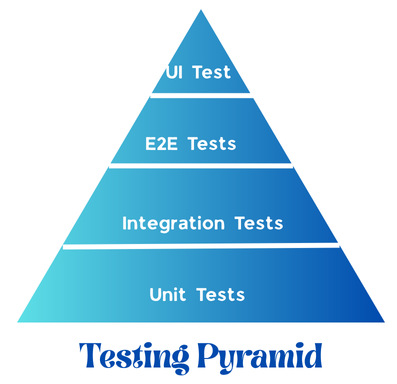
In the testing pyramid, unit tests sit at the bottom, representing the most fundamental and extensive part.
The second part of the pyramid is represented by integration tests.
Finally, the top part is where we will put UI and end-to-end tests. Only these tests will give us a wholesome understanding that the entire software works exactly as intended, and users will get the experience they expect. This is where you would use a test automation tool such as testRigor.
In general, the following is the situation with using unit tests and integration tests:
Unit Tests are Used When:
- You require fast testing feedback.
- You are verifying isolated logic (like in individual units).
- You’re refactoring or iterating quickly.
- You want high coverage of business logic.
Integration Tests are Used When:
- Multiple modules interact with each other.
- You have database or external API communication with your system.
- You want to catch real-world bugs.
- You are validating the system-level workflow.
General Rule of Thumb
- Use unit tests for the correctness of internal logic.
- Use integration tests for the correctness of system behavior.
What About the Cost?
Of course, cost is a crucial factor in determining the efficiency of software testing. Every project starts with a discussion about the ROI of test automation.
Unit tests are the fastest to write as developers implement them at the time of feature development. They are also cheaper to run as they don’t usually require a special environment or access to external resources.
When it comes to the speed of test execution, unit tests are the fastest. The best part is that we can run unit tests in parallel as they are entirely isolated, saving us a lot of time.
On the other hand, integration tests cost us a bit more time and money, but that does not mean they are less valuable. Rather, it’s just a different perspective as well as a type of feedback.
Respectively, all the following testing types, such as functional, UI, and end-to-end tests, cost more than unit and integration tests and are slower to run. However, they result in giving software teams a final clear picture and assurance that no bugs have been missed.
Conclusion
Unit tests and integration tests are essential pillars of a strong testing strategy. Unit tests validate individual components or modules, providing speed and efficiency, while integration tests ensure that the system works cohesively as a whole. You cannot rely only on one strategy, as both have their shortcomings and cannot guarantee the correct working of the software.
A balanced approach, guided by the testing pyramid, helps enhance reliability, efficiency, and developer confidence. Modern engineering teams that combine unit tests, integration tests, and end-to-end tests create software that is both stable and easy to maintain.
We hope that you now have a much better understanding of these testing types, as well as when each type of test is run. And if you’re looking for ways to improve your UI and end-to-end testing, don’t hesitate to give testRigor a try, to experience the future of software testing, with ultra-stable tests and minimal test maintenance. And best yet, no coding skills are necessary to build tests, so anyone on the QA team can do it.
| Achieve More Than 90% Test Automation | |
| Step by Step Walkthroughs and Help | |
| 14 Day Free Trial, Cancel Anytime |











