
Smoke Testing vs Regression Testing: Key Differences You Need to Know
 |
In the QA world, two concepts prove essential for any organization looking to ensure product integrity: Smoke Testing and Regression Testing. Although they share the same functional testing heritage, these two test categories find themselves at opposite ends of the testing world. Smoke testing is high-level, superficial, and quick; regression testing is low-level, thorough, and continuous. But combined, they make a pretty nifty safety net for releases, deployments, code merges, and sprint increments.

Despite the significance of these, they are commonly misunderstood or used incorrectly to the extent that smoke tests are sometimes perceived as a skippable check that should be written with no strategy in mind. On the other hand, regression suites can easily become overweight, unmanageable, and low priority. With increasingly complex software systems and a faster pace for Agile and DevOps development, grasping the distinction between smoke and regression testing and how to use them strategically with respect to each other has become more critical than ever.
| Key Takeaways: |
|---|
|
What is Smoke Testing?
Smoke testing includes a relatively small set of tests aimed at ensuring the stability of the core functionality of a software project. It is typically performed with every new software build, whether the build contains any new features or purely bug fixes. Since smoke testing is focused on just core functionality, it’s important to always keep in mind that more detailed testing is out of scope when it comes to smoke testing. Usually, detailed testing takes place as the next step, in the form of functional tests. Read: What is Smoke Testing in Software QA?
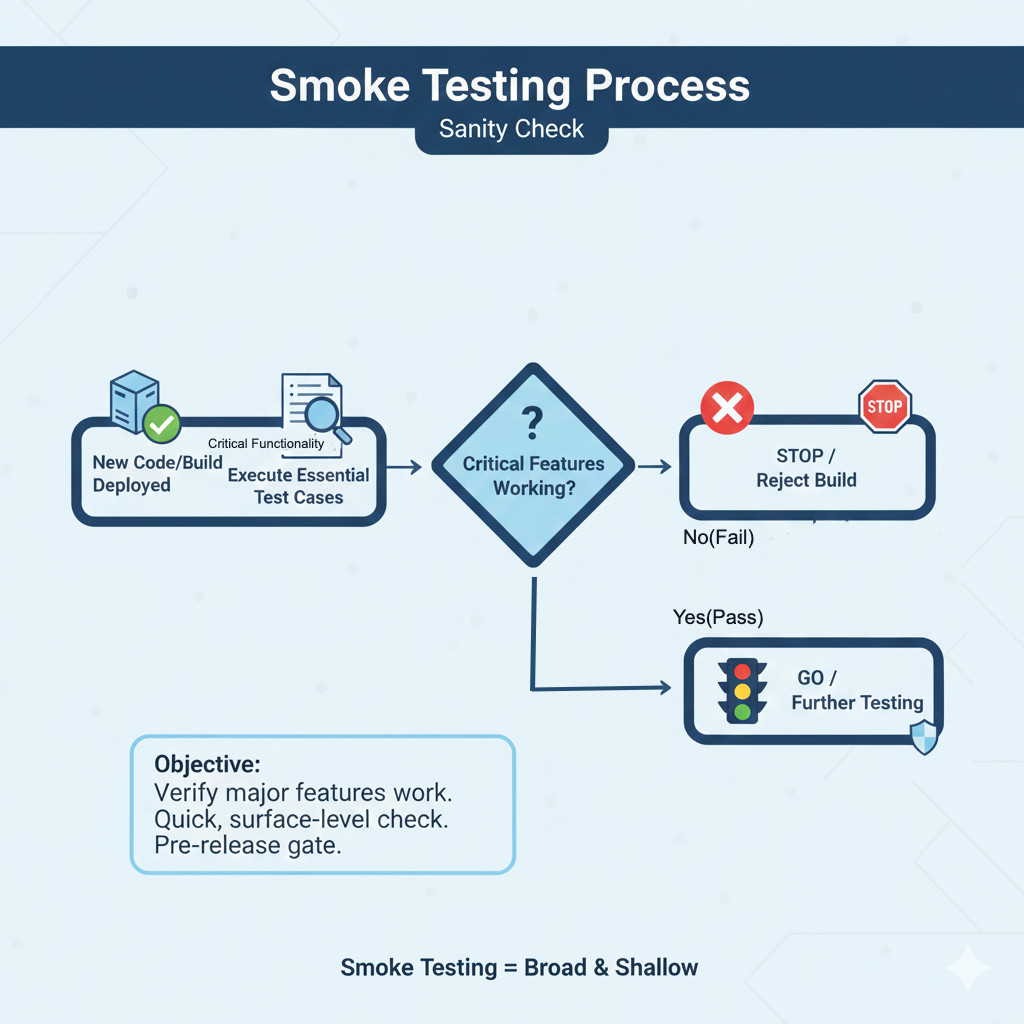
Failure of smoke tests usually results in treating the build as broken and sending the update back to the software developers to resolve. Smoke testing is sometimes referred to as build verification testing, since it is designed to reject broken builds early in the process, so further resources aren’t wasted on deeper testing.
What Smoke Testing Includes
A smoke test suite typically contains:
- Verification of the application’s ability to launch or initialize
- Validation that login and authentication work
- Confirmation that critical workflows load without crashing
- Checks for obvious, show-stopping defects
- High-level validation of UI rendering on key screens
- Basic navigation to ensure routing and transitions function
What Smoke Testing Does NOT Include
- It does not cover edge cases
- It does not explore alternative paths
- It does not attempt to break the system
- It does not validate business logic in depth
- It does not assess performance, security, or usability
Why Smoke Testing is Essential
Smoke tests save huge efforts and time to avoid testers plunging into a faulty build. The lack of smoke tests can cause your QA team to spend hours, and potentially days, engaging in very detailed test cases, only to find that the system is internally very broken. Read: Smoke Testing vs. Sanity Testing.
What is Regression Testing?
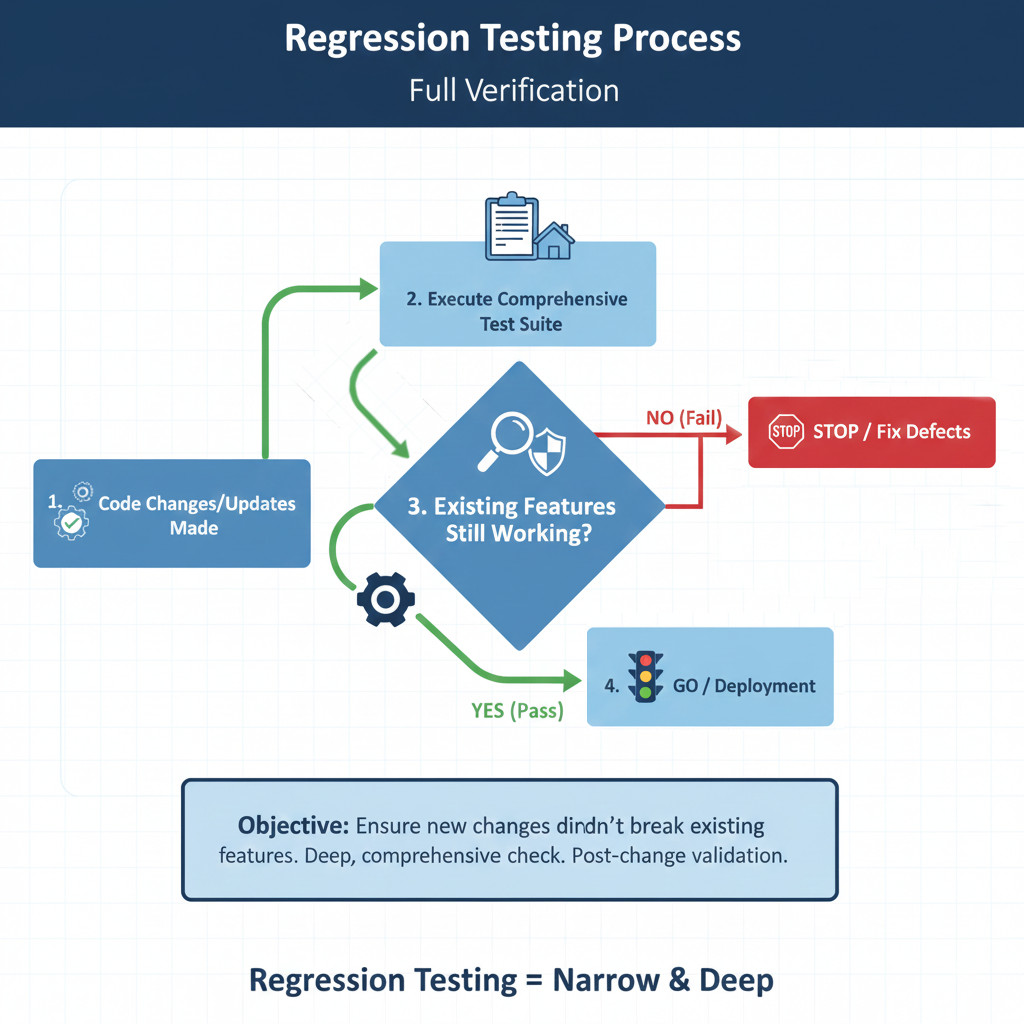
On the other hand, regression is a thorough testing process to ensure that every feature in the software under test functions as per requirements. All of the regression tests passing indicate that the product is ready to be released to the end-users. The code change that triggers the need for regression testing could be anything from bug fixes to new feature releases.
The main purpose of regression testing is to go beyond just testing the update itself, in order to confirm that other areas of the software project are not negatively affected by the recent changes. Read: What is Regression Testing?
Nature of Regression Testing
Features in the software are usually tightly intertwined, so it’s not uncommon that even a relatively simple bug fix breaks something else that might seem completely unrelated. Thus, regression testing is performed often (at least before every production release), and is usually very time-consuming when tested manually. It can take the whole QA team between a couple of days and multiple weeks. Read: Iteration Regression Testing vs. Full Regression Testing.
Why Regression Testing Expands Over Time
Both the product and the regression suite grow together. The more features, the more dependencies; the more dependencies, the greater likelihood that something will break when new code is added. The challenge lies in:
- Maintaining the suite
- Prioritizing high-risk areas
- Avoiding duplication
- Balancing automation with manual oversight
Read: How to Reduce Manual Regression Tests in Software Release?
Importance of Regression Testing
A lack of regression testing would lead to a decline in the quality of software. The result could be unstable, unreliable, and overly variable. Regression testing is used to guarantee a product’s long-term success, reliability, consistency, and continuity after every build.
Imagine a major bug is found towards the end of this testing process? First, this means that the developer will have to return to work they’ve already completed long ago (and likely already moved to a different task). Second, the regression testing will have to start from scratch afterward, to go over the same functionality yet again. You might get the idea why regression testing is usually the least enjoyable for QA people. It’s also not so hard to see why smoke and regression tests are typically the first candidates for automation. Read: Entry and Exit Criteria: The Gatekeepers of Successful Regression Testing.
Examples of Smoke and Regression Test Cases
Now, let’s go through some sample test cases to understand the difference between smoke and regression test cases. We can understand how many steps will be there for smoke test cases compared to regression, and also, we can see the complexity too. To do that, first let’s consider a sample app having:
- Home page
- User login and registration
- Product listing page
- Product details page
- Shopping cart
- Check out with payment
Now, let us see the test cases for smoke tests.
Smoke Test 1: Application Launch
- Title: Verify application home page loads successfully
- Objective: Ensure the app is up and responsive.
- Precondition: Build is deployed to the test environment.
Steps:
- Open the application URL.
- Wait for the home page to load.
Expected Result:
- Home page loads within an acceptable time,
- No HTTP error such as 404 or 500,
- Main header and key sections (menu, search bar, sign-in link) are visible.
Now, let’s look into another one
Smoke Test 2: User Login Basic Flow
- Title: Verify a valid user can log in
- Objective: Confirm basic authentication works.
Steps:
- Navigate to the Login page from the Home.
- Enter a valid username and password.
- Click on “Login”.
Expected Result:
- User is redirected to Dashboard or Home as a logged-in user,
- Username or profile icon is visible,
- No error messages are displayed.
Now, for the regression test, imagine a change: The team adds a “coupon code” feature on checkout. This is a small change in one screen, but it can impact totals, carts, orders, and emails. Now let’s see the test cases.
Regression Test 1: Add To Cart With Correct Price Calculation
- Title: Verify cart subtotal calculation for a single product
- Objective: Make sure the old price calculation still works after the coupon feature is added.
Steps:
- Log in as a valid user.
- Add ‘Product A’ with a price of 100 to the cart.
- Open the Cart page.
Expected Result:
- Quantity is 1,
- Item price shows 100,
- Subtotal is 100,
- No discount is applied when no coupon is used.
Regression Test 2: Apply an Invalid Coupon
- Title: Verify invalid coupon error handling
- Objective: Ensure proper validation and no crash on bad input.
Steps:
- Add any product to the cart and proceed to Checkout.
- Enter the coupon “ABC123” which is not valid.
- Click “Apply”.
Expected Result:
- User sees a clear error message like “Invalid coupon”,
- Total amount remains unchanged,
- No crash or page reload loop.
If you notice, smoke test cases are not in-depth; they just check the basic functionality, whereas regression covers in-depth validations.
Smoke Testing vs. Regression Testing: The Basics
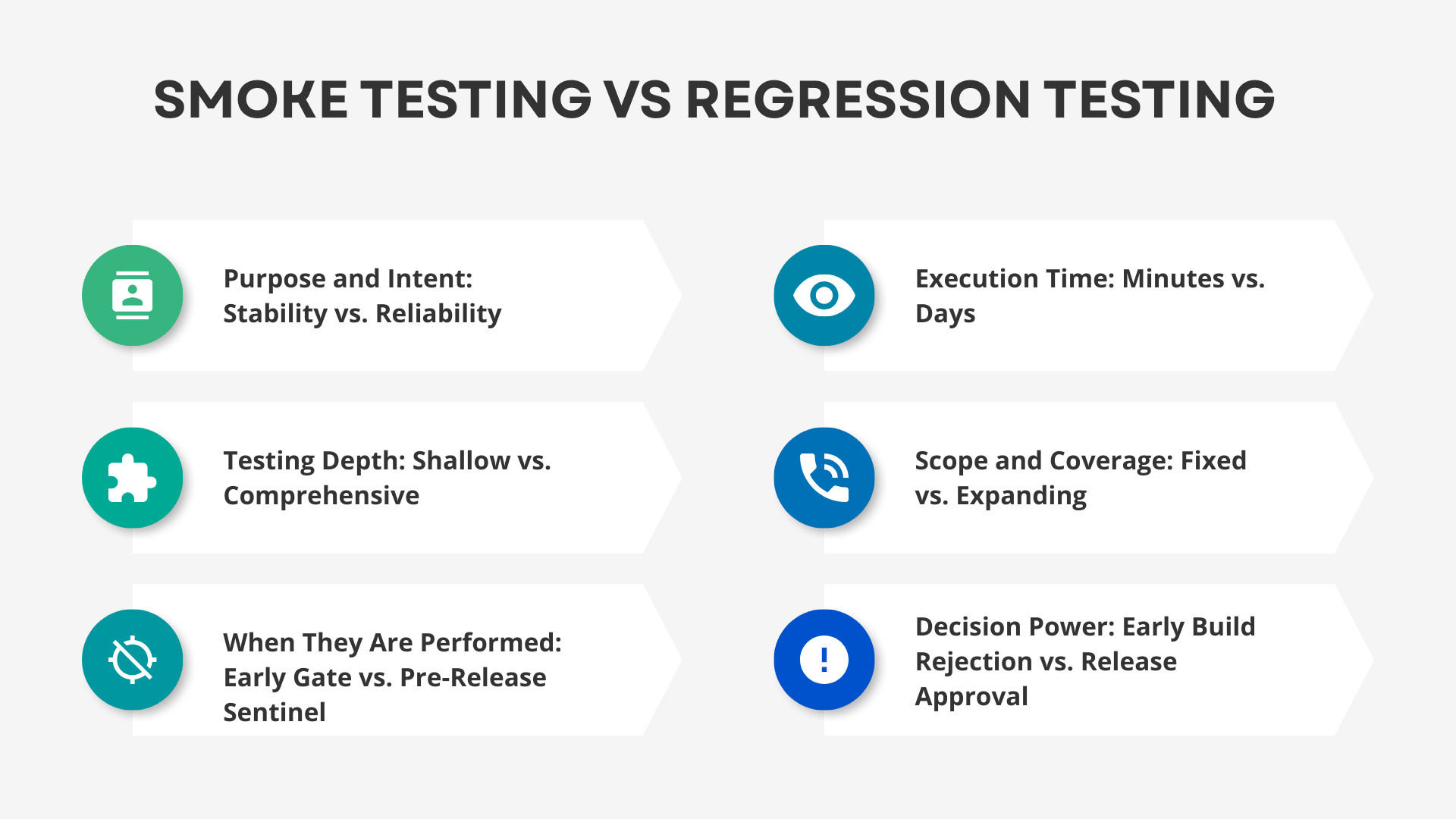
Smoke and regression testing are two entirely different ends of the spectrum, yet both hold significant importance in ensuring software stability and release certainty. Smoke tests represent rapid, high-level tests to confirm that builds are ready, and in contrast, regression testing delivers deep test coverage for your entire application. Knowing the basics of both situates teams to use them, not simply follow them automatically, and allows neither to be abused or underestimated.
Purpose and Intent: Stability vs. Reliability
Smoke testing verifies that a new build is basically stable before further testing is performed, detecting major failures in code and showstoppers early. On the other hand, regression testing is performed to ensure that your existing code functions correctly even after new features are added. To put it simply, a smoke test protects tester time, whereas regression testing protects the quality of a product.
Testing Depth: Shallow vs. Comprehensive
Smoke testing is a surface-level tests that test only the high-priority, basic workflows without going into deeper levels of logic or data. There are more than that where the regression testing goes, full business use cases, data interactions, UI, integration, and error handling. Thus, smoke testing is a rapid safety check, whereas regression testing is an exhaustive health check.
When They Are Performed: Early Gate vs. Pre-Release Sentinel
Smoke tests are performed as soon as the build is released for testing in order to check whether it is acceptable for testing. Regression tests come at the end of the process, generally prior to a bug fix or its introduction in new software versions. This timeframe allows smoke tests to be early gatekeepers and regression tests only to target the job for production.
Execution Time: Minutes vs. Days
The smoke tests are deliberately short because they’re testing only the critical paths and often take minutes to run. The regression testing may last for hours or even days, on account of its broad and deep coverage. The difference in time comparison is due to the very different objectives of each approach.
Scope and Coverage: Fixed vs. Expanding
Smoke suites are small and unchanging due to the fact that they only need to cover essentials with regard to application presence. Regression suites will always expand as more capabilities, fixes, and scenarios are added over time. That implies that the smoke testing is predictable, and regression testing keeps pace with the product.
Decision Power: Early Build Rejection vs. Release Approval
The smoke test is used to decide whether the build is acceptable for further testing or not. Regression testing is the proof that we need in order to sign off on a release and demonstrate that nothing has broken across the system. Combined, they form a pipeline of decisions, rejecting unstable builds early and approving them at the end.
| Aspect | Smoke Testing | Regression Testing |
|---|---|---|
| Primary Purpose | Validate build stability and core functionality | Verify that recent changes haven’t broken existing features |
| Depth of Testing | Shallow, high-level checks | Deep, thorough validation across the system |
| Scope | Small, fixed set of critical tests | Large, expanding suite covering full application behavior |
| Execution Time | Fast — typically minutes | Slow — can take hours to weeks |
| Testing Frequency | Very frequent, usually per build | Less frequent, often per sprint or release |
| Failure Impact | The build is rejected and sent back to the developers | Defects must be fixed, and the regression suite re-executed |
| Test Case Complexity | Simple, straightforward scenarios | Detailed, scenario-based, and logic-heavy tests |
| Automation Priority | Extremely high due to speed and repetition | High, but requires more planning and maintenance |
Automate Smoke Testing and Regression Testing with testRigor
There are too many advantages of automating these two types of testing. There aren’t any downsides, but there are a few things to consider. Let’s look into each of them.
First, it’s most cost-effective to automate features that are stable enough, and there are no plans to change them in the near future. For example, you likely don’t want to start building tests for a mobile application in case there’s a major UI redesign scheduled in a couple of months.
Once you have a stable product you want to automate testing for, it’s time to choose the right automation tool. Regardless of your software product, testRigor will likely be the best all-around choice due to its simplicity and broad coverage.
Once automated, the tests will start bringing significant benefits, saving hours or even days on every test run. Once automated, regular software project testing becomes far cheaper and less labor-intensive to perform. Additionally, by saving time and effort, the QA team will be able to spend more time on improving other areas of the software project.
Here’s the usual result of test automation:
- QA testers are happy not to waste time on the same tedious and repetitive testing.
- Developers are happy to get almost instant feedback and fix bugs while the relevant information is still fresh in their minds.
- Product owners are happy to ship the software to the end-users sooner.
- Business owners are happy to save money while increasing value.
- Customers are happy to get higher-quality software consistently.
Whether your team is still manually doing your software testing or if you’ve already got some experience with test automation, testRigor can really take your testing process to new heights with its cutting-edge Gen AI technology. If you’re interested in seeing how testRigor can help deliver immediate and lasting improvements to your testing process, reach out to our friendly team of testing experts, and we’ll walk you through all of the aspects of the process.
Advantages of using testRigor
- Gen AI-based: testRigor works on generative AI, so you just need to provide the test case description, and it can generate test cases for you, which helps to save a lot of time that testers can invest in creating more edge cases.
- Multi-Device Execution: testRigor is not a framework that works only on mobile; instead, it’s a testing powerhouse that can execute different types of test automation, like web and mobile browser, mobile app, desktop app, API, and even mainframe. Also, it supports execution in cross-browser and cross-device testing, thereby giving full coverage of browsers, operating systems, and devices.
- Integrations: testRigor has seamless integrations with most of the 3rd party applications, like project management tools, test management tools, CI/CD tools, and infra management tools. So, no need to create plugins to integrate; it’s already built.
login to App //Reusable rule
click "Products"
click "Add to cart" to the right of "Laptop A"
click "Cart"
click "Checkout"
enter stored value "stored coupon code" into "Coupon code"
click "Apply coupon"
check that page contains "Coupon applied"
check that element "Discount" contains "10" using ai
check that element "Total" contains "90" using ai
Above, the login steps will be mostly used in every test case. So instead of writing these steps every time, we can create reusable rules. To know more features of testRigor, read here.
Wrapping Up
Smoke and regression tests work at different levels; however, collectively they form a strong safety net for both build stability and product reliability in the long run. With each approach being adopted strategically by teams, they avoid early failures and uncover hidden problems before release.
Automating these tests, especially on an AI-powered platform like testRigor, helps organizations speed up delivery while simultaneously reducing manual work and retaining trust in every single deployment. In a rapidly changing development world, both of these approaches are critical to consistently delivering high-value software.
| Achieve More Than 90% Test Automation | |
| Step by Step Walkthroughs and Help | |
| 14 Day Free Trial, Cancel Anytime |











