
testRigor vs. Mabl
 |
What is mabl?
mabl is a cloud-based test automation platform used for testing web applications, APIs, and mobile browser experiences. It is commonly categorized as a low-code tool, as it allows users to create automated tests without writing extensive code, while still supporting custom scripting when needed.
Tests in mabl are typically created using the mabl Trainer, which is available as a browser extension or desktop application. The Trainer captures user interactions as it navigates through an application, turning those actions into automated test steps. Users can then enhance these tests by adding validations (assertions), conditional logic such as if/then rules, and reusable components called flows. These flows allow commonly used sequences, like login steps, to be reused across multiple tests. For more advanced scenarios, users can extend tests with JavaScript.
In addition to its low-code approach, mabl includes generative AI features that assist with test creation and maintenance. Users can describe a test scenario in natural language, and the system can generate an initial version of the test. The platform may also suggest validations or improvements based on the application’s UI during test creation.
mabl also uses machine learning techniques to support test maintenance. Instead of relying on a single identifier for UI elements, it captures multiple attributes to recognize elements during execution. If an application changes, the platform can attempt to identify elements based on these attributes, helping reduce test failures caused by UI updates.
mabl is typically used by QA and engineering teams as part of a continuous integration and delivery workflow. As a cloud-based platform, it manages test execution environments and integrates with tools like GitHub, GitLab, and Jira to trigger tests and track results within development pipelines.
Advantages of mabl
- Low-code and codeless test authoring options: Tests are created by interacting with the application using the mabl Trainer, which records user actions as structured steps. mabl also includes generative AI features that can help create test steps from natural language prompts.
- Automatic element identification and maintenance support: mabl identifies UI elements using multiple attributes (such as DOM structure, text, and position).
- Support for multiple testing types in one platform: The platform supports UI and API testing, along with accessibility checks and some performance-related insights, within a single workflow.
- Cloud-based execution environment: Tests run on mabl’s managed infrastructure, removing the need to maintain local test environments or browser grids. It integrates with CI/CD tools to trigger test runs during development cycles.
- Built-in reporting and diagnostics: Test runs include logs, screenshots, and performance data, which can help teams analyze failures and track application behavior over time.
Disadvantages of mabl
- Trainer-based workflow requirement: One might find the Trainer workflow slower for building large or complex test suites compared to directly writing test logic.
- Tedious UI navigation for codeless test creation: While the generative AI test authoring is helpful, it might be tedious due to its interactive nature.
- Platform-specific concepts and learning curve: Users need to learn mabl-specific constructs such as flows, variables, and environments, which may take time to become comfortable with.
- Not fully no-code for all scenarios: While many use cases are low-code and even codeless, more complex scenarios may require writing JavaScript.
- Maintenance still required for larger changes: While automatic element identification helps with small UI updates, significant changes to application structure or user flows still require manual updates.
- Pricing considerations: mabl is generally positioned as a premium tool, which may not be suitable for smaller teams or projects with limited testing needs.
What is testRigor?
testRigor is an AI-powered test automation platform designed to simplify how tests are created, executed, and maintained. Unlike mabl, which, though agent-driven, operates within a structured platform. testRigor keeps the process more direct by allowing tests to be written and maintained as plain language from the start.
Instead of writing code, relying on record-and-playback, or pair programming with an agent to create test cases, users directly create tests in plain English, which the system translates into executable steps. testRigor also offers options to use record-and-playback and generative AI-powered test authoring to generate plain English tests. It doesn’t depend on selectors and XPaths at all to identify UI elements. It sees the page like a human.
testRigor supports end-to-end testing across web, mobile, APIs, desktop, mainframe, and more within a single platform. testRigor focuses on reducing the effort required for both test creation and maintenance, making automation accessible to a broader team, not just the technical silo.
Getting started with testRigor is straightforward. There’s no need for long setup cycles or specialized training. Teams can begin automating tests almost immediately, which is especially valuable for fast-moving products and frequent releases. It is as simple as:
- Launch the testRigor app on the web and choose the desired settings for your test suite.
-
Entering test steps in plain English language. (want to know more about the supported commands? Take a look here)
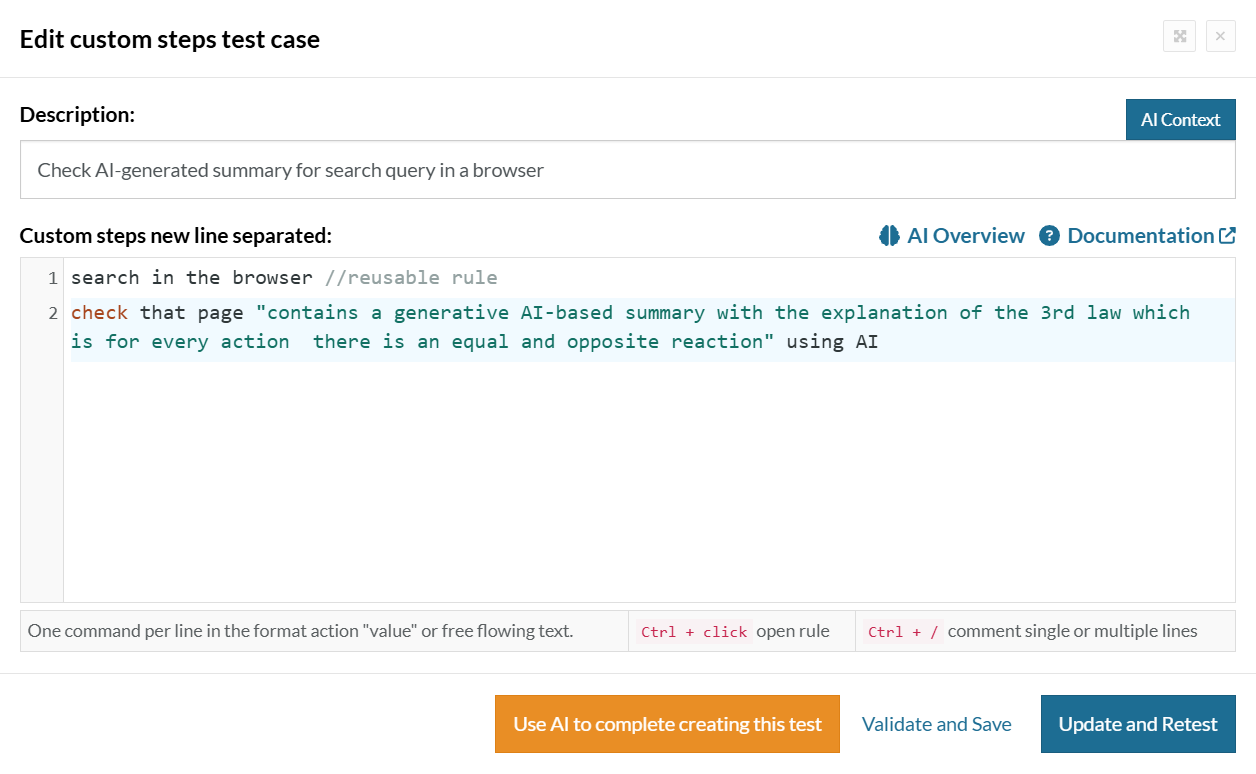
- All that’s left is to click the ‘Save and Run’ button.
Why testRigor is Simpler Compared to mabl
While mabl has introduced AI agents to help build tests, its core workflow still requires you to work within a specific technical framework. testRigor takes a more direct approach by removing several of these layers.
| Supported Features |
Mabl
|

|
|---|---|---|
| Test creation approach | Low-code + agentic AI + Trainer (visual/recorded workflows) | Plain English steps written directly by the user |
| GenAI / AI test authoring | Agentic tester + GenAI generate tests from prompts, but are integrated into platform workflows | Built into core workflow (tests defined in natural language) |
| Creation speed | High, but requires a review/refinement cycle for each | Extremely High; tests can be written as fast as you can type, often before the UI is even finished |
| Test structure complexity | Structured using flows, variables, environments, and reusable components | Linear, readable steps |
| Mobile testing | Primarily web and mobile web via emulators. Requires third-party workarounds for native app files | Native mobile and hybrid: Supports .ipa and .apk files on real physical devices and simulators |
| Cross-platform journeys | Limited to Web and API. Cannot easily jump from a browser to a desktop app or a physical phone | Universal: Can test a Web flow, then a Native Mobile app, then a Desktop app in a single test case |
| AI maintenance | Auto-healing: Uses DOM attributes and similar parameters to re-identify elements if their code changes | Semantic reasoning: Looks at the screen like a human. If a button’s code changes, but it still says “Login” or “Sign In”, the test never breaks |
| Non-browser interactions | Limited. Supports Email and PDF validation | Broad: Native support for SMS, Phone Calls, 2FA, and Captcha resolution |
| Coding skills | Low-code: Users must still understand the platform’s workflows and may need JavaScript for complex logic | Codeless: Entirely English-based. Complex logic is handled by the AI’s understanding of intent |
| Learning curve | Moderate (requires understanding platform concepts) | Lower (plain language-based) |
| Element identification | Uses multiple attributes (DOM, position, metadata) for element recognition | Based on visible text and user intent |
| Physical device testing | mabl relies on emulators | testRigor can execute tests on emulators as well as on actual physical iPhones and Android devices |
| Native desktop app testing | Focuses on web and mobile testing | testRigor can test standalone Windows applications (like Excel, Spotify, or custom ERPs) |
| Database testing | Focuses on web and mobile testing | You can run SQL queries directly within a test step to verify that data was correctly saved to the backend |
| Shift-left testing | mabl’s agent usually needs a URL to scan before it can build an accurate outline | Because testRigor is just English, you can write the full test based on a design document before a single line of code is written |
Choose testRigor if You Want to
- Want a solution that is fully AI-driven
- Skip recordings and structured workflows altogether
- Turn plain English directly into working tests
- Get value faster with less setup and learning
- Make automation accessible beyond QA engineers
- Move fast with frequent releases
- Eliminate test maintenance incurred while relying on CSS or XPath selectors
- Have a single platform to test everything
Conclusion
Choosing the right test automation tool comes down to how quickly you want to move and how much complexity your team is willing to manage. mabl is moving toward AI-driven testing with features like agentic test creation and assisted workflows. But it still requires managing flows and working within the tool’s ecosystem.
testRigor skips this hassle by letting you create and maintain tests in plain English while leveraging its AI to execute and maintain tests. If your goal is to move faster, reduce ongoing effort, and make test automation accessible across your team, testRigor is the way to get there.
| Achieve More Than 90% Test Automation | |
| Step by Step Walkthroughs and Help | |
| 14 Day Free Trial, Cancel Anytime |











