
What is A/B Testing? Definition, Benefits & Best Practices
 |
Ever disagreed over which button design works best? Maybe questioned whether a fresh headline would get more clicks. There’s that moment when you realize something’s missing. You start thinking of a way to decide fairly between two choices. Turns out, that urge has a solution: A/B testing.
| Key Takeaways: |
|---|
|
Let’s learn more about this type of testing and how it can help you ensure a better user experience.
A/B Testing Explained
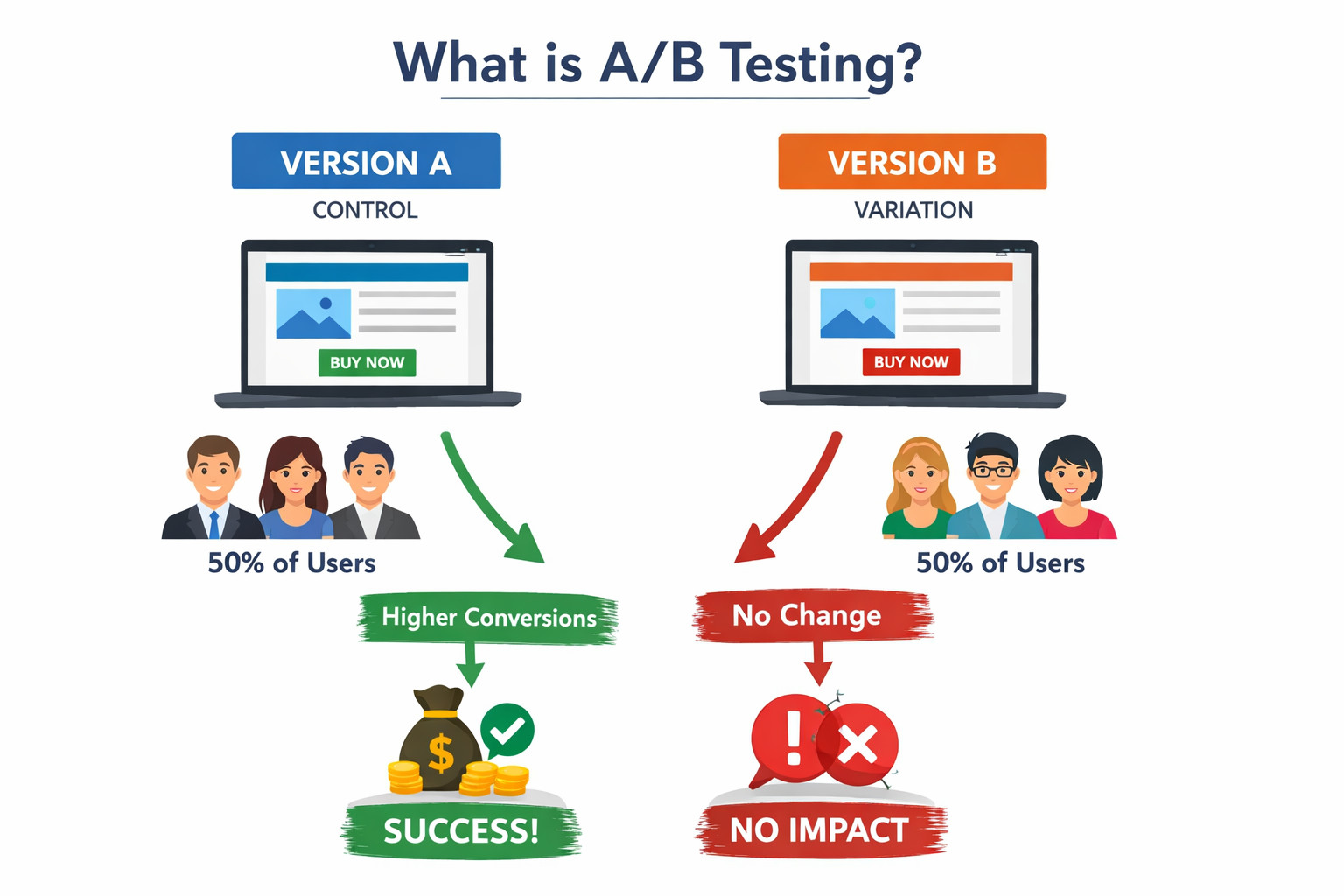
A/B testing, also known as split testing, is about measuring how well one version stacks up against another. You can clearly gauge the performance of the different versions once the results are stacked side-by-side. In A/B testing:
- Version A is the original (control).
- Version B is the variation (the change).
Some people get shown version A, while others see version B. After that, you need to wait for user reactions to see which version was a hit. The version that does better moves forward.
It can happen as an online controlled experiment shaped by rules. Try one version here, another there. Watch how people click, stay, or leave. Happens in emails too. Or within apps that fit in pockets. Real reactions, just outside the lab.
What makes it function? Actual people using it have the final say. Designers do not call the shots. Product managers hold no power here.
What Should You A/B Test?
There comes the natural question that comes after understanding A/B testing: which parts deserve a trial run? Here’s the quick take: nearly every element shaping user experience on your site, screen, or tool might qualify. Yet certain elements often reveal more useful truths than others. Here are the most common elements for A/B testing:
1. Headlines and Messaging
A headline usually grabs attention first – shaping how people expect the rest to feel. Testing small shifts in phrasing, mood, or angle reveals which version sticks better.
2. Call-to-Action (CTA) Elements
Button text, color, dimensions, and layout: each plays a role. Even slight changes to your call-to-action might shift user behavior noticeably.
3. Forms and Input Fields
If your goal involves capturing leads or information, experiment with things like form length, field placement, progress indicators, or social sign-in options.
4. Visual and Layout Characteristics
Images, videos, banners, and layout structure can affect how users view your content. Moving pictures around, swapping video styles, or adjusting page flow could reveal what grabs attention most.
5. Color Schemes and Style
A shade might stir a feeling – try switching reds for blues on buttons and watch what happens. Changes in background tones shift how users move through pages, sometimes without them noticing.
6. Extended Elements
While landing pages are a common testing ground, you can also test beyond them — like ad creatives, email subject lines, and post-conversion messaging.
Running thoughtful experiments on elements that impact user decisions helps you learn faster and improve your conversion rates over time.
What About Apps? Why Testing Matters Even More There
For apps, A/B testing carries extra weight in this case as it is no longer just a nice-to-have, but a survival tactic.
Teams often test:
- Onboarding flows
- Feature discovery
- Navigation layouts
- Push notifications
- Performance-related changes
App users rarely tolerate frustration. One failed interaction, slow load, or confusing screen can trigger abandonment. The stakes are higher here because:
- The App Store and Versioning Hinderance: If the version of the app is problematic and you then release another version to counter it, it’ll take time to get approved by the Apple App Store or Google Play Store, and there’s no guarantee that all users will update their app to the better version. This doesn’t happen in the case of a website, as users only see the latest deployment, with no concern about versioning. You might be stuck with that “broken” version on millions of phones for days while waiting for an update to be approved.
- An App Uninstall is Final: Most users never give an app a second chance. A/B testing allows you to roll out a change to a small group (e.g., 5%) to see if they stop using the app before you accidentally drive away your entire audience.
- Mobile Device-Specific Considerations: On a desktop computer, you have plenty of room to hide extra buttons or text. On a phone, every millimeter counts. A/B testing allows you to find where the design is beautiful but still perfectly functional for a thumb.
That’s why testing thoroughly and safely is absolutely non-negotiable. Automation helps teams validate experiments without slowing down releases.
Read more about mobile testing:
- Mobile Testing: Where Should You Start?
- What are the Metrics Needed for Effective Mobile App Testing?
- Top Mobile Testing Challenges
- Mobile First Design Testing – How to Guide
Why A/B Testing Matters in Conversion Rate Optimization (CRO)
What is Conversion Rate Optimization?
Every visit holds potential. Conversion Rate Optimization (CRO) is the practice of improving the percentage of users who take a desired action. This includes actions such as signing up, purchasing, or completing a task, within a website or app.
For apps and digital products, CRO is important because traffic alone doesn’t guarantee growth. Without conversions, strong campaigns still miss the mark.
Factors That Influence Conversion Rates in Digital Platforms
Several factors influence conversion rates, including:
- User interface (UI) and layout
- Clarity of messaging and CTAs
- Form length and complexity
- Navigation and flow
- Trust signals like reviews or guarantees
- Performance issues or friction points
A single issue here might be enough for someone to walk away mid-task.
Simple Example: Online Shopping
Think of a mobile store app where shoppers add products to their cart and yet abandon before paying. Maybe the cost isn’t clear, or perhaps there are endless forms to fill out – sometimes just a confusing CTA stops everything.
Instead of guessing the cause, teams can run A/B tests — for example, testing a simplified checkout page against the original. If the new version converts better, the data clearly shows what helped users move forward.
Testing Variations Boosts Conversion Rates
Here’s how A/B testing helps CRO:
- Comparing design and messaging choices directly.
- Reducing friction through measured changes.
- Validating improvements with real user behavior.
- Preventing decisions based on assumptions or opinions.
Fewer surprises come when changes are tested first, steadily improving conversion rates while minimizing risk.
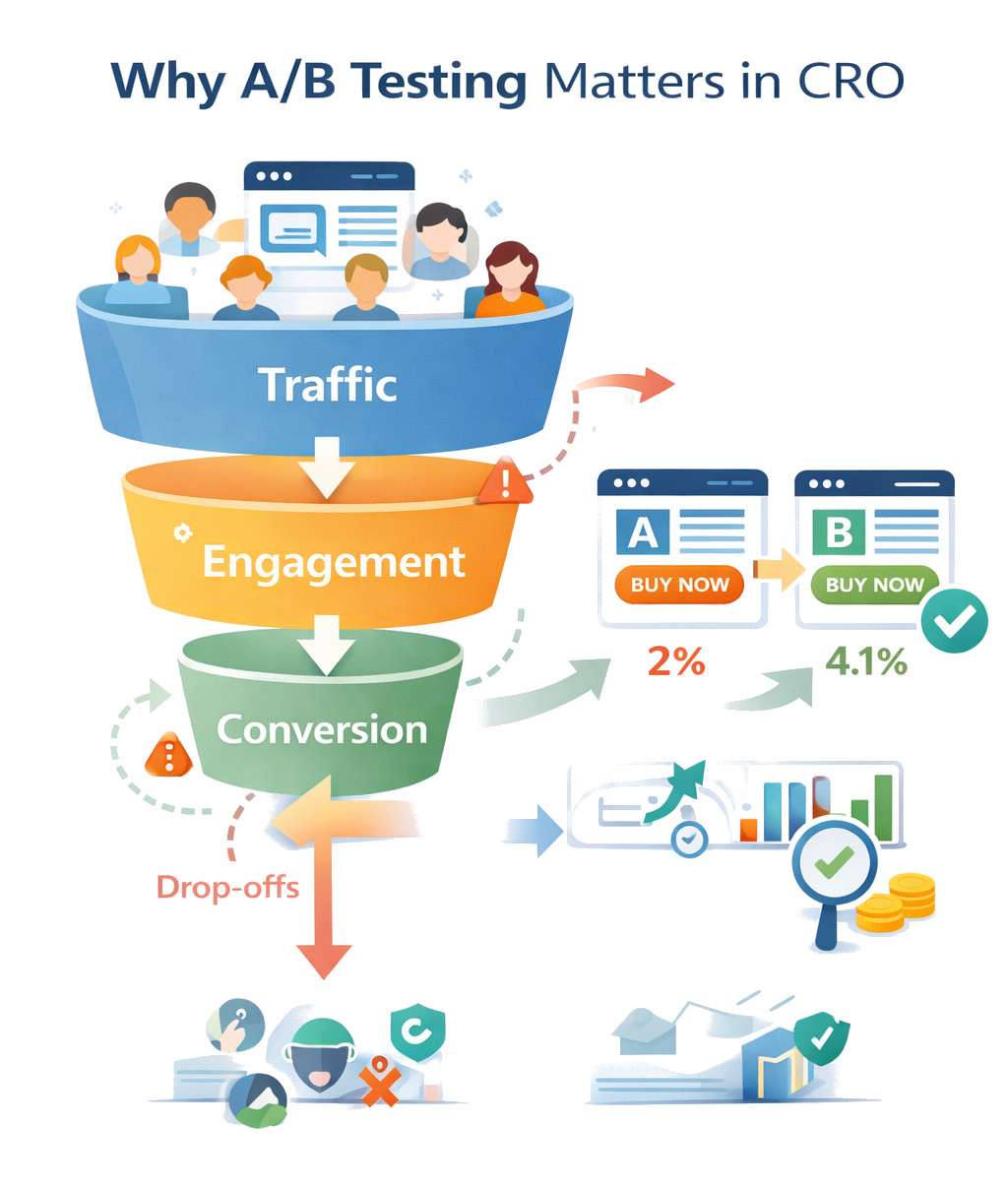
Small victories add up, slowly piling into something bigger. This quiet buildup lets some businesses reach twice the results while others stay stuck debating shades.
How to Do A/B Testing: A Simple Step-by-Step Flow
Testing one thing against another? While it sounds like a piece of cake, you’d be surprised to know how chaotic it can get. Hence, some order helps. You need a good process/system for A/B testing to give you meaningful results.
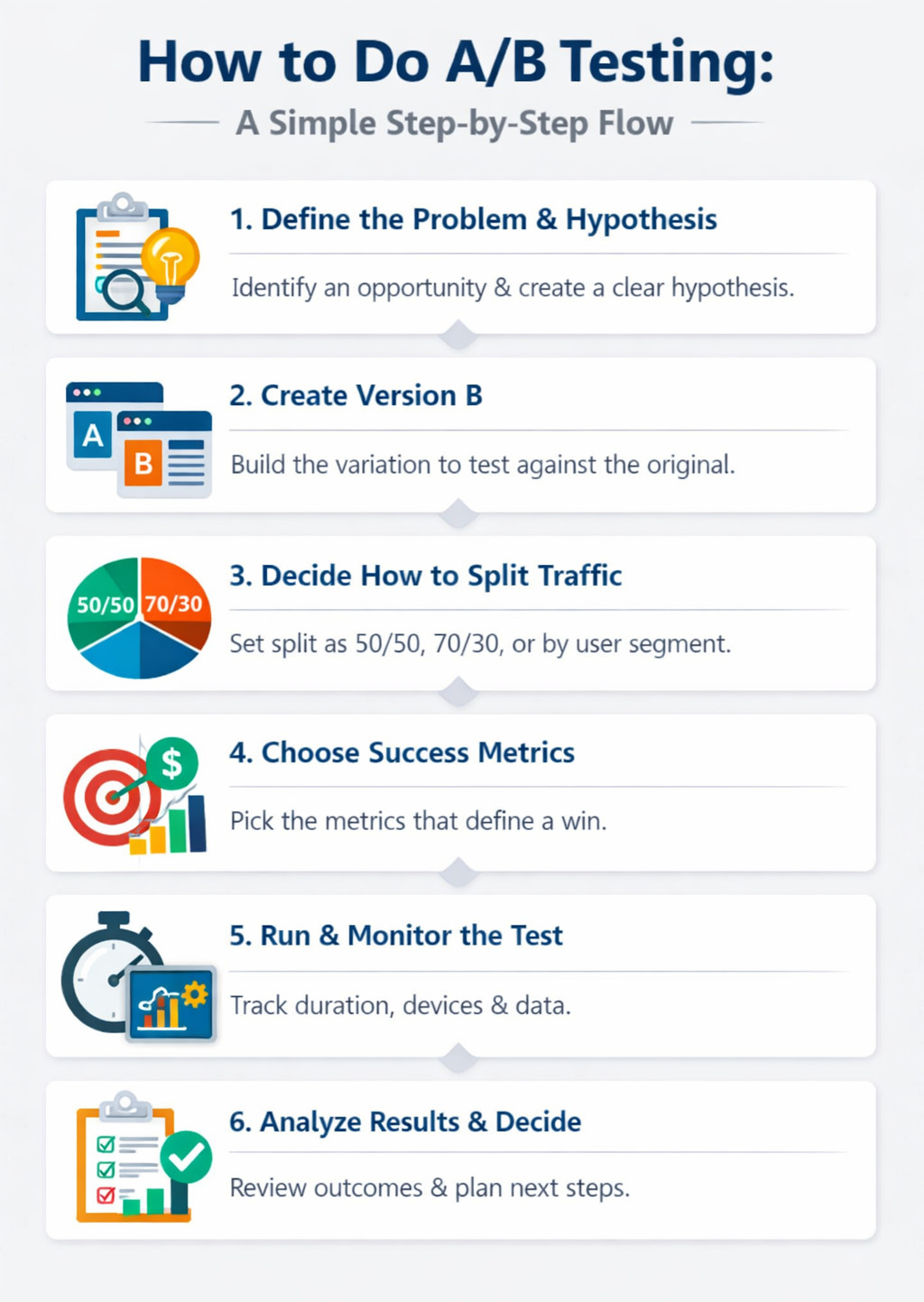
1. Define the Problem and Hypothesis
Imagine when someone stops using your product. Maybe they pause too long on one screen. Perhaps they leave without finishing. Watch closely. Notice where things go quiet. That silence might mean confusion. Or frustration. A spot like that becomes your starting point. Then turn that into a hypothesis that includes the problem statement, for example:
“If we simplify the signup form, more users will complete it because it reduces friction.”
This keeps the test focused on learning, not guessing.
2. Create Version B (the Variation)
An alternative version takes shape once the idea gets tested. Often, a single key element changes slightly so outcomes stay clear. Teams often check for usability issues, edge cases, and compatibility here before exposing users to the variation.
3. Decide How to Split Traffic
Some routes get more cars by chance, though balance isn’t guaranteed. Typical methods involve:
- 50/50 splits for clean comparisons
- Weighted splits (e.g., 70/30) to reduce risk
- Segment-based splits for specific user groups
The goal is fair exposure while managing impact.
4. Choose Success Metrics
Right off the bat, figure out how you’ll measure results. Maybe it’s conversions, clicks, task finishes, or revenue per visitor. Naming those numbers up front keeps choices honest down the road.
5. Run and Monitor the Test
Most teams run one test at a time per page or flow to avoid overlap. While it is running, think about:
- Test duration (long enough to capture stable behavior)
- Device or platform coverage
- Ongoing monitoring for bugs or performance issues
Avoid stopping tests too early based on initial results.
6. Analyze Results, Decide Next Steps
After the test finishes, check how it did based on what you wanted to achieve. When the new version performs better, go ahead and apply it across the board. Should it fall short, write down what stood out and let those insights guide your next guess.
Either way, each trial shapes what comes after.
Different Types and Methods of Running A/B Tests
Trying out A versus B might shift based on the test’s goal, the change’s complexity, or how tightly you want to manage its release. Mostly, it boils down to how variants reach users and just how many versions play a part.
Key Methods of Running A/B Tests: How A and B Versions Are Delivered
- After the page loads, client-side A/B testing swaps elements right inside the browser or app. Often, it adjusts content such as headlines, buttons, or how a layout looks. This approach is quick to launch but less suitable for testing deeper logic.
- Server-side A/B testing decides which version a user sees before the page or feature is delivered. This works better for testing backend logic, performance changes, pricing, or personalization rules.
Many teams now use feature flags or toggles to run A/B tests. These feature flags let teams test options without launching everything at once. Instead of flipping a single variation for everyone, they open access slowly. This makes it easier to pause experiments, limit risk, and tie A/B testing into continuous deployment workflows.
Types of A/B Testing (Comparison Table)
| Testing Method | What It Tests | When to Use It | Key Benefit |
|---|---|---|---|
| Classic A/B Testing | One element or page variation | When testing a single change | Simple, clear results |
| A/B/n Testing | One control vs multiple variants | When exploring multiple ideas at once | Faster learning across options |
| Multivariate Testing (MVT) | Multiple elements and combinations | High-traffic pages | Finds the best-performing combination |
| Split URL Testing | Entire page or experience | Major redesigns or structural changes | Clean separation of experiences |
| Multi-Armed Bandit (MAB) | Dynamic performance-based variants | Continuous optimization | Minimizes losses during testing |
| A/A Testing | Two identical versions | Validating tracking and tools | Ensures test accuracy |
| Feature Testing (Pre-launch) | New features or functionality | Before full rollout | Reduces release risk |
A/B Testing Examples You’ll See Everywhere
Funny how often you spot A/B tests once you’re looking. A handful of traditional A/B test cases look like this:
- Headline test: “Start Free Trial” vs “Get Started in 30 Seconds.”
- Button color test: Green vs blue
- Pricing page test: Monthly pricing first vs annual pricing first
- Email subject lines: Short vs curiosity-driven
- Checkout flow: One-page vs multi-step
A shift as small as a comma can ripple outward when tried enough times. What seems minor might tip the scales once stretched across thousands.
Real Life Examples
A/B testing is widely used by companies of all sizes to make smarter, data-driven decisions. Here are a few real-world examples:
- Zalora (Retail): Highlighting free returns and delivery on product pages resulted in a 12.3% lift in checkout rates, driven by clearer value messaging.
- Google (Search): Google tested different numbers of search results per page and found that 10 results delivered the best balance of speed and usability — a decision that still shapes search today.
- Grene (eCommerce): By redesigning its mini-cart with clearer CTAs and pricing details, Grene saw nearly 2× growth in purchased quantity, proving that checkout clarity matters.
A/B Testing and Software Testing: The Overlooked Connection
Testing two versions might seem harmless, yet sometimes it causes glitches. What looks like a small tweak could mess up the whole system. The two versions need to be usable for people to work with. Thus, every version rollout needs to be tested. Untested A/B versions can affect the outcomes by:
- Misleading users into believing that the software bugs are the intended changes in that version.
- Corrupting the results you capture. For example, if you’re tracking button clicks but the button does not work, then that is a false negative for your inference.
- Bad user experience will discourage users from giving a fair shot to the versions, which again paints an incorrect picture of the true user sentiment.
Read more about the impact of user experience on software:
- UX in Software Development: A Practical Guide
- Human-Centric Software: Where UX Meets Engineering
- UX Testing: What, Why, How, with Examples
That’s the reason modern QA teams link A/B trials with AI-powered automation tools.
How AI-Powered Testing Automation Supports A/B Testing
Since you want to focus on A/B testing, you’d like your test automation tool to verify the version to be as smooth and efficient as possible. With AI-powered testing, you can achieve this. A tool such as testRigor will not only save you from wasting time implementing test cases but also give you reliable testing powered by AI.
testRigor allows teams to:
- Write tests in plain English, making it easy for anyone on the team to quickly craft a bunch of validations.
- Validate flows across versions A and B after every rollout.
- Automatically test these versions in CI/CD, promoting continuous testing.
- Catch UI and functional issues before users do across various platforms and browsers.
- Try app and website tests without relying on fragile technical details of UI elements.
- Cut down on test maintenance time by letting testRigor’s AI engine do the maintenance for you.
Besides skipping complicated code scripts, teams outline how things should act. This keeps tests simpler to update, especially if trials shift every week.
Here’s why it matters. Speed keeps A/B testing alive. Yet fast work without care creates messes.
Metrics for A/B Testing
Best way to see real results? Run an A/B test with solid data. Good metrics tell you not just which version wins but why it won. Instead of relying on guesses, teams watch key goals alongside how users interact. Success comes from combining primary success indicators and supporting user-behavior metrics to calculate performance.
Primary Metrics
- Conversion Rate: Conversion rate tells you the share of people who actually signed up, bought something, or filled out a form. When numbers go up, that version often works more effectively.
- Click-Through Rate (CTR): A high number of views compared to actual clicks can reveal user interest. When checking buttons or links, what matters is how often people choose to click after seeing them.
- Bounce Rate: The percentage of users who leave without interacting further. A lower bounce rate often suggests your variant engages visitors better.
- Abandonment or Drop-off Rate: Particularly for multi-step flows — how many start a task (like filling a form or checkout) but don’t finish it.
Supporting Metrics
What lies behind the numbers often tells the real story. Because one figure shifts, others follow – or stay put. When things change, smaller details show how they connect. A closer look makes clear what stayed hidden at first glance. These pieces fit together without force, revealing movement or stillness alike.
- Time on Page and Scroll Depth: Higher engagement often means visitors are interacting with your content, not just skipping through.
- Form Start and Completion Rates: Useful when optimizing forms or multi-step flows.
- Session Duration / Pages per Session: Helps understand overall engagement patterns.
A win isn’t real unless it matches what you aimed to learn. Primary metrics tell you which version wins, and supporting metrics help you understand what changed in user behavior.
Common A/B Testing Mistakes (and How Smart Teams Avoid Them)
Few realize how tricky A/B tests can be. Teams stumble, not from laziness, yet speed pushes them into tiny errors that grow. Mistakes pile up before anyone notices.
Watch out for these usual mistakes:
1. Stopping Tests Too Early
Most people trip up here. They peek at the numbers of version A early, maybe after one or two days, and notice that version B seems ahead, so they stop right there.
Fake patterns show up at first. People act differently depending on the day. Traffic changes between weekdays and weekends. Without enough time, what looks real might just be random. Wait until things settle; otherwise, you’re chasing shadows.
Smart teams:
- Allow each test to finish completely before moving on.
- Pick when to quit before you start. That moment comes earlier than most expect.
- What matters most should guide you, not a hunch.
2. Running Too Many Experiments Without Control
Trying new things feels thrilling. When groups begin splitting test versions, they usually launch many trials together. Yet one trial running alongside another might mess up the outcomes by clashing silently in the background. Results shift without warning when signals cross.
A single change could seem like the reason numbers went up, yet somewhere else, another tweak was pulling the real weight. What looked effective stood alongside hidden shifts others never noticed.
Smart teams:
- Track experiment ownership.
- Limit overlapping tests on the same pages.
Test incrementally, not chaotically.
3. Breaking the User Experience During Experiments
This one cuts deeper than the rest.
A problem shows up when testing new versions. Login stops working during checks. People in a particular category can’t complete their purchase. Mobile version hits a wall when trying to buy. Last thing you noticed. Pages on phones show up broken. Looks like something went sideways during loading. Then, out of nowhere, what was supposed to be a test turns into a live system failure.
This is where automation and pre-deployment testing make all the difference. Each test must pass identical validations, just like every standard launch.
4. Testing Without a Clear Hypothesis
Without a guess to validate, nothing gets learned, just random picks. When learning halts, A/B tests turn into pointless clicks.
Smart teams:
- Always start with hypothesis testing.
- Write down what they expect to learn.
- Treat each test like a small scientific experiment.
5. Ignoring Long-Term Impact
Later down the line, gains from certain experiments fade when loyalty dips. A more aggressive CTA might increase clicks today, but increase churn next month. What works fast now might fail slowly.
Because of this, seasoned groups shift focus from conversions only, and instead, blend A/B trials with:
- Product analytics
- Customer feedback
- Automated regression testing
- Long-term monitoring
Best Practices for A/B Testing That Actually Works
Just before finishing, take note of these useful tips to avoid trouble:
- Aim to run one test at a time. This will help you focus systematically on the hypothesis, and you can build from the results easily.
- Always define success before starting.
- Let tests run long enough.
- Keep an open mind. Failing a test? That’s when learning kicks in. Success feels good, yet mistakes dig deeper. Each error points to what needs fixing.
- Don’t spend time optimizing for the wrong audience, meaning, your hypothesis needs to also include who you intend to target with these changes.
- Automate testing for every variation to ensure better results in A/B testing.
- Protect core user flows with regression tests.
Remember, every test runs just like a live release – because that is exactly what it is.
A/B Testing is About Learning, Not Just Winning
A/B tests aren’t just about lifting numbers or pitting versions against each other. The essence of this type of testing is to gauge user sentiments and go with what works best for them, which in turn improves sales and marketing. Do your homework and come up with hypotheses and versions that will be right for your target audience.
Make use of test automation to ensure stable versions before releasing them to your audience. Using intelligent test automation tools at this stage is a good way to make sure that you don’t spend too much time rectifying and stabilizing deployments, and instead, focus on the versions.
And finally, remember to have an open mind. There are good chances that what you thought was the best of designs doesn’t work with your audience. That’s perfectly fine, as long as you take that as a learning and keep building better versions based on these learnings.
FAQs
What is A/B testing, and how is it different from guesswork?
A/B testing compares two or more versions of the same experience using real user behavior. Instead of depending on opinions or assumptions, decisions are made based on measurable outcomes like conversions, clicks, or task completion. Moreover, in A/B testing, significant thought is put into creating the versions as opposed to plain guesswork. Thus, guesswork asks “What do we think works?” whereas A/B testing asks “What actually works?”
When should you NOT run an A/B test?
A/B testing isn’t always the right tool. Avoid running tests when:
- Traffic is too low to produce reliable results.
- There’s no clear hypothesis or success metric.
- The change is too minor to have a measurable impact.
- You’re testing major redesigns better suited for usability or qualitative research.
In these cases, interviews, usability testing, or analytics reviews may provide clearer insights than split testing.
How does A/B testing work for apps and features, not just web pages?
In apps and software products, A/B testing often happens through feature flags and progressive rollouts. Different user groups see different versions of features, onboarding flows, or performance improvements. This approach allows teams to test functionality safely before releasing it to everyone.
How do teams ensure A/B tests don’t break the product?
This is where automated testing becomes necessary. Before variations are exposed to users, teams validate both versions using regression and functional tests. AI-powered automation tools like testRigor help ensure that experiments don’t introduce bugs, break user flows, or negatively impact performance during live rollouts.
| Achieve More Than 90% Test Automation | |
| Step by Step Walkthroughs and Help | |
| 14 Day Free Trial, Cancel Anytime |











