
Testing AI Performance Under Peak Usage
 |
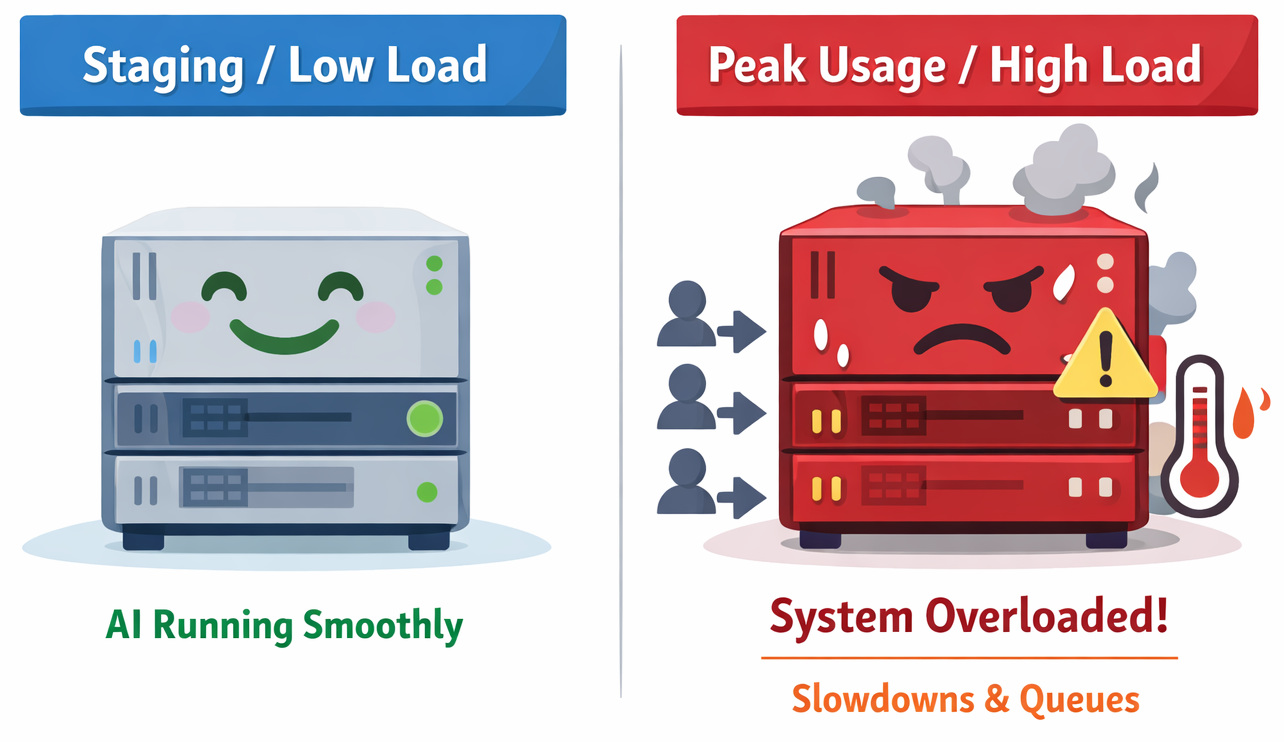
Back in November 2022, OpenAI launched ChatGPT to the public. Right away, loads of users flocked to try it out. So many logged in at once that things started cracking under pressure. The replies slowed down dramatically. Some queries got cut off mid-air. Certain features just stopped working for stretches. For many people, it was their first glimpse of something engineers already know well. However powerful, AI systems struggle when demand spikes unexpectedly. That moment revealed a truth often hidden behind smooth demos.
ChatGPT pulled in more than a million people within just five days. When things blow up like that, traditional app testing falls short because, unlike regular websites, AI acts unpredictably during peak usage.
Truth is, most teams aren’t ready for what happens next. When load spikes, AI doesn’t merely lag – its actions shift without warning. Delays creep in, uneven and odd. GPU queues get backed up, one after another. A few answers crawl while others race ahead. And the worst of all, AI starts answering poorly to users’ queries.
In many production systems, performance bottlenecks are only discovered after real traffic is experienced.
Which is why you should test AI performance under peak usage.
| Key Takeaways: |
|---|
|
Why Testing AI Performance Under Peak Usage Matters
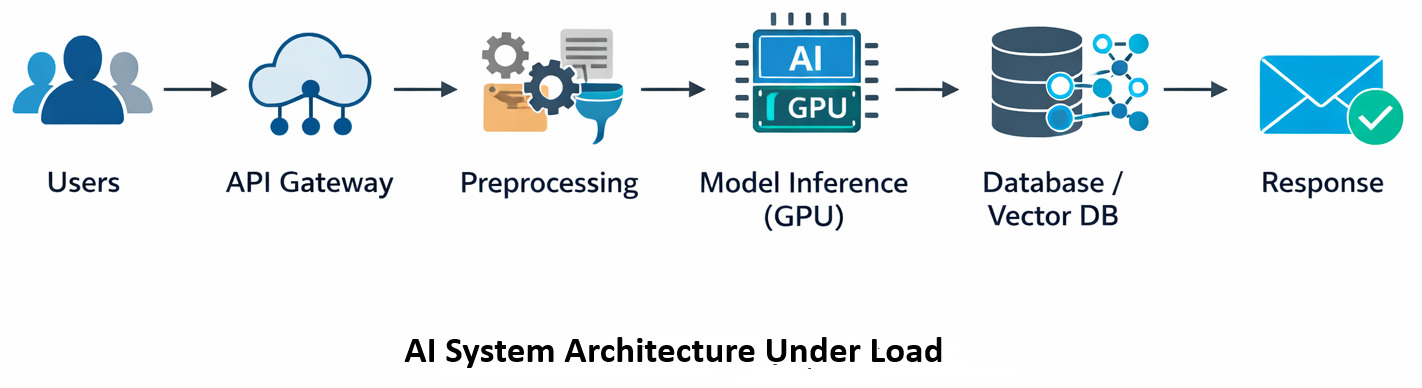
Testing AI systems under peak load isn’t just a technical exercise – it directly impacts business outcomes, user experience, and operational costs.
When AI performance degrades under high demand, users feel it immediately. Unlike traditional applications, where a delay might be tolerable, AI-driven features (like chatbots, recommendations, or fraud detection) are often expected to respond in real time. Even a few seconds of delay can lead to user frustration, abandoned sessions, or loss of trust in the system.
- Revenue loss due to failed or delayed transactions
- Customer churn caused by inconsistent or slow experiences
- Brand damage when AI systems behave unreliably under pressure
- Over-provisioning infrastructure to handle spikes
- Under-utilizing GPUs during normal traffic but hitting bottlenecks during peaks
- Increased operational costs due to retries, failures, and timeouts
Another critical reason is system reliability. AI systems don’t fail as predictably as traditional systems. Under peak usage, small delays in one component – like model inference or data preprocessing – can cascade into system-wide slowdowns. This makes failures harder to diagnose and recover from in real time.
Peak usage testing is essential for real-world readiness. Production traffic is rarely steady. It comes in bursts – during product launches, sales events, or unexpected spikes. Systems that perform well under controlled conditions can still fail when exposed to real-world variability.
Without testing for these scenarios, you are essentially deploying AI systems with unknown limits.
What AI Performance Testing Measures
A model’s behavior under pressure – say, dozens of users using it all at once – that’s what most mean by AI performance testing. Heavy traffic reveals cracks others miss during quiet moments. Stress shapes truth here more than any polished demo ever could.
Yet these measurements work a bit unlike those in traditional apps.
Peak usage tests often track these key measures:
| Metric | What It Measures | Why It Matters |
|---|---|---|
| Response time | Total time taken to process a request and return a result | It helps identify delays at different stages of the pipeline |
| Latency | Time required for the model to produce a response | Determines user experience |
| Throughput | Requests processed per second | Indicates system capacity |
| GPU utilization | Percentage of GPU resources used | Helps detect hardware bottlenecks |
| Error rate | Failed or timed-out requests | Reveals instability during heavy load |
In large-scale AI deployments, these metrics are continuously monitored during load tests.
Types of AI Performance Testing
Not all performance tests are trying to respond to the same question.
When teams talk about testing AI performance under peak usage, they’re usually referring to a combination of testing methods. Each one unveils a different kind of weakness. And honestly, this is where things get confusing. Because running just one type of test often gives a false sense of confidence.
Different types of performance tests are typically used together to evaluate system behavior under load.
Here are the ones that actually matter in real AI systems.
AI Load Testing (Baseline for Peak Usage)
AI load testing is where most teams start.
The idea is simple: simulate expected peak traffic and see how the system behaves.
Example time.
- response times
- throughput
- system stability
Expected traffic conditions are simulated during load testing.
This sounds simple, but in practice, it already reveals a lot.
In real projects, this usually breaks when one component, like preprocessing or a database, fails to keep up with the expected load, even if the model itself performs well.
AI Stress Testing (Finding the Breaking Point)
If load testing tells you how the system performs under expected conditions, stress testing answers a more uncomfortable question:
What happens when things occur out of plan?
Here, traffic is intentionally pushed beyond expected limits. Infrastructure limits are deliberately exceeded during stress tests.
- When does the system slow down?
- When does it stop responding?
- What fails first?
One limitation teams often underestimate is that failure rarely happens in a clean way. Instead, systems degrade unevenly, some requests succeed, others hang, and some fail completely.
Load testing and stress testing are something that confuse many teams; a more nuanced explanation of the difference is provided later in this blog.
AI Spike Testing (Handling Sudden Traffic Surges)
Now this is the one many teams skip and regret later. Spike testing focuses on sudden bursts of traffic, not gradual increases.
- product launches
- viral features
- unexpected user surges
Sudden increases in traffic are replicated during spike testing.
This sounds good on paper, but in practice, spike behavior is very different from steady load. A system that handles 5,000 users smoothly over time might struggle when those same 5,000 users arrive within seconds. In real projects, this usually breaks when autoscaling systems react too slowly to sudden demand.
AI Soak Testing (Sustained Peak Usage)
Not all peak usage is short-lived.
Sometimes systems need to handle high traffic for extended periods, hours, not just minutes.
That’s where soak testing comes in. Instead of pushing limits, the system is kept under consistent load for a long duration.
System performance is observed over extended periods during soak testing.
- memory leaks
- resource exhaustion
- gradual latency increases
Honestly, these problems are easy to miss in short tests but show up quickly in real production environments.
AI Load Testing vs AI Stress Testing
Example time.
Picture one company rolling out an AI customer support assistant. Everything runs smoothly at first, just dozens of people testing it here and there. Smooth responses. Quick answers. No hiccups so far.
Fresh off the press, the business rolls out its latest marketing campaign.
Out of nowhere, chat boxes light up across screens – thousands at once. A wave hits without warning.
The line separating AI load testing from AI stress testing begins to show. Each reveals distinct behaviors under strain. What matters here isn’t just volume, but how systems react when stretched in different ways.
| Testing Type | Goal | Typical Scenario |
|---|---|---|
| AI Load Testing | Measure performance under expected traffic | Simulating normal peak demand |
| AI Stress Testing | Identify the system breaking point | Pushing traffic beyond expected limits |
- Can the system handle 5,000 concurrent users?
- Will latency remain under 2 seconds?
Stress testing goes further.
- When does the system fail?
- What fails first?
During stress tests, infrastructure limits are intentionally exceeded.
Sometimes the model itself isn’t the problem. Instead, the bottleneck appears in a completely different place – like a vector database or authentication API.
Hidden Infrastructure Challenges in AI Scalability Testing
Funny thing – how AI scalability testing isn’t really about the brain of the system but the bones holding it up.
- the model inference service
- feature preprocessing pipelines
- storage layers
- external APIs
- orchestration systems
How a piece reacts when stressed might surprise you. In distributed AI architectures, delays are frequently introduced by inter-service communication.
Case in point.
A small company created a recommendation engine that suggests products on online stores. Because it used ML algorithms, results improved during early trials. Though still new, the system handled tasks quickly in controlled runs.
Higher traffic overwhelmed systems, causing delays to grow sharply.
The issue never existed in the model. It rested elsewhere, hidden in how people used it.
Built for feature storage. Each time a suggestion came in, several database queries fired off. When loads climbed, the system lagged. The machine learning flow froze under pressure.
The model was fast, but the system around it wasn’t.
You can thus see that testing AI scalability under realistic traffic patterns matters.
AI Load Testing Reveals Common Bottlenecks
Finding odd behaviors tends to increase once teams run actual AI load testing.
Now think about common slowdowns people run into. They show up a lot without warning.
GPU Queue Saturation
GPUs overload when inference requests flood in at once. Requests are queued before being processed. Latency grows, despite the model keeping its speed. Frequently, actual deployments fail because scaling policies roll out fresh instances at a sluggish pace.
Data Preprocessing Delays
Before inference, most AI models tidy up data. Tokenization, cleaning text, and feature extraction – each step adds delay. What trips up many teams? The way preprocessing grows as traffic increases. A quiet challenge sneaks in right there.
This might seem fine at first glance – yet real-world use often turns preprocessing steps into the bottleneck. What looks efficient in theory tends to drag down performance once it runs live.
External Dependency Latency
AI systems rarely operate alone.
- vector search engines
- knowledge bases
- third-party APIs
When external services slow down, overall system latency increases. Basically, the AI model gets blamed for something it didn’t cause.
How Traffic Patterns Affect AI Load Testing
Look, every surge in visitors follows its own pattern.
Teams running AI load tests often assume gradual increases in users. Useful, sure – yet reality tends to hit differently. Traffic is rarely like a leisurely climb up the stairs; it is more like a sprint, skipping multiple steps at a time to reach the top. A flash sale hits, or a much-awaited pop star’s concert tickets go live for sale. News breaks. Servers wobble under surprise crowds, no model predicted.
Here’s the difference.
| Traffic Pattern | Example Scenario | Risk Level |
|---|---|---|
| Gradual traffic growth | Users arrive steadily over time | Lower |
| Burst traffic | Thousands of users arrive within seconds | Higher |
Heavy spikes in activity can hit AI hard. Short traffic bursts are often capable of overwhelming inference queues.
Example time.
Something rolls out – an AI tool goes live. Right away, people hop on to take it for a spin (curiosity spreads quickly online). When too many users log in fast, lines form behind the scenes. Systems might be built for steady flow, yet bursts cause delays.
When real projects face sudden surges, the system can collapse if autoscaling rules often lag behind demand.
This failure often ties back to how AI behaves when first introduced to users.
Tools Used for AI Performance Testing
Testing AI performance under peak usage requires tools capable of simulating realistic traffic.
Originally built for web applications, but work well for AI services too.
- Apache JMeter
- Locust
- k6
These tools allow engineers to simulate thousands of concurrent users sending requests to AI APIs.
Large volumes of requests can be generated using distributed load generators.
I usually recommend starting small.
Run tests with 50 users. Then 200.
Then 1,000.
Because jumping straight to massive traffic can overlook important performance patterns.
Real-World Incident: When AI Systems Collapse Under Load
A sudden shift showed up when large language models first launched.
When lots of people used it at once, LLMs took much longer to reply. At times, the system just wouldn’t accept new requests for a while. This didn’t happen because the design was flawed. Capacity limits were reached during peak traffic periods.
When it comes to AI systems, high complexity doesn’t remove the need for close monitoring of how they run. Though technology advances quickly, performance testing still matters. Because hidden flaws can appear at any stage, watching behavior under real conditions remains essential. After all, no design is too smart to skip thorough checks.
How Teams Approach AI Performance Testing in Practice
Teams don’t usually jump straight into stress testing.
There’s a structured way engineers approach testing AI performance under peak usage, and skipping that structure is where problems begin. Performance testing is typically carried out in stages.
- Define expected peak traffic
- Run load tests to validate the baseline
- Introduce stress and spike scenarios
- Monitor system behavior
- Identify bottlenecks and iterate
Choosing the Right Type of AI Performance Testing
Each testing type answers a different question. Picking the right one matters.
| Scenario | Recommended Testing Type | Why It Matters |
|---|---|---|
| Validate expected peak traffic | AI Load Testing | Makes sure the system handles planned usage |
| Find system limits | AI Stress Testing | Identifies breaking points |
| Handle sudden surges | AI Spike Testing | Tests reaction to burst traffic |
| Validate long-running stability | AI Soak Testing | Detects gradual degradation |
Different testing methods are selected based on expected traffic behavior.
Example time.
Say, a fintech startup trained an AI tool to review bank records. This program relied on neural networks to pull insights out of PDFs.
Everything worked well, at least initially.
Engineers throw in a stress test before launch. Flooded the system with upload attempts, one after another. They observed that the system was burning out, giving delayed system performance.
The model is not to blame. The file-processing pipeline consumed too much memory when multiple large files were handled together. Faults appeared when files were loaded together. Too much data at once triggered the system block. Memory capacity was surpassed without warning. The overflow happened while documents came through in bulk.
If the team had skipped performance testing, the issue would have appeared during production.
That’s exactly the kind of problem AI load testing helps reveal early.
The Cost Side of Testing AI Performance Under Peak Usage
What doesn’t come up often? How peak usage affects costs just as much as performance.
AI systems scale using expensive infrastructure.
When traffic increases, systems often spin up additional GPU instances, high-memory compute nodes, and distributed inference workers.
Infrastructure costs can increase rapidly during high-traffic periods. Heavy demand hits hard. Costs rise fast – teams rarely see it coming. Pressure builds, then spending spikes. What seems small at first becomes a problem overnight.
Say a team runs a large-scale load test for an AI recommendation engine that we discussed earlier. Of course, the test runs perfectly. Traffic is handled without hiccups. But someone decides to check the cloud bill. One afternoon’s bill for the simulated traffic: several thousand dollars of GPU compute.
It happens far more often than you or I would think. AI performance testing is not restricted to reliability. It tackles a straightforward concern too:
Can the system handle peak demand without becoming financially unsustainable?
Deciding Whether Your AI System Is Ready for Peak Usage
Engineering teams will eventually grapple with the question:
Is our AI system ready for real traffic?
- First, it starts with testing the system using traffic like real use.
- Second, facing higher demand, performance metrics should hold steady without shifting.
- Third, failure modes should be analyzed.
Bet you didn’t see that coming – this part stings a little.
Things go sideways sometimes. AI is not always stable. Fallback mechanisms are often implemented to maintain service availability.
- Degrade model quality
- Route requests to smaller models
- Queue non-critical tasks
Failing gracefully takes just as much design expertise as high performance.
Lessons from Testing AI Performance
Here’s something learned: synthetic test setups usually miss how messy actual network flow can be.
One reason stands out: getting the balance right in scaling policies takes close attention.
Perhaps the biggest takeaway looks like this:
AI systems behave like ecosystems. Everything is connected. If one part shifts, then another drags behind. I’ve noticed that teams that treat performance testing as a continuous process tend to build much more reliable systems.
Performance testing is often repeated throughout the system lifecycle.
Test early.
Test often.
Additional Resources
- What are Fallbacks in AI Apps?
- AI Predictions for 2026: How to Test?
- Must-Have AI Tools for Engineers
- Best Free AI Testing Tools for QA Teams
- Garbage In, Disaster Out: Data Validation for AI Models
- Common Myths and Facts About AI in Software Testing
Frequently Asked Questions (FAQs)
- What does testing AI performance under peak usage actually involve?
Honestly, it’s not just about throwing a lot of traffic at the system and seeing what happens. When teams test AI performance under peak usage, they simulate real-world demand while monitoring things like inference latency, GPU utilization, and request queues.
- How is AI load testing different from traditional application load testing?
The big difference is that AI systems count on costly computing and slower inference steps. A usual web API might respond in milliseconds, but an AI model may need hundreds of milliseconds or several seconds to generate a response.
- What tools are commonly used for AI performance testing?
Many teams rely on familiar load-testing tools such as Apache JMeter, Locust, or k6 to simulate multiple simultaneous users. These tools can generate thousands of requests against AI APIs or inference endpoints. Distributed test infrastructure is often used to simulate large traffic volumes.
| Achieve More Than 90% Test Automation | |
| Step by Step Walkthroughs and Help | |
| 14 Day Free Trial, Cancel Anytime |











