
Automated Testing for API Versioning: Backward Compatibility, Contract Tests, and Safe Releases
 |
Things going wrong with APIs tend to be quiet, not loud. A call that once worked and got 200 responses now returns an error- 400. The server does not recognize the request anymore. Something changed on their end, without warning. It stopped accepting the previous method entirely. Now each attempt hits a wall. Previously valid credentials do nothing. The system behaves as if it forgot everything.
This is one reason why automated testing for API versioning matters so much now when updating digital handshakes. When these interfaces change, teams must keep older versions alive – or risk upsetting current users. Sounds simple until you try it.
| Key Takeaways: |
|---|
|
With smart tools such as testRigor, handling tests gets easier. These systems think ahead, reducing effort without slowing down. One moment it’s code, next it’s a real-world test. Tasks that once took hours now finish faster. Mistakes are reduced when automation handles repetition.
Let’s dive into automated API versioning testing.
Understanding API Versioning (and Why It Exists)
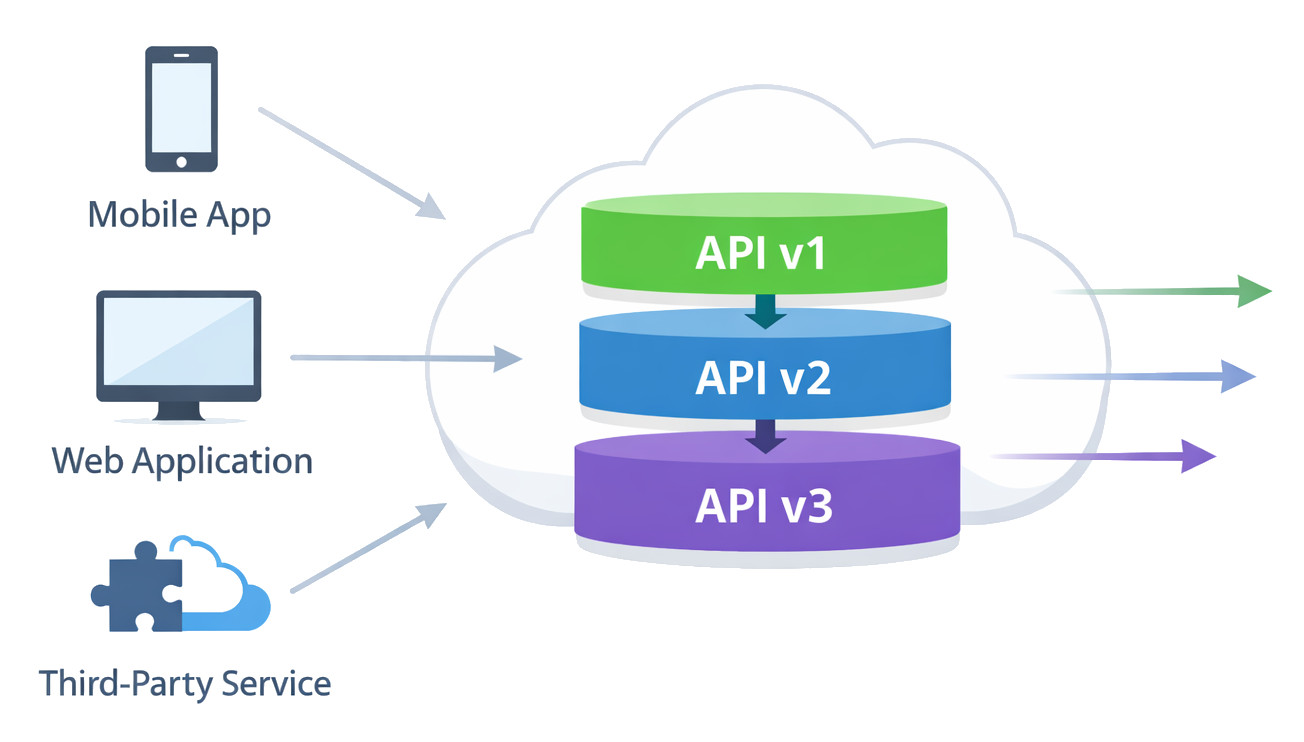
Applications grow or evolve, which means that updates will happen. When this happens, APIs must keep up with this growth. That is why systems need version tracking.
Right now, people using an API – like phone apps or outside tools – don’t always move to new versions right away. A few stay on the old one.
This is when versioning makes all the more sense.
Common API Versioning Strategies
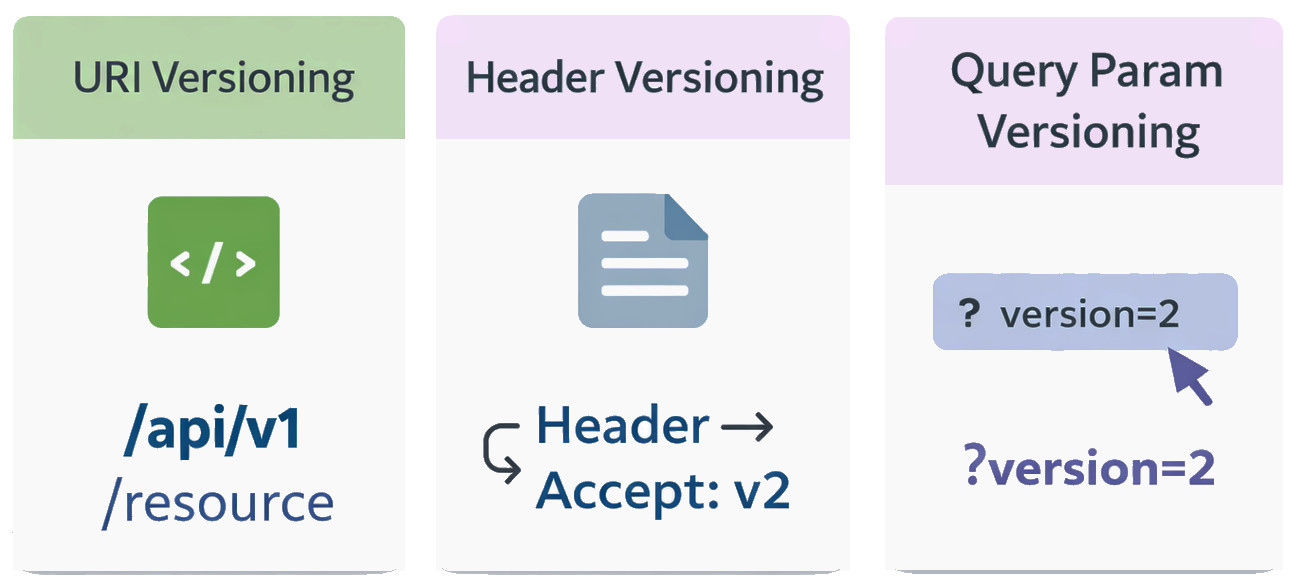
Understanding typical ways to version APIs comes first. That shapes test design. Each method changes how you build and keep tests running.
URI Versioning
/api/v1/users
/api/v2/users
Folks find it straightforward and simple to check, so plenty of teams lean on it. Each version behaves like a separate contract.
Header Versioning
Accept: application/vnd.company.v2+json
Clearer URLs, though testing gets a bit trickier. Your automation must manage headers carefully.
Query Parameter Versioning
/users?version=2
Messy it might become, yet simple at first glance. Over time, mistakes creep in more easily.
Not every method works the same way, so validating versions through APIs needs attention to detail. Still, some paths create more hurdles than others, which shape how tests are built. How things shift over time affects what gets tested and why certain choices matter more later on.
What is API Versioning Testing?
Testing API versions mainly comes down to a single question
“Does each version behave exactly the way it’s supposed to, without breaking the others?”
While it is easy to say, it is harder when you try!
This is because versioning introduces:
- Duplicated endpoints
- Subtle response differences
- Shared infrastructure
- Overlapping deployment cycles
This is when mistakes start happening.
API Compatibility Testing: The Real Challenge
Yesterday’s users keep working when today’s updates play nice with old setups. Compatibility tests make sure nothing snaps after a change rolls out. Things run smoothly only if new code respects what came before it.
This includes:
- Response structure
- Field names
- Data types
- Error behavior
- Default values
A change doesn’t need to be “big” to be breaking. Take away a feature thought unused, it might still matter to someone out there. Breaking isn’t about size. It hides in assumptions.
Compatibility testing is often overlooked because:
- It’s repetitive
- It’s time-consuming
- Much effort is needed when handling it manually
This leads to automation.
Backward Compatibility Testing (API): Why Automation Is Non-Negotiable
When newer API versions arrive, checking if the old versions still run properly is what backward compatibility testing involves. It ensures past environments do not break once updates roll out. Changes upstream might affect earlier forms, so confirming their stability matters. Functionality from before should remain untouched despite fresh additions. The goal? Older systems operate just like they did. Unexpected hiccups in legacy use cases need catching early. Stability through change defines this kind of check.
This typically involves:
- Running the same tests against multiple versions
- Checking if older response formats still work properly
- Keeping the business logic exactly as it is
- Checking that no silent regressions take place
This task just won’t stretch far manually. Mistakes can happen when you try it now and then. Doing this automatically is the only realistic option.
Automated tests can:
- Test it alongside v1, then check how v2 performs at the same time, while also tracking v3 simultaneously
- Spot major updates right away
- Stopping mismatched software pieces from entering service
Finding flaws early? That’s when checking different API versions during builds starts to matter.
Multi-Version API Testing in CI/CD Pipelines
Modern APIs roll out quickly these days. Daily drops happen often. Even several rounds before sunset.
When there is no automation, keeping track of versions feels like trying to remember every change by heart. It slips through fingers easily.
Effective CI/CD Version Testing Practices
A healthy pipeline includes:
- Automated tests for every active API version
- Backward compatibility checks on every build
- Schema validation for each response
- Contract verification before deployment
Failing well means spotting bugs before anyone notices them. What matters is catching issues fast, long before feedback rolls in.
This is also where brittle, script-heavy automation starts to struggle.
API Contract Testing: Keeping Everyone Honest
API contract testing often keeps users in sync. How it behaves matters more than how it’s built.
The contract defines:
- Available endpoints
- Request structure
- Response fields
- Data types
- Error scenarios
Fails happen when the API breaks the contract. That is exactly what occurs.
Consumer-Driven Contract Testing
With consumer-driven contract testing, the consumer defines expectations, and the provider must meet them. Expectations start small, though they ripple outward through every handshake made after. This strength really shows up in systems built from small services.
Yet every now and then, maintenance becomes a burden.
- Contracts must be updated
- Tests must evolve
- Failures need to be looked at the right way
Contracts can assist. Yet they fall short of full compatibility tests.
OpenAPI Schema Validation / Spec Testing
One way people often validate whether things work is by using OpenAPI schema checks, sometimes called spec testing. What you get back must match the documented structure. Rules come straight from Swagger definitions. Format tests run automatically every round. The blueprint guides what passes through.
This is great for:
- Catching missing fields
- Detecting type mismatches
- Enforcing documentation accuracy
Yet, schema validation can only go so far.
Here’s what it keeps quiet about:
- If business logic changed
- When defaults change slightly
- If performance degraded
Because of this, schema validation fits into automatic tests when updating APIs, just not every piece of the plan.
API Deprecation Testing and Sunset Policies
Eventually, older API versions will stop working. Yet deprecation isn’t only about outdated guides.
API deprecation testing/sunset policy testing ensures:
- Even outdated releases keep running till their sunset date
- Correct warnings come back just as they should
- Consumers are guided, not surprised
- When old versions go away, they leave without causing trouble
Automated tests can validate:
- Deprecation headers
- Warning messages
- Cutoff behavior after sunset
Without this, deprecation becomes chaotic.
Testing API Version Migrations: From v1 to v2 Without Surprises
Few remember to check what happens when APIs move to new versions.
Some spend time checking v1, while others look at v2 instead.
Yet how does one switch from here to there?
Shifting between versions sometimes causes hidden issues. A small change here might lead to problems there. Moving ahead could leave some parts behind. Not everything adapts smoothly when updates roll through. Some pieces fail without warning during transitions.
- Fields may be renamed instead of removed
- Response data may be reshaped
- Defaults may behave differently
- Edge cases suddenly appear
So the question is – does it actually work when moving between versions?
“If a consumer switches versions, will their experience still make sense?”
What API Migration Testing Involves
Migration-focused testing usually includes:
- Comparing how v1 answers differ from v2 when given identical prompts
- Validating that results match up on the business side, regardless of how the data is shaped
- Ensuring error handling remains predictable
- Checking that optional fields in older versions are handled safely in newer ones
This is closely tied to API compatibility testing and backward compatibility testing (API), but with a slightly different mindset. Not merely about keeping old systems working, it’s making sure new changes won’t break what hasn’t even arrived.
Why Automation Matters Here
Finding differences manually isn’t feasible after a point.
Automated tests can:
- Try sending that request across several API versions at once
- Validate expected differences
- Spot unexpected regressions early
Automated checks during deployment let developers tweak interfaces while keeping things stable. For businesses serving older systems or open endpoints, this flexibility matters a lot.
Why Traditional API Test Automation Often Falls Short
Teams often dive into API automation, hoping things go smoothly.
Then reality hits.
Common problems include:
- Faults appear once APIs shift
- Scripts are hard to read
- Maintenance becomes a full-time job
- Only engineers can update tests
Handling several API versions at once makes issues grow quickly.
Here’s when testing with AI begins making a difference.
AI-Powered Automated Testing for API Versioning
AI doesn’t magically solve versioning problems.
Still, it cuts down on hassle.
AI-driven tools can:
- Reduce brittle assertions
- Allow tests to be written in plain language
- Based on observations, suggest better testing approaches
- Make versioned testing accessible beyond engineers
One such tool that simplifies API testing with AI is testRigor.
How testRigor Helps with API Versioning Testing
testRigor is not “just another API testing tool.”
Fragile tests break too often, just like unmanaged versions do. This tool tackles both by keeping changes under control.
Plain English API Tests
Teams that use testRigor write tests using plain English. Each step shows up clearly in a language that everyone can understand, like a note passed between teammates.
That means:
- Fewer hard-coded assumptions
- Clearer intent
- Updates become simpler whenever a new version arrives
This is especially helpful when validating backward compatibility testing for APIs, where expectations must stay stable over time. Over time, even small shifts can cause big issues downstream. Predictable behavior helps avoid breaking existing setups. Reliability here isn’t optional – it’s built into how systems evolve.
Supporting Multi-Version API Testing in CI/CD
With testRigor, fitting into CI/CD setups feels natural. Teams find it works right away without extra steps. It just slots in, doing what needs to be done. Smooth connections mean tests run when they should. No delays, no hiccups, everything moves as expected.
- Run the same test logic across v1, v2, and v3
- Validate responses without rewriting scripts
- Catch compatibility issues before deployment
Not Just API Testing
testRigor can validate:
- UI flows
- End-to-end scenarios
- Basic database operations
You can test across multiple platforms and browsers, and test a variety of scenarios, even those AI features like LLMs and chatbots.
Building a Practical API Versioning Test Strategy
A realistic strategy includes:
- Automated regression tests for each version
- Checking if things work together when versions differ
- Checking rules for agreements and data structure details
- CI/CD enforcement
- Deprecation testing
- A tool that simply works without getting in your way
Versioning Without Fear
Whatever you do, version changes in APIs will happen. There’s no way around it. But if you play your cards right and prepare for these updates, you can avoid breaking changes.
With the right approach to API versioning testing, teams can:
- Move faster
- Deploy safer
- Support consumers better
If your APIs are growing, evolving, and serving multiple consumers, automated testing for API versioning isn’t optional anymore. This is what keeps today’s applications on track. Let automation take over tasks that feel tedious and repetitive. With a good testing tool, you can ensure that the automation doesn’t hinder your progress.
Additional Reads:
- API Testing Checklist
- How to Do API Testing in Microservices Architecture: A Beginner’s Guide
- API Contract Testing: A Step-by-Step Guide to Automation
- How to do API testing using testRigor?
| Achieve More Than 90% Test Automation | |
| Step by Step Walkthroughs and Help | |
| 14 Day Free Trial, Cancel Anytime |











