
You’re 15 minutes away from fewer bugs and almost no test maintenance Request a Demo Now
Turn your manual testers into automation experts! Request a Demo

Release Notes: Execute Button

New Execute Button for Seamless Test Case Execution from TestRail

testRigor introduces a powerful new Execute button that allows users to directly run test cases imported from TestRail with ease. Previously, you could provide test case steps to create tests within the trigger interface, but now this dedicated button automatically executes those steps for you.

When you import a test case from TestRail, testRigor pulls the test steps, test case name, and the corresponding TestRail link, enabling instant execution without additional setup. This streamlined integration improves testing efficiency by simplifying the process of running and validating TestRail-managed test cases directly from testRigor’s platform.
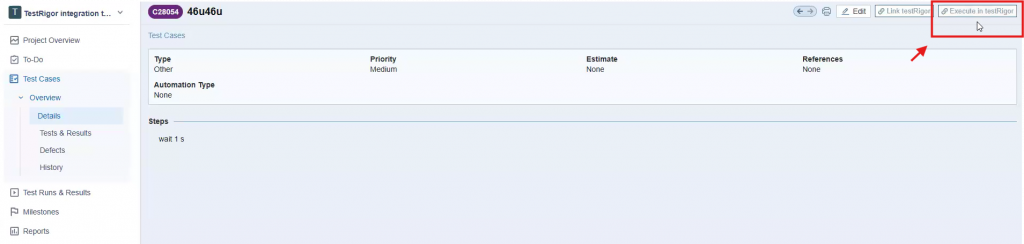
 

Caption: New testRigor button in TestRail platform.
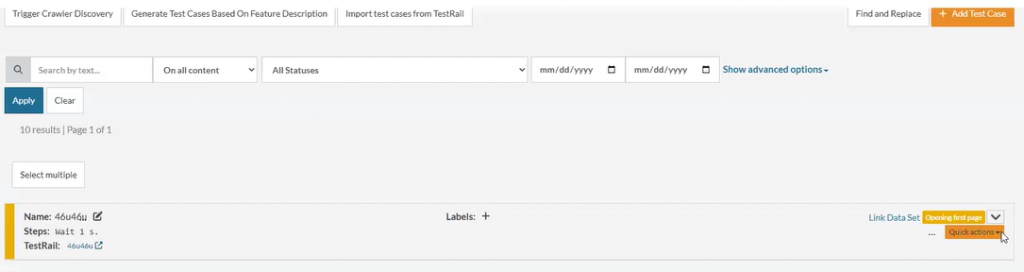
Caption: Test case executed

Related Articles

Release Notes: Cucumber Support for TestRail, AI Caching

Support for TestRail cucumber steps We now support TestRail Cucumber steps with full native integration. This allows you to ...

Release Notes: Better Xray Import, Enhanced AI Capabilities

Enhanced Xray Import Functionality The import process for Xray test cases now fully supports importing every test step and ...
Privacy Overview
This site utilizes cookies to enhance your browsing experience. Among these, essential cookies are stored on your browser as they are necessary for ...
Read more
Strictly Necessary CookiesAlways Enabled
Essential cookies are crucial for the proper functioning and security of the website.
Non-NecessaryEnabled
Cookies that are not essential for the website's functionality but are employed to gather additional data. You can choose to opt out by using this toggle switch. These cookies gather data for analytics and performance tracking purposes.









