
What is Prompt Versioning and Why do We Need it?
 |
“Mastering prompts isn’t about asking questions – it’s about unlocking answers by asking the right ones.”
– Emmanuel Apetsi
AI models are dependent on prompt engineering to fuel them. It’s not simply typing commands to produce outputs anymore. Now, this takes some thought and creativity, because the slightest adjustment can have your AI model singing a different song.
Here’s one such example – suppose you are running a customer support bot for an e-commerce platform. To make it sound friendlier, a team member makes a small, “harmless” change to the system prompt, adding: “Always start with a warm greeting.” All of a sudden, the bot no longer provides the structured JSON data your checkout system requires to process returns. Your customers are now unable to file claims because the new greeting breaks the data format, and your support tickets increase by 30 percent in one night. This isn’t a what-if catastrophe – it’s a very common experience for teams who think of prompts as sticky notes instead of software!
| Key Takeaways: |
|---|
|
The Reality of Prompts
Most teams begin their AI journey with a “golden prompt” – a specifically designed block of text that, after hours of tweaking, finally returns just the right response. It feels like a breakthrough. You save it to a shared document, hard-code it into your application, and call the job done.
- The Model Provider “Black Box”: Unlike a stable database or a local function, LLMs (like GPT-4 or Claude) are constantly being updated by their creators. A prompt that worked perfectly on Monday might produce shorter, less accurate, or incorrectly formatted answers on Tuesday because the underlying model weights changed behind the scenes.
- The Butterfly Effect of Instruction: In standard coding, changing a variable name doesn’t break your logic. In prompt engineering, changing a single word, or even moving a comma, can fundamentally alter how the model prioritizes instructions. Adding a “please” or a “be concise” might inadvertently suppress a critical piece of data you need for a downstream process.
- Parameter Sensitivity: A prompt doesn’t live in a vacuum. It relies on “hyperparameters” like Temperature (randomness) and Top-P (diversity). If a developer changes the temperature to make the AI more creative without documenting that change alongside the specific prompt text, the “golden prompt” will suddenly start hallucinating, and no one will know why.
Without a versioning system, you are essentially building your feature on shifting sand. When the output breaks, you aren’t debugging code; you’re playing a high-stakes game of “guess what changed”. This fragility is why saving a prompt isn’t enough; you need to track it, test it, and treat it as a moving target that requires constant oversight.
- Talk to Chatbots: How to Become a Prompt Engineer
- Prompt Design vs Prompt Engineering: Key Differences, Use Cases & Best Practices
- Why DevOps Needs a ‘PromptOps’ Layer
What is Prompt Versioning?
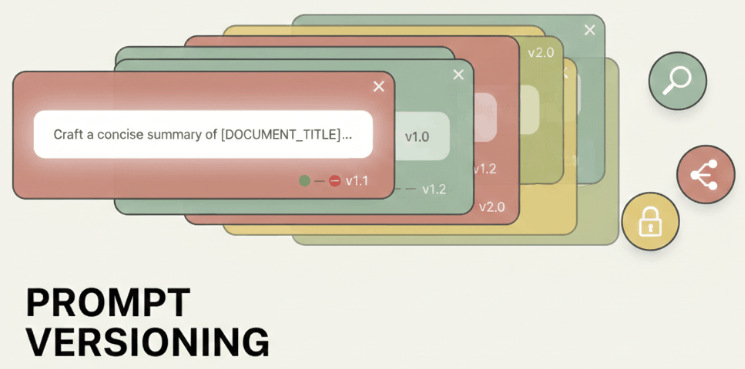
Prompt versioning is the practice of saving every single iteration of an instruction, giving it a unique name (like v1, v2, v3), and recording exactly what changed, why it changed, and how the AI responded to that specific version.
Example of Prompt Versioning
Let’s look at an example.
Imagine you are a developer for a real estate website. You’ve built an AI tool that takes raw notes from an agent and turns them into a polished house description.
Version 1.0: The Polished Professional
- The Instruction: “Write a professional description for this house based on these notes.”
- The Result: It works great! The descriptions are clear and formal.
- The Problem: The marketing team says the descriptions are “too boring” and want more “excitement”.
Version 1.1: The “Hype Machine”
- The Change: You update the instruction to: “Write an exciting description with lots of adjectives and emojis.”
- The Result: The AI now uses words like “STUNNING!” and “BREATHTAKING!”
- The New Problem: A week later, you realize the AI is now so excited that it’s hallucinating features that aren’t there, like claiming a house has a pool when the notes only mentioned a “puddle in the yard”.
Enter Prompt Versioning
Without versioning, you might have deleted the text for version 1.0 to make room for version 1.1.
- Compare: Look at v1.0 and v1.1 side-by-side to see exactly which word triggered the lies.
- Rollback: Instantly switch the live website back to v1.0 (the boring but honest version) while you fix the issue.
- Iterate: Create v1.2, which says: “Be engaging, but strictly stick to the provided facts.”
How does Prompt Versioning Help Engineers?
In traditional software, if a developer breaks a feature, they don’t have to rewrite the whole thing from memory. They go into their history and “revert” to the version that worked ten minutes ago. Prompt versioning brings that same safety net to AI development.
- Prompts are the Backend Logic: In traditional software, if you want a button to “Sort by Date”, you write a specific piece of code. In AI-powered software, that “code” is a prompt.
- Prompt Injection and Security: Engineers use prompts to create guardrails. They write hidden instructions to ensure the LLM doesn’t leak private data or start swearing at customers.
- Connecting the User Query to the LLM: When a user types a short question into an app, the engineer doesn’t just send that raw text to the AI. They wrap it in a sophisticated “wrapper” prompt to ensure the output is useful.
- Cost and Performance Optimization: Every word (token) sent to an LLM costs money. Engineers are constantly trying to make the prompt shorter to save the company thousands of dollars while keeping the quality high.
- Handling Model Updates: Engineers need to point their code to a specific version of a prompt that they know works with that specific model version. If they don’t, a model update could break their entire app’s functionality.
Without versioning, a prompt is just a floating piece of text. With versioning, it becomes a permanent record in your deployment pipeline.
Along with the above-mentioned reasons, prompt versioning further helps engineers in the following ways:
The “Undo” Button for AI Logic
Prompts are notoriously sensitive! Changing a single sentence to “be more concise” might accidentally cause the AI to stop following your formatting rules. If you aren’t versioning your prompts, you lose the original “working” version the moment you hit save. Versioning ensures that every tweak, no matter how small, is assigned a unique ID (like v1.0.4). If the new version fails in production, an engineer can “rollback” to the previous ID in seconds, preventing a minor tweak from turning into a day-long outage.
Eliminating Prompt Drift
Model providers (like OpenAI or Google) often update their underlying AI engines. A prompt that worked perfectly in January might behave differently in March because the “brain” behind it changed. Versioning allows engineers to pin a specific prompt to a specific model version. By tracking these together, you can see exactly when performance started to “drift” and identify if the issue was your new wording or the model provider’s update.
Parallel Testing: The Side-by-Side Comparison
When an engineer wants to optimize a prompt to make it faster or cheaper, they shouldn’t have to delete the current one to test the new one. Versioning allows for “branching”. An engineer can keep version 2.0 running for 90% of users while testing version 2.1 on the remaining 10%. This A/B approach lets the team use real-world data to prove the new version is actually better before committing to it.
The Audit Trail: Who, What, and Why?
In a professional engineering team, multiple people might touch a prompt – a product manager might update the tone, while a developer updates the technical constraints. Versioning creates a paper trail. It records exactly who changed the prompt, what specific words were added or removed, and what the intended goal was. This turns “guessing why the AI changed” into a transparent, searchable history.
How does Prompt Versioning Help QAs?
In traditional software testing, if you click a “Submit” button, the result is predictable. But with AI, the code is a sentence, and the output can change every time you run it. For a tester, this feels like trying to hit a moving target! Prompt versioning is the only tool that allows a tester to freeze that target long enough to actually measure it. Without versioning, a tester is just “chatting” with a bot. With versioning, they are validating a specific build of a product.
Creating a Baseline for Quality
To tell if a product is getting better or worse, you need a point of comparison. If a tester finds a bug in version 2.0 of a prompt (e.g., the AI starts giving medical advice it shouldn’t), they need to know if that bug existed in version 1.9. Versioning allows QA to run the exact same set of test questions against two different versions of the instructions. This side-by-side testing proves whether a specific change in the wording fixed the issue or created a new one.
Isolating the Flakiness Factor
AI is flaky! It might give a great answer nine times and a weird one on the tenth. When a tester finds a weird answer, they need to know: Is the AI just having a bad moment, or did the latest prompt change make it unstable?
By having a locked version ID, the tester can re-run the exact same prompt multiple times. If the error happens across different versions, it’s a model problem. If it only happens on the latest version, the tester has found a “prompt bug” that needs to be rolled back.
The Certification of a Prompt
Before a piece of software is released, QA usually signs off on a specific build. Prompt versioning allows for a QA-approved label. Instead of developers just pushing a new text change to the live site, the QA team can test v2.1.0, verify it meets safety and accuracy standards, and greenlight that specific version for production. This creates a gatekeeper process that prevents raw, untested instructions from ever reaching a customer.
Prompt Versioning Lifecycle
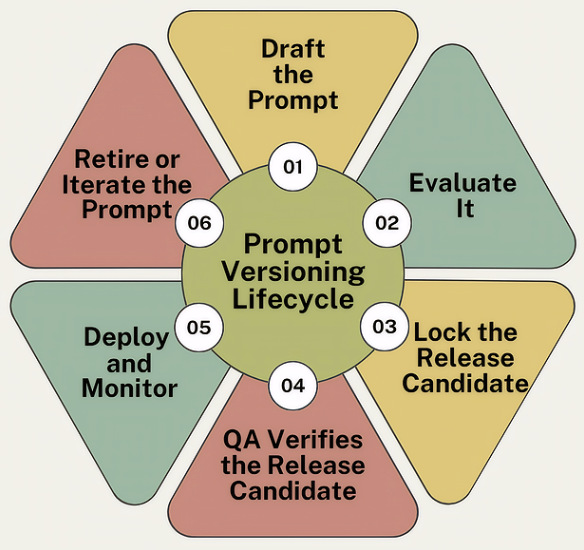
A prompt is never “finished”. You need to manage it through a repeatable series of stages to ensure it remains safe and effective.
Let’s look at a standard lifecycle of versioning prompts.
The Drafting Stage
Every prompt starts as a raw set of instructions. At this stage, a developer or a product manager writes the initial “recipe”. Instead of just testing it in a playground, the prompt is assigned a “Draft” status and a version number.
The Lab Testing Stage
Before a prompt moves forward, it must pass a “dry run”. Engineers run the draft prompt against a fixed set of 50 or 100 gold standard questions (known as a test suite). This helps them to see if version 1.0.0 actually follows the rules. If it fails, the developer tweaks the wording and saves it as version 1.0.1-draft. This prevents bad versions from ever moving toward the customer.
The Promotion Stage
Once a version passes the lab tests, it is locked. This means no one can change a single comma in version 1.1.0 without creating a brand-new version number. This helps to create a stable, unchangeable build that the QA team can formally inspect.
The QA Audit
The QA team takes the release candidate and tries to break it. They test for edge cases, such as: “What if the user asks a question in Spanish?” or “What if the user tries to trick the AI into giving a refund it shouldn’t?” The aim here is to give version 1.1.0 a “Certified” stamp of approval. If bugs are found, they aren’t fixed in the current version. Instead, a new version is started back at stage 1.
The Deployment & Monitoring Stage
The certified version is finally plugged into the live application. The application code now specifically calls for version 1.1.0. By using a specific version ID, the team ensures that even if someone writes a new and improved prompt tomorrow, the live website stays stable until that new version completes the entire lifecycle.
The Feedback Loop
After being live for a while, say a week, the team looks at the data. If users are happy, version 1.1.0 stays. If users are finding it too slow or too vague, the team gathers that feedback and begins the cycle again to create version 2.0.0.
Different Strategies for Testing Prompt Versioning
While there are different ways you can test prompt versioning, here are some of the most common ones:
Regression Testing
The most common risk with a new prompt version is that it fixes one problem but creates two more.
- The Goal: To ensure that version 2.0 can still do everything version 1.0 did correctly.
- The Practice: QA takes a golden set of 100 questions that the old version handled perfectly. They run those same 100 questions through the new version. If the new version fails even one of those previously safe questions, it’s a regression, and the version is rejected.
- What is Regression Testing?
- What Are Regression Defects? Causes, Examples & How to Prevent Them
- Automated Regression Testing
A/B Testing
It’s the most direct way to justify moving from one version to another.
- The Goal: To objectively prove which version performs better in the real world.
- The Practice: QA splits incoming traffic. 50% of users interact with version A, and 50% interact with version B.
- The Metric: QA looks at data like: Which version led to more helpful ratings? Which version resulted in fewer users asking to speak to a human? If version B wins, it becomes the new standard.
Read: What is A/B Testing? Definition, Benefits & Best Practices
Adversarial Testing
This is where QA tries to be the bad guy.
- The Goal: To see if a specific prompt version has weak guardrails that allow it to be tricked.
- The Practice: Testers use a specific version and try to force it to break its own rules. For example, if version 3.0 is supposed to be a “medical assistant”, QA will try to trick it into giving a recipe for a cocktail or disclosing private patient data.
- The Benefit of Versioning: If version 3.0 fails this test, QA can point to exactly which line of instruction was deleted from version 2.0 that made the system vulnerable.
Boundary and Edge Case Testing
- The Goal: To see how the prompt version handles weird data.
- The Practice: QA feeds the prompt version some extreme examples.
- Example: They input a 10,000-word document to see if the prompt version gets confused and loses its formatting.
- Example: They input a blank query to see if the AI gives a professional error message or starts rambling.
Read: What Are Edge Test Cases & How AI Helps
An interesting thing to note in all of these cases is the version ID. Without it, these tests are useless. If a tester finds a bug during an adversarial test but can’t lock the prompt they were using, the developer might change the text before the bug is even logged. Versioning ensures that the bug report is tied to a specific, unchangeable set of instructions, making it actually fixable.
Best Practices for Prompt Versioning
Let’s look at some helpful best practices that you can use to version your prompts.
Use Semantic Versioning (The X.Y.Z Rule)
- Major (The 1): You changed the entire structure. Example: Moving from a “Legal Assistant” to a “Creative Writer.”
- Minor (The 2): You added a new feature or rule, but the core job is the same. Example: Adding a rule that the AI must now use emojis.
- Patch (The 4): You fixed a typo or a small glitch. Example: Fixing a spelling error in the instructions.
It instantly tells everyone on the team how risky the update is.
Separate Prompts from Your Main Code
Never hard-code your prompts directly inside your application’s programming. This means storing your prompts in a separate registry or configuration file. This allows you to update or rollback a prompt version instantly without having to rebuild and redeploy your entire website or app.
Implement Immutable Versions
Once a version is released, it is locked. For example, you never edit v1.0.0. If you want to change a single comma, you must save it as v1.0.1. This ensures that your audit trail is perfect. If a customer had a bad experience on Tuesday, you can look at the logs and see the exact, unchangeable version of the prompt they saw.
Use Proper Documentation for Versions
- The environment (Dev, Staging, Prod) where it’s meant to be.
- Relevant metrics. For example, performance before and after the changes.
- The metadata associated with each version.
- Good comments explaining the intent of every change.
Have Good Rollback/Recovery Strategies
- Health monitoring
- Feature flags
- A/B deployments
Automated Testing of Prompt Versions
Automated testing is your saving grace when aiming to deploy high-quality changes to AI applications. You can further tackle AI’s black box problem by using test automation tools that run on AI. One good example is testRigor. It turns the guessing game of prompt updates into a repeatable science. Since testRigor uses plain English to run tests, it is uniquely suited for prompt versioning as it allows you to test the AI’s “human language” with “human language” instructions. Here are the ways in which using such a tool can simplify prompt version testing:
Test Different Prompt Versions Together
When you create a new prompt version (v2.0), you need to know if it’s actually better than the old one (v1.0). You can set up a testRigor suite that runs the exact same test case (e.g., “Ask the bot for a refund”) against two different versions of your app. testRigor captures screenshots and logs for both. This way, you can instantly see if the new prompt version is making the bot more helpful or if it’s starting to hallucinate and break the rules.
Regression Testing Happy Paths
Every time you tweak a prompt, you risk breaking something that used to work perfectly. You can create a golden set of tests in testRigor. These are your must-pass scenarios, like “Login works” or “Checkout completes”. Now, whenever a developer updates a prompt version, you run this suite. If the new wording causes the AI to miss a button or misread a label, testRigor flags it immediately. It ensures your “quick fix” didn’t break the entire user journey.
Testing AI Behavior Using Plain English Assertions
check that page “contains a positive response from the chatbot to help in response to the query” using ai
This allows you to test the intent of a prompt version.
Read: Chatbot Testing Using AI – How To Guide
No-Code A/B Experiments
Because testRigor tests are written in English, you don’t need a developer to write a complex script to test a new prompt. You can run this test against a Staging environment where you are trialing a new prompt version. If it passes, you have the data to prove that the version is ready for Production.
Catching UI Breakage Caused by Prompts
Sometimes a new prompt version makes the AI’s response too long, which can push buttons off the screen or break the layout of your mobile app. testRigor’s visual testing automatically spots if a new prompt version has caused a layout shift.
Read: How to do visual testing using testRigor?
To Sum it Up
Without versioning, prompt engineering is basically folklore, passed down through messages and half-remembered edits. By treating your prompts as versioned assets, you move from guessing to knowing. You give your developers a safety net and your QA team a baseline to test against.
FAQs
How often should I create a new prompt version?
The industry rule of thumb is: If you change a comma, you change the version. Because LLMs are so sensitive, even minor formatting changes can alter the output. By creating a new version for every tweak, you ensure that your QA team can test the exact build that is going to production. If you edit the same prompt without versioning, you lose your last known good state and make debugging impossible.
How does prompt versioning help with AI hallucinations?
Versioning doesn’t stop an AI from making things up, but it helps you diagnose why it happened. If your bot suddenly starts giving out wrong information, you can look at your version history to see if the latest prompt update removed a critical guardrail or if you switched to a cheaper, less capable model version. It turns a mysterious AI glitch into a traceable technical error that you can fix by reverting to a safer version.
Why does my prompt work in the “Playground” but break in my app?
This is a classic “version mismatch” issue. When you test in a provider’s playground (like OpenAI’s), you might be using a different model version or different “hidden” settings (like temperature) than your actual app uses. Prompt versioning fixes this by bundling the text and the settings together into one ID. If you aren’t tracking the version ID, you’re basically guessing which settings made the prompt work in the first place.
Can’t I just use GitHub to version my prompts?
Technically, yes, but there are better ways to do this specific task. While GitHub is great for code, it doesn’t easily show you the AI-specific data you need. In GitHub, you can see that a sentence changed, but you can’t easily see that the new sentence increased your “token cost” by 20% or made the AI’s tone more aggressive. Specialized prompt versioning tools allow you to see the text changes and the AI’s performance side-by-side.
| Achieve More Than 90% Test Automation | |
| Step by Step Walkthroughs and Help | |
| 14 Day Free Trial, Cancel Anytime |











