
Test Cases for Stock, Crypto, and Commodity Trading Platforms
 |
There are many points at which trades submitted via an online trading platform can go wrong. A stock price may look stable on a chart, but trading happens at a completely different value. A buy order could get confirmed, but the purchase never hits the portfolio. A crypto transfer can read “completed,” and the wallet balance won’t have moved. In case of a delayed response, a user can click on the button twice and execute the same commodity trade twice.
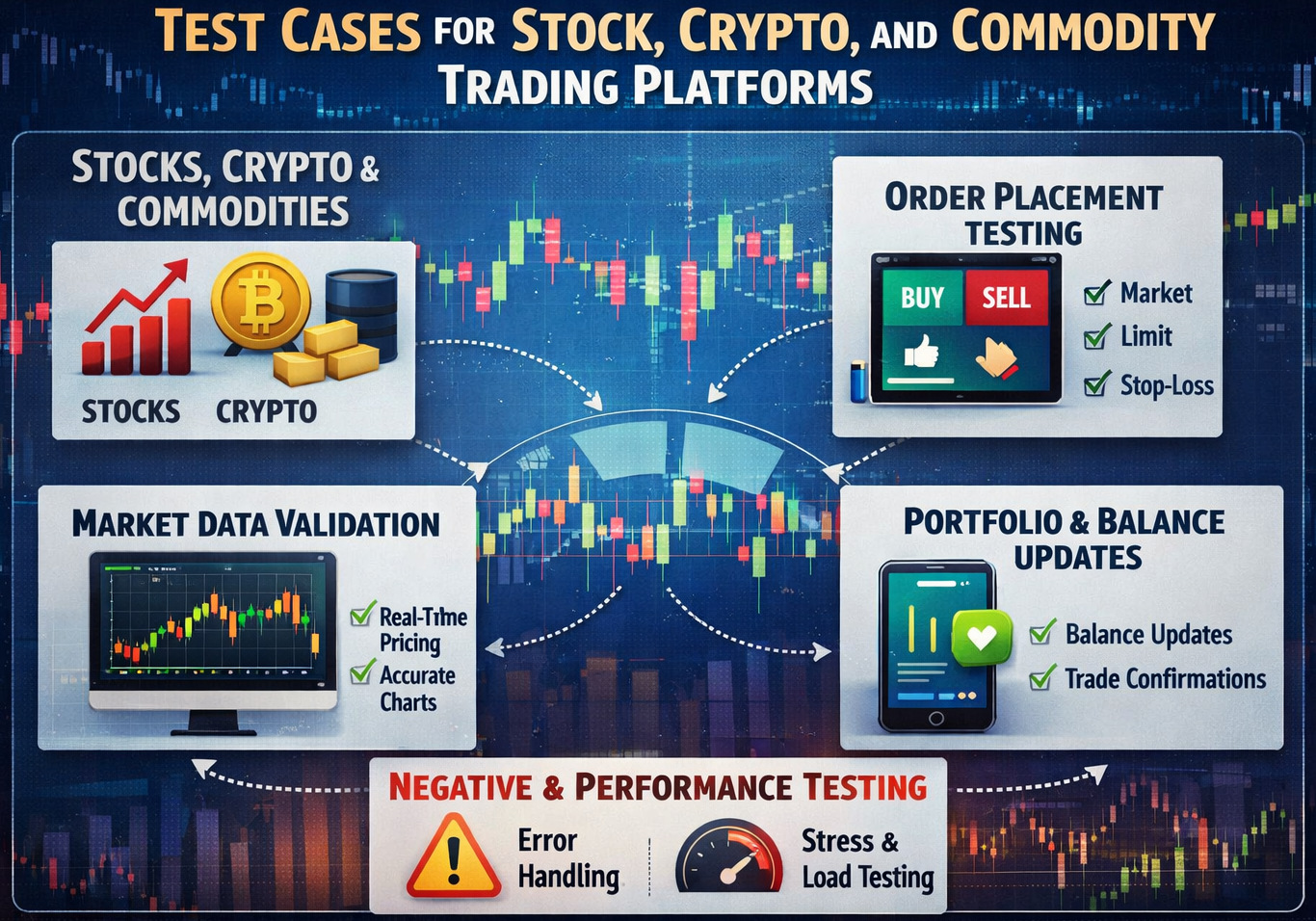
These scenarios drive QA teams to ask an essential question: Do we have the right trading platform test cases? It is easy to think that testing trading systems translates to asking if the “Buy” button works. It also needs confirmation of price correctness, successful order placement, and coordinated market data.
Trading platforms function in rapid environments where a multitude of transactions are executed concurrently. Break this for even a minor defect in this system, and then the money will be impacted, along with trust and regulatory compliance.
| Key Takeaways: |
|---|
|
Trading Software Testing
- A user placed an order, but it executed at the wrong price.
- A trade succeeded, but the portfolio balance never updated.
- Market data lagged behind the exchange price.
- The trading platform froze during peak market volatility.
- Users may execute their trades in highly volatile market tenders, where prices fluctuate in seconds.
- Traders can enter high-frequency orders, meaning they make multiple buy or sell requests in a matter of seconds.
- Other trades may fill orders partially, meaning only part of the requested quantity is executed.
- Orders can be affected by price slippage, where the execution price of an order differs from the expected price due to the movement in the market.
- The system shall automatically trigger margin calls whenever a platform account balance falls below required limits.
- Trading platforms should be able to deal with exchange API latencies or downtime without inducing erroneous order processing.
- Wallet or account balances must remain synchronized after every trade or transaction.
- The system must enforce trading session cut-off times when markets open or close.
Good test cases do not try to cover every possible permutation. Instead, they focus on the scenarios where failures affect users the most.
How to Create Test Cases for Trading Applications?
Testers need to gain knowledge on how the trading system works from the user perspective before writing test cases. A clear lens on the trading workflow facilitates knowing where exactly the transactions, validations and system interactions happen. With this knowledge, QA teams are able to craft test cases that closely mirror actual trading behavior and system interactions. A typical trading workflow includes:
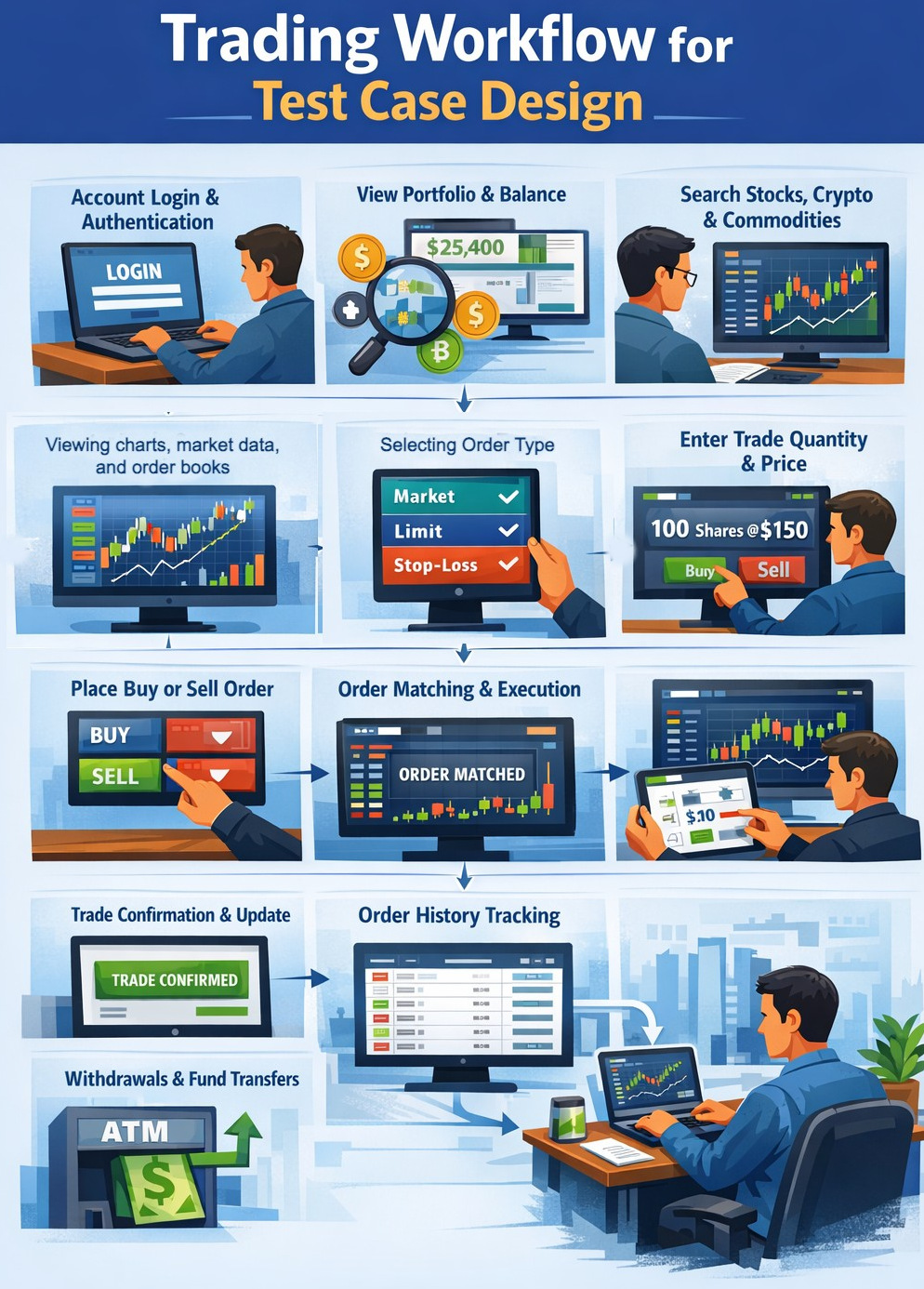
- Account login and authentication
- Viewing portfolio and account balance
- Searching for stocks, crypto assets, or commodities
- Viewing charts, market data, and order books
- Selecting order type (market, limit, stop-loss)
- Entering trade quantity and price
- Placing a buy or sell order
- Order matching and execution
- Trade confirmation and portfolio update
- Order history tracking
- Withdrawals or fund transfers
One of the simplest mistakes many teams make is testing components in isolation. But in reality, failures are interim between steps rather than within them. The price display can be fine, the order placement successful, and the execution complete, but the portfolio balance sometimes falls short. Therefore, trading platforms often contain functional testing as well as negative and end-to-end testing scenarios.
Functional Test Cases for Trading Application
Functional testing checks that the system behaves appropriately when users do what they’re expected to. These confirm that normal trading workflows function as expected. Although functional testing is important in ensuring that the presented outcomes of such logic are delivered accurately to all traders, but it does not catch everything.
Test Cases for Market Search and Asset Discovery
- Search for stock using the ticker symbol
- Search for crypto assets using the asset name
- Search for commodities like gold or oil
- Search for assets not listed on the platform
- Verify auto-suggestion in the search bar
- Verify search results display correct asset information
- Verify asset price updates in real time
- Verify market status display (open, closed, halted)
Incorrect search results or delayed market data can lead to incorrect trading decisions.
Test Cases for Market Data and Price Display
- Check live price updates from market data feeds
- Check for price discrepancies between charts and order entry panels
- Check that bid and ask prices are displayed properly
- Verify order book updates dynamically
- Check for price updates in very volatile markets
- Ensure historical price charts present correct data
- Check the correct formatting of prices across currencies
Test Cases for Order Placement
- Place a market buy order successfully
- Place a market sell order successfully
- Place a limit order with a specific price
- Place stop-loss order correctly
- Place a stop-limit order correctly
- Validate minimum and maximum order quantity
- Validate order price limits
- Verify trading fee calculation
- Verify the order confirmation message
Test Cases for Order Execution and Match
- Verify successful order execution
- Verify partial order fills
- Verify order cancellation before execution
- Validate time-based order expiration
- Verify price slippage handling
- Verify execution price accuracy
- Verify trade confirmation updates order history
Test Cases for Portfolio and Balance Updates
- Portfolio reflects purchased assets
- Portfolio reflects sold assets
- Account balance updates after trade
- Trading fees are deducted correctly
- Profit and loss calculations updated
- Margin account balances updated
- Portfolio value updates based on market price
Test Cases for Deposits and Withdrawals
- Deposit funds via bank transfer
- Deposit crypto assets via wallet transfer
- Withdraw funds successfully
- Verify withdrawal limits
- Verify transaction fee calculations
- Verify transaction history updates
Test Cases for Order Cancellation and Modifications
- Cancel pending limit order successfully
- Modify order quantity before execution
- Modify the limit price before execution
- Cancel partially filled orders
- Verify cancellation confirmation
- Verify portfolio updates after cancellation
Negative Test Cases for Trading Platforms
- Placing an order with insufficient balance
- Submitting duplicate orders due to repeated clicks
- Network interruption during order placement
- Attempting to trade when the market is closed
- Entering invalid price values
- Submitting extremely large orders
- Exchange API timeout or error response
- Cancelling an order after execution
These scenarios help ensure the system remains stable under abnormal conditions.
Non-Functional Test Cases for Trading Platforms
Beyond simply working, the system also has to work well. These trading platforms run in a fast-paced and real-time market environment. Test cases should check how the system performs, scales, and responds under heavy load & peak trading hours. They are also responsible for ensuring that the platform remains stable, secure, and provides a consistent user experience regardless of device and network conditions.
Trading Software: Performance Test Cases
- Handles thousands of concurrent traders
- Processes large numbers of orders per second
- Maintains real-time market data updates
- Remains responsive during market spikes
- Handles heavy traffic during market openings
Trading Software: Security Test Cases
- Secure authentication and session management
- Encryption of trading transactions
- Secure API communication with exchanges
- Protection against unauthorized trading access
- Protection against account takeover attacks
- Secure storage of user credentials and API keys
Trading Software: Usability and Compatibility Test Cases
- Charts display correctly on mobile and desktop
- Order entry forms are easy to understand
- Mobile trading works smoothly
- Error messages are clear
- Dashboard layout adapts across devices
Read: Automating Usability Testing: Approaches and Tools.
Critical Risk Areas in Trading Platforms
- Price Accuracy: Both charts, order books and execution engines have to have the same price in real time. If the displayed price and executed price are inconsistent, it may not only result in wrong trading decisions but also in the loss of user confidence.
- Order Execution Timing: Orders must be processed quickly and at most one time, with no delays or replication. Any delay or repeated execution can lead to unintended trades and financial losses.
- Portfolio Synchronization: Trades must reflect immediately in the user’s portfolio and account balance. Delays or discrepancies in the updates given can confuse users and influence future trading decisions.
- External Exchange Integrations: Market data and order transaction execution are heavily dependent on exchange APIs for trading platforms. These integrations need to deal with time outs, and failures, and inconsistent responses without breaking user transactions.
- Market Volatility Handling: Exchange platforms need to stay stable during extreme market activity and high volumes. A lack of adequate treatment for volatility can cause crash effects, deferred executions or erroneous prices.
Read: Transitioning from Manual to Automated Testing using testRigor: A Step-by-Step Guide.
Why Trading Platforms Need Automated Testing
The importance of manual testing still remains for exploratory testing or user experience validation. This process helps detect usability problems and find unexpected situations earlier in the test. However, it doesn’t scale well for complex trading platforms.
For trading platforms, there are thousands of assets, different order types and market conditions, and a multitude of user behaviours. It becomes very painful and tedious to test every possible combination manually, which is precisely why automation becomes vital for extensive coverage and reliable results.
testRigor for Trading Platform Testing
Traditional automation tools often struggle with trading platforms due to their dynamic nature. UI elements change frequently, market data updates continuously, and locator-based scripts tend to break easily. As a result, teams end up spending more time maintaining test scripts than actually validating the system. testRigor addresses this challenge by allowing testers to write tests in plain English based on real user actions instead of relying on fragile locators.
With testRigor, teams can easily handle long end-to-end trading workflows while automatically adapting to UI changes using AI, significantly reducing maintenance effort. It supports both web and mobile platforms and enables even non-technical testers to contribute to automation. Teams can validate complex scenarios such as multi-factor authentication, dynamic charts, API integrations, and financial transactions with ease. Additionally, testRigor integrates seamlessly with CI/CD pipelines, enabling continuous and reliable testing for trading platforms.
- Handles long, end-to-end flows easily in simple English, thus allowing non-technical testers to contribute.
- Fits new interface updates without needing adjustments, thanks to the tool’s AI abilities to adjust to small UI changes.
- Reduces maintenance drastically by removing dependency on UI element locators like XPaths, thus avoiding flaky test runs.
- Fine on websites, works with phones too, handles data connections without any problem.
- Test all kinds of features – login with 2FA, AI features like chatbots and LLMs, dynamic images, table data, file upload/downloads, audio testing, UI testing, API testing, and more.
- Ideal for regression testing before every release cycle.
- Integrates with other tools like those for CI/CD or test management to promote continuous testing.
Now, let’s see a scenario for a market buy order using testRigor.
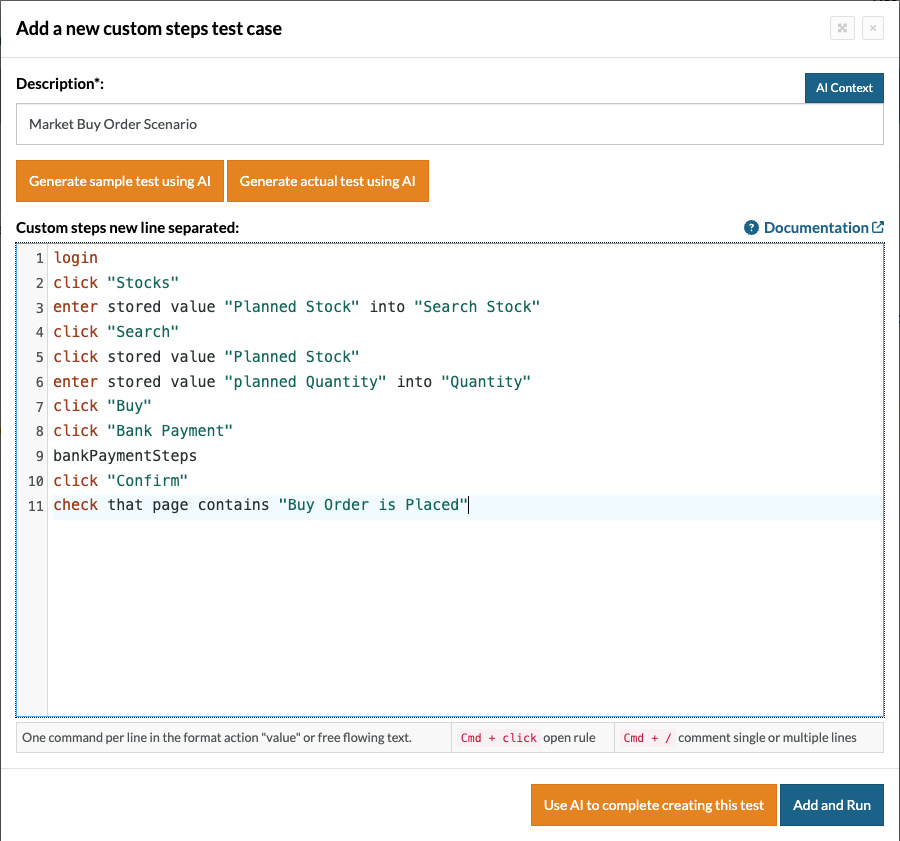
login // Reusable Rules
click "Stocks"
enter stored value "Planned Stock" into "Search Stock"
click "Search"
click stored value "Planned Stock"
enter stored value "planned Quantity" into "Quantity"
click "Buy"
click "Bank Payment"
bankPaymentSteps // Reusable Rules
click "Confirm"
check that page contains "Buy Order is Placed"
You can see how simple it is to create test scripts using testRigor. It is more like writing manual test cases. This helps even non-technical stakeholders to understand the test script easily and update it.
Why Trust Depends on Strong Testing
When it comes to testing trading platforms, the software must not only work but also ensure trust in the money exchange system. At any given time, traders want accurate prices, reliable execution of orders, and updates of their portfolio in respective systems instantly. Well-crafted test cases ensure that the system behaves consistently in sophisticated market scenarios, which is crucial to instilling confidence and encouraging users to keep using the platform.
Frequently Asked Questions (FAQs)
- How do trading platforms ensure fairness in order execution across all users?
Trading platforms rely on matching engines and exchange integrations that prioritize orders based on factors like price-time priority. Testing must validate that no user gets unfair advantages due to latency, system bias, or inconsistent execution logic.
- What role does latency play in trading platforms, and how should it be tested?
Latency directly affects execution price and user experience, especially in high-frequency trading environments. QA teams must measure system response times, simulate network delays, and ensure that latency does not lead to incorrect or delayed trade execution.
- How do trading platforms handle regulatory compliance, and what should QA validate?
Platforms must comply with financial regulations such as audit trails, transaction reporting, and user data protection. Testing should ensure accurate logging, traceability of trades, and adherence to regional compliance requirements.
| Achieve More Than 90% Test Automation | |
| Step by Step Walkthroughs and Help | |
| 14 Day Free Trial, Cancel Anytime |











