
Claude for QA Engineers: Use Cases and Limitations
 |
Claude is transitioning from a simple conversational AI to a workflow-driven assistant that can execute structured tasks. This change is immensely relevant for QA engineers as testing by its nature is process-driven, or rather repeatable, and governed by bespoke standards.
Agent skills enable Claude to follow matching workflows, perform tasks using domain-specific knowledge that was already done by other agents before, and help with the consistent execution of test tasks.
While traditional AI tools are focused on one-off prompts, Claude implements a structured definition of skills that can be reused in workflows. It fits right into the QA basics, such as designing test cases, managing defects, and validating regression. Hence, it becomes a ubiquitous assistant for the modern testing team.
| Key Takeaways: |
|---|
|
What Makes Claude Useful for QA?
- Reduced Repetitive Manual Effort: These skills automate routine QA activities, minimizing the need for testers to perform the same tasks repeatedly.
- Consistent Outputs Across Projects: By following predefined workflows, skills ensure uniformity in testing processes and results across different projects.
- Faster Onboarding of Processes: New team members can quickly adapt by using existing skills that clearly define established QA procedures.
- Scalable Automation without Heavy Coding: Enables teams to expand their test automation capabilities without requiring extensive programming expertise.
Since much of QA work follows structured patterns, Claude fits naturally into testing environments where consistency and repeatability are essential.
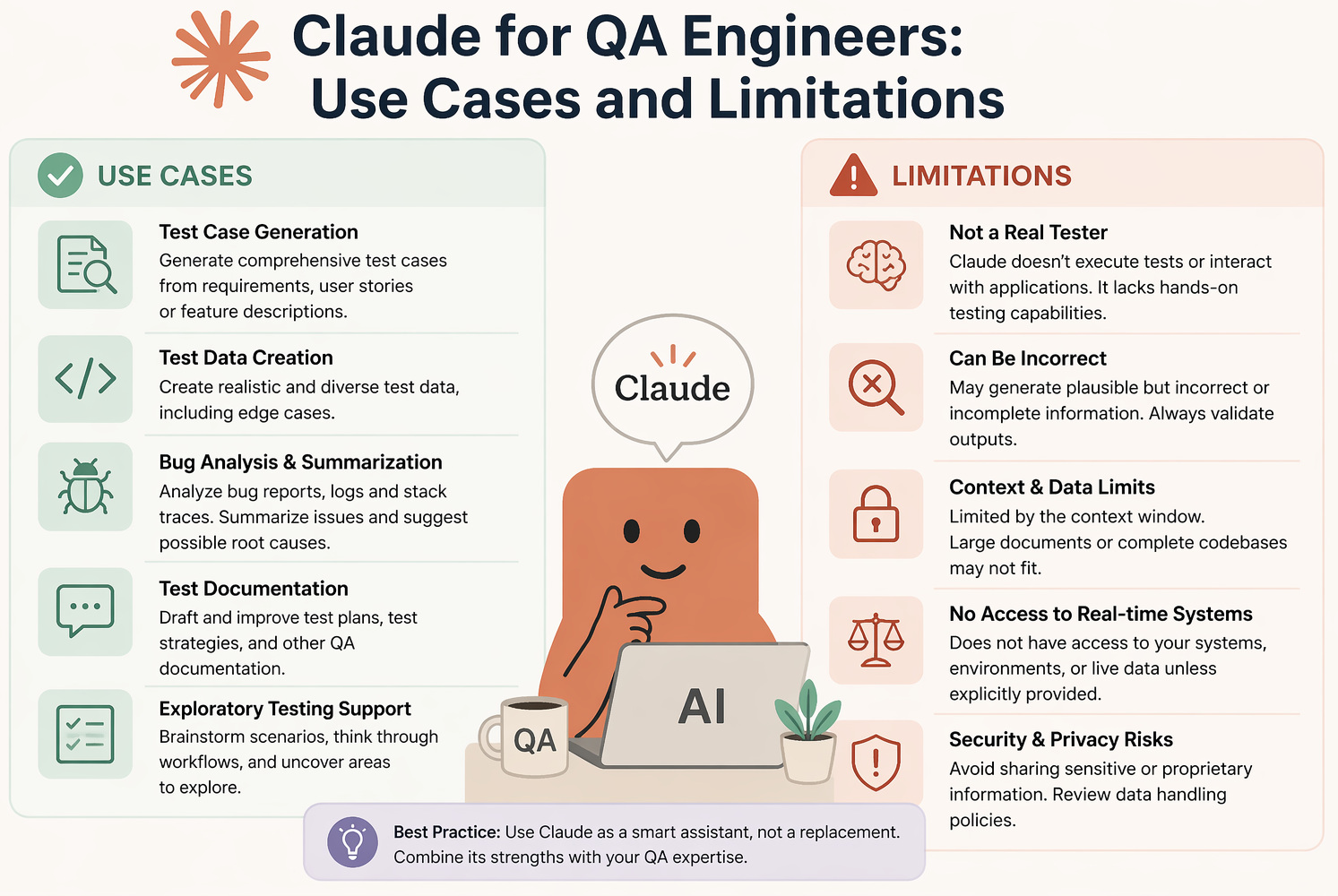
Use Cases of Claude for QA Engineers
- Test Case Generation: Claude can generate extensive test cases from user stories, requirements, or acceptance criteria in no time, including positive, negative, and edge scenarios. It also provides consistency through structured templates, thereby minimizing manual effort in test design.
- Test Automation Support: Claude helps teams move towards automation by producing scripts for UI and APIs, along with associated assertions and validations. In addition to that, it provides reusable code snippets that speed up the setup of the initial automation.
- Test Maintenance and Debugging: Since Claude understands flaky tests, recommends ways to fix broken locators, and analyzes failure logs, it gets much easier to manage your test suites. It makes for less debugging time and increases the reliability and stability of automated tests.
- Bug Report Creation: Claude turns imperfect test outputs into neat, structured bug reports with summaries, steps to reproduce, and expected results. Ensures improved collaboration between QA and developer teams with consistent communication within the team.
- Test Data Generation: Claude produces varied, realistic datasets from valid and invalid input. This removes the need to model and create data and is also able to handle complex testing scenarios.
- Test Result Analysis: Claude processes vast numbers of test results to analyze data and extract useful information like failure summaries and patterns in recurring problems. It helps teams to have a brief understanding of the regression results and escalate fixes accordingly.
- Coverage Analysis: Claude helps to connect requirements with different test cases and discover any missing scenarios or gaps in coverage. It provides a second layer of validation, aiding QA engineers in taking overall test completeness to the next level.
- Multi-Agent Testing Workflows: Claude simply has different specialized agents for UI, API, and security testing, which helps you to run multiple testing workflows in parallel. This distributed method reduces the time it takes to validate a release and improves test coverage.
Limitations of Claude in QA
- False Confidence in Outputs: Claude’s output can appear correct superficially, but could lack subtle or obvious gaps in underlying assumptions. This can create an illusion of confidence regarding test quality and completeness without proper understanding.
- Test Debt at Scale: If not managed carefully, automated test generation can lead to a large number of redundant or low-value test cases. Over time, this increases maintenance effort and makes test suites harder to manage efficiently.
- Limited Context Awareness: Claude relies entirely on AI context, so if there are missing inputs (for example, the text to summarize), the outputs will be incomplete or incorrect. Business rules, integrations, or key system dependencies may be missed as a result of this.
- Security and Compliance Risks: If not governed properly, exposing internal systems to Claude puts sensitive data and access control at risk. To avert such risks, robust security practices and compliance checks are essential.
Read: AI Compliance for Software.
- Skill Maintenance Overhead: To remain effective and relevant, agent skills must be continuously updated, owned by someone in the organization, and validated regularly. Old skills can deliver mixed or wrong results without routine upkeep.
- Coverage Gaps: Claude can help speed things up or allow testing to be more expansive, but it may still miss infrequent edge cases and convoluted user flows. Automation can miss various scenarios that will need human expertise to ensure proper coverage.
Read: Why Using Claude Alone for Testing Is Slowing You Down.
Claude for QA: Best-Fit Scenarios vs. Risk Areas
This table highlights where Claude adds the most value in QA workflows and where caution is required. It helps teams use Claude effectively as a productivity tool while ensuring critical decisions remain under human control.
| When to Use Claude in QA | When Not to Rely on Claude |
|---|---|
| Claude is most effective when applied to well-defined tasks that benefit from speed, consistency, and automation. | Claude should not be solely trusted in scenarios that require critical judgment and deep expertise. |
| Tasks are repetitive and structured, allowing Claude to execute them quickly with minimal variation. | Test strategy decisions should be handled by humans, as they require business context and risk assessment. |
| Standardization is required, ensuring outputs follow consistent formats and guidelines. | Security-critical validations must involve experts due to the high impact of potential failures. |
| Large datasets need processing, enabling faster analysis and summarization of extensive information. | Complex system behavior analysis often requires deeper contextual understanding beyond Claude’s capabilities. |
| Initial drafts or scaffolding are needed, helping teams kickstart work with a solid foundation. | Final release approvals should remain a human responsibility to ensure accountability and quality. |
| It works best as a productivity enhancer rather than a replacement for QA engineers. | Human oversight is essential to validate outputs and mitigate risks in all critical QA activities. |
Read: How to Keep Human In The Loop (HITL) During Gen AI Testing?
How testRigor Complements Claude for QA Automation
Claude may help QA engineers with test case ideas, automation planning, debugging suggestions, and summarizing results. Still, you need coding skills to review whether what has been generated is efficient and working.
In such cases, testRigor is how teams take those testing ideas and turn them into stable, executable automated tests. testRigor gives QA teams the ability to write end-to-end tests in plain English, eliminate maintenance due to moving locators, and automate web, mobile, API, desktop, mainframes, AI features, and cross-browser testing with no scripting.
This complements Claude, which does thinking, documentation, and analysis, combined with testRigor, which guarantees reliable test execution and scalable automation.
Read: All-Inclusive Guide to Test Case Creation in testRigor.
The Bottom Line
Claude is changing the testing game for QA teams with reusable, workflow-driven automation. This will minimize redundant work, increase consistency, and speed up delivery.
But of course, it is not a substitute for QA engineers. Instead, it acts like a robust assistant that augments productivity but still relies on human judgment and confirmation. The true value is in understanding what QA processes can be securely automated with Claude and which require more knowledge. Those teams that find this balance best will receive the greatest value from this shifting technology.
Frequently Asked Questions (FAQs)
- How reliable is AI like Claude for real-world QA testing?
AI can significantly accelerate test design, analysis, and documentation, but it is not fully reliable on its own. It may miss edge cases, misunderstand business context, or produce outputs that appear correct but contain hidden gaps. In real-world QA, AI should be treated as an assistant that improves efficiency, while human validation remains essential for accuracy and completeness.
- What are the biggest risks of relying too much on AI in QA?
The most critical risks include false confidence in outputs, growing test debt due to excessive or low-value test generation, lack of context awareness, and potential security concerns. Over-reliance on AI without proper governance can lead to unstable test suites and overlooked defects.
- How should teams effectively integrate AI into their QA process?
Teams should use AI for well-defined, repeatable tasks such as test case generation, data creation, and result analysis, while keeping humans responsible for strategy, critical validations, and final decisions. The most effective approach is to combine AI-driven insights with robust automation tools to balance speed, accuracy, and scalability.
| Achieve More Than 90% Test Automation | |
| Step by Step Walkthroughs and Help | |
| 14 Day Free Trial, Cancel Anytime |











