
Why Using Claude Alone for Testing Is Slowing You Down
 |
AI has quickly become part of everyday software development. From writing code to reviewing pull requests, tools like Claude are now helping teams move faster than before. It’s no surprise that testing is the next area where people are trying to apply the same approach.
On the surface, it makes sense. If AI can generate test scripts in seconds, why spend hours writing them manually? Many teams are already experimenting with this idea – asking Claude to create automation scripts, suggest test cases, or even debug failures.
But after the initial excitement, a pattern starts to emerge.
As applications evolve, UI elements change, workflows shift, and edge cases pile up. The scripts that looked fine on day one quickly become fragile, hard to maintain, and dependent on someone who understands the underlying code. Instead of speeding things up, teams often find themselves stuck maintaining what AI helped create.
This is where the gap becomes clear.
AI can help write tests – but it doesn’t solve the deeper challenges of test automation: stability, maintenance, and accessibility for the whole team.
And that raises an important question: are we actually making testing easier, or just writing code faster?
| Key Takeaways: |
|---|
|
Why Teams Are Turning to Claude for Testing
It’s easy to see why tools like Claude are getting attention in the testing space.
For teams already under pressure to ship faster, the idea of generating test scripts on demand is appealing. Instead of starting from scratch, you can prompt Claude with a scenario and get a working piece of code in seconds. For developers, especially, this feels like a natural extension of how they already work.
There’s also the convenience factor. Claude is flexible – it can help write API tests, UI tests, or even suggest edge cases you might have missed. When deadlines are tight, having something that accelerates the first draft of a test can feel like a big win.
In many cases, teams start using it as a shortcut. Need a quick Selenium script? Ask Claude. Want to convert a manual test case into automation? Let Claude take a pass at it. It reduces the initial effort and helps teams move past the blank-page problem.
For organizations that already rely heavily on code-based automation, this fits right in. There’s no need to change tools or processes – just add AI into the mix and keep going.
And that’s exactly the appeal. It simply makes the existing approach faster – at least at first glance.
Here’s a great take on this: Why Gen AI Adoptions are Failing – Stats, Causes, and Solutions
The Reality: Where Claude Falls Short in Test Automation
The early wins with Claude can feel convincing. Tests get written faster, and the initial setup looks easier than before. But once those tests are put into regular use, some cracks start to show.
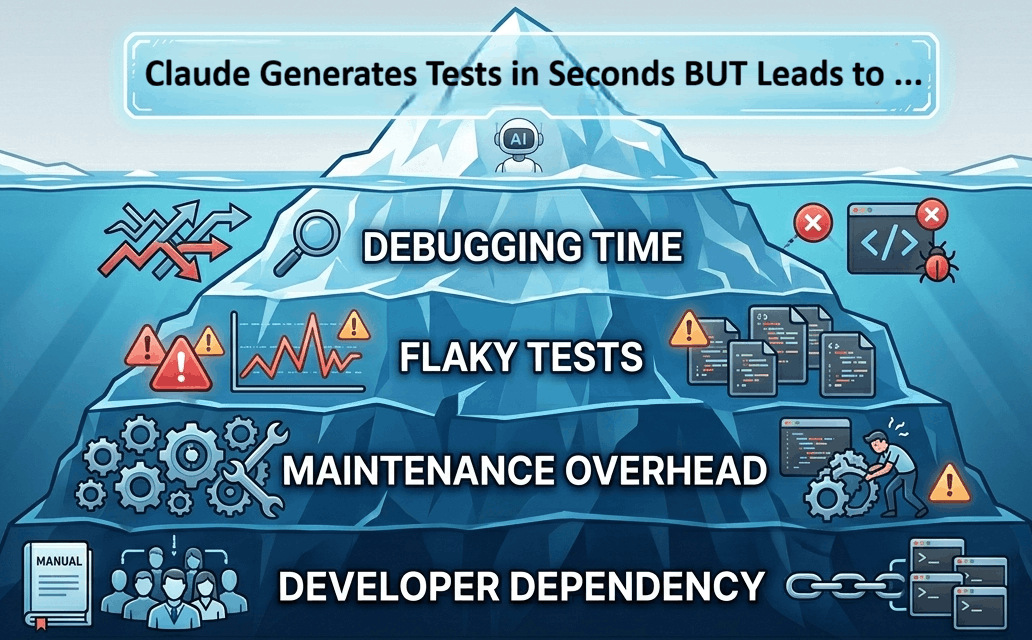
Still Requires Coding Skills
Claude can generate test scripts, but someone still needs to understand what it produces. If a test fails – or worse, behaves inconsistently – someone has to step in, read the code, and fix it.
That usually means relying on developers or experienced automation engineers. For QA teams with mixed skill levels, this creates a gap. Not everyone can contribute equally, and progress slows down as soon as something breaks.
High Maintenance Over Time
Test automation doesn’t fail on day one – it fails over time.
As the product evolves, small UI changes can cause tests to break. A button moves, a label changes, or an element ID gets updated. The scripts Claude generates are still tied to these details, which makes them fragile.
So while creating tests is faster, maintaining them becomes a constant effort. Teams end up spending more time fixing.
Lack of Built-In Testing Context
Claude works with prompts. It doesn’t have built-in awareness of your application, your environments, or how your tests are structured.
That means things like handling test data, managing environments, or retrying failed steps aren’t automatically taken care of. Teams have to build those layers themselves – or patch things together across multiple tools.
This adds complexity that isn’t obvious at the start.
- Trusting AI Test Automation: Where to Draw the Line
- AI Context Explained: Why Context Matters in Artificial Intelligence
Slower Collaboration Across Teams
Because everything revolves around code, testing becomes harder to share across roles.
Developers write or review the scripts. QA may validate them. But product managers or business stakeholders are usually left out because they can’t easily read or contribute to code-based tests.
Instead of speeding things up, this creates silos. Communication gaps widen, and testing becomes less collaborative than it should be.
The Bigger Problem: AI + Code ≠ Faster Testing
There’s a common assumption behind using tools like Claude for testing: if you can generate test code faster, you’ll end up testing faster overall.
In practice, it rarely works that way.
Here’s an interesting article on this: Is AI Slowing Down Test Automation? – Here’s How to Fix It
Writing the test is only a small part of the process. The real effort comes later, when tests start failing, environments change, or something behaves differently than expected. That’s where AI-generated code doesn’t help as much.
A test that takes seconds to generate can take hours to debug.
When something breaks, you still need to trace through the script, understand what the AI produced, and figure out why it’s no longer working. And because the code wasn’t written with long-term maintenance in mind, it’s often harder to fix than something built intentionally.
Then there’s the issue of flakiness. Tests that pass once don’t always pass consistently. Small timing issues, UI changes, or data inconsistencies can cause unpredictable failures. Fixing these isn’t about speed; it’s about stability. And that’s not something AI-generated code guarantees.
- More time spent debugging than creating
- Growing dependency on a few technical team members
- A backlog of brittle tests that nobody wants to touch
At that point, the original goal – moving faster – starts to slip away.
Because the real bottleneck in testing isn’t how quickly you can write code. It’s how easily you can maintain, understand, and trust your tests.
And that’s where the approach needs to change.
A Better Approach: Combine AI with No-Code Automation
Instead of trying to write test code faster, some teams are starting to ask a different question: what if we didn’t have to write code at all?
No-code automation takes a different path.
Tests are written in plain language, closer to how people actually describe workflows. Instead of dealing with selectors and syntax, you focus on what the user is doing – logging in, adding items to a cart, submitting a form. The technical layer is handled behind the scenes.
This has a few immediate effects.
First, more people can contribute. QA engineers, product managers, and even business stakeholders can read and create tests without needing to learn a programming language.
Second, tests become easier to maintain. When something changes in the UI, you’re not rewriting chunks of code – you’re updating a step that still makes sense in plain English.
And third, AI becomes more useful when it’s not tied to code generation. Instead of producing scripts that need ongoing care, it can support test design, suggest scenarios, assist with test execution, or help expand coverage – without adding complexity.
This approach doesn’t replace AI. It puts it in the right place. Because the goal isn’t to generate more code, it’s to remove the need for it wherever possible.
How testRigor Outperforms Claude for Testing
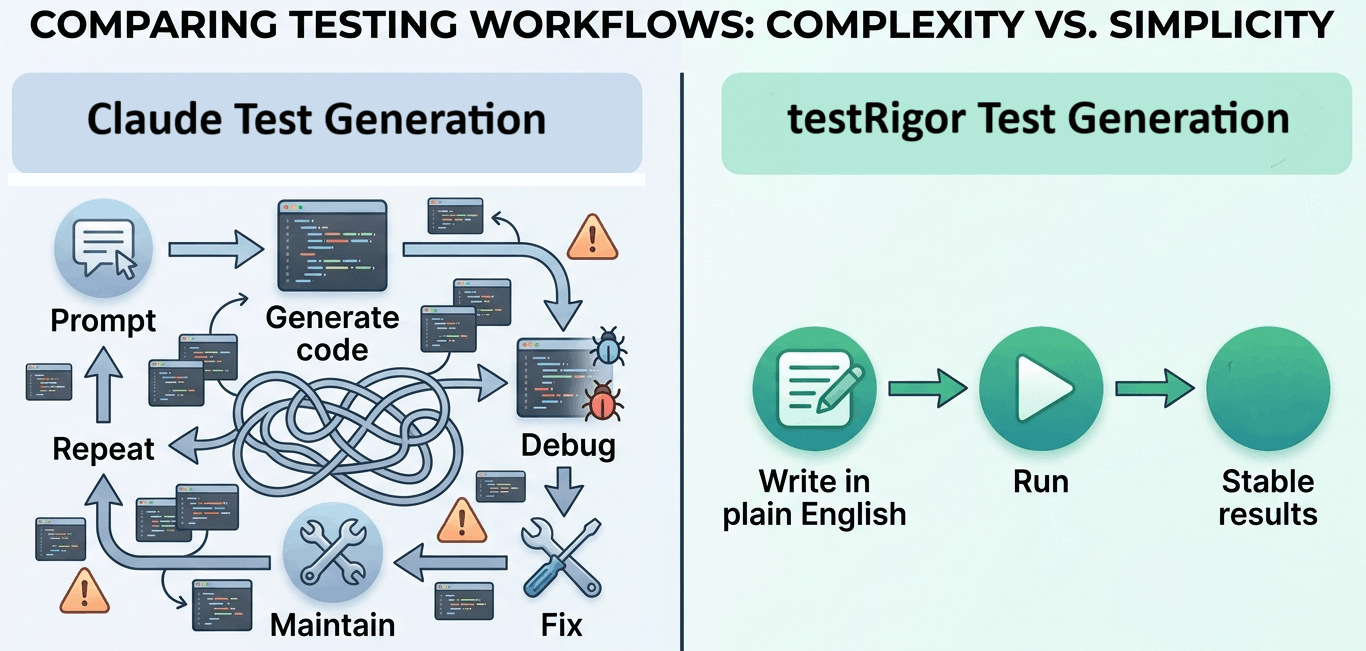
If you step back and look at what teams actually struggle with in testing, it’s not writing the first version of a test – it’s everything that comes after. Keeping tests stable, making updates quickly, and getting the whole team involved.
That’s where testRigor takes a different approach.
Plain English Test Creation
With testRigor, tests are written the way people naturally describe them.
There’s no need to think about selectors, frameworks, or syntax. You simply describe the user’s actions in plain English. This makes it possible for anyone on the team to create or review tests – not just developers or automation specialists.
Instead of waiting on someone with coding expertise, teams can move forward on their own.
Take a look at the All-Inclusive Guide to Test Case Creation in testRigor
Built for Stability, Not Just Speed
One of the biggest issues with code-based testing is how easily it breaks.
testRigor avoids that by focusing on how users interact with the application, rather than relying on fragile technical details. When the UI changes, tests don’t immediately fail because they aren’t tied to specific element locators in the same way.
This reduces the constant cycle of fixing and rewriting tests.
See how to Decrease Test Maintenance Time by 99.5% with testRigor
Faster End-to-End Automation
With Claude, you might generate a script quickly, but you still need to plug it into a framework, handle execution, and manage failures.
testRigor brings all of that together. You can create, run, and maintain tests in one place, without stitching multiple tools together. That means less setup, fewer dependencies, and fewer things that can go wrong.
Here’s a guide showing how easy it is to do End-to-end Testing with testRigor
True Team Collaboration
Because tests are easy to read and write, they don’t stay locked within the engineering team.
Product managers can review flows. QA can build coverage without waiting. Even non-technical stakeholders can understand what’s being tested and why.
This removes the usual bottlenecks and makes testing part of the broader team effort, not just a technical task.
Easy to Test Various Scenarios
testRigor offers an easy medium to create and run tests in plain English across various applications (web, mobile, desktop, mainframes) and browsers. You can automate all kinds of scenarios like logging in through 2FA, testing AI features like chatbots and LLMs, or even platform-specific operations like swiping and long presses in mobile applications.
Since the tool supports visual and API testing as well, you can automate scenarios across complex platforms, too, like those in SaaS or ERP software.
An Alternative: testRigor + Claude
This doesn’t have to be an either-or decision.
Claude is useful – just not in the way many teams first expect.
Instead of relying on it to generate test scripts that need ongoing maintenance, teams can use it where it actually adds value: thinking through scenarios, exploring edge cases, and filling gaps in coverage.
- Brainstorm different user flows you haven’t considered
- Identify edge cases based on a feature description
- Turn rough ideas into structured test scenarios
But instead of turning those ideas into code, you bring them into testRigor.
That’s where things become practical.
You take those scenarios and write them in plain English. In fact, you can even do a copy-paste from Claude and let testRigor run the plain English tests for you. They’re easy to understand, easy to update, and don’t require constant fixes when the application changes. The heavy lifting – execution, stability, maintenance – is handled for you. You can further leverage testRigor’s agentic AI capabilities to create plain English tests, even without Claude.
Instead of generating more code to manage, you’re using AI to improve test coverage, while keeping the actual tests simple, stable, and accessible to the whole team.
Stop Writing More Code, Start Testing Smarter
At first, using a tool like Claude to generate test code feels like a step forward. It saves time upfront and helps teams get past the initial effort of writing scripts.
But over time, the focus shifts.
It’s no longer about how quickly tests are created – it’s about how much effort it takes to keep them running. And that’s where code-heavy approaches, even with Claude’s AI, start to slow things down.
The teams that move faster aren’t the ones writing more test code. They’re the ones dealing with less of it.
By shifting to testRigor for a no-code approach, testing becomes simpler, more stable, and easier to scale across the team. AI still plays a role – but it supports the process instead of adding more to maintain.
If your current setup still depends on generating and fixing scripts, it might be worth rethinking the approach because better testing isn’t about speeding up the same process. It’s about removing the parts that hold you back in the first place.
Frequently Asked Questions (FAQs)
- What are the limitations of using Claude for QA testing?
Claude can write test code, but it doesn’t handle execution, maintenance, or stability. Tests created with it can become fragile over time, especially when UI changes occur. Teams often spend more time fixing scripts than creating new tests.
- How is testRigor different from AI tools like Claude for testing?
testRigor takes a no-code approach, allowing teams to create tests in plain English without relying on scripts. It also handles execution, maintenance, and stability, making it a more complete and scalable solution compared to AI tools that only generate code.
- Is no-code test automation better than AI-generated test scripts?
For most teams, yes. No-code automation reduces dependency on developers, minimizes maintenance, and allows broader team participation. AI-generated scripts may save time initially, but often create long-term overhead due to debugging and upkeep.
- Can Claude and testRigor be used together for testing?
Yes, they can complement each other. Claude can help brainstorm test scenarios or edge cases, while testRigor handles actual test creation, execution, and maintenance in a stable, no-code environment. But solely relying on Claude for QA isn’t advisable.
- Why do teams switch from code-based automation to tools like testRigor?
Teams often switch to reduce maintenance effort, improve test stability, and enable non-technical team members to contribute. Over time, this leads to faster releases and more reliable test coverage.
| Achieve More Than 90% Test Automation | |
| Step by Step Walkthroughs and Help | |
| 14 Day Free Trial, Cancel Anytime |











