
Opkey Alternative
 |
What is Opkey?
Traditional testing of ERP systems is often complex, time-consuming, and resource-intensive due to the intricate nature of the applications and their frequent updates and changes. You need specialized tools to do this. Opkey was developed to simplify and accelerate the test automation process, especially for large-scale enterprise applications.
Opkey is an AI-powered, no-code test automation platform designed primarily for enterprise applications, especially ERP systems such as Oracle, SAP, and Workday. It addresses these challenges through intelligent automation capabilities, pre-built libraries, and integration with various development tools and environments. The tool combines test automation with features like process discovery, impact analysis, and prebuilt test libraries.
Features of Opkey
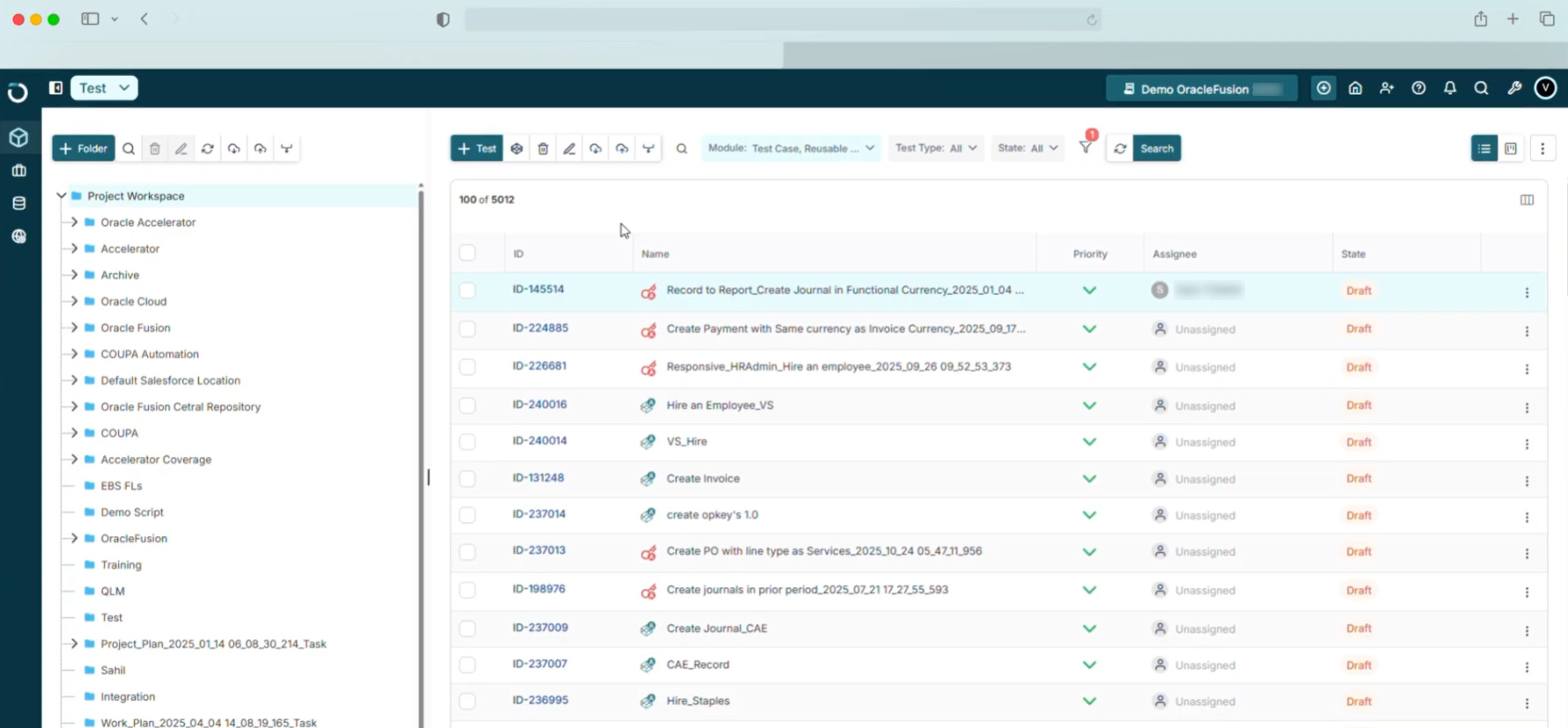
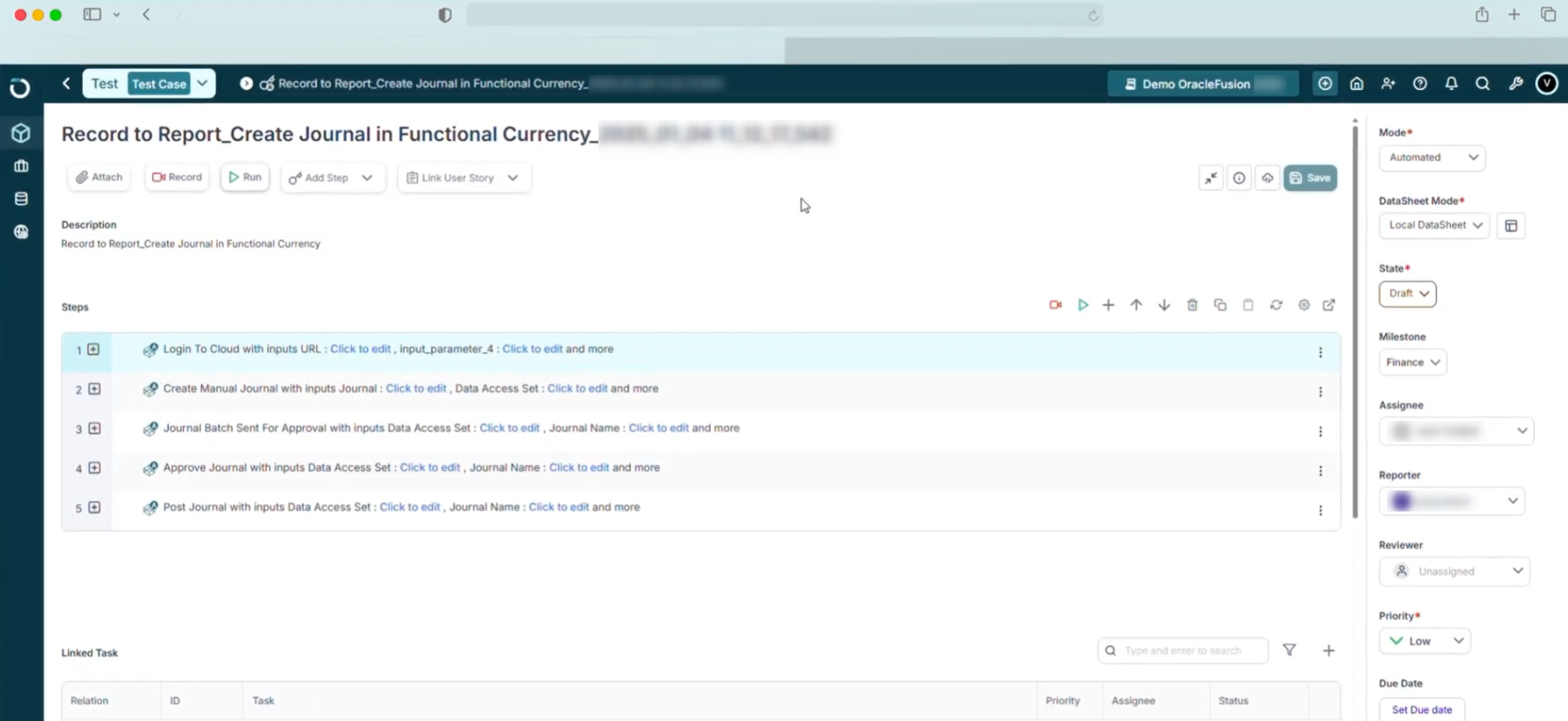
- No-code test creation with guided workflows: Opkey provides a visual, no-code interface for creating and managing test cases. Users can build tests using a drag-and-drop approach, along with guided workflows and templates.
- Self-healing scripts: If a software update moves a button or renames a field, Opkey’s AI recognizes the change and fixes the test script automatically.
- Prebuilt test libraries for enterprise applications: The platform includes a large repository of prebuilt test cases aligned with common ERP processes. These are designed to reduce the effort required to create tests for standard business scenarios.
- Test discovery and coverage analysis: Opkey analyzes system usage and business processes to identify areas that require testing. It helps teams understand which workflows are most critical and where test coverage may be missing.
- Release advisor: Instead of a human reading through pages of Oracle or Workday release notes, Opkey’s Agentic AI reads them for you. It then suggests what to expect in the upcoming release.
- Change impact analysis: Before system updates or upgrades, Opkey can identify which test cases and business processes are likely to be affected. This helps teams prioritize testing efforts during releases.
- AI-assisted test creation and maintenance: Opkey uses AI to assist with generating test steps and maintaining existing tests. While tests still follow structured workflows, AI helps reduce manual effort in updating them.
- Support for enterprise application environments: Opkey supports testing across environments commonly used in enterprise setups, including web-based ERP systems and related platforms. Its capabilities are primarily aligned with enterprise application ecosystems.
- Dashboards and reporting: Opkey provides dashboards that show test execution status, coverage, and system changes.
Considerations with Opkey
- Organizations that require a broader range of application testing beyond ERPs might find Opkey less suited to their needs than more general-purpose testing tools.
- This tool can be complex for beginners and might involve a steep learning curve.
- Opkey’s approach is built around business workflows, configurations, and lifecycle management. This can require upfront effort to map processes and set up the system, especially in complex enterprise environments.
- Opkey’s pricing for enterprise-level features can be relatively high compared to other test automation tools.
What is testRigor?
testRigor is an AI-powered test automation platform designed to simplify how tests are created, executed, and maintained. Unlike Opkey, which is best suited for ERP-first environments, testRigor offers a simpler alternative to testing all kinds of applications while availing the benefits of AI-driven testing.
Instead of writing code, users create tests in plain English, which the system translates into executable steps. testRigor doesn’t depend on selectors and XPaths at all to identify UI elements. It sees the page like a human.
It supports end-to-end testing across web, mobile, APIs, desktop, mainframe, and more within a single platform. testRigor focuses on reducing the effort required for both test creation and maintenance, making automation accessible to a broader team, not just the technical silo.
- Launch the testRigor app on the web and choose the desired settings for your test suite.
- Entering test steps in plain English language. (want to know more about the supported commands? Take a look here)
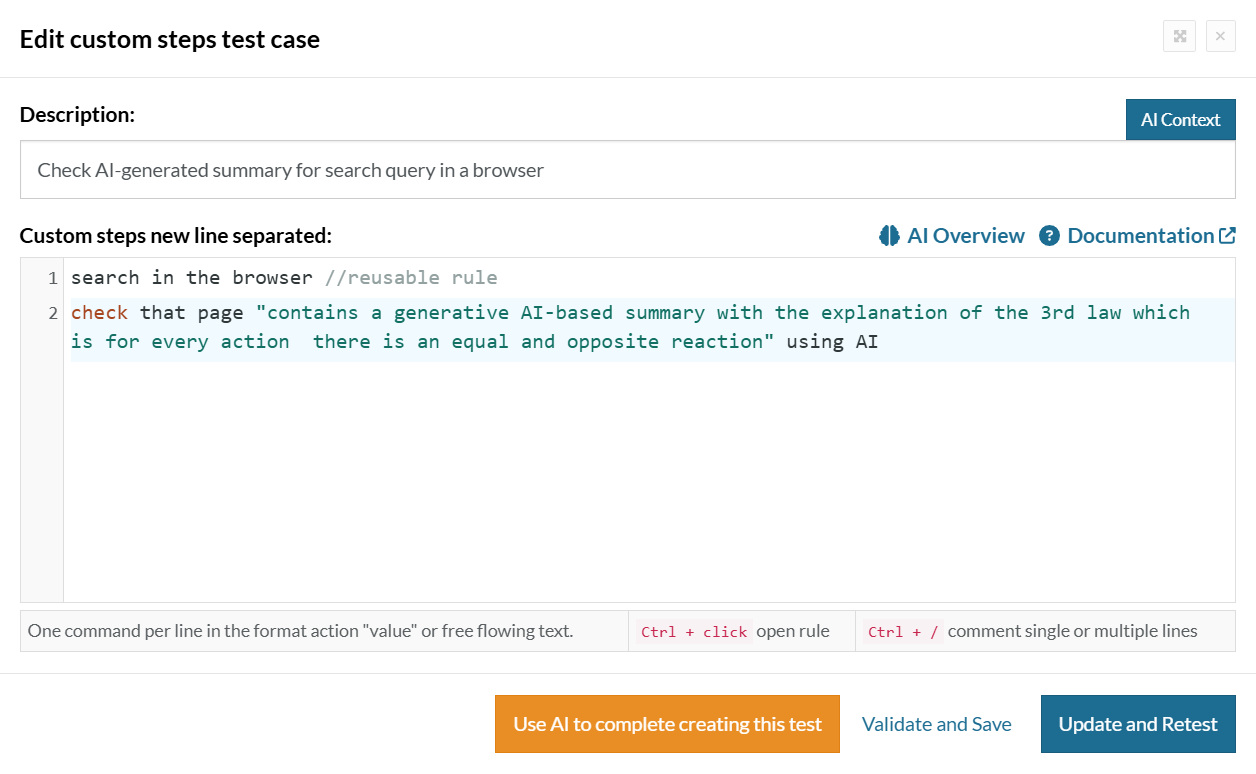
- All that’s left is to click the ‘Save and Run’ button.
Let’s take a look at what more this tool offers.
Features of testRigor
- Plain English Tests: With testRigor, you can create test cases in plain English language without worrying about unstable CSS/XPath locators. There are a few ways to do this:
- Write the English test scripts manually or import test cases from test management tools such as TestRail, PractiTest, ALM, etc., to directly run as automated tests.
- Use the record-and-playback feature to capture the test case when you execute it and generate plain English test cases. You can update and execute these recorded test cases at any point in time.
- Let the generative AI feature build test cases for you with just a brief description of the test scenario.
- Easy to Test Modern Applications: testRigor lets you test a variety of features like emails, files, database, QR code, SMS, and audio. It also supports testing AI features like chatbots, LLMs, graphs, and more.
- Single Tool for Many Platforms: Test various applications like native mobile and native desktop apps, web-based apps, ERP, and CRM systems like SAP, Salesforce, Oracle, Microsoft Dynamics, and even your legacy systems. Since testRigor emulates a human tester, what goes under the hood of the application under test is of little consequence to this tool.
- Supports Various Testing Types: Perform different kinds of testing like regression testing, smoke testing, UI testing, functional testing, end-to-end testing, UAT testing, API testing, and more.
- Stable Locator Strategy: This tool refers to elements from a human perspective and not from a locator standpoint. This eliminates the dependency on implementation details like XPaths and CSS selectors, which can change frequently.
- Near-zero Maintenance: You can get ultra-stable test runs and minimal test maintenance as testRigor uses AI here as well to self-heal test cases.
- Secure Platform: This platform is fully cloud-hosted, which means there are no extra infrastructure expenses. testRigor is also a secure platform that is ISO/IEC 27001:2022, SOC 2, HIPAA, and GDPR compliant.
- Advanced Reports and Logging: Every test run provides details about the execution, such as screenshots, relevant error messages, which are again in simple English, and video recordings. It also captures technical details, such as console logs and technical errors.
- Free Account Available: testRigor offers free public accounts that can be created directly via registration on its website. This is a good place to start before advancing to the subscription-based plans.
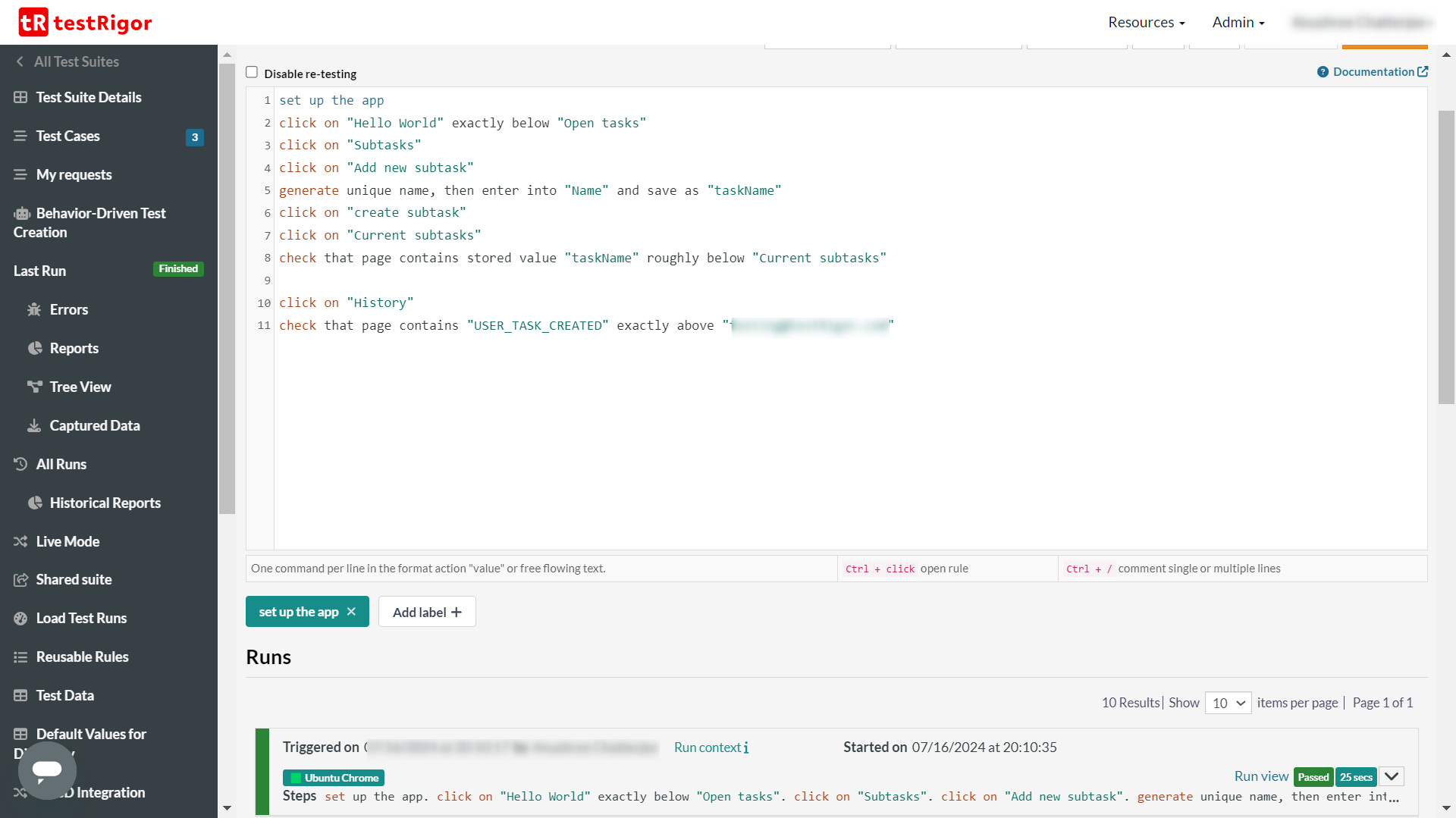
Here is an example of a testRigor test case. As you can see, these are just plain English test steps. So everyone on your team can create, execute, and update the tests without requiring any programming language proficiency.
You can use reusable rules (subroutines) to group English test steps for use in multiple test cases: ‘set up the app’ is a reusable rule here.
testRigor vs Opkey – Feature Comparison
AI-based testing is the new way to go about automation testing. Here’s a quick overview of the two tools.
| Parameters | Opkey | testRigor |
|---|---|---|
| Learning curve | Low for basic features but steeper for advanced customization | Very low and easy to pick up, even for non-technical users |
| Ease of test creation | No-code interface with guided workflows, templates, and prebuilt assets; test creation often aligned to structured business processes | Tests are written in plain English steps; no scripting or predefined structure required |
| Element recognition technique | Identifies elements using application context (like labels and workflows), with automatic updates when UI changes occur | Uses natural language instructions based on visible elements and user intent, reducing dependency on technical locators |
| Target applications | Focused on ERP and enterprise applications such as Oracle, SAP, and Workday | Designed for web, mobile, desktop, and APIs; can also be used for enterprise applications |
| Mobile testing support | Supports mobile environments, though the primary focus remains on enterprise and ERP systems | Supports mobile testing as part of broader cross-platform coverage |
| Test maintenance | Handles UI changes automatically, but workflow changes may still require updates | Very low test maintenance due to AI handling UI changes |
| Reporting and analytics | Dashboards focused on test execution, coverage, and the impact of system changes | Reporting includes execution results, history, and logs for end-to-end test flows |
| Cost | Typically follows enterprise pricing models, often tailored to large implementations | Generally simpler pricing model; more accessible for teams beyond large enterprises |
| Scalability | Built for large enterprise environments, especially ERP ecosystems | Scales across small to large teams, particularly for high test volumes across applications |
| Vendor lock-in | Uses proprietary structures tied to enterprise workflows and platform setup | Plain English tests are easier to read and modify, reducing dependency on platform-specific formats |
Switching from Opkey to testRigor
- They need faster test creation
- They want to reduce maintenance effort
- They are expanding beyond ERP into testing other types of applications across different platforms (web/mobile/desktop/mainframe)
- They want more of their non-technical team members involved in testing
Conclusion
Opkey and testRigor take different approaches to test automation.
Opkey focuses on enterprise systems and process-driven testing, while testRigor focuses on user workflows and ease of test creation across applications. For teams working primarily with ERP platforms, Opkey aligns well with those requirements. For teams looking to reduce test maintenance and simplify automation across modern applications, testRigor offers a different approach.
Choosing between them comes down to the type of systems you test and how you want to manage your automation over time.
| Achieve More Than 90% Test Automation | |
| Step by Step Walkthroughs and Help | |
| 14 Day Free Trial, Cancel Anytime |











