
Test Cases for Leave, Attendance, and Performance Reviews
 |
HRMS, payroll systems, and tools for workforce management are all important business applications. Leave Management, Attendance Tracking, and Performance Reviews are the most important and sensitive parts of these systems.
| Key Takeaways: |
|---|
|
This article explores structured test case design strategies, test case categories, edge conditions, automation considerations, and best practices for testing Leave, Attendance, and Performance Review systems.

Test Cases for Leave Management
Leave management systems allow employees, managers, and HR administrators of the company to perform the following:
| Personnel | Functionality |
|---|---|
| Employees | Apply for leave |
| Cancel or modify leave | |
| View leave balances | |
| Track leave history | |
| Managers | Approve or reject leave |
| View team leave calendars | |
| Configure leave policies | |
| HR Administrators | Define leave types |
| Configure accrual rules | |
| Set carry-forward policies | |
| Generate leave reports |
Testing leave management systems must cover functionality, policy enforcement, payroll integration, and compliance requirements.
Functional Test Cases for Leave Application
Let us review important functional test cases for leave applications.
A. Leave Application Submission
- Check that employees can request leave for actual dates.
- Check that the leave type dropdown displays the configured leave types.
- Check that the required fields (leave type, start date, end date, reason) are being enforced.
- Check that the system won’t let you submit a leave request with an end date that comes before the start date.
- Check whether the system prevents people from applying for leave for dates that have already passed (if the policy says they can’t).
- Check to see if the system lets you choose half-day leave.
- Check that the calculation for multiple-day leave doesn’t include weekends (if that’s how it’s set up).
- Check that the leave calculation does not include public holidays.
B. Leave Balance Validation
- Check that the leave balance is correct.
- Check whether the leave balance is low enough to allow leave without pay (LWP).
- Check that leave balance updates are applied correctly after approval.
- Ensure the leave balance remains unchanged if the leave is denied.
- Check whether the negative leave balance behavior is allowed or not allowed by policy.
- Ensure the balance correctly reflects the carry-forward leave.
C. Leave Modification & Cancellation
- Check that employees can cancel leave that is already planned.
- Check whether the policy requires a manager to take action to cancel after approval.
- Check that the leave balance is back to normal after the cancellation.
- Check that the modification triggers the updated approval workflow.
- Check that audit logs track changes.
Workflow Test Cases for Leave Application
- Check whether the leave request notification was sent to the manager in charge.
- Check that the manager can approve or deny with comments.
- Ensure the escalation mechanism is enabled after a specified period.
- Check that delegation approval works when the boss is away.
- Check that multi-level approval is set up (if it is).
- Check the permissions for HR overrides.
Leave Accrual & Policy Test Cases
- Check the calculation of the monthly leave accrual.
- Check that new employees’ prorated accruals are correct.
- Check whether leave accrual stops at the end of the contract.
- Check whether the carry-forward limit is being enforced.
- Check the calculation for leave encashment (if it applies).
- Check the limits of the maternity and paternity leave policy.
Edge Case Test Scenarios
- Using leave across the end of the financial year.
- Applying for leave that overlaps with already approved leave.
- Requesting time off during the notice period.
- Taking time off on a public holiday.
- Applying for leave across time zones (for remote teams).
- Testing for calendar conflicts when more than one employee asks for leave at the same time.
Read: What Are Edge Test Cases & How AI Helps.
Integration Test Cases for Leave Application
- Verify that approved leave is reflected correctly in payroll.
- Verify leave without pay impacts salary calculation.
- Verify leave data syncs to the attendance system.
- Verify that the reporting dashboards reflect the updated leave data.
Read: Integration Testing: Definition, Types, Tools, and Best Practices.
Test Cases for Attendance Management
The attendance management system is responsible for tracking the following functionality:
| Attendance Management Modules |
|---|
| Employee clock-in/clock-out |
| Shift schedules |
| Overtime |
| Late arrivals |
| Early departures |
| Remote work tracking |
| Biometric integrations |
Attendance accuracy directly affects payroll and compliance.
Clock-In / Clock-Out Test Cases
Let us review the test cases related to clock-in and clock-out.
Basic Functionality
- The employee can clock in within the allowed shift time.
- The employee can successfully clock out.
- The attendance system accurately records the timestamp.
- Geolocation-based clock-in restrictions (as per employee location).
- The system prevents duplicate clock-ins (and clock-in is disabled once clocked in).
Shift Rules
- Late marking after the grace period (if applicable).
- Early departure detection (if applicable).
- Overtime calculation after shift end (if applicable).
- Night shift handling across midnight.
- Shift rotation logic.
Attendance Regularization
- Verify employees can request an attendance correction.
- Verify supporting document upload works.
- Verify manager approval workflow.
- Verify that the corrected attendance is reflected in payroll.
- Verify audit logs capture changes.
Overtime & Work Hours Calculation
- Verify the daily work hour calculation.
- Verify weekly work hour aggregation.
- Verify overtime threshold rules.
- Verify holiday overtime multiplier.
- Verify weekend overtime rules.
Absence & Leave Integration
- Verify absence auto-marked if no clock-in.
- Verify approved leave prevents absence marking.
- Verify half-day leave impacts attendance.
- Verify that leave without pay is reflected in the attendance summary.
Biometric and Third-Party Integration Testing
- Verify biometric device sync.
- Verify duplicate biometric entries handling.
- Verify offline sync once the network is restored.
- Verify API integration with external time-tracking systems.
Compliance & Security Test Cases
- Verify that attendance data cannot be altered without authorization.
- Verify access control by role.
- Verify data encryption for biometric records.
- Verify audit trails for manual adjustments.
- Verify time zone handling across regions.
Edge Cases
- Clock in just before midnight and clock out after midnight.
- Test daylight saving time changes.
- Validate multiple shift swaps in the same week.
- Test simultaneous login from multiple devices.
- Verify GPS spoofing attempt.
Test Cases for Performance Reviews
Performance management systems support the following functions:
| Performance Review Modules |
|---|
| Goal settings for employees |
| Self-evaluation for employees |
| Manager’s evaluation of employees |
| Peer review |
| 360-degree feedback |
| Rating calculation |
| Performance cycle tracking |
These systems must ensure fairness, confidentiality, and consistency.
Goal Setting Test Cases
- Employees can create goals within the cycle.
- SMART goal format validation.
- Goal weight allocation totals 100%.
- Goal editing before manager approval.
- Goal locking after approval.
- Cascading goals from the manager to the team.
Review Cycle Management
- New review cycle creation.
- Cycle start and end date enforcement.
- The system restricts submissions outside the cycle window.
- Automated reminders before the deadline.
- Cycle archival after completion.
Self-Evaluation Test Cases
- Verify employees can submit a self-review.
- Verify rating selection within the allowed range.
- Verify comment fields accept the required length.
- Verify draft save functionality.
- Verify resubmission after the manager’s request.
Manager Evaluation Test Cases
- Verify the manager can view team reviews.
- Verify manager rating overrides allowed (if policy).
- Verify calibration rules.
- Verify rating normalization logic.
- Verify performance distribution limits (enforce bell curve).
360-Degree Feedback
- Verify the peer nomination process.
- Verify anonymous feedback functionality.
- Verify feedback deadline enforcement.
- Verify restricted visibility settings.
- Verify summary calculation across feedback sources.
Rating Calculation & Compensation Integration
- Verify the weighted average rating calculation.
- Verify overall performance score accuracy.
- Verify the integration of the performance rating module with the salary revision module.
- Verify bonus eligibility logic.
- Verify performance improvement plan trigger conditions.
Confidentiality & Access Control
- Verify employees cannot view other employees’ reviews.
- Verify HR-only access to calibration data.
- Verify access revoked after termination.
- Verify audit logs for rating changes.
Reporting & Analytics
- Verify performance distribution reports.
- Verify department-level analytics.
- Verify export to Excel/PDF.
- Verify filtering by performance cycle.
- Verify historical trend comparison.
Non-Functional Test Cases
Let us now have a look at the non-functional test cases related to leave, attendance, and performance review.
Performance Testing
- Verify the system supports peak leave submission (holiday season).
- Verify attendance data sync under high load.
- Verify review cycle submission load handling.
Read: What is Performance Testing: Types and Examples.
Usability Testing
- Verify intuitive leave calendar UI.
- Verify clear error messages.
- Verify mobile responsiveness.
Security Testing
- Role-based access testing.
- Penetration testing for attendance spoofing.
- Secure handling of employee evaluation data.
Read more: Security Testing.
Data Migration Testing
- Verify historical leave data migration.
- Verify attendance history integrity.
- Verify past review records for correctness.
Automation Strategy
Automation is critical for regression coverage.
Recommended Automation Areas:
- Leave balance calculation
- Attendance hour computation
- Performance rating calculation
- Approval workflows
- Policy enforcement rules
Not Ideal for Automation:
- UI cosmetic validations
- Exploratory and usability testing
- Complex calibration discussions
- Data-driven testing
- Role-based user simulation
- Integration API validation
Automation Using testRigor
testRigor is a generative AI-based automation tool that you can use to automate leave, attendance, or performance review systems. The following test case automates the “punch-in” functionality in the attendance system.
The testRigor test case is given below:
enter "Admin" into "Username"
enter "admin123" into "Password"
click "Login"
click "Time"
//punch In
click "Attendance"
click "Punch In/Out"
enter "testing punch In" into "Type here"
click "In"
Some of the screenshots generated as a result of the above test case execution are shown here:
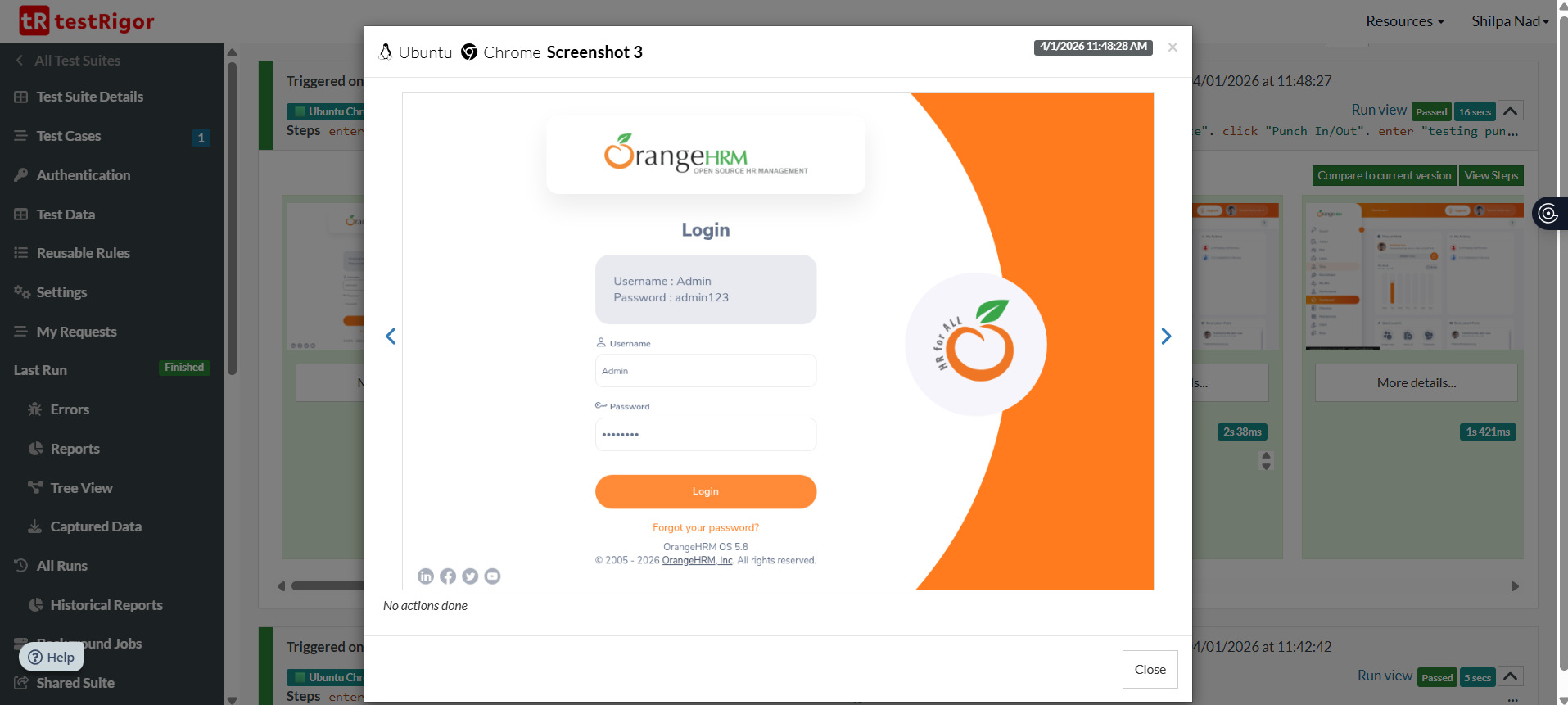
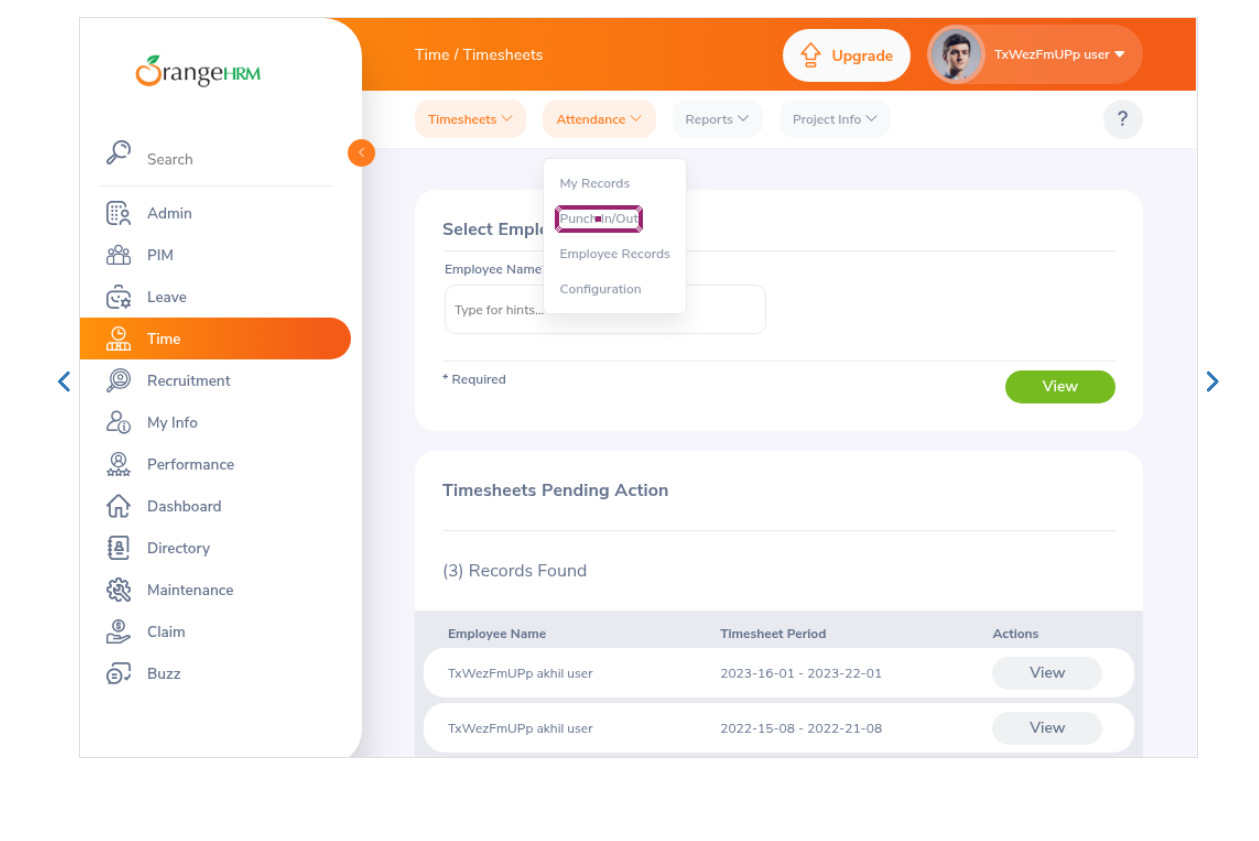
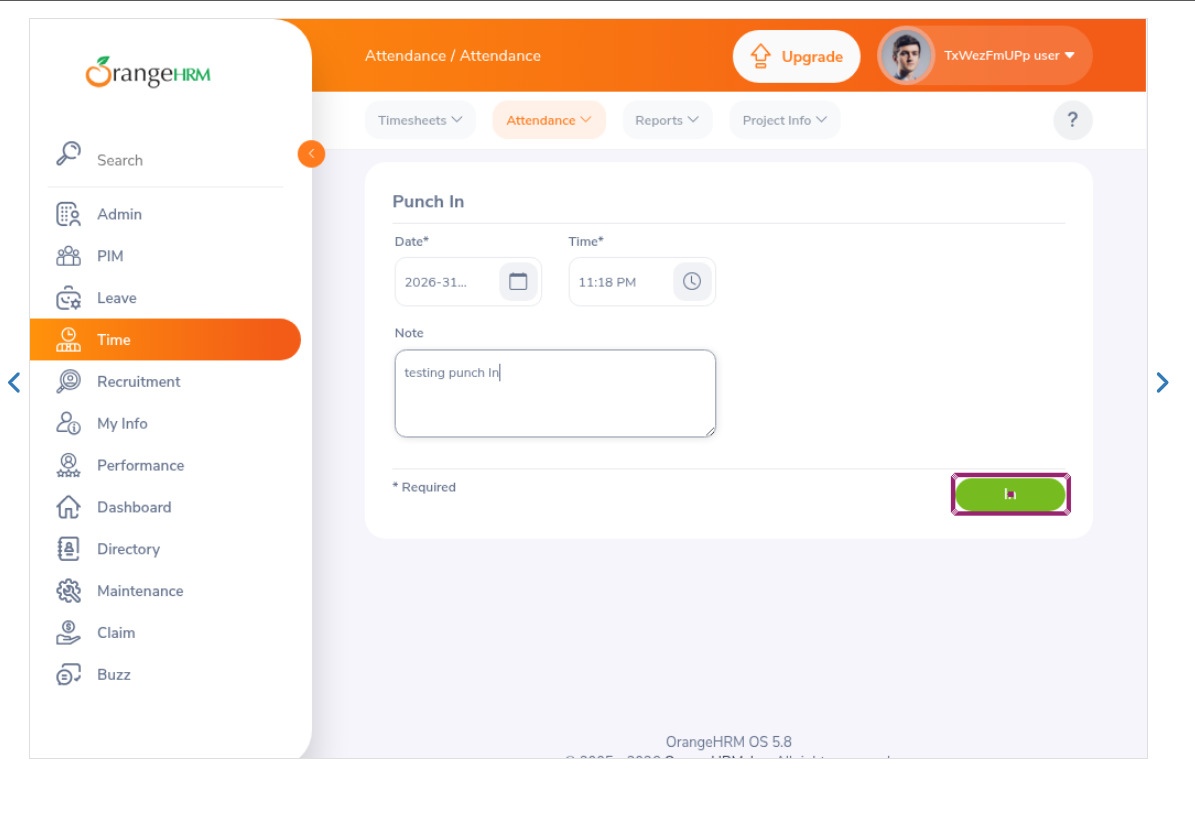
In a similar manner, you can automate other functions in this system, such as Leave, Performance review, etc.
Common Risks and Testing Pitfalls
When testing leave management, attendance, and performance review systems, certain risks and testing challenges should be given due attention. These challenges are as follows:
- Ignoring policy variations across regions.
- Not testing time zone differences.
- Overlooking year-end carry-forward logic.
- Missing edge cases in rating normalization.
- Skipping integration testing with payroll.
- Inadequate negative testing.
Best Practices for Designing Test Cases
Here are the best practices you can follow for designing test cases:
- Use boundary value analysis (leave limits, rating scales).
- Apply equivalence partitioning for leave types.
- Include negative and edge test scenarios for each module.
- Test real-world workflows end-to-end.
- Validate compliance with local labor laws.
- Include audit trail verification.
- Test concurrency scenarios.
Conclusion
Leave management, Attendance, and Performance Review modules are the backbone of workforce management systems. Discrepancies in these areas affect payroll accuracy, employee morale, regulatory compliance, and organizational trust. Therefore, comprehensive test coverage that validates the functionality, major workflows, edge cases, integrations, and non-functional aspects such as performance and security is required.
Well-designed test cases that cover the entire module ensure that policies are enforced correctly, data integrity is maintained, and employees experience a transparent and reliable system. By combining structured manual testing with strategic automation, organizations can significantly reduce defects, improve system reliability, and build stakeholder confidence.
Effective testing in these domains is not merely about verifying features; it is about safeguarding fairness, compliance, and organizational credibility.
Frequently Asked Questions (FAQs)
- Why is testing leave, attendance, and performance review modules important?
These modules directly impact payroll accuracy, employee satisfaction, and legal compliance. Errors or discrepancies in leave balances, attendance tracking, or performance ratings can lead to salary disputes, compliance violations, and reduced employee trust. Thorough testing of these modules ensures fairness, transparency, and policy enforcement.
- What edge cases should be tested in attendance systems?
Important edge cases include:
- Midnight crossovers for night shifts
- Daylight saving time changes
- Duplicate clock-ins
- GPS spoofing attempts
- Network failure during biometric capture
- Simultaneous multi-device login
- Which test cases are ideal for automation?
Automation is recommended for:
- Leave balance calculations
- Overtime computation
- Workflow approvals
- Rating calculations
- Policy enforcement rules
Manual testing is better suited for usability and exploratory testing. - What are common mistakes when testing HR systems?
Common pitfalls include:
- Ignoring time zone variations
- Skipping year-end carry-forward validation
- Overlooking edge cases in performance normalization
- Failing to test integration scenarios
- Not validating audit logs
| Achieve More Than 90% Test Automation | |
| Step by Step Walkthroughs and Help | |
| 14 Day Free Trial, Cancel Anytime |











