
Test Cases for Online Exam and Assessment Systems: A Functional Checklist
 |
These days, taking tests online isn’t something saved for backup options for colleges, high schools, and professional certifications, even big companies training their staff, because it’s simply how things work now. Whether it’s admission screenings or checking employee abilities, nearly all evaluations have shifted to digital platforms, putting more weight on those managing the process.

Imagine this: taking exams online without hiccups. That means checking if everything works right from login screens to submitting answers. Think about students using different devices, slow internet connections, and even accidental browser refreshes. Systems must keep track of progress no matter what happens. Some tests demand timed responses. Others require secure LMS (Learning Management System) environments where cheating is harder. Each situation needs its own check.
Panic spreads among students when an online exam platform crashes. Trust in the institution begins to fade fast. Support staff face a wave of frustration rolling in from every direction. Finding flaws before they matter this is what shapes how we write tests for online exams.
| Key Takeaways: |
|---|
|
Why Online Exam Testing Needs a Different Mindset
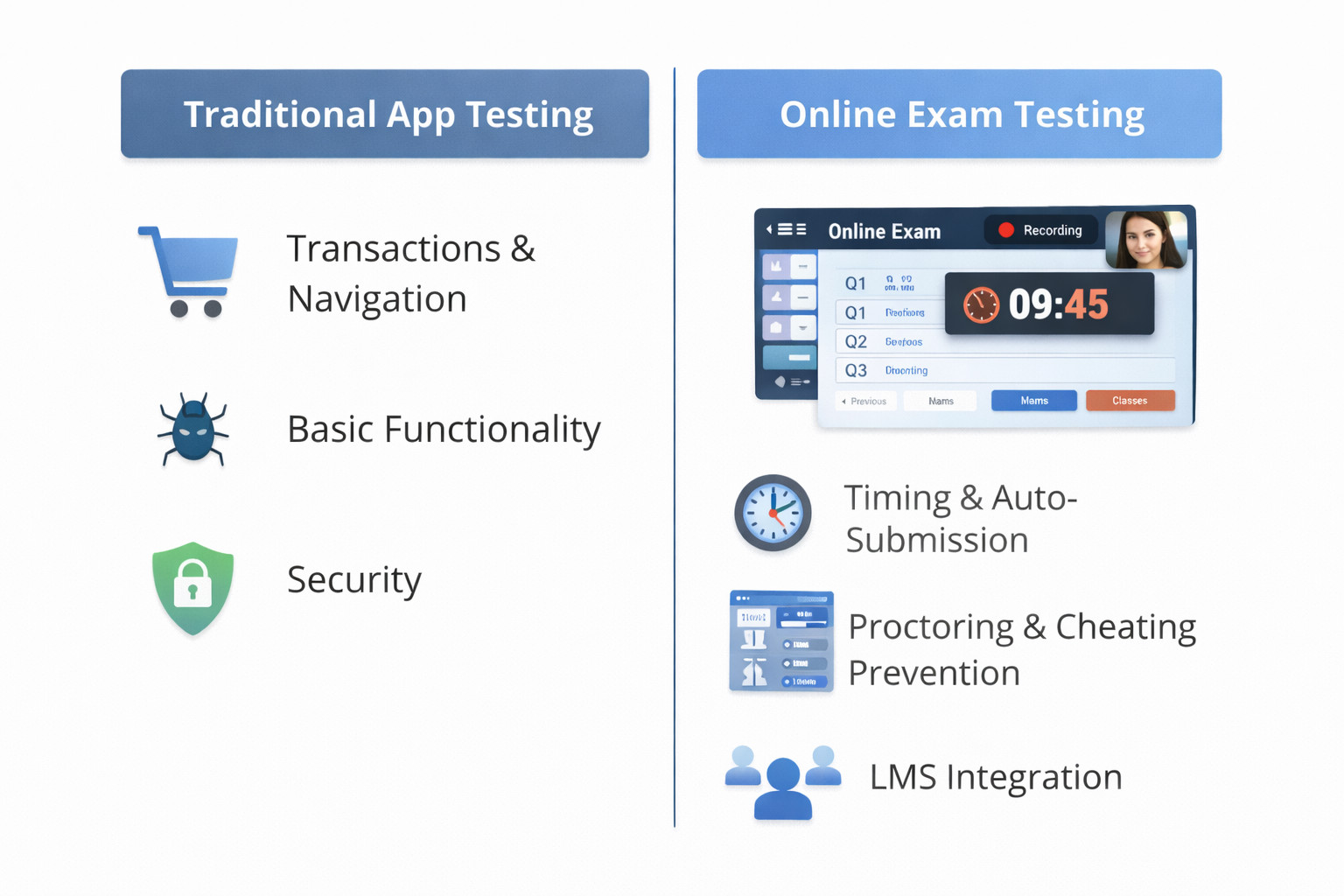
A fresh look at exams on the internet shows quirks unseen in everyday websites. What works for standard apps often misses the mark here.
Here’s why:
- You’re dealing with time-bound activities
- At any moment, a crowd of thousands could access the system together
- A single hiccup might undo everything a person worked for
- The system must work perfectly under stress
Besides this, testing systems usually come with features like:
- LMS integrations
- Proctoring tools
- Secure browsers
- Auto-submission logic
- Live monitoring dashboards
Online exam systems aren’t just validated one way. They face tests that look at function, speed, ease of use, safety, and consistency – all woven into one go-around. Finding clarity here means building each test step carefully.
Understanding Test Cases for Assessment Systems
A single step can show exactly what needs checking, how it’s done, and one clear result expected. Sometimes a few words lay out the action, the method, then point to the outcome meant to appear.
Still, grading setups demand more than surface checks. It isn’t only about whether a button responds. The real point is seeing how well a learner moves through every step of their exam – from first login to final submission.
Core areas your test cases must cover:
- Login and authentication
- Exam setup and configuration
- Question loading and navigation
- Timer behavior
- Answer saving and submission
- Result calculation
- Reports and analytics
- Error handling and recovery
Not every person follows rules when using a system, so testing must include actions that break norms alongside those that follow them, i.e., you must have both positive and negative test cases. Real behavior is messy, meaning checks need to cover mistakes just as much as correct steps. Expecting perfect input ignores how people actually act under pressure or confusion. Tests ought to reflect that reality.
Online Exam Testing: Key Functional Test Scenarios
Consider this first. Every exam setup needs these checks, no exceptions.
1. Student Login and Access Control
Verify each test case to make sure it covers what needs checking
- Valid login credentials work
- Wrong login details get rejected
- Expired accounts get locked out
- Once logged in, pupils see just the tests they must take. Access stays limited to what teachers have scheduled
- When time runs out, the session ends as expected
Odd how basic it seems, yet messed-up logins keep causing problems in test platforms.
2. Exam Launch and Guidelines
Once logged in, the student must be able to:
- See exam details
- Read instructions clearly
- Whenever it’s meant to begin, that is when you get to open the test booklet. Timing matters more than rushing ahead
- If the test has not begun, access gets denied
Timing checks matter most in test design. Questions stay hidden until it’s time – no exceptions. Only when allowed does a learner get access.
3. Question Navigation and Answer Saving
Problems often stay unseen. Check these points when testing:
- Switching from one question to another flows smoothly
- Your answers get stored without you needing to do anything
- Questions left blank remain that way
- Works just fine when you mark it for review
- Answers persist after refresh (if allowed)
Loss of answers impacts confidence quicker than anything else. That’s why testing demands a sharper eye here.
4. Exam Timer Validation (A Critical Section)
A glitched countdown hits hard when you’re mid-test. Nothing shuts down a digital exam faster than a timer gone wrong.
Timing validation on exams needs separate attention. Such a big deal that they earn their own spot.
Test cases should cover:
- The moment the test begins, so does the clock
- Even after reloading the page, the timer keeps going
- Timer syncs correctly on different devices
- When needed, alerts show up just in time
- When the clock runs out, the exam sends itself automatically
Try the edge case examples too
- What happens if the internet drops?
- Could a learner move between tabs? What happens then?
- Could the time setting cause issues? Maybe it depends on how clocks match up across devices.
A single glitch in timing can spiral fast into big trouble.
Quiz Application Testing: Beyond Simple MCQs
Modern quiz applications are not just multiple-choice anymore. They include:
- Drag and drop
- Complete each empty space
- Coding questions
- File uploads
- Audio/video responses
Few realize how much lies past just tapping those little circles on a screen.
Sample test cases:
- Verify drag-and-drop works on all browsers
- Validate what size files are allowed. See which formats work too
- Ensure code editors save work automatically
- Test audio recording permissions
- Check that preview runs without issues
A single kind of question won’t cover every possible mistake. Different formats break differently, so separate checks make sense.
LMS Testing Scenarios for Online Assessments
Nearly every web-based test now sits tucked within some kind of course software. Think Moodle or Canvas, common names, seen across schools. Blackboard still shows up often too. Even unique systems built just for one institution pop up regularly.
This brings an added level of difficulty.
Key LMS Testing Scenarios:
- The exam appears correctly in the course modules
- Permissions get checked before allowing entry
- Grades sync back to the LMS gradebook. They appear where teachers track progress. Every score updates automatically. Nothing needs manual entry
- Retakes follow rules
- Certificates generate correctly
- Progress tracking updates in real time
Focusing only on the exam misses key problems. Check where things connect; trouble often hides in those gaps.
Student Portal Functional Tests
Inside the student portal, life gets simpler. This space shows what your test setup really looks like.
Student portal functional tests should validate:
- Dashboard loads correctly
- Exam schedules for specific dates show up when they should
- Notifications are accurate
- Last login time shows up clearly
- Downloadable reports work
- Profile settings save correctly
Finding out how well people use the interface happens right here. When learners hesitate on which button to choose, their first thought may be that something failed.
Online Proctoring Test Cases (Often Overlooked)
Proctoring is becoming standard for high-stakes exams. Yet, figuring out if proctoring actually works? That part stays tricky.
Online proctoring test cases should include:
- Camera and mic permission checks
- Identity verification
- Face detection behavior
- Tab switching alerts
- Background noise detection
- Recording start and stop
- Proctor alerts and logs
Try the strict setting first, then switch to relaxed; exam conditions differ. See what happens if access gets blocked or a device stops working.
Concurrent User Testing: Preparing for Real Exam Day
Heavy traffic can crash exam systems when too many users join at once. Concurrent user testing stops disasters before they happen.
Validate these actions when testing:
- Login works under heavy load
- Questions load without delays
- Saved replies appear instantly, no waiting at all
- Timer stays accurate
- Submissions don’t fail
Finding problems this way happens when regular checks fall short. Must do? Yes. Skipping it? Not wise.
Negative Test Cases That Actually Matter
Bugs that otherwise passed QA undetected can pop up most often if someone acts unpredictably. Because of that, testing needs to include those negative actions:
- Browser crashes
- Internet disconnects
- Multiple logins
- Back button usage
- Reloading during submission
- Closing tab mid-exam
A strong test setup proves itself not just during smooth runs, but rather, in times of crisis. When glitches hit, the structure holds firm anyway.
Maintaining Test Cases for Evolving Assessment Platforms
Things shift fast in testing software. Different kinds of questions pop up now. Rules get updated without warning. Systems connect in ways they didn’t before. Safety steps grow stricter every few months.
That means test cases must be:
- Easy to update
- Easy to read
- Easy to reuse
Manual test cases become outdated fast, and automation scripts break even faster.
Here it is, the actual hurdle we face…
The Problem with Traditional Test Case Writing
Most people spend hours crafting tests manually. Caring for these demands still requires greater effort. Few people realize how much code it takes just to run these systems automatically.
That’s a problem when:
- Fresh changes pop up often around here
- Fresh guidelines pop up more than expected
- Teams are small
- Deadlines are tight
- Not everyone on the team is a coding genius
Far from just another tool, AI-driven test automation shifts how things work right here.
How AI-Powered Test Automation Helps Online Exam Testing
Modern tools need testers to build tough code. They allow people to create tests using everyday words. This is much like explaining steps to someone nearby.
This works well during online tests because:
- Flows are long
- Steps are repetitive
- Changes happen often
- Even people without tech skills can add value
AI-powered tools can help you to:
- Convert test cases into automated tests
- Update tests automatically when UI changes
- Run tests across browsers and devices
- Reuse test cases without rewriting them
- Reduce maintenance effort drastically
This is exactly when testRigor steps into the picture.
Using testRigor to Write and Automate Test Cases for Online Exams
A new way to handle testing shows up with testRigor. This tool runs on artificial intelligence, letting teams build checks using plain English. Writing code isn’t needed. Plain English gets the job done instead.
This changes things, quite a shift for online testing setups.
Test actions can be written as simple steps instead of complicated code
- “Login as student”
- “Wait until the timer ends”
- “Verify radiobutton is selected”
- “Check page contains …”
Because it gets the idea, testRigor builds an automated test from it.
Why testRigor Works Well for Exam Systems?
- Handles long, end-to-end flows easily in simple English
- Fits new interface updates without needing adjustments, thanks to the tool’s AI abilities to adjust to small UI changes
- Reduces maintenance drastically by removing dependency on UI element locators like XPaths, thus avoiding flaky test runs
- Fine on websites, works with phones too, handles data connections without fuss
- Allows non-technical testers to contribute
- Ideal for regression testing before every exam cycle
- Test all kinds of features – login with 2FA, AI features like chatbots and LLMs, dynamic images, table data, file upload/downloads, audio testing, UI testing, API testing, and more
- Integrates with other tools like those for CI/CD or test management to promote continuous testing
Due to testRigor’s simplistic approach to automated testing, focus shifts towards choosing and crafting effective tests, not wrestling with the technicalities of test automation. This leaves room for clearer priorities in checking software behavior.
Combining Manual and Automated Test Cases the Smart Way
Manual testing works better in certain cases. Some scenarios, like usability testing or real-world proctoring behavior, still benefit from manual testing.
A mix works well here. Sometimes combining ways makes sense. One method alone might miss something. Using two together often helps more. This way covers different angles at once
- Manual test cases for exploratory testing
- Automated test cases for regression and critical flows
- AI-powered tools to reduce maintenance effort
Freed from endless tedious work, testing grows smoothly using tools such as testRigor.
Testing Online Exams is About Trust
Truth be told, what really matters with online tests and LMSs is whether people believe in the system.
It’s common for students to rely on the system to keep their responses safe. If grading gets done right, that’s why educators rely on it. Big organizations rely on it working well when used a lot.
With good test cases, you can build this confidence in systems. Your test cases shape the platform’s reliability: be it checking logins, timing exams, working through LMS setups, watching online exams, or seeing how users interact at once.
Freed from old routines, today’s testing feels lighter when using AI-powered tools such as testRigor. Maintaining test cases day after day becomes less of a burden because the system adapts alongside changes.
Additional Resources:
- Why Testers Require Domain Knowledge?
- Functional Testing Types: An In-Depth Look
- Automating Usability Testing: Approaches and Tools
- Manual Testing vs Automation Testing: What’s the Difference?
| Achieve More Than 90% Test Automation | |
| Step by Step Walkthroughs and Help | |
| 14 Day Free Trial, Cancel Anytime |











