
Top Deployment Strategies: How to Test and Implement Them
 |
In modern software development, developing an application using high-quality code is only half the battle. The other half of that battle lies in how that code reaches production and is part of deployment strategies.
So, what is a deployment strategy?
It is the process of releasing a new version of an application to end users in a controlled, reliable, and low-risk manner.
| Key Takeaways: |
|---|
|
This article explores the most common deployment strategies, explains when to use each one, and, most importantly, details how to test applications effectively under each strategy.
Why is Deployment Strategy Important?
- How do users experience updates to an application?
- What happens if something goes wrong with the application?
- How quickly can we roll back the features or updates?
- Can old and new versions coexist in the same market?
- How much infrastructure overhead is required for deploying the application?
The entire testing process must align with these answers. For example, a strategy that runs multiple versions simultaneously requires robust backward-compatibility testing, while a high-risk strategy demands extensive pre-production validation.
Thus, a well-considered software deployment strategy is crucial for the success of any software delivery team.
- A deployment strategy ensures the software application is deployed consistently and repeatably, reducing the risk of errors and downtime.
- It allows teams to easily roll back to a previous version of the software in case of issues.
- A sound deployment strategy can be used to deploy software to different environments (e.g., development, staging, production) in a controlled and efficient manner.
- It allows teams to track and measure the success of their deployments easily.
- Teams can take advantage of modern deployment processes, such as continuous delivery and canary releases, to deploy their applications and gain the upper hand.
In essence, a carefully considered software deployment strategy ensures that software is delivered to customers quickly, safely, and with minimal disruption.
Deployment Strategies
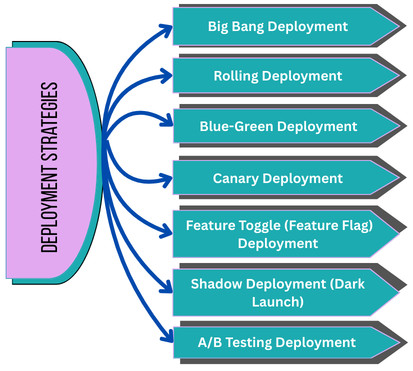
Deployment strategies involve various techniques, each offering different balances of speed, control, and safety for delivering updates to users. Here are the top 7 deployment strategies commonly used in modern software development:
1. Big Bang Deployment
A big bang deployment is a software deployment strategy in which all changes and updates are deployed to the production environment at once. It is the simplest and most traditional deployment strategy. In the big bang deployment strategy, the old version of the software application is completely replaced with the new version all at once. During this deployment, the system is taken offline (it is partially unavailable), the new version is deployed, and then users are able to use it.
- Small applications
- Internal tools
- Early-stage startups
- Low-traffic systems
- Applications with minimal dependencies
Testing Big Bang Deployment Strategy
Big bang deployments require significant coordination and testing to ensure that all changes work together as intended. They also need more testing and validation in a short period of time.
Because everything changes at once, testing must be extensive before deployment.
Key Testing Practices
- Comprehensive Regression Testing: Verifies that all existing application functionality remains functional. Mainly, automation is used to ensure this. Read: What is Regression Testing?
- End-to-End (E2E) Testing: Complete user workflows are tested across the system. Read: What is End-to-End Testing?
- Performance and Load Testing: This is performed to ensure that the new version can handle expected traffic immediately after release. Read: What is Performance Testing: Types and Examples
- Database Migration Testing: Database-related aspects such as schema changes, data integrity, and rollback scripts are validated to ensure the database is successfully migrated to the new version.
- Smoke Testing After Deployment: The Core functionality of the application is quickly verified using smoke testing before declaring the release successful. Read: What is Smoke Testing in Software QA?
Advantages
- The big bang deployment strategy is simple to implement.
- There is no need for duplicate infrastructure, as the old version is replaced immediately by the new version.
- The strategy is easy to understand and manage.
Disadvantages
- The big bang strategy has a high risk of failure.
- The downtime between the discontinuation of the old version and the deployment of the new version is often unavoidable.
- Rollbacks, if any, are complex to implement.
- Any defect in the application affects all users immediately.
2. Rolling Deployment
In a rolling deployment strategy, updates are gradually deployed to subsets of servers or instances in a sequential, controlled manner. Each subset is validated before deploying the next update. In this way, a new version is released incrementally across servers or instances. Some users may interact with the old version, while some may use the new version. But there is no downtime.
Rolling deployment strategy enables developers to quickly respond to issues during deployment. If an issue is detected during the deployment of one subset, the deployment process is halted, and the issue is addressed before the next deployment.
- Distributed systems
- Microservices architectures
- Cloud-based applications
- Systems requiring high availability
Testing Rolling Deployment
Testing for a rolling deployment must account for multiple versions running simultaneously. If issues are found in one subset, they must be addressed before the next deployment. Hence, the primary focus of testing is to ensure system stability when old and new versions coexist.
Key Testing Practices:
- Backward and Forward Compatibility Testing: In this, it is ensured that new services can interact with older ones, and vice versa, to maintain compatibility.
- API Contract Testing: APIs are validated to ensure compatibility during rollout. Read: API Contract Testing: A Step-by-Step Guide to Automation
- Canary-Style Validation (Subset Monitoring): Early instances of errors and issues are monitored before proceeding with the next steps. Read: What is Canary Testing?
- Data Consistency Testing: The Database and its related aspects are tested to ensure that they behave correctly with mixed versions.
- Observability Testing: Logs, metrics, and alerts are validated during partial deployment.
Advantages
- There is no downtime in rolling deployment as old and new versions coexist.
- There is a gradual exposure to risk.
- Rollback in a rolling deployment is easier than in a big bang deployment.
- Developers can quickly respond to issues or errors during deployment.
Disadvantages
- There may be a version inconsistency.
- As new and old versions coexist, deployment requires backward compatibility.
- There is a need for more complex testing and monitoring.
3. Blue-Green Deployment
- Blue: Current live version or the old version.
- Green: New version being prepared.
With this deployment strategy, you have both the old and new versions of the software running side by side. Blue-green deployment strategy is also known as the red/black deployment strategy. In this case, the stable, or older version, is referred to as red (blue) and the newer version is black (green).
The new version is thoroughly tested before deployment, and once it meets all the requirements, the load balancer automatically switches traffic over to it from the older version.
For the blue-green deployment strategy to work, both environments must use the same database schema to share data seamlessly, or there must be a system to synchronize schema versions.
- Mission-critical systems
- Applications requiring zero downtime
- Enterprises with mature DevOps pipelines
Testing Blue-Green Deployment
Blue-green deployment enables production-level testing before release. Its primary focus is to ensure the green environment is truly production-ready before switching traffic.
Key Testing Practices:
- Production-Like Validation: Full regression tests are executed on the green environment before deployment. Read: Production Testing: What’s the Best Approach?
- Smoke and Sanity Testing Before Traffic Switch: Core functionality and integrations of the application (new version – green) are verified before switching the blue environment. Read: Smoke Testing vs. Sanity Testing
- Database Migration and Rollback Testing: Database changes are tested to ensure they are compatible with both versions.
- Traffic Switch Testing: Load balancers, DNS changes, and failover mechanisms are thoroughly tested before traffic is switched from blue to green.
- Post-Switch Monitoring: Once switching is complete, errors, latency, and user behavior are tracked and monitored immediately after release.
Advantages
- There is zero downtime in the blue-green deployment strategy.
- Instant rollback is triggered by switching traffic back when issues or blockers occur.
- The testing environment used is production-like.
- Blue-green deployment allows for quick updates and rollouts.
Disadvantages
- This deployment strategy may incur higher infrastructure costs.
- It requires strong environmental parity.
- Blue-green deployment involves complex database migrations.
4. Canary Deployment
In the canary deployment strategy, a new version is deployed, and production traffic is gradually shifted from the older version to the new one. For example, during deployment, the older version might still handle 75% of traffic, while the newer version handles the remaining 25%.
The canary approach helps test the stability of the new version using live traffic from a subset of end users at different levels as the deployment progresses.
Canary deployment helps improve performance monitoring and makes it easier to roll back the software if the new version doesn’t work out.
- High-traffic consumer applications
- Risk-sensitive environments
- Continuous delivery pipelines
Testing Canary Deployment
In canary deployment, testing shifts from pre-deployment to real-time validation. Testing is focused on identifying issues early using real production data with minimal impact on the system.
Key Testing Practices:
- Automated Health Checks: System stability is continuously validated during rollout.
- A/B Comparison Testing: Metrics between the canary and stable versions are compared regularly.
- Error Budget Monitoring: This type of testing is performed to monitor error rates, latency, and crashes.
- Feature-Specific Validation: Testing focuses primarily on newly introduced functionality. Read: Functional Testing Types: An In-Depth Look
- Fast Rollback Testing: This practice ensures that the canary can be disabled instantly.
Advantages
- Issues can be detected early using the canary deployment strategy.
- There is a reduced blast radius.
- Real user feedback can be obtained using the canary deployment strategy.
Disadvantages
- Monitoring in the canary deployment strategy can be complex.
- It requires sophisticated traffic routing.
- It is harder to test edge cases in this type of deployment.
5. Feature Toggle (Feature Flag) Deployment
Feature toggle (aka Flags/Dark Launching) is a deployment strategy in software development that involves releasing a new version of software alongside the existing version without any users being aware of the latest version. The new version is deployed in a shadow or dark environment and receives live traffic from the existing environment without impacting users.
Features can be turned on or off dynamically via configuration.
- Continuous deployment environments
- Experimentation and A/B testing
- Gradual feature rollouts
Testing Feature Toggle Deployment
In feature toggle deployments, testing must validate both feature states. The testing aims to prevent hidden bugs caused by unused or conflicting flags.
Key Testing Practices:
- On/Off State Testing: Application behavior is validated by enabling and disabling features.
- Combinatorial Testing: The application is tested by verifying interactions between multiple feature flags. Read: Feature Flags: How to Test?
- Permission and Access Testing: By performing permission and access testing, it is ensured that flags are activated only for intended users.
- Rollback Simulation: Application stability is tested by simulating rollback. This is done by disabling features during testing.
- Flag Lifecycle Testing: Once the application is deployed, flags are removed.
Advantages
- The feature toggle strategy decouples deployment from release.
- Features can be enabled or disabled instantly.
- This deployment strategy supports experimentation.
Disadvantages
- The feature toggle strategy suffers from code complexity.
- There is a risk of technical debt if flags are not cleaned up.
- It requires disciplined management.
6. Shadow Deployment (Dark Launch)
In the shadow deployment strategy, the new version is deployed in parallel with the old version, but users do not see the new version’s output. The system compares results silently. Users do not have access to the new version right away. A copy or “fork” of the old version’s requests is received by the shadow version (new version) to verify if it handles them correctly.
This strategy can be used to test new features without waiting for them to go through QA testing.
Shadow deployment can also be used to monitor system performance and conduct stability tests. Still, it can be costly and complex to set up and can cause serious issues if not handled properly.
- Large-scale systems
- Algorithm or logic changes
- Risky refactors
- Machine learning systems
- Critical systems where performance validation is essential.
Testing Shadow Deployment
In shadow deployment, testing focuses on output comparison and performance. It validates correctness under real-world conditions without exposing users to risk.
Key Testing Practices:
- Response Comparison Testing: This method compares the outputs from old and new versions.
- Performance Benchmarking: Latency and resource usage for both versions are measured to test performance.
- Error and Exception Tracking: This technique identifies discrepancies in the shadow version without exposing them to users.
- Data Integrity Testing: It ensures shadow processing does not affect production data.
Read: What is Dark Launch and How to Test it?
Advantages
- This deployment strategy has zero user impact.
- Real production data is used for testing the shadow deployment.
- High confidence releases can be achieved.
- There is a comprehensive performance analysis.
Disadvantages
- The shadow deployment strategy incurs high infrastructure costs and double resource consumption.
- Implementation of the strategy is complex.
- It is hard to debug differences.
7. A/B Testing Deployment
A/B Testing Deployment strategy involves deploying two different versions of a software application to a small subset of users (test group) and comparing them to measure their performance and user experience.
The test group is divided into two groups, group A and group B, with each group receiving a different version of the software application. Both groups then determine which version performs better. The comparison is based on metrics such as conversion rates, user satisfaction, and user engagement.
- Product-focused companies
- SaaS platforms
- Applications where user behavior data drives business decisions.
Testing A/B Deployment
The two versions, A and B, of the same software are compared in this deployment strategy to determine which version performs best.
Key Testing Practices:
- Feature Testing and Validation: New features are tested in both versions by respective test groups, and implementation is validated.
- User Experience Optimization: Application versions are tested to verify user experience optimization.
- Performance Comparison: The performance of both versions is compared to determine which version is better in terms of performance.
Advantages
- Data-driven deployment decisions are made with A/B deployment.
- Risks are reduced due to controlled exposure.
- Developers can gather valuable insights into user behavior.
- The deployment can run for extended periods.
Disadvantages
- Infrastructure requirements are quite complex in A/B testing deployment.
- Sophisticated analytics are required to analyze and gather insights.
- Higher operational overhead as two versions of the application are deployed.
- There may be user experience inconsistencies.
Choosing the Right Deployment Strategy
There is no universally “best” deployment strategy. However, you can choose the right one depending on several factors as follows:
- Size and Complexity of the Project: You can use a simpler deployment strategy if your project is relatively small and has minimal dependencies. A blue-green deployment or a rolling deployment is the best choice for such projects. Larger and complex projects may use strategies like A/B testing or canary deployment.
- Level of Risk Tolerance: Evaluate the team’s tolerance of risk. If it is low, then use deployments like rolling that carry less risk of disruption. With high risk tolerance, deployment strategies like canary can be used that deliver faster feedback and reduced downtime with higher risk.
- Desired Level of Control: Various strategies offer varying levels of control. For instance, blue-green deployment allows you to switch between two identical environments, while canary deployment allows gradual rollout with testing in a live environment. Depending on your project requirements, you can choose the deployment strategy.
- Speed of Deployment: Speed is the primary criterion for the successful deployment of applications. Some deployment strategies, like canary, offer rapid delivery to production, while strategies like A/B testing are slower. Choose the deployment strategy that best optimizes your delivery process.
Test Automation for Smooth Deployments
- Validate every deployment.
- Set up special instructions to ensure that test suites are run after each deployment.
- Automatically check a variety of repetitive features in the application.
- Save manual efforts for more cognitive tasks.
You can further improve your efficiency by opting for test automation that involves AI. With AI, the process of writing test cases, executing them, and maintaining them becomes way easier, provided you use a good tool. One such tool is testRigor.
- This cloud-based testing platform offers generative AI-based testing.
- You can write automation tests in plain English language. This means all team members can participate in the test automation process, setting appropriate tests that validate what the user really wants.
- Test a variety of scenarios including AI features, across various platforms and browsers with a single tool.
- Integrate with a whole lot of tools, including those meant for CI/CD. This means continuous testing at ease.
- Automate different types of tests that check UI, APIs, end-to-end flows, functionalities, regressions, backend, and more.
- Save time on test maintenance as this tool offers smart AI features to combat problems like flaky test runs, changing UI elements, and more.
Conclusion
Deployment strategies are a critical part of the software quality process. Each strategy offers different features and changes how risk is introduced, how failures are handled, and how testing must be designed. Progressive deployment strategies such as blue-green, canary, and feature toggles offer good features for modern software development, combined with robust automation and observability.
Effective testing must be deeply integrated into the deployment process to ensure that innovation is not at the cost of reliability.
| Achieve More Than 90% Test Automation | |
| Step by Step Walkthroughs and Help | |
| 14 Day Free Trial, Cancel Anytime |











