
What is Quishing? How to Test?
 |
Cybercriminals are constantly evolving their methods, and one of the fastest-growing threats today is Quishing, a type of phishing attack delivered through QR codes. QR codes are integrated into everyday workflows, and what once was a simple marketing convenience has become a dangerous vector for credential theft, malware installation, and social engineering.
| Key Takeaways: |
|---|
|
This article provides a comprehensive review of quishing, including its functionality, effectiveness, real-world attack examples, and a detailed examination of how to test for quishing vulnerabilities using both manual and automated methods.
What Is Quishing?
Quishing (QR phishing) is a type of phishing attack technique in which a malicious actor uses a QR code to direct users to visit a malicious website or download a virus-filled document.
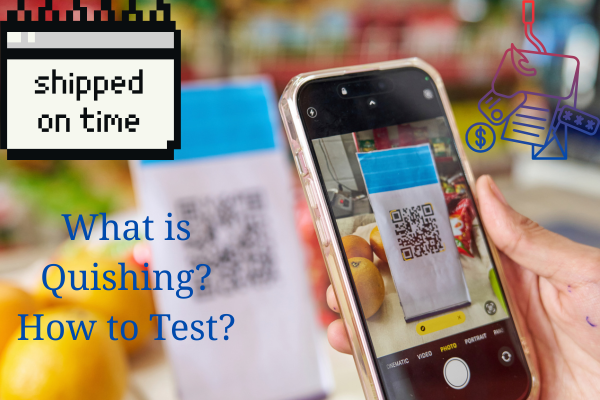
In quishing attacks, the victim is tricked into scanning a QR code instead of clicking a link in an email or SMS that leads to:
- A fake login portal to steal credentials
- A malware-infected website
- A payment scam website
- A malicious file download
- An attacker-controlled communication channel (WhatsApp, Telegram, etc.)
Quishing mainly exploits visual ambiguity and social engineering for attacks, as users often trust QR codes and cannot “see” the URL behind them before scanning.
What are QR codes?
QR codes, also known as Quick Response codes, are two-dimensional barcodes that can be easily scanned with a camera or a code reader application. QR codes are capable of storing large amounts of information, including URLs, product details, or contact information.
Scanning technology enables smartphone cameras or code readers to quickly and easily access the website to which the URL points.
Why QR Codes Are Attractive to Attackers
QR codes are everywhere, on menus, packaging, login pages, parking kiosks, airplane seats, and even on ID badges, making them a prime target for attacks.
Key reasons attackers prefer QR codes:
- Anonymity and Evasion: Traditional phishing filters can detect URLs in emails. However, QR codes are images, and many email security tools are unable to decode them automatically. This allows malicious URLs to bypass detection.
- User Behavior and Trust: People, by default, assume QR codes are safe because they are widely used for convenience.
- Visual Obfuscation: Users cannot verify a URL hidden inside QR codes without scanning. Since QR codes are widely used, people often neglect to check the URL due to various factors, such as a lack of time and limited knowledge. But most of the time, it is sheer negligence.
- Cross-Device Exploitation: Users often switch their mobile devices to use QR codes, as they do not work on all types of devices. Sometimes a quishing attack occurs on a device that has fewer security controls and lacks enterprise monitoring tools.
- Ease of Deployment: QR codes can be printed easily and pasted anywhere. Hence, attackers find it easy to print malicious QR codes and stick them over legitimate ones in:
- Public transport stations
- Parking meters
- Restaurants
- Office buildings
- Conferences
- Printed mailers and invoices
This makes quishing extremely scalable and difficult to trace.
How Quishing Works
Here are the general steps a quishing workflow follows:
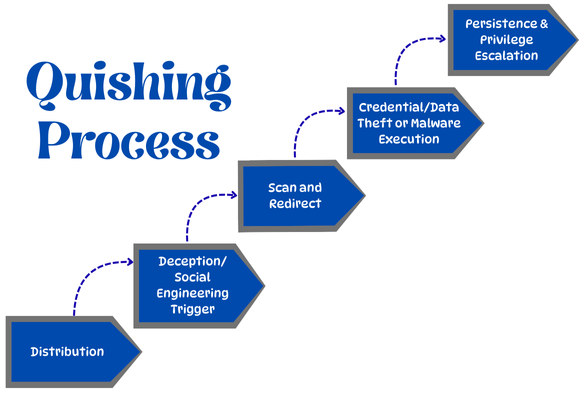
Step 1: Distribution
Scammers create malicious QR codes and distribute them physically (sticking them on ATMs, meters, menus, and posters) or digitally (via emails, texts, and social media).
Step 2: Deception/ Social Engineering Trigger
This malicious QR code is paired with a compelling pretext or some enticing promise, such as discounts, parcel tracking, or enticing messages like:
- “Reset your password to avoid account suspension.”
- “Update your Microsoft 365 login details.”
- “Scan to pay for parking.”
- “Claim your package.”
- “View confidential HR documents.”
This encourages users to scan QR codes.
Step 3: Scan and Redirect
The user scans the QR code using their phone, which redirects to a malicious but convincing URL. It may imitate:
- Office 365 / Google Workspace login
- Bank login pages
- Payment portals
- Company VPN login
- Mobile app download page
Step 4: Credential/Data Theft or Malware Execution
The fake site prompts users to enter sensitive information like passwords, credit card details, or automatically download harmful software, leading to identity theft or financial fraud.
Step 5: Persistence and Privilege Escalation
Attackers often use stolen credentials to escalate privileges inside the organization.
Examples of Real-World Quishing Attacks
Here are some real-world examples of quishing attacks:
-
Fake Microsoft 365 Login PagesThis is the most common quishing attack that targets corporate email credentials. Employees scan a QR code that takes them to a near-perfect replica of their organization’s Microsoft 365 login page, which is usually a scam.
-
Parking Fee ScamsFake QR codes are placed on parking meters that victims scan and pay. The URL is a fraudulent payment portal that sends money to scammers.
-
Restaurant / Menu Redirect ScamsAttackers replace QR codes on restaurant menus with malicious ones to steal payment information or install spyware.
-
Package Delivery FraudA package has a “missed package” note with a QR code leading to a phishing portal seeking:
- Personal details
- Credit card numbers
- Amazon/Apple login credentials
Texts and emails claiming package delivery issues (e.g., USPS) with links to fake sites are also used to steal info. -
Enterprise Badge or Meeting Room QR CodesSome organizations use QR codes for Wii-Fi access, visitor registration, document downloads, and meeting room scheduling.Attackers may replace them with QR codes that exfiltrate sensitive information.
Who is at Risk of Quishing?
Everyone who uses the internet is at risk of phishing or quishing. Still, younger adults, employees in finance, healthcare, and retail, as well as users of social media/SaaS platforms, are often higher targets, falling for targeted attacks or general scams that exploit urgency, curiosity, or impersonation to steal data, money, or accounts via email, text, or social media.
The following groups face higher exposure:
- Millennials and Gen Z: Young adults (between 18 and 40 years old) are often more susceptible due to less world experience with scams, but anyone can be tricked.
- Industries: Regulatory industries, such as financial Services, Healthcare, Retail, and E-Commerce, handle valuable data, making them prime targets.
- Executives: CEOs and senior leaders (“whales”) are targeted in whaling attacks for high-value access.
- Tech-Savvy Users: Employees using modern tools (SaaS, cloud services) are targets for “SaaS-to-SaaS” attacks.
How to Test/Defend Against Quishing
Defending against phishing requires a combination of vigilance, education, and technical methods. Key steps involved in testing/defending against quishing are:
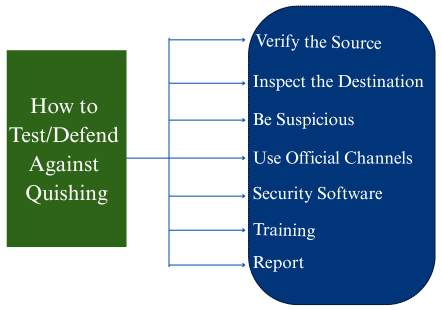
- Verify the Source: Always question the origin of the QR code; don’t trust stickers on public kiosks or codes in unexpected emails.
- Inspect the Destination: Before scanning, try to see the URL (some apps show it). After scanning, check the URL in your browser for typos, unusual domains, or the absence of https://.
- Be Suspicious: Be wary of urgent requests, prize offers, or unusual attachments within emails or messages. Do not click on them blindly before verifying their safety.
- Use Official Channels: For services such as parking or payments, use the official app or type the URL directly, rather than scanning a QR code on a sticker.
- Security Software: Utilize mobile security apps that can block malicious websites and keep your device up to date. Use MFA on all possible accounts for an extra layer of security.
- Training: Organizations should provide regular training that highlights common red flags, such as urgency and unusual sender addresses.
- Report: Report suspicious QR codes and emails to your IT department or relevant authorities.
Quishing Testing Strategies
Quishing testing strategies involve technical safeguards, employee education via simulations, and policy development to assess and build organizational resilience against malicious QR codes. The testing strategies are classified into two types, as discussed.
Simulated Attacks and User Training
This is the most effective strategy, which involves running controlled quishing simulations to measure employee vulnerability and improve awareness. The following simulations are executed as part of this strategy:
- Email-Based Simulations: Mock phishing emails are sent with embedded malicious QR codes (as images or in attachments, such as PDFs) that direct users to safe, simulated landing pages. These pages typically mimic standard lures, such as “voicemail notifications,” “MFA updates,” or “invoice access portals.”
- Physical Simulations (Sticker Campaigns): Fake but clearly marked (e.g., with “DON’T SCAN!” headlines), QR code stickers are placed in high-traffic physical areas like restrooms, elevators, printers, or parking stations. This helps to analyze real-world behavior at the point of scanning.
- Measurement and Feedback: Metrics such as scan rates, reporting rates, and time-to-report for employees are tracked and monitored. Employees who fall for the simulation should be automatically enrolled in short, focused micro-lessons on spotting red flags.
- Training Content: Education in quishing should cover key red flags:
- Unsolicited QR codes, especially those asking for credentials or payment info.
- Signs of physical tampering (stickers over legitimate codes).
- Generic sender names, urgency-based language, and misspelled URLs on the destination page.
Technical and Policy-Based Strategies
Technology and policy help provide a layered defense that can be tested and audited for effectiveness.
- Email Security Configuration Testing: Use email security tools to detect and decode QR codes within email bodies and attachments, flagging or blocking those linked to malicious URLs.
- Endpoint and Network Controls: Test if access to known malicious domains is blocked by endpoint protection and DNS/web filtering solutions after a user scans a QR code.
- MFA and Identity Layer Testing: Enforce a strong, phishing-resistant multi-factor authentication (MFA) across the organization to minimize the impact of compromised credentials obtained via quishing, as attackers would still need the second authentication factor.
-
Policy Audits and Enforcement:Conduct and enforce the following:
- Audit public-facing QR codes to check if they have been tampered with.
- Verify that official company communication guidelines prevent the use of unexpected QR codes for sensitive actions.
- Test incident response plans to ensure clear procedures are in place for handling a suspected quishing incident.
By combining these proactive testing and defense strategies, organizations can build a robust defense mechanism against evolving quishing threats.
The Future of Quishing
As QR code adoption continues to grow, quishing attacks will become:
- More personalized and targeted
- More automated
- More difficult to identify
AI-generated QR phishing pages will accurately mimic organizations. Attackers will increasingly target:
- Mobile payments
- Contactless authentication
- Digital identity systems
- Smart device onboarding
Organizations must therefore integrate quishing testing into their overall cybersecurity lifecycle right from the beginning.
Conclusion
Quishing represents one of the fastest-growing cybersecurity threats today that has been thoroughly underestimated. By hiding malicious URLs within QR codes, attackers can bypass traditional defenses and target users. Understanding how quishing works and how to test for it is essential for any organization seeking to secure its email systems, physical environment, and mobile devices.
By employing various testing strategies, organizations can develop a robust defense strategy and substantially reduce the risk of falling victim to QR-based phishing attacks.
Additional Resources
- The Significance of Cybersecurity in Software Development
- Cybersecurity Testing: Impact of AI
- Top Skills for Becoming a Successful Ethical Hacker
- QR Code Testing Made Easy: Tips and Tools
- How to do SMS, 2FA, and phone call testing using testRigor?
| Achieve More Than 90% Test Automation | |
| Step by Step Walkthroughs and Help | |
| 14 Day Free Trial, Cancel Anytime |











