
What Is Progression Testing? Definition, Examples, and How It Compares to Regression Testing
 |
Software development is a continuous and iterative process. New features are often added, bugs are fixed, performance is improved, and user experiences are refined with every release. However, every update and new feature brings with it excitement and a hint of uncertainty. Will the feature work as planned? Will the update serve its intended purpose or cause unintended consequences? While these changes are essential for growth, such questions and doubts linger every time new updates or features are introduced. This is where progression testing plays a pivotal role.
| Key Takeaways: |
|---|
|
This article explains what progression testing is, why it matters, how it differs from other types of testing, when and how it should be performed, and best practices for implementing it effectively.
What is Progression Testing?
Progression testing is a software testing technique to verify that changes made to an application, including new features, enhancements, bug fixes, or configuration updates, do not negatively impact existing functionality.
It validates and ensures that the system has progressed well from one version to the next.
In simpler terms, progression testing answers this key question:
“Does the software work as expected after making changes to it?”
Progression testing (aka incremental testing) is a pivotal concept in software testing. It serves as a bridge between innovation and stability, integrating multiple testing techniques to deliver a reliable and user-friendly software.
Progression testing = Functional Testing + Regression Testing + User Acceptance Testing
Here,
- Functional Testing: Validates if the new features or changes meet the specified requirements.
- Regression Testing: Verifies that the new updates/features do not disrupt existing functionalities.
- User Acceptance Testing (UAT): Ensures that the software works as intended and meets end-user expectations.
With the above combination, progression testing helps maintain software quality while embracing changes.
Although progression testing is often used interchangeably or closely associated with regression testing, progression testing emphasizes forward movement or progressing forward and validation of system stability as the product evolves.
Key Aspects of Progression Testing
Here are some of the key aspects of progression testing:
- Focus: Progression testing focuses on new functionalities, changes, and their interactions with the system.
- Goal: The objective is to confirm that new features meet requirements and don’t break any existing functionality.
- When: Progression testing is performed during development of new features, system integration, and incremental builds.
- Activities: This involves creating new tests, conducting exploratory testing, and identifying bugs in new code.
- Relation to Regression: While regression testing is the “old stuff” testing to ensure it still works, progression testing is for the “new stuff”.
Who Performs Progression Testing?
QA testers, including manual and automation engineers, typically perform progression testing. Developers often perform initial checks to ensure that changes are stable before passing them to the QA team.
Product managers and end-users sometimes participate during UAT to provide final validation, ensuring the software meets real-world needs. Together, these team members ensure that every update works and delights the users it serves.
Why Progression Testing Is Important?
Modern software systems are frequently updated, complex, and interconnected. If not tested thoroughly, even small changes can lead to serious issues in production. Progressing testing is crucial in this case as it:
- Prevents Unexpected Failures: Progression testing detects issues that usually have ripple effects across the application and prevents unexpected failures that may happen in production.
- Ensures Product Stability: When the application is updated with new features or other changes, the core functionality must remain stable to maintain user experience. Progression testing ensures the stability of this product. It also ensures that applications with a parent-child module relationship remain stable.
- Protects Business Reputation: It identifies issues early and hence protects business reputation, prevents revenue loss, and customer dissatisfaction.
- Supports Continuous Delivery: Progression testing, when integrated with CI/CD environments, enables safe and frequent releases.
- Reduces Cost of Fixes: Identifying issues early in the development lifecycle is significantly cheaper than fixing them after release.
- Integrates Modules Seamlessly: Progression testing ensures smooth integration of the new implementation with existing modules, preventing disruptions in the software’s overall functionality.
- Isolates Issues: With progression testing, it becomes easier to pinpoint the specific change responsible for an issue.
- Enhances Reliability: It focuses on functional, regression, and user acceptance testing, and guarantees new additions don’t compromise existing features, ensuring overall software reliability.
Progression Testing vs. Regression Testing
Progression testing is often used interchangeably with regression testing. However, there is a subtle distinction between them. The following table shows the key differences between the two:
| Aspect | Progression Testing | Regression Testing |
|---|---|---|
| Focus | Overall system behavior when new changes are introduced. | Ensures old functionality still works, and the system is stable. |
| Perspective | Forward-looking with emphasis on system evolution. | Backward-looking, stresses existing features. |
| Scope | May include new and existing features. | Typically focuses on existing features. |
| Objective | Validates correct system progression and ensures the new additions harmonize within the system. | Detects unintended side effects and confirms that existing features remain intact after code changes. |
| Test Cases | Creates test cases for new modules. | Reuses and reruns existing test cases. |
| Usefulness | Crucial during system integration and new feature addition. | Vital after code changes or bug fixes. |
| Risk Mitigation | Aims to prevent issues stemming from new integrations. | Guards against potential regressions due to code changes. |
| Automation Scope | Often involves manual testing for unique scenarios or edge cases. | Strongly benefits from automation for repetitive regression suites. |
Progression testing often involves regression testing, but with more emphasis on system evolution and readiness.
When To and Not To Perform Progression Testing?
Progression testing is not a one-time task. It is performed continuously throughout the software development lifecycle (SDLC).
When to Perform Regression Testing
Here are some common scenarios when progression testing should be performed:
- After the addition of new features
- After fixing bugs
- After code refactoring
- After integration of third-party tools or APIs
- After database or configuration changes
- Before User Acceptance Testing
- Before major release or hotfix deployments
Progression testing is automatically triggered as part of the build or deployment pipeline in Agile and DevOps environments.
When Not to Perform Progression Testing
While progression testing ensures software quality and stability, there are scenarios where it may not be the best approach. The following are such scenarios:
- Early development stages are during which unit testing and stabilization are more effective.
- For minor cosmetic changes that don’t impact functionality or performance of the application.
- When the base software is unstable.
- When testing prototypes or rapid iterations, they are subject to frequent changes and are better suited for exploratory or ad hoc testing.
- In situations where tight deadlines or resource constraints may necessitate prioritizing other testing types.
Types of Testing Included in Progression Testing
Progression testing combines several types of testing, depending on the changes made to the system. The following table summarizes the testing types included in progression testing:
| Testing Type | Used For |
|---|---|
| Functional Testing | It ensures that all features, new and existing, work according to requirements. |
| Regression Testing | Often performed alongside progression testing, it confirms that unchanged functionality remains unaffected. |
| Integration Testing | Verifies interactions between modules, services, or systems after changes. |
| Smoke Testing | Quick checks on new features and builds to ensure the application is stable enough for deeper testing. |
| Sanity Testing | Verifies that specific fixes or enhancements behave correctly. |
| Performance Testing (Selective) | Ensures changes have not affected (degraded) system performance. |
| Incremental Testing | Test modules sequentially after integration, starting with parent/child or standalone components and building up the system. |
| Exploratory Testing | Unscripted testing technique to discover unexpected behavior in new areas. |
| New Feature Testing | Creating and executing test cases specifically for newly added functionalities. |
| System Testing | Testing the complete, integrated system, including functional, non-functional, and end-to-end aspects. |
How to Do Progression Testing?
Progression testing can be done either manually or using automation. Here is the sequence of steps for performing progression testing using manual and automated testing:
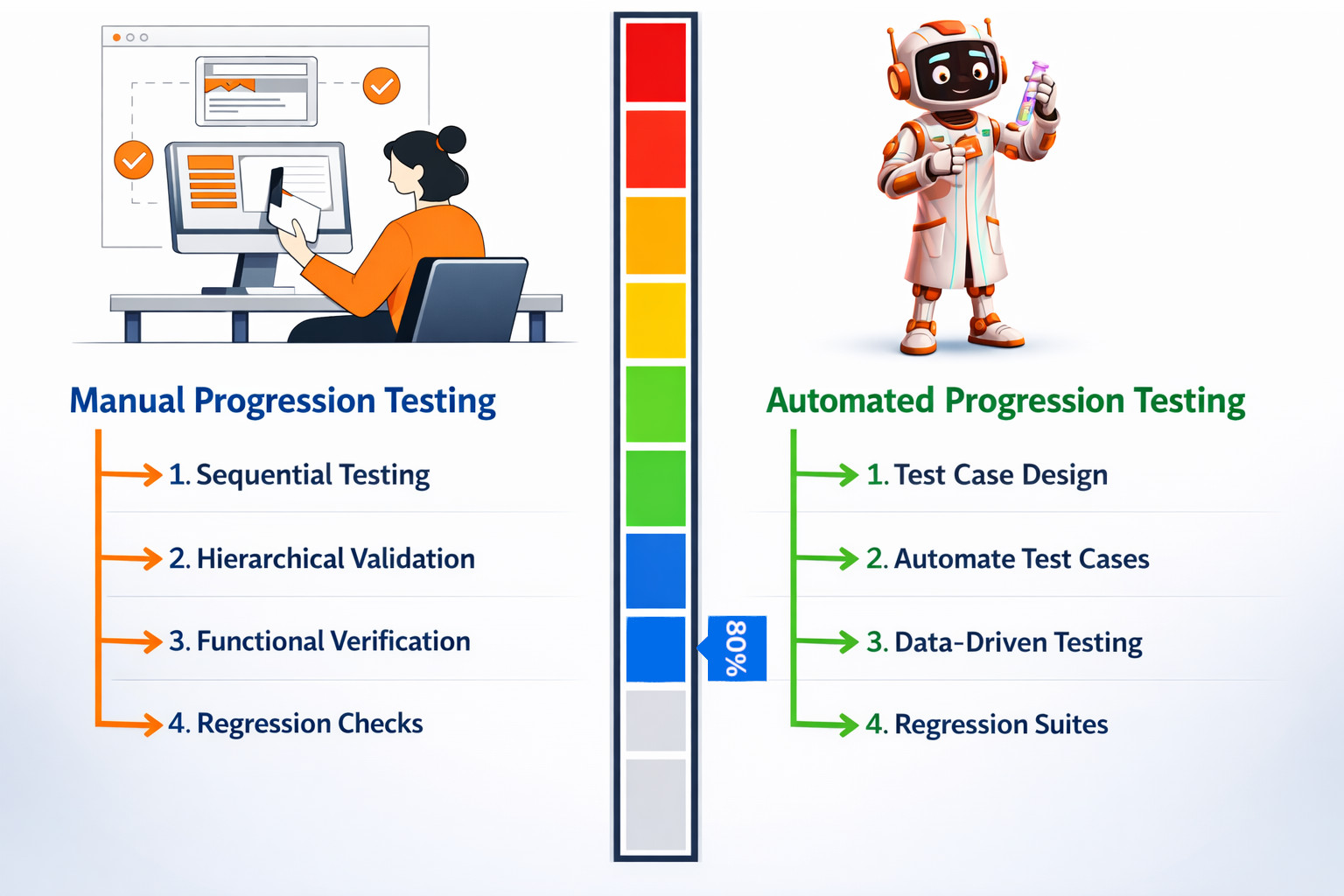
Manual Progression Testing
Here are the steps for manual progression testing to evaluate software modules:
- Sequential Testing: Test each module individually to ensure the new code integrates smoothly with the existing system.
- Hierarchical Validation: When an application has parent-child modules, assess related modules first to maintain stability.
- Functional Verification: Check if the new functionalities added behave as expected and don’t disrupt the existing features.
- Regression Checks: Verify that modifications haven’t caused previously resolved issues to resurface and that the existing functionality is stable.
Example of Manual Progression Testing
Consider an e-commerce app to which a new payment gateway has been added, and requires testing to determine the working of the ordering and inventory processing modules. You can proceed with manual progression testing as follows:
- Sequential Testing: All the payment gateway modules are tested individually to ensure proper integration.
- Hierarchical Validation: Next, validate how the payment gateway interacts with the order processing module (establishing a parent-child relationship).
- Functional Verification: Verify that the payment gateway processes payments correctly and doesn’t affect other order-related functionalities.
- Regression Checks: Validate that the addition of the payment gateway has not introduced any bugs in the existing system.
Automated Progression Testing
Automation speeds up progression testing. Tools like testRigor make this process efficient. Here are the steps for automated progression testing:
- Test Case Design: Develop test cases for each module interaction, taking into account real-world scenarios.
- Automate Scripts/Test Cases: Create automated scripts to simulate module interactions and streamline workflow.
- Data-Driven Testing: Automate scenarios with varying data inputs to validate system responses.
- Regression Suites: Maintain a suite of automated tests that can be rerun whenever new changes are made.
Manual progression testing is useful for exploratory testing and UI/UX validation, and it is less costly as it does not require automation setup. Automated progression testing, on the other hand, is faster and repeatable, has high coverage across builds, is ideal for CI/CD pipelines, and reduces long-term cost.
Manual progression testing, however, is time-consuming, prone to human error, and difficult to scale. Automated progression testing also has its own drawbacks, as it requires an initial setup that can be costly, and the need for maintenance of automated scripts.
Having said that, most modern teams rely heavily on automated progression testing, using manual testing strategically where human judgment is essential.
Designing an Effective Progression Testing Strategy
Teams need a clear and effective progression testing strategy to maximize the value of testing. The following steps help with this strategy:
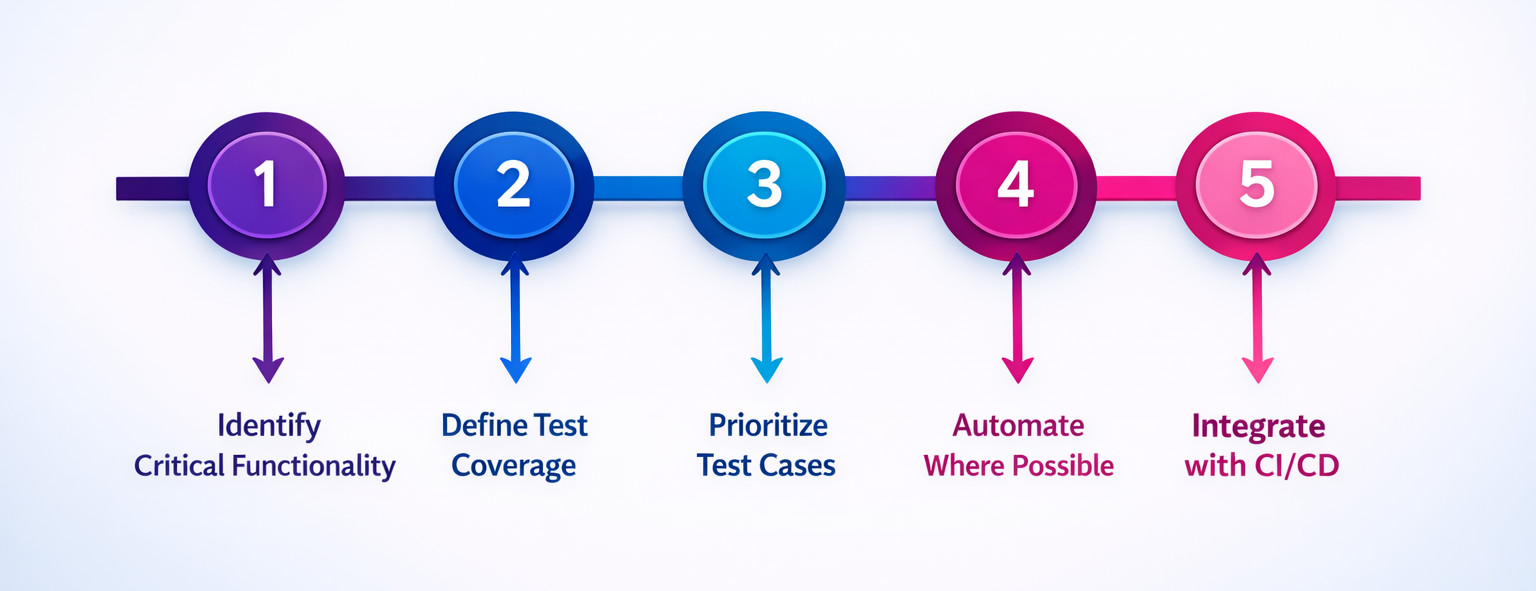
Step 1: Identify Critical Functionality
Determine the high-risk and business-critical features such as:
- Login and authentication
- Payments and transactions
- Data creation and storage
- Core workflows
Step 2: Define Test Coverage
Identify which areas must be tested for every release, as opposed to being selectively tested based on changes.
Step 3: Prioritize Test Cases
Not all tests are equal and require progression testing. Prioritize tests based on:
- User impact
- Failure likelihood
- Past defect history
Step 4: Automate Where Possible
Automate stable, repeatable test cases to ensure consistency and speed.
Step 5: Integrate with CI/CD
Ensure progression tests run automatically and continuously with every build or deployment by integrating them with CI/CD.
Challenges in Progression Testing
Despite its benefits, progression testing comes with several challenges as follows;
- Test Maintenance Overhead: If an application has frequent UI or logic changes, it can break automated tests. This increases the maintenance overhead.
- Growing Test Suites: As test suites grow in size, they can slow down pipelines if not optimized.
- False Positives and Flaky Tests: Unreliable tests lead to false positives and flaky tests, reducing trust in test outcomes.
- Incomplete Coverage: When test cases fail to cover critical test scenarios, it may lead to production issues.
Here are some tips to overcome these challenges:
- Use stable selectors and robust test design.
- Regularly review and refactor test cases as and when required.
- Remove redundant or low-value tests that you feel will not have an impact.
- Monitor and fix flaky tests promptly.
Best Practices for Progression Testing
Follow these best practices for progression testing to ensure long-term success:
- Start Early: Incorporate progression testing into the system right from the beginning of SDLC to catch issues when they are cheapest to fix.
- Keep Tests Independent: Create distinct test cases for new features and modules, and ensure each test runs independently to improve reliability.
- Focus on User Journeys: Emphasize validating real-world workflows rather than isolated features.
- Balance Coverage and Speed: Strike a balance between coverage and speed.
- Review Results Consistently: Treat failed progression tests as critical issues and solve them on priority.
- Continuously Improve: Track test results continuously and update test suites as the application evolves.
- Automate Relentlessly: Automate test cases for new features and implementation, and integrate them into CI/CD for immediate feedback on code changes.
- Prioritize Risk: Focus on critical user flows, high-risk areas, and business impact to ensure effort aligns with potential issues.
- Build Maintainable Tests: Write clear, simple, and focused test cases that are easy to read and update.
- Establish Feedback Loops: Encourage communication between developers and testers for quick feedback and defect resolution.
Tools Commonly Used for Progression Testing
Progression testing can be supported by a wide range of testing tools, depending on the technology stack and team requirements. Here are some of the testing tools that are used for progression testing:
- testRigor: This is a no-code, AI-powered test automation tool that allows users to write functional and end-to-end test cases in plain English, which are then automated and executed. Progression testing, which validates new or modified functionality, is a core use case for this tool.
- TestComplete: A commercial tool that supports automated functional tests for desktop, web, and mobile applications. It offers both scriptless (record-and-playback) and coded options and robust object recognition features.
- Appium: This is an open-source tool based on the WebDriver protocol used for automating native, mobile web, and hybrid applications on iOS and Android platforms.
- Playwright: This is a newer, developer-friendly open-source framework that provides fast and reliable automation for modern web apps across different browsers.
- Ranorex: A commercial tool offering reliable cross-platform automation for desktop, web, and mobile applications, featuring a reliable Object Spy and visual recorder to help non-coders automate tests.
- Virtuoso QA: This is an AI-native platform that enables test creation using natural language and features AI-powered self-healing to reduce test maintenance, targeting enterprise needs for scalable and resilient automation.
Conclusion
Progression testing is essential for ensuring that software evolves safely and reliably. As applications become more complex and release cycles shorten, the risk of unintended side effects increases. Progression testing mitigates this risk by validating that new changes integrate seamlessly with existing functionality.
Progressing testing combines thoughtful test design, strategic automation, and continuous integration to enable teams to move forward with confidence. This approach is not just about preventing failures but also about supporting sustainable, high-quality software growth.
| Achieve More Than 90% Test Automation | |
| Step by Step Walkthroughs and Help | |
| 14 Day Free Trial, Cancel Anytime |











