
Test Automation with AI
 |
What’s AI?
Frequently referred to by its acronym, AI, Artificial Intelligence is a pervasive term in our contemporary world. It’s integrated into devices and applications we interact with daily. Information Technology (IT) has been dramatically transformed by incorporating AI, enhancing capabilities and efficiency. AI has driven innovation and improvements across various tools, including search engines and other applications. So, what precisely is AI?
| Key Takeaways: |
|---|
|
AI refers to developing and applying computer systems capable of performing tasks that typically require human intelligence. These tasks may include interpreting natural language, recognizing patterns, learning from experience, and making informed decisions. AI technology can range from systems that carry out specific, narrow tasks, such as voice recognition, to hypothetical systems that possess general intelligence comparable to human cognitive abilities.
AI can be classified into three types:

- Narrow AI – Known as weak AI, refers to artificial intelligence systems that are designed and trained for a specific task. They are highly specialized systems and perform very well at their intended tasks, but they don’t possess understanding or consciousness. Examples include most of the AI used today, such as Google’s search algorithms, image recognition software, recommendation systems, and voice assistants like Amazon’s Alexa or Apple’s Siri.
- General AI – Often termed Strong AI, these theoretical systems can perform any intellectual task like a human, understanding, learning, and adapting across various domains. Unlike Narrow AI, they can transfer learning across studies, demonstrating more extensive comprehension. However, such AI currently remains in the realm of theory.
- Superintelligent AI – Known as Superintelligent AI, this speculative and futuristic concept refers to an AI that could exceed human intelligence, outperforming us in virtually all economically valuable tasks. Despite its potential benefits, it also raises significant risks and is a hot topic of discussion in the AI community.
Essentially, AI technology embodies the endeavor to create machines that can adapt to and learn from their environment, thereby augmenting tasks currently performed by humans. AI technologies are increasingly prevalent in our everyday lives, often working behind the scenes in systems and services we interact with daily. AI impacts many aspects of modern living, from personalized web search results and recommendations to speech recognition in mobile devices and customer service chatbots.
Why is AI Needed in Test Automation?
The evolution of software testing over the past few decades has been a fast-paced journey. It was initiated with manual testing, where human testers performed every operation. Next came the era of automated testing, which introduced scripts to carry out repetitive tasks, reducing human effort and error. This phase transitioned into agile testing, emphasizing constant feedback and iterative development, making the testing process more adaptive and efficient. Then came continuous testing, which involves early and often during the development cycle to ensure any issues are identified and addressed as soon as possible.
Nearly every application integrates some form of Artificial Intelligence (AI). For instance, many applications feature AI-powered chatbots or are designed to work with voice assistants such as Alexa, Google, or Siri. To thoroughly test these AI-enabled features, it’s crucial to incorporate AI within test automation. This ensures that the unique behavior and responses of these AI components are effectively evaluated under different scenarios, contributing to the overall robustness and reliability of the application. Here is an article about why you need test automation.
Consider self-driving cars; for instance, if the vehicle’s intelligence malfunctions or makes an erroneous decision, or if there’s a delay in response time, it could result in a car accident, posing a significant threat to human life. Without the use of AI in test automation, the complexities of modern AI-based features may not be fully addressed, potentially leading to lower quality or performance issues in the final product. As the prevalence of artificial intelligence in our daily lives continues to expand, the necessity for its testing escalates correspondingly.
Read here about the applications of generative AI in testing.
How AI Supports Test Automation?
As we discussed earlier, the necessity of integrating AI with test automation and why we need to do that, let’s see how it will benefit software testing in the long run.
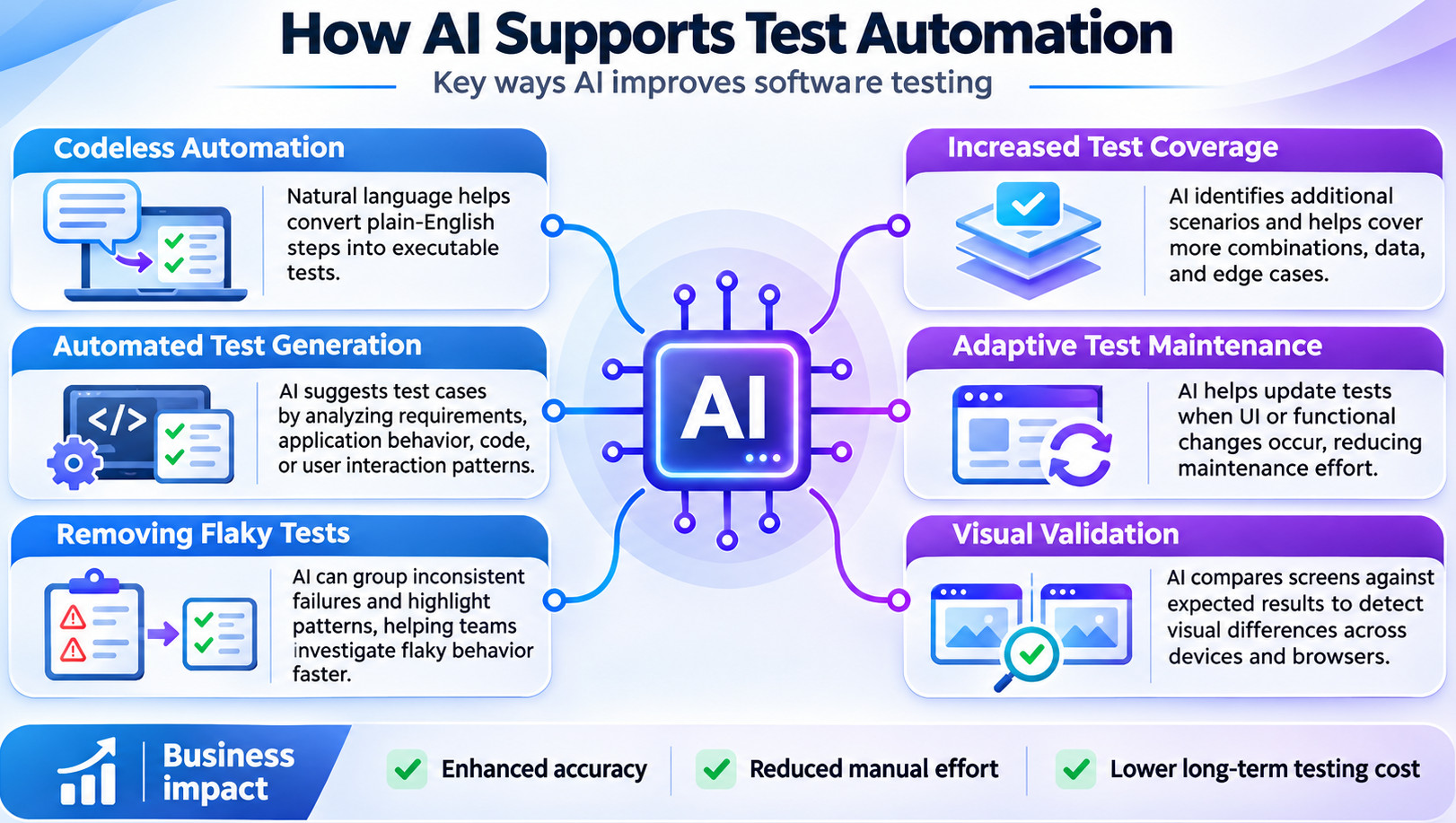
- Codeless Automation: One of the most significant advantages of using AI in test automation is creating codeless scripts. Using Natural Language Processing (NLP), AI helps to convert test scripts written in plain English to actual code. The benefit of codeless testing is that it gives anyone in your team the power to generate tests, making the whole process more user-friendly and accessible. We will discuss it more later in this article. To understand how natural language enables testers to create and execute automated tests without extensive programming knowledge, explore Natural Language Processing for Software Testing.
- Automated Test Generation: AI can suggest test cases by analyzing requirements, application behavior, code, or user interaction data. These suggestions can speed up test design, but teams should review them to confirm that they cover the intended behavior and include meaningful checks. This feature is particularly advantageous as it shortens the manual effort and time invested in creating test cases while rigorously examining various functionalities.
- Removing Flaky Tests: Flaky tests can fail inconsistently for reasons such as timing issues, unstable test data, environment differences, concurrency, or unreliable element identification. AI can help group failures and identify patterns, but the underlying cause still needs to be investigated. A test that passes after an automatic change should also be checked to ensure it still validates the intended behavior.
- Increased Test Coverage: AI helps analyze extensive data and identify more testing scenarios that may have been overlooked. As a result, the testing process becomes more comprehensive, and the software quality improves; this enhanced coverage also allows AI to discover and simulate a broader range of test scenarios, leading to more extensive testing and better software quality overall. AI can handle complex test scenarios and high volumes of test data more effectively than traditional testing approaches.
- Adaptive Test Maintenance: One of the known challenges in test automation is maintaining test scripts when there are changes in the software’s UI or functionalities. Traditional automated tests can fail under these conditions. AI-based testing tools can learn from application changes, whether minor UI adjustments or significant functional updates, and update test cases accordingly. This learning ability minimizes the maintenance effort and increases the resilience and reliability of test cases, keeping them effective even when the software under test evolves.
- Visual Validation: AI can be utilized in visual testing to compare the visuals of an application against expected results. AI algorithms can compare screenshots of an application’s UI against a baseline image to detect any discrepancies, whether as noticeable as a misaligned button or as subtle as a color shade difference. This is particularly useful for testing across different devices, browsers, and screen resolutions.

- Enhanced Accuracy: Manual testing invariably risks human error, and traditional test automation struggles when faced with dynamic data. By utilizing machine learning, the test understands how different elements are expected to operate, thus reducing test authoring time. These features can spare your team countless hours of inspection and correction while concurrently boosting the accuracy and quality of your tests.
- Reduce Cost: With its ability to perform tasks quickly, reduce manual effort, and minimize errors, AI can significantly reduce the cost of testing in the long run. While there might be an upfront investment in AI-powered testing tools, the return on investment becomes apparent through quicker testing cycles and higher-quality software.
Read here how to save the QA budget.
Testing AI-Powered Applications
AI can help teams create and maintain tests, but applications that use AI need to be tested too. Unlike a conventional feature that always returns the same result for the same input, a generative AI feature may produce different responses. Tests should therefore check whether responses meet defined quality and safety criteria, rather than relying only on exact text matches.
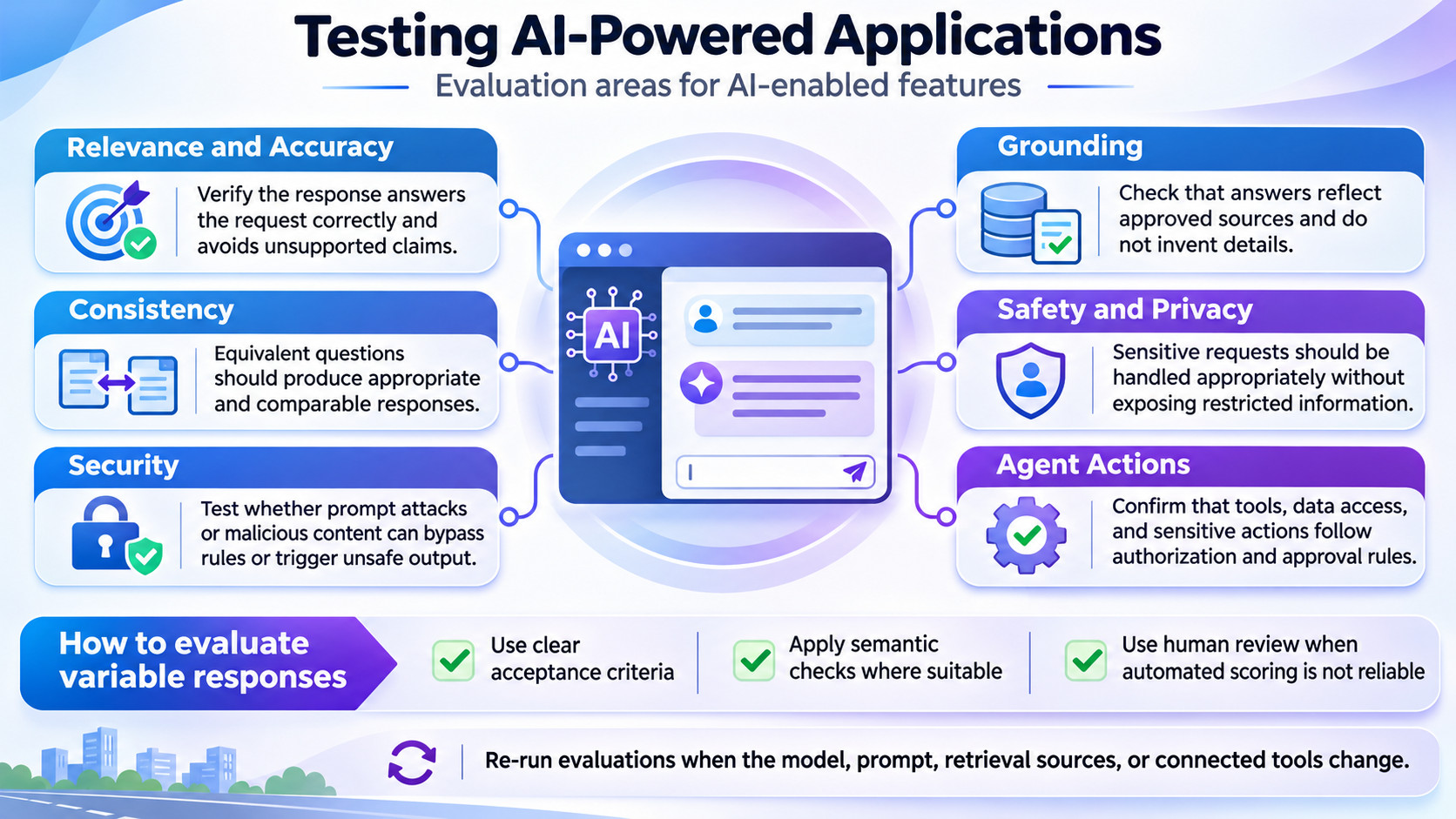
- Relevance and accuracy: Check whether the response answers the user’s request correctly, includes the information needed to complete the task, and avoids unsupported claims.
- Grounding: For AI features that use company documents or other approved sources, verify that the response reflects those sources and does not invent details they do not contain.
- Consistency: Test whether the system responds appropriately to equivalent questions phrased in different ways, while allowing for reasonable variation in wording.
- Safety and privacy: Check that the system handles sensitive requests appropriately and does not reveal personal, confidential, or restricted information.
- Security: Test whether malicious instructions in user prompts or retrieved content can make the system ignore its rules, disclose information, or produce unsafe output.
- Agent actions: Verify that an AI agent uses only the tools and data it is authorized to access, and that sensitive or irreversible actions follow the required approval steps.
For responses that can vary, tests can use clear acceptance criteria, semantic checks, and human review for cases where automated scoring is not reliable. Teams should rerun evaluations when they change the model, prompt, retrieval sources, or connected tools, and monitor important behavior after release. The checks should reflect the risks and intended use of each feature.
Continuous Testing with AI
Continuous testing poses significant challenges due to factors like siloed automation, limited visibility of requirements, and the volume of tests. However, by integrating Artificial Intelligence (AI) and Machine Learning (ML) with continuous testing, we can establish an autonomous and zero-touch quality assurance (QA) process. This integration is necessary because software releases occur weekly, with frequent updates rolling out almost every other day, demanding a streamlined and more efficient testing approach.
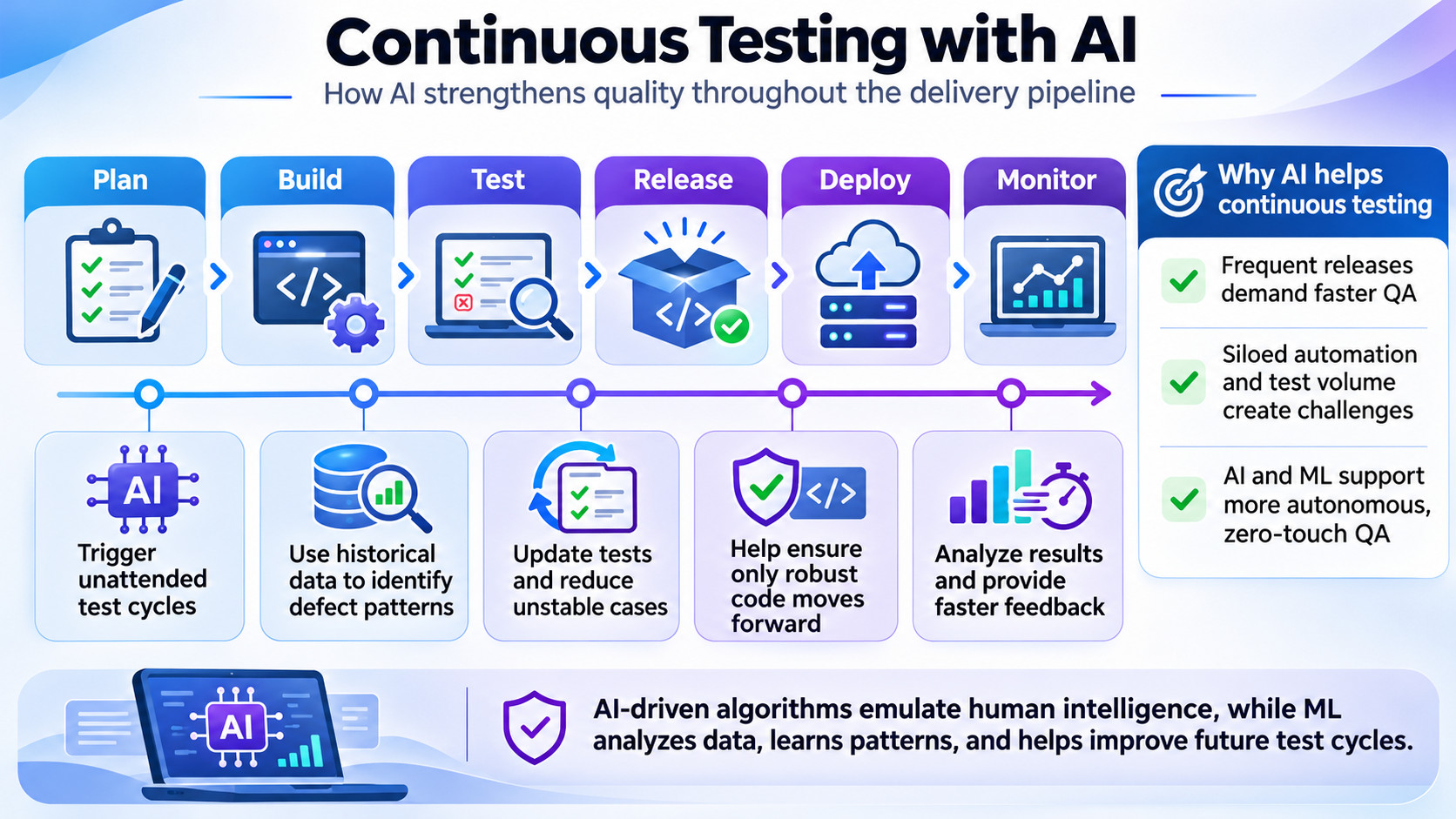
AI integration enhances testing by enabling QA teams to trigger unattended test cycles, leveraging insights derived from historical data and past events to identify defects. AI-driven algorithms emulate human intelligence, while ML automatically updates test scripts, eliminating unstable test cases. AI-based engines ensure that only robust code progresses to subsequent stages, while ML-specific algorithms analyze data to extract patterns and make predictions. This holistic approach significantly enhances software testing processes.
Know more about DevTestOps and TestOps in Agile.
AI-based Methods for Test Automation
- Regression Suite Automation: Regression testing can be time-consuming and labor-intensive for testers. However, with the integration of AI, regression suite automation becomes more intelligent and efficient. By leveraging AI algorithms, automated tests can intelligently determine the necessary test cases to run based on changes in the code. The primary objective of this approach is to reduce the time required to execute a regression test cycle by selecting and implementing the appropriate set of test cases. This targeted and intelligent selection of test cases ensures that the regression testing process is optimized, saving testers time and effort while providing adequate test coverage.
- Self-healing Automation: AI-enabled self-healing in test automation involves automatically resolving script breakages due to changes in objects or other properties. The key objective of this approach is to minimize the need for manual intervention and expedite the self-healing process. When changes are detected in the application or its elements, AI algorithms can dynamically adapt the test automation scripts to accommodate these modifications. This ensures that the test automation remains robust and functions accurately, even with evolving software or UI changes. By reducing the need for manual intervention, the self-healing process saves time and effort, enabling more efficient and seamless test automation maintenance.
- Data Analytics: Software testing entails a meticulous and ongoing process involving deploying numerous test cases for each software version to ensure a bug-free release. Consequently, a substantial volume of data is generated, necessitating analysis to interpret test results and provide feedback to the development team. AI tools play a significant role in data categorization and even identifying testing errors, such as false negatives. By leveraging AI algorithms, testers can streamline the analysis process, gain insights from the data, and make informed decisions. This integration of AI in software testing enhances efficiency, accuracy, and the overall effectiveness of the testing process.
Intelligent Test Automation: testRigor
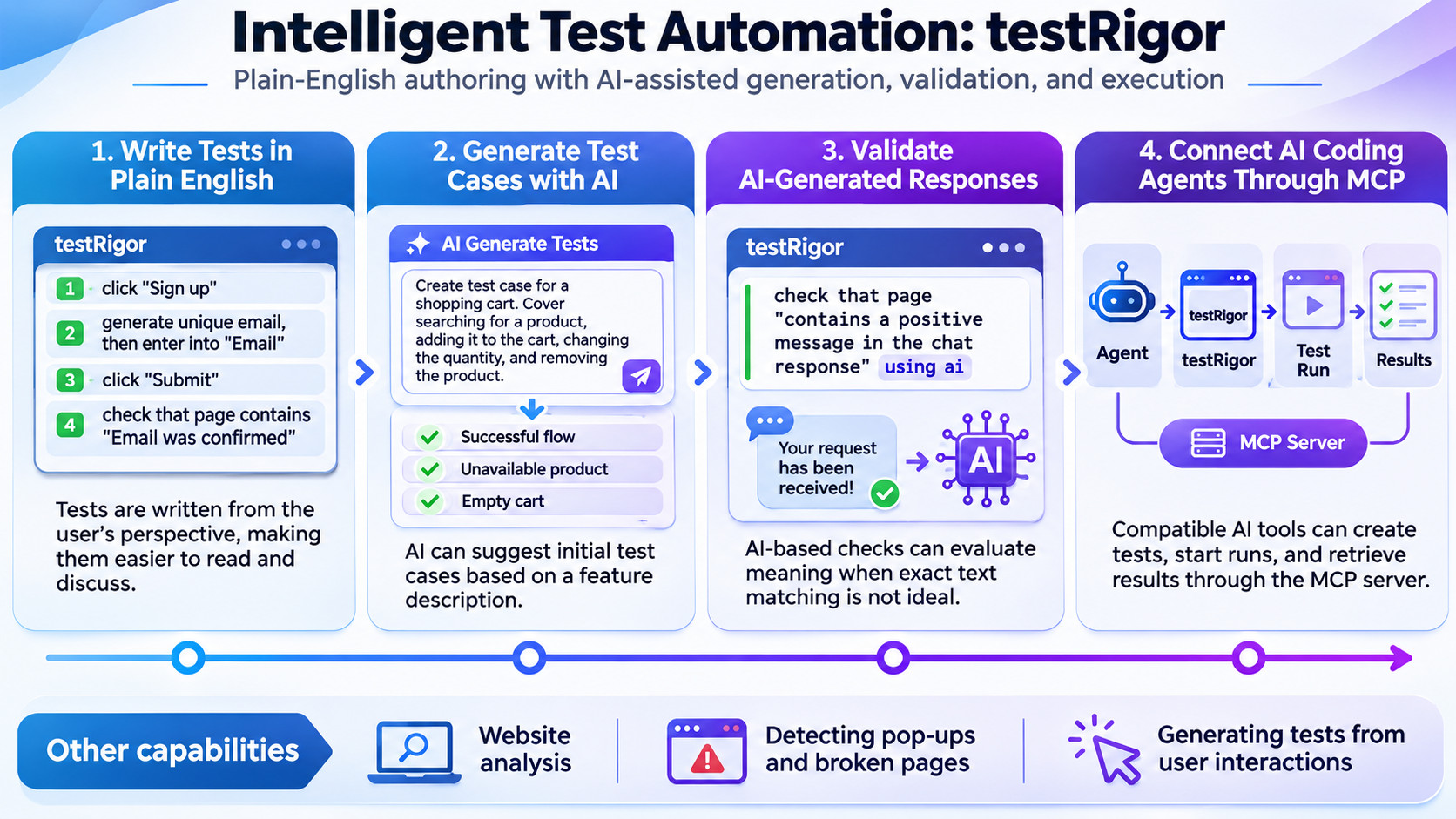
testRigor combines plain-English test authoring with AI-assisted features for test generation, execution, and validation. Teams can write tests themselves or use generative AI to create a first draft from an application description or test scenario. The generated tests can then be reviewed and refined to match the expected business behavior.
Write Tests in Plain English
click "Sign up"
generate unique email, then enter into "Email" and save as "generatedEmail"
generate unique name, then enter into "Name" and save as "generatedName"
enter "PasswordSuperSecure" into "Password"
click "Submit" to the right of "Cancel"
check that email to stored value "generatedEmail" was delivered
click "Confirm email"
check that page contains "Email was confirmed"
check that page contains expression "Hello, ${generatedName}"
Beyond simple sign-up workflows, AI can also simplify testing complex forms with dynamic fields, different input types, and validation rules, as explained in How to Test Form Filling Using AI.
Generate Test Cases with AI
Instead of starting with every test step, a tester can describe the application or the behavior to check and ask AI to suggest test cases. Depending on the workflow, testRigor can generate suggested steps from a description or interact with the application to create a test. Review and adjust the generated cases before using them. For example, a tester could provide this prompt:
Create test case for a shopping cart. Cover searching for a product, adding it to the cart, changing the quantity, and removing the product.
AI could suggest scenarios for the successful flow, an unavailable product, and an empty cart. This is an illustrative example; the generated steps will depend on the application description and the information provided. For a more detailed walkthrough, see Generating Tests with AI and How to Automate Web Testing with testRigor.
Validate AI-Generated Responses
check that page "contains a positive message in the chat response" using ai
The condition should be specific enough to make the result useful. For high-impact decisions, review the result against the product’s requirements. See the testRigor language documentation for examples of AI-based validations.
Connect AI Coding Agents Through testRigor’s MCP
testRigor’s MCP server can connect it to compatible AI tools. Depending on the supported tools and the connected user’s permissions, an agent can create or update test cases, start test runs, and retrieve results. A tester could, for example, ask an agent to create a checkout test, run it, and summarize the failures. Review the generated tests and results before accepting changes to a shared suite. See how to use testRigor’s MCP server.
The features available depend on the testing workflow and configuration. See testRigor’s features and how to utilize AI in software testing.
Endnote
We are fast approaching a time when even Continuous Testing will need help to keep pace with the shrinking delivery cycle times, increasing technical complexity, and accelerating rates of change. The integration of Artificial Intelligence in test automation, exemplified by platforms like testRigor, is a game-changer in software testing.
This transformative approach improves accessibility, collaboration, and efficiency, producing more robust quality checks for software applications. testRigor’s integrated AI features provide a glimpse into the future of test automation, where advanced technologies work hand in hand with human expertise to deliver high-quality software in an agile and fast-paced environment
Frequently Asked Questions (FAQs)
- How should organizations get started with AI-powered test automation?
Organizations should begin with a small pilot involving stable, frequently executed test scenarios where improvements can be measured easily. They should assess existing automation challenges, identify suitable tools, and establish clear success criteria before expanding adoption. A phased approach allows teams to validate effectiveness, understand limitations, and build confidence in AI-assisted testing.
- How can teams measure the ROI of AI-powered test automation?
Teams can measure return on investment by comparing test creation time, maintenance effort, execution costs, defect detection rates, and regression cycle duration before and after adopting AI-powered tools. They should also account for licensing, implementation, training, and ongoing review costs. Tracking these metrics over multiple release cycles helps determine whether AI automation delivers sustainable improvements.
- Can AI-powered test automation be implemented in legacy applications?
Yes, AI-powered test automation can be applied to many legacy applications, depending on their technology, accessibility, and integration capabilities. Some tools can interact with applications through their user interfaces without requiring major changes to the underlying system. However, older technologies, restricted environments, and unconventional UI elements may require additional configuration or specialized testing approaches.
| Achieve More Than 90% Test Automation | |
| Step by Step Walkthroughs and Help | |
| 14 Day Free Trial, Cancel Anytime |