
Trusting AI Test Automation: Where to Draw the Line
 |
You can’t look anywhere without seeing automated testing boosted by artificial intelligence. All sorts of tools shout from their rooftops that they run on AI. During presentations, the pitch always includes things like more stable tests, quicker launches, and less manual work. At first glance, it seems like the solution everyone waited for. Finally, handling weak scripts and piles of unfinished quality tasks.
But we also see real-life examples. An AI-created test cleared an issue it should have caught. And the team may have relied on those outcomes. Leadership could be demanding heavier AI use in tests, leaving you to sort out what that truly looks like in day-to-day QA.
This blog focuses on balance. Rather than debating if AI in test automation works well or poorly, it examines when confidence makes sense, spots where flaws appear, and situations where tools falter. Teams might apply artificial intelligence during checks while holding onto oversight.
| Key Takeaways: |
|---|
|
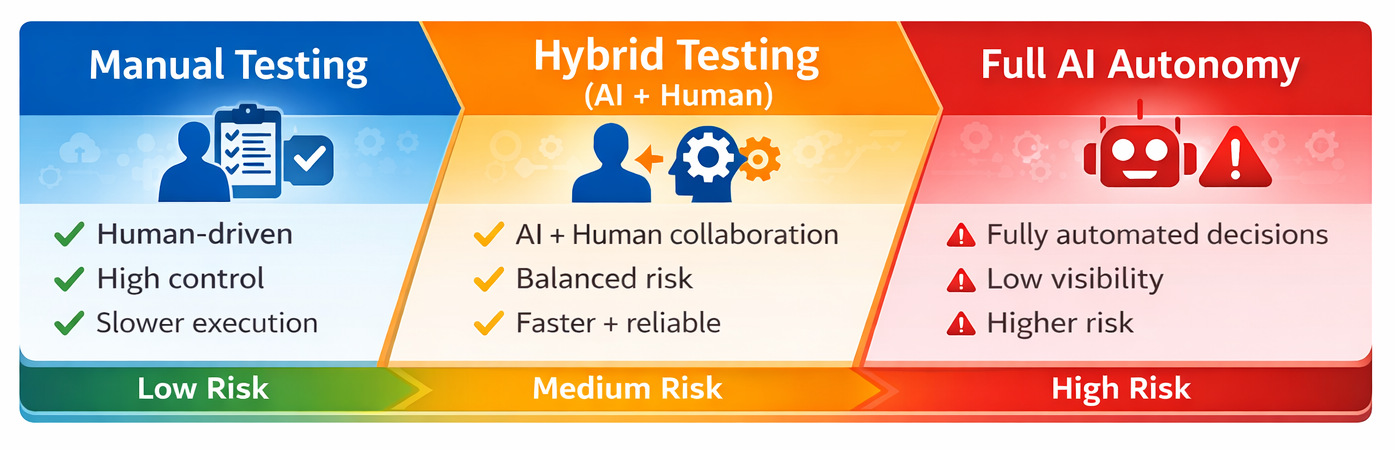
Why Teams are Turning to AI Test Automation
What makes AI-driven testing tools appealing? That’s where we begin.
Traditional test scripts, which work on implementation details, often fail when small changes happen. Fragile code means extra hours fixing what already worked. When user interfaces shift, old tests stop running properly. Scaling software makes staying on top of testing tougher for each cycle. Keeping test coverage meaningful becomes harder every sprint.
A few things ease the burden, such as automated testing powered by artificial intelligence.
- Generate tests faster
- Adapt to UI changes automatically
- Reduce manual effort
- Learn from past test runs
- Increase test coverage without increasing headcount
When speed matters most, a solution that cuts through delays suddenly feels essential.
This might seem fine in theory, yet once tried.
AI doesn’t magically understand your product, your customers, or how your company works. That gap? It’s what makes trust sketchy.
What AI in Software Testing Actually Does Well
AI in software testing handles repetitive tasks, finds bugs quickly, learns from data, improves test coverage, and adapts to changes. A bright boundary starts with seeing where artificial intelligence really works well in testing software.
AI Test Automation for Speed and Scale
Flooded with data, AI sorts through mountains of test cases without slowing down. Because it learns from each run, spotting edge cases becomes quicker than waiting for a human tester to catch them. Anomalies pop up less often when every pattern gets checked automatically. Humans might miss subtle repeats, yet the system flags them every time.
- Creating basic regression tests
- Identifying flaky tests
- Prioritizing which tests to run based on past failures
- Detecting UI changes that might impact automation
Finding shortcuts often happens here during actual runs. Thanks to AI-based tools, routine chores shrink, freeing up room for extensive testing instead.
Reducing Maintenance Pain
One of the most appealing promises of AI-powered test automation is “self-healing” tests.
A change in a button label doesn’t always stop testing; AI context understands what you meant and keeps things moving through self-healing.
One issue teams often miss out on is that self-healing is helpful when things fix themselves, yet hidden issues often slip through. When tests adjust on their own, but if the core tests are not enough for coverage, then self healing can not help.
The Risks of Trusting AI Test Automation Too Much
Trust in AI testing tools goes beyond technical issues. That choice shapes how teams judge results.
The Illusion of Confidence
AI tools are very good at producing confident-looking results. Green lights glow on dashboards without fail. Neat layouts line up in reports every time. Everything appears under control.
Yet being sure doesn’t mean you’re right.
- Wrong things get claimed by AI tests. Sometimes they miss what really matters.
- Tests pass because only happy paths were considered. It is not a proof of function. Just a proof that things line up, for now.
- Some teams skip verifying test steps once they think the machine takes care of everything.
This happens because people rely too hard on AI, so they ignore doubts about what the system says.
Lack of Context and Business Understanding
Funny thing is, automated tests driven by artificial intelligence can’t grasp the reason behind a feature’s purpose.
It doesn’t know which edge case is business-critical and which one is cosmetic. It doesn’t know when a “minor” UI change is actually a serious usability issue.
- Financial systems
- Healthcare applications
- Compliance-heavy environments
- Products with complex user journeys
Now here’s a twist: AI spots the gaps between things. Only people choose if those gaps mean anything.
This difference matters most when figuring out where to draw the line.
Read more: Common Myths and Facts About AI in Software Testing.
AI vs. Traditional Test Automation: It’s Not a Binary Choice
Teams often get it wrong when they set up a battle between AI and traditional testing automation.
Wrong to compare them like that.
What really matters?
Where Should AI Assist, and Where Should Humans Stay Firmly in Control?
An AI following set rules will act the same every time. When it stops working, the reason is clear. Traditional automation is deterministic. Success means only specific steps were confirmed. What happens always ties back to fixed logic.
Probabilistic, that’s how test automation with artificial intelligence works. Patterns shape its predictions; nothing is more certain than odds.
One way isn’t always superior. Sometimes the other fits better.
- Traditional automation for critical, well-defined flows
- AI-assisted testing for scale, discovery, and maintenance
- Human review for interpretation and decision-making
Read: Generative AI vs. Deterministic Testing: Why Predictability Matters.
Where AI Test Automation Works Well?
Let’s be concrete.
- Testing Repetitive, Low-Risk Scenarios: Start with smoke tests, then move to light regression tests. When gaps show up, the fallout stays small for these.
- Supporting Test Creation (Not Replacing It): AI can help draft tests, suggest scenarios, or convert requirements into test cases. Yet each of these needs human eyes that question, adjust, reshape: people who step in after the AI speaks.
- Analyzing Test Results: AI is excellent at spotting trends:
- Which tests fail most often
- What parts of the app keep acting up
- Where flaky behavior is increasing
When put to work like this, AI acts more like a helper than a boss.
Where AI Test Automation Breaks Down
- Critical Business Logic
Strange how AI trips up when right or wrong hinges on subtle company logic.When things go live, it often falls apart if:
- Calculations are complex
- Rules change frequently
- Business risk is high for failure
A human must step in when deciding if a launch passes safety checks here. AI and test automation alone can’t make that call under these conditions. - User Experience Meets User Intent
AI can check that a button exists. What does it miss completely? Whether a user would actually know what to do next. Strange how clear this seems, yet people skip it while racing toward total machine control.
- Edge Cases Worth Noticing
Hidden deep inside edge cases, the costliest errors often hide. Funny thing? AI struggles here, unless humans show them how.
How Well Does AI Fit in a Testing Scenario?
| Scenario | AI Fit | Why |
|---|---|---|
| Smoke tests | High | Low risk, repeatable |
| Functional regressions | High | Repeatable |
| Business logic validation | Low | Context-heavy |
| Compliance testing | Very low | Requires accountability |
| UX validation | Low | Human judgment needed |
Human-in-the-Loop Testing: The Real Trust Boundary
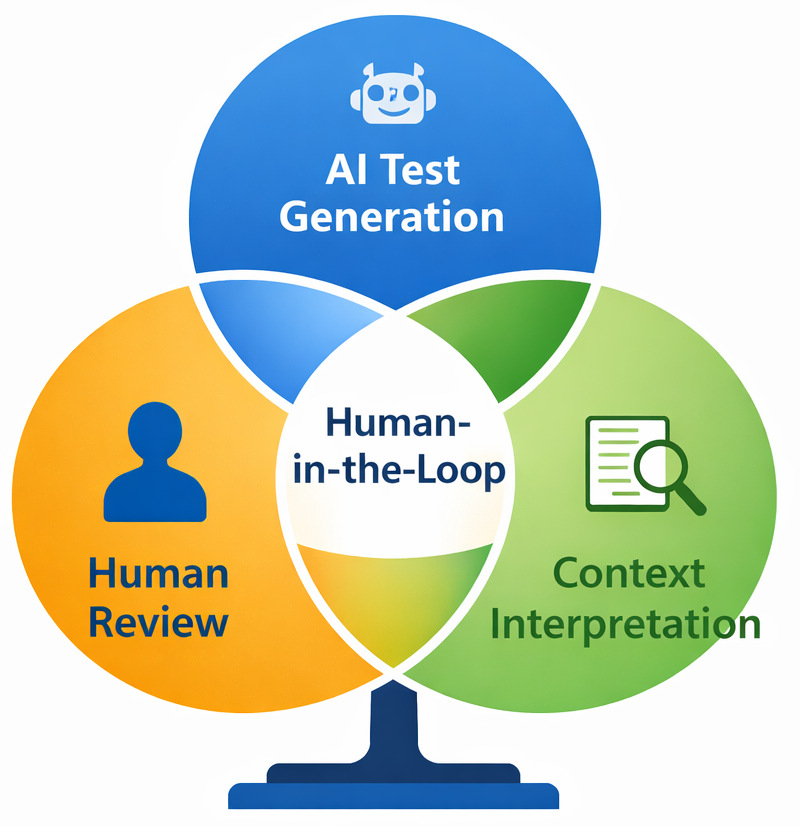
People still have a role to play; AI can not do everything. That approach? It is called Human-in-the-Loop (HITL), where human judgment guides the process.
- AI does the heavy lifting
- A human decides in the end
- Reviewing generated tests
- Validating test results
- Deciding release readiness
- Investigating ambiguous failures
Not a backup plan. Built into the system on purpose. Here’s something obvious. It points right at it. What matters is people, not pushing them out. It’s placing them right where impact happens.
AI vs. Human Responsibility in Testing
| Testing Area | AI’s Role | Human’s Role |
|---|---|---|
| Test generation | Draft scenarios quickly | Review intent and relevance |
| Regression testing | Run at scale | Decide what actually matters |
| UI change detection | Flag differences | To judge the impact on users |
| Test result analysis | Identify patterns | Interpret risk and decide action |
| Release approval | None | Final accountability |
Drawing the Line: A Practical Decision Framework
So where should teams draw the line?
A useful way to think about it is risk.
- What happens if this test gives a false positive?
- Who is accountable if the AI is wrong?
- Can a human easily review this decision?
As risk increases, AI autonomy should decrease.
| Scenario | AI Role | Human Role |
|---|---|---|
| Basic regression | High | Spot checks |
| UI changes | Medium | Review adaptations |
| Business-critical logic | Low | Full validation |
| Compliance decisions | None | Full control |
This isn’t anti-AI. It’s pro-reliability.
Warning Signs You’re Trusting AI Test Automation Too Much
Slowly, trust in AI testing grows without anyone really noticing. Teams rarely choose it on purpose.
At first, everything runs smoothly. Speed picks up in testing. The reports appear neater. Over time, routines shift without notice. Errors start being overlooked. A green dashboard feels reassuring, perhaps more than it should.
A few red flags pop up time after time in actual team settings.
“The Tests Passed, So We Shipped” Becomes the Default.
Release decisions are made primarily because AI-driven tests are passed. That’s trouble brewing.
When the go-ahead leans entirely on AI verdicts, caution should rise. Green signals from code aren’t enough to push forward.
- A user points out an issue someone might’ve expected to spot earlier
- Finding out late, teams see nobody ever checked what the tests were really saying
- Some mistakes get brushed off by saying they likely weren’t actual problems
Decisions need tests, yet we shouldn’t hand control over to AI.
If No One can Explain What a Test is Actually Verifying
This thing flies under the radar, yet shows up almost everywhere.
If you ask:
“What is this test actually checking?”
The response is:
“I’m not totally sure, but the AI generated it”.
It’s too late now. Trust slipped away a while back.
One limitation teams often underestimate is that opaque tests erode accountability. If a failure happens, nobody steps up. Figuring out why it feels like shooting in the dark. Trust slips, regardless of how polished the system appears.
AI “Fixes” Failures Without Anyone Noticing
Self-healing tests sound amazing. Yet now and then, reality checks in.
Yet that idea seems fine at first glance yet might cover up deeper problems when tried out.
- Tests adapt automatically
- Failures disappear without explanation
- Changes aren’t reviewed by humans
Fixing flaws could hide deeper issues rather than clear them up.
What shifts beneath the surface, AI ought to reveal using Explainable AI (XAI).
Test Failures are Treated as Noise
Once defects get brushed off as “just AI being weird,” confidence slips into lazy acceptance.
- Ignored alerts
- Reduced investigation
- Slower reaction to real defects
Strange how smarter the AI seems, yet people ignore what it says without really rethinking. The sharper it acts, the quicker human minds tune out. Growth in AI ability leads to weaker human scrutiny. As performance improves, attention drops off.
No Clear Owner for Test Results
A quick way to check? Try this.
Who answers if a machine-run test delivers incorrect results? When answers lack clarity or say something vague like “the tool”, it means nobody has drawn a clear line on who or what to trust.
Something AI does well is help. It cannot take responsibility.
What Happens When Teams get this Wrong?
When teams overtrust AI test automation, the impact doesn’t show up as the one overwhelming failure. It shows up as a pattern. Releases are accelerated, but confidence quietly drops. Issues reach customers that automation was expected to catch. And when leadership asks why, the answer is often unclear and not because testing was missing, but because no one fully understood what the tests were actually validating.
One of the biggest risks is accountability drift. Things start slipping when no one owns the call. Someone says the AI approved it, so that becomes the excuse. Without a person standing behind choices, fixing issues drags on.
Teams add manual checks to compensate. Release cycles lengthen. Automation becomes something people tolerate rather than rely on.
AI-Powered Test Automation in Practice: Where testRigor Fits
Here’s how things look when it comes to tools, more precisely, where testRigor shows up in this discussion.
One of the biggest problems with AI test automation today is that many tools push toward more autonomy without enough transparency or control. With testRigor, things unfold another way.
The last thing you need is teams wrestling with brittle scripts or fragile selectors.
- Writing tests in plain English
- Keeping tests aligned with user behavior
- Reducing maintenance without hiding intent
This matters since clarity builds trust. Understanding comes first.
A test begins to look something like this:
“Verify that a user can reset their password.” This is a Reusable Rule in plain English.
- Review it
- Validate it
- Decide whether the result makes sense
What happens when AI lends a hand? Effort drops. Yet thinking stays human. Not replaced, just supported differently now.
- Test intent remains intact
- When things go wrong, spotting why gets simpler
- Humans remain accountable
With testRigor, people stay in control while AI lends a hand during testing instead of stepping in unseen. Decisions still come from the team, never handed off without notice. The tool works beside testers rather than taking over quietly behind the scenes.
Read: All-Inclusive Guide to Test Case Creation in testRigor.
What this Means for Teams Adopting AI in Testing
- Does everyone on the team grasp the test goals?
- Is it possible to believe outcomes without just going along?
- Do humans stay in control of release decisions?
Most teams failing at AI for testing aren’t stuck with weak tools. Their issue? Applying those tools everywhere, no boundaries, no focus.
Trust is Earned, Not Assumed
- Faster feedback
- Better coverage
- Less manual work
- Risk increases
- Context matters
- Accountability is required
AI can help shape choices. People still hold the final say.
This isn’t giving in. This is what dependable testing looks like in practice.
Frequently Asked Questions (FAQs)
- Is AI-powered test automation reliable for business-critical applications?
A: AI-powered test automation can be reliable when humans remain in the loop, especially for test design, result interpretation, and release decisions. For business-critical or regulated systems, AI should assist with coverage and analysis, not make final calls.
- How does testRigor help teams draw the line with AI testing?
A: Tests written in plain English are easier to review, easier to trust, and easier to maintain. That clarity makes it simpler for teams to stay in control, understand failures, and decide when AI assistance is helpful and when human judgment needs to step in.
- Can AI test automation fully replace human testers?
A: No, and that’s not a failure of AI.AI test automation is great at handling repetition, scale, and pattern detection. What it cannot do reliably is understand business intent, user expectations, or risk. Those things still require human judgment.In real projects, this usually breaks when teams assume that passing AI-driven tests automatically means a feature is “good to go.” That assumption often leads to missed edge cases and production issues that no model could have reasoned about without context.
| Achieve More Than 90% Test Automation | |
| Step by Step Walkthroughs and Help | |
| 14 Day Free Trial, Cancel Anytime |











