
What Is System Integration Testing (SIT)? Process, Examples, and Best Practices
 |
Modern software typically isn’t designed as one cohesive, self-contained system. Even features of a simple application consist of numerous interconnected components like frontend, backend services, databases, authentication systems, payment gateways, notification tools, and analytics services. These components need to talk to each other and frequently communicate with third-party applications and outdated legacy systems that may not always play nicely with newer technology.
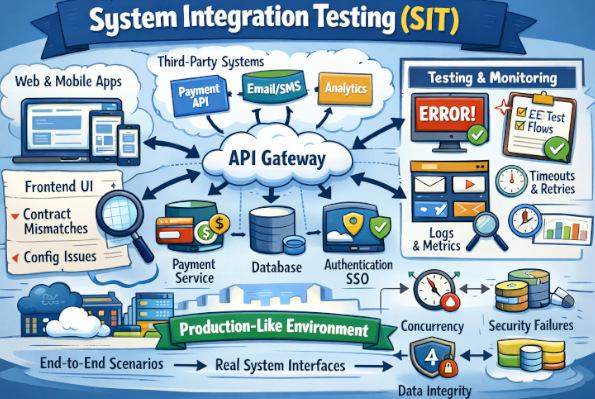
Each of those pieces could be developed by a separate team, written in a different language, deployed at a different time or under some other operational restraints, and yet the user expects to have it all work just as if it were part of one integrated product. That’s the purpose of System Integration Testing (SIT).
SIT is where you test if your integrated systems do what they need to when they work as a single systemic unit; specifically around areas of interfaced systems (i.e., transfer data from one another), triggering events between each other, and agreeing on timeliness and/or assumptions. It’s when you begin to realize what is a very much not-so-comfortable truth: that anything passed “in isolation” doesn’t mean all that stuff works together.
| Key Takeaways: |
|---|
|
What is System Integration Testing (SIT)?
- Does Service A send the right payload to Service B?
- Does B interpret it correctly and respond with the correct data?
- Does the database reflect the right state after multiple systems coordinate?
- What happens if the payment provider is slow or returns an unexpected code?
- Do retries, idempotency, and compensations work correctly?
- Is the user journey still correct if a dependent system is degraded?
SIT reveals problems that don’t show up when everything is mocked.
Read: Integration Testing: Definition, Types, Tools, and Best Practices.
Why SIT is Important in Software Testing
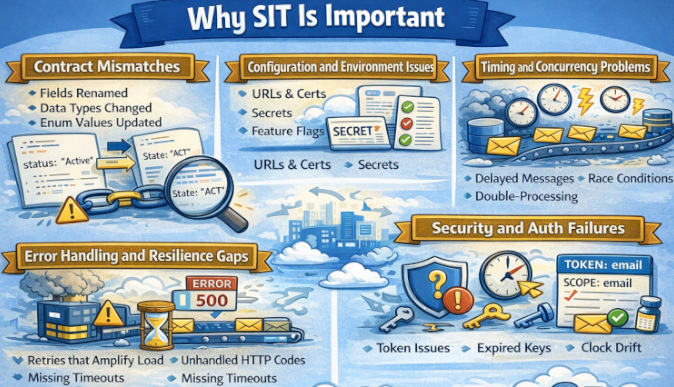
Today’s systems just aren’t single monoliths. Instead, they are systems composed of many moving parts: microservices, shared services, web/mobile clients, and backend APIs. And they are largely dependent on integrations such as vendor APIs (payments, email/SMS, KYC, shipping), identity and access layers (SSO, OAuth, SAML), event and messaging infrastructure (Kafka/RabbitMQ/SQS), as well as data pipelines and analytics.
- Contract Mismatches: A field renamed, a type changed, or an enum updated can break the integration even if both systems “pass their own tests.”
- Configuration and Environment Issues: URLs, certificates, secrets, feature flags, and service discovery may differ from dev to staging.
- Timing and Concurrency Problems: Delayed messages, race conditions, eventual consistency, double-processing.
- Error Handling and Resilience Gaps: Retries that amplify load, unhandled HTTP codes, missing timeouts, and partial failures.
- Security and Auth Failures: Token scopes, expired keys, clock drift, incorrect claim mapping.
Read: Integration Testing vs End-to-End Testing.
Integration Testing vs. System Integration Testing
It’s common to confuse integration testing with System Integration Testing. Though they sound similar, there are a lot of differences between the two.
Integration tests verify that a few things play nicely together. Most often, they lie within a product boundary (e.g., Service A ↔ Service B ↔ DB, or UI ↔ API). It’s less likely to be implemented in a test suite even where the stubs or the mocks of its dependent components are provided, and it is more about interfaces & contracts among modules/data format/error handling.
System Integration Testing (SIT) will validate end-to-end behavior of the product, ideally with a production-like environment: real external systems (and their certified test endpoints), payments, SSO, email or SMS, and any queues and data pipelines. It verifies inter-system flows, configuration, networking/security/auth, and real-world integration failures at all levels in the stack.
| Integration Testing | System Integration Testing (SIT) |
|---|---|
| Verifies interactions between a few components/services | Verifies the entire system working together end-to-end |
| Usually within the product boundary (internal modules/services) | Includes external systems as well (payments, SSO, SMS/email, etc.). |
| External dependencies are often mocked/stubbed | Uses real integrations or official sandbox/cert endpoints |
| Focuses on API/contracts, data mapping, and interface errors | Focuses on cross-system workflows, config, auth, networking, and reliability |
| Runs earlier and more frequently (often in CI) | Runs later in a dedicated SIT environment/cycle |
| Faster and easier to isolate failures | Slower and harder to debug due to many moving parts |
| Smaller, targeted test data | More realistic, end-to-end test data and accounts |
Read: Continuous Integration and Testing: Best Practices.
System Integration Testing vs. User Acceptance Testing
System Integration Testing (SIT) concentrates on verifying that all internal services and external systems can connect properly in a production-like technical system as a complete integrated system. UAT is concerned with verifying that the system conforms to business requirements and is ready for real users to accept and use.
| System Integration Testing (SIT) | User Acceptance Testing (UAT) |
|---|---|
| Focuses on technical end-to-end integration | Focuses on business validation and user acceptance |
| Executed by QA and engineering teams | Executed by business users or product owners |
| Uses production-like environments with real integrations | Uses staging environments aligned to business scenarios |
| Validates data flow, configuration, security, and system behavior | Validates functional correctness and usability |
| Identifies integration failures, timing issues, and config gaps | Identifies requirement mismatches and user experience issues |
| Provides technical sign-off for release readiness | Provides final business sign-off before production |
SIT in the Software Testing Life Cycle
System Integration Testing (SIT) sits in the Software Testing Life Cycle after integration testing and before User Acceptance Testing (UAT), acting as the stage where the product is validated as one complete, unified system. At this point, all real services, configurations, security rules, and external dependencies are exercised together in a production-like environment.
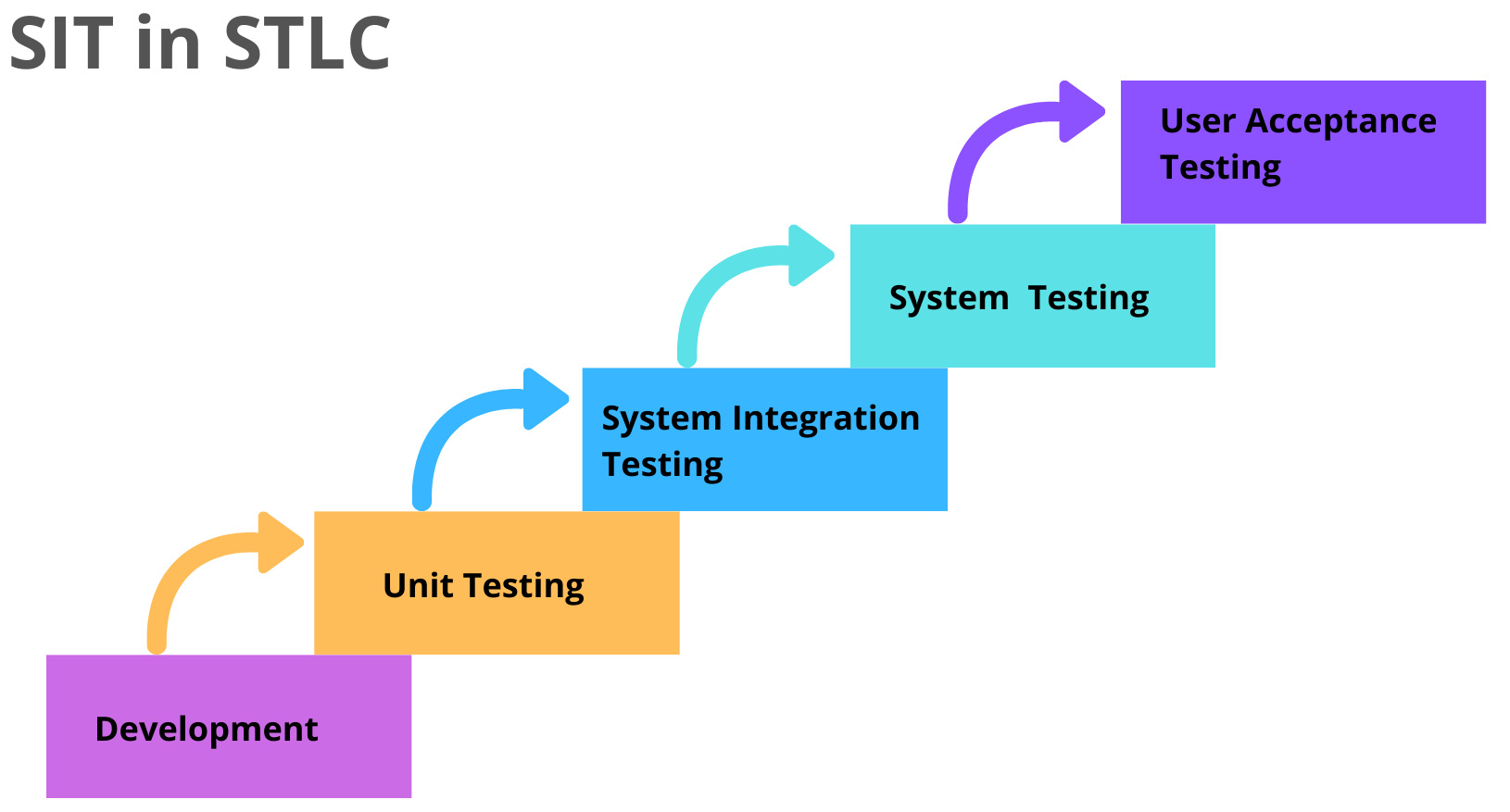
SIT serves as the final technical confidence gate before business validation begins. It exposes cross-system failures such as configuration drift, authentication issues, timing problems, and third-party integration gaps that are rarely visible in earlier testing stages.
Read: STLC vs. SDLC in Software Testing.
Scope of System Integration Testing
SIT scope is about what you test, and the best SIT suites focus on integration risk instead of trying to cover everything. In practice, you prioritize critical end-to-end flows across identity, payments, messaging, and data handoffs because most failures happen at system boundaries. You also validate environmental realities, such as configuration, certificates, network rules, retries, and timeouts, and partner sandbox behavior, since these issues often do not appear in isolated integration tests.
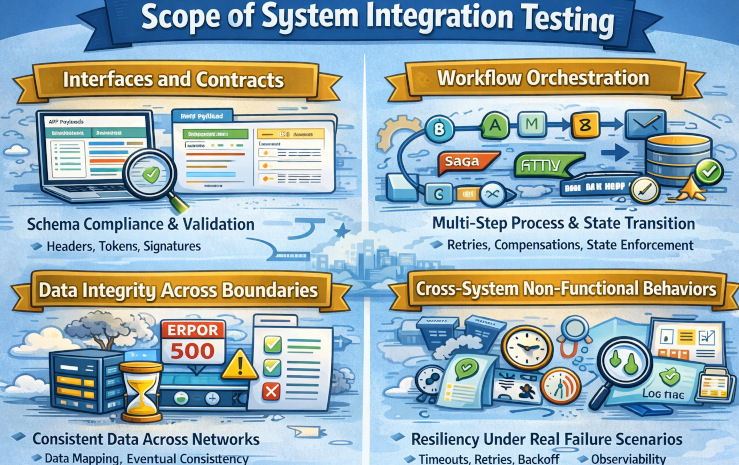
- Interfaces and Contracts: Confirms integrations follow the agreed behavior, including request and response schemas, required headers, auth tokens, signatures, and correct validation of optional and required fields. It also ensures backward compatibility so existing clients and dependent services keep working as APIs evolve.
- Workflow Orchestration: Validates that multi-step processes across services execute in the correct order, persist state properly, and handle failures without breaking the business flow. It also verifies that state transitions are enforced correctly, including retries and concurrency scenarios.
- Data Integrity Across Boundaries: Ensures data is mapped correctly between systems and remains accurate as it moves through different services and external platforms. It also validates eventual consistency after asynchronous updates and confirms reconciliation jobs reliably detect and correct mismatches without introducing new errors.
- Cross-System Non-Functional Behaviors: Verifies the system stays resilient under real latency and failure conditions by handling timeouts safely, applying bounded retries with backoff, and respecting rate limits without cascading outages. It also ensures observability is strong end-to-end, with actionable logs, traces, and correlation IDs that let you track a single transaction across every service.
Read: Integration Tests vs Unit Tests: What Are They And Which One to Use?
System Integration Testing Process
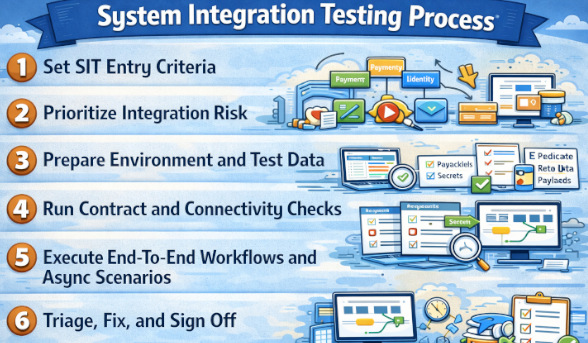
- Set SIT Entry Criteria: Confirm the build is deployed to the SIT environment and all core services are up and healthy. Verify connectivity to required dependencies such as SSO, vendor sandbox APIs, queues, and databases so you do not start testing on a broken setup.
- Prioritize Integration Risk: Choose what to test based on where failures would hurt most and where change was greatest, such as payments, identity, messaging, and critical customer journeys. This keeps SIT focused on catching cross-system breakages instead of trying to cover every feature.
- Prepare Environment and Test Data: Align configurations, feature flags, certificates, secrets, and webhook callback URLs across all services and partner systems. Create repeatable test users, roles, and datasets that can be reused or reset so results are consistent run to run.
- Run Contract and Connectivity Checks: Validate request and response schemas, required headers, authentication tokens or signatures, and expected error codes before running long workflows. These quick checks surface common blockers early, like wrong configs, expired certs, or mismatched API contracts.
- Execute End-To-End Workflows and Async Scenarios: Run multi-step flows that cross services and state transitions under both success and failure conditions. Include asynchronous realities like delayed events, duplicates, out-of-order messages, and eventual consistency to ensure the system converges correctly.
- Triage, Fix, and Sign Off: Log defects with clear reproduction steps and correlation IDs so teams can trace a single transaction across services quickly. Retest only the impacted flows after fixes, and sign off when critical journeys are consistently passing and remaining risks are explicitly accepted.
Read: Gap Analysis in QA: How Do You Master It?
System Integration Testing Strategies
SIT strategies are different ways teams organize integration testing so they can find failures faster and reduce release risk. The right approach depends on system complexity, team coordination, and how many external dependencies you rely on. Most teams choose a strategy that balances speed of integration with how easily they can isolate and debug issues.
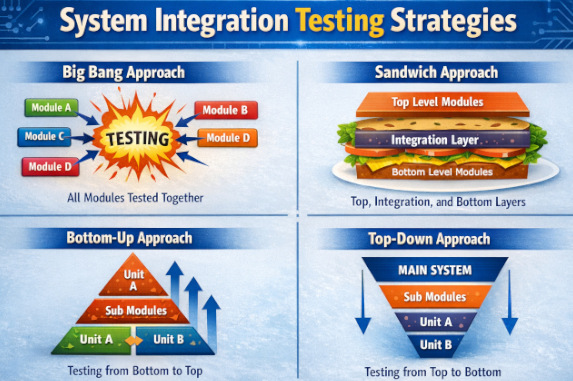
- Big Bang Integration: All components are integrated at once, and SIT is run on the fully assembled system to see if everything works together. It can mirror real-world behavior quickly, but failures are hard to isolate, debugging gets messy, and it depends on every team and dependency being ready at the same time.
- Top-Down Integration Testing: Starts with high-level modules and gradually integrates lower-level components using stubs. It allows early validation of system flow but may delay detection of defects in low-level modules. This approach is especially useful when business logic and user workflows are critical.
- Bottom-Up Integration Testing: Lower-level modules are tested first and then progressively integrated into higher-level modules. This approach ensures core functionality is stable early but delays validation of user-facing features. Drivers are commonly used to simulate higher-level modules during early testing stages.
- Sandwich (Hybrid) Integration Testing: Combines both Top-Down and Bottom-Up testing, allowing parallel testing of upper and lower layers. It reduces dependency on stubs and drivers but requires strong coordination between teams. This approach is effective for large systems with clearly defined middle-layer logic.
Read: Test Automation for Beginners: Where to Start?
SIT Best Practices
- Make Integration Contracts Explicit: Keep the specs, schemas, and error formats versioned and visible so integrations are not based on assumptions. SIT should quickly surface contract drift when any side changes.
- Prioritize Risk-based SIT: Focus SIT on money paths, login paths, high-change areas, complex orchestration, and unstable vendors instead of trying to test everything. A lean suite that runs reliably is more valuable than a large suite that teams stop trusting.
- Test Idempotency and Retries Explicitly: Verify retries, duplicates, and replays do not create duplicate orders, double charges, or corrupted state. Confirm compensations reliably reverse partial actions when distributed steps fail.
- Validate Timeouts, Circuit Breakers, and Backoff: Simulate slow responses, 429 throttling, and network drops to confirm resilience settings behave correctly. The system should fail safely and degrade gracefully rather than triggering cascading failures.
- Build Observability into SIT: Ensure correlation IDs propagate across services and that logs, traces, and metrics make failures diagnosable end-to-end. SIT should verify that errors are meaningful and that retries and failures are measurable.
- Use Production-like Configs and Security: Run SIT with real-world TLS, auth rules, gateways, scopes, and secret handling so results reflect production behavior. Many integration issues only show up when security and networking constraints match production.
Read: Risk-based Testing: A Strategic Approach to QA.
Common SIT Challenges
- Flaky Tests Due to Async Timing: Replace fixed sleeps with polling within timeout windows and validate results using durable signals like DB state, logs, or traces. Keep tests idempotent and use deterministic, isolated test data to avoid “works on rerun” failures.
- External Sandbox Instability: Reduce vendor noise by limiting sandbox calls, caching tokens, and using fallback stubs for non-critical paths. Run vendor-dependent tests in a separate pipeline lane and monitor vendor status to interpret failures correctly.
- Debugging Across Multiple Teams: Correlation IDs should be used everywhere. Centralize logs and traces so one transaction can be followed end-to-end. Use an integration ownership matrix and a triage playbook to route issues fast with clear evidence.
- Environment Drift from Production: Use infrastructure as code and automated config parity checks to keep SIT aligned with production-like settings. Continuously validate secrets and certificates so SIT failures reflect real issues, not environment gaps.
Read: Flaky Tests – How to Get Rid of Them.
Automating System Integration Testing
Automating SIT means building repeatable tests that validate real integrations (service-to-service + third-party) and prove key end-to-end workflows work reliably across environments. Here’s a practical, battle-tested way to do it.
- More Resilient UI-to-API System Validation: A lot of SIT checks are triggered via the UI (because that’s how real users drive the system), but the verification needs to confirm system behavior across services. testRigor’s AI-driven element identification reduces fragility from UI locator changes, so your SIT automation doesn’t fail just because someone refactored the frontend, meaning you can focus on validating the integration outcomes instead of fixing selectors. Read: How to do API testing using testRigor?
- Vision AI Style Stability for Fast-changing Apps: SIT automation tends to break when UI layouts shift (which happens constantly in modern delivery). testRigor’s Vision AI approach helps tests continue to find and interact with elements based on how they appear/behave, reducing maintenance and making it practical to keep SIT suites running continuously in CI.
- Natural-language Test Authoring: SIT often involves long workflows. With testRigor, teams can write these flows in plain English-like steps, which makes it easier for QA, product, and even non-technical stakeholders to contribute to integration coverage without waiting on heavy scripting.
Conclusion
System Integration Testing validates that your full system works correctly when all real components and external services are connected, including UI APIs, database, identity auth, payments, messaging, and vendor endpoints. It exposes cross-system failures that isolated tests miss, such as contract drift, configuration mismatches, timing issues, retries, idempotency gaps, and security problems in a production-like environment. With testRigor, you can automate these end-to-end integration flows more reliably, using resilient UI automation and plain English steps, so SIT stays stable and release-ready even as the product evolves.
Frequently Asked Questions (FAQs)
What is the primary goal of System Integration Testing?
The primary goal of System Integration Testing is to verify that all integrated systems work together correctly as one unified product in a production-like environment. SIT is less about validating individual features and more about confirming that data flows, configurations, security, timing, and external dependencies behave correctly across system boundaries.
It answers the critical question: “Will this system actually work in the real world?”
Should SIT use real third-party systems or mocks?
SIT should use real external systems whenever possible, or their official, certified sandbox/test endpoints. Mocks can still be useful for non-critical paths or unstable vendors, but core business flows (payments, identity, messaging, webhooks) must be validated against real integrations. Otherwise, SIT becomes another form of integration testing and loses its value.
Why do tests pass in integration testing but fail in SIT?
Tests often pass in integration testing because those tests run in controlled environments with mocked dependencies, simplified configurations, and predictable timing. SIT introduces real-world conditions such as network latency, real authentication systems, production-like certificates, asynchronous events, and actual third-party behavior. These realities expose issues like configuration drift, contract mismatches, race conditions, and resilience gaps that isolated tests cannot reveal.
| Achieve More Than 90% Test Automation | |
| Step by Step Walkthroughs and Help | |
| 14 Day Free Trial, Cancel Anytime |











