
STLC vs. SDLC: Key Differences and Phases Explained
 |

Taking the development scenario of a new e-commerce website as an example, developers following the Software Development Life Cycle (SDLC) completed interface design, coding, and basic functional testing. However, testers who adopt the Software Testing Life Cycle (STLC) discovered a major vulnerability that endangers customer data. This shows that SDLC and STLC both have significant differences and overlap with each other.
In this guide, we’ll explore the intricacies of STLC and SDLC and understand how they complement each other to deliver high-quality software.
| Key Takeaways: |
|---|
|
What is SDLC?
The SDLC is like a roadmap for building software. It is a step-by-step process that teams use to design, build, test, and deliver software applications. It helps to ensure that software is developed systematically, meets user requirements, and is completed within a set time and budget.
- It offers a clear structure to manage software projects.
- It helps to maintain a high level of quality.
- It ensures everyone in the team understands their role and the expectations for the project.
- It helps to identify problems early in the process, which is cheaper and easier to fix.
Phases of the SDLC
SDLC involves a series of steps to ensure that the software works as intended. Here’s a breakdown:
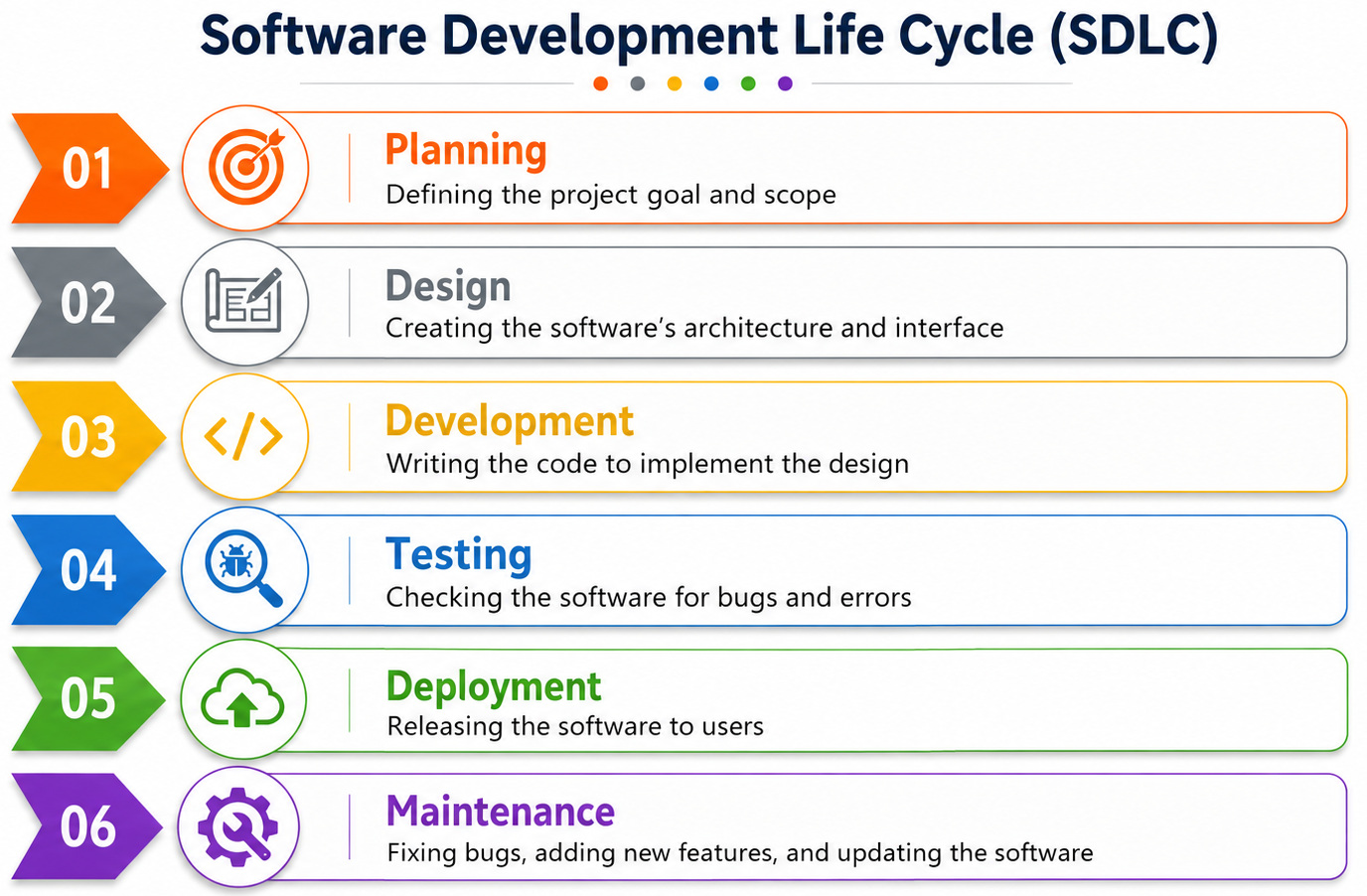
1. Requirements Gathering and Analysis/ Planning
- Goal: Understand and document what users and stakeholders need from the software.
- Activities: Meeting with clients, identifying what the software should do, and documenting all the requirements.
- Outcome: Usually, it’s a requirements specification document that outlines what the software should accomplish. Quite often seen as stories and epics in Agile Scrum.
- Example: A food delivery company wants a mobile app where customers can order food, track delivery, and make online payments. Business analysts gather requirements from restaurant owners, delivery partners, and customers to understand all expected features.
2. System Design
- Goal: Create a blueprint or plan for building the software.
- Activities: Designing the software architecture, creating detailed system models, and specifying technical details.
- Outcome: A design document that outlines how the software will be built and how all parts will work together.
- Example: Architects design how the food delivery app will work, including database structure, user interface layouts, payment gateway integration, and GPS tracking functionality. They also decide which technologies and cloud infrastructure will support the application.
3. Implementation (or Coding)
- Goal: Build the software by writing code.
- Activities: Developers write code based on the design document by using programming languages and development tools.
- Outcome: Working source code that forms the basic structure of the software application.
- Example: Developers write the actual code for features like restaurant search, cart management, payment processing, and order notifications. Frontend developers build the app screens while backend developers create APIs and database logic.
4. Testing
- Goal: Find and fix bugs or errors to ensure the software is working as intended.
- Activities: Running various tests like unit tests, system tests, integration tests, and user acceptance tests.
- Outcome: A bug-free and stable software product that is ready for deployment.
- Example: QA engineers test whether customers can successfully place orders, apply discount coupons, and receive notifications. They also check if the app crashes under heavy traffic during peak dinner hours.
5. Deployment
- Goal: Deliver the software to users so that they can start using it.
- Activities: Installing the software on user machines or a server, making it available to users, and setting up necessary environments.
- Outcome: A fully functional software application accessible to users.
- Example: The completed food delivery app is released on the Google Play Store and Apple App Store for customers to download and use. The operations team configures production servers and monitors the launch.
6. Maintenance
- Goal: Keep the software up-to-date, fix new bugs, and add new features based on user feedback.
- Activities: Making updates, providing support, fixing problems that arise, and adapting the software to changing user needs.
- Outcome: Improved and maintained software that continues to meet user needs over time.
- Example: After release, users report that the app becomes slow during weekends, so developers optimize the system performance. The company also adds new features like live chat support and scheduled deliveries based on customer feedback.
Why SDLC Alone Cannot Ensure Quality
Even when a software team carefully follows the Software Development Life Cycle, quality issues can still appear in the final product. Requirements may be misunderstood during the planning stage, leading developers to build features differently from what users actually expect.
During development, programmers often focus heavily on functionality and deadlines, which can cause edge cases and unexpected user behaviors to be overlooked. A feature may work perfectly under normal conditions but fail when users perform unusual actions or enter invalid data.
Modern applications also face challenges related to security, scalability, and performance that are not always visible during development alone. This is why the Software Testing Life Cycle plays a critical role in identifying vulnerabilities, performance bottlenecks, and hidden defects before the software reaches end users.
What is STLC in Software Testing?
STLC is a series of steps that testing teams follow to ensure the quality of a software application. It focuses on finding and fixing bugs to make sure the software is functional, reliable, and ready to meet user expectations before it goes live.
- It ensures that software is tested thoroughly before release.
- It helps to find and fix defects at an early stage, reducing the cost of fixing issues later.
- It improves software quality and reliability.
Phases of the STLC
It’s a series of steps to ensure that the software works as intended. Here’s a simplified breakdown:
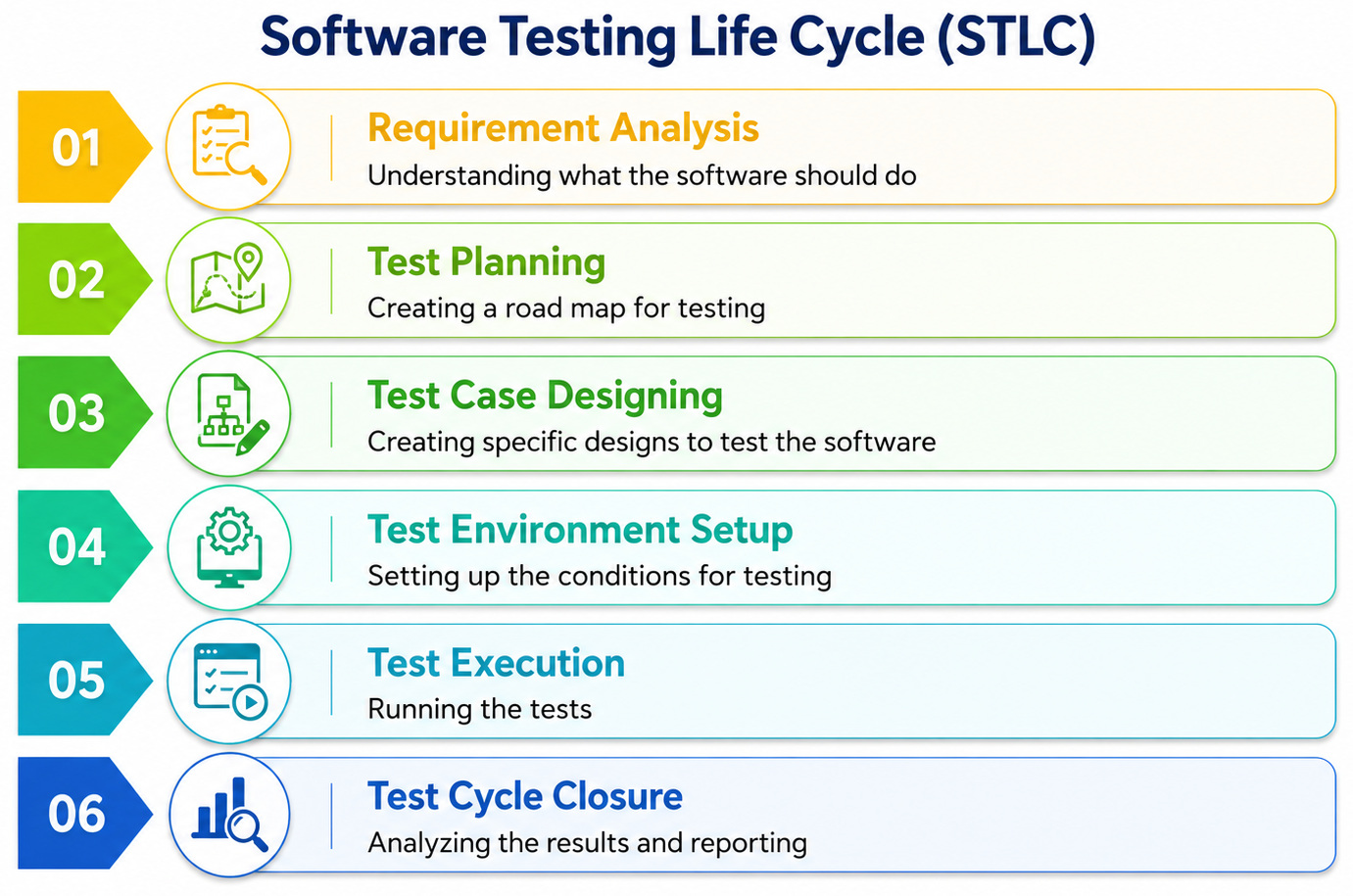
1. Requirement Analysis
- Goal: Understand what needs to be tested based on software requirements.
- Activities: Reviewing the requirements and identifying testable items, clarifying any doubts with stakeholders, and identifying the types of tests needed (e.g., functional, performance, security testing).
- Outcome: A list of requirements that are clearly understood and ready for testing.
- Example: Testers review the requirements of an online banking application to identify what needs testing, such as money transfer limits, login security, and transaction history accuracy. They also identify potential risk areas like payment failures and unauthorized access.
2. Test Planning
- Goal: Create a detailed plan for how testing will be done.
- Activities: Preparing a test plan document that outlines the testing strategy, scope, resources, timeline, and objectives. Testers also identify tools, roles, and responsibilities.
- Outcome: A test plan that acts as a roadmap for the testing process.
- Example: The QA manager prepares a testing strategy for an e-commerce website before Black Friday sales. The team decides timelines, testing tools, resource allocation, and the types of testing needed, including performance and security testing.
3. Test Case Development
- Goal: Create detailed steps for performing tests on the software.
- Activities: Write test cases and test scripts that describe what actions to perform, the expected outcomes, and the test data needed. Reviewing and getting approval for these test cases.
- Outcome: A set of well-defined test cases that cover all the testing scenarios.
- Example: QA engineers create test cases to verify whether users can add items to the shopping cart, remove products, apply coupons, and complete payments successfully. They also prepare test data for valid and invalid scenarios.
4. Test Environment Setup
- Goal: Prepare the hardware, software, network, and any other tools needed to perform testing.
- Activities: Setting up test servers, installing applications, configuring settings, and ensuring everything is ready for testing.
- Outcome: A test environment that mimics the production environment where testing can be conducted.
- Example: The testing team creates a staging environment that closely matches the real production setup of a ride-sharing application. This includes test servers, databases, APIs, and simulated GPS services for realistic testing.
5. Test Execution
- Goal: Run the tests to find defects or bugs.
- Activities: Executing the prepared test cases and scripts, logging test results, and marking tests as pass or fail. If a bug is found, testers document it with details for developers to fix.
- Outcome: Test reports showing what tests passed and failed, and details of any defects found.
- Example: Testers execute test cases on a healthcare portal to verify patient registration, appointment booking, and report downloads. When they discover that appointment confirmations fail for certain users, they log defects for developers to fix.
6. Test Cycle Closure
- Goal: Wrap up the testing process, evaluate results, and learn from the process.
- Activities: Analyzing test coverage, documenting lessons learned, identifying areas for improvement, and preparing a final test summary report. If everything passes, testing is considered complete.
- Outcome: A test closure report summarizing all testing activities, results, and any outstanding issues.
- Example: After testing a streaming platform, the QA team analyzes test coverage, defect trends, and unresolved issues before release approval. They document lessons learned and prepare a final testing summary report for stakeholders.
Difference Between SDLC and STLC
| Aspect | SDLC | STLC |
|---|---|---|
| Definition | SDLC is the process of developing software through multiple phases that include planning, creating, testing, and deploying the software. | STLC is a subset of the SDLC focused solely on testing the software to ensure it meets requirements and is defect-free. |
| Scope | Covers the entire lifecycle of software development, from gathering requirements to maintenance after deployment. | Focuses specifically on the testing phase within the software development lifecycle. |
| Primary Goal | To deliver high-quality software that meets user requirements and business goals within a specified timeframe and budget. | To verify that the software works as intended, is bug-free, and meets specified quality standards. |
| Phases |
Typical phases include:
|
Typical phases include:
|
| Role of Testing | Testing is a part of the entire SDLC and is often just one phase within the broader cycle. | Testing is the central focus of STLC; every phase revolves around ensuring the software quality. |
| Involvement of Stakeholders | Involves multiple stakeholders like business clients, developers, project managers, etc., throughout all phases of development. | Primarily involves the testing team but also coordinates with developers and business analysts to clarify requirements and report issues. |
Overlap Between STLC and SDLC
Think of SDLC as the blueprint for building a software application. It outlines the stages, from initial planning to deployment and maintenance. However, even the most meticulously designed blueprint can have flaws. This is where STLC in software testing comes into play.
In essence, STLC is a subset of SDLC that focuses on the quality assurance and testing aspects of software development. By working together, SDLC and STLC help ensure that the final product is reliable, efficient, and meets user expectations.
How STLC and SDLC Overlap
While they have distinct phases, STLC and SDLC are closely intertwined:
| Phase | SDLC | STLC |
|---|---|---|
| Requirement Analysis | Developers analyze the requirements to understand what needs to be built. | Testers analyze the same requirements to understand what needs to be tested. |
| Design | Engineers design the software’s blueprint and architecture. | Testers review the design to identify testing scenarios and create test cases. |
| Development | Developers write the code for the software application. | Testers prepare the testing environment, tools, devices, and test data. |
| Testing | Developers may perform unit testing on individual modules. | Testers conduct functional, performance, security, usability, and regression testing. |
| Deployment | The completed software is released to customers or end users. | Testers perform final validation and acceptance testing before release. |
| Maintenance | Engineers release updates, patches, and enhancements. | Testers verify updates to ensure no new defects are introduced. |
Conclusion
SDLC and STLC are essential frameworks in software development and testing, each playing a unique but interconnected role. SDLC provides a comprehensive roadmap for creating software, ensuring it meets user requirements and business objectives. STLC, on the other hand, focuses exclusively on quality assurance, ensuring the software is bug-free and performs as expected. The overlap between these cycles highlights their complementary nature: while SDLC emphasizes building software efficiently and systematically, STLC ensures that the end product is reliable and ready for deployment.
Modern software development requires structured approaches to both development and testing. One can achieve this through SDLC and STLC. It not only helps organize efforts and resources but also builds a better platform for communication and collaboration amongst teams. Together, they create a balanced approach to software development, combining innovation with rigorous quality control.
Frequently Asked Questions (FAQs)
- What happens if testing is delayed until the end of software development?
Delaying testing until the final stages of development can significantly increase the cost and complexity of fixing defects. Bugs discovered late may require major architectural changes, delay releases, and negatively impact user experience and business reputation.
- Why is early testing important in modern software projects?
Early testing helps identify defects, requirement gaps, and design issues before development progresses too far. This approach, often called “shift-left testing“, reduces risk, lowers fixing costs, and improves overall software quality.
- Can SDLC exist without STLC?
Software can technically be developed without a formal STLC, but the chances of defects, security issues, and performance failures increase significantly. STLC ensures that software is systematically validated before reaching end users.
| Achieve More Than 90% Test Automation | |
| Step by Step Walkthroughs and Help | |
| 14 Day Free Trial, Cancel Anytime |











