
What is Use Case Testing? Definition, Examples, and Best Practices
 |
Current software applications today do more than just “work”. They are expected to solve real user problems, deliver consistent experiences across devices, platforms, and scenarios, while also supporting business goals. As traditional testing methods focus solely on individual functions or lines of code, they often fail to validate whether a system truly meets user expectations. You need a process that focuses more on users and how they interact with the applications, and determines if the application meets their needs.
This is where Use Case Testing plays a crucial role.
| Key Takeaways: |
|---|
|
This article explores what use case testing is, why it matters, how it is performed, its advantages and limitations, and how it fits into modern testing strategies.
What Is a Use Case?
Before we delve into use case testing, let us first get a basic idea about a use case.
A use case is a description of how a user (also referred to as an actor) interacts with a system to achieve a specific goal.
- The user’s objective is to interact with the system.
- The steps taken to achieve that objective.
- The system’s responses to the interaction.
- Possible alternate or failure paths for the user system interaction, and evaluates potential risks and system dependencies.
- It manages scope requirements related to the project.
- A use case is useful in establishing the requirements.
- A use case visualizes the system architecture.
- It communicates complex technical requirements to relevant stakeholders easily.
A use case is often represented in documents or pictorially and is a user-driven approach. It typically describes the success and failure scenarios, as well as any critical variations or exceptions in the system that need to be handled.
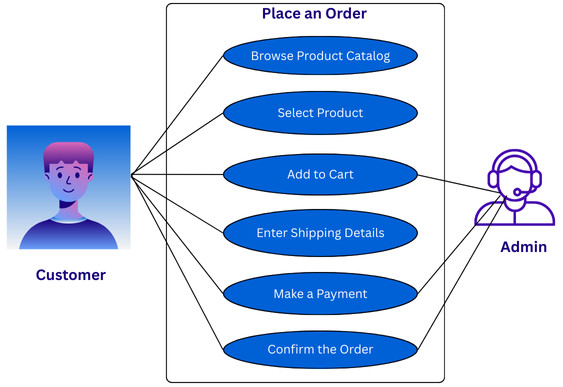
For example, in an e-commerce application, the “Place an Order” use case involves browsing the product catalog, selecting a product, and adding it to a cart, entering shipping details, making a payment, and receiving confirmation that the order has been successfully placed.
How to Write a Use Case for Your Project Requirements?
A use case serves as a helpful piece of information for your project documentation.
- Brief Description: A summary explaining the overall use case.
- Pre-condition: These are the conditions the user needs to fulfill before the use case begins.
- System: A system can be a product, an application, a service, or software to be taken into consideration.
- Actors: A user who interacts with the system and exhibits the required behavior is the actor. An actor can be an entire organization, another system, or a piece of hardware.
- Basic Flow or Main Scenario: This is a specific sequence of actions and interactions between actors and the system, commonly referred to as a use case instance.
- Alternate Flow: Aside from the basic, typical workflow, a system can also have an alternate workflow.
- Exception Flow: This workflow prevents the user from achieving desired results.
- Post-conditions: Conditions that are validated after executing the use case.
Example of Use Case in Real-world Scenarios
As an example, take an online food delivery application. This is the primary use case where users can use the online delivery app to place food orders online.
The app can be used to select restaurants, pick dishes, receive orders, track orders, process payments, and communicate with the restaurant that is delivering the order.
- Use Case Description: A user can order food online using the food delivery app.
- System: Online Food Delivery Application.
- Pre-condition: The user should have valid credentials to access the system online.
- Primary Actor: Individual ordering food online and making payments.
- Basic Flow or Main Scenario: The user/customer can explore available restaurant options on the app. He/she can then browse through the dishes available based on convenience and food preferences. The possible use case can be a customer and a restaurant employee interacting using the food delivery application. Once the required items are selected, they are added to the cart. The individual makes a payment and places the order.
- Expected Flow: The expected outcomes of each iteration can also be tracked. This helps development teams understand the overall system’s functionalities, enabling them to execute coding requirements more effectively.
- Post-condition: The system sends a notification with the order details, payment information, and the expected delivery time.
Who Writes the Use Case?
When it comes to writing the use cases, the customer requirement specifications are provided by the client or customer, and then the development team writes the possible use cases according to these specifications.
Alternatively, there can also be a scenario where special workshops are conducted for writing the use cases. All the concerned stakeholders can attend this workshop so that everybody is aligned with the product goals and requirements.
Once use cases are finalized by the development team, they are passed to the customers for review.
Once use cases are approved by the customer, they are sent to the development team for design and implementation. The use cases are also shared with the testing team for test plan design and test case creation.
Since project stakeholders are aware of the product’s functionality and overall design flow, it is recommended that they write the required use cases.
Read more about How Requirement Reviews Improve Your Testing Strategy.
What Is Use Case Testing?
Use case testing is a black-box testing technique that helps identify test cases from use cases. These test cases form part of the entire system from start to finish on a transaction basis. Read more on black-box testing here.
The goal of use case testing is to validate whether the system behaves correctly when users follow real-world workflows.
In short, use case testing answers the question: “Can users successfully achieve their goal using this system?”
Use case testing shifts the focus from ‘does the system work?’ to ‘does this system work for the user?’ Hence, instead of focusing on internal code structure, use case testing tests the system from the user’s perspective to ensure that all required steps in the test case work correctly, all scenarios (alternate + error) are handled gracefully, and the system responds appropriately at every stage.
Use case testing is primarily used for functional testing to identify issues in a developed system. It also identifies gaps in your application that could have been missed during component testing. Use case testing also helps determine the software quality through end-to-end (E2E) testing.
Features of Software Use Case Testing
- The use case testing mainly focuses on testing the system functionality and behavior from the end user’s perspective. It works on user interactions and real-time scenarios, with the software verifying the outputs generated by the software with a set of user inputs.
- It identifies and defines various use cases or scenarios and uses them as a framework for managing the tests. It confirms that the software can function at par to support the users in real-world situations.
- The use case testing helps uncover potential defects or issues in user interactions, data flow, functionality, and system integration.
- It has positive and negative testing that helps identify issues in various circumstances and ensures that the system meets the requirements and performs appropriately in different usage scenarios.
- The use case testing also supports the integration testing by identifying defects while various modules and sub-modules interact with each other.
Who Performs Use Case Testing?
- Testers: QA professionals and testers usually lead the testing process. They write and execute test cases based on the defined use cases and verify that the system behavior is as expected in different user scenarios.
- Business Analysts: Use cases that reflect real-world user needs and business goals are sometimes defined by business analysts. In some cases, they may also assist in validating the results.
- Developers: Developers sometimes help in use case testing, specifically when automated testing is used or if there is a need to verify whether the system matches the specifications they’ve built.
- Product Owners/Stakeholders: Product owners or other stakeholders may occasionally be involved in reviewing test cases. This is required to ensure the application aligns with the business objectives or user expectations.
Why is Use Case Testing Important?
- Aligns Testing with Business Goals: Use cases are derived from business requirements. Testing these use cases ensures that the system delivers value and meets user expectations and business needs.
For example, testing whether a user can “Reset Password” successfully is more meaningful than testing individual validation rules in isolation.
- Focuses on Real User Behavior: Use case testing focuses on how real users interact with the system, simulating end-to-end workflows, typical user decisions, common mistakes, and edge cases.
It is highly effective at uncovering usability defects and workflow gaps that other testing methods may miss.
- Improves System-level Validation: Unit and integration testing techniques only validate components. However, use case testing validates the entire system, ensuring that various modules of the system work together seamlessly.
- Enhances Communication Across Teams: Use cases are important for developers, testers, business analysts, and stakeholders alike. They reduce misunderstandings and improve collaboration, serving as a shared language among the stakeholders.
How Does Use Case Testing Work?
Use case testing is a process that follows the steps discussed here:
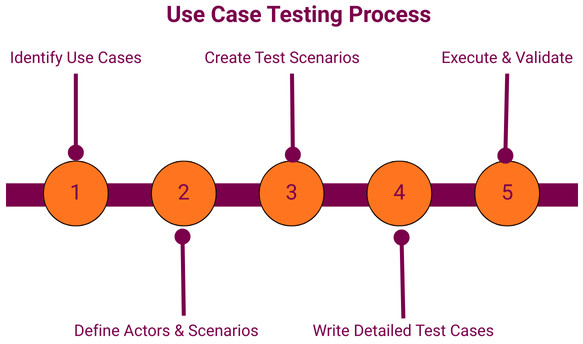
Step 1: Identify Use Cases
- Business requirement documents (BRDs)
- User stories
- Functional specifications
- Stakeholder interviews
Step 2: Define Actors and Scenarios
- Primary and secondary actors.
- Main, alternate, and exception scenarios.
Identifying these scenarios and actors ensures comprehensive coverage.
Step 3: Create Test Scenarios
- Verify that a registered user can place an order using any of the available payment methods.
- Validate that order placement fails gracefully when payment is declined.
Step 4: Write Detailed Test Cases
- Test case steps
- Valid Input data
- Expected results
Once test cases are written, they can be executed manually or automatically.
Understand the difference between test scenarios and test cases in this article.
Step 5: Execute and Validate
Once test cases are executed, the results are verified to ensure that the system behavior matches expectations. Any deviations are logged as defects.
Example of Use Case Testing
As a real-world scenario, consider that you have to test a use case “User Login” for a web application. The workflow is represented as follows:
Use Case: User Login
Actor: Registered Application User
Goal: Log in successfully and access the application dashboard
Main Flow:
- User navigates to the login page using the application URL.
- User enters a valid username and password.
- User clicks the “login” button.
- The system authenticates the user.
- User is logged in successfully and redirected to the dashboard.
Alternate Flow:
- User selects “Remember Me” option
Exception Flows:
- Invalid credentials
- Password not following password policy
- Locked account
- Expired password
The flows described above in turn become one or more test cases in use case testing.
Advantages of Use Case Testing
- User-centric Approach: Test cases used in use case testing reflect real-world scenarios rather than theoretical behavior.
- Comprehensive Coverage: It covers main, alternate, and failure paths, thus providing a comprehensive coverage of the system being tested.
- Early Defect Detection: Use case testing helps uncover issues related to incorrect workflows or missing requirements earlier in the SDLC.
- Improved Requirement Validation: It ensures user requirements are correctly implemented and testable.
- Supports Agile and DevOps: Use case testing supports DevOps and Agile. The use cases can easily map to user stories and acceptance criteria.
- Minimizes Complexities: It minimizes the complexities as it deals with a particular transaction at a time.
Limitations of Use Case Testing
- Not Ideal for Low-level Defects: Use case testing may not detect certain defects, such as performance bottlenecks, memory leaks, and logical errors at the code level.
- Time-consuming: It has detailed use cases and test cases for these use cases require significant time and effort, especially if the system is complex and large.
- Depends on the Quality of Use Cases: If use cases are poorly written or incomplete, it may lead to inadequate test coverage.
- User-specific Scenarios: Use case testing covers only user-specific scenarios, and it is impossible to achieve hundred percent test coverage.
Best Practices for Effective Use Case Testing
- Write Clear and Concise Use Cases: Use cases should be clear, concise, and free of any ambiguities. They should strictly focus on user goals.
- Cover Edge and Negative Scenarios: Don’t limit workflows only to happy paths. Ensure the use case scenarios cover edge and negative circumstances.
- Prioritize High-value Use Cases: Give the highest priority to business-critical workflows.
- Keep Use Cases Updated: Always revisit and revise the use cases as requirements always evolve. Subsequently, update the corresponding test cases.
- Combine with Other Testing Types: Perform use case testing alongside unit, integration, and non-functional testing.
- Use Centralized Repository: Maintain all the test assets, such as test cases and test outcomes, in a central location for all team members to access.
- Monitor Postconditions: Observe and monitor postconditions and metrics so that you can make improvements and update the test cases in the long run.
Use Case Testing in Agile and Modern Development
- User stories
- Acceptance criteria
- Behavior-driven development (BDD) scenarios
Use Case Testing with testRigor
Instead of writing long-format documents, in an Agile environment, use cases may be lightweight and embedded directly into sprint planning and test automation. Modern test automation tools like testRigor allow teams to automate use case flows, ensuring consistent validation across releases.
- AI-powered Testing: testRigor uses generative AI to streamline and simplify test creation, execution, and maintenance.
- Plain Language Test Creation: Unlike many tools that require you to write automated tests in code or in some keyword format, testRigor adopts a much simpler method. You can use plain English language statements to automate all kinds of tests. The AI-powered engine interprets these statements and executes them. This means that everyone on the team can participate in test automation, which makes it all the more effective and useful in ensuring quality for the customer.
- One-stop Solution: You can test across multiple browsers and platforms like the web, mobile (native, web, and hybrid), desktop, and even mainframes with this single tool. Test functional, regression, UI, accessibility, APIs, ERP systems, and even basic database operations using this tool.
- Test Various Scenarios: Be it logging into an account using 2FA to checkout products, or verifying a SAP or Salesforce dashboard, or validating modern AI features like chatbots and LLMs, testRigor can handle it all.
- Multiple Integrations Available: You can integrate testRigor with various platforms and tools, like those for CI/CD to promote continuous testing, test management to automate manual test cases, databases, and more.
login as Admin
navigate to Sales Dashboard
find record of “employee”
verify the performance
Each of these English statements can be customized through reusable rules that let you define the specific values and operations the command statement will follow; all again, in plain English language. Or, you can even use testRigor’s generative AI capability to define the rule’s specification for you in plain English language.
In this way, you can cover various use cases in a syntax that is the same as writing manual test cases. Here’s an example of this – see how testRigor integrates with TestRail to simplify automation of manual test cases while also supporting test management.
Conclusion
Use case testing is an important software testing technique that bridges the gap between technical implementation and real-world scenarios. It validates end-to-end workflows from a user’s perspective and ensures that systems not only function correctly but also deliver meaningful value to users.
While it does not replace lower-level testing techniques, use case testing complements them by focusing on what matters most, whether the system works for the user.
In times where user experience, reliability, and business outcomes define software success, use case testing remains a crucial component of any comprehensive testing strategy.
| Achieve More Than 90% Test Automation | |
| Step by Step Walkthroughs and Help | |
| 14 Day Free Trial, Cancel Anytime |











