
What is Dark Launch and How to Test it?
 |
When it comes to releasing new features, software companies constantly face challenges to release the software without compromising system stability, user experience, or business objectives.
If at all, the new features released are not performing as expected, that might hurt the business significantly. So, how about a way to deploy new functionality into production silently, without anyone being aware of it, and only activate it when you are ready to expose it?
This is where the concept of a Dark Launch comes in.
| Key Takeaways: |
|---|
|
This article explores what dark launches are, why they matter, their benefits and risks, real-world use cases, and how to test a dark launch effectively.
What is Dark Launch?
A dark launch is the process by which a new feature or system component is deployed to production silently, without exposing it to the general user base. The feature exists in the system but remains inactive or invisible.
The separation of deployment from release is the distinguishing characteristic of a dark launch:
- Deployment: Code is shipped to production servers.
- Release: Users gain access to the deployed code.
Traditionally, deployment and release were never distinguishable, as once code is deployed, users immediately get access to it. Dark launches, however, have broken this connection. It allows teams to push code to live production but keep it gated or dormant.
To keep the new feature disabled, a “feature toggle” or a “feature flag” is used that is in the OFF state. This way, new code can be tested with real production traffic and load without affecting the end-user.
The term “dark” here refers to the fact that the new functionality is not yet visible (i.e., it is still in development).
How Dark Launch Differs from Other Release Strategies
Organizations use several release strategies to deploy their functionalities and applications. Let’s have a look at how these strategies differ from dark launch.
Dark Launch vs. Canary Release
Dark launch and canary testing enable teams to assess how new functionality impacts system performance or product metrics with real users, or in a production environment, as a software engineer might describe.
However, there is a difference between the two strategies.
In dark launches, users are not informed that they’re participating in a test or using a new feature. That’s why they’re called ‘dark’.
In canary tests, on the other hand, at least some users are aware of that. A beta test is an example of canary testing, wherein a new feature is rolled out to a small percentage of users.
Read: What is Canary Testing?
Dark Launch vs. Feature Flag Release
In a feature flag release, a toggle feature is used, which can be set ON/OFF for selected user groups. If the feature flag is ON, the new functionality is visible to whitelisted users, unlike in dark launch, where new functionality is visible only to internal users.
Read: Feature Flags: How to Test?
Note that a dark launch may later evolve into a canary rollout or feature-flag release; however, the key distinction is that the feature begins in a dark state, unseen by users.
Why Companies Use Dark Launches
Most of the organizations, including tech giants like Google and LinkedIn, use dark launch as part of their release engineering strategy. Dark launches are essential for the following reasons:
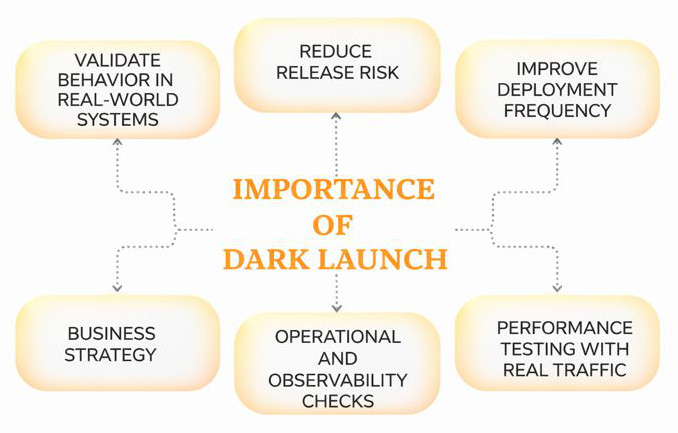
Validate Behavior in Real-World Systems
Inevitably, testing environments may not precisely match production. Several parameters, such as data volume, user interactions, network conditions, and integration paths, differ significantly. A dark launch allows developers to observe and monitor how a new feature behaves within the real system. If the behavior is not as expected, they can roll back the feature at any time and work on improving it.
Reduce Release Risk
In a traditional setup, releasing features directly to users introduces business risk. Bugs become costly. A dark launch isolates this risk by letting teams verify readiness before public exposure.
Improve Deployment Frequency
Continuous delivery pipelines benefit from smaller, frequent deployments. Dark launches encourage fast iterations and make deployment less risky.
Performance Testing with Real Traffic
To measure the system’s response to a new feature without affecting the users, many companies route a copy of production traffic (shadow traffic) to a dark-launched feature. This way, they can measure the response and take appropriate action.
Operational and Observability Checks
With a dark launch, teams can verify new functionality for CPU/memory usage, latency and throughput, database impact, error patterns, and the correctness of logging and monitoring.
All of these help assess the situation before enabling the feature live.
Business Strategy
As part of a business strategy, organizations often want to keep certain functionality hidden from their competitors until they are ready. Dark launch facilitates this.
How Dark Launch Works: Key Mechanisms
Dark launches are typically implemented using one or more of the following key techniques:
Feature Flags / Toggles
Feature flags are used to allow teams to deploy new logic while controlling who sees what. During a dark launch, the feature flag remains off for all users or is enabled only for internal testers. Only the users for whom the feature flag is ON are able to use the new functionality.
Some of the feature management platforms include:
- LaunchDarkly
- Unleash
- Optimizely
- Custom-built solutions
Shadow Traffic (Mirrored Traffic)
In this mechanism, real user requests are duplicated and sent to the new feature for testing. Responses, however, are discarded.
The shadow traffic mechanism is commonly used in:
- Search systems
- Recommendation engines
- ML models
- Database migrations
- Backend services
Backend-Only Deployments (Invisible to UI)
This is a technique in which the deployments are invisible to the UI. These are basically new business logic features that exist behind an API endpoint. These features are not yet called by the UI.
Routing Rules
In this technique, reverse proxies (such as NGINX or HAProxy) or service meshes (like Istio) are used to route traffic only to selected internal IPs or test accounts for the new feature.
Gradual Rollout
In this mechanism of dark launching, a new feature is initially enabled for a small percentage of users, and it is then gradually increased as the feature attains stability and performance.
What Can Be Dark Launched?
Dark launches are not limited only to frontend features. Any new software feature, backend system, or infrastructure change can also be dark launched.
Examples of functionalities that can be dark launched include:
- New User Interface (UI) Elements: Any UI component, like a new registration scheme or a different layout scheme for a part of the application, can be dark launched to a small group of users to assess and obtain their feedback.
- Backend Changes: Features that reside in the backend and are not visible to the user, such as a new payment processing system, a different database, a new API, algorithms, an updated recommendation engine, or a new business logic, are ideal candidates for dark launching.
- Infrastructure Updates: New infrastructure feature implementations, like a new queuing system, a different cloud service, or microservices migrations, can be dark launched by sending a small percentage of traffic to it while keeping the old system running in parallel.
- Performance-critical Features: Features like a new checkout flow or payment system integrations can be dark launched to see if they improve sales or slow down performance. Based on the results, the new functionality can either be rolled out or rolled back.
Benefits and Risks of Dark Launching
The following table presents the benefits and risks associated with dark launching:
| Dark Launching – Benefits | Dark Launching – Risks |
|---|---|
| Reduces deployment risk | Increased system complexity and technical debt |
| Improves confidence in new features | Debugging can be harder when behavior differs for internal vs public users |
| Allows performance benchmarking under real load | Zombie code if dark-launched features are never released |
| Supports gradual release strategies | Additional monitoring and flag-management overhead |
| Improves team velocity | Security concerns if hidden APIs accidentally become accessible |
| Enables hidden R&D experimentation | |
| Provides earlier integration feedback |
How to Test a Dark Launch
Testing a dark launch requires a structured approach that covers both functional and non-functional aspects. Testing must be controlled, careful, and well-monitored as the feature is already in production.
A general workflow to test dark launch is given below:
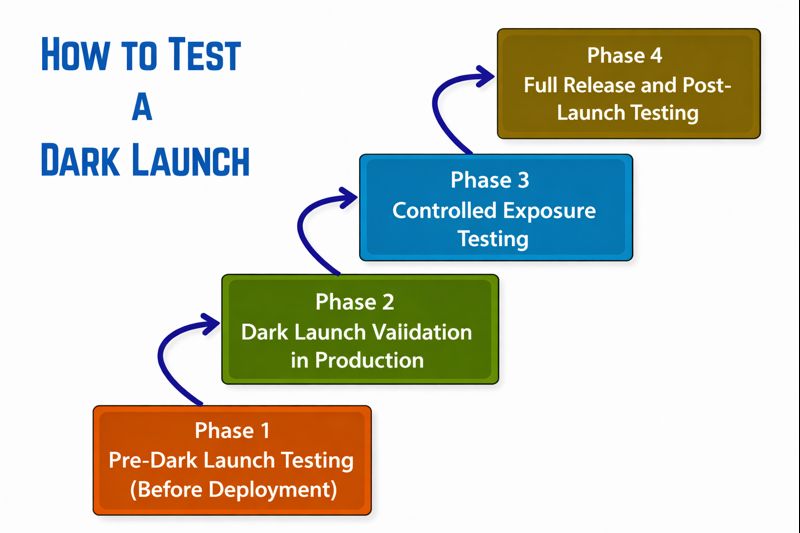
Phase 1: Pre-Dark Launch Testing (Before Deployment)
This is the first phase carried out before the dark launch of a new functionality. It should be noted that even though the feature will be deployed darkly, it should be thoroughly tested beforehand.
Feature Flag Testing
The new functionality is deployed with the feature flag OFF, as it is a dark launch. The feature flag toggling should work in all environments, and fallback behavior should be safe and predictable.
Functional Testing
Deployed functionality is verified for logic, UI workflows, requirements, and interactions using unit, integration, API tests, and end-to-end workflows. Cross-browser and device tests are also included in case UI is involved.
Non-functional Testing
Non-functional testing of new functionality is also part of this phase, in which security, accessibility, usability, and basic load testing are performed to assess the performance of the new functionality.
Read: Functional Testing and Non-functional Testing – What’s the Difference?
All these testing workflows can be verified using tools like testRigor, which can automate all these flows, including flag-based conditional scenarios.
Phase 2: Dark Launch Validation in Production
Once the feature is deployed, dark, active validation can begin. This includes shadow traffic testing, internal user testing, observability and monitoring checks, and automated alerting. Performance benchmarking may be used to assess performance.
Shadow Traffic Testing
In this technique, a copy of actual user traffic is sent to the new service. The responses are discarded as they should not disrupt existing users. But the system is verified to assess how the new service handles real-world queries and load. Anomalies or performance degradation are also tracked.
This technique is ideal for algorithmic updates or backend rewrites.
Internal User Testing
Users such as internal testers, employees, QA teams, or designated accounts can access the dark-launched feature using:
- Whitelist accounts
- Internal IP ranges
- Feature flag activation
They can test the new feature using automated end-to-end tests in production (using synthetic test accounts) to confirm behavior.
Observability and Monitoring Checks
Observing and monitoring the new feature launched is key to this phase. The following parameters are monitored for the newly dark-launched feature:
- CPU/memory usage of new components
- Error rates and stack traces
- Database queries and load
- Network latency and throughput
- Cache hit/miss ratios
- API responsiveness
- Log event patterns
- Queue backlogs (if applicable)
Observability and monitoring tools, including Prometheus + Grafana, Datadog, New Relic, ELK stack, and Splunk, can be used.
Automated Alerting
To assess the new functionality, behavior, and output, certain alerts can be configured that will trigger automatically when conditions are met. Example conditions for which alerts can be set include:
- Error rate > 2%
- Latency spike > 300ms
- Memory leak growth over 24 hours
- CPU saturation over threshold
Performance Benchmarking
Dark-launched component is compared with its current counterpart in terms of:
- Latency improvements/regressions
- Resource usage changes
- Throughput differences
- Scalability under load
- Real-world performance versus staging tests
Phase 3: Controlled Exposure Testing
Once the dark-launched functionality passes the testing in phase 2, it can begin controlled rollout. This is done using the following mechanisms:
Canary Testing
In this mechanism, the functionality is partially rolled out by enabling it for 0.5% users first. Once these users pass the feature, the access is subsequently extended for 1% users, then 5%, and so on.
A/B Comparison (If Relevant)
A/B testing is performed for user-facing changes, such as comparing conversion rates, monitoring engagement, tracking session duration, and analyzing user retention. With A/B testing, it is ensured that the feature not only works technically but also adds business value to the organization.
Regression Testing
Automated regression test suites should be run to ensure no unrelated functionality breaks. Regression testing should be performed even after enabling the feature for more users.
A tool like testRigor is ideal for continuous regression monitoring in production-like systems. You can automate a variety of your UI tests, regression tests, functional tests, and more in plain English language. This makes test automation a possibility for all without the hindrance of knowing a programming language. The tool can run tests across various platforms (web, mobile, and desktop) and test a variety of scenarios, including those involving AI features like LLMs and chatbots. Moreover, this AI-powered tool can streamline test executions and maintenance, reducing your workload.
Phase 4: Full Release and Post-Launch Testing
At this stage, the feature is fully rolled out, and now the post-launch testing and monitoring should begin. Once the feature is proven stable, the percentage of traffic that can access the functionality is gradually increased by flipping the feature flag to “ON” for more users.
The steps performed in this phase are:
Post-Release Monitoring
Monitoring of new functionality is continued at least for one or two release cycles by looking for parameters, including:
- Unexpected spikes in support tickets
- Customer feedback issues
- Performance anomalies
- Edge-case failures
Cleanup and Technical Debt Review
Dark launches often introduce temporary feature flags, routing rules, logging hooks, and debug endpoints.
The system is cleaned up by removing unneeded flags, deleting old code paths, and updating the documentation. This prevents the “flag debt”.
The new feature can now gradually be rolled out.
Read: Continuous Deployment with Test Automation: How to Achieve?
Best Practices for Effective Dark Launch Testing
The following best practices should be followed for effective dark launch testing:
- Always Use Feature Flags: Dark launches depend on strict control, and a feature flag is one of the mechanisms for this. Use feature flags to toggle new functionality ON or OFF without deploying new code. The flag should also be monitored, logged, documented, and easily removable.
- Start with Non-critical Features: Begin dark launching with lower-risk components or features to gain experience and confidence before applying them to core functions.
- Automate as Much as Possible: Automated tests prevent regression when toggling features on/off. Tools like testRigor can automate UI flows, API testing, data validation, and cross-platform scenarios.
- Maintain Strong Observability: Dark launch should be monitored comprehensively to observe its performance, or it might lose much of its value.
- Limit Initial Exposure: Initially, provide access to a small number of users, such as internal users. Once they pass the functionality, then go for a little bigger group, and subsequently scale up to extend the access to the public.
- Use Synthetic Accounts: Always use synthetic accounts for testing unless shadow testing is explicitly designed for real user data.
- Keep Rollback Plans Ready: Deployment should be rolled back if anything goes wrong. Fast rollback is essential for safe experimentation.
- Document Flag Configurations: Keep a clear, up-to-date record of all feature flags, their purpose, and their current settings to prevent complexity.
- Clean Up Technical Debt: Clear feature flags and associated code once a feature is fully launched to keep the codebase clean. Read: How to Manage Technical Debt Effectively?
Real-World Examples of Dark Launches
Here are some of the real-world examples of dark launches:
Facebook’s News Feed Algorithms
Facebook is known to deploy new ranking models darkly and run them against shadow traffic before rolling them out.
Google Search Experiments
Google constantly tests search algorithm variations quietly before enabling them globally.
Netflix Microservice Changes
Netflix may deploy new microservices behind feature flags, observing traffic patterns before releasing them publicly.
E-commerce Platforms
Checkout flow optimizations, recommendation engines, or fraud detection logic often undergo dark launches because errors could be costly and may affect business.
Conclusion
Dark launching is a powerful deployment strategy that helps organizations deliver new features safely, confidently, efficiently, and silently. By separating deployment from release, organizations can validate new functionality under real-world conditions, minimize risk, and ensure stable user experiences.
With strong observability, disciplined feature-flag management, and the right automation tools, teams can transform dark launches into a highly effective part of their continuous delivery workflow.
| Achieve More Than 90% Test Automation | |
| Step by Step Walkthroughs and Help | |
| 14 Day Free Trial, Cancel Anytime |











