
Top Test Cases for Flight Booking Systems: A Checklist
 |
There is a whole lot that can go wrong when booking a flight online. The fare looks fine, then jumps to the final payment screen. A seat appears to be available, then disappears when selected. The payment processes, but the ticket never arrives. There can be times when you have a verification through the website itinerary, and an entirely different thing in the email confirmation, and this is where testing teams look for flight booking test cases for reference.
As a tester, you have to make sure this is not happening for the AUT (Application Under Test). Not during a sale. Not during a holiday surge. Not with thousands of travelers trying for the last few scattered seats before prices shoot up again. Early testing prevents these failures from reaching the end-user. And that pressure is in place all the time. Quiet, steady, and unavoidable.
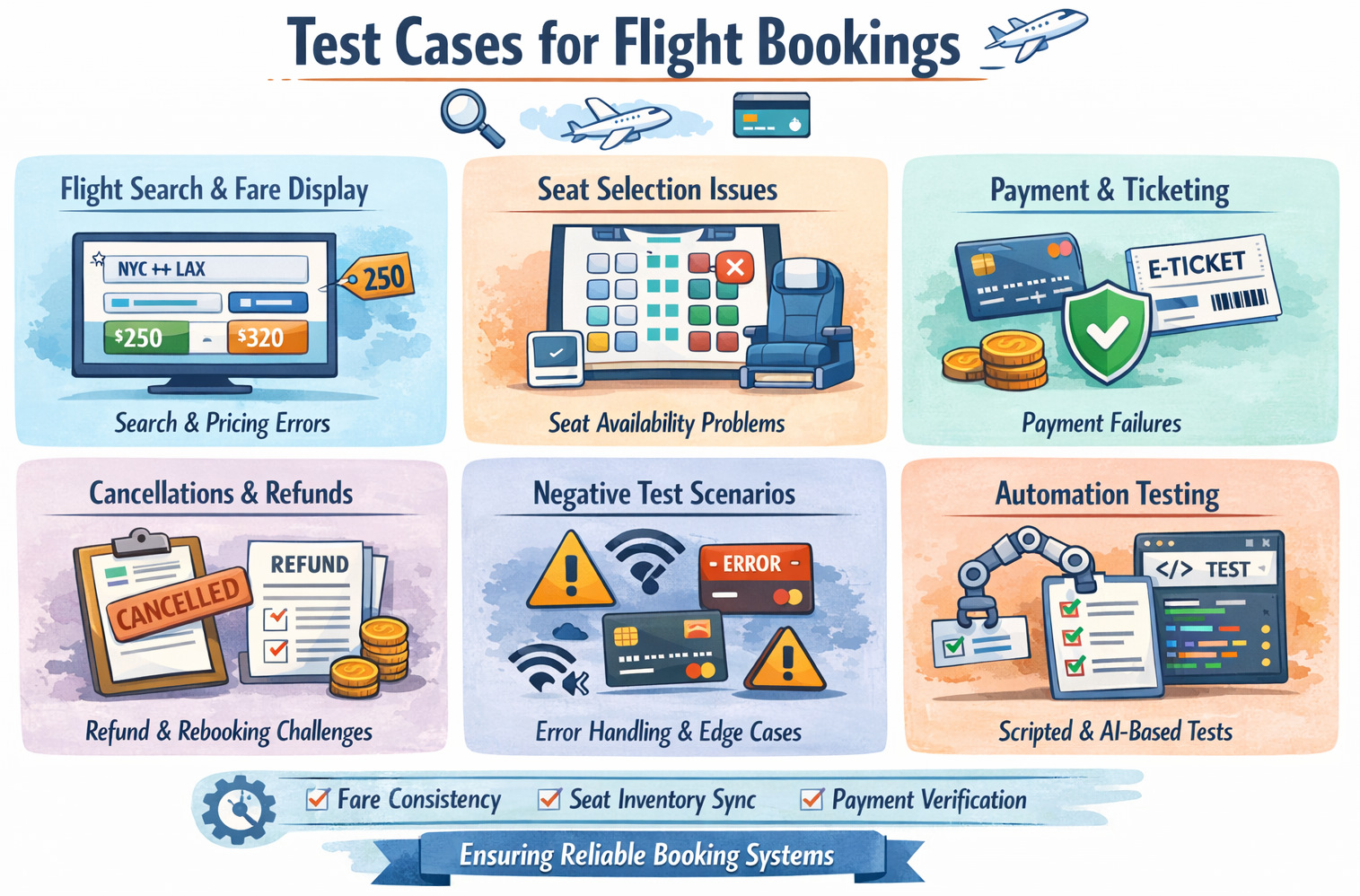
On the surface, flight booking systems seem simple.
Search. Pick a flight. Add passenger details. Pay. Done. But whoever has worked on one knows how deceptive that simplicity is.
Fare classes behave differently. Seat availability changes second by second. Rates differ by route and country. Baggage, meals, and other ancillary services can all make a difference in the final price. Airline APIs return inconsistent responses. Payment, ticketing, and confirmation can take place in different systems. A single tweak to search logic can unintentionally impact the booking rules one or two steps down the road.
This is the reason testers, QA leads, and product teams return to this theme time and again. Not because they need a bigger checklist for the event they have in mind. Because they want more precise thinking: what scenarios really matter, where flight booking flows normally break down, and how to test without grinding everything to a standstill.
| Key Takeaways: |
|---|
|
Why Test Cases Matter in Flight Booking Systems
- Maybe a booking failed during a demo.
- Maybe the displayed fare did not match the charged amount.
- Maybe a user paid but never received a ticket.
- Maybe automation broke after what looked like a harmless UI update.
Flight booking systems sit right in the middle of user experience, business rules, external integrations, and time-sensitive inventory. On paper, they may seem structured. In production, they face a much rougher world.
- Users booking across time zones
- Return flights crossing date boundaries
- Multi-city or connecting itineraries
- Temporary airline API delays
- Price refreshes are triggered during checkout
- Seat availability changing mid-flow
- Payment success without ticket issuance
- Rebooking after partial failure
Good test cases don’t have to cover every possible permutation. That is neither practical nor helpful. The point is to protect against where the booking systems most likely fail in ways that users actually feel the failure.
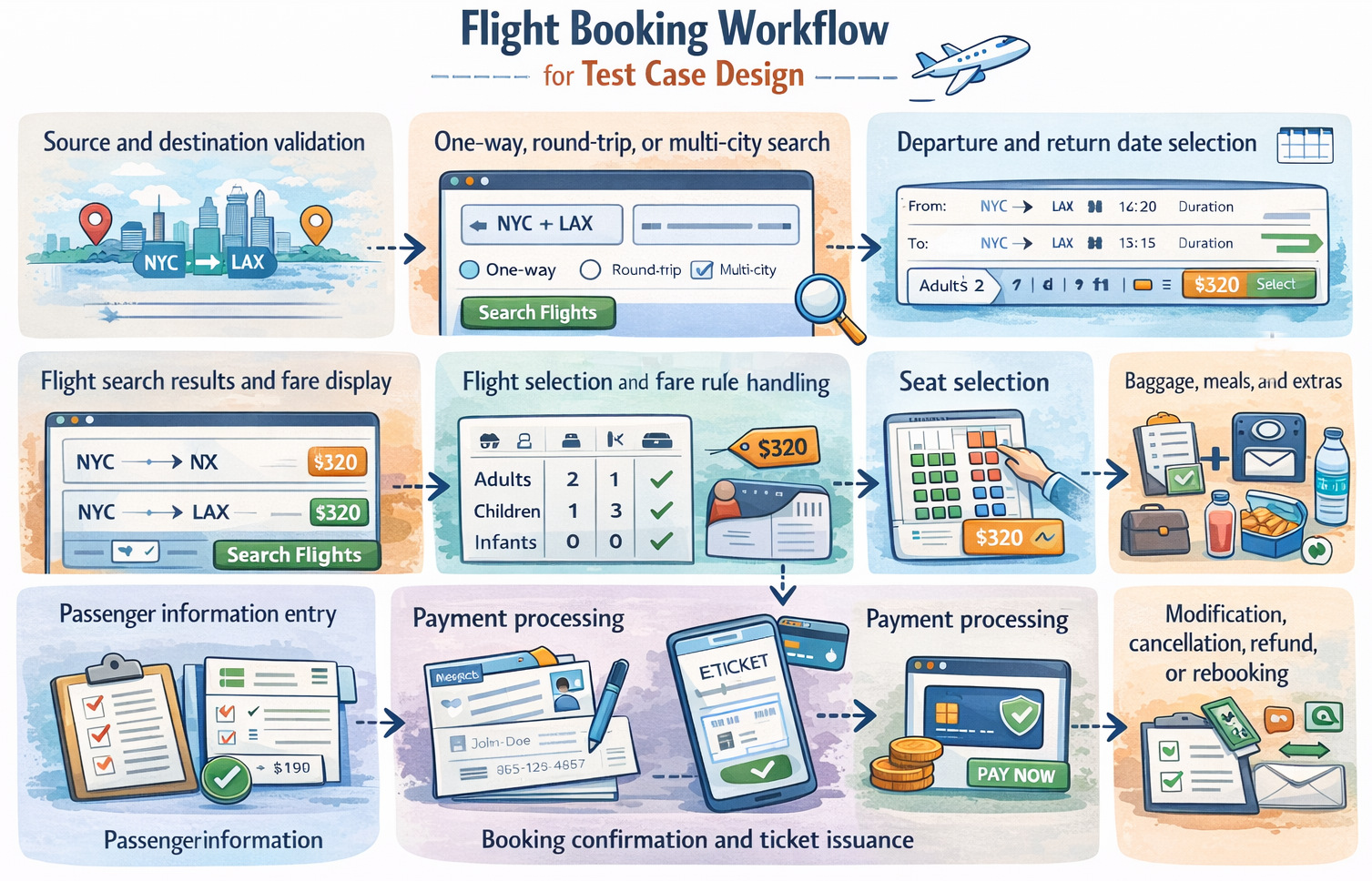
Flight Booking Workflow for Test Case Design
Before writing any test case, the first question is simple: what exactly is the system supposed to do from a traveler’s point of view?
- Source and destination validation
- One-way, round-trip, or multi-city search
- Departure and return date selection
- Flight search results and fare display
- Flight selection and fare rule handling
- Seat selection
- Baggage, meals, and extras
- Passenger information entry
- Payment processing
- Booking confirmation and ticket issuance
- Modification, cancellation, refund, or rebooking
This is where a lot of teams go wrong. They try out snippets of the journey in isolation and think that, therefore, the full flow is safe. But in real life, major failures occur between steps, not within them.
A search can work perfectly. The fare display may appear correct. Payment can succeed. Yet ticketing can still fail. Or a reservation may show up as confirmed online, but the email confirmation never arrives. Or a seat may have been reserved in one service and not reflected in another.
This is the reason why a combination of functional, negative, and end-to-end scenarios must be carried out while testing flight booking systems.
Functional Test Cases for Airline Reservation Systems
Functional tests verify whether the system behaves as expected when things go right. They are necessary, but they are never enough on their own.
Flight Booking Test Cases: Search Functionality
- Perform a search with a valid origin, destination, and travel dates
- Search for one-way flights
- Search for round-trip flights
- Search for multi-city itineraries
- Search with past departure dates
- Search for a point of return before the departure date
- Searching with incorrect pairs of airport codes or city names
- Search for the maximum and minimum number of passengers
- Search with adults, children, and infants in different combinations
- Search when no flights are available
Date-and-time logic is one of those things that teams often underestimate. Flight systems are extremely sensitive to overnight routes, international travel, and time zones. A flow that looks right in one area may behave quite differently in another. Departure and arrival times aren’t just labels. They have the power to influence pricing, eligibility, connections, and traveler expectations.
Flight Booking Test Cases: Availability and Fare Display
These test cases make sure that the system retrieves available flights according to the user’s search criteria, such as departure city, destination, travel date, and passenger details. They ensure that the accurate fare information, such as base price, taxes, and other charges, is always displayed consistently to users. These are also the most error-prone scenarios.
- Real-time seat availability is displayed correctly
- Fare is shown consistently in search results and the detail view
- Price remains consistent from selection to payment
- Taxes, surcharges, and service fees are calculated correctly
- Fare classes displayed accurately
- Discount codes or promotional fares are applied correctly
- Last-seat availability updates correctly under concurrent booking attempts
- A fare refresh message is shown when the price changes before checkout
Fare logic in flight systems is particularly fragile because it frequently relies on other services. One will show the updated fare while another may still display old data. If the amount the user is charged is different than what they think they would be charged, that’s rarely something that goes unnoticed.
Flight Booking Test Cases: Passenger Details and Booking Forms
- Mandatory passenger fields validated properly
- Validations for full name, title, date of birth, and gender
- Passport and visa-related fields are validated when required
- Email and phone number format checks
- Special characters in passenger names are handled correctly
- Multiple passengers entered successfully
- An infant is linked correctly to the adult passenger
- Frequent flyer number accepted and validated
- Emergency contact details accepted correctly
Flight Booking Test Cases: Seat Selection and Ancillary Services
- Seat map loads correctly
- Available, occupied, and blocked seats are displayed accurately
- The user can select and change a seat before payment
- Extra-legroom or premium seats priced correctly
- Baggage add-ons are reflected in the final fare
- Meal preferences were saved properly
- Priority boarding or insurance added correctly
- Ancillary service prices remain consistent through checkout
Flight Booking Test Cases: Payments
- Successful payment completes the booking flow
- Payment failure handled gracefully
- Duplicate payment prevented
- Redirect to the external payment gateway works correctly
- Return from the payment gateway restores the correct booking state
- Delayed payment confirmation handled correctly
- Booking is created only once after successful payment
- Payment and ticket issuance status remain in sync
Flight Booking Scenarios: Negative Test Cases
- Invalid card details entered during payment
- Session expires during checkout
- Browser refresh during payment or booking confirmation
- User clicks back after completing payment
- Network interruption while booking is being processed
- Airline API returns a timeout or a malformed response
- Fare changes after flight selection but before payment
- The selected seat becomes unavailable before confirmation
- Passenger age does not match fare type rules
- Attempt to book more passengers than allowed
- Invalid promo code entered
- Duplicate submission caused by repeated clicks
Flight Booking Scenarios: Cancellation, Rebooking, and Refunds
- Cancellation within the free cancellation period
- Cancellation after penalty applies
- Partial refund for one passenger in a multi-passenger booking
- Refund amount calculated correctly
- Failed refund processing handled properly
- Booking status updated after cancellation
- Rebooking to a different flight works correctly
- Fare difference calculated correctly during rebooking
- Travel credits or vouchers applied correctly
- Refund confirmation sent to the user
Non-Functional Testing for Flight Booking Apps
A booking system can be functionally correct and still fail the business if users find it slow, confusing, or unsafe.
Performance Test Cases
- Handles peak search and booking traffic
- Responds quickly during high-demand fare sales
- Maintains stability when many users search the same route
- Supports concurrent seat selection without corruption
- Keeps booking flow responsive under load
Security Test Cases
- Protection of personal and payment information
- Secure session handling
- Prevention of unauthorized booking access
- Secure API communication with airline and payment providers
- Data masking in logs and error responses
- Role-based access for internal users
Usability and Compatibility Test Cases
- Mobile and desktop consistency
- Browser compatibility
- Responsive layout across devices
- Accessibility of forms, calendars, and seat maps
- Readable fare breakdowns and booking summaries
- Clear error messages and recovery guidance
Read: Automating Usability Testing: Approaches and Tools.
Common Risk Areas in Flight Booking Systems
- Date and Time Logic: Flights involve time zones, overnight routes, international borders, and daylight savings changes. A tiny typo here can break search, show, eligibility, or itinerary accuracy.
- Fare Consistency: Prices tend to fluctuate dynamically. That system has to communicate those changes clearly and not charge users unexpectedly.
- Seat Inventory Sync: Availability can change in real time. Payment should never be finalized for seats or flights that have already been taken.
- Payment and Ticket Issuance Gap: Successful payment does not lead to successful booking. This gap needs to be thoroughly tested.
- External Integrations: APIs, payment gateways, tax services, email systems, and loyalty systems for airlines can all fail in various ways. Testing should reflect that reality.
Why Manual Testing Alone is Not Enough
Flight booking systems still require manual testing. It allows teams to investigate confounding behavior, confirm that new flows work as they should, and catch problems that scripted tests might miss earlier in the process. But it does not scale well.
There are many things that have changed in flight booking systems. There are too many variables that affect outcomes, such as routes, passenger types, fare classes, ancillaries, currencies, taxes, devices, and integrations. Manually running through all the relevant combinations rapidly becomes costly and impractical. That is why automation is helpful.
Read: Transitioning from Manual to Automated Testing using testRigor: A Step-by-Step Guide.
How testRigor Helps with Flight Booking Testing
The issue is that traditional automation does not really scale well with booking applications. Constantly breaking selector-based scripts with UI updates, layout shifts, renamed elements, and dynamic content. As time goes by, teams spend more of their effort fixing tests than learning from them. This is where testRigor becomes useful.
- Handles long, end-to-end flows easily in simple English
- Fits new interface updates without needing adjustments, thanks to the tool’s AI abilities to adjust to small UI changes
- Reduces maintenance drastically by removing dependency on UI element locators like XPaths, thus avoiding flaky test runs
- Fine on websites, works with phones too, handles data connections without any problem
- Allows non-technical testers to contribute
- Ideal for regression testing before every release cycle
- Test all kinds of features – login with 2FA, AI features like chatbots and LLMs, dynamic images, table data, file upload/downloads, audio testing, UI testing, API testing, and more.
- Integrates with other tools like those for CI/CD or test management to promote continuous testing.
Let’s see one test case for search flight booking, using testRigor’s plain English commands.
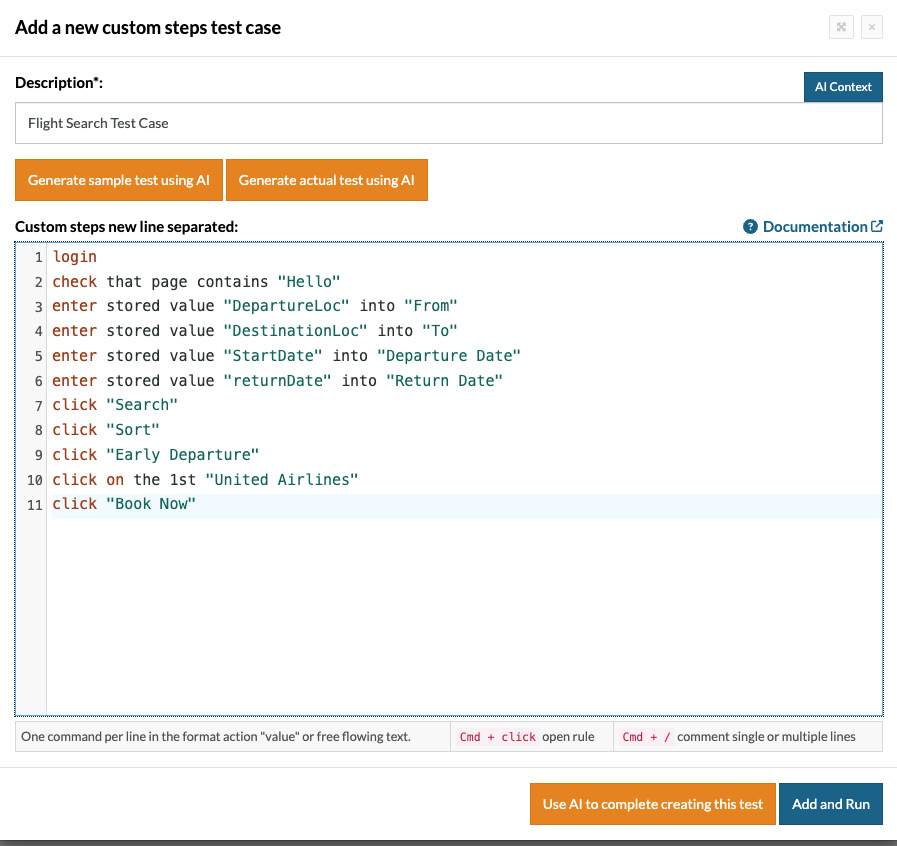
login // Reusable Rules
check that page contains "Hello"
enter stored value "DepartureLoc" into "From"
enter stored value "DestinationLoc" into "To"
enter stored value "StartDate" into "Departure Date"
enter stored value "returnDate" into "Return Date"
click "Search"
click "Sort"
click "Early Departure"
click on the 1st "United Airlines"
click "Book Now"
You can see how simple it is to create test scripts using testRigor. It is more like writing manual test cases. This helps even non-technical stakeholders to understand the test script easily and update it.
Building Trust Through Testing
Testing the functionality of flight booking is not just about ensuring that a system works. It is about maintaining travelers’ faith in the system. Users expect prices to stay the same, and their bookings to be confirmed with certainty when they get out into flight search, fare selection, and payment. Well-designed test cases help ensure that the system behaves reliably, even when there are complex conditions at play. This prevents failures from being introduced, which could break user trust in the product.
FAQs
-
How do testers handle real-time seat inventory changes during booking?
Testers simulate concurrent booking scenarios where multiple users attempt to reserve the same seat. This helps verify that the system updates seat availability correctly and prevents double booking. It also ensures the booking fails gracefully if the seat becomes unavailable. -
How can QA teams test flight booking systems when airline APIs are unstable?
Teams often use API mocks or sandbox environments to simulate airline responses during testing. This allows testers to validate system behavior even when external APIs are slow or unavailable. It also helps test error handling and fallback mechanisms. -
How should testers validate fare changes during checkout?
Testers verify that the system detects price changes and clearly notifies the user before payment. The updated fare should be displayed with a refresh message and require user confirmation. This prevents users from being charged an unexpected amount.
| Achieve More Than 90% Test Automation | |
| Step by Step Walkthroughs and Help | |
| 14 Day Free Trial, Cancel Anytime |











