
DevOps.com Highlights Industry Shift Towards Intelligent Test Automation
 |
“A small change in what you see can lead to a big shift in what you do.” — James Clear.
Today, we see that the AI adoption in QA has now moved from experiments to the actual operational reality. The first wave of GenAI in QA brought a huge capability: test case generation. And yes, at first, we all felt magical about it. Didn’t we?
We got all our wishes fulfilled with: Paste a requirement. Press enter. Get a full test automation suite in minutes.
But then, reality felt somewhat different. Because while AI-generated test cases look complete and working, they often miss a few product assumptions or ignore real-world edge cases. Also, they failed to match the organization’s testing style, tooling, or risks/priorities. In pursuit of “instant automation”, we got into cleanup and rewriting the tests. And ultimately, we have a pile of tests that nobody trusts.
And honestly, it is not surprising. AI is still growing and learning.
We have seen this story repeating itself across enterprises, with each new tech wave. So, the next phase of AI in QA would not be judged by how fast it generates tests. But it will be evaluated based on whether it improves confidence, stability, and decision-making as delivery cycles are shorter and shorter.
Do you think it is just a prediction? It is already happening. Let us find out what Hélder Ferreira, Director of Product Management at Sembi, and Bruno Mazzotta, Solution Engineer Manager at testRigor, discussed about this at DevOps.com.
| Key Takeaways: |
|---|
|
We are Shifting to QA Life Cycle Intelligence
Let us highlight an important evolution: GenAI tools started as “task machines.” They generate steps, write expected results, and produce large volumes of test cases.
But volume is not equal to value, specifically, in the software field.
Quality doesn’t come from “more tests.” It comes from the right tests, run at the right time, with reliable results and clear traceability. In modern DevOps pipelines, QA leaders aren’t asking: Can we generate 500 test cases?
Instead, they are asking today:
- Do we know which test suite to run after this UI change?
- What is the actual business risk of this release?
- Which automation suite is stable enough to run and will not get into false positives/negatives?
- Which tests fail, why did they fail, and who needs to act to fix them?
The questions have changed. As DevOps.com perfectly captures in the article “Beyond Test Case Generation: How to Create Intelligent Quality Ecosystems”. This is where testRigor’s philosophy aligns deeply with DevOps.com’s concept of complete software development life cycle intelligence.
Quality Ecosystems and Connected Intelligence
Let us describe a practical “quality ecosystem” as three connected layers:
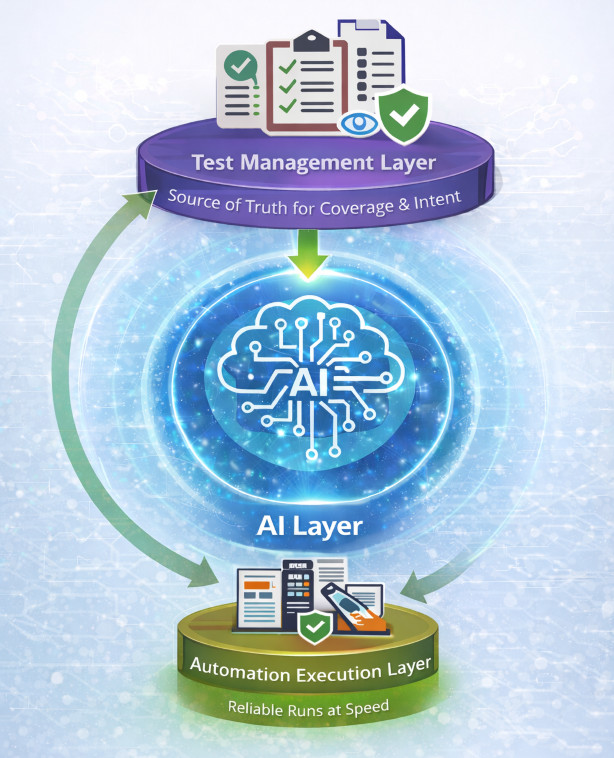
- Test Management Layer (single source of truth for coverage and intent)
- Automation Execution Layer (reliable and stable test runs at speed)
- AI Layer (connective glue that keeps everything aligned with each other)
That is exactly the direction the software industry must move in. At testRigor, we believe the AI layer should not be treated like a standalone “generator.” It should behave like a quality intelligence engine, continuously working and linking these areas:
- Product or User Intent: AI should understand what the user experience is supposed to achieve. It should not just be what the requirement text says. It must translate intent into meaningful validation that reflects real user journeys. This ensures automation aligns with actual product behavior and customer expectations.
- Business Risk: Not every feature carries the same impact or risk to the business. And AI should help prioritize what matters the most. By connecting tests to business-critical flows, compliance needs, and high-impact scenarios, QA teams can focus on reducing real release risk. This enables smarter regression planning instead of running everything more quickly.
- Automation Coverage: AI should provide visibility into what is truly covered versus what is assumed to be covered. It should highlight gaps, redundant tests, and missing edge cases across UI, API, and data layers. This creates stronger test strategy alignment and prevents false confidence.
- Execution Outcomes: Test results shouldn’t just be pass/fail. They should be such that they can be interpreted, and decisions can be made easily. AI can detect patterns across failures, identify recurring weak points, and distinguish real defects from flaky behavior. This reduces noise and accelerates debugging cycles.
- Release Readiness Decisions: Ultimately, AI should support the decision every QA leader owns: Are we ready to ship? By linking coverage, execution results, and risk priorities, AI can provide a clearer readiness signal. This helps release owners move faster without compromising quality.
Because the real challenge is not writing tests once. The real challenge is keeping them relevant, stable, and trusted as the product evolves. Read: Integrating AI into DevOps Pipelines: A Practical Guide.
AI in DevOps: Let Us Review-first
DevOps.com’s article clearly emphasises the idea of review-first governance. Honestly, this is a big deal. Many organizations have already experienced the “one-shot generation trap” of gen AI in software testing. AI generates a full suite instantly. Then testers spend many days correcting it, and later the test suite becomes unmaintainable and unusable.
So, what is the problem? Actually, the ordering is wrong.
The correct workflow is:
- The first step is to let AI propose coverage
- Then let humans approve/refine it
- Generate tests that are worth keeping
- Use these generated automated tests with all required integration in the DevOps ecosystem
This is exactly how QA organizations avoid turning GenAI into a new form of technical debt. At testRigor, we strongly believe governance is not optional. AI is powerful, but quality is a responsibility, not a suggestion engine.
Intelligent Automation Beyond Test Creation
Currently, the biggest pain in automation is definitely not about writing tests. Writing automated tests is just a matter of a prompt, or more precisely, prompt engineering. The bigger pain is about maintaining them. Tests commonly break when UI labels change, locators are updated, user flows are redesigned, or back-end behavior shifts. Each of these changes may be minor from a development perspective, but they can trigger widespread failures across automated tests. Without intelligence built into automation, QA teams are left spending valuable time fixing scripts instead of validating real risk.
Intelligent automation addresses this by focusing on stability over time. It detects what changed, understands which tests are impacted, and proposes targeted updates that QA teams can review and approve. The result is automation that adapts to the product. It reduces maintenance effort, flakiness, and restores trust in test results. If AI only generates tests but does not help maintain them, then it actually does not solve QA’s real bottleneck. It just shifts the burden. That is why self-healing is such a powerful capability of intelligent test automation.
Read: Decrease Test Maintenance Time by 99.5% with testRigor.
Let us Rethink QA for AI Products
We have an abundance of AI-based products today: LLMs, chatbots, AI agents, and many more. Traditional QA relies on static and deterministic expected results. But AI systems do not behave that way. So, for the testing, you need to:
- Create Intent-based Assertions: Instead of validating exact text, teams must validate whether AI has achieved the intended outcome. For example, did the assistant collect the right fields, follow the workflow, and complete the task correctly? Read: How to perform assertions using testRigor?
- Run Policy Enforcement Checks: AI systems must consistently follow business and security policies, regardless of user prompts. Testing should confirm the system refuses restricted actions, follows approval workflows, and applies role-based rules. Read: Top 10 OWASP for LLMs: How to Test?
- Perform Hallucination Validation: AI responses must be grounded in approved sources, especially in regulated industries. QA should validate whether the system retrieves the correct knowledge and avoids generating false or unsupported claims. Read: What are AI Hallucinations? How to Test?
- Test Drift Detection after Model Updates: Even small model or prompt updates can change behavior unexpectedly. Testing must detect when responses drift from expected intent, tone, accuracy, or compliance requirements over time. Read: AI Compliance for Software.
- Use Guardrails: AI applications must consistently prevent harmful or disallowed outputs. This includes testing for privacy leaks, unsafe recommendations, and violations of legal or organizational guidelines. Read: What are AI Guardrails?
This is exactly where testRigor sees the future of QA headed: structured testing for probabilistic systems. The teams that win would not be the ones who generate the most test cases. They will be the ones who define the strongest “must always work” behaviors tied to business risk, and validate them continuously in CI/CD.
Real-World Scenario: AI and DevOps Pipeline
Now, let us consider a real-world scenario of a fintech company. It releases updates to its billing platform twice a week. The QA team supports multiple workflows such as invoice generation, tax calculations, refunds, and PDF exports. These are used by thousands of enterprise customers. Earlier, their team focused on AI-generated test cases to speed up coverage. But the problem they were facing was consistency and stability. In every new sprint, they generated new tests, yet failures increased. The reason is that many generated cases did not reflect real business rules or production edge cases.
When we have an intelligent automation approach, the QA team uses AI not just to generate tests. But also to maintain automation stability across releases, through self-healing, Vision AI, and AI context. For example, a developer updates the invoice export screen and modifies the date filter logic on the UI. Next step is that AI flags which automated tests were impacted, suggested updates to tests, and recommended a regression suite based on business risk (high-value invoices, multi-currency transactions, and role-based access). Instead of running the full regression suite, the release owner approved a prioritized set of tests and shipped confidently. In our example, the regression time is reduced from 8 hours to 90 minutes, while also reducing false failures.
Another use case is when the app’s requirements change, or a new feature is added. Here, intelligent test automation tools such as testRigor can generate new tests, and these tests can be verified by the HITL (Human In The Loop).
This is precisely where AI delivers actual value in a DevOps environment. We do not achieve this by generating more test cases. We get this value by making smart decisions and through stable automation over time.
Read: Test Automation for FinTech Applications: Best Practices.
A Roadmap to Intelligent Test Automation
Here is a practical way to move from basic AI-based test generation to true intelligent test automation in a DevOps environment.
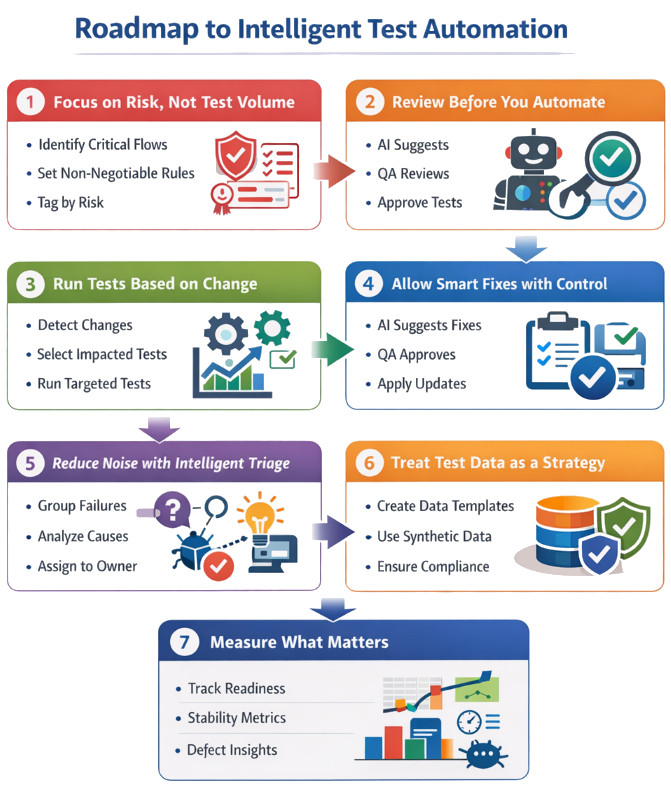
Step 1: Focus on Risk
Problem: A lot of AI-generated tests do not mean better quality
Solution: Select tests based on risk. And accordingly, create a test suite using these tests
- Find out critical business flows (e.g., login, payments, exports, authentication)
- Define rules that can not be broken at any cost (accuracy, permissions, calculations)
- Use tagging to identify tests by risk and features
Result: Test coverage is not about counting tests, it becomes more about managing risk effectively.
Step 2: Review and then Automate
Problem: One-click test generation leads to rework
Solution: Add a human review step before tests go live
- AI suggests what to test
- QA reviews and refines
- Only approved items become executable tests
Result: Builds higher trust as a human is involved, and results in fewer useless tests.
Step 3: Test Based on Changes
Problem: Teams often run full regression because they lack visibility into what has changed
Solution: Use risk-based or priority-based testing (considering the changes)
- Find out what changed in CI/CD
- Then map relevant tests to features and components
- Run only the tests linked to the affected modules and risk
Result: This will allow us to have faster automated regression cycles, with fewer tests.
Step 4: AI Fixes Test Automation
Problem: Small UI or workflow changes break tests if test automation is implementation-based
Solution: Use stable test automation, let automation suggest fixes, but require approval
- AI proposes where updates are required
- QA reviews and confirms
- Approved changes are incorporated, and tests work fine
Result: This helps us to have stable automation without losing control over test automation.
Step 5: Have Triage and RCA
Problem: Test failures may cause difficulty in making decisions because the root causes are not known
Solution: Use AI to interpret results. Explainable AI (XAI) helps with this, defining why AI has done what it has done
- Group similar failures
- Summarize likely causes
- Route issues to the right owner
Result: This helps to resolve defects ASAP with no confusion.
Step 6: Strong Test Data
Problem: Use of poor test data will provide poor test results
Solution: Standardize realistic, good, and compliant data
- Create standard data templates for high-risk scenarios
- Use masked or synthetic data for testing
- Build repeatability and compliance in test data
Result: You will have more reliable validation. Read: Test Data Generation Automation.
Step 7: Measure What Matters
QA leaders need insight, not test counts. They need data and metrics that help them make effective decisions.
You can track:
- Release readiness (risk coverage + pass rates)
- Customer satisfaction
- Stability trends and flake rates
- Time to triage and fix
- Escaped defect patterns
Result: Finally, QA becomes the decision engine. Read more: Metrics for QA Manager.
What about an Actual Sprint Cycle?
In a sprint cycle, the process begins on Day 1 or 2, where AI proposes coverage areas for new user stories. Then the QA teams review and refine them before generating the final automated tests. On a daily basis, the CI pipeline executes smoke tests. Also, the regression suites are executed based on what has changed in the code or UI. If failures occur, AI helps by grouping similar issues, summarizing likely causes, and suggesting potential fixes. Again, human reviewers approve any required fixes. Before release, teams run only the P0/P1 risk-based suite along with change-driven impacted tests. This process provides a clear release readiness view for faster and more confident go/no-go decisions.
Ask these Questions for Control-driven QA
We see that DevOps.com closes the article with a message that we too strongly support:
Do not evaluate AI-based testing tools solely on demos.
Use these control points instead:
- Does the tool support review-first workflows?
- Can QA teams enforce governance and compliance?
- Can it integrate into the existing delivery pipelines?
- Does it link testing back to risk and business outcomes?
- Does it reduce churn?
At testRigor, we believe the future belongs to testing platforms that help QA and engineering teams reduce rework and endless test maintenance. Intelligent tools build stable automation that keeps working through continuous product change. This accelerates feedback loops across the pipeline and ultimately improves release confidence. In real DevOps environments, teams do not struggle because they lack tests. Instead, they struggle because they lack reliable signals they can act on quickly. The most valuable automation is the kind that stays aligned with business intent, adapts to change without constant maintenance, and provides clear insights into what is safe to ship confidently.
Because in DevOps, speed is meaningless without trust.
Conclusion
DevOps.com article clearly captures the industry’s new reality: “This is what DevOps rewards — fast feedback, shared accountability and fewer handoffs.”
Meanwhile, AI in QA is evolving from “test generation” to intelligent quality ecosystems. At testRigor, we are committed to making intelligent test automation accessible to everyone. The goal is not to create more automation. Instead, the goal is to create a QA pipeline that is stable under pressure. This happens when quality scales with velocity, the tests stay stable, and organizations can ship faster without guessing. No one wants to get into a situation where we just have to ship and pray.
Because in the end, the most valuable thing QA delivers is not test cases. It is confidence. And that is what intelligent QA ecosystems are really all about.
| Achieve More Than 90% Test Automation | |
| Step by Step Walkthroughs and Help | |
| 14 Day Free Trial, Cancel Anytime |











