
Test Optimization: Strategies and Best Practices
 |
Software applications, whether a simple mobile game or a complex financial system, have high expectations. It has to deliver exceptional performance, be reliable, and be of high quality. Delivering software with all these features hinges on your ability to design and execute an effective test strategy.
Optimizing tests to improve this approach can help you achieve greater efficiency and thoroughness, ensuring a high-quality result.
| Key Takeaways: |
|---|
|
This article explores the key optimization strategies, techniques, and best practices to optimize your testing processes across manual and automated environments.
What Is Test Optimization?
Test optimization is the systematic approach to making the test process more time and cost-efficient without compromising test accuracy and quality.
Test optimization helps QA teams get the most out of their testing efforts and streamlines processes to deliver consistent results in the long run.

- Maximizing defect detection with minimal redundancy.
- Improving test execution speed.
- Reducing maintenance overhead.
- Increasing stability and reliability.
- Aligning test coverage with risk and business value.
- Ensuring scalable testing as the application evolves.
Test optimization results in faster feedback cycles, lower costs, and more confident releases.
Instead of waiting to optimize test suites after they are ready to execute, optimizing them right from the initial stages is integral to ensuring software quality. Several optimization strategies are used to improve test suite efficiency.
Why Test Optimization Matters?
- Faster Release Cycles: Long-running test suites delay feedback and slow down CI/CD pipelines, ultimately slowing release cycles. Optimized tests reduce execution time, enable rapid validation, and quicker deployments, allowing quicker feedback during development and CI/CD pipelines.
- Reduced Maintenance Costs: Poorly designed test suites require constant updates, especially when UI updates or workflows change. This brittleness can be reduced by optimizing test suites and reducing overall maintenance costs.
- Improved Test Reliability: Optimized tests improve reliability and consistency. It also reduces flaky tests and instability in environments.
- Better Resource Utilization: Testing resources, such as cloud testing environments, infrastructure, and compute resources, are expensive. Optimized testing reduces unnecessary resource consumption, lowering operational costs.
- Increased Test Coverage with Less Effort: Optimization eliminates redundant tests and focuses on high-risk areas, delivering more value from fewer test cases.
- Enhanced Scalability: With optimization, your QA process grows alongside your product without becoming a bottleneck.
- Boosts Developer Confidence: Developers identify and fix issues earlier with faster, more reliable feedback loops.
- Improves Release Quality: Test optimization ensures more stable releases and better user experiences by catching critical bugs early.
Core Principles of Test Optimization
Before diving into test optimization strategies, it is important to understand guiding principles:
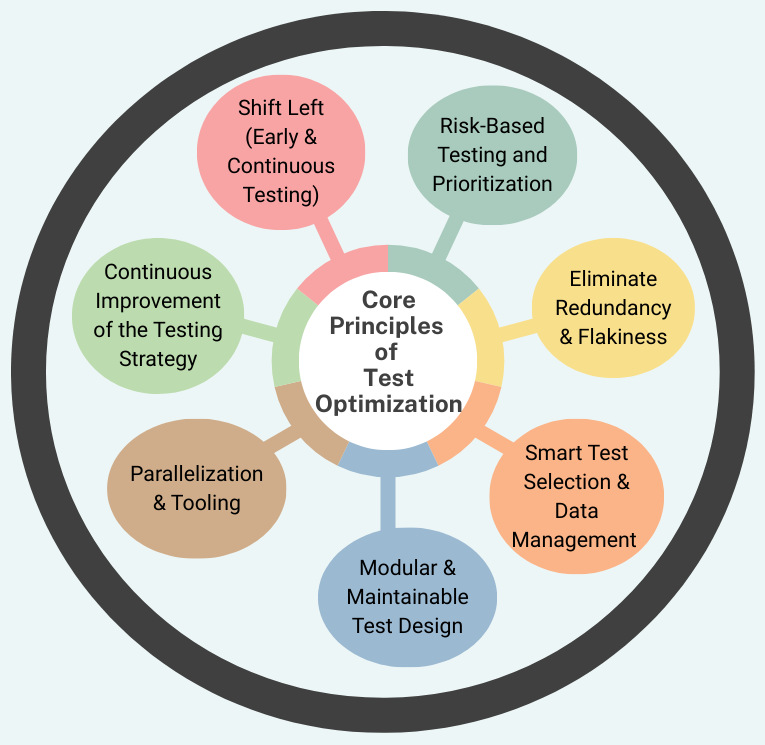
1. Shift Left (Early and Continuous Testing)
- Start Early: Do not wait until development ends to start testing. Instead, integrate it into the initial stages of the software development lifecycle (SDLC), such as reviewing requirements and design documents. Read Shift-left Testing-Software Testing Done Early.
- Cost Reduction: Detecting and fixing bugs early is significantly cheaper than fixing them post-release.
- Continuous Feedback: The test suite should be run automatically on every code push or pull request to provide immediate feedback.
2. Risk-Based Testing and Prioritization
- Pareto Principle (80/20 Rule): According to this rule, 80% of defects are often found in 20% of the code. Test optimization should focus on identifying these high-risk areas.
- Prioritize Critical Features: Business-critical, revenue-impacting, or high-traffic workflows should be prioritized for testing.
- Categorize Tests: Run smoke tests on every commit, and comprehensive regression tests nightly or weekly.
Read more about risk-based testing here.
3. Eliminate Redundancy and Flakiness
- Remove Redundant Tests: Regularly audit the test suite to remove obsolete or duplicate tests.
- Fix Flaky Tests: Identify and fix tests that pass or fail inconsistently (flaky tests). This restores confidence in the automation suite.
- Right-Size Test Granularity: Tests should neither be too broad (slow/fragile) nor too narrow (low value).
Read the article, What are Flaky Tests in Software Testing? Causes, Impacts, and Solutions for more information on flakiness.
4. Smart Test Selection and Data Management
- Impact Analysis: Only the tests affected by the code changes should be run, rather than running the entire regression suite every time the code is changed.
- Data-Driven Testing: Increase coverage using realistic, diverse, and clean datasets without creating additional test scripts.
- Environment Isolation: Prevent test interference and false results using consistent, ephemeral, or isolated environments.
5. Modular and Maintainable Test Design
- DRY Principle (Don’t Repeat Yourself): Separate common steps like login into reusable modules or functions.
- Modular Architecture: Modularize the test architecture by breaking down large, complex tests into smaller, independent, and reusable components.
- Self-Healing Tests: Use modern tools like testRigor that automatically adapt to UI changes, reducing maintenance time.
6. Parallelization and Tooling
- Parallel Execution: Run tests across multiple browsers, devices, or containers simultaneously to drastically reduce overall execution time.
- Choose the Right Tools: Automation tools chosen should align with the team’s skills, support CI/CD integration, and provide actionable analytics.
7. Continuous Improvement of the Testing Strategy
- Beware of the Pesticide Paradox: Repeating the same tests eventually fails to reveal new bugs, just as pesticides become ineffective when used repeatedly. Update and revise test cases continuously to keep them effective. Read: The Pesticide Paradox: Sustaining the Effectiveness of Testing Methods
- Analyze Metrics: Monitor key performance indicators (KPIs) like test duration, failure rates, and defect detection rates to identify bottlenecks.
By adhering to these core principles, teams can move from “testing everything” to “testing smartly,” transforming testing from a bottleneck into a competitive advantage.
Test Optimization Strategies and Best Practices
Test optimization strategies reduce execution time, minimize redundancy, and maximize coverage, thereby enhancing software quality and efficiency. Here are the key test optimization strategies:
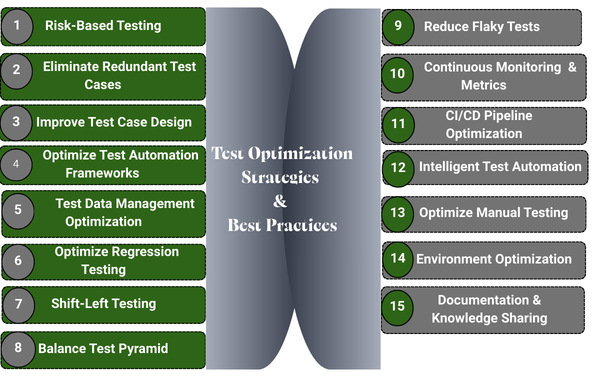
Strategy 1: Risk-Based Testing
This is one of the most effective optimization strategies. Test cases are prioritized based on the business impact and high-risk areas to focus efforts on critical functionality.
- Business impact
- User criticality
- High-risk areas
- Failure likelihood
- Complexity
- Change frequency
- Identify critical business workflows.
- Rank features by impact and probability of failure.
- Allocate more tests to high-risk areas.
- Reduce coverage in low-impact areas.
Optimizing risk-based testing prevents over-testing of trivial features, improves defect-detection efficiency, and aligns testing with business priorities.
Strategy 2: Eliminate Redundant Test Cases
As applications evolve, test cases increase and often overlap. The reason may be multiple tests validating the same functionality, similar assertions across test scripts, or duplicate regression scenarios.
- Conduct periodic test case audits to check for redundant tests.
- Merge overlapping tests.
- Replace repetitive scenarios with parameterized tests.
- Maintain a centralized test repository.
When you eliminate redundant tests, execution time is shortened, and maintenance overhead is reduced.
Strategy 3: Improve Test Case Design
If tests are well-designed, they are easier to maintain and scale. On the other hand, poor test design results in fragile, inefficient test suites.
- Atomic Tests: Each test should validate one specific behavior.
- Independent Tests: Keep tests independent by avoiding inter-test dependencies.
- Clear Naming Conventions: Name test cases such that they describe the intent clearly.
- Data-Driven Testing: Logic and test data should be separate to increase flexibility.
- Reusable Components: Separate repetitive steps into reusable modules.
Strategy 4: Optimize Test Automation Frameworks
- Use a Page Object Model (POM) or similar patterns to encapsulate UI elements and interactions into reusable components.
- Reduce hard-coded values and use dynamic locators and configurations that minimize breakage when UI changes.
- Implement smart waiting mechanisms to avoid fixed delays. Improve speed and stability by using conditional waits.
- Avoid fixed delays. Use conditional waits to improve speed and stability.
- Execute tests concurrently across different browsers and devices to reduce pipeline time.
- Use headless browsers for test execution where visual validation is not required.
- Regularly refactor automation code to remove technical debt.
Strategy 5: Test Data Management Optimization
Management of test data should be optimized for improving repeatability and reliability. Inefficient test data can slow down execution and cause instability.
- Use synthetic data where possible.
- Automate test data creation.
- Reset environments automatically.
- Use lightweight data sets for regression.
- Mask sensitive data in test environments.
Strategy 6: Optimize Regression Testing
- Regression Suite Segmentation: Divide tests into smoke tests, critical path tests, and full regression.
- Test Impact Analysis: Execute only tests affected by recent code changes.
- Historical Defect Analysis: Identify areas with frequent defects and focus on them.
- Remove Obsolete Tests: Regularly review test scenarios and remove outdated ones.
Read: What is Regression Testing?
Strategy 7: Shift-Left Testing
- Unit testing
- API testing before UI testing
- Static code analysis
- Code reviews
- Contract testing
Shift-left testing reduces the need for heavy end-to-end testing.
Strategy 8: Balance Test Pyramid
Use a well-structured test pyramid to improve efficiency. Keep UI tests minimal to improve stability and speed, as they are slower and more brittle.
- Large base (lowest layer): Unit tests
- Middle layer: API/service tests
- Small top: UI/end-to-end tests
Strategy 9: Reduce Flaky Tests
Flaky tests or tests that fail and pass inconsistently erode trust in automation. Flakiness is due to environmental instability, test data conflicts, external dependencies, or timing issues.
- Use proper synchronization.
- Isolate environments.
- Mock external systems.
- Retry logic (with caution)
- Monitor and quarantine unstable tests.
Strategy 10: Continuous Monitoring and Metrics
- Test execution time
- Test pass/fail rate
- Flakiness rate
- Defect detection rate
- Automation coverage
- Maintenance effort
Track trends using dashboards and continuously improve.
Strategy 11: CI/CD Pipeline Optimization
Testing must integrate seamlessly into DevOps workflows as efficient pipeline design ensures rapid feedback.
- Run smoke tests on every commit.
- Schedule a full regression nightly.
- Use parallel nodes.
- Trigger test suites based on code changes.
- Fail fast on critical errors.
Strategy 12: Intelligent Test Automation
Test automation using AI is intelligent and further optimizes efforts. For example, using self-healing tests reduces maintenance effort by up to 88%. Some of the optimization steps for test automation are:
- Automatically generate tests.
- Use self-healing for broken locators.
- Identify redundant tests.
- Analyze failure patterns.
- Suggest coverage improvements.
Intelligent automation reduces maintenance overhead and improves scalability.
Strategy 13: Optimize Manual Testing
Optimization is not limited to automation. In fact, manual testing should complement and not duplicate automated testing coverage.
- Use exploratory testing strategically.
- Focus on high-risk areas.
- Maintain clear test charts.
- Avoid scripted repetition for stable flows.
- Capture findings efficiently.
Strategy 14: Environment Optimization
Test environments significantly impact performance. While stable environments reduce false failures and delays, unstable environments cause them.
- Use containerized environments like Docker.
- Maintain environmental parity with production.
- Automate environment provisioning.
- Monitor resource usage.
- Clean up unused resources.
Strategy 15: Documentation and Knowledge Sharing
- Maintain updated test documentation.
- Document test strategy and architecture.
- Create onboarding guides.
- Share lessons learned and record observations.
- Conduct regular test reviews.
Step-by-Step Test Optimization Process
- Identify Objectives and Scope: Set the testing goals (e.g., faster release, better coverage), define what to test, and the success criteria.
- Analyze Current Test Coverage: Identify valuable, redundant, or obsolete tests from existing test suites.
- Prioritize Tests: Identify tests based on risk, code change frequency, and business impact. Prioritize them for execution.
- Remove Redundant/Low-Value Tests: Eliminate tests that do not add value, are excessive, or frequently fail due to instability (flaky tests).
- Automate Repetitive Tasks: Speed up execution by automating repetitive tasks.
- Profile and Refine (Performance Optimization): Identify slow tests, analyze their performance, and optimize them for faster execution.
- Continuous Maintenance: Regularly review and update the test suite to ensure it remains relevant.
Conclusion
In an era of rapid development, quick delivery, and high user expectations, optimized testing is a strategic advantage. Test optimization is not a one-time activity but is a continuous process. As systems evolve, testing strategies must adapt to maximize testing effectiveness rather than reduce it.
By applying several optimization strategies such as risk-based testing, eliminating redundancy, improving design, balancing the test pyramid, reducing flakiness, and leveraging intelligent automation, teams can build lean, powerful, and scalable test suites.
Frequently Asked Questions (FAQs)
1. What is risk-based testing in test optimization?
Risk-based testing prioritizes testing efforts based on the likelihood of failure and business impact. High-risk features, such as core payment flows, authentication, or compliance-related modules, are prioritized, while low-risk features receive proportionally less attention, ensuring efficient use of testing resources.
2. When should you automate tests?
- Repetitive
- High-frequency
- Business-critical
- Stable in functionality
- Time-consuming to execute manually.
- Exploratory and rapidly changing features may be better suited for manual testing.
3. What role does test data management play in optimization?
- Test reliability
- Execution speed
- Repeatability
- Security compliance
Automating data creation, using lightweight datasets, and maintaining isolated environments help streamline testing processes.
4. Can AI help with test optimization?
- Automatically generate test cases
- Detect redundant tests
- Self-heal broken locators
- Analyze failure trends
- Recommend coverage improvements
AI enhances scalability and reduces manual maintenance effort.
| Achieve More Than 90% Test Automation | |
| Step by Step Walkthroughs and Help | |
| 14 Day Free Trial, Cancel Anytime |











