
Release Notes: Screen resolution, articles and resources
 |
AI-Enhanced Screen Resolution Options for Web and Desktop Testing.
We are excited to announce the introduction of customizable screen resolution settings designed to optimize AI reliability for your web and desktop testing needs. Users can now select the most suitable screen resolution that aligns with their specific requirements and enhances the effectiveness of AI commands.
To access this feature, navigate to Settings -> Advanced -> Screen Resolution. Alternatively, you can find this option while setting up a new test suite under Advanced Settings -> General.
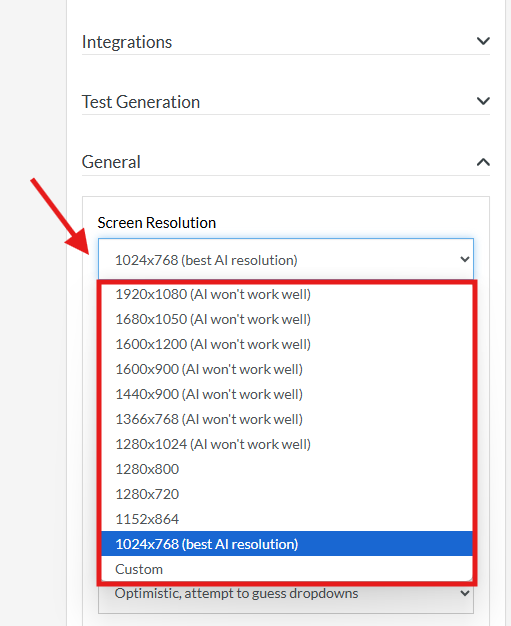
Caption: Test Suite Screen Resolution set up.
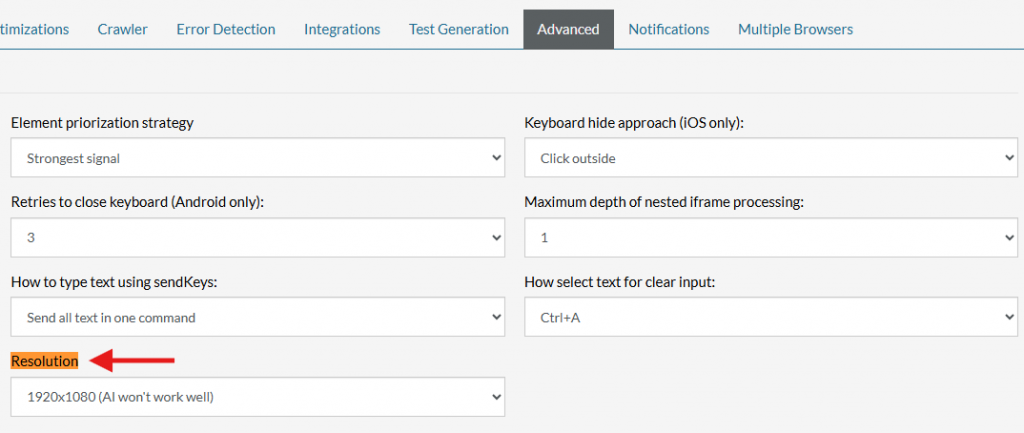
Caption: Settings resolution.
Expanded Resources: Access More Examples and Support.
We are pleased to announce an expansion of our resource offerings, centralizing a wealth of information to the left sidebar of your test suite in order to enhance your test cases. You can now access a broader range of resources, including:
-
Community Tests: Explore a collection of tests contributed by users to inspire and inform your own testing strategies.
-
Support Tickets (Paid Customers): You can utilize our support ticket system for personalized assistance and troubleshooting.
-
How-To Articles: Discover step-by-step guides that cover various aspects of using testRigor effectively.
-
Training and Tutorials: Access comprehensive training materials and tutorials designed to help you master the platform.
These resources are designed to leverage all publicly available information from testRigor, ensuring you have the tools and knowledge necessary to optimize your testing processes. Dive into our expanded resource library today and elevate your testing capabilities.
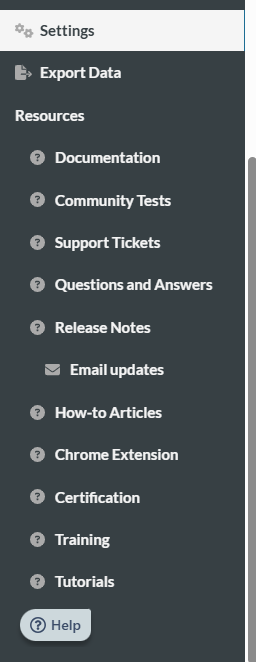
Caption: Resources added.










