How to Generate Code that Works with Claude Code /goal Feature
 |
AI coding assistants can produce impressive quantities of software in a very short time. Tell an agent what you want, and it can build components, routes, validation logic, database changes, and tests in minutes. But the speed of generation is not equivalent to correctness. Code can compile, look polished, and still fail to satisfy the user’s real need.

A more reliable approach changes what guides the AI during development. Instead of asking Claude Code to implement a loosely defined feature and evaluating the result afterward, the team first translates the expected behavior into executable end-to-end tests. These tests establish clear success criteria, allowing Claude Code to generate and refine the application until all required behaviors pass.
This is basically Acceptance Test-Driven Development, or ATDD, for agentic software development. The main idea is simple: specify observable success before generating implementation.
| Key Takeaways: |
|---|
|
Start with the User Journey, Not the Technical Design
Consider an update to a user sign-up flow. Registration is a useful example because it involves several layers of an application:
- The user interface collects registration details.
- Validation rules detect missing or invalid information.
- Backend logic processes the request and creates the account.
- The application communicates the outcome to the user.
- A successful registration may lead to an authenticated experience.
Let us take an example: we modified an existing registration application based on the required user experience. The changes included:
- Remove ‘Reset to Home’: Remove the ‘Reset to Home’ option from the registration flow.
- Add email confirmation: After successful registration, send a confirmation email to the user.
- Add confirmation action: Include a clickable button in the email so the user can confirm the account.
- Rename the email button: The button in the confirmation email should be labeled Confirm Email.
- Complete registration after confirmation: Verify that clicking the Confirm Email button successfully completes the email confirmation step.
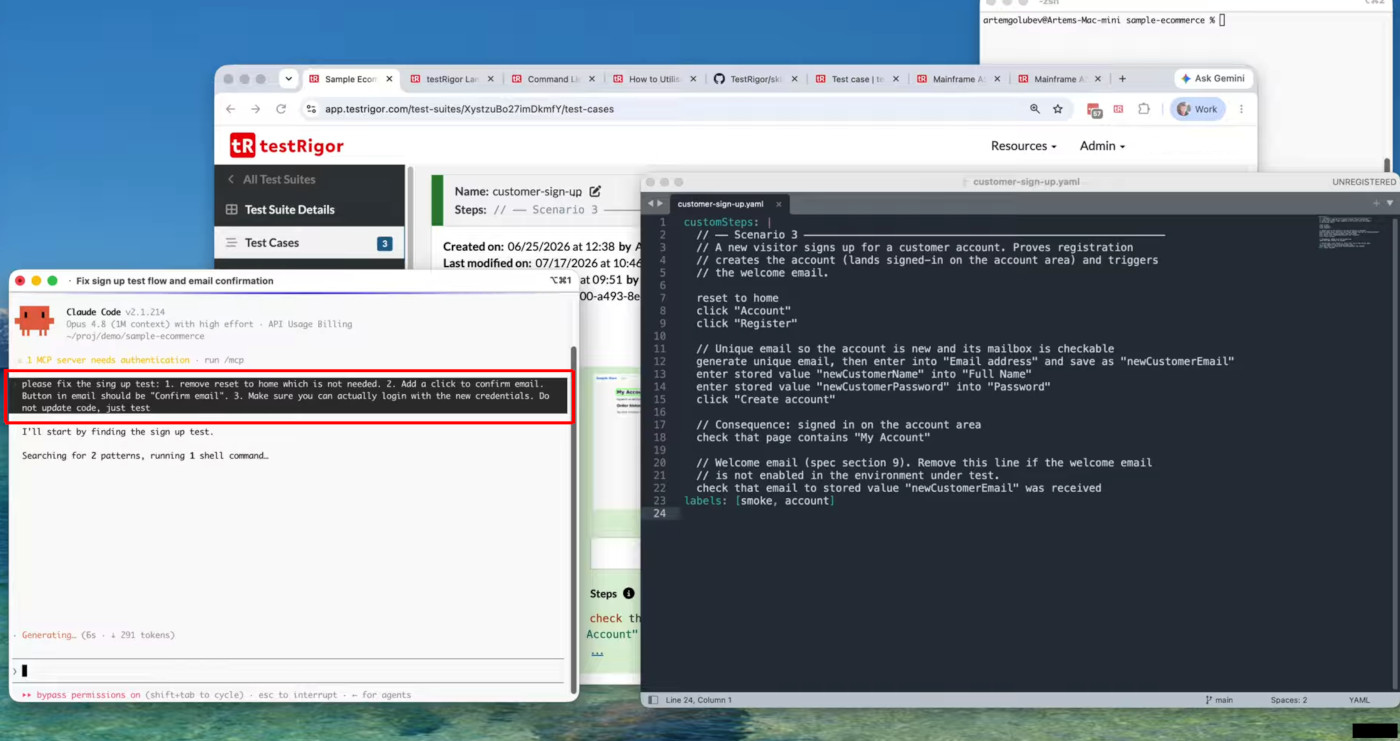
Before changing the code, describe the complete user journey in language that product owners, testers, and developers can easily understand. For example, generate a unique email address, open the sign-up page, enter all required user information, submit the form, and verify that the application confirms the account was created successfully. Additional acceptance scenarios should cover negative cases, validation rules, and important boundaries.
Read: Write, Run & Maintain testRigor Tests with Your AI Coding Agent.
Make the Tests the Source of Truth
Reviewing acceptance tests is one of the most valuable human checkpoints in the workflow. It is far cheaper to correct a misunderstood scenario before code generation than to repair an implemented feature later. Product, engineering, and QA can inspect the same readable specification and ask:
- Does this represent the intended user experience?
- Are the success and failure outcomes explicit?
- Are important business rules missing?
- Is each result observable and unambiguous?
- Could the test pass while the feature is still broken?
Once the team agrees on the scenarios, they become a shared contract. The requirement is no longer scattered across a ticket, chat thread, design, and developer assumptions. It is captured in a form that people can understand and the system can execute. This does not eliminate the need for human judgment. It places that judgment at the most influential point: defining the goal.
Why AI-Generated Code Still Needs a Precise Goal
An AI coding agent is highly capable, but it cannot infer every unstated product decision. A request such as “improve the sign-up experience” leaves many questions unanswered:
- Which fields are required?
- What should happen when a user enters invalid information?
- How should the application confirm successful registration?
- Must the new account work immediately?
- Which pages, services, emails, or databases are involved?
In our example, we can see a goal mentioned as: /goal generate code to make updated sign up test green. iterate until test case succeed. Do NOT change the test. At the end run all tests to make sure they all are green.
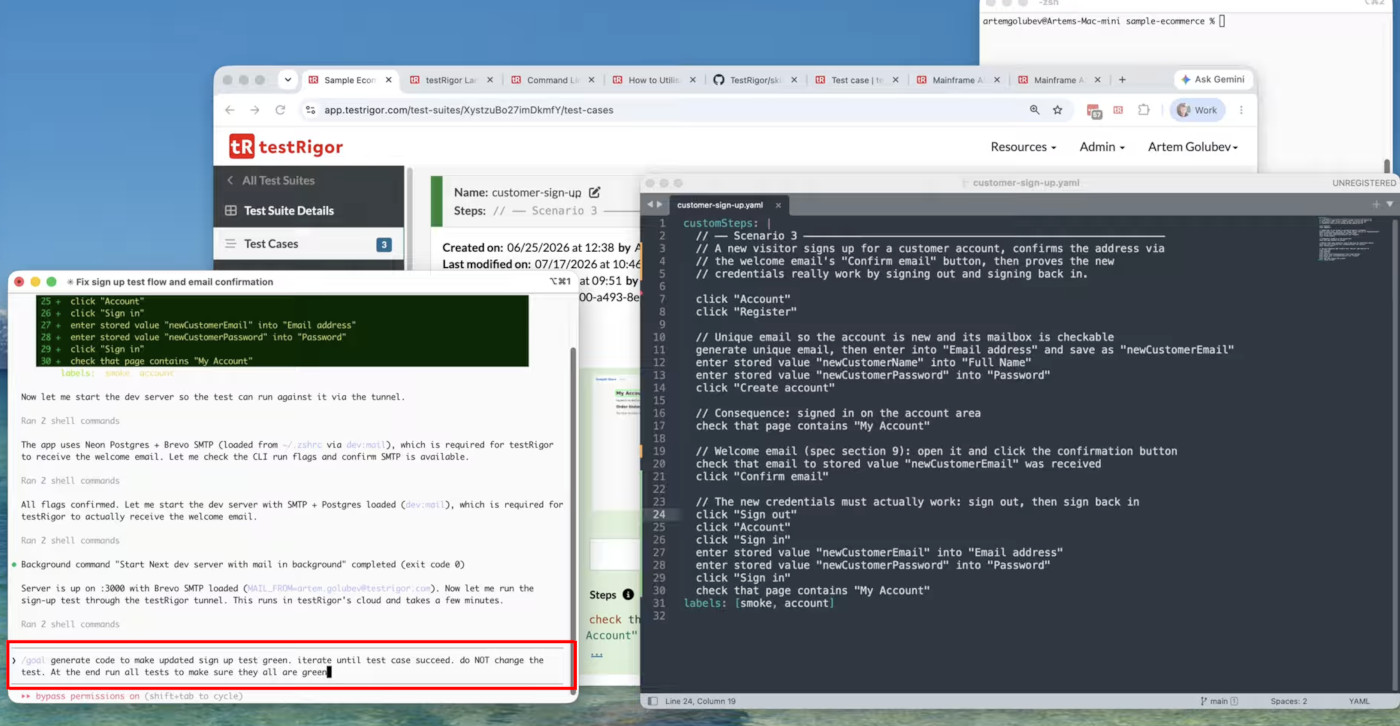
If these details remain implicit, the agent must make assumptions. Some may be reasonable, but reasonable is not necessarily correct. The generated code can satisfy the wording of the prompt while missing the business outcome.
Traditional development often discovers this mismatch late. A developer implements the feature, QA interprets the requirement, and stakeholders review the result. Each handoff can reveal a different understanding of “done,” causing rework.
Executable specifications reduce that ambiguity. They describe the feature through actions and outcomes that can be run against the real application. The agent is no longer working toward a vague sentence. It is working toward concrete, testable behavior.
What the /goal Workflow Changes
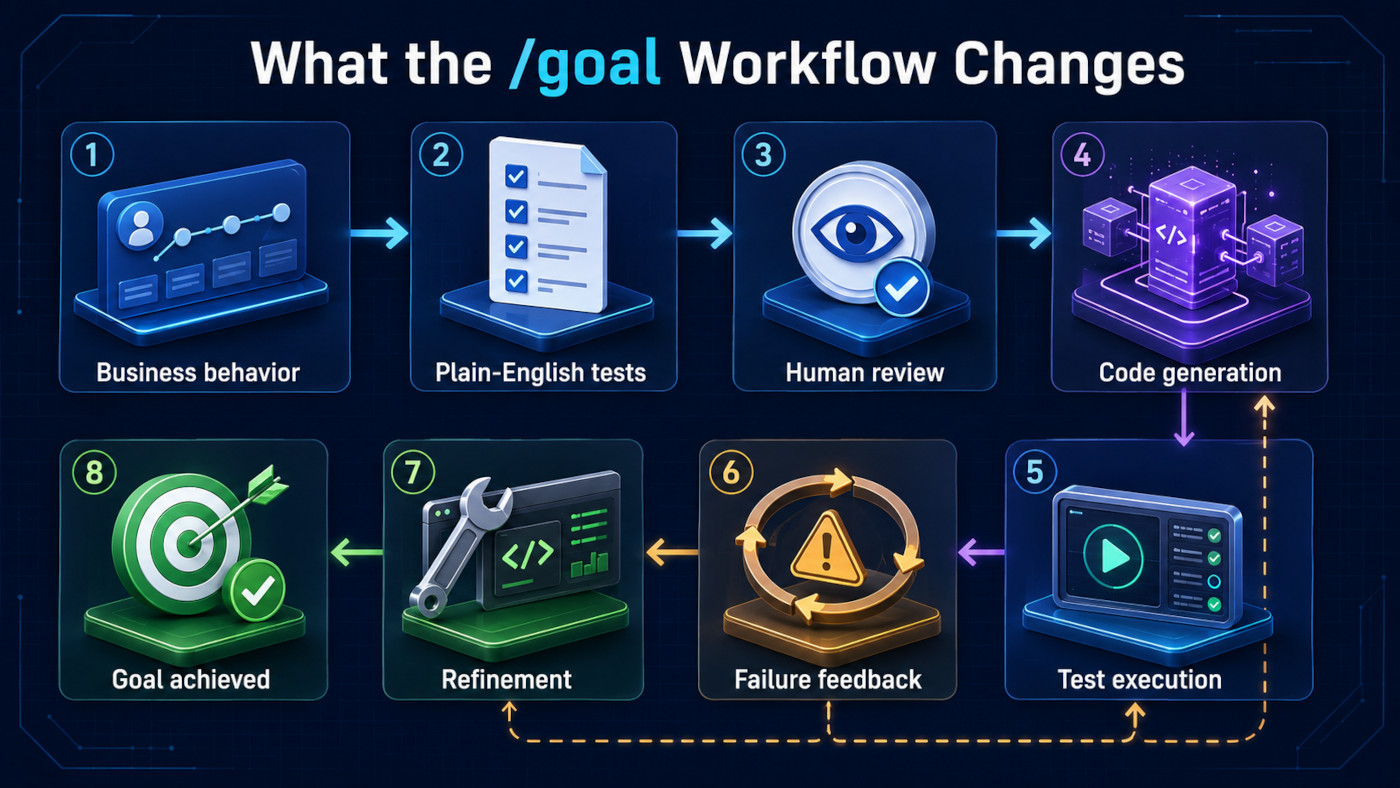
The /goal-style workflow gives the coding agent a target to repeatedly verify. The loop looks like this:
- Describe the intended business behavior.
- Convert that behavior into plain-English end-to-end tests.
- Review the tests before implementation.
- Ask the coding agent to build or modify the feature.
- Run the tests against the application.
- Use failures as feedback for the next implementation attempt.
- Continue until the agreed scenarios pass.
This is different from just asking the AI to write unit tests after the fact, having the AI write the code. Often, tests are created from the implementation, which reflect what the code already does. Acceptance tests defined from the requirements specify what the product must do, regardless of how it is implemented. It makes a difference.
In the first case, the code might affect the test. And in the second, the test is limited by the code.
Read: Claude for QA Engineers: Use Cases and Limitations.
Acceptance Tests and Unit Tests Play Different Roles
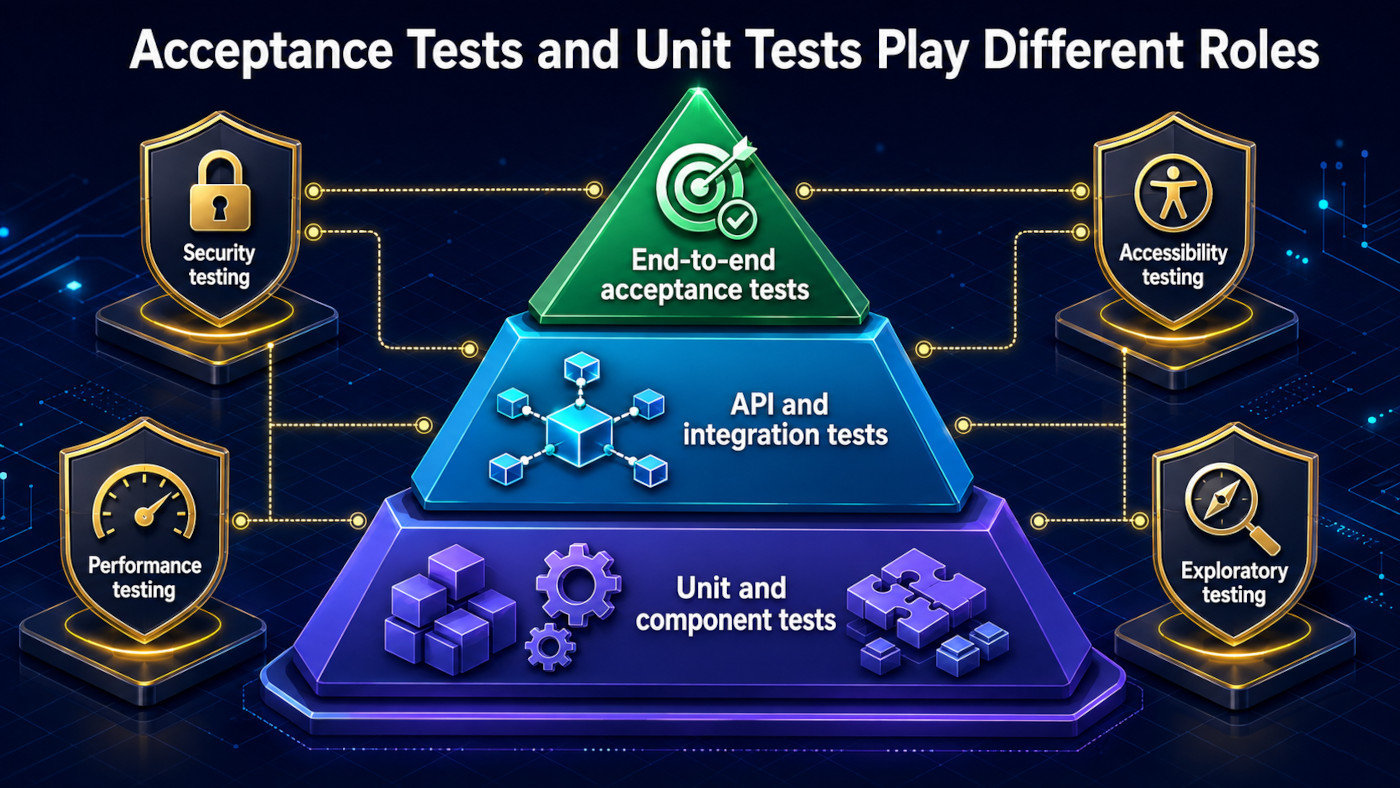
End-to-end acceptance tests should not replace lower-level testing. They answer a particular question: can a user or connected system complete the required journey through the assembled product?
Unit and component tests remain valuable for checking business rules, edge cases, error handling, and internal logic quickly. API tests can verify service contracts without using the interface. Security, accessibility, performance, and exploratory testing uncover risks that a happy-path acceptance suite may not address. The strongest arrangement is layered:
- Acceptance tests define the feature’s externally visible contract.
- API and integration tests verify collaboration between services and data stores.
- Unit and component tests provide fast, focused feedback on internal logic.
- Specialized testing evaluates qualities such as security, accessibility, resilience, and performance.
The /goal workflow gives AI generation a reliable north star; it does not reduce quality engineering to a single test type.
Why Plain-English End-to-End Tests Help
Conventional UI automation tools use XPath expressions, CSS selectors, element IDs, and framework-specific commands. Such technical details are useful for automation tools to locate and manipulate interface elements, but may obscure the business purpose of the test. They can also make tests fragile, as small changes to the interface can break the automation even when the user journey is still working correctly.
generate from regex "[a-z]{10,18}", then enter into "Notes" and save as "actionNotes"
This approach provides several benefits:
- Clearer Business Intent: Tests describe what the user does and what outcome is expected.
- Improved Readability: Product owners, business analysts, developers, and testers can understand the same scenarios.
- Reduced Maintenance: Tests are not dependent on selectors and internal page structure.
- Greater Resilience: Harmless layout or implementation changes are less likely to break tests.
- Better Collaboration: Teams can review and agree on expected behavior before implementation begins.
- Effective AI Guidance: Plain-English tests provide coding agents with clear, executable success criteria.
Apart from this feature, there are some advanced features that help you test your application using simple English commands.
- Reusable Rules (Subroutines): You can easily create functions for the test steps that you use repeatedly. You can use the Reusable Rules to create such functions and call them in test cases by simply writing their names. See the example of Reusable Rules.
- Global Variables and Data Sets: You can import data from external files or create your own global variables and data sets in testRigor to use them in data-driven testing.
- Integrations: You can integrate with other test case management frameworks like TestRail or CI/CD tools to ensure that continuous testing is happening after every release.
- Complex Features Testing: testRigor offers many capabilities to interact and verify outcomes on the screen using plain English commands for simple interactions with tables, email, phone calls, file upload, SMS, 2FA scenarios, QR Code, Captcha resolution, and many more.
Read: Why Using Claude Alone for Testing Is Slowing You Down.
Build, Test, and Refine Until the Goal Is Met
After the scenarios have been approved, Claude Code can implement the requested change. Its agentic workflow is particularly useful here because it can inspect the repository, edit files, run commands, read failures, and revise its work. The acceptance suite gives this activity a stopping condition. Rather than declaring success when the code has been written, the process declares success when the required behavior has been demonstrated. A typical iteration may unfold as follows:
- Claude Code examines the current sign-up implementation and relevant project conventions.
- It changes the interface and supports application logic.
- The application is started in a testable environment.
- The acceptance scenario runs through the user journey.
- A failure reveals a mismatch, for example, an incorrect validation message or a missing post-registration transition.
- Claude Code uses the evidence to modify the implementation.
- The scenario runs again, along with relevant regression tests.
This feedback loop is more dependable than repeatedly telling the model “fix the sign-up flow,” because each iteration produces objective evidence. The AI is not grading its own prose or relying on a visual impression of the code. It is responding to executable results.
In our example, you can see Claude first executing the test case as per the goal.
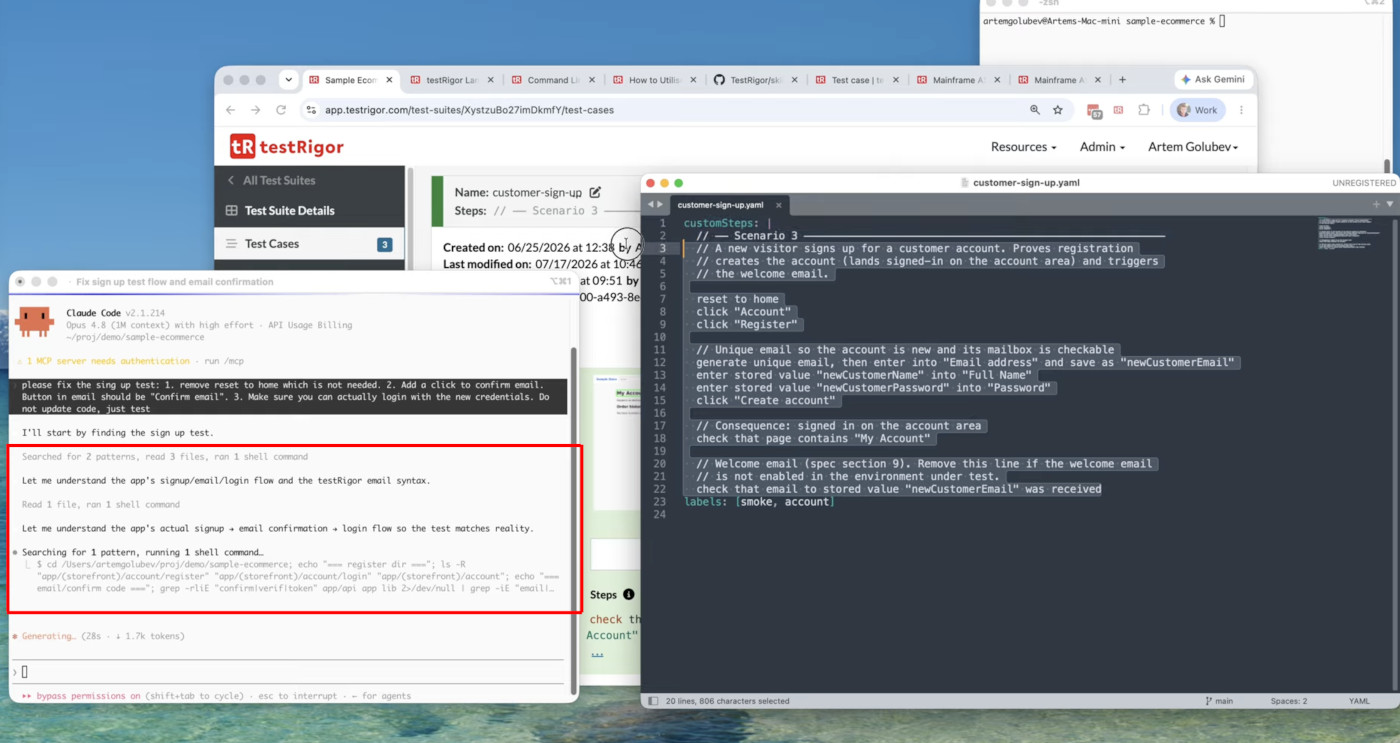
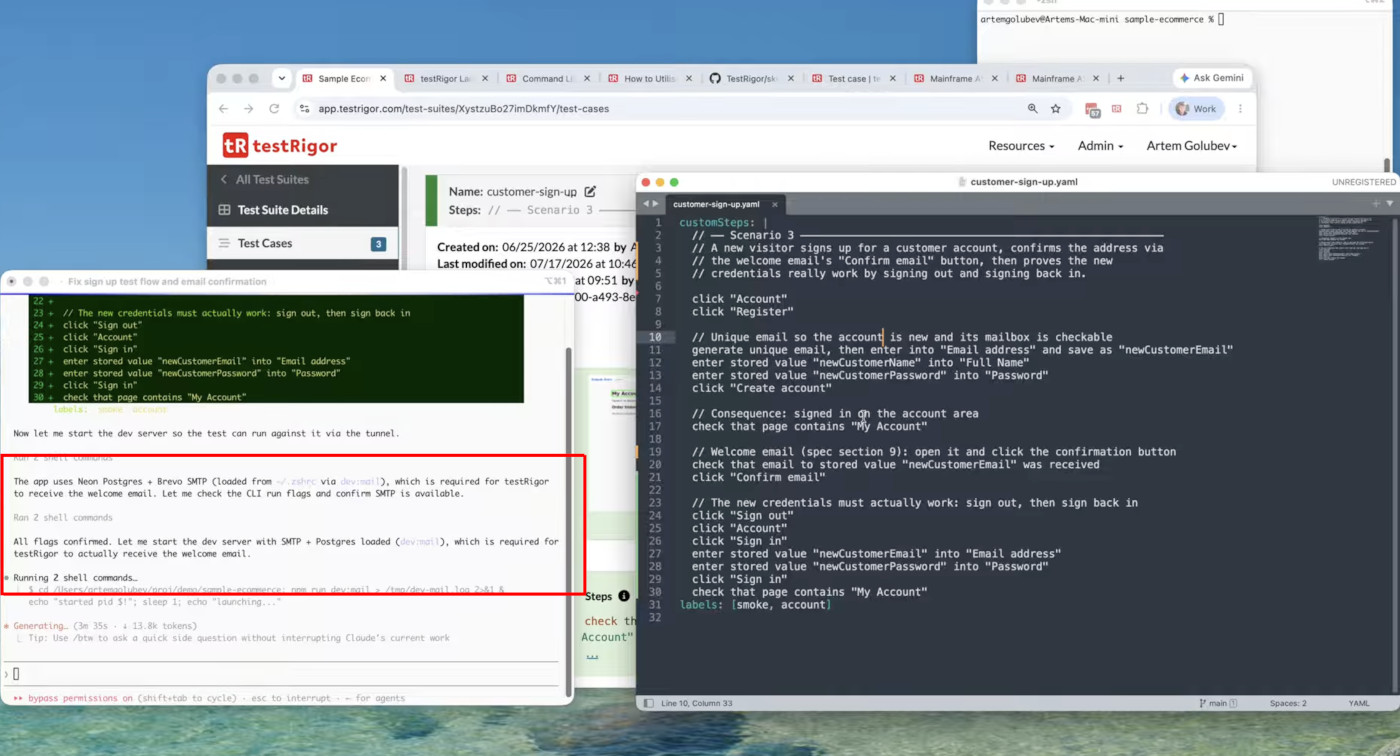
Now Cluade, understands that there is no confirm email button; it tries to modify the implementation to make sure the test passes. We can see in the logs that Claude starts the application on the Dev server with SMTP and Postgres for testRigor to receive the welcome email.
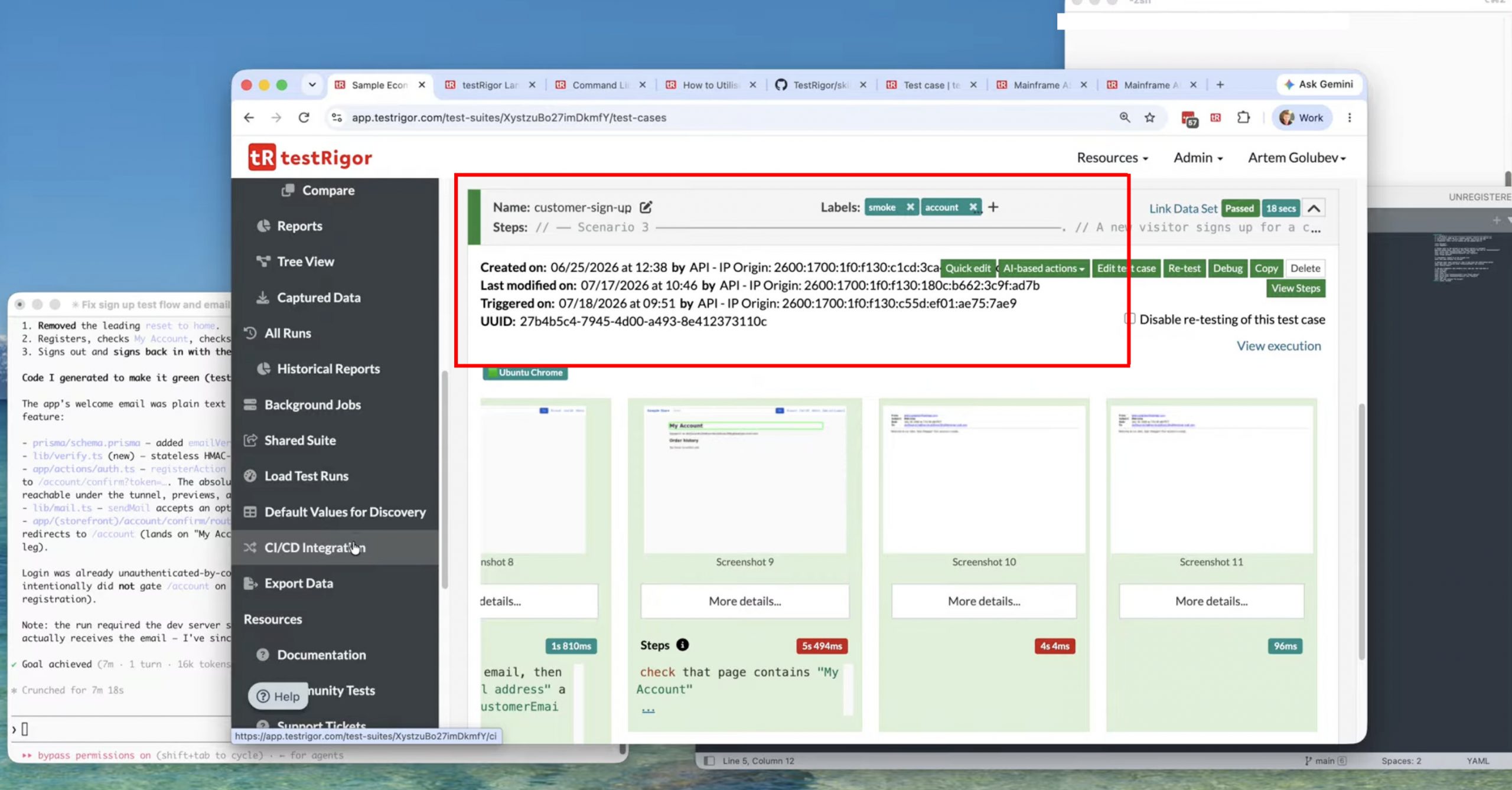
Now, with multiple iterations, Claude ensures the changes are implemented, and the test case is passed.
This approach follows the principles of Acceptance Test-Driven Development (ATDD), where acceptance tests are defined before the application changes are implemented. These tests describe the expected behavior from the user’s perspective, and the application is then developed or modified until those acceptance tests pass, ensuring that the final implementation satisfies the agreed business requirements.
Common Mistakes to Avoid
A goal-driven development workflow is effective only when its tests accurately represent the required behavior and failures are interpreted correctly. Avoiding the following mistakes helps ensure that the coding agent produces reliable changes instead of merely optimizing the implementation to make the tests pass.
- Writing Vague Outcomes: “Verify that registration works” is not sufficiently precise. A test should identify what observable result proves success, such as a confirmation message, authenticated session, account record, or successful next action.
- Overfitting Tests to the Current Interface: If every scenario encodes page structure and technical selectors, the specification becomes another implementation artifact. Describe what the user sees and does whenever possible.
- Letting the AI Approve its Own Requirements: AI can help expand a requirement into candidate scenarios, but a human should confirm business intent, risk, and completeness. A perfectly passing test suite is not valuable if it validates the wrong behavior.
- Testing Only the Happy Path: The main journey is a starting point. Sign-up behavior also needs relevant negative cases, data validation, duplicate-account handling, error recovery, privacy considerations, and other risks appropriate to the product.
- Stopping When the New Test Passes: A feature can meet its new acceptance criterion while breaking an existing behavior. Run the relevant regression suite and inspect unexpected side effects before treating the change as complete.
- Treating Every Failure as an Application Defect: Failures can come from the implementation, environment, test data, test design, or an unavailable dependency. The agent should diagnose the evidence instead of blindly changing production code until the signal turns green.
A Practical Adoption Strategy
Teams do not need to change their entire development process at once. A focused pilot involving one well-defined feature is usually the most effective way to introduce a goal-driven workflow, measure its value, and identify any adjustments needed before broader adoption.
Start with a contained feature that has a clear user journey and measurable acceptance criteria, such as registration validation, password recovery, profile editing, or checkout confirmation. Then follow a structured process:
- Select a feature with clear boundaries and observable outcomes.
- Write a small set of plain-English end-to-end scenarios covering the primary journey, validation rules, and important failure conditions.
- Review the scenarios with product owners, developers, testers, and other stakeholders responsible for product quality.
- Resolve unclear or conflicting requirements before implementation begins.
- Ensure the tests can run reliably in an environment accessible to the coding agent.
- Ask the agent to implement the change and execute the tests.
- Use test failures and execution evidence to guide each refinement.
- Run relevant regression tests before considering the feature complete.
After the pilot, evaluate more than code-generation speed. Consider the following questions:
- How much requirement ambiguity was discovered before coding began?
- How many implementation and repair cycles were required?
- Did the acceptance tests remain stable after interface changes or refactoring?
- Could product owners, developers, and testers understand and improve the scenarios?
- Were regressions identified before release?
- How much human intervention was needed to investigate failures?
- Did the resulting implementation satisfy the intended business outcome?
- Did the workflow reduce testing effort or simply move it to another stage?
These observations show whether the workflow improves clarity of requirements, collaboration, product quality, and confidence in delivery, not merely whether the AI can generate code quickly.
From Prompt-Driven Development to Evidence-Driven Development
The broader lesson from the demonstration is that better prompts alone are not enough. Prompts communicate intent, but executable specifications provide evidence. They turn a conversational request into a measurable contract and give an AI coding agent a dependable way to evaluate its own progress.
This changes the human role as well. Developers, testers, and product stakeholders spend less time translating requirements across separate artifacts and more time agreeing on behavior. The AI can handle much of the implementation-and-repair cycle, while people retain control of the goal, risk decisions, and final acceptance.
The result is a more disciplined form of AI-assisted development: Define the behavior. Review the behavior. Generate the implementation. Execute the specification. Repair the gaps. Keep the tests as protection.
Claude Code can generate code rapidly. Combined with goal-oriented, plain-English end-to-end tests, it can also be guided toward code that demonstrably works for the user. That is the real value of the /goal approach; it shifts confidence away from how convincing the generated code looks and toward what the running product can prove.
Wrapping Up
Claude Code can expedite implementation, but reliable results depend on specifying observable success before generating code. The /goal workflow converts acceptance criteria into an executable contract that informs development, exposes gaps, and enables continuous refinement.
testRigor makes it easy for teams to write end-to-end scenarios in plain English, making those goals easier for product owners, developers, testers, and AI coding agents to understand and validate. Goal-driven development and testRigor combine to shift AI-assisted coding from probable output to software that visibly satisfies user expectations.
FAQs
- Can the Claude Code goal workflow be used with an existing application?
Yes. Teams can define acceptance scenarios for a new feature, defect, or behavioral change and allow the coding agent to work within the existing repository. Before making changes, the agent should examine the project structure, conventions, dependencies, and relevant tests to reduce the risk of introducing inconsistent code. - How should test data be managed in a goal-driven coding workflow?
Test data should be predictable, isolated, and reusable. Teams can generate unique values for each execution, reset the environment between runs, and avoid depending on shared records that other tests or users might change. Reliable test data helps ensure that failures represent genuine behavioral problems rather than data conflicts. - Can goal-oriented acceptance tests be included in a CI/CD pipeline?
Yes. Once the acceptance scenarios run reliably, they can become part of the continuous integration or delivery process. Teams may run a focused set for every relevant change and execute the broader regression suite at appropriate delivery checkpoints. - How can teams measure whether the goal workflow is improving development?
Teams can monitor requirement defects, implementation cycles, test stability, escaped defects, regression failures, time spent investigating failures, and human intervention. These measurements reveal whether the workflow improves product correctness and delivery confidence rather than merely increasing code-generation speed.
| Achieve More Than 90% Test Automation | |
| Step by Step Walkthroughs and Help | |
| 14 Day Free Trial, Cancel Anytime |