Performance Testing in Global ERP Deployments
 |
ERP systems fuel core operations, right from order-to-cash to finance, manufacturing, HR, and supply chain. A performance regression in an ERP release can lead to a domino effect on the full business. This is why embedding performance testing into CI/CD pipelines is a strategic necessity.
Say, finance transactions that previously finished in under a second suddenly take eight or nine seconds. Overnight reconciliation jobs begin overflowing into active business hours. Procurement workflows intermediately fail during peak usage windows. If large datasets are queried simultaneously by distributed teams, then reporting dashboards start timing out. In more severe cases, transaction queues silently begin accumulating until the platform slowly degrades rather than failing suddenly.
Such incidents are pretty frustrating as performance testing usually happens to be part of the release cycle. The problem is rarely whether testing happened. The problem is what exactly was tested.
Performance testing in global ERP deployments from a QA perspective needs a fundamentally unique mindset compared to traditional enterprise apps. Testers are not only challenged with simply testing if app handles concurrent users. Their main challenge is understanding how deeply connected systems respond once actual operational complexity begins piling across databases, integrations, infrastructure layers, distributed users, and long-running background workloads.
| Key Takeaways: |
|---|
|
Why ERP Systems Cannot Be Tested Like Traditional Enterprise Applications
Borrowing performance testing strategies from conventional web apps during enterprise transformation programs is one of the biggest mistakes.
In a typical SaaS application, a user request usually includes a relatively isolated sequence of operations. A request reaches an API gateway, business logic executes, data gets retrieved or persisted, and the application returns a response. Performance testing these systems often revolves around measuring concurrency thresholds, response time degradation, and infrastructure saturation.
ERP systems work very differently.
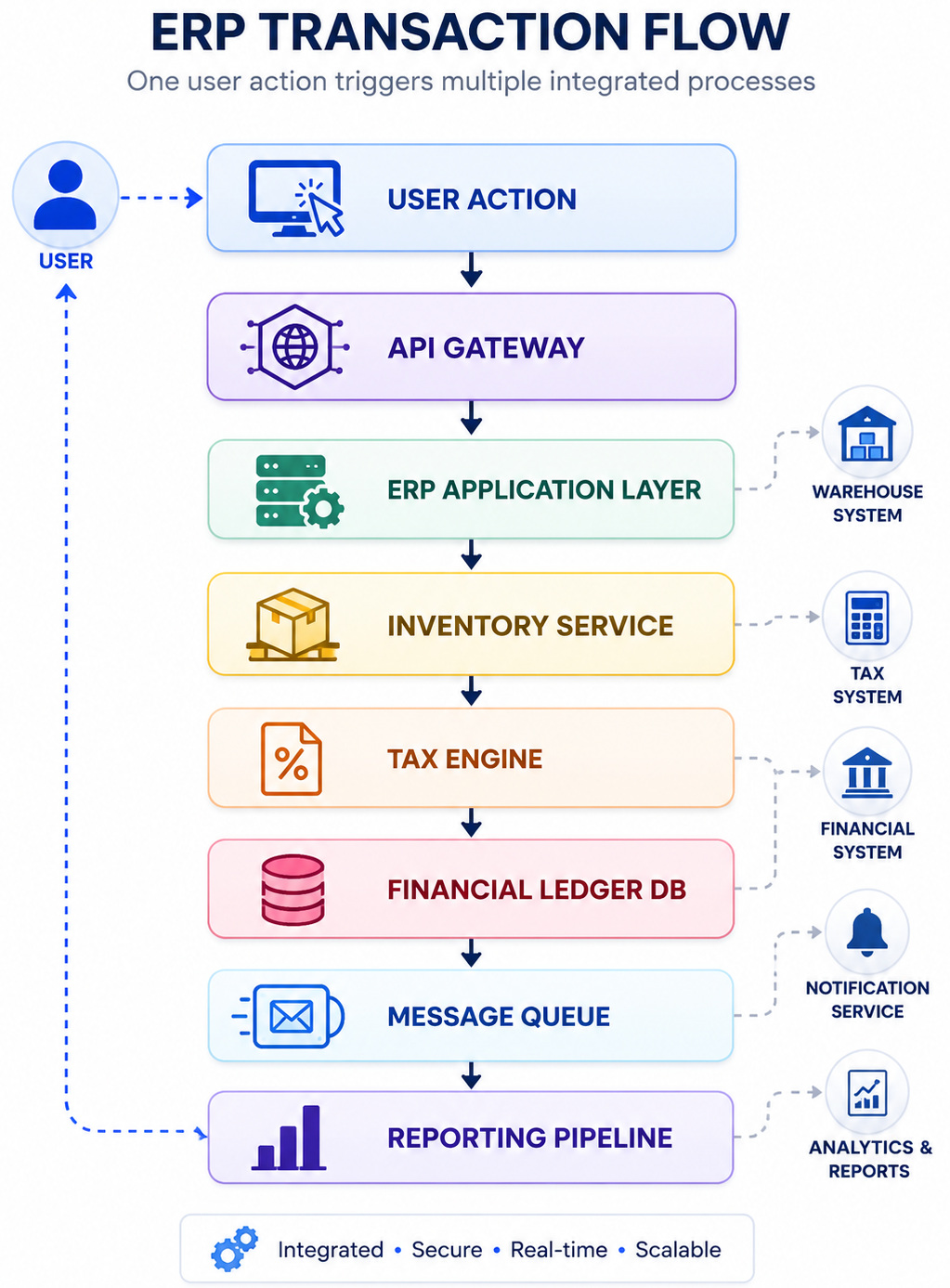
Take something as simple as purchase order creation inside a global ERP environment. At the UI level, the transaction looks straightforward. But internally, the workflow may trigger inventory verification against warehouse management systems, validate vendor contracts stored in procurement services, execute tax calculations through region-specific compliance engines, write accounting entries to financial ledgers, initiate asynchronous downstream notifications, and update reporting systems consuming operational data for analytics.
From the perspective of the end user, it feels like one transaction.
At the systems level, dozens of dependent operations may execute simultaneously.
This is exactly why traditional load testing often produces wrong results. Simulating ten thousand users repeatedly executing a single workflow tells us very little about how the architecture behaves when these transactions begin competing for shared resources under realistic business conditions.
In ERP systems, performance testing stops being a concurrency issue and becomes a systems engineering issue.
Which Features Need to be Performance Tested?
A common mistake in enterprise QA programs is treating performance testing as a single validation activity. In practice, ERP systems need multiple forms of performance testing because different failure patterns surface under different workload conditions.
Throughput testing targets understanding transaction capacity under expected production load. The objective here is not simply measuring speed but understanding how many business transactions the system can process continuously without degradation.
Stress testing deliberately pushes infrastructure beyond expected capacity to catch architectural breaking points. In ERP environments, this often exposes connection pool exhaustion, thread starvation, or infrastructure throttling behavior that remains invisible during normal testing.
Volume testing becomes equally important because ERP platforms collect enormous datasets over time. Queries performing successfully against a test database containing one million records often drift dramatically once production tables reach fifty million or one hundred million rows.
Endurance testing reveals long-running resource degradation patterns. Memory leaks, session accumulation, connection exhaustion, and delayed garbage collection frequently appear only after systems function continuously for extended periods.
Concurrency testing focuses on resource contention between concurrent business transactions competing for shared database records, which is where many ERP failures begin.
Database Lock Contention Is Often the First Real Hurdle
In large ERP systems, performance degradation frequently begins at the database layer long before infrastructure dashboards show obvious warning signs.
This happens because ERP platforms depend heavily on highly transactional relational databases managing shared operational datasets. Unlike loosely coupled microservices architectures designed for horizontal scaling, ERP workloads frequently concentrate enormous transactional pressure against centralized databases.
Consider inventory allocation workflows.
Imagine thousands of warehouse transactions updating stock availability records while procurement users simultaneously reserve inventory quantities against the same product catalog.
BEGIN TRANSACTION;

UPDATE inventory_stock
SET available_units = available_units - 75
WHERE product_id = 90214;

UPDATE purchase_allocation
SET allocation_status = 'CONFIRMED'
WHERE order_id = 128472;

COMMIT;
Under moderate concurrency, these operations complete without issue.
Under production-scale traffic, lock wait time begins accumulating rapidly. Transactions queue behind locked records, connection pools begin saturating, and application response times slowly increase despite CPU utilization appearing relatively healthy.
This is one of the most dangerous failure patterns because infrastructure metrics often look misleadingly normal.
A mature performance testing strategy should intentionally simulate high-volume concurrent writes while monitoring database-specific metrics such as transaction rollback rate, deadlock frequency, lock wait duration, query execution latency, and connection pool utilization.
ERP systems fail here more often than most teams realize.
The important thing to understand is that these testing strategies rarely exist independently. Production systems usually fail when several workload patterns begin interacting simultaneously.
That interaction is exactly what mature QA teams need to replicate.
Verifying Batch Processing During Peak Operational Load
Batch processing brings in another category of failures that conventional performance testing often overlooks.
Most enterprise ERP systems depend heavily on scheduled background jobs. Payroll processing, invoice settlement, financial reconciliation, tax reporting, currency conversion, and data archival are frequently executed as asynchronous workloads independent of interactive user traffic.
The problem comes out of the woodwork when these workloads overlap.
Say, month-end financial close operations.
Finance teams may be generating large analytical reports while reconciliation jobs simultaneously process millions of ledger entries in the background. Interactive procurement users continue executing purchase workflows while scheduled invoice processing services consume the same infrastructure resources.
The architecture begins competing with itself. This is exactly where QA teams need scenario-based performance testing rather than isolated load testing.
A realistic test scenario might involve generating twenty thousand active user transactions while triggering reconciliation jobs processing five million financial ledger updates in parallel.
The goal is not simply measuring response time. The goal is observing resource contention patterns.
Under these conditions, teams should actively monitor database locks, transaction rollback frequency, CPU saturation thresholds, memory allocation pressure, and queue accumulation across asynchronous services.
Batch collision testing consistently reveals bottlenecks that isolated testing environments fail to expose.
The Noisy Neighbor Issue due to Multi-Tenant Cloud ERP Systems
As ERP platforms move more and more toward cloud-native deployment models, another category of performance problems has become increasingly important for QA teams.
The noisy neighbor effect.
Many cloud ERP systems function within multi-tenant infrastructure environments where multiple tenants share compute resources, storage systems, and network layers.
This leads to a subtle but dangerous problem.
Imagine one enterprise tenant suddenly initiating large-scale invoice processing workloads consuming substantial CPU and storage IOPS inside a shared infrastructure cluster.
A completely unrelated tenant working on the same infrastructure may suddenly experience degraded API response times despite generating perfectly normal traffic.
The problem begins entirely from resource contention occurring outside the application itself.
This often appears in containerized infrastructure environments running Kubernetes-based workloads where aggressive workloads trigger CPU throttling, storage contention, or excessive network pressure across shared infrastructure nodes.
From a QA perspective, testing for noisy neighbor behavior needs deliberately introducing competing infrastructure workloads while measuring system degradation.
Metrics worth monitoring here include pod eviction frequency, CPU throttling percentage, storage IOPS consumption, memory pressure, queue backpressure, and latency variation between tenants.
Traditional load testing rarely captures this.
Cloud-native performance engineering needs infrastructure-aware testing strategies.
Throughput, Response Time, and the Metrics That Actually Matter
One of the biggest mistakes teams make during ERP performance testing is depending too much on average response time as the main success metric. Average latency can often be misleading. A transaction averaging 500 milliseconds tells us very little if a percentage of users intermittently experience delays of eight or ten seconds during peak load.
This is why mature QA teams follow a bigger set of performance indicators. Throughput remains critical because it measures how many business transactions the system can process consistently over time. Metrics like P95 and P99 latency often provide far more information than simple averages, especially when identifying queue buildup or intermittent performance degradation occurring deeper in the architecture.
Beyond latency, transaction failure rate helps detect instability under sustained load, while connection pool utilization and queue depth become important when ERP workflows rely heavily on asynchronous processing. Database lock wait time is equally important, often revealing transactional contention before infrastructure metrics reveal any visible stress.
Effective performance engineering is rarely about measuring speed alone. The real value comes from correlating these metrics together and understanding how the system behaves under sustained business load.
Scale-Up vs Scale-Out Architecture
An often overlooked factor in ERP performance testing is understanding how database architecture influences system behavior under load.
Traditional ERP systems usually rely on scale-up architecture, where performance improves by vertically increasing resources within a single database node through additional CPU, memory, or faster storage. While this model maintains strong transactional consistency, it finally experiences hardware limitations.
Scale-out architecture works differently by distributing workload horizontally across multiple nodes using mechanisms such as read replicas, sharding, or distributed query execution layers. While this boosts throughput, it introduces additional challenges like replication lag, synchronization overhead, and cross-node communication latency.
For QA teams, this difference matters because each architecture fails differently. Scale-up systems usually degrade through hardware saturation, while scale-out environments often introduce distributed system bottlenecks that require entirely different testing strategies.
Observability Has Become More Important Than Load Testing Alone
Traditional performance testing has historically focused on generating traffic and measuring how the system responds externally. In modern ERP systems, that method is no longer enough.
Performance degradation often originates deep within distributed infrastructure layers where application-level monitoring provides limited visibility. This is where observability becomes essential.
Distributed tracing allows QA teams to follow transactions across services and identify whether slowdowns originate from database queries, thread exhaustion, network latency, queue backpressure, or unstable downstream dependencies.
The distinction is important. Traditional performance testing tells teams that the system slowed down. Observability helps explain why it slowed down, which fundamentally changes how QA teams approach production readiness.
Final Thoughts
ERP systems fail differently from conventional applications. They fail gradually through database contention, unstable downstream dependencies, infrastructure resource contention, network latency accumulation, asynchronous queue buildup, and scaling limitations that only become visible once real business complexity begins interacting simultaneously.
The strongest QA teams understand something many organizations still underestimate. Performance testing is not about proving the application works under load.
It is about proving the enterprise can continue operating when production begins behaving exactly the way real-world business systems inevitably do.
And in large-scale ERP deployments, those are very different objectives.
Frequently Asked Questions (FAQs)
- Why is performance testing critical for ERP systems?
A: ERP systems manage business-critical workflows such as finance, procurement, supply chain, and HR. Performance degradation in one module can create cascading business disruptions, making performance testing essential for ensuring operational continuity during production workloads.
- What types of performance testing should QA teams perform for ERP applications?
A: ERP systems typically require throughput testing, stress testing, concurrency testing, endurance testing, volume testing, and batch processing validation. Since ERP workloads are highly interconnected, relying on only conventional load testing often produces incomplete results.
- Which performance metrics matter most when testing ERP systems?
A: Mature QA teams monitor throughput, P95/P99 latency, transaction failure rate, connection pool utilization, queue depth, database lock wait time, CPU throttling, and infrastructure resource saturation rather than relying only on average response time.
- Can ERP performance testing be integrated into CI/CD pipelines?
A: Yes. Modern QA teams increasingly integrate automated performance regression testing into CI/CD pipelines to detect latency spikes, infrastructure bottlenecks, and performance regressions early, preventing costly failures after production deployment.
| Achieve More Than 90% Test Automation | |
| Step by Step Walkthroughs and Help | |
| 14 Day Free Trial, Cancel Anytime |