
ERP Testing 101
 |
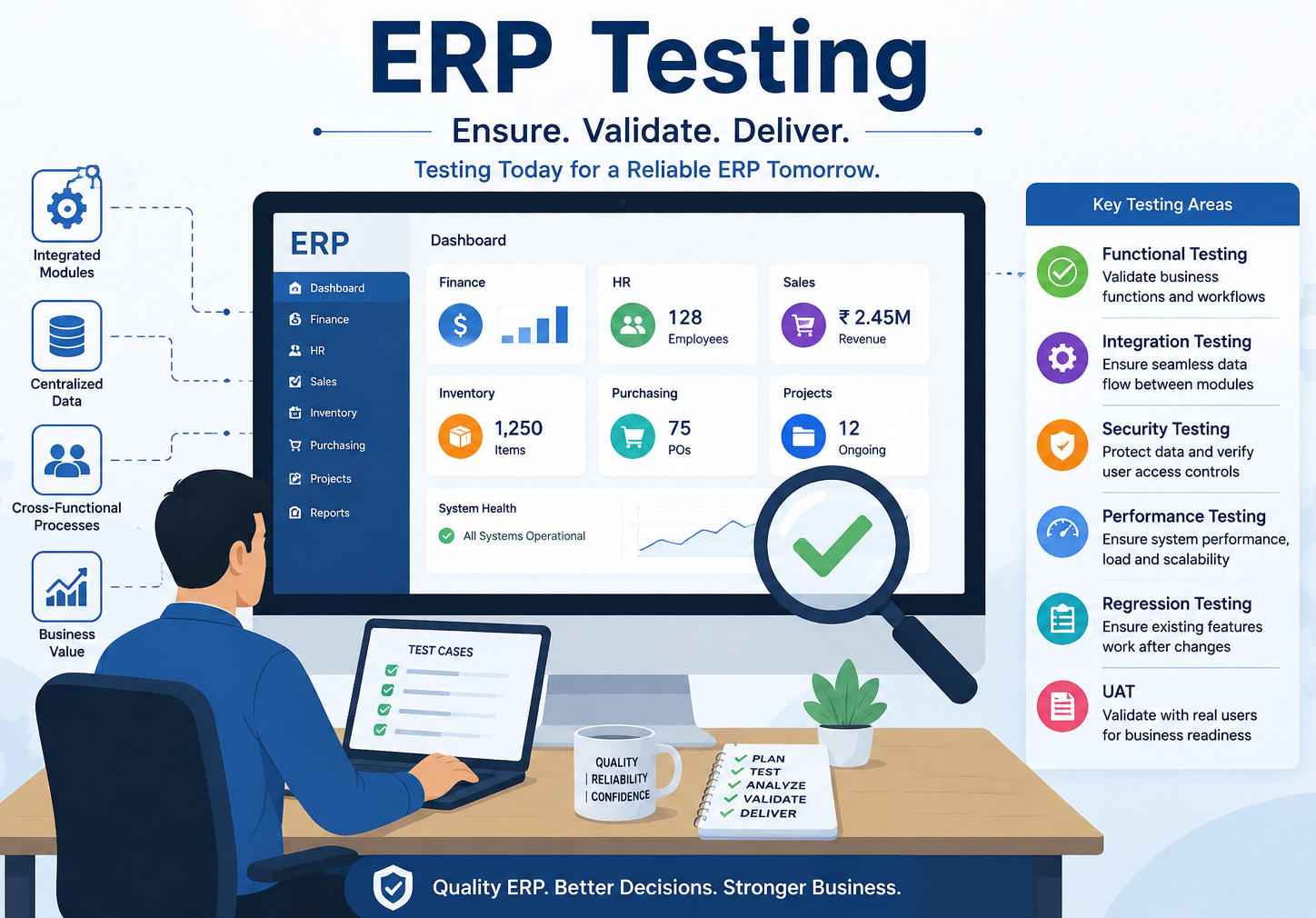
Enterprise Resource Planning (ERP) systems are at the core of modern organizations. They are not simply another bland piece of software; they are the digital backbone that links finance, procurement, human resources, supply chain management, and manufacturing with customer operations into a single integrated ecosystem.
Businesses continue to run smoothly when there is a proper ERP system. And when it is not, the consequences are catastrophic. This is exactly why ERP testing is not optional; it is mission-critical.
| Key Takeaways: |
|---|
|
What is ERP Testing?
ERP Testing is the process of providing accurate, consistent, and efficient functioning across all the integrated modules of an Enterprise Resource Planning system. It validates not only features but also the flow of data across interconnected business processes.
Unlike standalone applications, ERP systems are tightly coupled so that the action in one can trigger repercussions in multiple areas of the system. Creating a purchase order can cascade through procurement, inventory levels, financial records, and vendor management; comprehensive testing is therefore mandatory.
- Data flows accurately and consistently across all interconnected modules without loss or duplication.
- Business processes execute as expected, aligning with defined workflows and organizational requirements.
- Integrations with external and internal systems function seamlessly without errors or delays.
- Customizations and configurations do not disrupt or break the core system functionality.
- Performance and security meet enterprise standards, maintaining system reliability and data protection.
Why ERP Testing is Different from Regular Testing
- It is process-driven, not just feature-driven: You are not just testing a “button” or a “form”, you are validating entire business workflows.
- It involves multiple modules simultaneously: A defect in one module can cascade into others.
- It has real financial and operational impact: A bug in payroll or invoicing isn’t just a defect; it can result in financial loss or compliance issues.
- It often involves heavy customization: Most ERP implementations are tailored to the organization, making testing more complex.
Why ERP Testing is Important
ERP systems are at the core of an organization, managing finance, supply chain, and everything. Testing them well ensures these sophisticated systems operate properly, enable essential business processes, and mitigate unwanted outages.
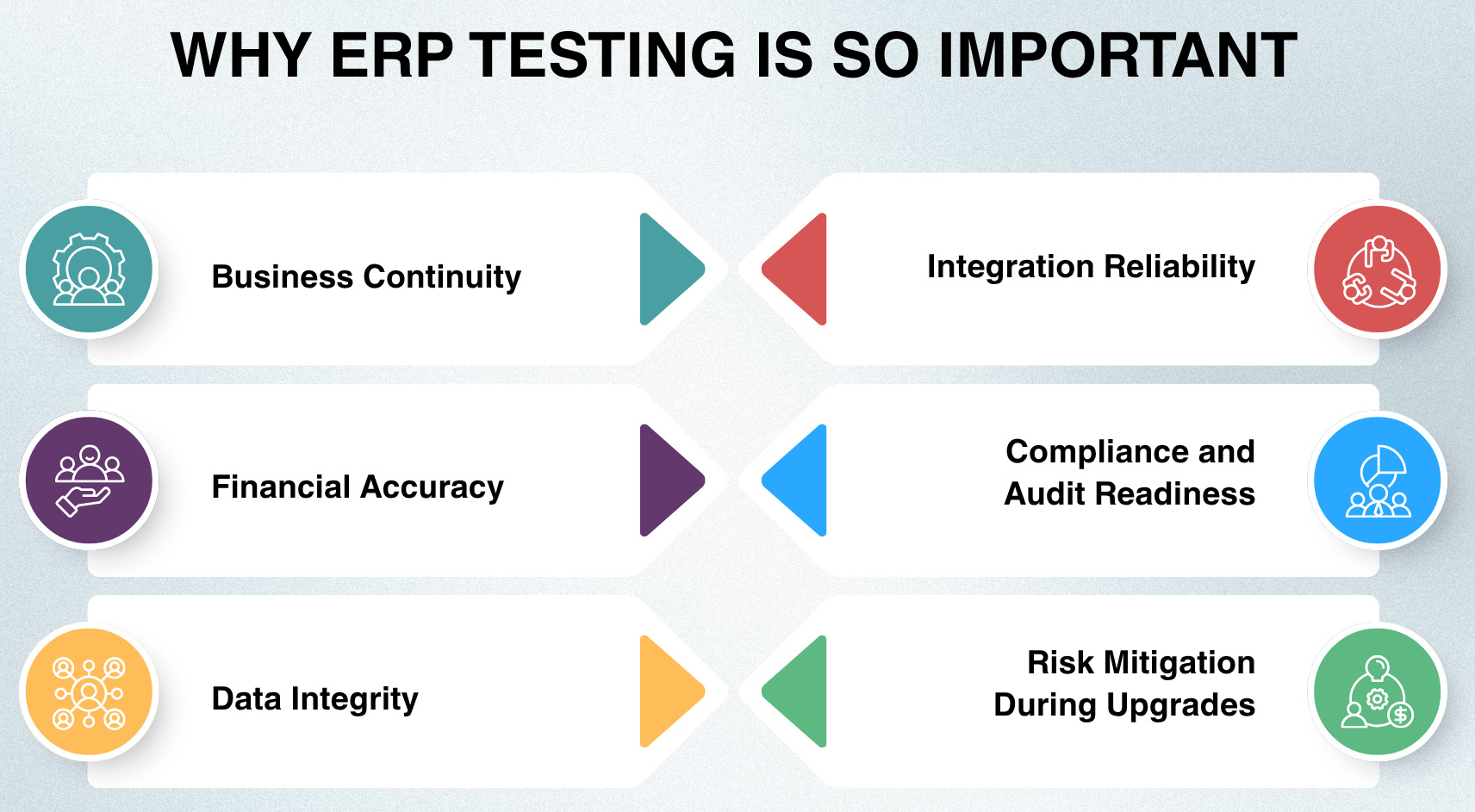
- Business Continuity: An ERP failure may cause a business to grind to a standstill, with several departments being impacted at once. Every workflow that is critical should go through this testing phase. For instance, order processing failure disrupts customer orders and shipment delays.
- Financial Accuracy: Due to the sensitive nature of financial data handled by ERP systems, even slight mistakes can bring significant effects. Testing validates the calculations and ensures compliance with financial regulation. For example, a tax miscalculation could cause regulatory fines or monetary imbalances.
- Data Integrity: ERP works on the basic concept of interdependency, shared data among multiple modules; hence, consistency is critical. Testing ensures that the data are accurate & synchronized and not duplicated or corrupted. For instance, if benchmark data is misaligned, it can lead to inappropriate lists of products for sale.
- Integration Reliability: ERP systems frequently integrate with various external and internal platforms. Testing ensures that these integrations work as expected in actual environments. For example, due to the failure of syncing an ERP with a CRM system, customer order information may become incomplete and lost.
- Compliance and Audit Readiness: Specific regulatory and industry standards are strict compliance requirements for organizations. ERP testing makes sure all compliance is met, and audit trails are maintained. For instance, non-compliance with GDPR leads to legal problems and fines.
- Risk Mitigation During Upgrades: However, ERP systems are getting updated, which can bring new risks. This is to ensure that updates do not spoil any functional or customization efforts. For instance, a customized approval workflow could be interrupted or delayed because of a system upgrade, thereby halting business processes.
Key ERP Workflows to Test
Instead of making isolated functionalities, it is best to validate your ERP systems by testing real-time business workflows. This is to follow your end-to-end processes, working fine across various modules, maintaining the ground reality scenarios. By putting focus on the essential workflows, we are able to catch critical issues in the early days and ensure that the system reliably supports core business operations.
Procure-to-Pay (P2P): This workflow manages the complete purchasing lifecycle, from identifying a need for goods or services to making the final payment to vendors. It ensures that procurement, inventory updates, and financial transactions are all aligned and accurately recorded.
- Verify purchase requisition creation with valid inputs
- Validate approval workflow triggers correctly
- Ensure PO (Purchase Order) is generated with the correct vendor details
- Confirm that the goods receipt updates the inventory
- Validate 3-way matching (PO, receipt, invoice)
- Ensure payment is processed only after approval
Order-to-Cash (O2C): This workflow handles the end-to-end sales process, starting from customer order placement to receiving payment. It ensures smooth coordination between sales, inventory, and finance functions.
- Verify sales order creation with correct pricing
- Validate credit limit checks
- Ensure inventory is reduced after shipment
- Confirm invoice accuracy
- Validate payment posting updates accounts receivable
Record-to-Report (R2R): This workflow forms the financial backbone of the ERP system by managing accounting processes and generating financial reports. It ensures accurate tracking, consolidation, and reporting of financial data.
- Validate journal entry posting
- Ensure ledger balances update correctly
- Verify trial balance accuracy
- Confirm that financial reports are generated correctly
Hire-to-Retire (H2R): This workflow covers the entire employee lifecycle, from onboarding to exit, including payroll and performance management. It ensures HR processes are consistent, compliant, and accurately recorded.
- Validate employee data entry
- Ensure payroll calculations are correct
- Verify tax deductions
- Confirm final settlement during exit
Inventory Management: This workflow focuses on tracking and managing stock levels, warehouse movements, and replenishment processes. It ensures that inventory data remains accurate and supports operational efficiency.
- Validate stock updates after goods receipt
- Ensure inventory transfer between warehouses
- Verify automatic reorder triggers
Manufacturing (Plan-to-Produce): This workflow manages the production lifecycle, including planning, material requirements, and execution of manufacturing processes. It ensures that production runs efficiently with the right materials and accurate tracking.
- Validate BOM (Bill of Materials) accuracy
- Ensure production orders are generated correctly
- Verify raw material consumption updates
Types of Testing for ERP Systems
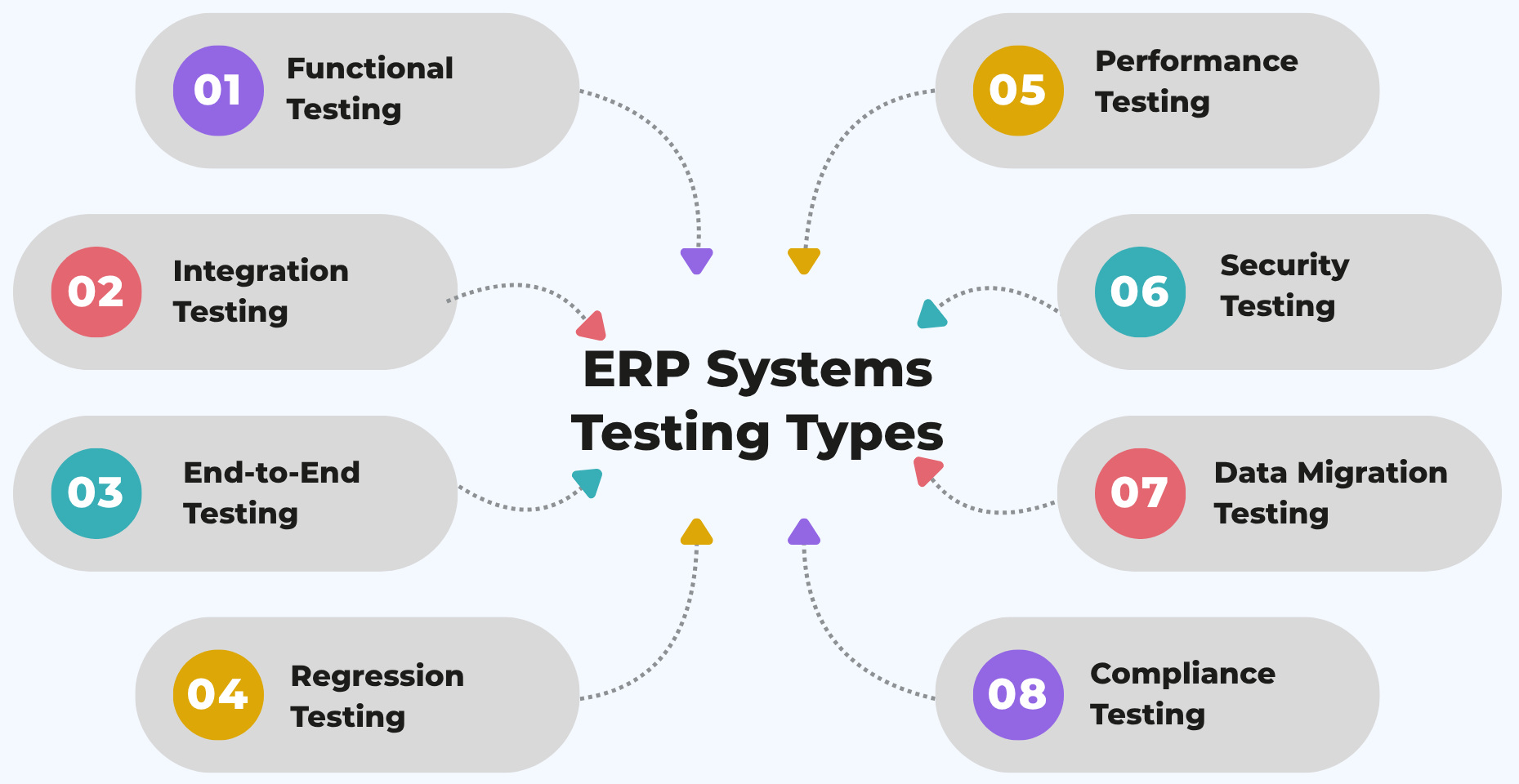
ERP testing requires a combination of multiple testing types to ensure the system works reliably across complex, interconnected modules. Each testing type focuses on a specific aspect, collectively ensuring accuracy, performance, security, and business alignment.
Functional Testing
Functional testing ensures every ERP module acts according to business requirements and expected logic. This makes sure that production features like invoice creation, payroll step calculation, and order process produce accurately in the stated condition.
As an example, testing confirms if the invoices are created with the correct amount totals and tax calculations. It also verifies payroll calculations work out appropriate salaries, deductions, and compliance rules.
Integration Testing
Integration testing allows various ERP modules to talk to one another, confirming that their capabilities and data exchanges work together without inconsistencies. It ensures the correctness of all layers between connected systems and modules.
For instance, if a procurement activity triggered an update to the financial records, integration testing ensures that those updates are accurate. In a like manner, it validates that sales transactions in real-time decrease the inventory level.
End-to-End Testing
End-to-end testing tests full-fledged business processes across various ERP modules. It keeps real-world scenarios running from end to end without failure.
The entire Procure-to-Pay flow, for example, is tested to ensure that every stage in the payment process, from requisition, through to purchase order and invoice approval, right up to payment, is connected correctly. This highlights gaps that would likely not be evident in a module-by-module test.
Regression Testing
Regression testing prevents any new changes, updates, or fixes from breaking existing functionality. In ERP systems, it is more important due to frequent upgrades and heavy customizations.
As an example, regression tests check that order processing works as before following an ERP upgrade. It also makes sure that custom workflows would not be impacted by any reasonable change to the system.
Performance Testing
Performance testing tests the performance of your ERP system at different load levels. This is to allow the system to run a large amount of transactions and data without any slowdown.
A test, for instance, simulates thousands of concurrent transactions to validate system stability. It also serves to confirm that big reports can be produced in a reasonable time frame.
Security Testing
Security testing helps keep sensitive business data safe and ensures access controls are in place. It addresses discovering weaknesses and avoiding access that is not authorized.
It checks role-based access to ensure that users see (or change) only the data they are allowed to. It assesses other controls, such as measures that protect data using encryption or that prevent outsiders from accessing systems.
Data Migration Testing
Data migration testing ensures that data transferred from legacy systems to the ERP system is accurate and complete. It validates data integrity, consistency, and compatibility after migration.
For example, it checks whether customer, financial, and inventory data are correctly migrated without loss or duplication. It also ensures that historical records remain usable in the new system.
Compliance Testing
Compliance testing validates that the ERP system adheres to regulatory and industry-specific requirements. It ensures that processes and data handling meet legal and audit standards.
For example, testing verifies adherence to financial regulations and reporting standards. It also ensures that the system maintains proper audit trails and supports compliance requirements.
Why Automate ERP Testing?
- Scale of Testing: There are thousands of test cases in ERP systems; various workflows with constant updates, which are cumbersome to handle manually. Automation is an efficient way to perform tests at a large scale and with reliability.
- Frequent Changes: ERP systems are constantly evolving as configuration changes, new module enhancements, and integration point upgrades occur. Automation allows you to validate these changes quickly and not slow down delivery.
- Regression Complexity: Automating regression testing in ERP systems is a labor-intensive and time-costly affair. Automation allows for faster execution, providing greater coverage while mitigating the risk of human error.
- Cross-Module Validation: Because there are numerous departments associated with ERP modules, it has to be validated. Using automation to mimic real business workflow. Make sure data flows uninterrupted between the modules.
- Cost Efficiency: Automation takes some time to set up, but it helps you save a fortune on testing costs. It reduces redundancy of manual work, reduces testing time, and increases efficiency.
Read: How to Automate ERP Testing.
How AI-Based Testing Transforms ERP Testing
- Self-Healing Tests: AI-powered testing tools can identify UI changes automatically and update the test scripts according to these changes. This makes tests less fragile due to changes in the UI and ensures the stability of automation over time. For instance, enabling self-healing features in testRigor so that when the UI changes, it minimizes effort on test maintenance.
- Natural Language Testing: With AI, test cases can be written in plain English and communicate directly with non-technical people. This would help to facilitate collaboration between Business teams and also QA. Using testRigor enables users to create and write tests in plain language, thus reducing dependency on complex scripting.
- Smart Test Maintenance: Maintaining ERP test suites is traditionally time-consuming due to frequent updates and customizations. AI significantly reduces this burden by automatically adjusting tests when changes occur. testRigor helps minimize maintenance overhead by intelligently managing test updates behind the scenes through self-healing, Vision AI, and AI context.
- Intelligent Test Coverage: AI can analyze how applications behave and detect gaps in test coverage. By adopting testRigor, teams can gain more coverage apart from insights and recommendations generated through AI.
- Visual Validation: AI validates UI elements visually, as opposed to code-based locators. It makes tests more resistant to structural changes in the application. Read: How to do visual testing using testRigor?
To understand how easy it is to create test scripts in testRigor, let’s see an example test case for Sales order creation for a valid customer.
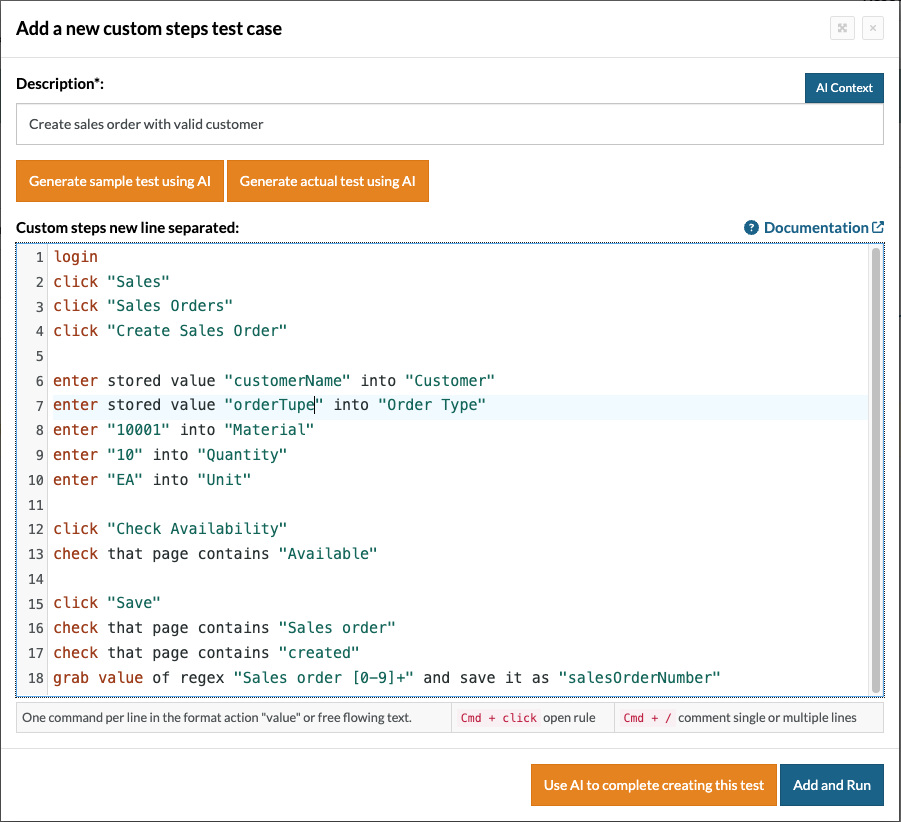
login
click "Sales"
click "Sales Orders"
click "Create Sales Order"
enter stored value "customerName" into "Customer"
enter stored value "orderTupe" into "Order Type"
enter "10001" into "Material"
enter "10" into "Quantity"
enter "EA" into "Unit"
click "Check Availability"
check that page contains "Available"
click "Save"
check that page contains "Sales order"
check that page contains "created"
grab value of regex "Sales order [0-9]+" and save it as "salesOrderNumber"
For the above example, using testRigor, we can create reusable rules, which help to reduce the test case steps count and also, using stored value test data, we don’t have to hardcode test data every time, thereby increasing the modularity.
testRigor supports a wide range of ERP application testing, including SAP, Oracle ERP, Microsoft Dynamics 365, NetSuite, Infor, Epicor, and similar platforms.
Conclusion
ERP testing works beyond a feature-based validation and confirms that the entire business runs seamlessly. The modules demand expertise in technology as well as a deep understanding of the respective business domain.
The speed, scale, and complexity of modern ERP systems still make automation, particularly AI-powered solutions like testRigor, a necessity to keep up.
Frequently Asked Questions (FAQs)
What are the biggest challenges in ERP testing?
The biggest challenges include complex integrations, frequent customizations, large datasets, evolving business workflows, and maintaining regression coverage after upgrades or configuration changes.
Which industries rely heavily on ERP testing?
Industries such as manufacturing, healthcare, retail, banking, logistics, education, and pharmaceuticals heavily depend on ERP testing because their operations rely on integrated business processes.
How long does ERP testing usually take?
The duration depends on the size of the ERP implementation, the number of modules, integrations, and customizations. Large enterprise ERP projects can require weeks or even months of testing cycles.
| Achieve More Than 90% Test Automation | |
| Step by Step Walkthroughs and Help | |
| 14 Day Free Trial, Cancel Anytime |











