How to Simplify User Acceptance Testing of ERP Systems?
 |
ERP systems rank among the technology projects with the highest costs, greatest complexity, and most critical business impacts for all types of organizations. Yet a large share of such projects run into problems during the user acceptance testing (UAT) phase, which occurs immediately before the system’s official launch. In this phase, business users must rush to complete a set of tasks: verifying workflows, testing new processes, and learning the system, while also being required to finalize high-risk decisions related to system switchover.
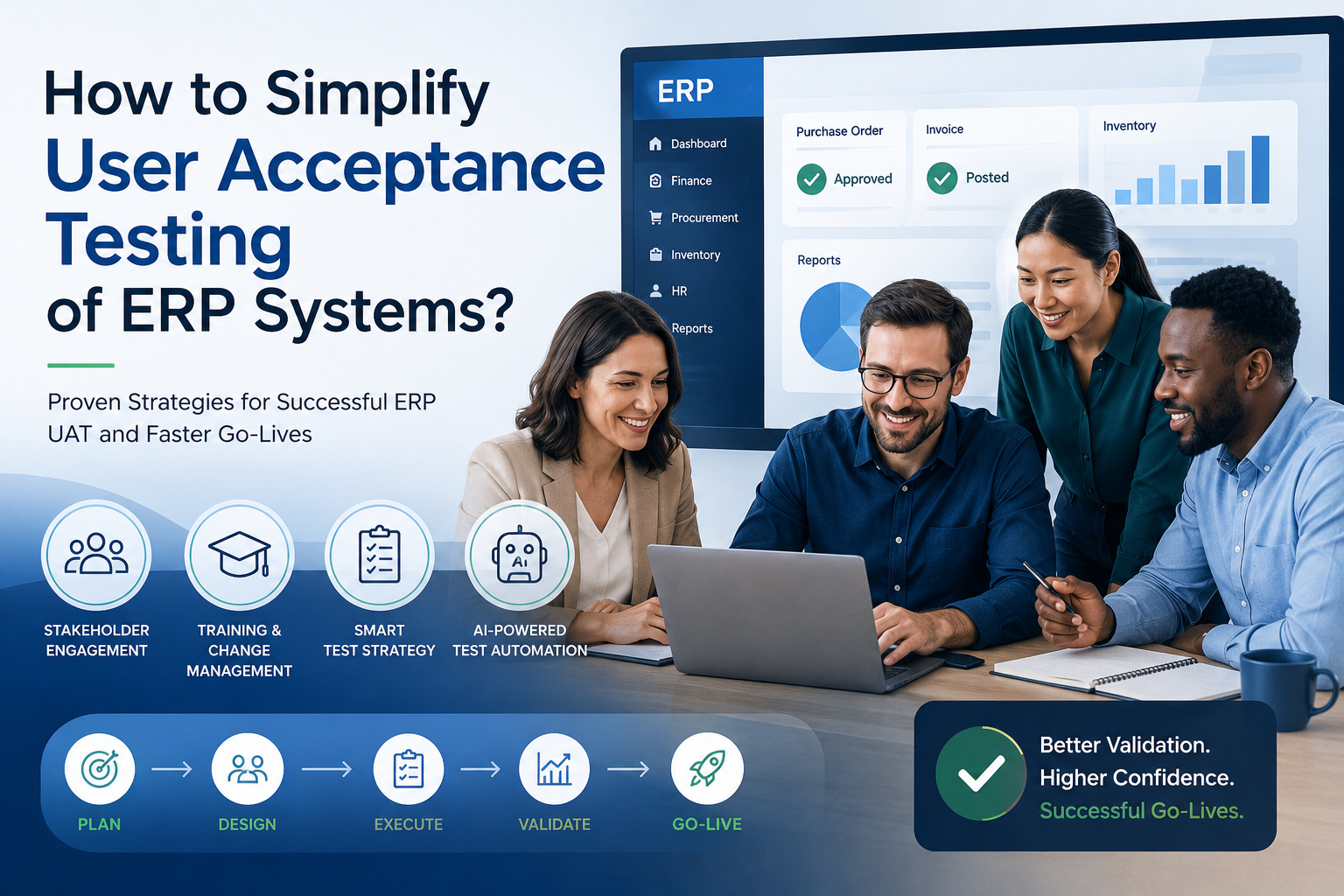
A widespread cognitive misconception prevails across the industry: ERP UAT is often regarded as nothing more than a purely technical testing activity, when in fact it is a collaborative work that is highly human-dependent. Various business stakeholders who hold the final acceptance authority generally lack professional testing experience. This article will explore five core directions centered on the simplification of ERP UAT.
| Key Takeaways: |
|---|
|
What is User Acceptance Testing in ERP Systems?
User Acceptance Testing (UAT) focuses on business readiness. Unlike functional testing and integration testing, which center on technical requirements, UAT is the phase in ERP scenarios where business users verify that the system can support daily operations.
The core goal of user acceptance testing (UAT) for ERP systems is clear and simple: to verify whether users can smoothly use the new system to complete their routine work duties. The separate tests for the finance, procurement, and HR departments each correspond to their respective business processes, and the core guiding principle always prioritizes business outcomes rather than technical functions.
ERP systems are unique because they support multiple interconnected departments. A single transaction can affect inventory, procurement, finance, reporting, and compliance simultaneously. This makes acceptance testing much more comprehensive than traditional software testing.
Why ERP UAT is Difficult
Testing a typical business application often involves validating individual features or workflows. ERP systems are different because they support complete business processes that span multiple departments and teams.
For example, creating a purchase order may involve approvals from procurement managers, inventory checks, supplier management activities, invoice processing, and financial postings. If any part of this workflow fails, the impact extends beyond a single user or department.
- Multiple departments participate in testing.
- Workflows span numerous modules and systems.
- Regulatory requirements must be validated.
- Business processes often change during implementation.
- Stakeholders have limited time available for testing.
Because of these factors, ERP acceptance testing requires careful planning and strong stakeholder engagement.
Read: ERP Testing 101.
Who Performs UAT in ERP Projects?
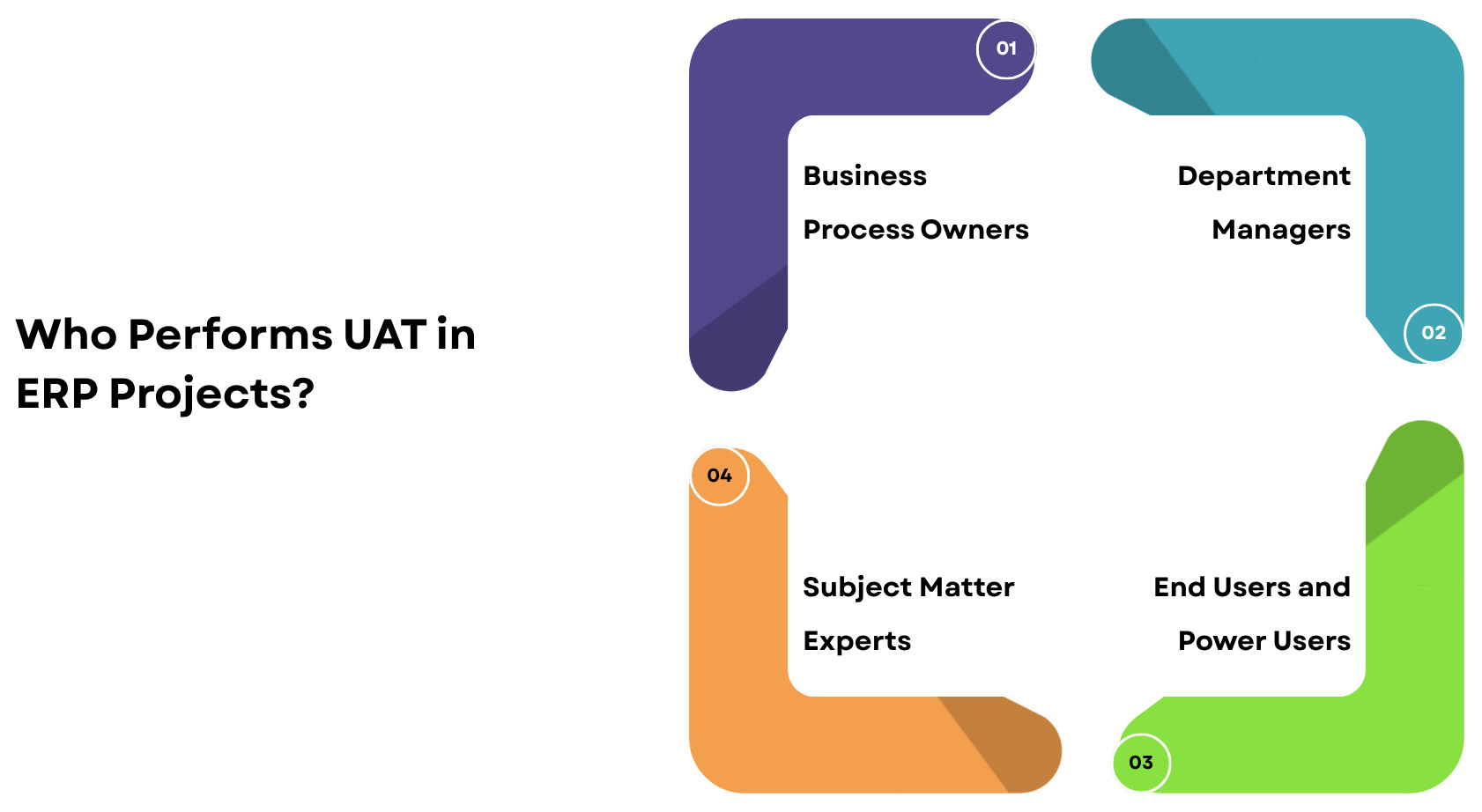
- Business Process Owners: They are often the most important participants during acceptance testing. These individuals oversee functions such as finance, procurement, human resources, manufacturing, or supply chain operations. Because they understand business objectives and operational requirements, they are uniquely qualified to evaluate whether the ERP system supports organizational needs. Their approval frequently serves as the final authorization before deployment.
- Subject Matter Experts: They possess in-depth, hands-on operational business knowledge, are familiar with real-world work processes, and can identify issues overlooked by technical teams by using their command of exception scenarios and special cases. They are familiar with users’ actual system usage habits and are the most effective participants in User Acceptance Testing (UAT).
- Department Managers: They evaluate ERP systems from a broader business perspective. They focus on productivity, efficiency, reporting capabilities, and overall operational readiness. Their feedback often helps determine whether the system will support departmental goals after deployment.
- End Users and Power Users: They interact with business systems every day and understand workflow challenges better than most stakeholders. Because they will use the ERP system extensively after go-live, their feedback provides valuable insight into usability and process effectiveness.
Why Stakeholder Sign-Off Matters
- Business processes function correctly.
- Critical workflows have been validated.
- Employees can perform their responsibilities.
- Organizational risks are acceptable.
- The business is prepared for go-live.
For many organizations, stakeholder approval is the most important milestone in the entire ERP project. This makes stakeholder engagement a critical factor in UAT success. If key users are not involved throughout the testing process, confidence levels often remain low even when the system itself performs well.
The Psychology Behind ERP User Adoption
- Fear of Change: This creates uncertainty, and uncertainty often creates resistance. Employees may worry about making mistakes, losing productivity, or struggling to learn new workflows. These concerns can influence how users approach UAT. Some become reluctant participants, while others become highly critical of the new system.
- Loss Aversion: People tend to focus more on losses than gains. Even if an ERP implementation improves ten different processes, users may focus on the one workflow that has changed significantly. This psychological tendency can create negative perceptions during acceptance testing.
- Resistance to New Processes: As enterprises work to implement ERP systems, they replace localized process variations and temporary manual workarounds with standardized workflows. While this change improves efficiency, it reduces flexibility, and user resistance most often emerges during the User Acceptance Testing (UAT) phase, when staff first encounter the redesigned processes.
- Lack of Confidence: Users who lack confidence in the new system often struggle to provide meaningful feedback during testing. Instead of evaluating business processes, they focus on navigation challenges and unfamiliar interfaces. This is one reason why training is so important before UAT begins.
How Change Management Improves ERP UAT Success
- Executive sponsorship
- Stakeholder engagement
- Clear communication
- Training programs
- Feedback mechanisms
- Ongoing support
- Involve Users Early: One of the best ways to improve acceptance is to involve users throughout the project. Employees who participate in workshops, requirements discussions, and process design activities develop a sense of ownership. This ownership often translates into stronger UAT participation.
- Communicate Frequently: Regular communication helps employees understand project objectives, upcoming changes, and expected benefits. When people understand the reasons behind change, they are more likely to support it.
Why Traditional ERP UAT Approaches Struggle
- Slow Execution: Manual test execution is time-consuming, especially when hundreds or thousands of ERP business scenarios must be validated across multiple modules.
- Limited Coverage: Due to time and resource constraints, teams often test only critical workflows, leaving many business processes insufficiently validated.
- Human Error: Testers can unintentionally skip steps, enter incorrect data, or misinterpret expected results, leading to inaccurate testing outcomes.
- Inconsistent Results: Different testers may execute the same test case differently, resulting in variations that make defect analysis and reporting more difficult.
- High Maintenance Effort: Updating spreadsheets, test scripts, and documentation for every ERP change requires significant effort and can quickly become overwhelming.
Business users frequently spend considerable time recording evidence and documenting results instead of focusing on validating whether business processes meet operational requirements. As organizations increasingly adopt cloud-based ERP platforms that release frequent updates, these traditional UAT methods become harder to scale and maintain effectively.
How AI-Based Test Automation Simplifies ERP UAT
- Self-Healing Tests: AI-powered testing tools can identify UI changes automatically and update the test scripts according to these changes. This makes tests less fragile due to changes in the UI and ensures the stability of automation over time. For instance, enabling self-healing features in testRigor so that when the UI changes, it minimizes effort on test maintenance.
- Natural Language Testing: With AI, test cases can be written in plain English and communicate directly with non-technical people on your team. This would help to facilitate collaboration between business teams and also QA. testRigor enables users to create and write tests in plain language, thus reducing dependency on complex scripting.
- Smart Test Maintenance: Maintaining ERP test suites is traditionally time-consuming due to frequent updates and customizations. AI significantly reduces this burden by automatically adjusting tests when changes occur. testRigor helps minimize maintenance overhead by intelligently managing test updates behind the scenes through self-healing, Vision AI, and AI context.
- Intelligent Test Coverage: AI can analyze how applications behave and detect gaps in test coverage. By adopting testRigor, teams can gain more coverage apart from insights and recommendations generated through AI.
- Visual Validation: AI validates UI elements visually, as opposed to code-based locators. It makes tests more resistant to structural changes in the application.
Read: How to do visual testing using testRigor?
Traditional test automation frameworks typically require programming skills, creating a collaboration gap between business experts and QA automation teams. As a result, business users with deep process knowledge are often unable to contribute to test creation. Modern AI-powered testing platforms remove this barrier by enabling test creation in natural language, empowering business users to participate in automation, improving collaboration, eliminating process bottlenecks, and enhancing overall testing efficiency and quality.
Simplifying ERP UAT with testRigor’s AI
- Logs into the ERP system
- Creates a purchase order
- Uploads a supporting quotation document
- Emails the purchase order to the supplier
- Verifies that the purchase order email is received
- Confirms the uploaded quotation is attached to the email
- Validates the purchase order total
- Verifies the purchase order appears in the procurement dashboard using AI
testRigor helps you test ERP-specific test scenarios such as email, file uploads, graphs, latest AI features, chatbots, and more. Using traditional test automation tools, the test script will be a huge chunk of programming code that is not easily understandable by stakeholders, and the maintenance effort is huge. Let’s see how this scenario can be automated using testRigor.
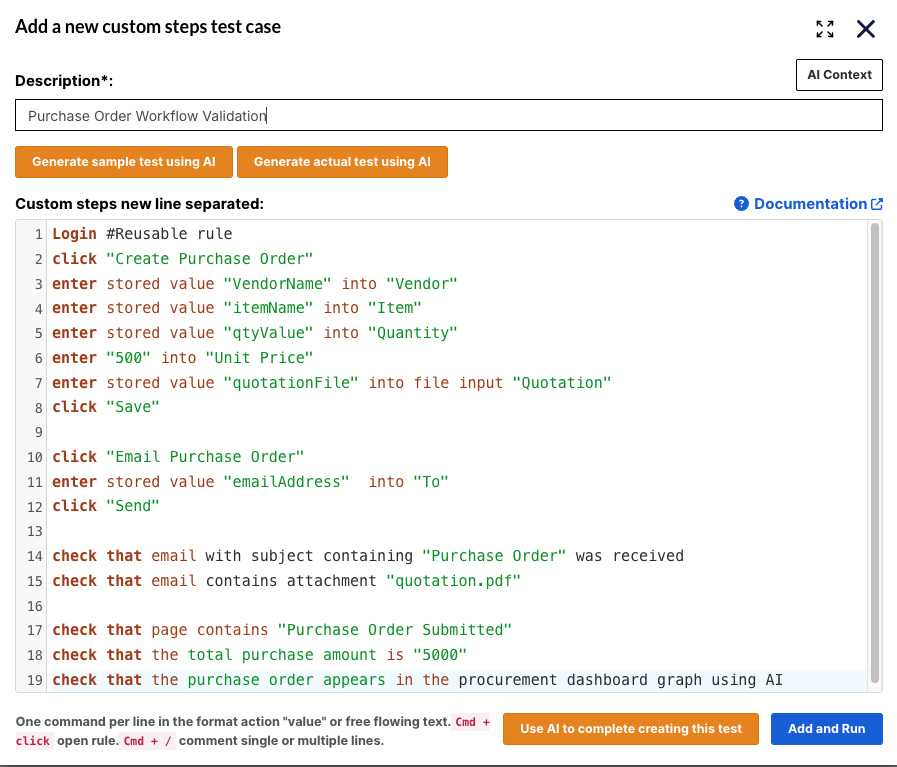
Login #Reusable rule
click "Create Purchase Order"
enter stored value "VendorName" into "Vendor"
enter stored value "itemName" into "Item"
enter stored value "qtyValue" into "Quantity"
enter "500" into "Unit Price"
enter stored value "quotationFile" into file input "Quotation"
click "Save"

click "Email Purchase Order"
enter stored value "emailAddress" into "To"
click "Send"

check that email with subject containing "Purchase Order" was received
check that email contains attachment "quotation.pdf"

check that page contains "Purchase Order Submitted"
check that the total purchase amount is "5000"
check that the purchase order appears in the procurement dashboard graph using AI
Because the tests are written in business language, process owners and subject matter experts can participate directly in test creation and maintenance. Also, in the above example, if you check, we don’t have any detailed steps for login; instead, we just mentioned “Login,” which is a reusable rule. So using testRigor, we can create reusable rules, which help to reduce the test case step count, and also, using stored value test data, we don’t have to hardcode test data every time, thereby increasing the modularity.
- Greater stakeholder involvement
- Faster automation development
- Reduced maintenance effort
- Better alignment with business requirements
- Improved collaboration between business and QA teams
For ERP implementations, this capability can significantly simplify User Acceptance Testing by allowing the people who understand the business process to actively participate in validating it.
Best Practices for Successful ERP UAT
- Involve Stakeholders Early in the Project: Business users, process owners, and department leaders should participate from the beginning to ensure that requirements, workflows, and expectations are accurately captured. Early involvement also increases user buy-in and reduces resistance during deployment.
- Use Realistic Business Scenarios: Testing should reflect actual day-to-day business operations rather than isolated system functions. Realistic scenarios help identify issues that may only appear when multiple ERP processes interact with each other.
- Establish Clear Acceptance Criteria: Clearly defined acceptance criteria ensure that everyone understands what constitutes a successful test outcome. This minimizes ambiguity, improves decision-making, and supports objective sign-off at the end of UAT.
- Automate Repetitive Validation Activities: Automating frequently executed test scenarios reduces manual effort and allows teams to validate changes more quickly and consistently. This is especially valuable for ERP systems that undergo regular updates, patches, and configuration changes.
Conclusion
User Acceptance Testing is the last gate to know if an ERP system is really ready for the business, and stakeholder participation is as important as the technology itself. With the right mix of change management, user training, and modern test automation, UAT can be easier, more collaborative, and more confident in deployment decisions. Platforms like testRigor further close the gap between business users and automation by allowing stakeholders to build and maintain tests using plain English, making UAT faster, more scalable, and more aligned with real business processes. A lean, business-driven UAT process ultimately reduces implementation risk and supports a successful ERP go-live.
Frequently Asked Questions (FAQs)
- How long does User Acceptance Testing typically take for an ERP implementation?
The duration of ERP UAT depends on the project’s size and complexity. Small implementations may complete UAT in two to four weeks, while large enterprise-wide ERP deployments can require several months to validate all business processes and obtain stakeholder approval.
- What types of defects are most commonly discovered during ERP UAT?
ERP UAT often uncovers business process gaps, incorrect workflow configurations, approval issues, data migration inconsistencies, reporting inaccuracies, and usability concerns that may not be identified during earlier technical testing phases.
- Can ERP User Acceptance Testing be performed in parallel with employee training?
Yes. Many organizations combine UAT with end-user training because it allows employees to learn the new system while validating real business scenarios. This approach improves user confidence, accelerates adoption, and helps identify usability issues earlier.
- What metrics should organizations use to measure ERP UAT success?
Beyond pass and fail rates, organizations should track business process coverage, stakeholder participation, defect resolution time, critical workflow completion, user satisfaction, sign-off readiness, and post-go-live defect trends to evaluate the overall effectiveness of ERP UAT.
| Achieve More Than 90% Test Automation | |
| Step by Step Walkthroughs and Help | |
| 14 Day Free Trial, Cancel Anytime |