What is RPA Automation? Guide to Intelligent Bots (2026)
 |
Today’s organizations rely on repetitive processes, such as copying data from one application to another, processing invoices, updating customer records, reconciling transactions, preparing reports, and validating documents. In Robotic Process Automation (RPA), these routine activities are performed by software bots across web applications, desktop software, legacy platforms, spreadsheets, and email tools.
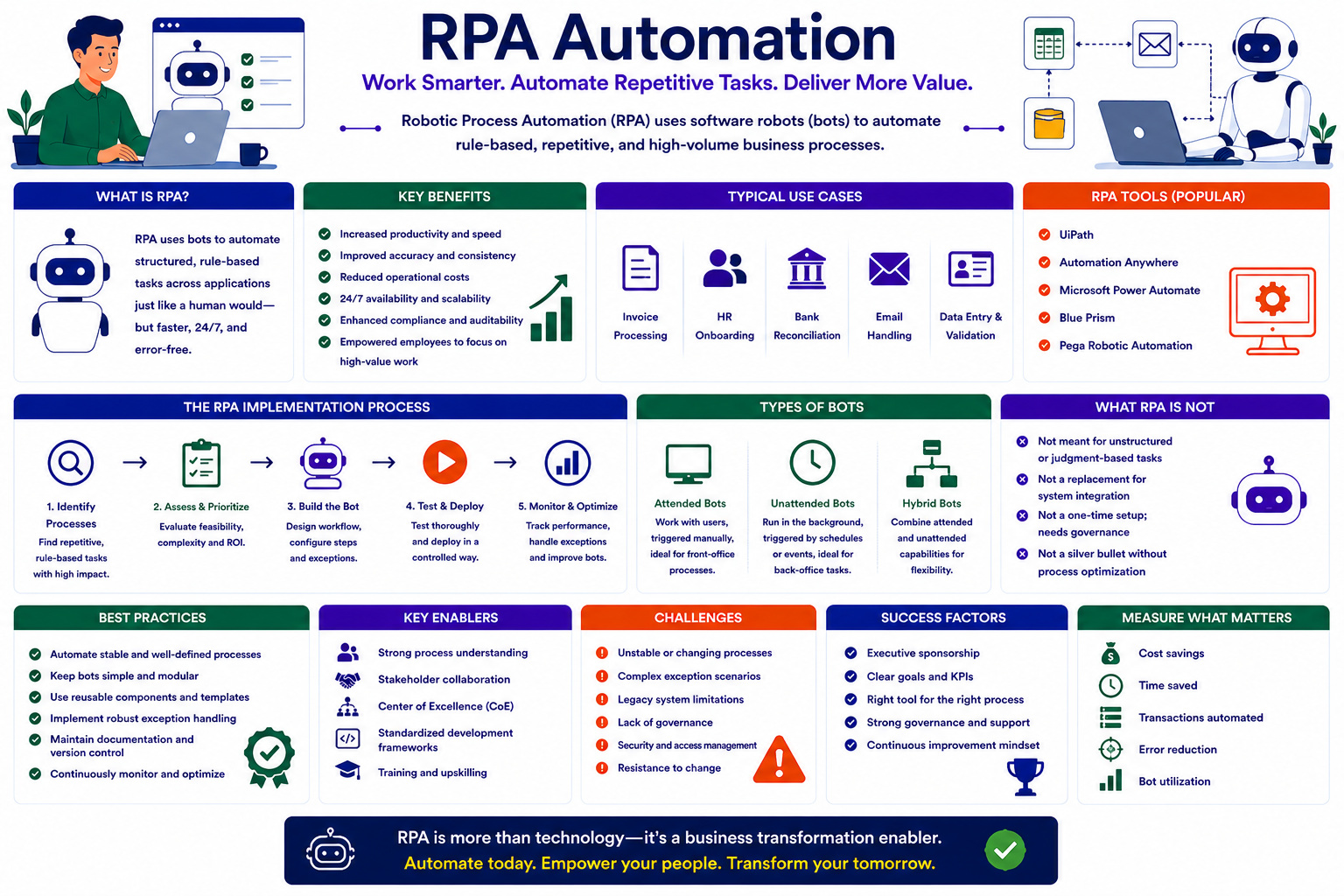
Unlike traditional integrations, RPA does not require organizations to replace their systems or build complex APIs, but rather works through existing user interfaces. Automation doesn’t work if you don’t select the right processes, deal with exceptions, secure data, test thoroughly, and monitor continuously.
| Key Takeaways: |
|---|
|
How RPA Works
A typical RPA solution consists of software bots, automation workflows, orchestration capabilities, credential management, monitoring, and analytics. The workflow encompasses such things as launching apps, reading emails and files, extracting data, entering data, applying business rules, calling APIs, and sending notifications.
The orchestration platform makes the decision of when and where bots run across the organization. It handles automation, balances the workload between bots, queues transactions, secures credentials, and monitors execution results. RPA bots can function in attended or unattended modes.
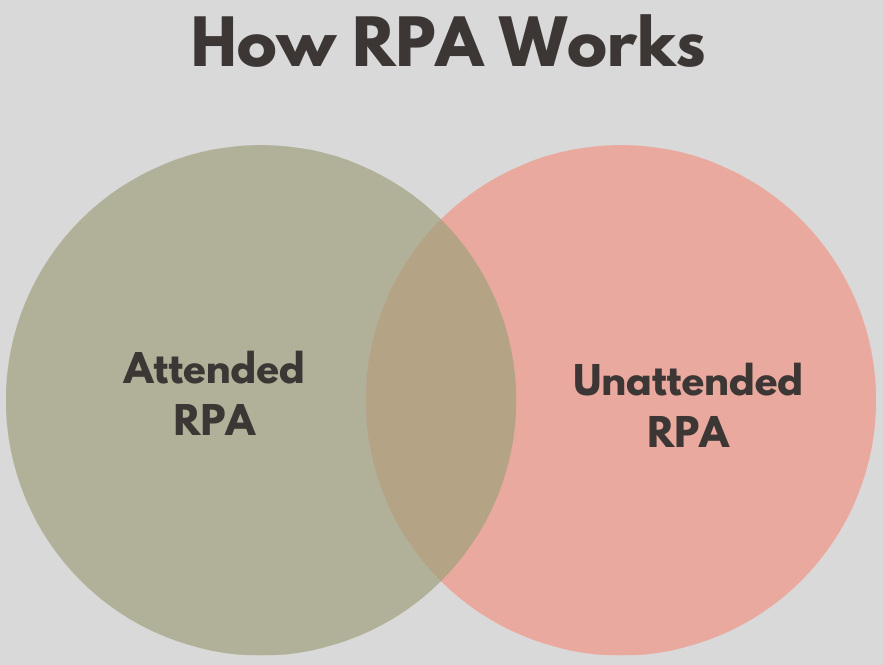
Attended RPA
Attended bots are typically initiated by the user and are built to work with employees. They help the user execute selected portions of a process while the employee still has responsibility for the entire activity.
For example, a customer service rep may trigger a bot during a support call. The bot pulls up the customer’s account information from different systems and displays it on a single screen. This lets the representative concentrate on communicating with the customer instead of juggling multiple apps.
Unattended RPA
Unattended bots do not require the constant intervention of a human. Typically, they are started by a schedule, an incoming email, an uploaded file, a transaction or a system event.
For instance, an unattended bot can run overnight, collect sales data from regional systems, compile the data, create a management report, and email it to business leaders before the next working day begins.
Many organizations use a combination of both models. Unattended bots complete routine background processing, while attended bots assist employees with decisions and exceptions.
Read more: Process Automation.
What is RPA Automation?
- Open an email containing the invoice.
- Download the attached PDF.
- Read the supplier name, invoice number, and amount.
- Log in to an Enterprise Resource Planning system.
- Find the corresponding purchase order.
- Compare the invoice against the purchase order.
- Enter the invoice information.
- Route it for approval.
- Notify the finance team if information is missing.
Most of these steps can be automated by an RPA bot. It could monitor the mailbox, download the invoice, extract the relevant information, validate it based on the defined rules, update the ERP platform, and send the appropriate notification.
RPA is best applied to processes that are repetitive, rule-based, digital, high volume, and relatively stable. Where processes require a lot of empathy, negotiation, creativity, or complex human judgment, they may require a human or a combination of RPA and artificial intelligence.
Read: What is RPA? Robotic Process Automation Testing.
RPA Automation Tools
RPA automation tools provide the capabilities needed to build, deploy, manage, and monitor software bots, including visual workflow designers, pre-built connectors, document processing, credential management, orchestration, analytics, and exception handling.
- UiPath
- Automation Anywhere
- Microsoft Power Automate
- SS&C Blue Prism
- Pega Robotic Automation
- Robot Framework
- Robocorp
For instance, an organization that is already leveraging Microsoft 365, Dynamics 365, and Azure might opt for Power Automate since it fits well within its existing ecosystem. A large financial institution with hundreds of unattended bots may want to choose a platform that has good orchestration, auditability, workload management, and centralized governance.
- A visual environment for designing automation workflows
- Screen and web automation for interacting with applications
- Connectors for ERP, CRM, email, cloud, and productivity platforms
- OCR and document-processing capabilities
- APIs and database integration
- Centralized bot scheduling and orchestration
- Secure credential and identity management
- Work queues for distributing transactions
- Logging, monitoring, and operational analytics
- Exception handling and automated recovery
- Version control and deployment management
- Role-based access and audit trails
RPA Business Benefits
RPA can increase operational efficiency by leveraging software bots to carry out repetitive tasks faster, with greater accuracy and without interruption, guided by predefined business rules and maintaining detailed audit trails. It improves customer and employee experience by speeding up delivery of service and freeing up employees to focus on analysis, decision-making, process improvement, and complex cases.
| Top Business Benefits | Organizational Impact |
|---|---|
| Improved operational efficiency | Completes repetitive, high-volume tasks faster and continuously |
| Reduced operational costs | Decreases the manual effort required for routine processes |
| Greater accuracy and consistency | Minimizes errors and applies business rules uniformly |
| Better compliance and auditability | Records every automated action for monitoring and audits |
| Improved employee productivity | Allows employees to focus on complex, strategic, and customer-facing work |
Intelligent Process Automation (IPA)
Intelligent Process Automation (IPA) is a combination of RPA and artificial intelligence, machine learning, process mining, document intelligence, natural language processing, analytics, and workflow orchestration. Unlike traditional RPA, which is largely focused on structured, rule-based tasks, IPA can process variable documents, understand written communication, make predictions and help with more complex decisions.
For example, IPA can pull data from invoices with different layouts, do a three-way match, update the ERP system, and send mismatches to finance employees for review. It can also read customer emails, look up order information, check replacement eligibility and availability, create service requests, and draft responses, while keeping humans in the loop for decisions requiring judgment or accountability.
Cognitive RPA Bots
Cognitive RPA bots bring together traditional automation with technologies like machine learning, computer vision, OCR, speech recognition, natural language processing, and generative AI. Instead of the predictable inputs and fixed rules of traditional bots, they can process scanned forms, handwritten documents, emails, customer messages, images, and call transcripts.
Cognitive bots can, for example, extract patient details from healthcare documents, classify customer requests by sentiment and urgency, or flag abnormal banking transactions for investigation before updating the relevant systems. AI outputs may be uncertain or wrong, so organizations need to set confidence thresholds and funnel cases with low confidence, unusual, financial, or legally important cases to authorized humans for review.
AI-Augmented RPA Workflows
An RPA workflow augmented with AI uses artificial intelligence to analyze data, generate content, predict outcomes, and propose next steps, while RPA executes the operational steps within business systems. In this model, the AI provides the reasoning layer, and the RPA bot provides the execution layer.
- Receive information from an email, document, form, chat, image, or system event.
- Use AI to classify, extract, summarise, or interpret the information.
- Validate the AI output against business rules and reference data.
- Assess the confidence level and operational risk.
- Send uncertain or sensitive cases for human review.
- Use RPA to complete approved actions across applications.
- Record the transaction and generate an audit trail.
- Monitor the outcome and use feedback to improve the workflow.
The quality of an AI-augmented RPA workflow depends on the reliability of its input data, models, business rules, and system integrations. Organizations should continuously monitor accuracy, false classifications, failed transactions, human overrides, and unexpected outcomes.
Hyperautomation Framework
Hyperautomation is a coordinated approach to discovering, designing, automating, managing, and continuously improving business processes with technologies such as RPA, AI, machine learning, process mining, document intelligence, workflow orchestration, APIs, low-code platforms, analytics, and human-in-the-loop controls. It is used to choose the right technology for each stage of the process and to align the automated activities with human decisions.
For example, an insurance claim may begin when a customer uploads a form, photographs, invoices, and supporting documents. Document intelligence extracts the information, computer vision assesses the images, and machine-learning models identify potential risk indicators. A workflow platform coordinates the process, while RPA retrieves policy details from legacy systems and creates the claim record.
Straightforward claims may continue through automated validation, while complex or suspicious cases are sent to claims professionals. Once a decision is approved, an RPA bot can update the policy system, initiate payment, archive the documents, and communicate the result to the customer. A hyperautomation framework generally contains several connected layers.
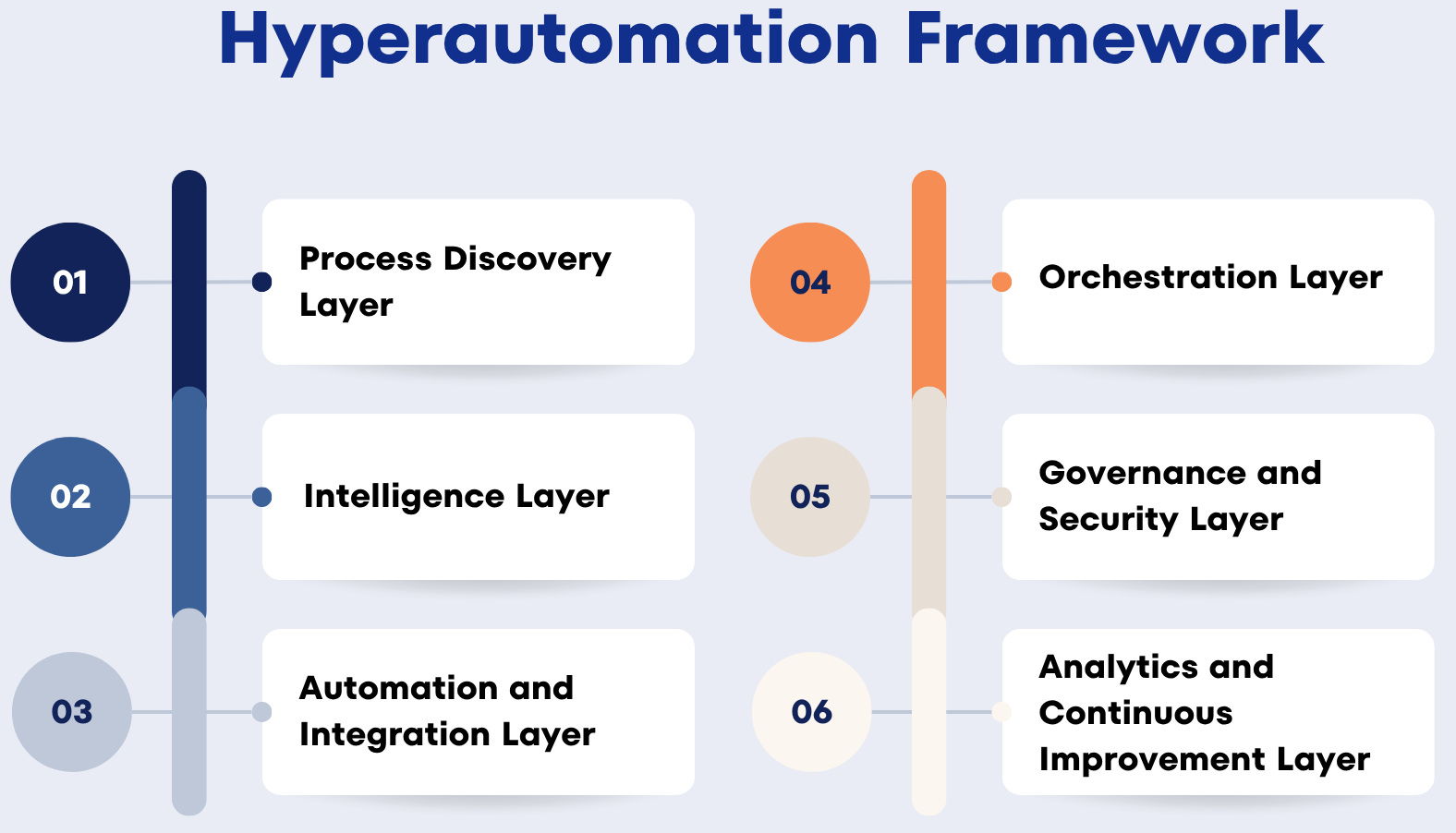
- Process Discovery Layer: Process mining and task mining analyze system logs and user activities to identify process variations, delays, rework, bottlenecks, and automation opportunities. For example, process mining may reveal that purchase-order approval takes five days because requests are repeatedly routed to the wrong approver.
- Intelligence Layer: Uses AI to interpret documents, messages, images, and other unstructured information. Enables classification, extraction, prediction, recommendations, and summarisation. For example, it can classify customer complaints by product, urgency, sentiment, and issue type before sending structured data to the workflow.
- Automation and Integration Layer: Combines RPA bots, APIs, integration platforms, and low-code applications to perform tasks and exchange information between systems. For example, a workflow may use an API to update a modern CRM platform and an RPA bot to enter the same information into a legacy desktop application.
- Orchestration Layer: Manages the end-to-end process by allocating tasks, controlling queues, applying rules, coordinating bots, invoking AI services, and assigning human approvals. For example, it can pause an invoice when its purchase order is missing, assign the issue to procurement, and resume automation after resolution.
- Governance and Security Layer: This layer ensures that automation follows organizational standards for identity management, access control, data protection, auditing, change management, testing, risk, and compliance. For example, every bot should have an owner, approved permissions, a documented purpose, a monitoring plan, and a recovery procedure.
- Analytics and Continuous Improvement Layer: Measures automation performance and business outcomes using metrics such as processing time, transaction volume, exception rates, bot utilization, costs, and human interventions. For example, teams can use these insights to redesign inefficient processes, optimize underperforming bots, and identify new automation opportunities.
Implementing RPA Successfully
- Process Discovery: Observe current activities, document workflows, measure transaction volumes, identify exceptions, and establish performance baselines.
- Feasibility and Value Assessment: Evaluate application stability, data quality, process variation, security, compliance, implementation costs, expected savings, and operational risks.
- Process Design: Define inputs, outputs, business rules, system interactions, roles, exceptions, security requirements, and recovery procedures.
- Development: Build the automation using reusable components for activities such as system login, email processing, data extraction, ERP updates, and notifications.
- Testing: Validate normal transactions and failure scenarios, including missing data, invalid formats, unavailable applications, expired credentials, network interruptions, unexpected pop-ups, duplicates, and partial transactions.
- Deployment and Monitoring: Track transaction volumes, successful executions, failures, processing times, queue sizes, exception categories, and business outcomes continuously.
Testing RPA, Cognitive Bots, and AI-Augmented Workflows
- Functional Testing: Verifies that every bot action and business rule works as intended.
- Integration Testing: Confirms that the bot interacts correctly with applications, databases, APIs, files, and email systems.
- Data Validation Testing: Ensures that information is accurately extracted, transformed, calculated, and entered.
- Security Testing: Validates credential protection, access controls, encryption, audit logs, and confidential data handling.
- Recovery Testing: Checks whether the bot can retry, resume from a checkpoint, or transfer work to an employee without creating duplicate transactions.
- AI Workflow Testing: Evaluates extraction accuracy, classification quality, confidence scores, hallucinations, bias, explainability, and incorrect recommendations.
- User Acceptance Testing: Involves business users to validate real-world exceptions and informal rules that may not appear in process documentation.
- Regression Testing: Confirms that changes to applications, workflows, business rules, document formats, or AI models do not affect existing bot behavior.
Real-World Test Automation Results
Enumerate, an end-to-end property and community management software provider, used testRigor to progress from zero automation to more than 1,000 automated tests and achieve 100% test automation within six months.
This reduced the effort spent fixing production issues from 43% to 23% and saved approximately $180,000 in Selenium setup and additional hiring costs.
Read the full case study: How Enumerate went from zero to 100% automation in 6 months and 6X QA success rate.
Another real-world case study is about Leasepath and testRigor. They automated 51 critical Microsoft Dynamics 365 test cases within four months using testRigor. Its QA team reduced regression testing from one to two weeks involving up to 15 people to approximately five hours, while saving 30 person-weeks of manual execution and avoiding the need to hire automation engineers.
Read the complete case study: How Leasepath cut regression from weeks to hours, automated 51 critical tests, with near-zero maintenance.
Measuring Automation Success
The success of automation should be gauged by business outcomes, not the number of bots deployed, since a large bot estate doesn’t automatically translate to meaningful transformation. The main metrics are: processing time, automation success rate, manual effort, data accuracy, cost per transaction, exception rates, human intervention, customer response time, compliance, bot utilization, employee satisfaction, maintenance effort, and overall business value.
For example, if automation reduces the human effort required to process an invoice from ten minutes to two minutes, the organization can calculate the time savings across its monthly volume while also monitoring duplicate detection, late payments, exceptions, supplier experience, and maintenance. AI-augmented workflows should also track classification and extraction accuracy, confidence levels, human overrides, false positives, and incorrect recommendations to identify whether more autonomy is safe and valuable.
The Future of RPA Automation
RPA is transitioning from simple task automation to intelligent process automation through deeper integration with AI, process mining, APIs, workflow platforms, decision engines, and human expertise. Hyperautomation, cognitive bots, and BPaaS (Business Process as a Service) will allow organizations to redesign end-to-end processes, and employees will be increasingly responsible for overseeing automation, managing exceptions, improving business rules, and making complex decisions.
Businesses that combine these technologies with strong security, governance, testing, monitoring, and human oversight will be better positioned to achieve sustainable business transformation.
Frequently Asked Questions (FAQs)
- How long does it take to implement an RPA solution?
A simple RPA automation may take a few weeks, while complex enterprise workflows involving multiple systems, approvals, and security controls can take several months.
- Can RPA work with legacy applications that do not provide APIs?
Yes. RPA bots can interact with legacy applications through their user interfaces by clicking buttons, entering information, reading screens, and downloading files.
- Will RPA replace employees?
RPA generally replaces repetitive activities rather than complete job roles. Employees can focus on customer interaction, exception management, analysis, decision-making, and process improvement.
- What is the difference between RPA and business process management?
RPA automates specific tasks by interacting with applications, while business process management focuses on designing, coordinating, and improving complete processes involving systems, employees, decisions, and approvals.
| Achieve More Than 90% Test Automation | |
| Step by Step Walkthroughs and Help | |
| 14 Day Free Trial, Cancel Anytime |