Test Bed in Software Testing
 |

The way we deliver software has changed from quarterly releases to dozens of deployments per day. Testing environments have grown exponentially more complicated as a result of cloud-native architecture, AI-generated code, Kubernetes, microservices, and continuous delivery. A well-crafted test bed has become a requirement for validating software in a production-like environment to allow for reliable automation, security testing, performance validation, and release confidence.
This guide is all about modern software testing testbeds and explains everything you need to know.
| Key Takeaways: |
|---|
|
What is a Test Bed?
A test bed is a controlled environment containing the software, infrastructure, integrations, configurations, test data, and testing tools needed to validate an application or system. It provides you with a stable, repeatable environment to run functional, integration, performance, security, and end-to-end tests without impacting live systems. Testbeds are a well-defined and predictable test environment where nothing can go wrong where nothing can go wrong.
The test bed is typically designed to simulate the operating conditions the software is expected to encounter once deployed. The application may have cloud infrastructure, containers, databases, APIs, mobile devices, browsers, network conditions, third-party services, and monitoring systems. Testing the application in realistic conditions allows teams to find defects, integration failures, compatibility issues, and performance bottlenecks before they get to end-users.
Test Bed vs. Test Environment
A common myth is that a test bed and a test environment are the same thing. While the terms are often used interchangeably, there are subtle differences.
A test environment is the overall setup in which testing activities are performed. It includes infrastructure, processes, tools, data, and supporting systems used across the testing lifecycle.
A test bed is more specific. It includes the exact hardware, software, configurations, test data, and tools that are collected to execute a particular set of tests.
| Test Bed | Test Environment |
|---|---|
| Focuses on executing tests | Focuses on supporting testing activities |
| Includes hardware, software, data, and configurations | Includes people, processes, infrastructure, and tools |
| Created for specific testing objectives | Created for broader testing operations |
| Can be considered a subset of the test environment | Encompasses one or more test beds |
Test Bed Architecture
Typically, test beds were built on dedicated physical servers that were free for weeks or months. Modern software delivery has changed this approach. Today’s enterprise test beds are dynamic environments that are automatically provisioned when testing begins and torn down when testing is complete.
A modern test bed is often a unified ecosystem of cloud infrastructure, container platforms, infrastructure as code, automated deployment pipelines, monitoring platforms, synthetic test data generation, and AI-powered testing tools. Instead of manually setting up environments, organizations define all of the infrastructure as code so environments can be recreated in a consistent fashion within minutes.
A typical workflow follows these steps:
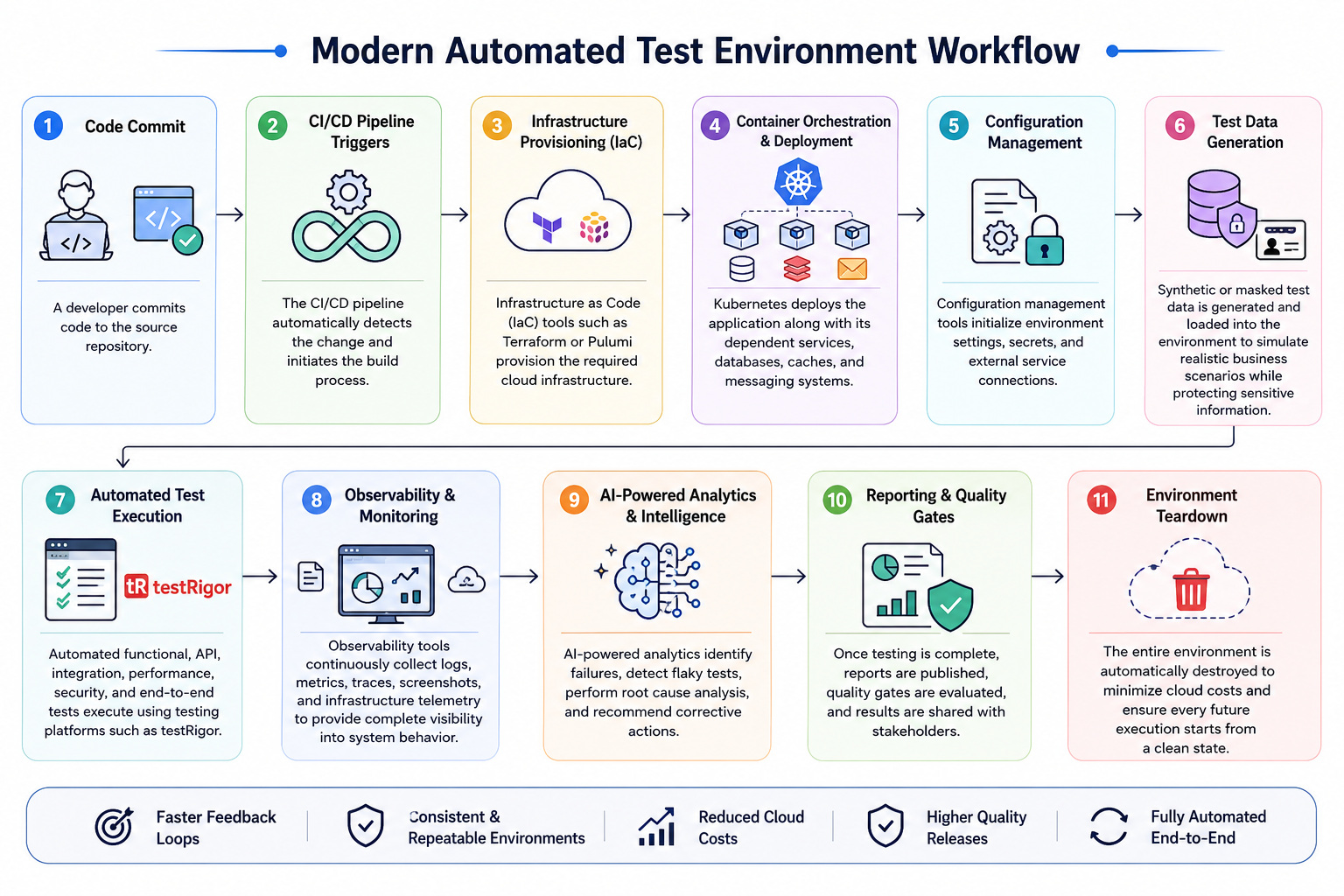
- A developer checks code into the source repo.
- The CI/CD pipeline picks up the change automatically and starts the build process.
- Required cloud infrastructure is provisioned using Infrastructure as Code (IaC) tools such as Terraform or Pulumi.
- Container orchestration platforms like Kubernetes deploy the application along with its dependent services, databases, caches, and messaging systems.
- Configuration management tools set environment settings, secrets, and connections to external services.
- This enables the creation and import of synthetic or masked test data into the environment to mimic real business scenarios while safeguarding sensitive data.
- Automated functional, API, integration, performance, security, and end-to-end tests execute using testing platforms such as testRigor.
- Throughout execution, observability tools continuously collect logs, metrics, traces, screenshots, and infrastructure telemetry to provide complete visibility into system behavior.
- AI-powered analytics identify failures, detect flaky tests, perform root cause analysis, and recommend corrective actions.
- Once testing is complete, reports are published, quality gates are evaluated, and the entire environment is automatically destroyed to minimize cloud costs and ensure every future execution starts from a clean state.
This automated lifecycle provides a way for organizations to provision production-like environments in minutes, eliminate configuration drift, improve environment consistency, reduce operational overhead, and provide faster, more reliable feedback to development teams. By treating the test bed as an ephemeral, fully automated part of the CI/CD pipeline, organizations can accelerate software delivery while maintaining high levels of quality, scalability, and release confidence.
Components of a Modern Test Bed
A modern test bed is composed of several interconnected layers, which work in synergy to create a stable, realistic, and repeatable test environment. The exact elements will depend on the application architecture, testing goals, deployment model, and business needs.
Infrastructure Layer
The infrastructure layer provides the computing resources required to host the application and its supporting services. It may include physical devices, virtual machines, cloud instances, containers, Kubernetes clusters, browser grids, mobile device farms, and edge devices.
The infrastructure should represent the systems on which the application is expected to operate. For cloud-native applications, this may involve dynamically provisioning resources in AWS, Azure, Google Cloud, or a private cloud environment.
Platform and Application Services
This layer includes the operating systems, runtime environments, application servers, databases, middleware, API gateways, identity providers, message brokers, caches, and other services required by the application.
For example, a microservices-based application may depend on Kubernetes, PostgreSQL, Redis, Kafka, an authentication service, and several internal APIs. These services must be configured correctly so that the application behaves as it would under real operating conditions.
Network and Connectivity Layer
The network layer defines how the components inside the test bed communicate. It may include local and wide-area networks, VPN connections, firewalls, proxies, service meshes, DNS configurations, load balancers, and cloud networking services.
Testing teams may also simulate latency, bandwidth limitations, packet loss, unstable connections, and regional network conditions. This helps identify failures that may not appear in fast and stable development environments.
Test Data Layer
The test data layer provides the information required to execute realistic business scenarios. It may contain synthetic data, masked production data, generated user profiles, transaction records, product catalogs, healthcare records, or financial datasets.
Sensitive information should be anonymized, encrypted, or replaced with synthetic data to meet privacy and regulatory requirements. A reliable test bed should also support resetting, refreshing, and versioning test data so that test executions remain consistent.
Integration and Service Virtualization Layer
Most enterprise applications depend on third-party systems, external APIs, payment providers, ERP platforms, identity services, or legacy applications. These dependencies may be unavailable, expensive, unstable, or difficult to control during testing.
Service virtualization tools can simulate these external systems and return predefined responses. This allows teams to test failures, delayed responses, unavailable services, invalid data, and other edge cases without depending on the actual external system.
Automation Layer
The automation layer contains the tools and frameworks used to execute functional, regression, API, mobile, desktop, performance, security, accessibility, and end-to-end tests.
Platforms such as testRigor allow testers to create or generate automated tests in plain English and execute them across web, mobile, desktop, APIs, mainframes, emails, SMS, databases, AI features, chatbots, and other application layers. Automation improves test coverage, shortens feedback cycles, and enables testing to run continuously within CI/CD pipelines.
Observability Layer
The observability layer collects logs, metrics, traces, screenshots, infrastructure events, application errors, and resource utilization data during testing.
Tools such as Prometheus, Grafana, Datadog, and OpenTelemetry help teams determine whether a failure was caused by the application, infrastructure, network, test data, or automation. This visibility significantly reduces investigation and debugging time.
Security and Access Layer
A test bed may contain source code, API credentials, configuration files, secrets, and sensitive test data. Access should therefore be controlled through authentication, authorization, encryption, network segmentation, and secrets management.
Secrets management platforms such as HashiCorp Vault, AWS Secrets Manager, and Azure Key Vault help prevent passwords, tokens, and certificates from being exposed in scripts or configuration files.
Provisioning and Configuration Layer
Infrastructure as Code and configuration management tools automate the creation and maintenance of the test bed. Terraform, Pulumi, CloudFormation, Ansible, Docker, Helm, and Kubernetes are commonly used to provision infrastructure and configure environments consistently.
Automated provisioning reduces manual errors, accelerates environment setup, and enables teams to recreate the same test bed whenever required.
Why is a Test Bed Important?
- Control Your Environment: A test bed provides an isolated environment where testing activities are conducted without affecting live systems. This sandboxing ensures that testing does not disrupt business operations or compromise production data.
- Reproduce Results: One key benefit of a test bed is its ability to reproduce specific conditions and scenarios. This is critical for debugging issues, performing regression testing, and validating fixes consistently.
- Evaluate Performance: Test beds enable performance testing by simulating workloads and varying conditions. This helps assess the application’s scalability, responsiveness, and resource utilization.
- Validate Security: Test beds provide a secure space to conduct vulnerability assessments and penetration testing, ensuring the application complies with security standards and best practices. Read more about Security Testing.
- Check Compatibility: By mimicking production environments, test beds ensure that the software is compatible with various hardware, operating systems, and network setups, minimizing deployment risks.
When Should a Team Invest in a Test Bed?
A dedicated test bed is not always needed for every project. The need usually depends on application complexity, release frequency, and testing requirements.
- Multiple third-party integrations are being tested
- Applications must support several browsers or devices
- Automated regression testing is being performed regularly
- Frequent releases are being pushed through CI/CD pipelines
- Production failures carry significant business risk
- Performance or load testing is being conducted
For smaller applications with limited integrations, lightweight testing environments may often be sufficient. For enterprise systems, however, dedicated test beds are typically considered essential for maintaining release confidence.
Types of Test Beds
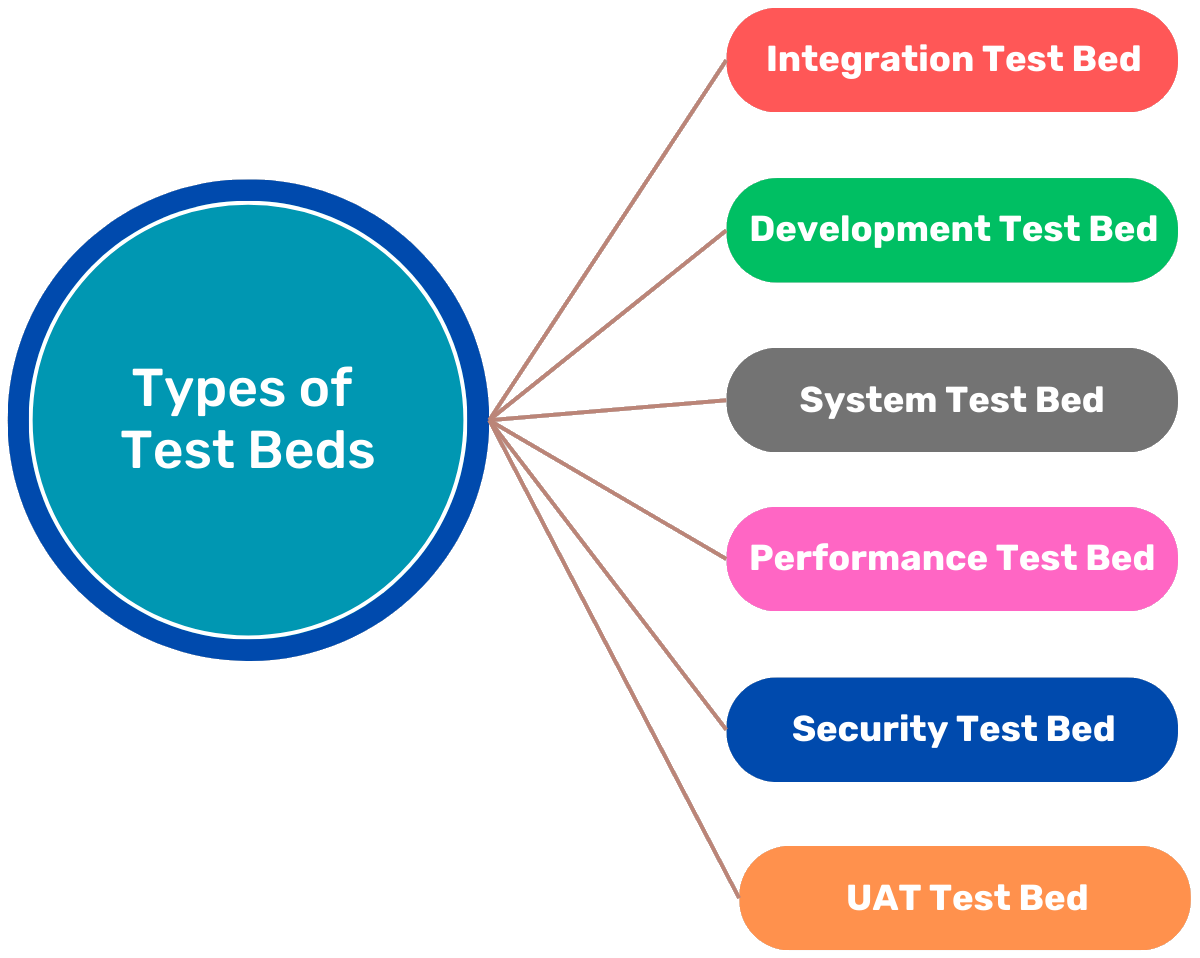
Test beds are classified based on the testing goals and the specific requirements of the application or system under test. Each type is designed to address different aspects of software quality, including functionality, performance, compatibility, and security.
Below are the main types of test beds:
Development Test Bed
It is used by developers to validate code functionality and catch defects during the early development stages. It is simple, localized, and often tailored to individual developer needs.
- Minimal setup with tools like IDEs, debuggers, and unit testing frameworks.
- Runs in isolated environments such as local machines or virtual environments.
- Local testing setup using IntelliJ IDEA or Visual Studio.
- Unit testing frameworks like JUnit or NUnit.
Integration Test Bed
An integration test bed ensures that individual software modules or services work together as intended. It is designed to test interactions, data flow, and system interdependencies.
- Simulates middleware, APIs, and communication protocols.
- Configured for data flow validation between integrated components.
- Middleware testing setup for APIs.
- Validating interactions in a microservices architecture.
System Test Bed
A system test bed validates the functionality and workflows of the entire application as a complete system. It mimics real-world usage scenarios and tests the application’s behavior end-to-end.
- Full-stack configurations, including hardware, software, and networks.
- Comprehensive test coverage for all integrated components.
- Testing an e-commerce system from login to checkout.
- Validating a complete healthcare application workflow.
Performance Test Bed
A performance test bed evaluates the software’s scalability, responsiveness, and reliability under various load conditions. It identifies bottlenecks and ensures the application meets performance requirements.
- Includes load testing and stress testing tools.
- Simulates varying workloads and network conditions.
- Using Apache JMeter to test an online banking application under peak traffic.
- Stress testing a mobile app for concurrent user scenarios.
Security Test Bed
A security test bed is configured to identify vulnerabilities and ensure that the application meets security standards. It replicates real-world attack scenarios to assess system resilience.
- Tools for penetration testing and vulnerability scanning.
- Isolated setups to avoid compromising production systems.
- OWASP ZAP environment for web application security testing. Read: Top 10 OWASP for LLMs: How to Test?
- Simulating SQL injection attacks to evaluate application resilience.
User Acceptance Test (UAT) Bed
A UAT test bed mirrors the production environment and is used by end-users to validate that the software meets business requirements. It ensures the application is ready for deployment.
- Configurations are identical to production environments.
- Focuses on user scenarios and workflows.
- Testing a CRM system with real customer scenarios.
- Validating a mobile app’s usability with beta testers.
How to Set Up a Test Bed
Setting up a test bed involves creating an environment that replicates the operational conditions in which the software will run. This includes configuring hardware, software, networks, and test data to simulate real-world scenarios as closely as possible.
- Define Requirements: Setting up a test bed involves creating an environment that replicates the operational conditions in which the software will run. This includes configuring hardware, software, networks, and test data to simulate real-world scenarios as closely as possible.
- Get Resources: Procure the necessary hardware, software licenses, and testing tools required to replicate the production environment. This includes obtaining physical devices, virtual resources, and realistic test data to simulate user scenarios. Preparing appropriate resources ensures that the test bed can support the planned testing activities effectively.
- Configure the Environment: Install and configure the operating systems, databases, middleware, and application servers required for the test bed. This step also involves setting up the network infrastructure, such as routers, firewalls, and connectivity tools, while integrating testing tools for automation or monitoring. Proper configuration ensures the test bed mirrors the intended production setup, enabling accurate testing.
- Create Production-Like Conditions: A test bed should simulate production as closely as possible. Matching operating system versions, browser versions, network configurations, integrations, and realistic test data helps make sure that defects are caught before release. The closer the test bed resembles production, the more reliable the testing results will be.
- Test the Test Bed: Perform initial test runs, or dry runs, to verify that the test bed functions as intended and aligns with production specifications. During this phase, discrepancies or misconfigurations are identified and resolved to ensure the environment is stable and reliable. Validation guarantees that the test bed meets all testing requirements before full-scale tests begin.
- Automate it: Use configuration management tools like Terraform or Ansible to automate repetitive tasks such as environment setup, maintenance, and test execution. Implementing test automation frameworks reduces manual effort and increases efficiency, especially in regression and performance testing. Automation ensures consistency across testing cycles and accelerates the testing process.
Challenges in Managing Test Beds
- High Costs: Setting up and maintaining hardware, software, and licenses for a test bed can be expensive. This is especially true for complex environments. Cloud-based solutions can reduce costs but often require skilled expertise to implement and manage effectively.
- Complexity: Managing a test bed with diverse configurations, integrations, and dependencies can be challenging due to the complexity of modern systems. Automated tools can help simplify this process, but they require initial setup effort and expertise.
- Configuration Issues: Discrepancies between the test bed and the production environment can lead to missed defects and unreliable test results. Regular synchronization with production systems is essential to ensure the test bed remains relevant and accurate.
- Data Security: Test data often contains sensitive or confidential information, posing security and compliance risks. Techniques like anonymization and encryption are necessary to protect this data while maintaining its usefulness for testing.
- Scalability: Traditional test beds may struggle to handle dynamic workloads or large-scale testing scenarios. Cloud-based or containerized environments provide the flexibility to scale resources up or down as needed.
Best Practices for Test Bed Management
- Use Automation: Automate test bed provisioning and maintenance with tools like Ansible or Terraform to reduce manual effort and errors. Implement CI/CD pipelines to enable efficient and consistent automated testing.
- Adopt Virtualization and Containers: Utilize virtual machines or containerization technologies like Docker to create scalable and cost-effective environments. Use orchestration tools like Kubernetes to manage containerized test beds efficiently. Read: What are Docker and Kubernetes, and why do I need them?
- Monitor and Optimize: Employ monitoring tools to track resource usage and system performance during tests. Regularly analyze performance data to identify and resolve bottlenecks or inefficiencies.
- Document Everything: Maintain comprehensive documentation for test bed configurations, setup procedures, and processes to ensure consistency. Detailed records support knowledge sharing and enable smooth transitions for new team members.
- Regularly Update the Environment: Keep the test bed synchronized with production by applying updates, patches, and configuration changes. Regular maintenance ensures the environment remains relevant and reliable for accurate testing.
Future of Test Beds
- AI-powered test beds leverage artificial intelligence and machine learning to optimize configurations and predict potential issues, improving efficiency and reducing manual intervention.
- Self-healing environments are emerging, enabling test beds to automatically detect and resolve configuration problems, minimizing downtime and maintaining consistency.
- The rise of IoT and edge computing has led to the development of specialized test beds designed to validate the performance and security of connected devices and edge applications in diverse environments.
- Additionally, serverless test beds simplify provisioning by eliminating the need to manage the underlying infrastructure, offering cost-effective and scalable solutions for modern testing needs.
These advancements transform test beds into dynamic, intelligent systems that meet the demands of evolving technologies.
Conclusion
A test bed is more than just a collection of tools and environments; it is the foundation for effective software testing. By simulating real-world conditions, a test bed ensures that software is robust, secure, and meets the expectations of users.
Organizations that invest in well-designed test beds reap the benefits of improved software quality, faster time to market, and reduced costs associated with defects in production. As technology continues to evolve, test beds will play an even more central role in enabling innovation and delivering software that meets the demands of an increasingly complex world.
Frequently Asked Questions (FAQs)
- How is a test bed different from a staging environment?
A staging environment is typically used for final release validation and is usually maintained as a long-running environment. A test bed can be created for a specific testing objective, such as performance, security, integration, or compatibility testing, and may be temporary or highly customized.
- Can multiple teams use the same test bed?
Multiple teams can share a test bed, but shared environments often create test data conflicts, configuration changes, scheduling issues, and unstable results. Providing isolated or ephemeral test beds for individual teams, branches, or pull requests can improve reliability and reduce dependency-related delays.
- How often should a test bed be updated?
A test bed should be updated whenever significant changes are made to the application architecture, infrastructure, dependencies, security policies, databases, browsers, devices, or production configuration. Automated synchronization and configuration drift detection can help keep the environment current.
- What should teams measure to evaluate test bed effectiveness?
Teams can track environment provisioning time, availability, configuration drift, failed deployments, environment-related test failures, infrastructure utilization, recovery time, cloud cost, and the percentage of tests blocked by unavailable dependencies.
| Achieve More Than 90% Test Automation | |
| Step by Step Walkthroughs and Help | |
| 14 Day Free Trial, Cancel Anytime |