Revolutionizing QA: How to Create Tests in Seconds with testRigor’s Generative AI
 |
Creating a useful automated test takes more than writing a few steps. QA teams need to understand the user journey, translate it into clear actions, add meaningful checks, and keep the test aligned with the application as it changes. Building that first draft can take time, especially when a scenario involves several screens, data inputs, and decision points.
Generative AI can help teams move from a test idea to a first draft more quickly. The article Generative AI in Software Testing explores how this technology can be applied across the testing lifecycle.
testRigor’s Generative AI helps teams get started faster. Describe the test you want to create, and the platform can generate steps based on your app or feature description. The result gives QA professionals a practical starting point they can review, edit, and extend.
| Key Takeaways: |
|---|
|
What Does Generative AI Mean for Test Creation?
Generative AI refers to systems that produce new content in response to instructions. The content might be text, code, images, or another structured output. These systems learn patterns from training data and use those patterns to respond to a prompt. The result is generated for the request; it is not simply a fixed response selected from a list.
In QA, the prompt can describe a user journey or a testing goal. The generated output can then provide a draft that a tester reviews and adapts. This can be useful because teams often understand what they need to verify but still have to spend time expressing that scenario in the format required by their automation platform.
For example, a tester might need to cover a user signing in, opening a page, submitting a form, and checking that a confirmation appears. The value of AI-assisted generation is that it can help translate this description into a sequence of test steps. The team can then concentrate on whether the flow represents the requirement correctly and whether the checks are strong enough.
Generative AI does not remove the need for testing expertise. A generated test is a starting point; the people who understand the product, users, and business rules remain responsible for deciding what the test should cover and whether its results are meaningful.
Ways to Generate Tests with testRigor
testRigor offers several AI-assisted options for creating test cases and test steps. The right option depends on whether you’re starting with a test suite, a written scenario, an existing test, or feature details.
Generate Test Cases When Creating a Test Suite
When creating a test suite, you can ask testRigor to generate test cases from a description of the application or feature. You can also choose how many test cases you want it to create. The description gives the AI an initial understanding of what the tests should cover.
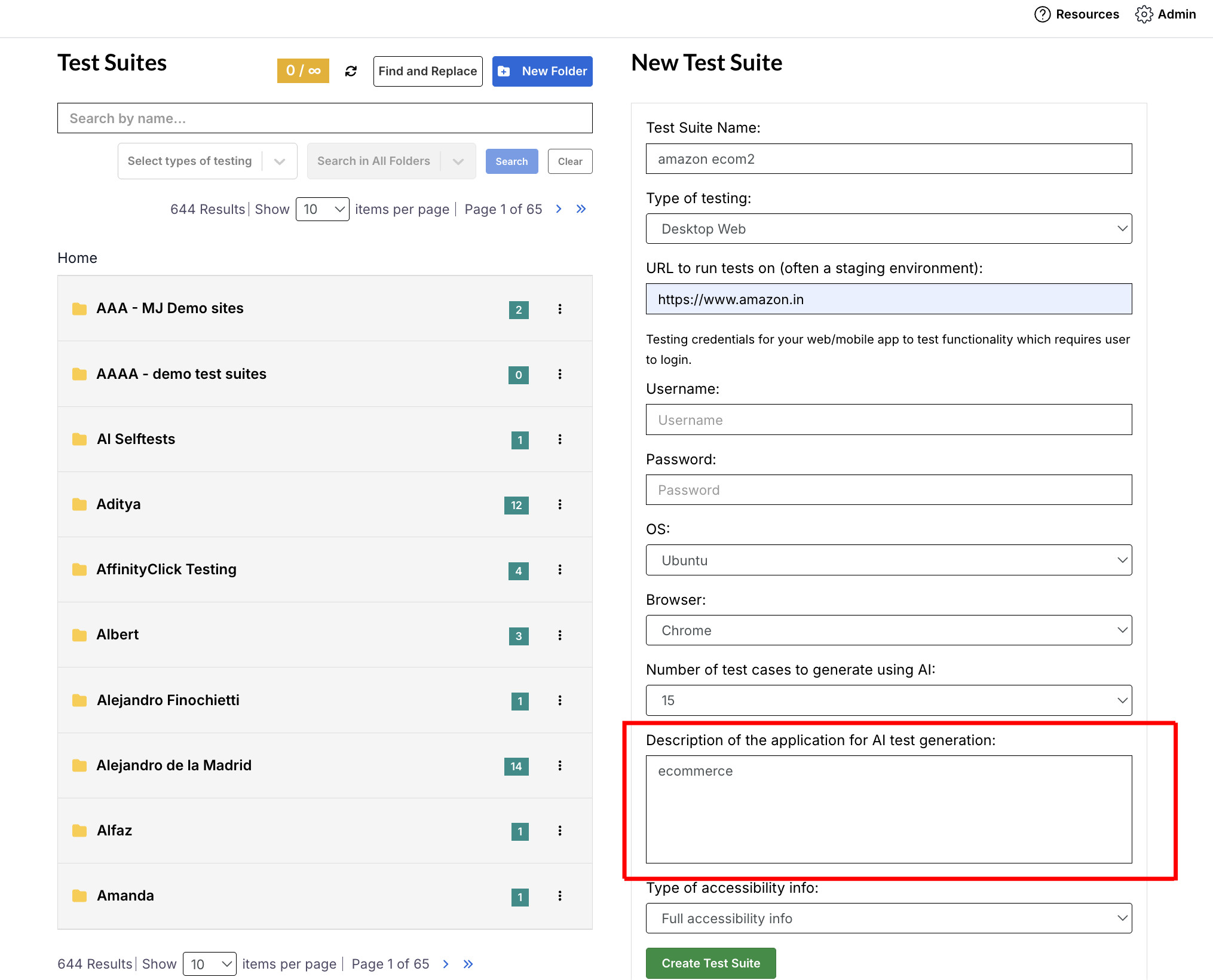
The number of cases generated depends on the count you select. Review the cases to check whether they cover the right features and user paths. You can edit the description or generated cases to better reflect your testing needs.
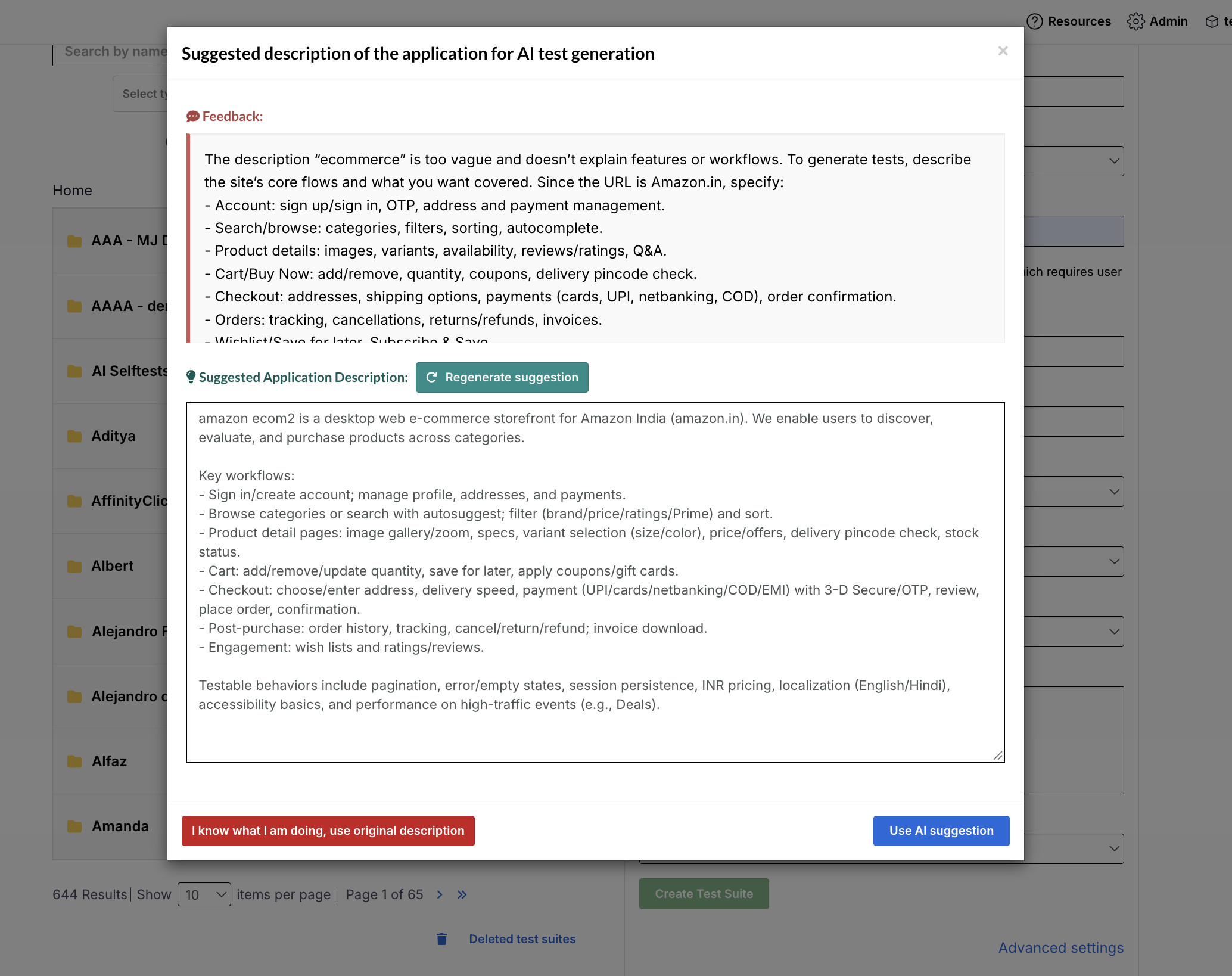
If the description is brief, generic, or unclear, testRigor can use its Generative AI capabilities to crawl the application URL you provide. This helps it build a more detailed description of the application and its available user journeys. It uses that context to create test cases.
Generate a Sample Test with AI
Enter a test title or description to generate a sample sequence of steps in testRigor’s format. This option can show how a scenario can be expressed as test steps. The generated sample gives you a concrete draft to review.
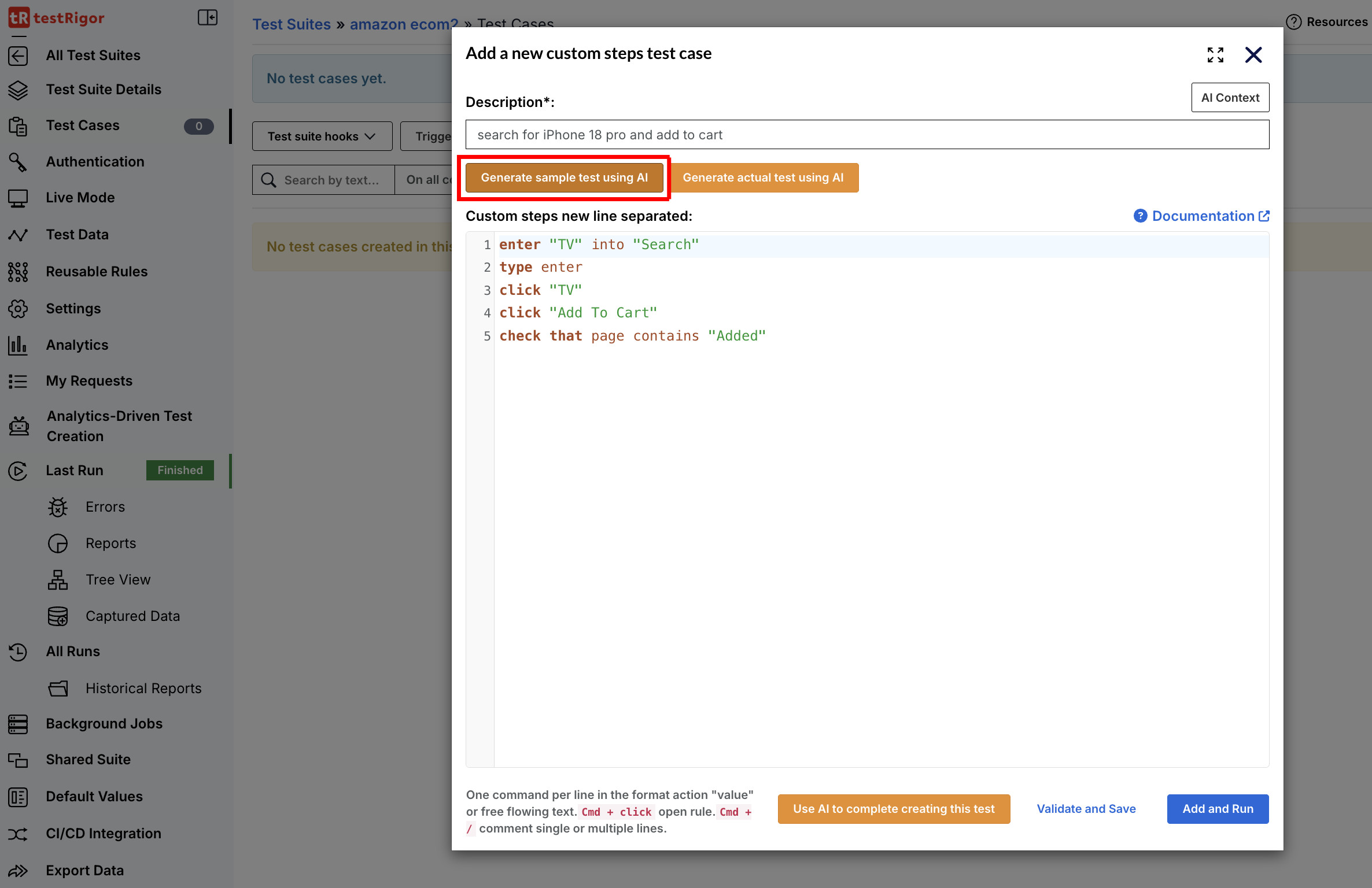
This can be useful when your team is getting familiar with the test format or wants help turning a written scenario into steps. You can use the sample to understand how the actions are structured. Then adapt the steps to suit your application and testing needs.
The sample is a starting point, so check it against the intended scenario. Update any steps or values that do not match your application. Add or refine assertions to make clear what the test should verify.
Generate an Actual Test with AI
Provide a scenario description and let testRigor generate a test for your application. The generated flow is created in the context of that application. You can inspect how the scenario translates into test steps.
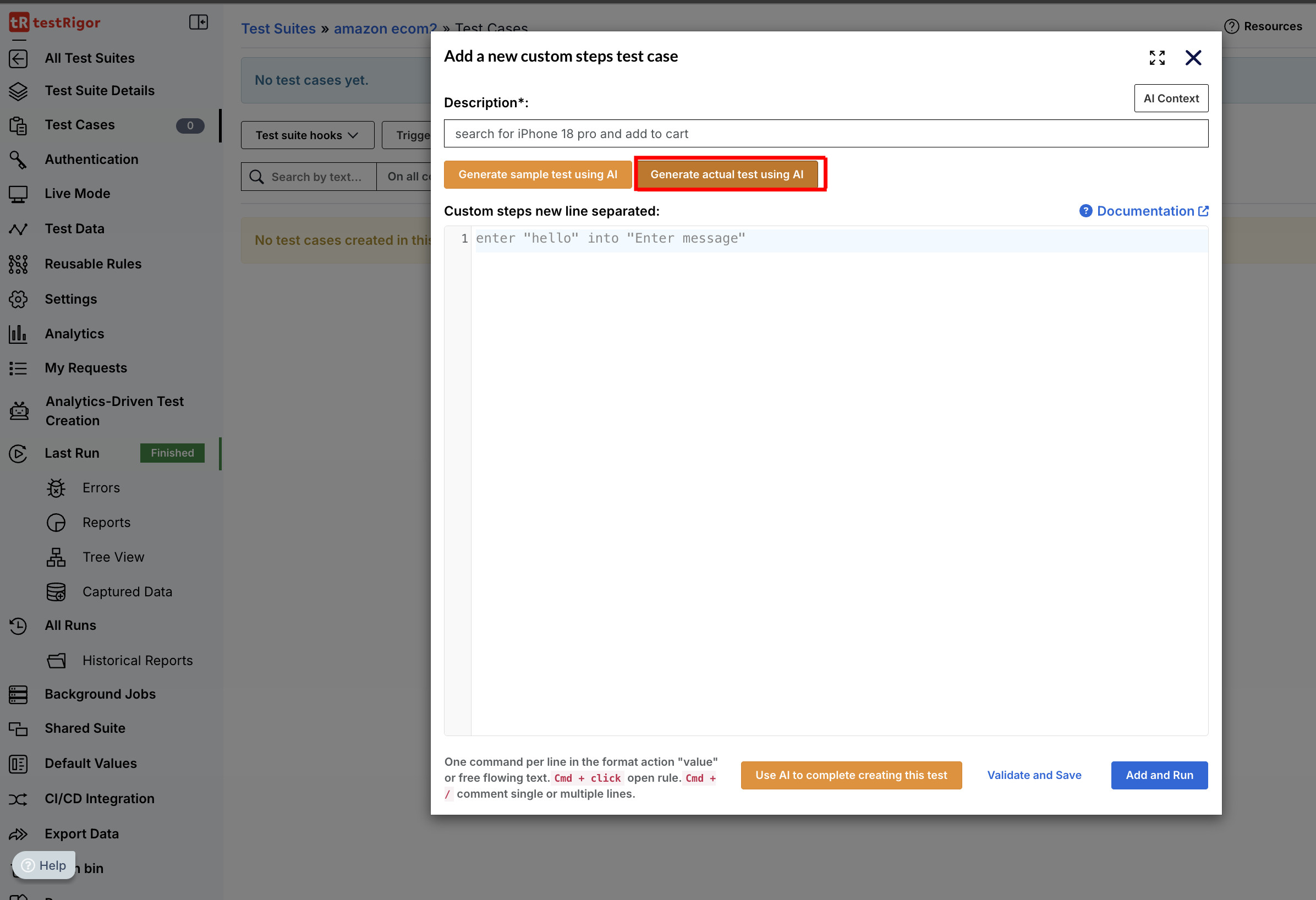
A detailed description can help the generated test better reflect the intended user journey. Include the user’s goal, the key actions, relevant information to enter, and the expected outcome. These details give the AI clearer guidance when creating the flow.
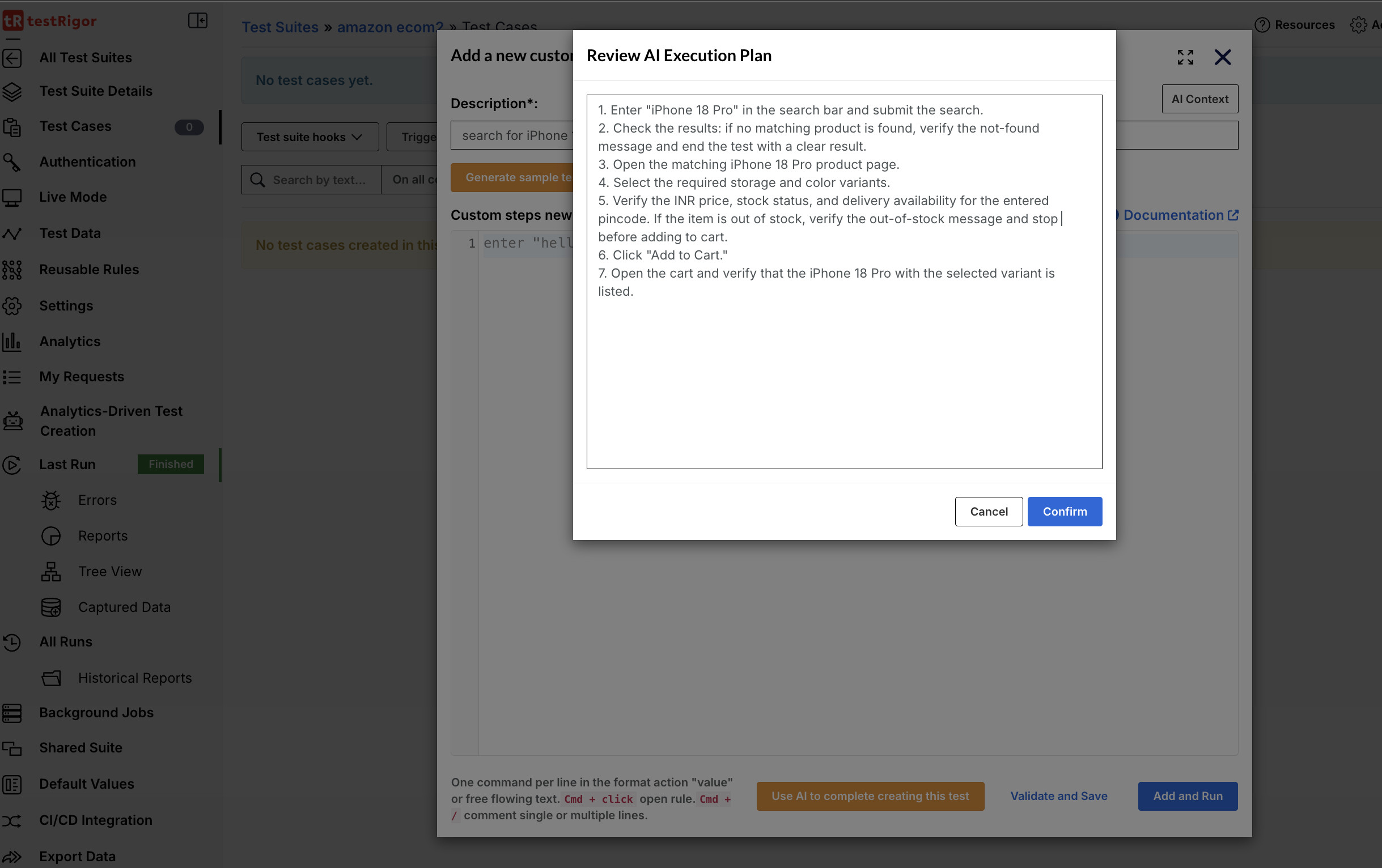
After generation, review the steps and assertions against the application and the requirement. Check that the flow follows the right path and verifies the outcome that matters. Refine the test wherever the generated version needs more context or detail.
Use AI to Complete Creating This Test
Use this option when you have already started creating a test and want AI to help continue it. testRigor can use the test description and the steps you have written so far as context. It also considers the AI Context provided for the test.
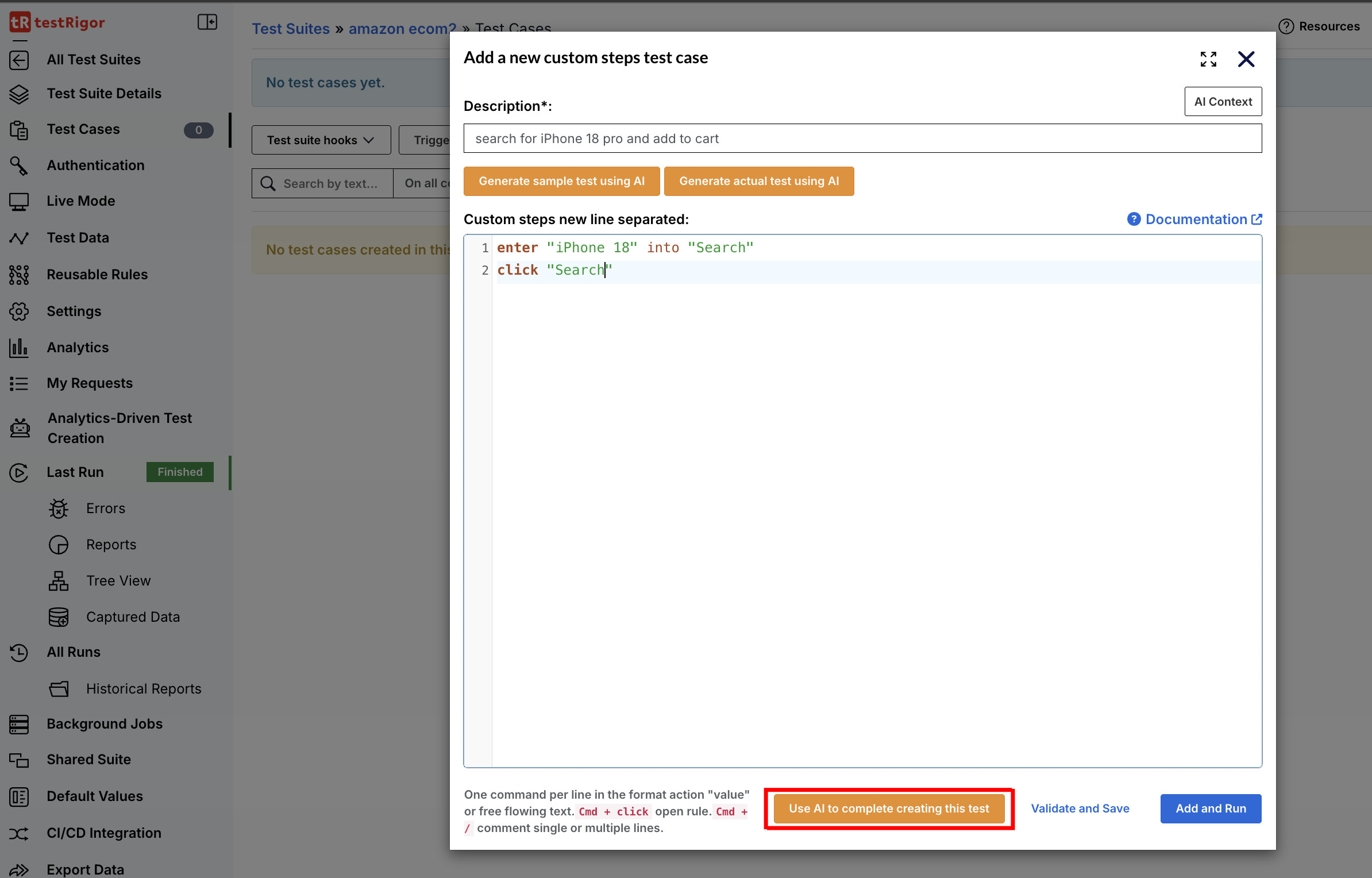
Based on this information, the AI can add steps that are missing from the current flow. This can help when you have described the goal and begun the test but have not completed the full scenario. The added steps build on the work already in the test.
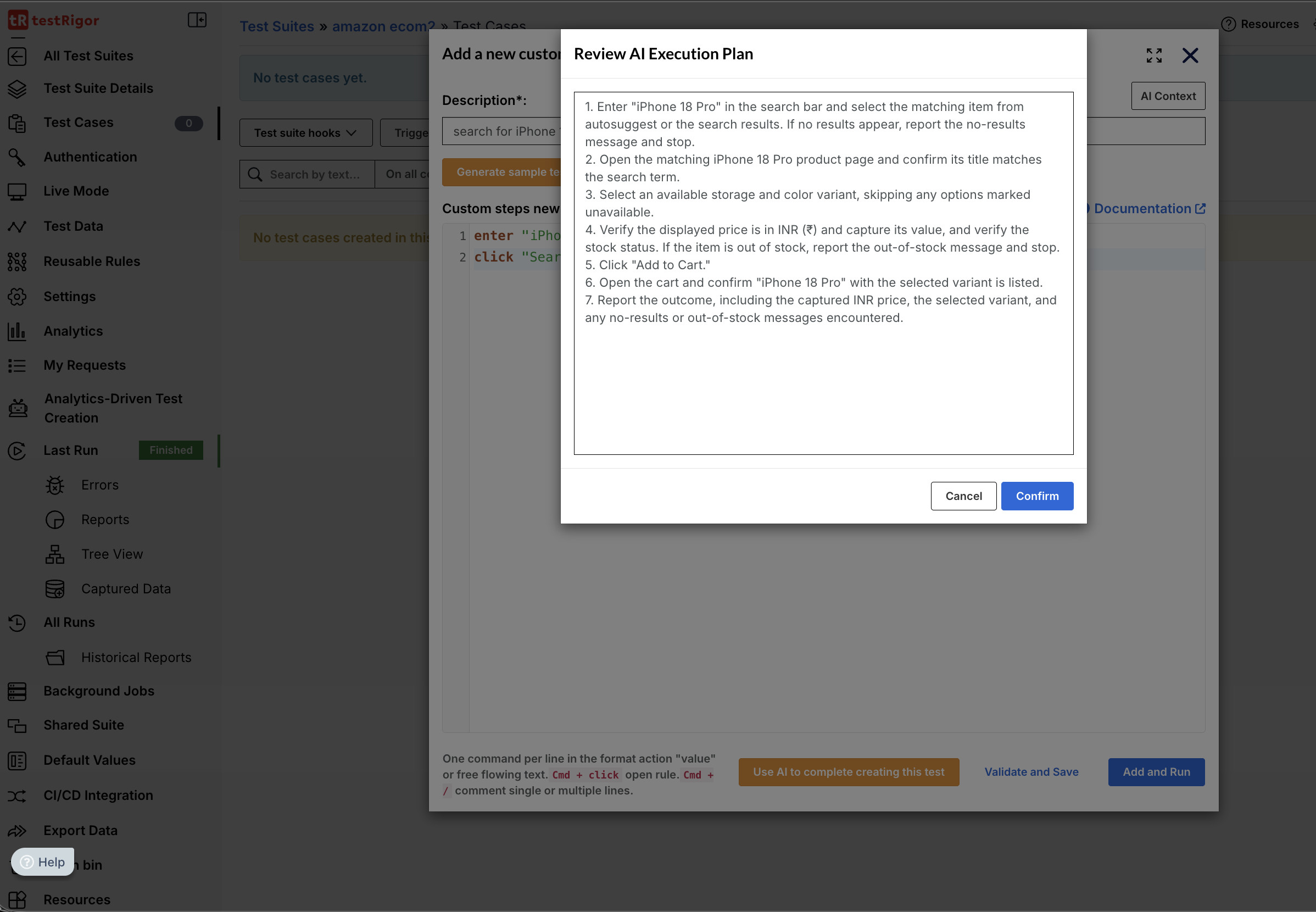
Review the completed flow to confirm that the new steps fit the intended journey. Check that the sequence is correct and that the test verifies the expected result. Edit the steps or assertions as needed before using the test.
Generate Test Cases Based on a Feature
This option generates test cases using the feature description provided at the beginning of the process. You can also upload a supporting diagram or Figma design to provide additional information about the feature. These materials can help explain the screens, interactions, or requirements the tests should cover.
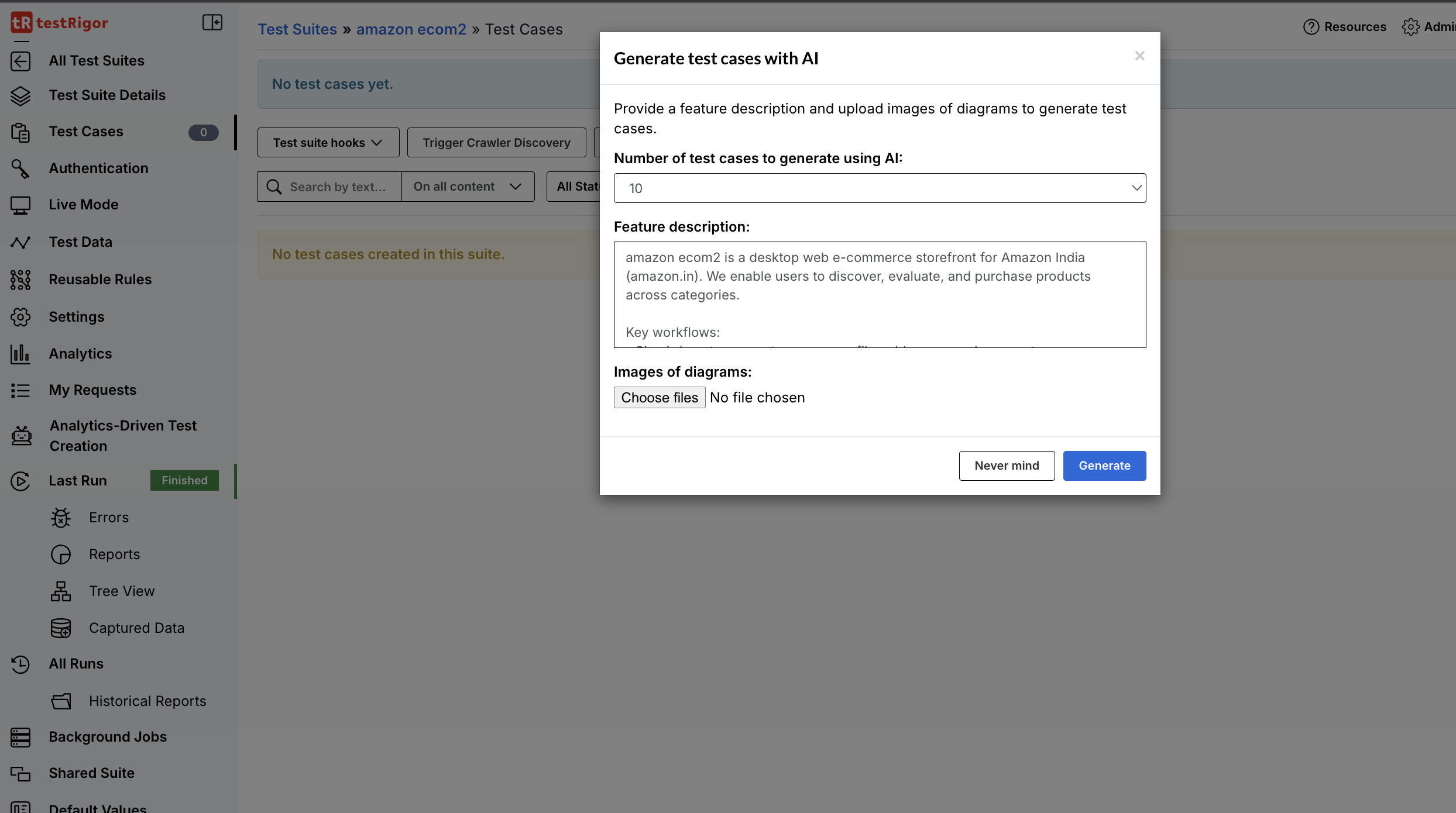
The generated cases give the team test scenarios to review in the context of the feature. Compare them with the description and any uploaded design materials. This helps identify whether the important user paths and expected outcomes are represented.
Review the cases for gaps, unclear steps, or assumptions that do not match the feature. Add or edit cases to reflect the application’s requirements and business rules. This review helps ensure the generated tests are useful for the feature being tested.
From a Test Description to an End-to-End Flow
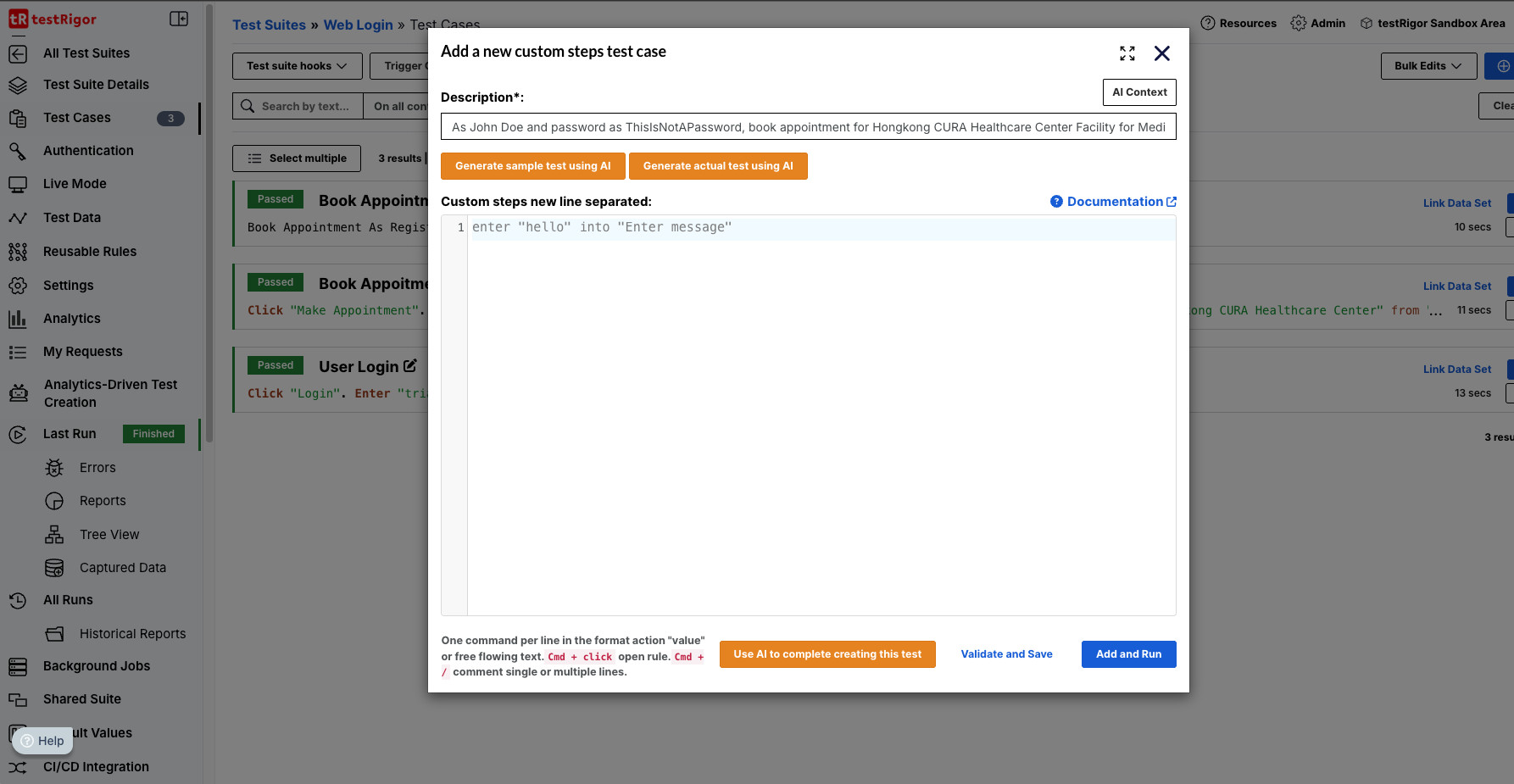
To generate an actual test, enter a description of the scenario and select Generate actual test using AI. The description should explain what the user is trying to do and what outcome the test should verify. It does not need to anticipate every implementation detail, but including the main actions and expected result gives the generation process useful context.
For example, a team might describe a flow in which a user signs in, opens a particular area of the application, completes a form with specified values, submits it, and checks that a confirmation is displayed. This communicates the test’s purpose and its central steps. The team can then review whether the generated test includes the right screens, data, and checks.
Now, we have given the description for generating the test case:
Now let’s see the AI-generated test case. Users can review the test cases and make necessary changes.
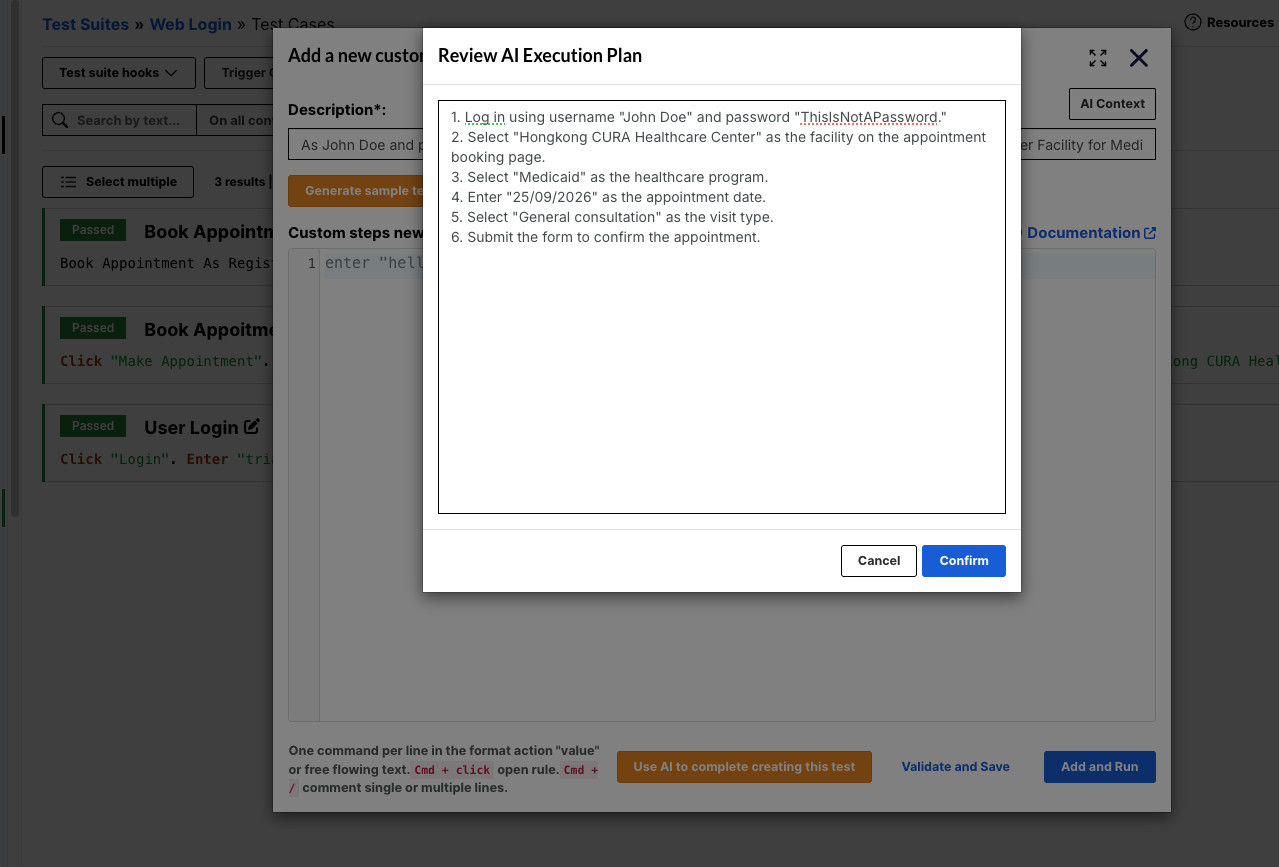
After the request is submitted, testRigor creates a sequence of steps for the application flow. Instead of receiving only a block of text, the team can review the generated test alongside screenshots associated with its steps. These visuals help show what the system is doing at different points in the journey.
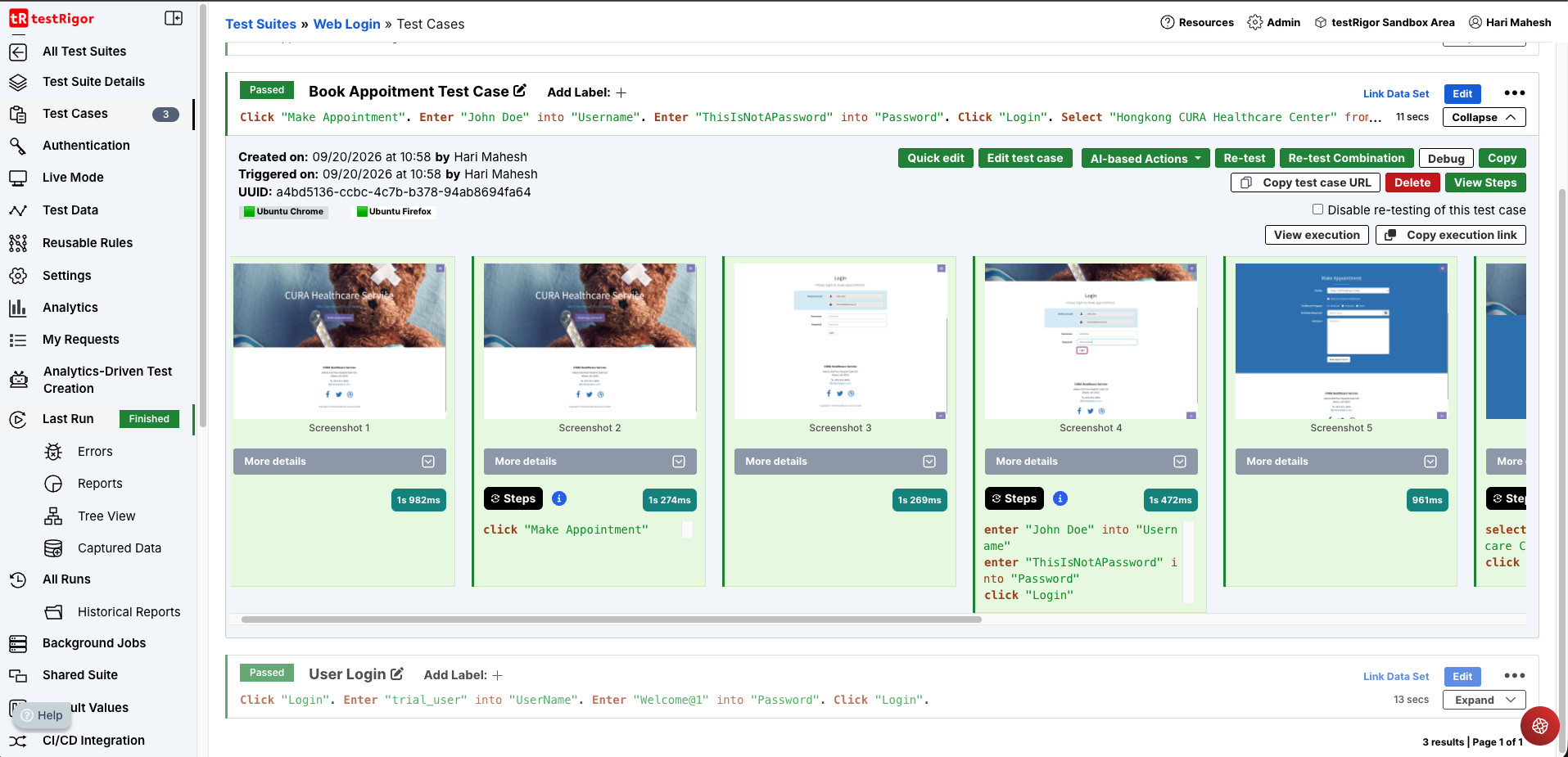
Screenshots can make a generated flow easier to understand during review. A tester can compare the steps with the intended user journey, notice where the test moves through the application, and decide whether anything needs to be clarified or changed. They also provide helpful context when another team member reviews the test.
Review and Customize the Generated Test
A generated test should be treated as a draft that needs human review. Start by checking the overall journey: does it reflect the requirement, follow the correct sequence, and reach the intended outcome? Then examine each step and assertion in more detail.
- Does the test begin in the right state, and does it follow the expected user path?
- Are the values entered by the test appropriate for the scenario?
- Does the test check the outcome that matters, rather than only confirming that an action was possible?
- Are there important edge cases or alternate outcomes that should be covered separately?
- Would another tester understand what the test is validating?
The generated output is customizable. You can update values, adjust steps, add assertions, and make other changes to align the test with your requirements. For instance, a team might add a check for a confirmation message, verify that a particular field has the expected value, or include an additional step that reflects a business rule not stated in the original description.
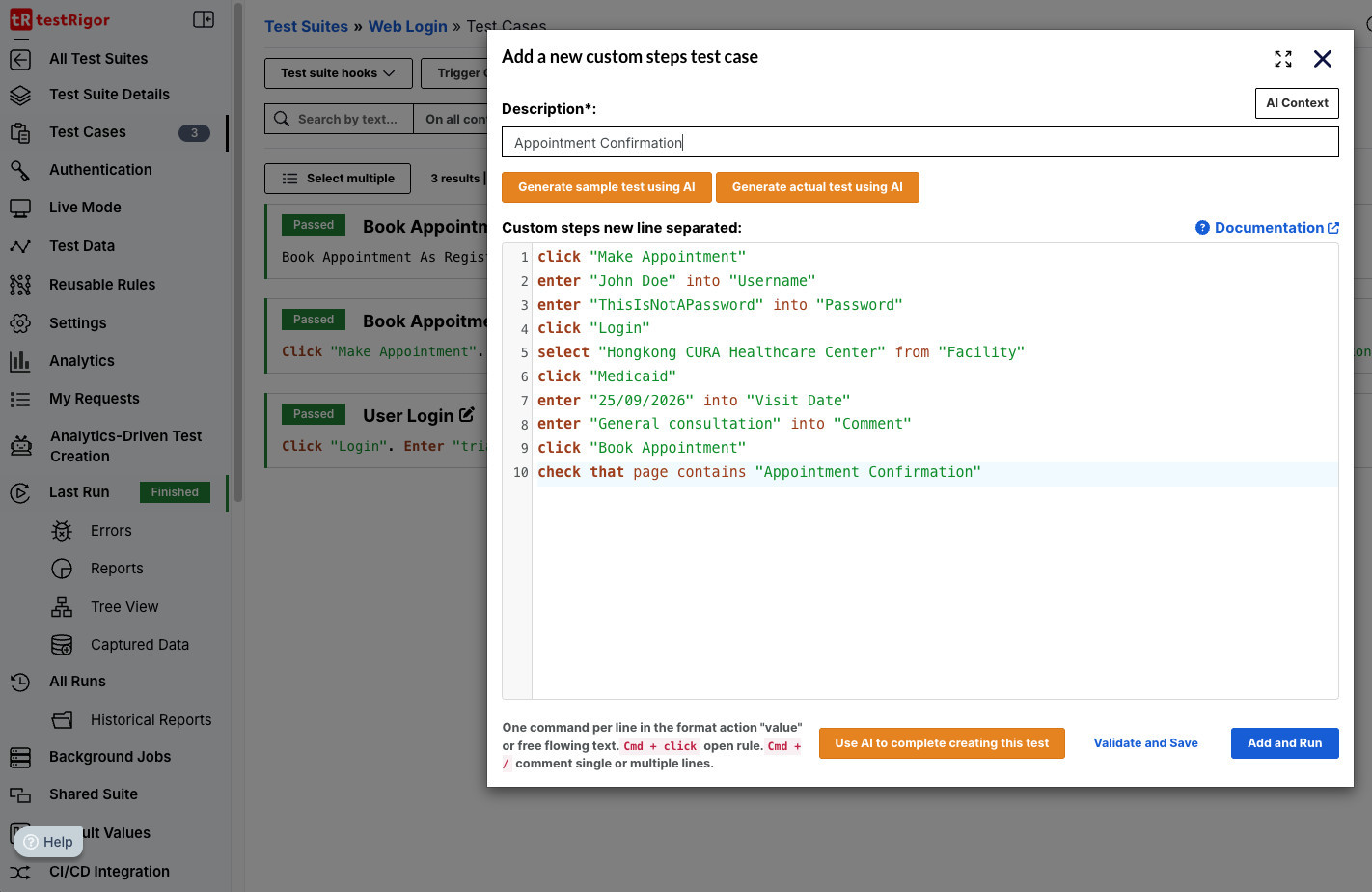
This editing stage is important because a test can follow the visible steps of a journey and still miss the behavior that matters. A form may submit successfully while storing an incorrect value. A confirmation may appear even though a key detail is missing. Reviewers should make sure the assertions provide evidence that the intended outcome occurred.
Teams using an AI assistant can also connect it to testRigor through testRigor’s MCP server. MCP lets a compatible assistant interact with testRigor for supported tasks, such as working with test cases or executing tests; the available actions depend on the configured tools and the user’s access. This can support an AI-assisted review workflow, but the team should still check any proposed changes and confirm that the test matches the requirement.
Read: How to Utilize testRigor’s MCP Server.
Once the test has been reviewed and refined, the team can decide whether it is ready for its suite and how it should be maintained alongside the application. AI generation can reduce the effort required to create an initial draft; it does not make review or ongoing ownership unnecessary.
Where the Time Savings Come From
Writing a test from scratch often involves several tasks: interpreting the requirement, organizing the journey into steps, expressing those steps in the automation format, and deciding where to add checks. AI-assisted generation can help with the first draft of that work. The tester can then spend more attention on validating the journey, improving assertions, identifying missing cases, and reviewing risk.
This can change how QA teams approach test creation. When the first draft is easier to produce, teams may find it simpler to explore scenarios that have been described but not yet automated. Product experts can contribute their understanding of workflows, while QA professionals focus on coverage, test quality, and whether the resulting checks provide useful evidence.
The goal is not to create tests without human input. It is to reduce some of the manual effort involved in translating a scenario into a test, so that the team can use its time on decisions that require product context and quality judgment.
A generated draft can also give product owners, business analysts, and QA professionals a concrete artifact to discuss. Instead of reviewing a requirement only as prose, the team can examine a proposed sequence of actions, point out missing decisions, and clarify what the test should assert. That conversation can improve the scenario itself before the team relies on it for ongoing regression coverage.
Watch the video to see how to create test cases with testRigor’s AI:
Tips for Describing a Test Scenario
A useful description gives the system a clear goal and enough detail to create a relevant first draft. It can help to include the user’s starting point, the main actions, any important data, and the expected result.
For example, a description such as “test the checkout page” leaves many choices open. The application may have several checkout paths, user types, and possible results. A more focused description could specify the user’s goal, the items or information involved, and the confirmation the test should look for. The exact details will vary by application, but the intent should be clear enough for a reviewer to recognize the scenario.
- State the purpose. Explain what behavior or user goal the test is intended to cover.
- Describe the main journey. Mention the key screens or actions that make up the flow.
- Include relevant data. Specify values that are important to the scenario, while avoiding details that do not affect the outcome.
- Name the expected result. Say what the test should verify at the end, such as a confirmation, updated value, or expected state.
- Keep separate scenarios distinct. If a requirement includes different user paths or outcomes, separate descriptions can make each test easier to review.
These are practical writing suggestions, not a guarantee that every generated step will be correct. The output still needs to be checked against the application and the requirement. Clear descriptions can make that review more focused by giving the team a shared understanding of the intended test.
The QA Team Still Owns Quality
AI-generated tests should be reviewed before they become part of a test suite. The team remains responsible for confirming that each step and assertion reflects the intended behavior. This is especially important when a scenario involves business rules, permissions, financial values, sensitive data, or workflows where a missed condition could have a material impact.
Review also helps keep tests maintainable. A test should communicate why a flow matters, not only which buttons it clicks. When a team understands the purpose of a test and the result it checks, it is better positioned to update the test when the application changes.
Generative AI can help create a first version, but product knowledge, risk assessment, and quality decisions continue to come from the team. Used with that approach, AI can support test creation without taking the reviewer out of the process. For a broader view of AI’s role in testing, AI in Software Testing looks at how AI can support software testing beyond test generation.
Extending Generative AI Across QA
Test creation is one way Generative AI can support quality engineering. Teams can also explore how AI may assist with other activities, such as test planning, scenario development, and reviewing test assets. The most useful applications will depend on the team’s workflow, its existing tools, and the areas where people spend the most time.
testRigor’s Generative AI test creation feature is designed to make it easier to move from a test idea to an editable test flow. Describe the scenario, review the generated steps and screenshots, and refine the test to fit your application. With a clear description and thoughtful review, AI can help teams spend less time getting started and more time strengthening the quality of their tests.
Frequently Asked Questions (FAQs)
- How should a team decide whether to scale AI-generated tests?
Start with a small set of representative scenarios. Compare the generated drafts with team-written tests for accuracy, review effort, useful coverage, and how often the tests need updating.
- How should teams handle sensitive information in test prompts?
Follow your organization’s data-handling rules. Use approved test data, and avoid including credentials, personal information, or confidential business details unless the tool and process are authorized for that data.
- What should teams consider when a test depends on specific data or environment conditions?
Document the required data, user permissions, and starting conditions in the scenario. Then verify that the test can run reliably in the intended environment and that its data can be reset or reused safely.
| Achieve More Than 90% Test Automation | |
| Step by Step Walkthroughs and Help | |
| 14 Day Free Trial, Cancel Anytime |