
Live Webinar: How to Select an Automation Tool in the AI Era: Hype vs Reality Register Now.
Turn your manual testers into automation experts!Request a Demo

December 16th, 2024 Release Notes (Wordings Update, Integrations Management)

Weekly Newsletter
Receive weekly testRigor newsletters packed with insights on test automation, codeless testing, and the latest advancements in AI.

Updated Visibility Options for Web Elements 

We have updated the wording for the “Determining visibility of web elements” option in Settings -> Speed Optimizations to improve clarity:

Old: “Always check visibility of all page elements (slow, more reliable)”.
New: “Always check visibility of all page elements (slower, more reliable)”.

Old: “Consider off-screen elements as invisible (fast, require scrolls)”.
New: “Consider off-screen elements invisible (faster, requires more scrolling)”.
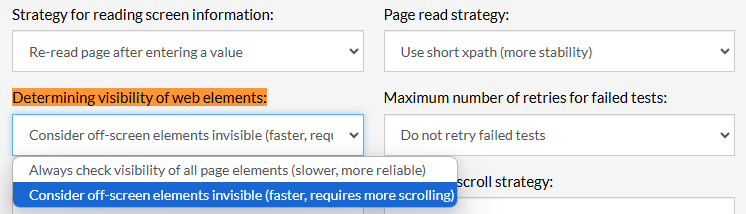
Caption: Settings visibility location.

Enhanced Test Case Management Integration from Test Cases:

Test cases now allow clients to manage test case management system links directly from the Edit Test Case page. This feature improves accessibility and integration management, enabling quick navigation and updates for connected test management tools. You can see an example with Azure DevOps link:

Caption: Change integration link button.
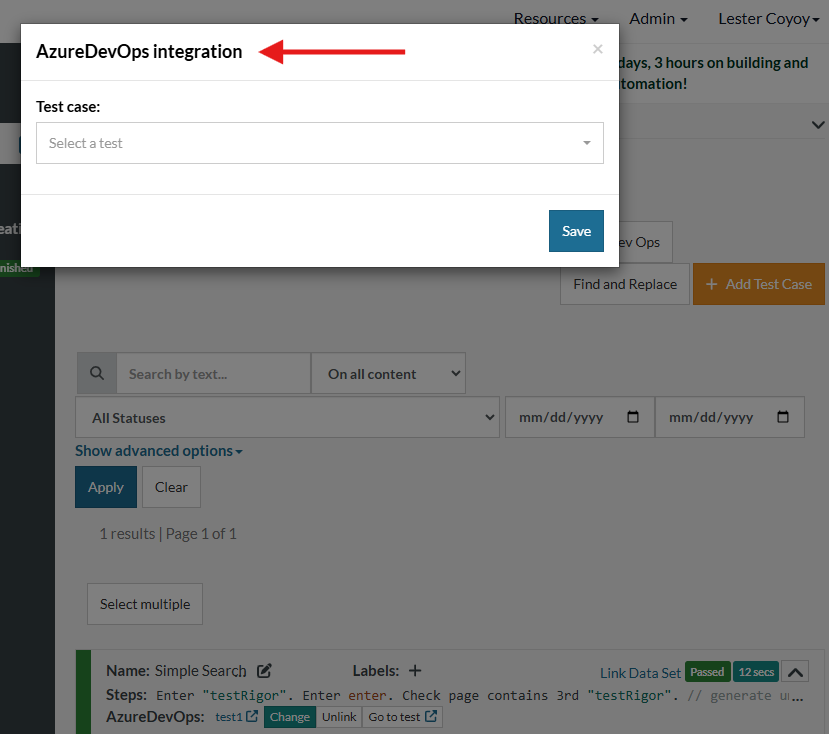
Caption: Integration management from test case.


Related Articles

Release Notes: Native Date Handling, Override Chrome Extension

Native Support for Date and Time Operations testRigor now supports native date and time handling with new built-in variables and ...

Release Notes: Version Control, Rerun Failed, Team Folders

Version Control for Test Cases This feature introduces test case versioning, similar to the existing functionality for rules, ...

Release Notes: New Setting for Finding Tables

New Setting for Finding Tables This update introduces a condition-based table search strategy to improve table detection ...
Privacy Overview
This site utilizes cookies to enhance your browsing experience. Among these, essential cookies are stored on your browser as they are necessary for ...
Read more
Strictly Necessary CookiesAlways Enabled
Essential cookies are crucial for the proper functioning and security of the website.
Non-NecessaryEnabled
Cookies that are not essential for the website's functionality but are employed to gather additional data. You can choose to opt out by using this toggle switch. These cookies gather data for analytics and performance tracking purposes.








