
Release Notes: Combined Steps for Data Entry
 |
New Setting to Disable Combined Steps for Data Entry in Terminal Emulation
testRigor introduces a new configurable option to control how data entry steps are displayed during test execution, specifically for Terminal Emulation scenarios. You can find this setting under Settings -> Advanced -> Combined Steps.
Available Options
-
Enabled (Default): Data entry steps are combined and displayed as a single grouped step with one screenshot. For example, entering an email, password, and clicking sign-in will appear as one consolidated step with a single screenshot.
-
Disabled for Entering Data: Each data entry step is shown individually with its own screenshot. This means separate screenshots for entering email, entering password, and clicking sign-in, providing detailed visibility for each action.
Benefits and Use Cases
-
Enhanced Debugging: Viewing individual screenshots for each data entry step helps identify issues more precisely during test failures.
-
Mainframe Testing Optimization: This feature is especially valuable for mainframe applications, where detailed step-by-step visibility is crucial. We recommend enabling separate screenshots by default for all mainframe testing to improve clarity and accuracy.
By disabling combined steps for entering data, you gain clearer visibility into each data entry action, improving both debugging efficiency and test transparency.
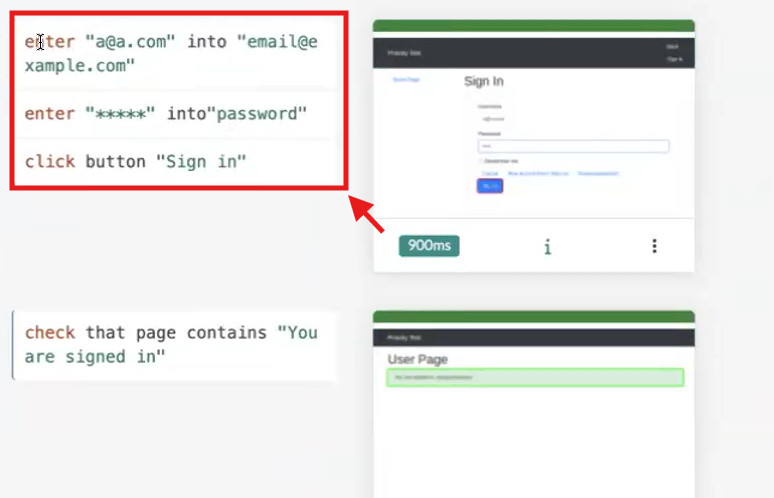
Caption: Enabled Combined Steps setting.
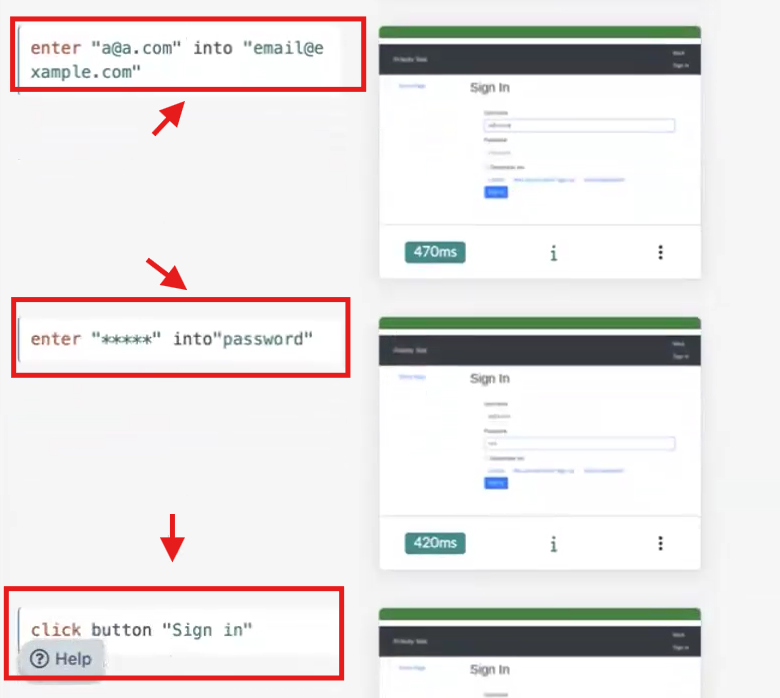
Caption: Disabled Combined Steps for entering data.










