
How to do Workflow Automation Testing?
 |
Modern applications are no longer simple CRUD systems. They are living ecosystems of services, users, integrations, background jobs, analytics engines, and AI components, all stitched together through workflows.
A workflow is where business value actually happens. A user doesn’t just “click a button.” They sign up, verify their email, choose a plan, enter payment details, trigger backend provisioning, receive onboarding emails, and get access to features. That entire journey is the product.
If you test only pages, APIs, or components in isolation, you are not testing the product. You are testing fragments. Workflow automation testing focuses on validating real business flows from start to finish across systems, states, and roles under realistic conditions.
| Key Takeaways: |
|---|
|
Understanding Workflow Automation Testing
Workflow automation testing works to validate the complete implementation of business processes from the beginning to the end to make sure that every transition, data exchange, decision branch, and cross-system interaction works as intended. Rather than just looking at unit, API, or UI testing, this involves examining how everything integrated into real operational flows works.
Such testing validates crucial issues like state transitions, cross-system data consistency, conditional logic paths, and role-based interactions. It also guarantees that event-driven processes, exception handling, and recovery mechanisms behave reliably under real-world conditions.
After all, workflow automation testing protects business results and not technical correctness. When the quality of code is assured by unit tests, the integrity, continuity, and success of the business process become the safety net of workflow tests.
Read: End-to-end Testing Frameworks.
Why Traditional Automation Falls Short
Many automation failures in enterprises stem from a fundamental misunderstanding. Teams automate screens, not workflows. Consider a checkout process. A typical UI test might click add to cart, proceed to checkout, enter payment details, and verify a confirmation message.
The test passes. But what if the inventory was not reduced? What if the payment webhook failed? What if the confirmation email was never sent? What if the order state is stuck as ‘Pending’? The UI test passes, but the business flow is broken.
That is the danger of shallow automation. Workflow testing goes beyond surface validation. It confirms that the system behaves as a cohesive whole.
Read: Testing Frameworks are Dead.
| Traditional Testing | Workflow Testing |
|---|---|
| Focuses on individual pages, buttons, and form validations. | Focuses on complete business journeys from start to finish. |
| Validates isolated components such as UI screens or API endpoints. | Validates state transitions, data flow, and cross-system interactions. |
| Often limited to single-user or single-role scenarios. | Covers multi-role interactions and permission-based transitions. |
| Relies heavily on DOM structure and element locators. | Centers on business logic and process integrity rather than UI structure. |
| Struggles with asynchronous processes and background jobs. | Actively validates event-driven flows, retries, and delayed processing. |
| Test systems in isolation. | Orchestrates validation across multiple integrated systems. |
Workflow Testing vs. End-to-End Testing
Workflow automation testing focuses on validating complete business processes across systems, roles, states, and integrations to ensure real-world business outcomes are achieved. End-to-end testing primarily verifies that a user journey works from start to finish, often concentrating on functional flow rather than deep orchestration and cross-system integrity.
| Workflow Automation Testing | End-to-End Testing |
|---|---|
| Validates complete business workflows across multiple systems and integrations. | Validates a user journey from start to finish within the application. |
| Focuses on business outcomes, state transitions, and process integrity. | Focuses on functional flow and expected outputs. |
| Actively verifies cross-system data consistency and backend state changes. | Typically validates UI flow and major API responses. |
| Covers conditional branching, retries, and failure recovery scenarios. | Commonly emphasizes happy path scenarios. |
| Includes validation of asynchronous, event-driven, and background processes. | Often limited to synchronous, user-triggered flows. |
| Tests multi-role interactions and permission-based transitions. | Usually tests a single-user perspective. |
| Designed to protect revenue, compliance, and operational stability. | Designed to ensure the functional correctness of the application flow. |
From UI Automation to Workflow Intelligence
Modern testing strategies are evolving from a UI automation tool to a workflow intelligence one. They look beyond surface interactions to validate business intent, system behavior under change, contextual decision logic, and multi-layer integrations across the stack.
This approach requires a fundamental mindset change. Instead of asking, “Does the button work?”, we ask, “Does the entire business flow achieve the intended outcome under realistic and failure-prone conditions?”
Read: GUI Testing – A Complete Guide.
Core Principles of Workflow Automation Testing
To test workflows effectively, follow these foundational principles. These principles ensure that automation validates real business outcomes rather than just technical checkpoints. They also help create resilient, scalable test suites that remain stable even as systems evolve.
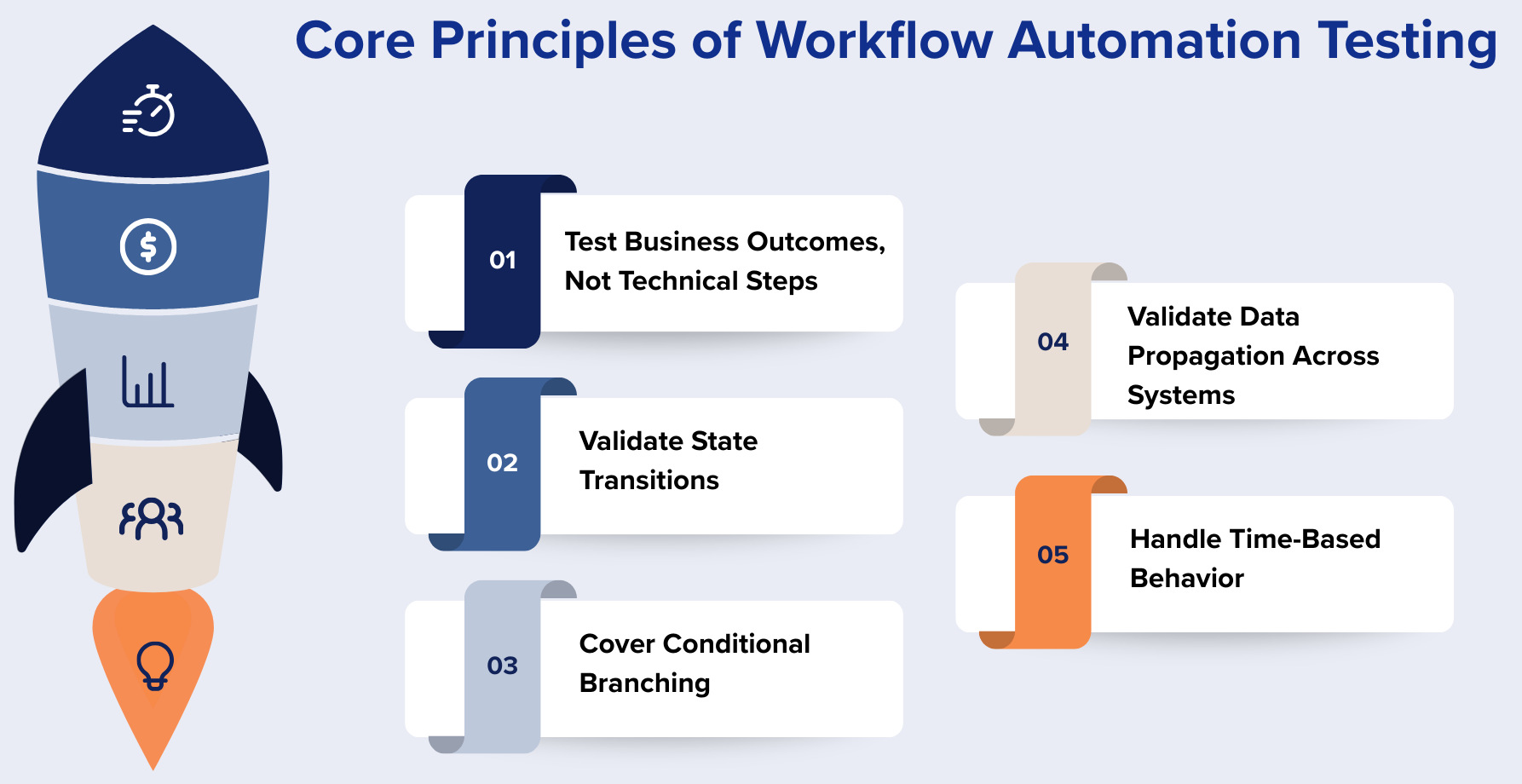
Test Business Outcomes, Not Technical Steps
If so, the results must be more business-oriented than mere technical. Rather than checking that an element exists or that a field is visible or that a button is clickable, workflow testing needs to check meaningful business activities. The priority should be to see if an order is placed, payment is confirmed, an invoice is generated, a notification is sent, and whether the database indicates the correct status.
The real aim is business validation, not interface validation. With nothing but the UI checks being irrelevant if the workflow is not going to deliver what the business says it’s going to do.
Validate State Transitions
Workflows are state machines where each task passes through an official process (Draft, Submitted, Approved, Processed, Closed, etc.). The testing should guarantee that each transition complies with established rules and only valid paths are accepted.
Automation must ensure that invalid transitions are blocked, states are correctly persisted, and audit trails are preserved. Any improper or corrupted state movement can prove a severe workflow flaw.
Cover Conditional Branching
Real-world workflows are rarely linear and often depend on conditional decision logic. For example, if payment succeeds, then an order ships; if it fails, the system retries, and if retries fail, the order may be canceled.
Workflow automation must cover not only the happy path but also negative paths, edge conditions, and exception handling scenarios. Ignoring these branches leads to untested critical failure scenarios.
Validate Data Propagation Across Systems
Business processes frequently move data across multiple systems, such as from user input to database storage, CRM display, invoice generation, and email notifications. A single broken data mapping can silently corrupt downstream systems without immediate visibility.
A data flow between systems can be a costly task if a system is in an uncoordinated system, as data can be lost to a system in a silo and fail to be seen within a critical stage. At each point of integration, workflow automation should verify data consistency and integrity. Accuracy in propagation will stop hidden differences that will eventually show up as compliance or financial issues.
Handle Time-Based Behavior
Time-bound logic in many workflows is often implemented within a number of workflows; for example, SLA windows, delayed triggers, scheduled jobs, and expiry rules are all time-based logic. These time-based conditions frequently present a range of time-related issues that static validation cannot take into account.
Without checking temporal behavior, workflows may seem in the right place, but don’t operate properly with respect to real operations timing.
Workflow Automation Testing: Steps and Best Practices
Let’s break this down into a practical implementation roadmap. This approach will help you move from theory to execution with clarity and structure. Each step builds on the previous one to ensure comprehensive, resilient, and business-focused workflow validation.
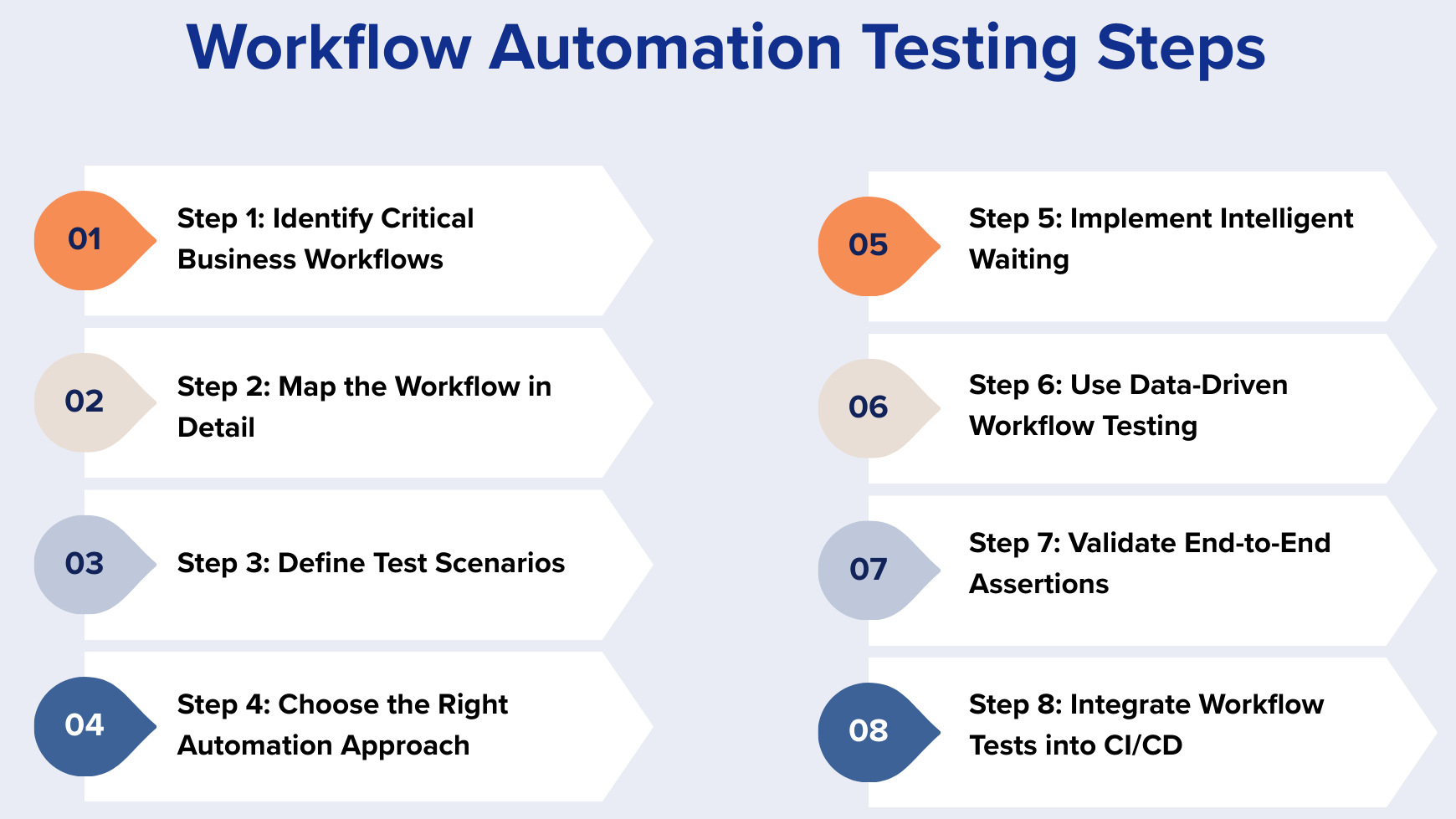
Step 1: Identify Critical Business Workflows
Map the most important processes, such as user registration, payment processing, order fulfillment, approval flows, CI/CD deployments, and ticket lifecycles, and identify the processes that are essential for business success. Many processes don’t require broad automation coverage. Zero in on processes that have a key impact on revenue, compliance, or operational stability.
Prioritise workflows by revenue impact, user frequency, regulatory requirements, integration complexity, and the cost of failure. Automation coverage should be highest for high-risk and high-visibility systems at all times.
Step 2: Map the Workflow in Detail
Develop a detailed workflow map that will involve entry triggers, user actions, system responses, backend processes, external integrations, conditional branches, and final outcomes. Explain the full-cycle journey in terms of flowcharts, BPMN (Business Process Model and Notation) diagrams, sequence diagrams, or state transition models.
Find out where issues happen during mapping (where failures can occur, where data changes, delays, or asynchronous behavior might happen). This blueprint is a strategic basis for your automation design.
Step 3: Define Test Scenarios
For each workflow, establish structured scenarios, specifically, the happy path, negative cases, including invalid inputs or service failures, and timeout or permission-denied scenarios. You may also want to have edge cases, including boundary conditions, partial completion, interrupted flows, and re-entry behavior.
Concurrency needs to be accounted for as well, especially when multiple users trigger the same workflow simultaneously. Testing race conditions and data conflicts ensures system resilience under real-world load.
Read: Test Scenarios vs. Test Cases: Know The Difference.
Step 4: Choose the Right Automation Approach
Most workflow testing involves hybrid automation of UI automation, API validation, database checks, event monitoring, email verification, and log inspection. Dependence on one layer almost never suffices in covering all the business behaviors.
For instance, you might use the UI to activate the workflow, APIs to validate state transitions, database queries to confirm persistence, and email or webhook checks to verify notifications. This layered orchestration provides true workflow validation rather than surface-level automation.
Step 5: Implement Intelligent Waiting
Avoid static waits that rely on fixed delays, as they create fragile and slow tests. Instead, implement intelligent waiting strategies that monitor actual system signals.
Wait for state changes, poll APIs for status updates, listen to events, monitor database flags, or detect UI status changes dynamically. Intelligent synchronization dramatically reduces flakiness and improves execution reliability.
Read: How to add waits using testRigor?
Step 6: Use Data-Driven Workflow Testing
Workflows can behave differently when data varies, such as in user roles, payment types, currencies, or geographic conditions. Parameterizing tests enables broader coverage across realistic data combinations.
However, risk-based prioritization can mitigate combinatorial explosion. Focus on the most impactful and likely data variations instead of running tests across every possible combination.
Read: How to do data-driven testing in testRigor (using testRigor UI).
Step 7: Validate End-to-End Assertions
Workflow assertions must involve more than just visual UI confirmation. Backend states, system logs, database records, API responses, and notification triggers need to be validated. By ensuring proper flow at all layers of the system, we can achieve comprehensive assertions. This ensures business correctness, not just surface.
Read: How to perform assertions using testRigor?
Step 8: Integrate Workflow Tests into CI/CD
Workflow tests should be built into CI/CD pipelines so that they are running automatically after a deployment and during nightly builds. Their work should be to validate staging settings prior to production releases and to set off alerts when something goes awry. When implemented properly, workflow tests serve as ongoing business health monitors. They deliver early warning signs for regressions that may affect revenue, compliance, or the user experience.
Advanced Workflow Testing Strategies
- Event-Driven Workflow Testing: Modern architectures depend on microservices, event buses, and message queues, where workflows are triggered and move forward through Kafka events, RabbitMQ messages, or webhooks. Testing must validate that events are published with the correct payload, consumed successfully, and that the resulting system state updates accurately.
- Parallel Workflow Testing: Many real-world workflows require high concurrency with multiple concurrent triggers under a variety of load conditions. Testing must ensure there is no data corruption, race conditions, or deadlocks when workflows execute in parallel.
- Recovery & Resilience Testing: The workflows have to be tested to check for failure states such as system crashes, the retry logic activation, partial completion, or idempotency behavior. For instance, if a payment API fails, the system should retry correctly, and if duplicate requests are sent, the workflow must prevent duplicate processing.
- Multi-Role Workflow Testing: Many workflows span multiple roles, like when an employee submits a request, a manager approves it, finance processes it, and an admin audits the action. Testing should be based on fluidity of role switching, boundary checks for permission, and audit logs should be correctly created at all points.
Common Pitfalls in Workflow Automation
- Over-Reliance on UI Automation: The UI is the most fragile layer and breaks frequently with minor design changes. A better approach is to trigger workflows through the UI but validate outcomes through APIs and database checks.
- Ignoring Non-Functional Aspects: Workflows must also satisfy performance SLAs, security controls, audit requirements, and compliance rules. Functional correctness alone does not guarantee business readiness.
- Not Cleaning Up Test Data: Workflows generate persistent data such as orders, tickets, transactions, and users, which can accumulate rapidly. Without proper cleanup, environments become polluted, causing false positives and slower test execution.
- Testing Only the Happy Path: Most real failures occur in exception paths, timeouts, partial failures, and edge scenarios. Ignoring these branches leaves critical business risks untested.
AI-Powered Workflow Automation Testing
An AI-powered workflow automation test is more than just a scripted validation. It is intelligence-based, uses business intent, AI context, and system behavior across layers. Rather than checking individual steps individually, AI tracks transitions, identifies anomalies in state change patterns, adjusts to UI changes, and ensures full implementation in real-life scenarios.
This lowers fragilities, increases the breadth of coverage for the edge cases, and allows early recognition of workflow-related failures that regular automation often cannot detect.
testRigor supports AI-driven workflow testing, enabling teams to write tests in plain English based on real user behavior and business applications instead of specific technical locators. Its Vision AI and self-healing power eliminate DOM structure dependency, allowing tests to hold even as the UI changes.
It allows for synchronized testing to the true orchestration-based testing throughout the systems and tests based on UI/API/db and user action and role switching.
Conclusion
Workflow automation testing, by contrast, goes a long way to ensuring that all components work together perfectly, safeguarding every transition, integration, and decision path to work reliably under real-world conditions. With integrated layered validation and intelligent synchronization, along with resilience testing, teams are in a strong position to go beyond the fragile UI checks to genuine end-to-end business assurance. At a time when workflows are increasingly distributed, event-driven, and AI-powered, we need to embrace workflow testing as the bedrock of revenue protection, user trust, and operational stability.
Frequently Asked Questions
Why do UI tests pass while real business workflows fail in production?
UI tests typically validate visible outcomes such as confirmation messages or page transitions. However, real workflow failures often occur in background processes such as failed webhooks, incorrect database state transitions, broken message queues, or missing downstream updates. Without validating backend states and integrations, surface-level automation can give false confidence.
What are the biggest risks of not implementing workflow automation testing?
Without workflow testing, organizations risk revenue leakage, compliance violations, data corruption across systems, delayed processing, broken approvals, and silent integration failures. These issues often remain undetected until customers report them or financial discrepancies appear, making them costly and damaging to brand trust.
How do you test asynchronous and event-driven workflows effectively?
Effective testing of asynchronous workflows requires intelligent synchronization strategies such as polling APIs for status changes, validating message queue events, monitoring database flags, and verifying retries or delayed triggers. Static waits are unreliable; validation must be based on actual system signals and state changes.
| Achieve More Than 90% Test Automation | |
| Step by Step Walkthroughs and Help | |
| 14 Day Free Trial, Cancel Anytime |











