
Katalon Alternative
 |
What is Katalon?
Katalon is a test automation platform that supports web, mobile, API, and desktop testing in a single environment. It combines record-and-playback, keyword-driven testing, and scripting, so teams can work with either low-code or full-code approaches depending on their needs.
Recent versions also include AI-assisted test creation, where tests can be generated from descriptions, requirements, or existing assets, along with features like self-healing for locators and automated analysis of test results. This adds to its existing tooling rather than replacing scripting entirely.
Considerations with Katalon
- Level of technical expertise in your team: Katalon supports low-code and scripting approaches. Basic tests can be created without coding, but more complex scenarios often require working with Groovy/Java. Teams should be comfortable moving between these levels.
- Language lock-in: Katalon primarily uses Groovy for scripting. If your developers write in JavaScript, Python, or C#, they might find it annoying to switch to a different language just for testing.
- Dependency on Selenium and Appium: Katalon utilizes Selenium and Appium under the hood. While this offers flexibility, it also means that the limitations of these tools are inherited. Even with the AI and low-code features, all of Selenium and Appium’s issues aren’t abstracted.
- Test maintenance is reduced, but not removed: While Katalon includes self-healing now, changes in logic or workflow still need to be reviewed. Moreover, it still depends on element locators, making it prone to brittleness. Because it uses backup locators, there is a risk it might “heal” by clicking the wrong element if two buttons look similar in the code.
- Tooling can become complex over time: Katalon combines multiple components for test authoring, execution, analytics, and even AI features. While this provides flexibility, it can increase setup and onboarding time and require the team to learn multiple parts of the platform.
- The AI features are still scattered within the platform: Katalon has added several AI capabilities in recent versions, including test generation and self-healing. These features can reduce effort in certain areas, but they are layered on top of an existing low-code and scripting-based model.
What is testRigor?
testRigor is an AI-powered test automation platform designed to simplify how tests are created, executed, and maintained. Unlike Katalon, testRigor offers a simpler alternative to testing all kinds of applications while availing the benefits of AI-driven testing that is native to the tool.
Instead of writing code, users create tests in plain English, which the system translates into executable steps. testRigor doesn’t depend on selectors and XPaths at all to identify UI elements. It sees the page like a human.
It supports end-to-end testing across web, mobile, APIs, desktop, mainframe, and more within a single platform. testRigor focuses on reducing the effort required for both test creation and maintenance, making automation accessible to a broader team, not just the technical silo.
Here is a video to show you how testRigor uses prompt engineering and generative AI to generate test cases from plain English or other natural languages.
Shifting to a New Testing Process through testRigor
When you are using testRigor, there is no reliance on any of the implementation details, such as CSS/XPath locators of elements. In plain English, you can easily mention an element through the text and its position on the screen/UI. This solves the major drawback imposed by code-based automation testing, and therefore, testRigor tests are ultra-stable.
enter "Kindle" into "Search"
enter enter
click "Kindle Scribe"
click "Add To Cart"
check that page contains "Item Added To Cart"
As you can see in the above example, the elements are identified through the text visible on the UI. Also, the actions and assertions on these elements are in plain English (or any natural language). This is possible because testRigor uses artificial intelligence to reduce the maintenance effort typically associated with automated tests. It can automatically adjust tests based on changes in the application’s UI. This decreases the time spent on maintaining tests after each application update.
Through testRigor, you can build automated tests even before engineers build the code. This is because it supports you in performing shift left testing using Specification Driven Development (SDD). You can shift from the ‘Old Process‘ of specification, coding, QA automation, and test execution to a ‘New Process‘. Here, you can use your natural language specifications directly as tests and reach success early on.
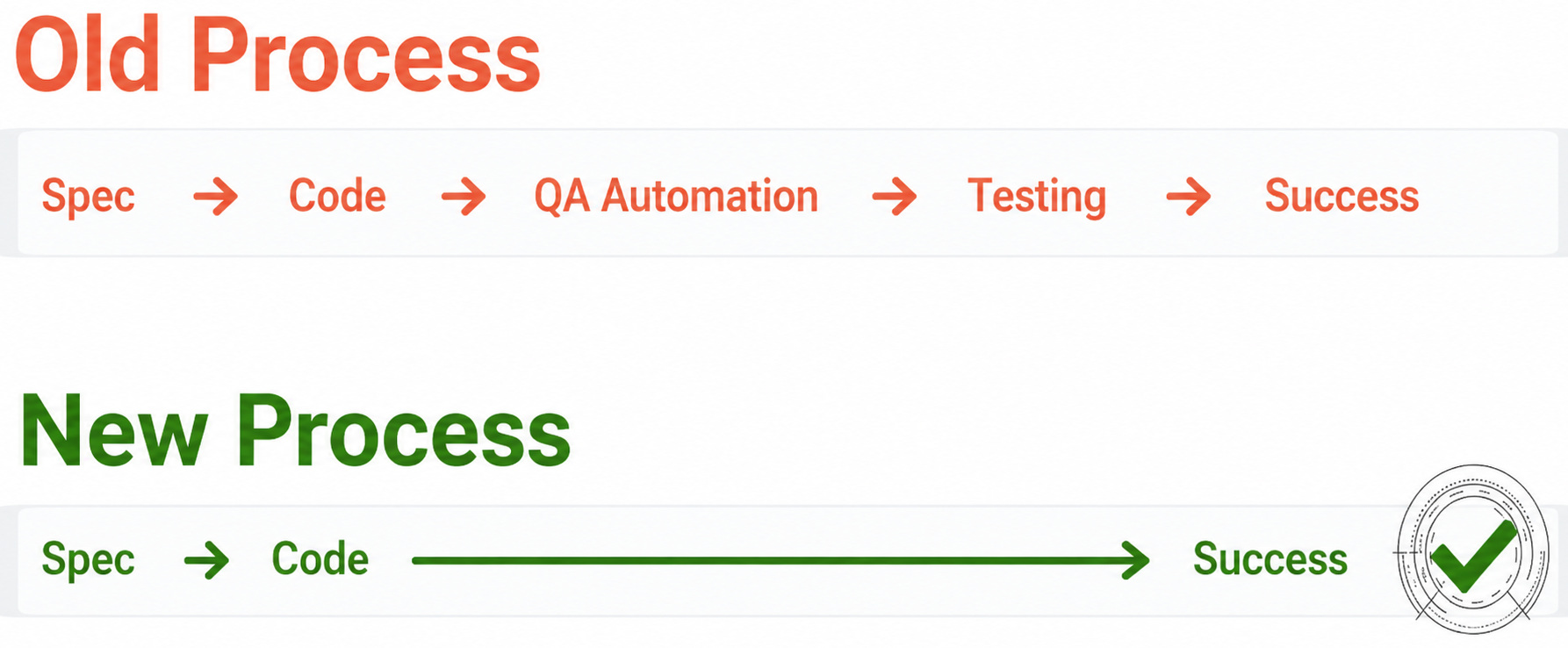
How testRigor Simplifies Testing of Complex Scenarios
- Plain English Tests: With testRigor, you can create test cases in plain English language without worrying about unstable CSS/XPath locators. There are a few ways to do this.
- Write the English test scripts manually or import test cases from test management tools such as TestRail, PractiTest, ALM, etc., to directly run as automated tests.
- Use the record-and-playback feature to capture the test case when you execute it and generate plain English test cases. You can update and execute these recorded test cases at any point in time.
- Let the generative AI feature build test cases for you with just a brief description of the test scenario.
- Easy to Test Modern Applications: testRigor lets you test a variety of features like emails, files, database, QR code, SMS, and audio. It also supports testing AI features like chatbots, LLMs, graphs, and more.
- Single Tool for Many Platforms: Test various applications like native mobile and native desktop apps, web-based apps, ERP, and CRM systems like SAP, Salesforce, Oracle, Microsoft Dynamics, and even your legacy systems. Since testRigor emulates a human tester, what goes under the hood of the application under test is of little consequence to this tool.
- Supports Various Testing Types: Perform different kinds of testing like regression testing, smoke testing, UI testing, functional testing, end-to-end testing, UAT testing, API testing, and more.
- Stable Locator Strategy: This tool refers to elements from a human perspective and not from a locator standpoint. This eliminates the dependency on implementation details like XPaths and CSS selectors, which can change frequently.
- Near-zero Maintenance: You can get ultra-stable test runs and minimal test maintenance as testRigor uses AI here as well to self-heal test cases.
- Secure Platform: This platform is fully cloud-hosted, which means there are no extra infrastructure expenses. testRigor is also a secure platform that is ISO/IEC 27001:2022, SOC 2, HIPAA, and GDPR compliant.
- Reports and Logging: Every test run provides details about the execution, such as screenshots, relevant error messages, which are again in simple English, and video recordings. It also captures technical details, such as console logs and technical errors.
- Free Account Available: testRigor offers free public accounts that can be created directly via registration on its website. This is a good place to start before advancing to the subscription-based plans.
- Reusable Rules (Subroutines): You can easily create functions for the test steps that you use repeatedly. You can use the Reusable Rules to create such functions and call them in test cases by simply writing their names. See the example of Reusable Rules.
- Parallel Testing and CI/CD: When the testing timelines are so strict in DevOps, Agile, and faster delivery cycles, you can only rely on testRigor for parallel testing, AI, and automation testing to keep the CI/CD pipelines running smoothly.
- Accessibility and Exploratory Testing: You can efficiently perform accessibility testing through testRigor. Read here how to build an ADA-compliant app. This intelligent tool helps you run exploratory testing with its AI-powered features. Read how to perform exploratory testing with testRigor.
testRigor enables you to test web, mobile (hybrid, native), API, desktop, and mainframe apps with minimum effort, cost, and maintenance. Its AI-powered capabilities let everyone on your team create and execute plain English test cases and achieve excellent test coverage.
Comparison Table: Katalon vs. testRigor
| Feature\Tool | Katalon | testRigor |
|---|---|---|
| Effortless initial set-up |
/ (moderate setup) |
(simpler setup) |
| Manual testers, PMs, and everyone can create and maintain automated tests |
/ (basic yes, advanced needs coding) |
|
| You can create tests BEFORE the code has been released through SDD | ||
| The same test code works efficiently for web, mobile, and native desktops with no modifications | ||
| Ease of test maintenance |
/ (depends on locators even though there’s self-healing) |
(easier due to natural language / intent-based) |
| Ease of debugging tests |
/ (needs some coding knowledge despite AI assistance) |
(no dependency on coding knowledge) |
| Execute your manual test cases out of the box | ||
| Web testing | ||
| Mobile testing (native, hybrid) | ||
| Native desktop testing | ||
| Test web, mobile, Email, SMS, 2FA, API, database, files, QR code, and more complex functions in one test | ||
| Test with 2FA logins | ||
| Downloaded file testing | ||
| Advanced in-built logging and reporting | ||
| SSO and native Okta integration | ||
| Accessibility testing |
/ (with libraries) |
|
| Generate tests using AI |
(AI-assisted) |
(AI-native / primary interface) |
| Test AI-based features |
Conclusion
Katalon offers a flexible platform with support for low-code and scripting, along with a growing set of AI-assisted features. testRigor, on the other hand, focuses on simplifying test creation and maintenance by using plain English and reducing dependency on locators. This can make it easier for non-technical team members to contribute and can help reduce the effort required to keep tests up to date, especially for UI-heavy workflows.
If your goal is to create and maintain tests with less overhead and broader team involvement, testRigor may be a better option.
| Achieve More Than 90% Test Automation | |
| Step by Step Walkthroughs and Help | |
| 14 Day Free Trial, Cancel Anytime |











