
Release Notes: Downloaded files validations, AI command parse, Screen resolution, API Endpoints, Upload files and certs form CLI, Open files
 |
Validations on downloaded files
check that downloaded file "sample.pdf" contains "Item A" below "Item B"
check that downloaded file contains "Item A" in table at 1st row and column "Column 1"
AI command parser enhacements
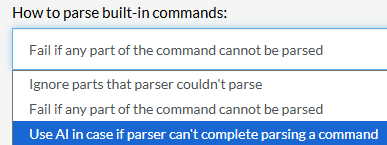
A new setting has been added that will modify a command using AI if said command couldn’t be parsed. This setting will try to amend a command if it couldn’t be parsed. You can access this option on the Settings section, AI tab.
Screen resolution changes
Our team has made changes to the default test suite resolution. All newly created test suites will be set at 1280×1024 rather than 1024×768.
Open downloaded files
open downloaded file "sample.pdf"
New API endpoints for Desktop Web
With the latest update, our team has expanded the APIs with Personal Token supports for test suites in order to include, read, list and update operations. You can check more details about this new addition on the CI/CD section of the test suite
Upload files and certificates from CLI
You can now upload files and certificates through the CLI. The following command triggers a full run with local files or .pfx certificates uploaded as variable values for that run only. Add typed entries to the –variables-path JSON.
{
  "myFile": { "type": "FILE", "value": "/path/to/file.pdf" },
  "myCert": { "type": "CLIENT_CERTIFICATE", "value": "/path/to/cert.pfx", "password": "cert-password" }
}
testrigor test-suite run --variables-path variables.json
testrigor test-suite run TEST_SUITE_ID --token SUITE_CI_TOKEN --variables-path variables.json
For more information about tR’s CLI check the following link.










