
Release Notes: Raw Binary Uploads, Vertical Scroll Length, Test Data Version History
 |
Binary Upload as Raw or Multipart
With this new update, the call api command is able to upload binary data as two different types: Multipart and Raw. This allows for more complex uploads, such as files + JSON for Multipart, while Raw guarantees that only the complete, full file gets sent in its raw format. By default, the binary upload gets done in Multipart format, but users can now specify to use raw instead. The two commands can be used as follows:
call api put "http://dummy.restapiexample.com/api/v1/update" with headers "Content-Type:application/octet-stream" and "Accept:application/json" and "x-ms-blob-type:BlockBlob" and binary data stored value "rawBinaryFile" as raw
call api put "http://dummy.restapiexample.com/api/v1/update" with headers "Content-Type:application/octet-stream" and "Accept:application/json" and "x-ms-blob-type:BlockBlob" and binary data stored value "rawBinaryFile" as multipart
Vertical Scroll Length
Our team has deployed a new configuration for testRigor that allows users to control the constraints for scrolling vertically. This was added because, originally, testRigor considered every page as the whole browser window, which worked for most cases but would scroll excessively on certain pages. Now, we are introducing a new concept called “Usable Size”, which restricts the scroll to only the actual page’s contents. Additionally, users now have the option to also ignore the header and/or footer, helping with other pages with unusual designs.
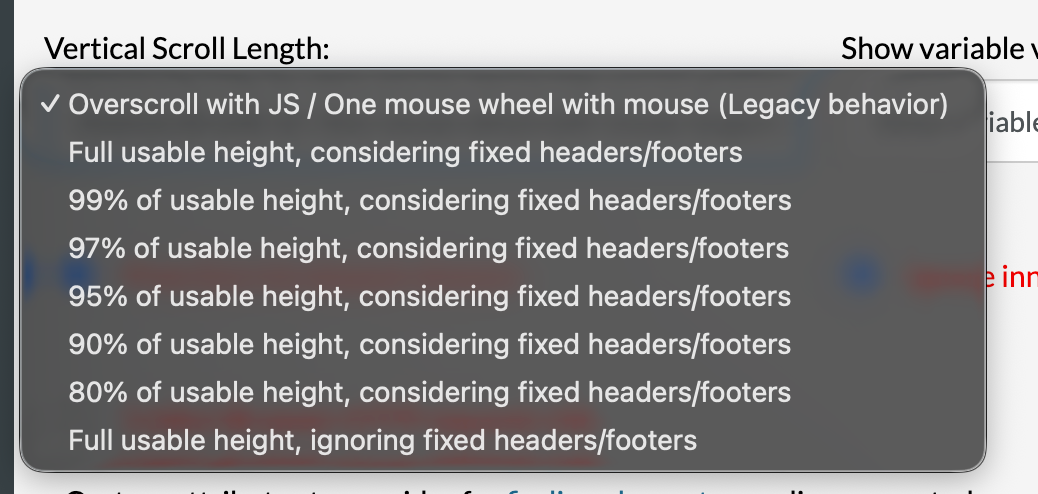
Caption: New setting for Vertical Scroll Length.
When using any setting with the “usable height” option, it will already consider only the real contents of the page, as opposed to the Legacy behavior, which considers the entire browser window. This setting can be found under the Advanced tab.
Version History for Test Data
We are also introducing Version History functionality for the Test Data page, including global variables and datasets. When changing values or names of variables, users will be able to compare to older versions and rollback if needed. This can be done individually for each variable by clicking the three vertical dots icon and clicking “Version History”. From the modal, users can see older versions of the variable and choose to rollback to older versions. This is not possible with File type variables, as the old file gets replaced in the server.
For datasets, changes like variable values, added or removed rows, new variables created, etc., are all taken into account for the version history.
Index from Stored Value
It is now possible to use a variable to specify the index for an element, for example:
save "second" as "index"
click index stored value "index" "element name"
In this example, testRigor will utilize the contents of the variable called “index” as the index to click the element called “element name”.










