
Build mobile tests anyone on your team can run Request a Demo Now
Turn your manual testers into automation experts!Request a Demo

Release Notes: Screen Capture Order

Weekly Newsletter
Receive weekly testRigor newsletters packed with insights on test automation, codeless testing, and the latest advancements in AI.

Change order of screenshot capturing for Mobile tests

testRigor now offers enhanced flexibility with the introduction of a new setting: “Screenshot Capture Order.” This feature specifically applies to Mobile Native apps and allows users to determine whether screenshots are captured before or after reading source data.

To modify the screenshot capture order, navigate to Settings -> Advanced -> Screenshot Capture Order within your Test Suite. You can choose between two options:

  • Capture Before Source Data Reading: This option captures screenshots prior to accessing the source data, providing a visual context of the app’s state.

  • Capture After Source Data Reading: This option captures screenshots after the source data has been read, allowing for a more accurate representation of the app’s behavior post-interaction.
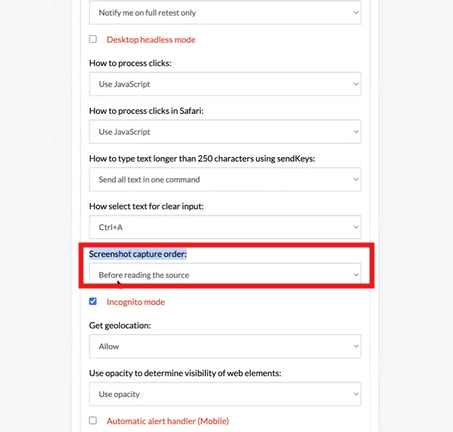
Caption: Going default setting for new test suites.
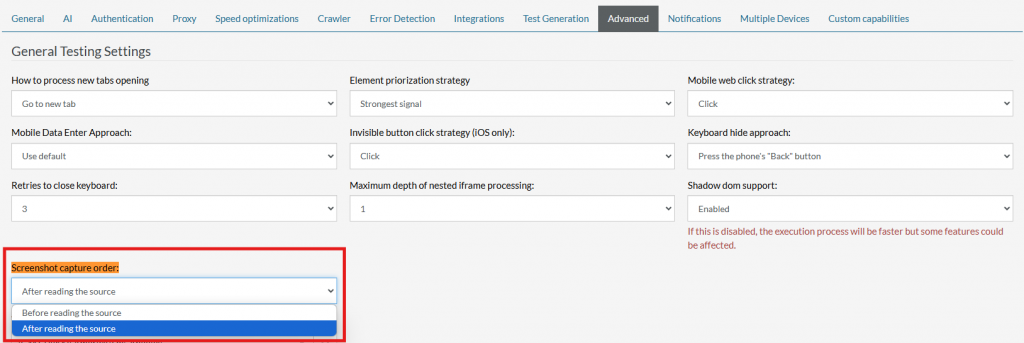
Caption: Screen capture order in Settings.

This enhancement allows that users can optimize their testing processes and ensure that screenshots accurately reflect the desired state of their applications.


Related Articles

Release Notes: Version Control, Rerun Failed, Team Folders

Version Control for Test Cases This feature introduces test case versioning, similar to the existing functionality for rules, ...

Release Notes: New Setting for Finding Tables

New Setting for Finding Tables This update introduces a condition-based table search strategy to improve table detection ...

Release Notes: Retry Clicks, Extract Rules, Live Mode Description

Retry Clicks Functionality We’ve introduced a new enhancement to the click command designed to improve reliability when a ...
Privacy Overview
This site utilizes cookies to enhance your browsing experience. Among these, essential cookies are stored on your browser as they are necessary for ...
Read more
Strictly Necessary CookiesAlways Enabled
Essential cookies are crucial for the proper functioning and security of the website.
Non-NecessaryEnabled
Cookies that are not essential for the website's functionality but are employed to gather additional data. You can choose to opt out by using this toggle switch. These cookies gather data for analytics and performance tracking purposes.








