
Claude Chrome Extension Vulnerability: A Security Lesson for Every AI User
 |
What if a website you visit could quietly tell your AI assistant what to do?
What if an AI tool with access to your emails, files, and browser tabs started following instructions from a stranger instead of you?
And how much damage could a hacker cause if they gained control of an AI assistant you trusted every day?
A browser assistant used by millions of people… It can read your emails, look at Google Drive, and send emails from your name without your consent. This was the case with Anthropic’s Claude Chrome Extension in late 2025 and early 2026. If you visited a malicious website, that site could secretly take control of your browser.
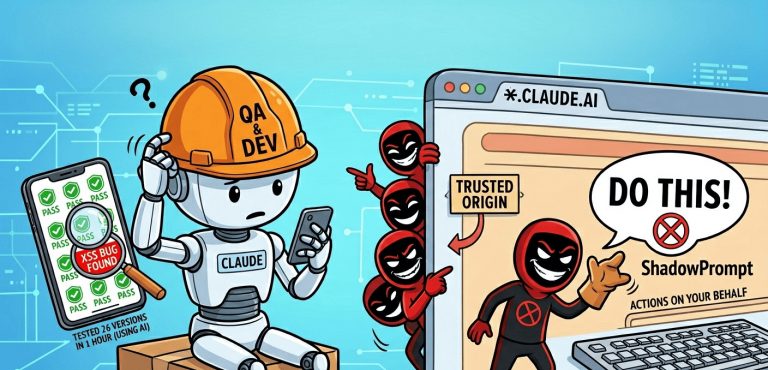
This Anthropic security flaw was discovered by Oren Yomtov, a researcher at Koi Security, who named it “ShadowPrompt.” The ShadowPrompt zero-click attack required neither user interaction nor additional permissions. All you had to do was visit a website created by hackers, and they could send any commands they wanted to Claude’s sidebar, resulting in complete AI assistant hijacking. Claude interpreted the attacker-controlled instructions as if they originated from a trusted source and processed them accordingly.
| Key Takeaways: |
|---|
|
How did the Exploit Chain Work
This attack wasn’t caused by a single bug. It was the result of two small security flaws that came together to create a major vulnerability. These are not the kinds of issues that can easily be caught by regular security checks.
- Problem 1: An Inaccurate Allowlist: When Claude’s extension was designed, it was set to accept prompts from any subdomain starting with *.claude.ai. This was required for new users to set up accounts. There were no other restrictions in place. So Claude considered even messages coming from subdomains running third-party vendor code via the postMessage API to be prompts provided directly by the user. This exposed a gap between a trusted origin vs execution context.
- Problem 2: An XSS Bug in the CAPTCHA Subdomain: Anthropic was using Arkose Labs for CAPTCHA verification. Its components were hosted on a subdomain called a-cdn.claude.ai, so it easily passed the wildcard check used by the Claude extension’s externally_connectable manifest setting. An older version of this Arkose component was still live. It had two serious bugs: First, it would accept postMessage data from anywhere without any checks. Second, it would display this data without sanitization using React’s dangerouslySetInnerHTML. This allowed hackers to send an HTML payload and run their JavaScript code on a-cdn.claude.ai.
Attackers combined these two weaknesses to create a classic confused deputy attack.
The extension believed the message came from a trusted *.claude.ai subdomain. It assumed the user had typed it and passed the hacker’s instructions to Claude, enabling a malicious prompt injection.
The attack operated through a hidden webpage element, making it effectively invisible to the user. But by then, the hacker could have already bypassed security controls, achieved a privileged mode session bypass, and initiated silent browser data exfiltration to steal Google OAuth tokens associated with the user’s authenticated session, gain access to your Google Drive, and obtain the ability to send emails on your behalf.
How Claude Helped Uncover Its Own Vulnerability
There’s something else in this story that’s even more shocking than the vulnerability. Yomtov himself explained how he discovered it on LinkedIn:
“I tested about 26 versions of this component at once. In just an hour, I got the results. One of them had the exact XSS bug I needed to complete the hack. I would never have done this if there had been no AI. Who would have bothered to spend 130 hours testing all the old versions just because of a suspicion? But when the time it takes to test an idea is reduced from hours to minutes, we try every possible approach we can think of.”
Here’s the highlight: he used Claude to do it! No matter what extension he was testing, the same assistant helped him find the bug. AI helped him work at a speed that would normally be impossible.
This is a big lesson. If a researcher can use AI to check 26 versions in just an hour, imagine how much greater the security risks are today than they were in the past. Companies can no longer assume that no one will find old files or outdated versions, because hacking methods have changed dramatically.
Key Security Lessons for Developers and QA Teams
Software teams who create browser extensions and link other companies’ code to their own trusted subdomains should learn important lessons about the Chrome extension security model from this incident.
Beware of Other Companies’ Code on Your Own Subdomain
The subdomain a-cdn.claude.ai belonged to Arkose Labs. However, it was located under a main domain that the Claude extension blindly trusted. When you put a third-party CDN, analytics script, or other vendor code on your subdomain, it can automatically gain the same level of trust as your main site, leading to a dangerous zero-permission extension inheritance where the malicious site inherits elevated permissions.
Old Versions Are Still a Threat
The new version that Arkose Labs was using at the time did not have this XSS bug. This problem was in an old version from months ago. Hackers were able to exploit it because no one deleted that old file after it was no longer needed. What quality assurance (QA) and security teams need to understand from this is that it’s not enough to just look at the latest version in your tests. You need to track exactly where the older versions and files are located.
AI Browser Assistants Are More Dangerous
Today’s AI assistants can switch tabs in the browser, run JavaScript, and interact with the accounts we’re logged into. As AI assistants become smarter, we need to pay closer attention to how trustworthy the information they receive is. Otherwise, attackers may be able to manipulate them into approving and executing actions without the user’s knowledge or oversight.
Practical Steps for Developers and QA Teams
It’s not enough to just look at what your extension does. You also need to look at who it trusts. To do this, make the following mandatory in development and testing:
- Check the extension’s trust relationships: Review the trust settings carefully. Make sure that even a wildcard (*) doesn’t give your extension access to unwanted sites.
- Include old and abandoned links in the test list: If you have a system for storing code by version in URLs, those old links should also be included in your security regression scope.
- Treat third-party code on your own subdomain as your own code: When you put another company’s code on your subdomain, you are transferring the trust of your main site to it. Therefore, you need to have strict quality assurance (QA) checks when testing those vendor codes.
- Test the Prompt Execution Boundaries of Your AI Agents Accurately: If you have an AI assistant in your product that has access to a browser or application, you should test what happens when it receives instructions from untrusted origins. Don’t just view prompt injection as a threat, but as a test case that needs to be tested properly.
- Understand the true capabilities of attackers to prepare your threat model: Today, researchers can audit dozens of component versions simultaneously with the help of AI. When security and QA teams evaluate software, they should keep in mind that hackers have the same capabilities.
The Bigger Lesson Behind ShadowPrompt
The ShadowPrompt vulnerability has now been patched. Those using a fully updated version of the Claude Chrome extension should no longer be concerned. But the architectural pattern that led to this attack is not unique to this one extension. That is, trusting an origin without properly verifying the execution context.
Following the ShadowPrompt attack, researchers at LayerX Security discovered another security flaw in the Claude browser extension, called ‘ClaudeBleed.’
While ShadowPrompt showed how a website could exploit trusted domains and prompt injection to make Claude accept attacker-controlled instructions as legitimate user input, ClaudeBleed showed that another browser extension could communicate with Claude’s extension and misuse its privileges.
Though both are different types of attacks, they highlight the same serious issue: the need to enforce strict security standards around who AI assistants in browsers communicate with and what they are allowed to do.
Teams building or testing software that includes AI agents with real browser access should make sure that their extension code is secure. Testing and uncovering such issues can be a bit tricky. Meanwhile, think, “What could an attacker do if someone could speak to our agent in a trusted voice?”
Building reliable test coverage for such complex software with integrated AI is a completely different challenge from traditional automation. This is where comprehensive security regression testing and analysis tools specific to extensions come in. To catch such trust boundary issues before they reach production, QA and development teams must use specialized security scanning frameworks and robust end-to-end integration tests to thoroughly validate cross-origin communication.
| Achieve More Than 90% Test Automation | |
| Step by Step Walkthroughs and Help | |
| 14 Day Free Trial, Cancel Anytime |











