What Are Testing Levels? A Complete Guide
 |
Software testing is not merely about finding bugs. It is much more than that. It helps achieve quality before the product reaches users. Today, software applications are pretty complex. They have multiple components, services, APIs, and databases that interact in different ways. To make sure the software works correctly at every stage of development, testing needs to be performed at different testing levels.
| Key Takeaways: |
|---|
|
This complete guide on testing levels explains what testing levels are, why they matter, the four primary testing levels, and best practices for implementing them effectively.
What Are Testing Levels?
Testing levels, also known as levels of testing, are distinct phases or stages of software testing that verify different aspects of an application during the Software Development Life Cycle (SDLC). The primary idea behind the concept is that each testing level targets a specific aspect of the software functionality and has a specific objective, testing scope, and set of stakeholders.
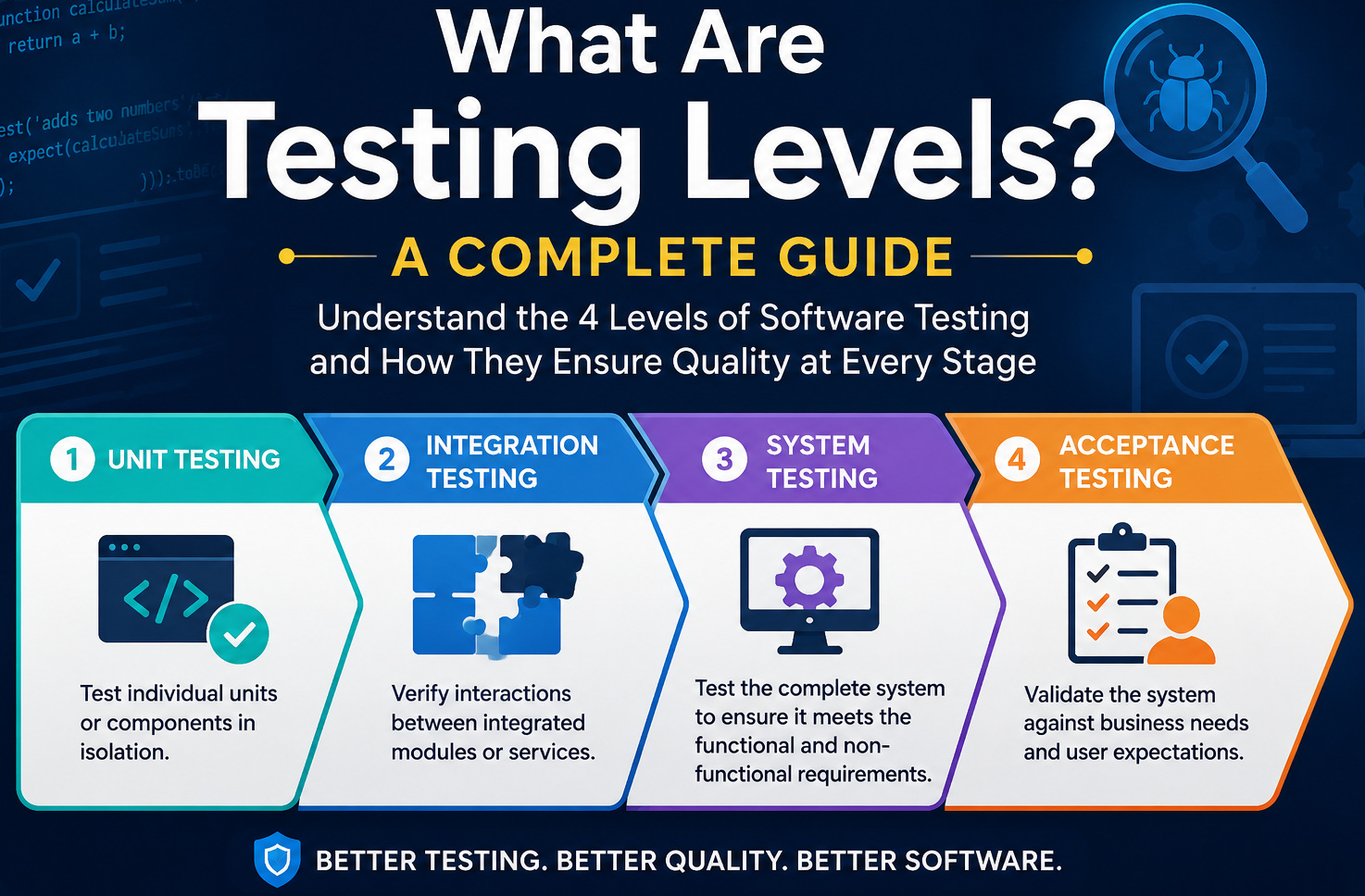
- First, the individual code units are tested.
- Then integrated components are checked.
- The complete system is tested after this.
- And finally, the software is tested against business requirements before release.
This layered testing approach makes sure that defects are detected as early as possible. It reduces debugging effort and development costs.
Why Are Testing Levels Important?
- Early Bug Detection: When defects are detected during unit testing, it is cheaper than discovering them during production. In addition, when tested early, issues do not move further through the system. Read: Minimizing Risks: The Impact of Late Bug Detection.
- Improved Software Quality: Each testing level verifies a different aspect of the application. It results in comprehensive quality assurance.
- Reduced Development Costs: If a bug is found later in the development process, it is more expensive to fix. With testing levels, bugs are found early and rework is minimized.
- Easier Debugging: When tests fail at a specific level, it is easier for developers to identify the source of the problem.
- Better User Experience: Acceptance testing validates that the software satisfies business needs and user expectations before deployment.
The Four Main Testing Levels
- Unit Testing
- Integration Testing
- System Testing
- Acceptance Testing
Let us know about each one in detail.
1. Unit Testing
Unit testing is the first level of software testing. It is done at the code level. Individual units or components of an application are checked in isolation. Unit testing builds impartiality and analyzes the functionality of each component.
What is a unit?
- A function
- A method
- A class
- A module
Mostly, developers write and execute unit tests during development.
Objectives of Unit Testing
- Verify individual pieces of code
- Ensure business logic works correctly
- Catch programming errors early
Example
calculateDiscount(price, percentage)
- Correct discount calculation
- Zero discount handling
- Negative input validation
- Maximum discount limits
Benefits
- Fast execution
- Easy debugging
- Encourages better code quality
- Supports continuous integration
2. Integration Testing
Once you have ensured individual units work correctly, the next testing level is integration testing, where you ensure that components communicate properly. Integration testing allows testers to test groups of units integrated into a system or subsystems and verify interactions between them.
Instead of testing isolated functions, it checks whether connected components exchange data correctly.
Objectives of Integration Testing
- Verify module interactions
- Detect interface defects
- Validate API communication
- Ensure database connectivity
Example
- User Service
- Product Service
- Payment Service
- Order Service
Each of these services has been unit tested. Still, you have to perform integration testing to confirm they work together seamlessly.
- Product inventory updates after payment
- Payment confirmation creates an order
- Email notifications are triggered correctly
Common Integration Testing Approaches
- Big Bang Integration: In this approach, all modules/components are integrated simultaneously. This approach requires a simple setup. However, debugging is difficult, and sometimes bugs are detected late.
- Incremental Integration: Here, modules are integrated gradually using a top-down approach, bottom-up testing, or sandwich (hybrid) testing.
3. System Testing
System testing is performed on a fully integrated system comprising the whole application. Unlike integration testing, which focuses on module interactions, system testing tests the entire software product against functional and non-functional requirements.
System testing is typically performed by QA teams in an environment that closely resembles production.
Objectives of System Testing:
- Validate complete workflows
- Verify business requirements
- Test end-to-end functionality
- Evaluate overall system behavior
Example
- User registration
- Account creation
- Money transfer
- Online transactions
- Transaction history
- Notifications
- Security checks
The system is tested from the user’s perspective.
Types of System Testing
- Functional Testing
- Regression Testing
- Performance Testing
- Load Testing
- Security Testing
- Usability Testing
- Compatibility Testing
- Recovery Testing
Benefits
- System testing validates complete software behavior
- It detects integration issues missed earlier
- System testing ensures production readiness
4. Acceptance Testing
Acceptance testing tests the system’s functional and non-functional aspects, including performance, security, usability, accessibility, compatibility, and reliability.
Acceptance testing is the final testing level before software deployment. Unlike previous testing levels, acceptance testing validates whether the software solves the intended business problem.
Objectives
- Confirm business requirements
- Validate user workflows
- Ensure deployment readiness
- Gain stakeholder approval
Types of Acceptance Testing
- User Acceptance Testing (UAT): Performed by actual users or clients.
- Business Acceptance Testing (BAT): Verifies if business objectives are achieved.
- Operational Acceptance Testing (OAT): Validates operational readiness, including:
- Backup
- Monitoring
- Disaster recovery
- Maintenance
- Alpha Testing: Performed internally before public deployment.
- Beta Testing: Performed by selected external users under real-world conditions.
Example
- Ticket booking
- Payment completion
- Seat selection
- Booking confirmation
- Refund process
If these workflows meet business expectations, the software is approved for deployment.
Comparison of Testing Levels
The following table compares the four testing levels:
| Testing Level | Primary Goal | Performed By | Scope |
|---|---|---|---|
| Unit Testing | Validate individual components | Developers | Smallest code units |
| Integration Testing | Verify module interactions | Developers / QA | Multiple connected modules |
| System Testing | Test the complete application | QA Team | Entire system |
| Acceptance Testing | Validate business requirements | Clients / End Users | Production-ready software |
Best Practices for Testing Levels
- Balance Your Testing: Use the Testing Pyramid. Write mostly unit tests, a smaller amount of integration tests, and only a few large acceptance tests.
- Automate Where Possible: Automate unit, integration, regression, and system tests to accelerate development and support continuous integration and delivery (CI/CD).
- Shift-Left Testing: Start testing early in the SDLC. When we find issues during coding, it is much less costly than fixing them post-production.
- Independent Tests: Each test should be run independently without relying on the outcome of other tests. This way, you can diagnose failures easily.
- Good Test Data: Test with datasets that are similar to production scenarios, including edge cases and invalid inputs.
- Negative Testing: Verify that the application gracefully handles invalid actions, incorrect inputs, and unexpected conditions.
- Review and Update Test Cases: As features evolve, update your test suite to reflect new functionality and changing requirements.
What to Avoid?
- Unit testing is skipped, and only end-to-end tests are relied upon
- Integration testing is ignored for APIs and third-party services
- Testing is delayed until development is complete
- Using unrealistic or outdated test data
- Regression testing is neglected after code changes
- Acceptance testing is treated as a substitute for system testing
Avoiding these common mistakes helps build a more reliable and maintainable testing strategy.
How to Automate Testing Levels
- Unit Testing: These tests can be completely automated and executed with every code change.
- Integration Testing: These are frequently automated to validate APIs, databases, and service interactions.
- System Testing: Commonly automated for regression suites, while exploratory testing remains manual.
- Acceptance Testing: Can be automated for repetitive scenarios, though stakeholder-driven validation is typically manual.
A balanced mix of automated and manual testing provides the best coverage while maintaining efficiency.
Conclusion
Testing levels form the foundation of an effective software quality assurance strategy. By verifying software incrementally, from individual code units to complete business workflows, teams can identify defects early, reduce development costs, and deliver reliable applications.
So, each testing level has a distinct purpose. Unit testing checks individual components, integration testing makes sure integrated modules work together, system testing tests the complete application, and acceptance testing confirms business readiness. Together, testing levels provide comprehensive coverage required for good-quality software.
If you are building a small web application or a large enterprise platform, by having all four testing levels, you can build a robust, scalable, and production-ready software.
Frequently Asked Questions (FAQs)
- Which testing level is performed first?
Unit testing is the first level of testing. Developers test individual functions, methods, or classes to verify they work correctly before integrating them with other components.
- Who performs each testing level?
- Unit Testing: Developers
- Integration Testing: Developers and QA engineers
- System Testing: QA team
- Acceptance Testing: End users, clients, or business stakeholders
- Can testing levels be automated?
Yes. Unit, integration, and regression tests are commonly automated. System testing can also be automated for repetitive scenarios, while acceptance testing often combines automated and manual validation.
- Are testing levels used in Agile and DevOps?
Yes. Testing levels are widely used in Agile and DevOps environments. Automated unit and integration tests are integrated into CI/CD pipelines, while system and acceptance testing help ensure release quality.
- What happens if a testing level is skipped?
Skipping a testing level increases the risk of undetected defects, costly fixes, integration failures, and poor user experience. Following all testing levels provides comprehensive quality assurance before deployment.
| Achieve More Than 90% Test Automation | |
| Step by Step Walkthroughs and Help | |
| 14 Day Free Trial, Cancel Anytime |