
Test Cases for a Banking Web Application
 |
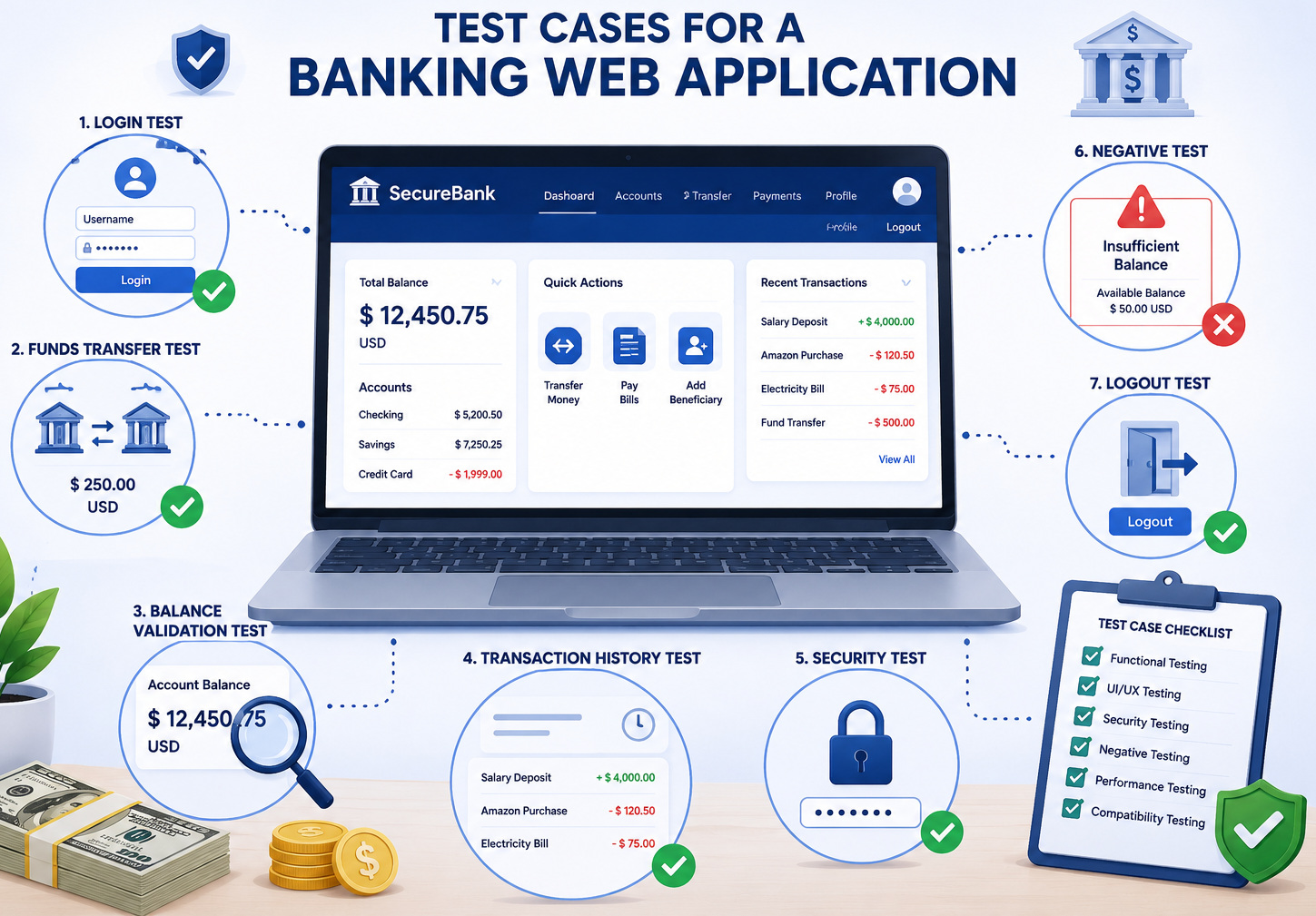
Though banking web applications may seem simple on the outside, they are extensively complicated and require thorough multi-layered testing. Each and every feature, from login authentication to fund transfers, directly interacts with sensitive financial data, and even a slight defect may be classified as critical. It is not only functional correctness that testers must ensure, but also data integrity, reliability of the system with continuous usage, and smooth user experience over varying conditions.
Apart from functionality, banking systems have to comply with stringent security, compliance, and performance requirements. This includes confirmation of encryption, access controls, fraud prevention mechanisms, and regulatory sandboxing while ensuring the technology stacks to support heavy loads for reliability. Good testing is about protecting trust, protecting assets (financial and otherwise), and making sure the app works as intended in production.
| Key Takeaways: |
|---|
|
Why Test Cases Matter in Banking Web Applications
- Maybe the account balance is not updated after a transfer.
- Maybe the transaction succeeds but does not appear in the statement.
- Maybe a user is charged twice.
- Maybe the OTP expires, but the session still continues.
- Maybe a customer can access another customer’s information through a broken authorization rule.
These are not ordinary bugs. A small defect in banking can damage customer confidence immediately.
This is what makes a banking application exist at the intersection of money movement, customer identity, external integrations (the rules in which banks can get their fees approved), compliance requirements, security controls, all collected as risks. This is very critical and sensitive, with high business impact because testing is a non-optional activity.
High-quality test cases allow QA teams to check not just that the application works, but that it works safely, accurately, and consistently under real banking conditions.
Read: Automated Testing in the Financial Sector: Challenges and Solutions.
Banking Web Application Workflow for Test Case Design
Normally, before writing the test cases directly, you should first map out how people will use it in real life. Most banking web platforms have a fairly standard flow involving core actions and touchpoints, which users rely on daily. A typical banking web application workflow includes:
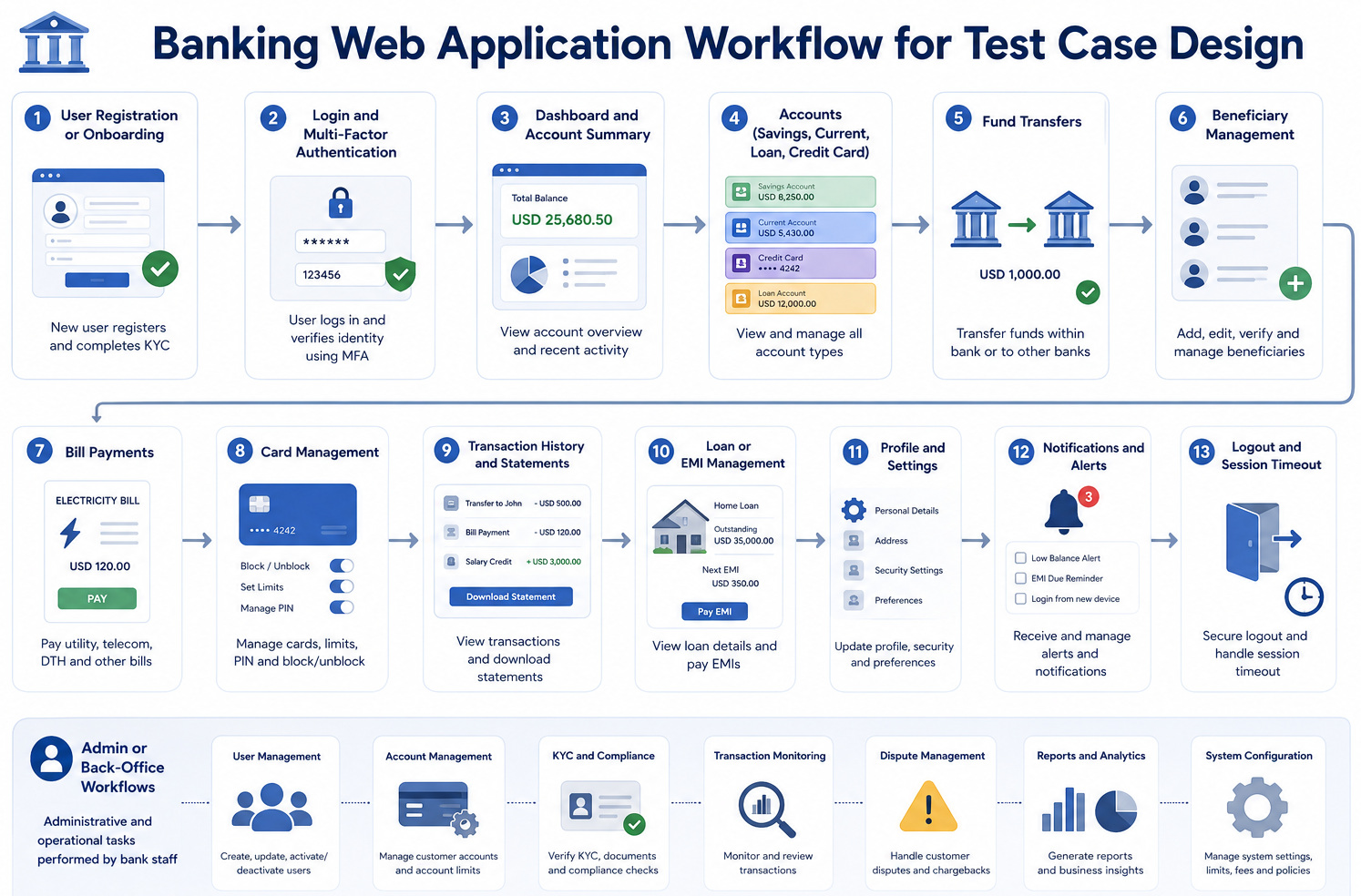
- User registration or onboarding
- Login and multi-factor authentication
- Dashboard and account summary
- Savings, current, loan, or credit card accounts
- Fund transfers
- Beneficiary management
- Bill payments
- Card management
- Transaction history and statements
- Loan or EMI management
- Profile and settings
- Notifications and alerts
- Logout and session timeout
- Admin or back-office workflows
This is particularly because most major defects occur in the interface between these modules. Fund transfers could be successful whilst the available balance doesn’t update. A bill payment can be completed, but its notification may not. This is why end-to-end banking test cases are of utmost importance.
Functional Test Cases for Banking Web Applications
Functional test cases verify that the banking application works as expected under normal business scenarios. They validate that each feature behaves according to business needs and leads to the expected result for users.
Banking Test Cases: User Login and Authentication
- Login works correctly with a valid username and password
- The system prevents access with an invalid username
- Access is denied when an incorrect password is entered
- The account gets locked after multiple consecutive failed login attempts
- Password field masks characters securely on the login page
- OTP is generated successfully during login
- User is able to log in with a valid OTP
- System rejects login attempts with an expired OTP
- Access is denied when an incorrect OTP is entered
- Resend OTP functionality works as expected
- User is successfully logged out of the application
- Restricted pages cannot be accessed after logging out using the browser back button
Banking Test Cases: Account Dashboard
- Account summary is displayed correctly after successful login
- Savings, current, loan, and credit card accounts appear accurately
- Available balance and current balance are shown correctly
- Account numbers are masked appropriately where required
- Recent transactions are listed with correct details
- Account status, such as active, dormant, frozen, or closed, is displayed accurately
- Dashboard loads properly for users with multiple accounts
- User sees only their own account information without any data leakage
- Dashboard reflects updated information after a recent transaction
- An appropriate error message is shown when account details fail to load
Banking Test Cases: Fund Transfer
- Transfer to an existing beneficiary is processed successfully
- Transfer to a newly added beneficiary works correctly
- Transfer between own accounts completes without issues
- The transfer to another bank account is executed properly
- Transfer is successful with a valid amount
- The system prevents transfer with a zero amount
- System rejects transfer with a negative amount
- Transfer is blocked when the amount exceeds the available balance
- Minimum and maximum transfer limits are enforced correctly
- The daily transaction limit is applied accurately
- Transfer completes successfully with a valid OTP
- Transfer is denied when an invalid OTP is entered
- Transfer fails if the OTP has expired
- Duplicate transfers are prevented on repeated clicks
- The confirmation page is displayed before final submission
- A transaction reference number is generated for each successful transfer
- Account balance updates correctly after a successful transfer
- A failed transfer does not deduct any amount from the account
- The transaction appears correctly in the transaction history
Banking Test Cases: Beneficiary Management
- The new beneficiary has been added successfully with valid details
- Account number validation works correctly
- Confirm that account number validation is applied properly
- IFSC, SWIFT, or routing code validation works as expected
- A duplicate beneficiary cannot be added
- Beneficiary activation through OTP is completed successfully
- A cooling period is applied before transfer, where applicable
- Beneficiary details can be edited successfully
- The beneficiary can be deleted successfully
- An inactive beneficiary cannot be selected for transfer
- The beneficiary list displays accurate details
- Special characters are restricted in fields where they are not allowed
Banking Test Cases: Transaction History and Statements
- Recent transactions are displayed correctly
- Debit and credit entries are shown accurately
- Transaction date, amount, description, and reference number appear correctly
- Transactions can be filtered by date range
- Transactions can be filtered by transaction type
- Transactions can be searched by keyword or amount
- Pagination works correctly in the transaction history
- Account statement downloads successfully as a PDF, CSV, or Excel
- The statement reflects the latest transactions
- Failed transactions show the correct status
- Reversed transactions are displayed accurately
Banking Test Cases: Cards
- Debit card details are displayed with proper masking
- The credit card outstanding balance is shown accurately
- Card activation works successfully
- Card blocking is completed correctly
- Card unblocking works as expected
- Transaction limits can be set successfully
- International transactions can be enabled or disabled
- PIN change flow works correctly
- Incorrect PIN validation is handled properly
- The card replacement request was submitted successfully
- Card statement downloads correctly
Read: How to do Digital Banking Testing?
Negative Test Cases for Banking Web Applications
- Enter incorrect login credentials multiple times
- Use expired OTP
- Refresh the page during the fund transfer
- Click submit multiple times during payment
- Close the browser during transaction processing
- Enter an invalid account number
- Enter the mismatched account number and confirm the account number
- Transfer amount greater than available balance
- Attempt transfer beyond the daily limit
- Try accessing another user’s account through a modified URL
- Use the browser back button after logging out
- Attempt SQL injection in input fields
- Attempt cross-site scripting in the remarks or description fields
- Upload an invalid document type in the KYC flow
- Disconnect the network during payment
- Try to reuse an old transaction request
Non-Functional Testing for Banking Web Applications
A banking app may be functional as intended, but may not be secure, or slow and/or hard to use. This is the reason why non-functional testing is so important.
Performance Test Cases
Banking applications need to be able to cope with peak load conditions like salary days, tax deadlines, and more so during festive seasons and major finance events without degrading. In these instances, large transaction volumes and user activity can put the system under a lot of pressure.
- Handles login requests efficiently during peak traffic
- Loads the dashboard within an acceptable response time
- Processes fund transfers quickly under load
- Retrieves transaction history without noticeable delay
- Supports a high number of concurrent users without degradation
- Maintains bill payment performance under heavy usage
- Prevents duplicate transactions during high load conditions
- Recovers smoothly after a temporary service slowdown
Security Test Cases
Security forms the foundation of any banking application and cannot be treated as an afterthought. It ensures that sensitive financial data, user identities, and transactions are protected from unauthorized access and threats.
- Protection of sensitive financial and personal data
- Secure session management and timeout handling
- Prevention of unauthorized access to user accounts and features
- Secure communication over HTTPS and encrypted channels
- Data masking in logs, error messages, and UI where required
- Role-based access control for different user types
- Defense against SQL injection attacks
- Protection against cross-site scripting vulnerabilities
- Prevention of CSRF (Cross-Site Request Forgery) attacks during transactions
- Audit logging of critical and sensitive user actions
Usability and Compatibility Test Cases
- Consistency across mobile and desktop experiences
- Compatibility across major browsers
- Responsive layout across different screen sizes
- Accessibility of forms and key user interactions
- Clear and understandable error messages with guidance
- Simple navigation between accounts and features
- Readable transaction details and summaries
- Proper labeling of input fields for better usability
- Clear warnings before irreversible actions
Common Risk Areas in Banking Web Applications
- Authentication and Session Management: Secure login flows, OTP verification, and handling of all session-based configurations are the main things with banking systems. Weak authentication logic can cause unauthorized access to OTP reuse or improper session timeout.
- Transaction Accuracy and Balance Consistency: Every transaction needs to be consistent throughout all systems. Balances, transaction history, and notifications should get updated instantly after a successful transfer.
- Fund Transfer Integrity: Atomic and reliable money movement. The nightmare most common in this space is partial failures, which occur when money has been debited but the credit never appears.
- Payment Processing and Confirmation Gap: Similar to booking systems, a payment being successful doesn’t always mean it is complete. A payment or transfer may succeed at the gateway level, but it may see an internal failure on our side.
- Security and Data Protection: Banking applications handle highly sensitive data such as account numbers, card details, and personal information. Risks include data leakage, improper encryption, insecure APIs, and vulnerabilities like SQL injection or XSS. Security testing is non-negotiable.
Why Manual Testing Alone is Not Enough
Manual testing makes sense in cases of exploratory testing, usability review, and validating new business flows. However, there are more combinations than we can manually test with each release in a typical banking system. They are account type, user criteria, limits on transactions, payment modes & currencies, devices/browsers, approval workflows, and integration responses. It becomes too slow and prone to errors, requiring us to repeat these tests by hand.
So, with automation, the team can run regression tests faster and quicker. Most importantly, it can be used for login, verifying the dashboard, fund transfers, beneficiary workflows, bill payments, statements, and security regression tests.
How testRigor Helps with Banking Application Testing
Traditional automation often struggles with banking applications because UI elements change, security flows evolve, OTP handling varies, and dynamic dashboards can break locator-based scripts.
testRigor helps by allowing teams to write tests in plain English, close to how a real user would describe the banking flow. This makes tests easier to understand, maintain, and scale.
- Handles long, end-to-end flows easily in simple English
- Fits new interface updates without needing adjustments, as tests adjust to small UI changes
- Reduces maintenance drastically by removing dependency on UI element locators like XPaths, thus avoiding flaky test runs
- Fine on websites, mobile (hybrid, native), API, desktop apps, mainframes, handles data connections without any problem
- Allows non-technical testers to contribute
- Ideal for regression testing before every release cycle
- Test all kinds of features – login with 2FA, AI features like chatbots and LLMs, dynamic images, table data, file upload/downloads, audio testing, UI testing, API testing, and more.
- Integrates with other tools like those for CI/CD or test management to promote continuous testing.
Let’s see one test case for an account transaction, using testRigor’s plain English commands.
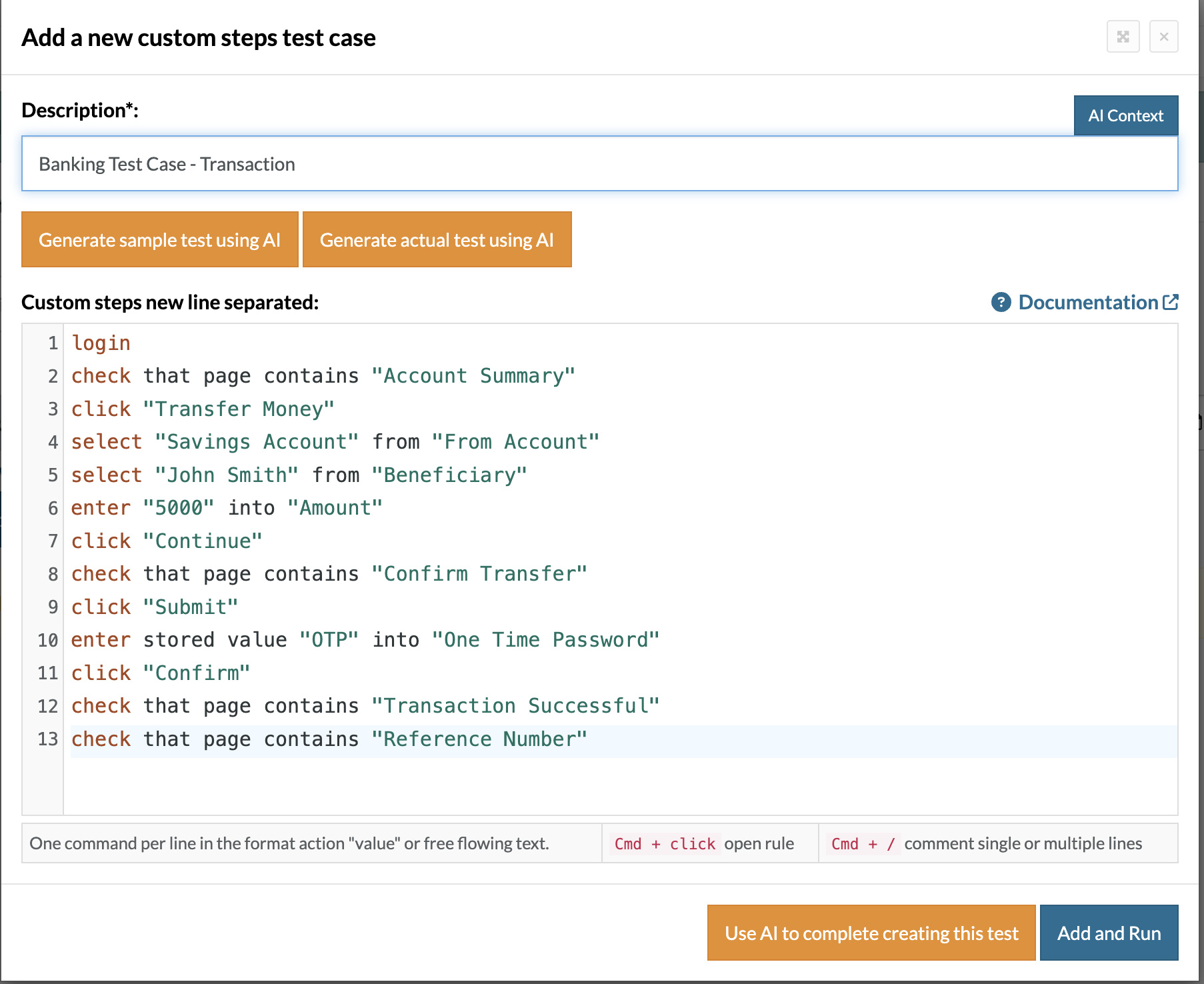
Login // Reusable Rules
check that page contains "Account Summary"
click "Transfer Money"
select "Savings Account" from "From Account"
select "John Smith" from "Beneficiary"
enter "5000" into "Amount"
click "Continue"
check that page contains "Confirm Transfer"
click "Submit"
enter stored value "OTP" into "One Time Password"
click "Confirm"
check that page contains "Transaction Successful"
check that page contains "Reference Number"
This style is easier for QA teams, business analysts, and non-technical stakeholders to understand. It also reduces maintenance because tests are not tightly dependent on fragile UI locators.
Read: Test Automation for FinTech Applications: Best Practices.
Building Trust through Banking App Testing
When testing a banking web application, it is not only about clicking the proper button. This is about the safety of money, identity, privacy, and customer trust. Users want their balances to be correct, they expect safe transactions, reliable payments, and they need to ensure that their personal data stays private. These test cases help teams catch issues before they land in customers’ hands. Quality in banking is not only a technical requirement, but it is also a requirement to build customer trust.
Frequently Asked Questions (FAQs)
- What makes banking application testing different from regular web application testing?
Banking applications deal with sensitive financial data, real-time transactions, regulatory compliance, and strict security requirements. Even a minor defect can lead to financial loss, fraud risks, or legal issues, making testing far more critical than in standard web applications.
- Which testing type is most important for banking applications?
There is no single most important testing type because banking systems require a combination of functional, security, performance, integration, and compliance testing. However, security and transaction integrity testing are considered especially critical.
- Why is transaction consistency important in banking systems?
Transaction consistency ensures that balances, statements, notifications, and backend records remain synchronized after every financial operation. Inconsistent updates can create financial discrepancies and damage customer trust.
| Achieve More Than 90% Test Automation | |
| Step by Step Walkthroughs and Help | |
| 14 Day Free Trial, Cancel Anytime |











