
What is Back-to-Back Testing? Meaning, Examples, and When to Use It
 |
In modern software development, it is essential to deliver new features quickly to stay in the market. However, it is more vital to ensure that changes introduced do not demonstrate any unwanted behavior that can harm the user engagement with the software system. As applications become more complex, spanning microservices, APIs, databases, and third-party integrations, teams need reliable methods to verify that a new version of the system behaves as expected when compared to an earlier version. This is where Back-to-Back Testing plays a critical role.
| Key Takeaways: |
|---|
|
This article examines what back-to-back testing is, how it operates, its use cases, its advantages and limitations, and its role in modern testing strategies.
What is Back-to-Back Testing?
Back-to-back testing is a comparison-based testing technique where two systems, versions, or implementations are executed in parallel or sequence using the same inputs, and their outputs are compared to identify differences.
Back-to-back testing determines the optimum component or system from the two being compared.
- An old (baseline) version and a new (candidate) version to compare with the baseline version.
- A reference implementation (from the baseline version) and an alternative implementation.
- Two systems are developed independently to meet the exact requirements.
The core principle of back-to-back testing is:
If the same input produces different outputs, the difference must be explained.
Back-to-back testing need not be performed for a complete software system always. It can be applied to smaller components such as individual modules or independent components.
- When different components are tested.
- When the same component is tested but with two different versions.
You need to keep in mind that every input is the same; otherwise, the input could affect the outcome.
In the first scenario, where different components are tested using back-to-back testing, it is used to determine which software is better and is extensively used.
In the second scenario, back-to-back testing is performed for two different versions of the same system to determine whether the new version performs as well as the older version and if the latest changes have introduced any issues or performance-related bugs.
The back-to-back testing technique is beneficial when migrating legacy systems to new platforms or when refactoring code, as it ensures that the new system replicates the behavior of the old one without introducing regressions.
Why is Back-to-Back Testing Important?
Traditional testing approaches relied heavily on manually written expected results and business rules that were encoded into test assertions. However, when systems have extremely complex logic, their outputs are dynamic and large, and are undergoing refactoring or migration, these testing approaches are not sufficient.
Back-to-back testing comes to the rescue by reducing the need to define explicit expected results, as it utilizes an existing, trusted system as the oracle.
- Detect regression errors promptly when updating software, ensuring that new changes do not negatively impact existing functionality.
- Verify algorithmic consistency of the system in cases where an algorithm is re-implemented or optimized, maintaining the integrity of computational results.
- Ensure compliance with original specifications when refactoring or rewriting components, which is essential in safety-critical systems.
Back-to-back Testing acts as a safety net that helps maintain software quality and user trust during the software evolution process.
How Back-to-Back Testing Works
The basic workflow of back-to-back testing consists of the following sequence of steps:
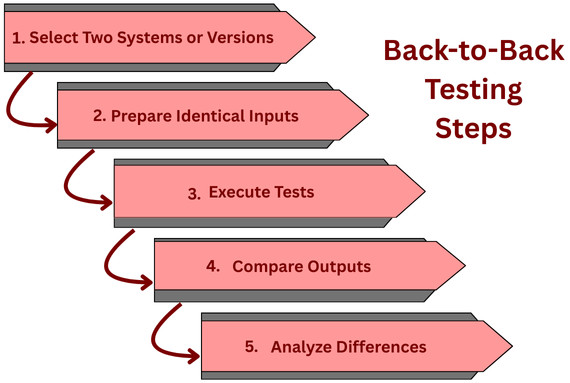
- Select Two Systems or Versions: Identify one version as a baseline ( older version) and the new version as a candidate version. Prepare a standardized set of test cases.
- Prepare Identical Inputs: Prepare a set of identical inputs that are to be fed to baseline and candidate systems. These inputs can be:
- API requests
- User workflows
- Data sets
- Event streams
- Execute Tests: Execute the tests for both systems using the same inputs. Once execution is completed, capture their outputs, responses, logs, or side effects.
- Compare Outputs: Once the entire dataset is collected, compare outputs for an exact match, field-by-field, or based on a specified tolerance.
- Analyze Differences: Analyze the outcomes for expected (intentional changes) and unexpected (potential defects) differences. If the outputs match, it confirms the functional equivalence of the baseline and candidate versions. On the other hand, any mismatch indicates a possible issue in one of the versions.
What Is Compared in Back-to-Back Testing?
- API response bodies
- HTTP status codes
- Database records
- File outputs
- Logs and metrics
- UI states (less common but possible)
Common Use Cases for Back-to-Back Testing
Generally, back-to-back testing is most useful and desirable in situations where high reliability is vital, and the system has a predictable output.
Here are some common use cases where back-to-back testing is used:
1. Regression Testing
Regression detection is one of the most common uses of back-to-back testing. When new code is added to the system, teams like to ensure that existing functionality is not affected by the introduction of new code.
- Old production behavior
- New staging or test behavior
Any difference is a candidate for investigation.
2. System Migration and Modernization
- Monolith to microservices migrations
- Legacy system replacements
- Platform or framework upgrades
In these scenarios, the old system is taken as a reference, and the new system is expected to replicate its behavior exactly, which is verified using back-to-back testing.
3. Algorithm and Engine Validation
Back-to-back testing is widely used in critical fields like financial systems, pricing engines, recommendation systems, and scientific computation software. To ensure the correctness of these systems, two implementations of the same algorithm are tested against each other using back-to-back testing.
4. Third-Party Integration Replacement
When replacing critical components such as payment gateways, search engines, or analytics tools, back-to-back testing becomes handy to ensure the new integration generates results that are consistent with the old one under the same conditions.
5. Performance and Load Validation
Back-to-back testing can also be used to validate the load and performance of the system. It is specifically used to compare metrics like response times, resource usage, and throughput.
Testing and comparing these metrics ensures that new improvements do not degrade system behavior.
This helps ensure improvements do not degrade system behavior.
Back-to-Back Testing vs Other Testing Types
Back-to-back Testing differs from other testing types primarily in its comparative approach. Back-to-back testing compares outputs from two versions of a system under test, typically an existing, stable system against its new or modified version. This is unlike unit, integration, or system testing, which focus on individual components, interfaces, or entire systems.
The back-to-back testing approach is handy when the internal logic of a system has changed, but the external behaviour should remain consistent.
The following tables summarize the key differences between back-to-back testing and other testing types, such as regression testing, A/B testing, and performance testing.
Back-to-Back Testing vs Regression Testing
| Aspect | Regression Testing | Back-to-Back Testing |
|---|---|---|
| Expected Results | Predefined assertions | Output comparison |
| Maintenance | High for complex logic | Lower |
| Use Case | Feature stability | System equivalence |
Back-to-back testing is a specialized form of regression testing. In contrast to regression testing, which checks for unchanged behavior, Back-to-Back Testing targets explicit changes in algorithms, optimizations, or any refactoring that should not alter the external functionality. Overall, it is less about catching bugs in new features and more about ensuring that the existing behavior remains reliable after changes.
Back-to-Back Testing vs A/B Testing
| Aspect | A/B Testing | Back-to-Back Testing |
|---|---|---|
| Purpose | Measure user impact | Verify consistency |
| Versions | different versions | identical or new vs. old |
| Audience | Real users | Test environment |
| Outcome | Statistical insights | Functional differences |
A/B testing focuses on user engagement and aims to improve it. Back-to-back testing, on the other hand, is used to ensure stability, ensuring that new code behaves in a manner consistent with existing code.
Back-to-Back Testing vs Performance Testing
| Aspect | Performance Testing | Back-to-Back Testing |
|---|---|---|
| Primary Aim | Speed, Scalability, Stability | Consistency & Regression |
| What it Checks | How fast/reliable under load (Quality) | Same output for same input (Correctness) |
| Metrics | Response Time, TPS, Errors | Pass/Fail, Output comparison |
| Scope | Broad (User Experience, System Capacity) | Narrow (Input -> Output) |
| When Used | Before releases, for the load capacity | After changes, for regression |
Performance testing measures the system’s responsiveness, stability, and scalability, which differs from Back-to-Back Testing, which focuses on consistency. Similarly, stress testing pushes the system to its limits, whereas Back-to-Back Testing compares typical operational outputs.
In essence, Back-to-Back Testing is a specialized testing technique that ensures that the external behavior of a system remains consistent despite internal changes, distinguishing it from other testing types that may focus on different aspects of software quality and reliability.
Benefits of Back-to-Back Testing
- Validation of Consistency: Back-to-back testing ensures that two or more system versions produce consistent results, which is crucial when upgrading or refactoring.
- Regression Detection: It identifies unintended changes or regressions in behavior between software versions being tested.
- Benchmarking: This testing technique enables the comparison of performance and output between different implementations of the same algorithm or system.
- Increased Confidence: It develops confidence in system reliability and correctness, particularly in safety-critical systems where discrepancies can lead to severe consequences.
- Error Isolation: Back-to-back testing helps pinpoint the source of errors by comparing outputs from different systems or versions.
- Specification Conformance: It validates the system’s adherence to specified requirements by comparing it with a reference implementation.
Challenges in Back-to-Back Testing
- Test Environment Configuration: It is challenging to ensure that the test environments for both the old and new systems are identical, as differences may skew results.
- Data Synchronization: Data alignment between systems to ensure consistent input for comparative testing is challenging, especially with dynamic or real-time data.
- Test Case Alignment: It is challenging to create test cases that apply to both systems and accurately reflect the intended behavior of each.
- Output Comparison: Sophisticated tools or scripts are required for analyzing and comparing outputs, as differences can be subtle and not immediately apparent.
- Non-Deterministic Behavior: Systems with non-deterministic outputs, such as those involving timestamps or randomization, complicate comparison.
- Performance Issues: If there are performance discrepancies between systems, test results may demonstrate false positives or negatives.
- Resource Intensiveness: A back-to-back testing approach can be resource-heavy as it requires significant computational power and time, especially for large-scale systems.
- Change Management: It is challenging to track and manage changes between two systems under test to understand the impact on test results.
- Error Diagnosis: Sometimes it is difficult to find out where the issue lies, in the new system, the old system, or the test itself, as isolating and diagnosing the root cause of discrepancies can be time-consuming.
Back-to-Back Testing in Automated Pipelines
Back-to-back testing in automated pipelines compares the outputs of two different versions of a system using the exact same input to ensure consistency and detect unexpected changes (regressions). In a CI/CD pipeline, back-to-back testing can be automated to provide fast, reliable feedback to developers.
CI/CD Integration
- Pre-release pipelines
- Migration validation pipelines
- Canary deployments
- Baseline and candidate versions are deployed.
- Automated back-to-back tests are executed.
- Outcomes obtained are compared.
- If differences found are unacceptable, deployment is blocked.
Tools and Automation
- Replaying (retesting) test cases automatically
- Comparing large payloads
- Generating diff reports
How to Implement Back-to-Back Testing with testRigor?
Back-to-back testing with testRigor involves using its AI-driven, plain English test automation to quickly create and run tests for regression, retesting, and parallel execution. This ensures new changes don’t break existing functionality by focusing on self-healing tests and reusable rules for efficiency, often by re-running failed tests or running full suites on different environments (like LambdaTest).
- Create Base Tests: Write core end-to-end tests in plain English for critical user flows, such as registration and checkout. Check this article for creating tests in testRigor.
- Implement Reusable Rules: Create reusable rules for repetitive steps like filling forms.
- Use Data-Driven Testing: Execute the same tests with multiple data sets (e.g., different user credentials) using CSV uploads or manual input.
- Trigger Retesting: Run the test suite after a build, and use the “Rerun failed” button to quickly verify bug fixes without re-running everything.
- Run on Multiple Environments: Set up multiple environments/configurations to execute tests in parallel across different platforms.
With a combination of these features, testRigor enables quick creation and execution of regression suites, making back-to-back testing efficient and reliable.
Best Practices for Effective Back-to-Back Testing
- Define Acceptable Differences Clearly: Remember that not every difference is a defect. Be clear on what acceptable differences you can allow.
- Normalize Outputs Before Comparison: Before you begin comparing the outcomes, normalize the results by removing volatile or irrelevant fields.
- Use Representative Test Data: As far as possible, use production-like inputs for testing.
- Automate Comparison Logic: Instead of manually comparing logic, use automated comparison for scalability.
- Combine with Other Testing Types: Combine back-to-back testing with other testing types, such as unit and integration. Remember, it does not replace other testing types.
- Track Differences Over Time: Track and analyze differences over time, as they can uncover hidden issues.
When Should You Use Back-to-Back Testing?
- Critical systems are migrated or refactored.
- Parity between implementations is to be validated.
- It is difficult to define expected results.
- You need high confidence in behavioral consistency.
- Business requirements are intentionally changed frequently.
- The baseline system is unstable or unreliable.
- Outcomes obtained are highly subjective or user-driven.
Real-World Example of Back-to-Back Testing
- An old engine system that processes prices in batch mode.
- A new engine that uses real-time computation.
- Pricing discrepancies can be identified.
- Performance gains can be measured.
- Increase confidence in correctness.
The Future of Back-to-Back Testing
- AI/ML model validation
- Microservices architecture
- Continuous deployment environments
With further advancements in test automation and intelligent comparison engines, back-to-back testing is set to evolve from a niche technique into a mainstream testing strategy.
Conclusion
Back-to-back testing is a powerful, pragmatic testing method to validate software behavior by comparing two systems or versions under identical conditions. It focuses on consistency rather than predefined expectations, and enables teams to detect regressions, validate migrations, and ensure system parity with significantly less manual effort.
While this approach has its own limitations, such as reliance on a trusted baseline, it excels when used with other testing methodologies. For organizations dealing with legacy code, complex systems, or large-scale refactoring, back-to-back testing can be the difference between confident releases and costly surprises.
| Achieve More Than 90% Test Automation | |
| Step by Step Walkthroughs and Help | |
| 14 Day Free Trial, Cancel Anytime |











