
Is AI-Driven Element Recognition the end of Page Object Model (POM)?
 |
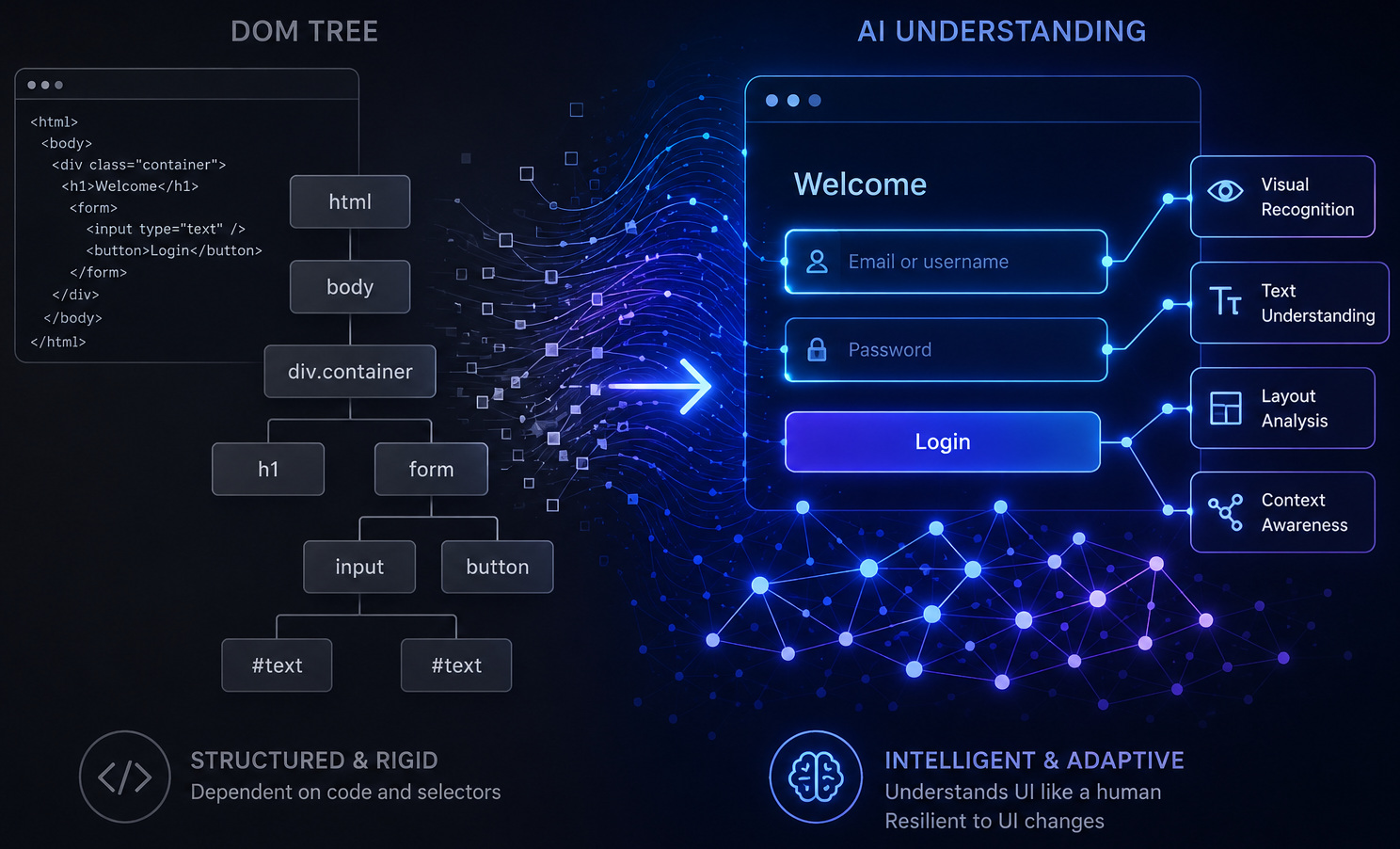
As a newbie in the testing field, especially until a couple of years ago, it’s inevitable that you were suggested by a senior to use Page Object Model (POM) if you are building UI tests. And that it was the industry practice. Yes, indeed it was. And you, being the diligent junior, you followed it. You created neat Java classes for each page: CheckOutPage, LoginPage, etc. Added helpers, getters, and setter methods. In theory, it worked perfectly.
However, after some time, you would have observed that your regression suite had transformed into this slow, fragile, waiting-to-explode bomb. Even minor UI modifications, crashing multiple files, and reviewing PRs felt like reading massive Java tomes.
Why is a design pattern that has defined Selenium frameworks for over a decade no longer helpful today?
| Key Takeaways: |
|---|
|
What is Project Object Model (POM)?
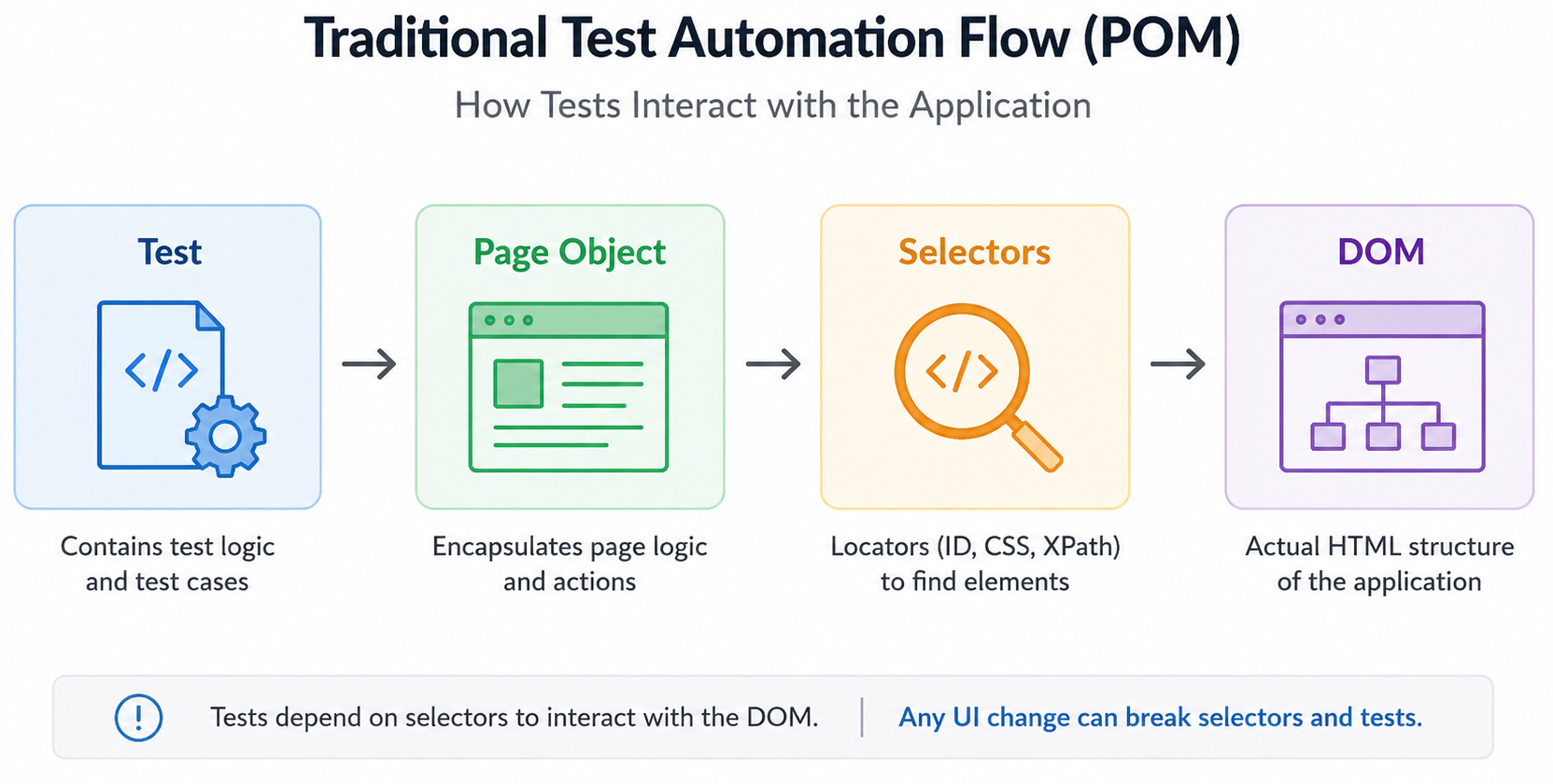
Page Object Model (POM) is the design pattern in Selenium where we build an object repository for storing and organizing the page elements or objects. It’s a very prominent design pattern in web/mobile automation. The benefit of using POM is that it decreases code redundancy and complexity. Additionally, it makes code more extensible and enhances test script maintenance by functioning as an interface for the page under test.
- Test logic (what the test does)
- UI interaction logic (how it interacts with the page)
- Locators (IDs, CSS selectors, XPath)
- Methods that interact with those elements
public class LoginPage {
  By username = By.id("username");
  By password = By.id("password");
  By loginBtn = By.id("login");
  public void login(String user, String pass) {
driver.findElement(username).sendKeys(user);
driver.findElement(password).sendKeys(pass);
  driver.findElement(loginBtn).click();
  }
}
- Reduced duplication
- Improved maintainability
- Made tests more readable
For years, it was considered best practice.
What is the Issue Now?
The problem identified with POM was the fragility of selectors. POM didn’t eliminate fragility; instead, it just centralized it.
As its base, POM relied on selectors. And selectors have always been the weakest link in UI automation.
- UI Changes Frequently: Even minor changes (renaming a class, restructuring HTML) can break tests.
- Selectors are Implementation Details: They depend on how the UI is built, not how users interact with it.
- Dynamic Content Complicates Everything: Modern apps generate IDs, classes, and structures dynamically.
- XPath and CSS Can Become Brittle Quickly: Complex locators are hard to read, debug, and maintain.
- Using data-testid for element identification
- Stable IDs
- Clean naming conventions
…you’re still manually maintaining a mapping between your tests and the DOM. And at a higher level, that becomes costly.
The Maintenance Burden of POM
- A UI change breaks dozens (or hundreds) of tests
- You waste hours updating locators
- Tests fail not because functionality is broken, but because selectors changed
- Flaky tests
- Delayed development cycles
- Broken trust in automation
POM helps manage the damage, but it doesn’t solve the root cause.
Read: Why Selenium Sucks for End-To-End Testing in 2026.
Enter AI-Driven Element Recognition
AI in test automation is changing the game by shifting how elements are identified.
- Text content (“Login”, “Submit”)
- Visual layout
- Element relationships
- Accessibility attributes
- Historical interaction patterns
- AI context
What this means in practice:
driver.findElement(By.css('#login-btn')).click();
Click “Login” button
The system figures out which element you mean, even if the underlying DOM changes. AI-driven test automation tools like testRigor are good at using AI for element identification. We will cover this concept in detail further down this blog.
What are Self-healing Locators?
One of the most impactful innovations is self-healing locators.
- The system analyzes previous successful runs
- It evaluates nearby elements and AI context
- It identifies the most likely replacement
- It updates the locator automatically
Result:
Tests don’t fail just because a class name changed.
- Test maintenance
- False failures
- Debugging time
Read more: Self-healing Tests.
Where does this Leave Page Object Model?
We’re shifting towards a DOM-based automation to intent-based automation. The traditional methods relied on finding an element by locator and performing the action. The AI-driven method describes the user’s intent and allows the system to decide how to execute it. This tends to lean more towards how users actually interact with the applications.
Why This Challenges the Page Object Model
The Page Object Model exists primarily to manage selectors.
If selectors become dynamic, self-healing, and AI-generated, then POM’s main responsibility starts to disappear.
Traditional Structure: Test → Page Object → Selectors → DOM
Emerging Structure: Test → Intent → AI system → UI
- Large locator repositories
- Constant selector updates
- Tight coupling to the DOM structure
This brings us to the pressing question: Is POM dead?
Short answer: no. However, it’s no longer sacred.
POM became the default because it brought order to chaos. Rather than scattering selectors everywhere, we centralized them. This strategy did help, but it didn’t remove the core problem. We were still reliant on brittle selectors.
In other words, POM didn’t eliminate fragility. It just organized it.
What’s changing now is the question itself. Instead of asking, “Where should I store my selectors?”, we’re starting to ask, “Why am I managing selectors at all?”
login with email OTP
search for "iPhone"
purchase "iPhone 17"
logout
At this point, you’re not really managing selectors anymore; you’re expressing intent.
So no, POM isn’t dead. But a selector-heavy POM is starting to feel like legacy.
The Rise of New Testing Patterns
A bigger change is happening beyond just element recognition; how we structure tests is changing.
Traditional frameworks mirrored the UI: LoginPage, DashboardPage, etc. That worked when apps were page-based. But modern apps are dynamic, component-driven, and constantly updating.
So, the idea of a stable “page” is already weakening.
Many teams are moving toward component-based models, focusing on reusable parts like forms or AI-based features such as chatbots. And AI switches the game completely here.
login
  click "BestBuy.com"
  enter "iPhone 17" into "What can we help you find today?"
  enter enter
  click "Recently Viewed"
  click "Manage all your recently viewed items >"
  click "submit search"
  click "Apple - Pre-Owned iPhone 16 Pro 512GB (Unlocked) - Black"
Now the test reads like a user journey, not a DOM script.
This is where intent-driven testing comes in. You describe what the user does, not how the UI is wired underneath. Some teams are even experimenting with declarative styles, focusing on outcomes rather than steps.
We might not be fully there, but the direction is clear: higher abstraction, less DOM awareness.
Benefits of AI-Driven Testing
The biggest practical win is simple: less time fixing tests.
Anyone who’s worked with Selenium knows the cycle: tests fail, nothing’s actually broken, and you end up updating selectors. Over and over again.
AI-driven recognition cuts a lot of that out. If a button moves or its class changes, the system can still find it using context. That alone can save hours every sprint. Tools like testRigor help achieve this with their simplified test case generation, AI-driven capabilities, and more efficient methods of validation.
How does testRigor Achieve This?
testRigor uses Vision AI and AI context to achieve element recognition with AI. It allows machines to interpret and make sense of the visual elements of UI, such as buttons, text, images, and icons. This is the same as how a human tester would do it. This method is highly useful in testing apps with intense graphical user interfaces (GUIs), mobile apps, games, and other software products that use a lot of visual elements.
As you already know, the traditional test automation method depended heavily on pre-existing scripts and locators to communicate with UI elements. But came with its set of limitations when working with regular UI changes, dynamic content, or complicated visual elements.
Vision AI tackles selector fragility by allowing automation frameworks to interpret the application under test (AUT) at the visual layer. Rather than relying solely on DOM-based locators (CSS/XPath), it uses computer vision models to detect and interact with UI elements based on visual features, such as geometry, color, spatial relationships, and layout context. This abstraction improves test resilience to UI changes and significantly reduces locator maintenance overhead.
With testRigor, you spend less time crafting locators and more time focusing on what the test is supposed to validate.
Another benefit is stability. When element identification becomes more flexible, flaky tests caused by minor UI changes drop noticeably.
Does POM Still Matter?
With tools like testRigor in the equation, the question changes. This is mostly because in this model, you are not really using POM.
click "Login button"
enter "[email protected]" into "Email"
Since testRigor works on advanced AI algorithms, you can even test AI Features Testing, Chatbots Testing, Graphs Testing, Mainframe Testing, and many more complex test automation in plain English, without worrying about locators. The system uses computer vision and machine learning to identify elements based on what the user sees, not how they’re implemented.
- locator repositories
- XPath/CSS abstraction
- constant selector maintenance
click "cart icon" using ai
Final Thoughts
The Page Object Model was a necessary evolution in test automation. It brought structure, clarity, and maintainability to a chaotic space. But it was built for a world where selectors were the only way to interact with the UI.
That world is changing. AI-driven element recognition is bringing down reliance on selectors, removing brittle dependencies, and allowing more resilient automation.
The role of POM is rapidly depreciating.
The future of test automation is less about DOM structure, more about user intent, and increasingly powered by AI.
Frequently Asked Questions (FAQs)
- Is Page Object Model still relevant in modern test automation?
A: Yes, but its role is evolving. POM is still useful for structuring tests and promoting reusability, but its heavy reliance on selectors is becoming less relevant with AI-driven and intent-based testing approaches.
- What are self-healing locators in test automation?
A: Self-healing locators use AI/ML to automatically recover from broken selectors by analyzing historical runs, DOM changes, and element context, decreasing test failures caused by UI updates.
- How does Vision AI improve UI test automation?
A: Vision AI enables tools to identify elements based on visual characteristics like layout, text, and position instead of the DOM structure. This makes tests more resilient to UI modifications and reduces maintenance overhead.
| Achieve More Than 90% Test Automation | |
| Step by Step Walkthroughs and Help | |
| 14 Day Free Trial, Cancel Anytime |











